buttons CHEVROLET AVALANCHE 2012 2.G Owner's Manual
[x] Cancel search | Manufacturer: CHEVROLET, Model Year: 2012, Model line: AVALANCHE, Model: CHEVROLET AVALANCHE 2012 2.GPages: 508, PDF Size: 7.78 MB
Page 138 of 508
Black plate (8,1)Chevrolet Avalanche Owner Manual - 2012
5-8 Instruments and Controls
3. Press the set/reset button tostart the compass calibration.
Or, if the vehicle does not have
DIC buttons, press and hold the
trip odometer reset stem for
two seconds to start the
compass calibration.
4. The DIC will display CALIBRATING: DRIVE IN
CIRCLES. Drive the vehicle
in tight circles at less than
8 km/h (5 mph) to complete
the calibration. The DIC
will display CALIBRATION
COMPLETE for a few seconds
when the calibration is complete.
The DIC display will then return
to the previous menu.Clock
To set the time and date:
1. Turn the ignition key to ACC/ACCESSORY or ON/RUN, then
press the
Obutton to turn the
radio on.
2. Press the
Hbutton to display
HR, MIN, MM, DD, YYYY (hour,
minute, month, day, and year).
3. Press the softkey located under any one of the tabs to change
that setting.
4. To increase the time or date, do one of the following:
.Press the softkey below the
selected tab.
.Press the¨SEEK button.
.Press the\FWD button.
.Turn thefknob clockwise. 5. To decrease the time or date, do
one of the following:
.Press the©SEEK button.
.Press thesREV button.
.Turn thefknob
counterclockwise.
To change the time default setting
from 12 hour to 24 hour or to change
the date default setting from month/
day/year to day/month/year:
1. Press the
Hbutton and then
the softkey located below the
forward arrow tab. 12H, 24H, the
date MM/DD (month and day),
and DD/MM/ (day and month)
displays.
2. Press the softkey located below the desired option.
3. Press the
Hbutton again to
apply the desired option, or let
the screen time out.
Page 157 of 508
Black plate (27,1)Chevrolet Avalanche Owner Manual - 2012
Instruments and Controls 5-27
Operation and Displays
The DIC has different displays
which can be accessed by pressing
the DIC buttons located on the
instrument panel, next to the
steering wheel. If the vehicle does
not have DIC buttons, the trip
odometer reset stem can be used to
access some of the menu items
The DIC displays trip, fuel, and
vehicle system information, and
warning messages if a system
problem is detected.
The DIC also allows some features
to be customized. SeeVehicle
Personalization (With DIC Buttons)
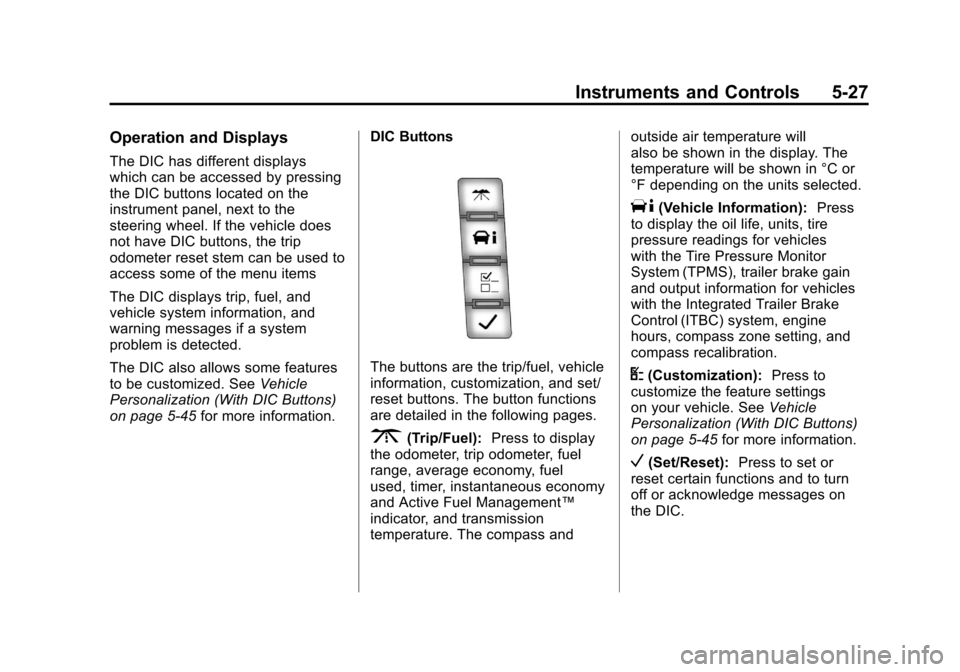
on page 5‑45 for more information. DIC Buttons
The buttons are the trip/fuel, vehicle
information, customization, and set/
reset buttons. The button functions
are detailed in the following pages.
3(Trip/Fuel):
Press to display
the odometer, trip odometer, fuel
range, average economy, fuel
used, timer, instantaneous economy
and Active Fuel Management™
indicator, and transmission
temperature. The compass and outside air temperature will
also be shown in the display. The
temperature will be shown in °C or
°F depending on the units selected.
T(Vehicle Information):
Press
to display the oil life, units, tire
pressure readings for vehicles
with the Tire Pressure Monitor
System (TPMS), trailer brake gain
and output information for vehicles
with the Integrated Trailer Brake
Control (ITBC) system, engine
hours, compass zone setting, and
compass recalibration.
U(Customization): Press to
customize the feature settings
on your vehicle. See Vehicle
Personalization (With DIC Buttons)
on page 5‑45 for more information.
V(Set/Reset):Press to set or
reset certain functions and to turn
off or acknowledge messages on
the DIC.
Page 158 of 508
Black plate (28,1)Chevrolet Avalanche Owner Manual - 2012
5-28 Instruments and Controls
Trip/Fuel Menu Items
(with DIC Buttons)
3(Trip/Fuel):Press to scroll
through the following menu items:
Odometer
Press the trip/fuel button until
ODOMETER displays. This display
shows the distance the vehicle has
been driven in either kilometers (km)
or miles (mi). Pressing the trip
odometer reset stem will also
display the odometer.
To switch between English and
metric measurements, see “Units”
later in this section.
Trip Odometer
Press the trip/fuel button until TRIP
displays. This display shows the
current distance traveled in either
kilometers (km) or miles (mi) since
the last reset for the trip odometer.
Pressing the trip odometer reset
stem will also display the trip
odometer. The trip odometer can be reset to
zero by pressing the set/reset
button while the trip odometer is
displayed. You can also reset the
trip odometer while it is displayed by
pressing and holding the trip
odometer reset stem.
The trip odometer has a feature
called the retro-active reset. This
can be used to set the trip odometer
to the number of kilometers (miles)
driven since the ignition was last
turned on. This can be used if the
trip odometer is not reset at the
beginning of the trip.
To use the retro-active reset feature,
press and hold the set/reset button
for at least four seconds. The trip
odometer will display the number of
kilometers (km) or miles (mi) driven
since the ignition was last turned on
and the vehicle was moving. Once
the vehicle begins moving, the trip
odometer will accumulate mileage.
For example, if the vehicle was
driven 8 km (5 miles) before it is
started again, and then the
retro-active reset feature is
activated, the display will show
8 km (5 miles). As the vehicle begins
moving, the display will then
increase to 8.2 km (5.1 miles),
8.4 km (5.2 miles), etc.
Fuel Range
Press the trip/fuel button until FUEL
RANGE displays. This display
shows the approximate number of
remaining kilometers (km) or
miles (mi) the vehicle can be driven
without refueling. The display will
show LOW if the fuel level is low.
The fuel range estimate is based on
an average of the vehicle's fuel
economy over recent driving history
and the amount of fuel remaining in
the fuel tank. This estimate will
change if driving conditions change.
Page 160 of 508
Black plate (30,1)Chevrolet Avalanche Owner Manual - 2012
5-30 Instruments and Controls
Instantaneous Economy and
Active Fuel Management™
Indicator
If your vehicle has this display,
press the trip/fuel button until INST
ECON V8 displays. This display
shows the current fuel economy at a
particular moment and will change
frequently as driving conditions
change. This display shows the
instantaneous fuel economy in liters
per 100 kilometers (L/100 km) or
miles per gallon (mpg). Unlike
average economy, this screen
cannot be reset.
An Active Fuel Management
indicator will display on the right
side of the DIC, while INST ECON
displays on the left side. Active Fuel
Management allows the engine to
operate on either four or eight
cylinders, depending on your driving
demands. When Active Fuel
Management is active, V4 will
display on the DIC. When ActiveFuel Management is inactive, V8
will display. See
Active Fuel
Management
®on page 9‑30 for
more information.
Blank Display
This display shows no information.
Vehicle Information Menu
Items (with DIC Buttons)
T(Vehicle Information): Press
to scroll through the following menu
items:
Oil Life
Press the vehicle information
button until OIL LIFE REMAINING
displays. This display shows an
estimate of the oil's remaining useful
life. If you see 99% OIL LIFE
REMAINING on the display, that
means 99% of the current oil life
remains. The engine oil life system
will alert you to change the oil on a
schedule consistent with your
driving conditions. When the remaining oil life is low,
the CHANGE ENGINE OIL SOON
message will appear on the display.
See
“CHANGE ENGINE OIL SOON”
under Engine Oil Messages on
page 5‑38. You should change the
oil as soon as you can. See Engine
Oil on page 10‑8. In addition to the
engine oil life system monitoring the
oil life, additional maintenance is
recommended in the Maintenance
Schedule in this manual. See
Maintenance Schedule on
page 11‑3 for more information.
Remember, you must reset the OIL
LIFE display yourself after each oil
change. It will not reset itself. Also,
be careful not to reset the OIL LIFE
display accidentally at any time
other than when the oil has just
been changed. It cannot be reset
accurately until the next oil change.
To reset the engine oil life system,
see Engine Oil Life System on
page 10‑11.
Page 162 of 508
Black plate (32,1)Chevrolet Avalanche Owner Manual - 2012
5-32 Instruments and Controls
Compass Recalibration
This display allows for calibrating
the compass. SeeCompass on
page 5‑6.
Blank Display
This display shows no information.
Trip Odometer Reset Stem
Menu Items (with DIC Buttons)
Use the trip odometer reset
stem to view the odometer and trip
odometer. The Language selection
and Engine Hours display can also
be accessed with the trip odometer
reset stem.
Odometer
Press the trip odometer reset stem
until ODOMETER displays. This
display shows the distance the
vehicle has been driven in either
kilometers (km) or miles (mi). Trip Odometer
Press the trip odometer reset
stem until TRIP displays. This
display shows the current distance
traveled in either kilometers (km) or
miles (mi) since the last reset for the
trip odometer.
The trip odometer can be reset to
zero by pressing and holding the trip
odometer reset stem while the trip
odometer is displayed.
The trip odometer has a feature
called the retro-active reset. This
can be used to set the trip odometer
to the number of kilometers (miles)
driven since the ignition was last
turned on. This can be used if the
trip odometer is not reset at the
beginning of the trip.
To use the retro-active reset feature,
press and hold the trip odometer
reset stem for at least four seconds.The trip odometer will display the
number of kilometers (km) or
miles (mi) driven since the ignition
was last turned on and the vehicle
was moving. Once the vehicle
begins moving, the trip odometer
will accumulate mileage. For
example, if the vehicle was driven
8 km (5 miles) before it is started
again, and then the retro-active
reset feature is activated, the
display will show 8 km (5 miles).
As the vehicle begins moving, the
display will then increase to 8.2 km
(5.1 miles), 8.4 km (5.2 miles), etc.
Language
This display allows you to select
the language in which the DIC
messages will appear. To select a
language:
1. Press the trip odometer reset
stem until ODOMETER displays.
Page 163 of 508
Black plate (33,1)Chevrolet Avalanche Owner Manual - 2012
Instruments and Controls 5-33
2. While in the ODOMETERdisplay, press and hold the
trip odometer reset stem for
three seconds until the currently
set language displays.
3. Continue to press and hold the trip odometer reset stem to scroll
through all of the available
languages.
The available selections are
ENGLISH (default), FRANCAIS
(French), ESPANOL (Spanish),
and NO CHANGE.
4. Once the desired language is displayed, release the trip
odometer reset stem to set your
choice.
Engine Hours
To display the ENGINE HOURS,
place the ignition in LOCK/OFF or
ACC/ACCESSORY, then press and
hold the trip odometer reset stem for
four seconds while viewing the
ODOMETER. This display shows
the total number of hours the engine
has run.Trip Odometer Reset
Stem Menu Items
(without DIC Buttons)
Language
This display allows you to select
the language in which the DIC
messages will appear. To select a
language:
1. Press the trip odometer reset stem until ODOMETER displays.
2. While in the ODOMETER display, press and hold the
trip odometer reset stem for
three seconds until the currently
set language displays.
3. Continue to press and hold the trip odometer reset stem to scroll
through all of the available
languages.
The available languages are
ENGLISH (default), FRANCAIS
(French), ESPANOL (Spanish),
and NO CHANGE. 4. Once the desired language is
displayed, release the trip
odometer reset stem to set your
choice.
Trip Odometer
Press the trip odometer reset stem
until TRIP displays. This display
shows the current distance traveled
in either kilometers (km) or
miles (mi) since the last reset for the
trip odometer.
The trip odometer can be reset to
zero by pressing and holding the trip
odometer reset stem while the trip
odometer is displayed.
The trip odometer has a feature
called the retro-active reset. This
can be used to set the trip odometer
to the number of kilometers (miles)
driven since the ignition was last
turned on. This can be used if the
trip odometer is not reset at the
beginning of the trip.
To use the retro-active reset feature,
press and hold the trip odometer
reset stem for at least four seconds.
Page 173 of 508
Black plate (43,1)Chevrolet Avalanche Owner Manual - 2012
Instruments and Controls 5-43
TIRE LOW ADD AIR TO TIRE
On vehicles with the Tire Pressure
Monitor System (TPMS), this
message displays when the
pressure in one or more of the
vehicle's tires needs to be checked.
This message also displays LEFT
FRT (left front), RIGHT FRT (right
front), LEFT RR (left rear),
or RIGHT RR (right rear) to indicate
the location of the low tire. The low
tire pressure warning light will also
come on. SeeTire Pressure Light
on page 5‑24. You can receive more
than one tire pressure message at a
time. To read the other messages
that may have been sent at the
same time, press the set/reset
button or the trip odometer reset
stem. If a tire pressure message
appears on the DIC, stop as soon
as you can. Have the tire pressures
checked and set to those shown on
the Tire Loading Information label. See
Tires on page 10‑49, Vehicle
Load Limits on page 9‑16, and Tire
Pressure on page 10‑56. The DIC
also shows the tire pressure values.
See “DIC Operation and Displays
(With DIC Buttons)” earlier in this
section.
Transmission Messages
SERVICE 4 WHEEL DRIVE
This message displays if a problem
occurs with the four-wheel-drive
system. If this message appears,
stop as soon as possible and turn
off the vehicle. Make sure the key is
in the LOCK/OFF position for at
least one minute and then restart
the vehicle and check for the
message on the DIC display. If the
message is still displayed or
appears again when you begin
driving, the four-wheel-drive system
needs service. See your dealer.
TRANSMISSION HOT IDLE
ENGINE
Notice: If you drive the vehicle
while the transmission fluid is
overheating and the transmission
temperature warning is displayed
on the instrument panel cluster
and/or DIC, you can damage the
transmission. This could lead to
costly repairs that would not be
covered by the warranty. Do not
drive the vehicle with overheated
transmission fluid or while the
transmission temperature
warning is displayed.
This message displays along with a
sound if the transmission fluid in the
vehicle gets hot. Driving with the
transmission fluid temperature high
can cause damage to the vehicle.
Stop the vehicle and let it idle to
allow the transmission to cool. This
message clears and the chime
stops when the fluid temperature
reaches a safe level.
Page 175 of 508
Black plate (45,1)Chevrolet Avalanche Owner Manual - 2012
Instruments and Controls 5-45
Vehicle
Personalization
Vehicle Personalization
(With DIC Buttons)
Your vehicle may have
customization capabilities that allow
you to program certain features to
one preferred setting. Customization
features can only be programmed to
one setting on the vehicle and
cannot be programmed to a
preferred setting for two different
drivers.
All of the customization options may
not be available on your vehicle.
Only the options available will be
displayed on the DIC.The default settings for the
customization features were set
when your vehicle left the factory,
but may have been changed from
their default state since then.
The customization preferences are
automatically recalled.
To change customization
preferences, use the following
procedure.
Entering the Feature
Settings Menu
1. Turn the ignition on and place
the vehicle in P (Park).
To avoid excessive drain on the
battery, it is recommended that
the headlamps are turned off.
2. Press the customization button to scroll through the available
customizable options.
Feature Settings Menu Items
The following are customization
features that allow you to program
settings to the vehicle:
DISPLAY IN ENGLISH
This feature will only display if a
language other than English has
been set. This feature allows you to
change the language in which the
DIC messages appear to English.
Press the customization button until
the PRESS
VTO DISPLAY IN
ENGLISH screen appears on the
DIC display. Press the set/reset
button once to display all DIC
messages in English.
DISPLAY LANGUAGE
This feature allows you to select
the language in which the DIC
messages will appear.
Page 176 of 508
Black plate (46,1)Chevrolet Avalanche Owner Manual - 2012
5-46 Instruments and Controls
Press the customization button until
the DISPLAY LANGUAGE screen
appears on the DIC display. Press
the set/reset button once to access
the settings for this feature. Then
press the customization button to
scroll through the following settings:
ENGLISH (default):All messages
will appear in English.
FRANCAIS: All messages will
appear in French.
ESPANOL: All messages will
appear in Spanish.
NO CHANGE: No change will be
made to this feature. The current
setting will remain.
To select a setting, press the set/
reset button while the desired
setting is displayed on the DIC.
You can also change the language
by pressing the trip odometer reset
stem. See “Language” under DIC
Operation and Displays (Without
DIC Buttons) earlier in this section
for more information. AUTO DOOR LOCK
This feature allows you to select
when the vehicle's doors will
automatically lock. See
Automatic
Door Locks on page 2‑8 for more
information.
Press the customization button until
AUTO DOOR LOCK appears on the
DIC display. Press the set/reset
button once to access the settings
for this feature. Then press the
customization button to scroll
through the following settings:
SHIFT OUT OF PARK (default):
The doors, including the tailgate, will
automatically lock when the vehicle
is shifted out of P (Park).
AT VEHICLE SPEED: The doors,
including the tailgate, will
automatically lock when the vehicle
speed is above 13 km/h (8 mph) for
3 seconds.
NO CHANGE: No change will be
made to this feature. The current
setting will remain. To select a setting, press the set/
reset button while the desired
setting is displayed on the DIC.
AUTO DOOR UNLOCK
This feature allows you to select
whether or not to turn off the
automatic door unlocking feature.
It also allows you to select which
doors and when the doors will
automatically unlock. See
Automatic
Door Locks on page 2‑8 for more
information.
Press the customization button until
AUTO DOOR UNLOCK appears on
the DIC display. Press the set/reset
button once to access the settings
for this feature. Then press the
customization button to scroll
through the following settings:
OFF: None of the doors will
automatically unlock.
DRIVER AT KEY OUT: Only the
driver door will unlock when the key
is taken out of the ignition.
Page 183 of 508
Black plate (53,1)Chevrolet Avalanche Owner Manual - 2012
Instruments and Controls 5-53
Exiting the Feature
Settings Menu
The feature settings menu will be
exited when any of the following
occurs:
.The vehicle is no longer in
ON/RUN.
.The trip/fuel or vehicle
information DIC buttons are
pressed.
.The end of the feature settings
menu is reached and exited.
.A 40 second time period has
elapsed with no selection made.
Universal Remote
System
SeeRadio Frequency Statement on
page 13‑20 for information
regarding Part 15 of the Federal
Communications Commission (FCC)
rules and Industry Canada
Standards RSS-GEN/210/220/310.
Universal Remote System
Programming
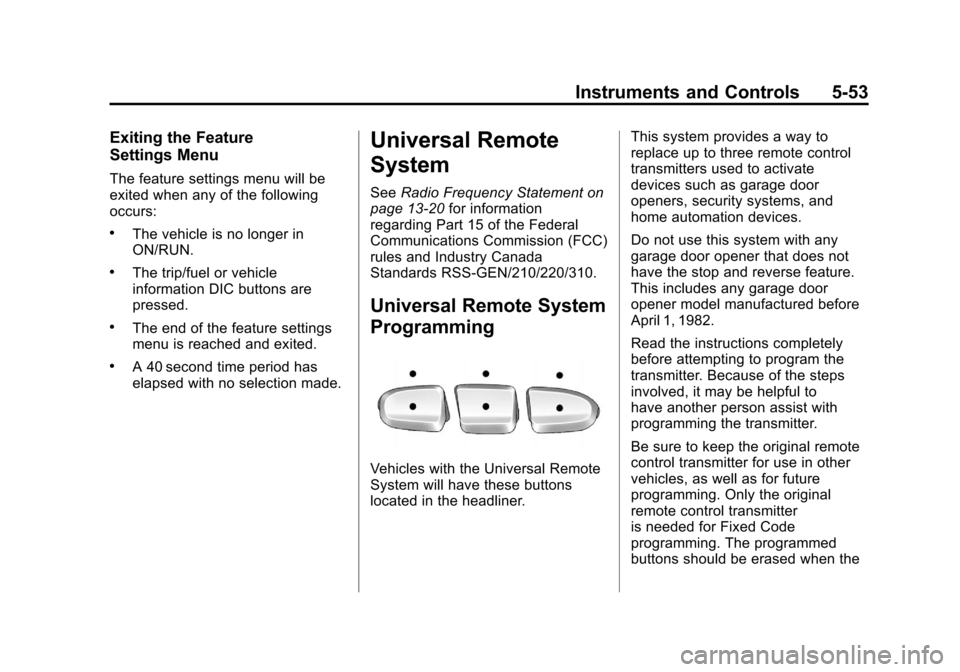
Vehicles with the Universal Remote
System will have these buttons
located in the headliner. This system provides a way to
replace up to three remote control
transmitters used to activate
devices such as garage door
openers, security systems, and
home automation devices.
Do not use this system with any
garage door opener that does not
have the stop and reverse feature.
This includes any garage door
opener model manufactured before
April 1, 1982.
Read the instructions completely
before attempting to program the
transmitter. Because of the steps
involved, it may be helpful to
have another person assist with
programming the transmitter.
Be sure to keep the original remote
control transmitter for use in other
vehicles, as well as for future
programming. Only the original
remote control transmitter
is needed for Fixed Code
programming. The programmed
buttons should be erased when the