reset CHEVROLET AVEO 2002 Service User Guide
[x] Cancel search | Manufacturer: CHEVROLET, Model Year: 2002, Model line: AVEO, Model: CHEVROLET AVEO 2002Pages: 5127, PDF Size: 41.82 MB
Page 1916 of 5127
Speedometer and Odometer
Your speedometer lets you see your speed in both
miles per hour (mph) and kilometers per hour (km/h).
Your odometer shows how far your vehicle has
been driven in either miles, used in the United States,
or kilometers, used in Canada.
Trip Odometer
The trip odometer can record the number of miles, used
in the United States, or kilometers, used in Canada,
traveled for up to two trips.
You can cycle between the odometer and trip
odometers A and B by pressing the reset button located
in the lower right area of the speedometer. By pressing
the reset button, you can tell how many miles or
kilometers have been recorded on either Trip A or Trip B
since you last set the trip odometer back to zero.
To reset each trip odometer to zero, press and hold the
reset button. The reset button resets only the trip
odometer that is being displayed. Each trip odometer
must be reset individually.
Tachometer
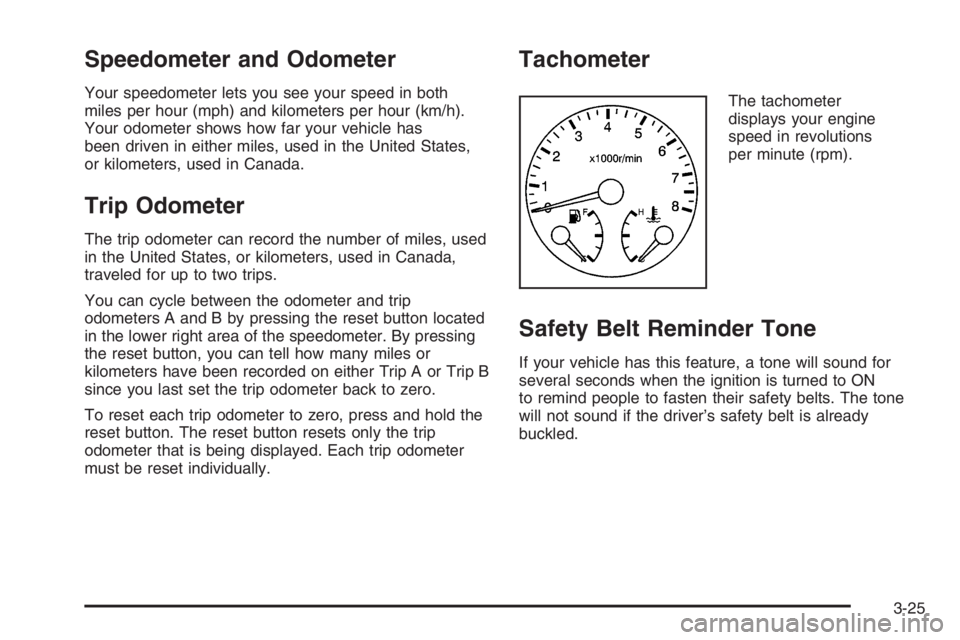
The tachometer
displays your engine
speed in revolutions
per minute (rpm).
Safety Belt Reminder Tone
If your vehicle has this feature, a tone will sound for
several seconds when the ignition is turned to ON
to remind people to fasten their safety belts. The tone
will not sound if the driver’s safety belt is already
buckled.
3-25
Page 1923 of 5127
Clock
Your vehicle has a digital clock. The clock is located in
the secondary instrument cluster on the center of
the instrument panel, above the center air outlets. When
the ignition is turned to ACC or ON, the time is
displayed in the digital clock. There are two adjusting
buttons for the digital clock:
H (Hour):To go forward one hour, press the H button
once. To go forward more than one hour, press and hold
the button until the correct hour is reached.
M (Minute):To go forward one minute, press the
M button once. To go forward more than one minute,
press and hold the button until the correct minute
is reached.
After disconnecting the battery or replacing the fuse,
reset the clock.
Safety Belt Reminder Light
The safety belt light will
come on and stay on until
the driver’s safety belt
is buckled.
If the driver’s belt is already buckled, the light will not
come on.
Airbag Readiness Light
There is an airbag readiness light on the secondary
information center (SIC), which shows the airbag
symbol. The system checks the airbag’s electrical
system for malfunctions. The light tells you if there is an
electrical problem. The system check includes the
airbag sensor, the airbag modules, the wiring and the
crash sensing and diagnostic module. For more
information on the airbag system, seeAirbag System on
page 1-56.
3-32
Page 1925 of 5127
Anti-Lock Brake System Warning
Light
If your vehicle has an
anti-lock brake system, this
light will come on when the
ignition is turned to ON and
may stay on for several
seconds. That is normal.
If the light stays on, turn the ignition to LOCK. Or, if the
light comes on, stop as soon as possible and turn
the ignition off. Then start the engine again to reset the
system. If the light still stays on, or comes on again
while you are driving, your vehicle needs service. See
your GM dealer. If the regular brake system warning
light is not on, you still have brakes, but you do not have
anti-lock brakes. If the regular brake system warning
light is also on, you do not have anti-lock brakes
and there is a problem with your regular brakes. See
Brake System Warning Light on page 3-27.
The anti-lock brake system warning light will come on
briefly when you turn the ignition to ON. This is normal.
If the light does not come on then, have it fixed so it
will be ready to warn you if there is a problem.
Hold Mode Light
If your vehicle has this
feature, this light will come
on when the hold mode
is active.
If the HOLD mode light flashes, have your vehicle
checked. See “Hold Mode” underAutomatic Transaxle
Operation on page 2-21for additional information
on this feature.
Malfunction Indicator Lamp
Check Engine Light
Your vehicle has a
computer which monitors
operation of the fuel,
ignition, and emission
control systems.
3-34
Page 1929 of 5127
Fog Lamp Light
If your vehicle has this
feature, the fog lamps light
will come on when the
fog lamps are in use.
The light will go out when the fog lamps are turned off.
SeeFog Lamps on page 3-15for more information.
Door Ajar Light
The door ajar light will
come on whenever a door
is opened, regardless
of the ignition position.
If the key is in the ignition while the driver’s door is
open, you will also hear a warning chime.
Audio System(s)
Determine which radio your vehicle has and then read the
pages following to familiarize yourself with its features.
Driving without distraction is a necessity for a safer
driving experience. SeeDefensive Driving on page 4-2.
By taking a few moments to read this manual and
get familiar with your vehicle’s audio system, you can
use it with less effort, as well as take advantage of
its features. While your vehicle is parked, set up your
audio system by presetting your favorite radio stations,
setting the tone and adjusting the speakers. Then,
when driving conditions permit, you can tune to your
favorite stations using the presets and steering
wheel controls if the vehicle has them.
{CAUTION:
This system provides you with a far greater
access to audio stations and song listings.
Giving extended attention to entertainment
tasks while driving can cause a crash and you
or others can be injured or killed. Always keep
your eyes on the road and your mind on the
drive — avoid engaging in extended searching
while driving.
3-38
Page 1930 of 5127
Keeping your mind on the drive is important for safe
driving. For more information, seeDefensive Driving on
page 4-2.
Here are some ways in which you can help avoid
distraction while driving.
While your vehicle is parked:
•Familiarize yourself with all of its controls.
•Familiarize yourself with its operation.
•Set up your audio system by presetting your
favorite radio stations, setting the tone, and
adjusting the speakers. Then, when driving
conditions permit, you can tune to your favorite
radio stations using the presets and steering wheel
controls if the vehicle has them.
Notice:Before adding any sound equipment to
your vehicle, such as an audio system, CD player,
CB radio, mobile telephone, or two-way radio, make
sure that it can be added by checking with your
dealer. Also, check federal rules covering mobile
radio and telephone units. If sound equipment can
be added, it is very important to do it properly.
Added sound equipment may interfere with
the operation of your vehicle’s engine, radio, or
other systems, and even damage them. Your
vehicle’s systems may interfere with the operation
of sound equipment that has been added.
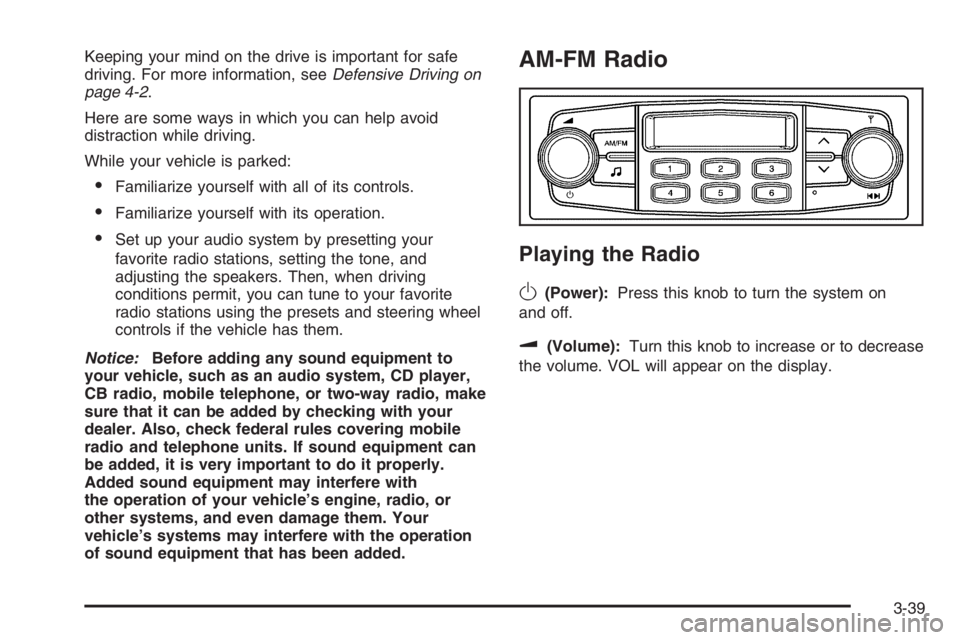
AM-FM Radio
Playing the Radio
O
(Power):Press this knob to turn the system on
and off.
u(Volume):Turn this knob to increase or to decrease
the volume. VOL will appear on the display.
3-39
Page 1931 of 5127
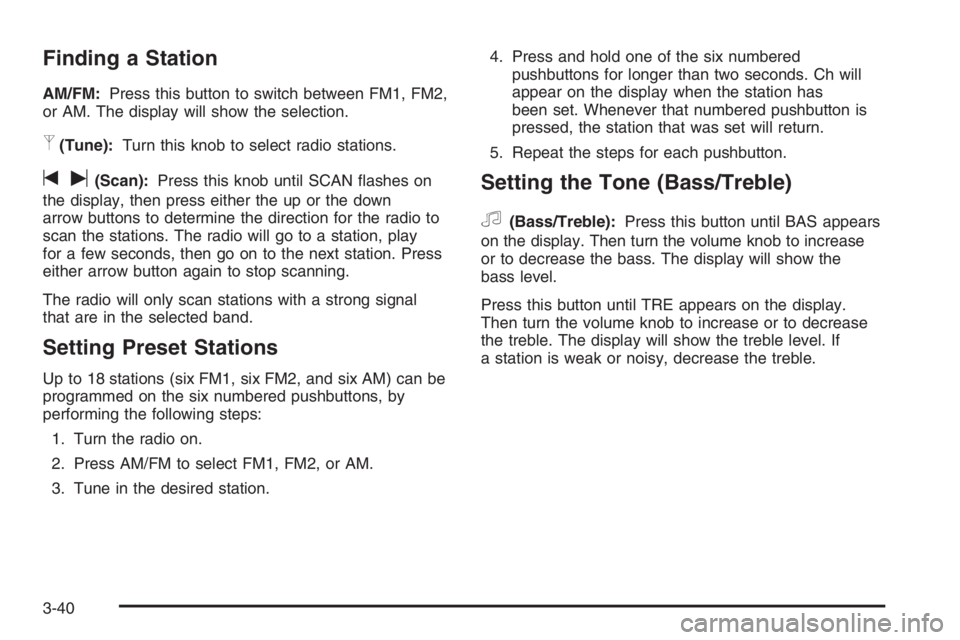
Finding a Station
AM/FM:Press this button to switch between FM1, FM2,
or AM. The display will show the selection.
p(Tune):Turn this knob to select radio stations.
tu(Scan):Press this knob until SCAN flashes on
the display, then press either the up or the down
arrow buttons to determine the direction for the radio to
scan the stations. The radio will go to a station, play
for a few seconds, then go on to the next station. Press
either arrow button again to stop scanning.
The radio will only scan stations with a strong signal
that are in the selected band.
Setting Preset Stations
Up to 18 stations (six FM1, six FM2, and six AM) can be
programmed on the six numbered pushbuttons, by
performing the following steps:
1. Turn the radio on.
2. Press AM/FM to select FM1, FM2, or AM.
3. Tune in the desired station.4. Press and hold one of the six numbered
pushbuttons for longer than two seconds. Ch will
appear on the display when the station has
been set. Whenever that numbered pushbutton is
pressed, the station that was set will return.
5. Repeat the steps for each pushbutton.
Setting the Tone (Bass/Treble)
f
(Bass/Treble):Press this button until BAS appears
on the display. Then turn the volume knob to increase
or to decrease the bass. The display will show the
bass level.
Press this button until TRE appears on the display.
Then turn the volume knob to increase or to decrease
the treble. The display will show the treble level. If
a station is weak or noisy, decrease the treble.
3-40
Page 1933 of 5127
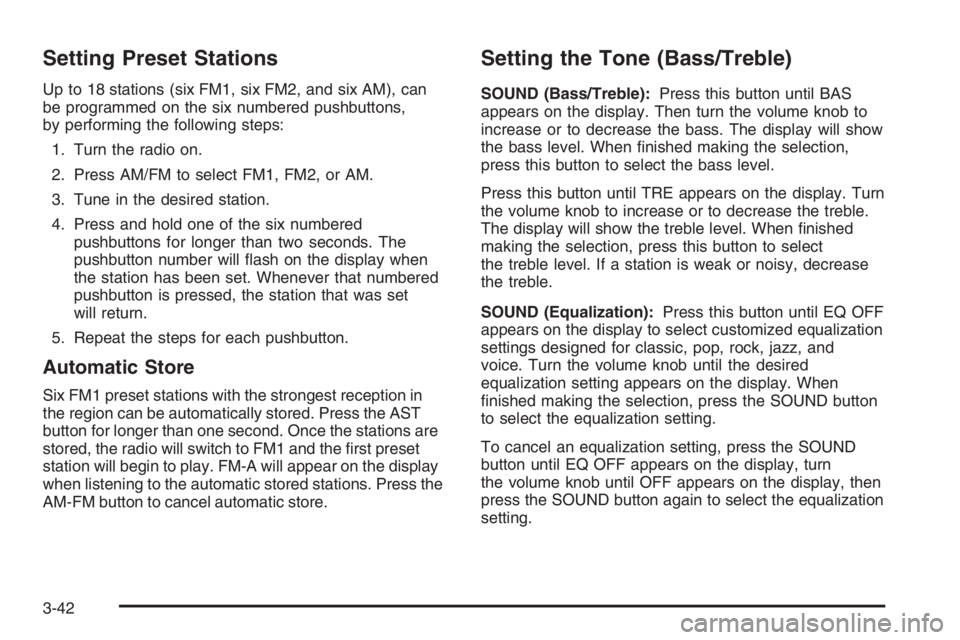
Setting Preset Stations
Up to 18 stations (six FM1, six FM2, and six AM), can
be programmed on the six numbered pushbuttons,
by performing the following steps:
1. Turn the radio on.
2. Press AM/FM to select FM1, FM2, or AM.
3. Tune in the desired station.
4. Press and hold one of the six numbered
pushbuttons for longer than two seconds. The
pushbutton number will flash on the display when
the station has been set. Whenever that numbered
pushbutton is pressed, the station that was set
will return.
5. Repeat the steps for each pushbutton.
Automatic Store
Six FM1 preset stations with the strongest reception in
the region can be automatically stored. Press the AST
button for longer than one second. Once the stations are
stored, the radio will switch to FM1 and the first preset
station will begin to play. FM-A will appear on the display
when listening to the automatic stored stations. Press the
AM-FM button to cancel automatic store.
Setting the Tone (Bass/Treble)
SOUND (Bass/Treble):Press this button until BAS
appears on the display. Then turn the volume knob to
increase or to decrease the bass. The display will show
the bass level. When finished making the selection,
press this button to select the bass level.
Press this button until TRE appears on the display. Turn
the volume knob to increase or to decrease the treble.
The display will show the treble level. When finished
making the selection, press this button to select
the treble level. If a station is weak or noisy, decrease
the treble.
SOUND (Equalization):Press this button until EQ OFF
appears on the display to select customized equalization
settings designed for classic, pop, rock, jazz, and
voice. Turn the volume knob until the desired
equalization setting appears on the display. When
finished making the selection, press the SOUND button
to select the equalization setting.
To cancel an equalization setting, press the SOUND
button until EQ OFF appears on the display, turn
the volume knob until OFF appears on the display, then
press the SOUND button again to select the equalization
setting.
3-42
Page 1937 of 5127
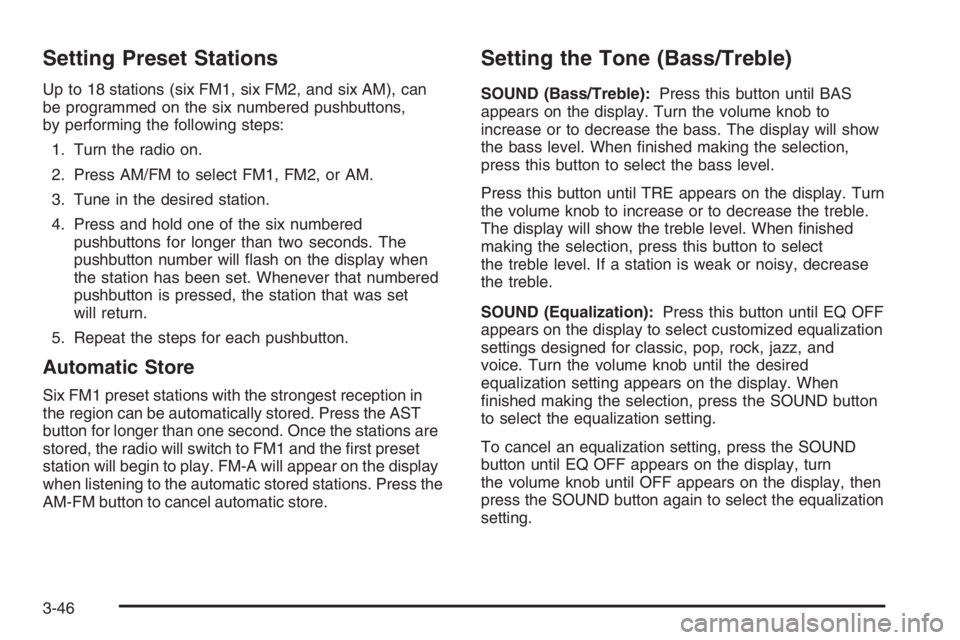
Setting Preset Stations
Up to 18 stations (six FM1, six FM2, and six AM), can
be programmed on the six numbered pushbuttons,
by performing the following steps:
1. Turn the radio on.
2. Press AM/FM to select FM1, FM2, or AM.
3. Tune in the desired station.
4. Press and hold one of the six numbered
pushbuttons for longer than two seconds. The
pushbutton number will flash on the display when
the station has been set. Whenever that numbered
pushbutton is pressed, the station that was set
will return.
5. Repeat the steps for each pushbutton.
Automatic Store
Six FM1 preset stations with the strongest reception in
the region can be automatically stored. Press the AST
button for longer than one second. Once the stations are
stored, the radio will switch to FM1 and the first preset
station will begin to play. FM-A will appear on the display
when listening to the automatic stored stations. Press the
AM-FM button to cancel automatic store.
Setting the Tone (Bass/Treble)
SOUND (Bass/Treble):Press this button until BAS
appears on the display. Turn the volume knob to
increase or to decrease the bass. The display will show
the bass level. When finished making the selection,
press this button to select the bass level.
Press this button until TRE appears on the display. Turn
the volume knob to increase or to decrease the treble.
The display will show the treble level. When finished
making the selection, press this button to select
the treble level. If a station is weak or noisy, decrease
the treble.
SOUND (Equalization):Press this button until EQ OFF
appears on the display to select customized equalization
settings designed for classic, pop, rock, jazz, and
voice. Turn the volume knob until the desired
equalization setting appears on the display. When
finished making the selection, press the SOUND button
to select the equalization setting.
To cancel an equalization setting, press the SOUND
button until EQ OFF appears on the display, turn
the volume knob until OFF appears on the display, then
press the SOUND button again to select the equalization
setting.
3-46
Page 1944 of 5127
Finding a Station
AM:Press this button to switch to an AM station. The
display will show the selection.
FM:Press this button to switch to an FM station. The
display will show the selection.
()TUNE:Press this button to select radio
stations.
Press the up arrows to increase or the down arrows to
decrease the radio frequencies.
¦¥SEEK:Press this button to seek radio stations.
Press the up arrows to seek the next radio station
or the down arrows to seek the previous radio station.
SCAN/AST:Press this button to scan radio stations.
The radio will go to a station, play for a few seconds,
then go on to the next station. Press this button again to
stop scanning.
The radio will only scan stations with a strong signal
that are in the selected band.
Automatic Store
Press this button for longer than two seconds to use
Automatic Store.
FM1’s six preset stations with the strongest station in
the region can be automatically stored. The display will
show AUTO SCANNING and SCANNING will flash
on display.
Stored stations will flash for a short time on display in
sequence. Once the stations are stored, the radio
will switch to FM1 and the first preset station will begin
to play. FM-A will appear on the display when
listening to the automatic stored stations. Press the AM,
FM button to cancel automatic store.
3-53
Page 1945 of 5127
Setting Preset Stations
Up to 24 stations (six FM1, six FM2, six AM1, and
six AM2), can be programmed on the six numbered
buttons, by performing the following steps:
1. Turn the radio on.
2. Press the AM or FM button to select FM1, FM2,
AM1orAM2.
3. Tune in the desired station.
4. Press and hold one of the six numbered buttons for
longer than two seconds. The preset button number
one through six will flash on the display when the
station has been set. Whenever that numbered
preset button is pressed, the memorized station will
return.
5. Repeat the upper four steps for each preset button.
Order of Sound Function
The order for sound function is BASS, TRE, BAL,
FADE, EQ OFF, and VOL.
Setting the Tone (Bass/Treble)
SOUND (Bass/Treble):Press this button until BAS
appears on the display. Turn the volume knob to
increase or to decrease the bass. The display will show
the bass level. When finished making the selection,
press this button to set the bass level selection.
Press this button until TRE appears on the display. Turn
the volume knob to increase or to decrease the treble.
The display will show the treble level. When finished
making the selection, press this button to set the treble
level selection. If a station is weak or noisy, decrease
the treble.
Adjusting the Speakers (Balance/Fade)
SOUND (Balance/Fade):To adjust the balance
between the right and the left speakers, press this button
until BAL appears on the display. Turn the volume
knob to increase or to decrease. The display will show
the balance level. When finished making the selection,
press this button to set the balance level.
To adjust the fade between the front and the rear
speakers, press this button until FAD appears on the
display. Turn the volume knob to increase or to
decrease the fade between the front and the rear
speakers. The display will show the fade level. When
finished making the selection, press this button to set the
fade level.
3-54