reset CHEVROLET AVEO 2002 Service Owner's Manual
[x] Cancel search | Manufacturer: CHEVROLET, Model Year: 2002, Model line: AVEO, Model: CHEVROLET AVEO 2002Pages: 5127, PDF Size: 41.82 MB
Page 1953 of 5127
Finding a Station
AM:Press this button to switch to an AM station. The
display will show the selection.
FM:Press this button to switch to an FM station. The
display will show the selection.
()TUNE:Press this button to select radio
stations.
Press the up arrows to increase or the down arrows to
decrease the radio frequencies.
¦¥SEEK:Press this button to seek radio stations.
Press the up arrows to seek the next radio station
or the down arrows to seek the previous radio station.
SCAN/AST:Press this button to scan radio stations.
The radio will go to a station, play for a few seconds,
then go on to the next station. Press this button again
to stop scanning.
The radio will only scan stations with a strong signal
that are in the selected band.
Automatic Store
Press this button for longer than two seconds to use
Automatic Store.
FM1’s six preset stations with the strongest station in
the region can be automatically stored. The display will
show AUTO SCANNING and SCANNING will flash
on display.
Stored stations will flash for a short time on display in
sequence. Once the stations are stored, the radio
will switch to FM1 and the first preset station will begin
to play. FM-A will appear on the display when
listening to the automatic stored stations. Press the AM,
FM button to cancel automatic store.
Setting Preset Stations
Up to 24 stations (six FM1, six FM2, six AM1, and
six AM2), can be programmed on the six numbered
buttons, by performing the following steps:
1. Turn the radio on.
2. Press the AM or FM button to select FM1, FM2,
AM1orAM2.
3. Tune in the desired station.
3-62
Page 1954 of 5127
4. Press and hold one of the six numbered buttons for
longer than two seconds. The preset button number
one through six will flash on the display when the
station has been set. Whenever that numbered
preset button is pressed, the memorized station will
return.
5. Repeat the upper four steps for each preset button.
Order of Sound Function
The order for sound function is BASS, TRE, BAL,
FADE, EQ OFF, and VOL.
Setting the Tone (Bass/Treble)
SOUND (Bass/Treble):Press this button until BAS
appears on the display. Turn the volume knob to
increase or to decrease the bass. The display will show
the bass level. When finished making the selection,
press this button to set the bass level.
Press this button until TRE appears on the display. Turn
the volume knob to increase or to decrease the treble.
The display will show the treble level. When finished
making the selection, press this button to set the treble
level. If a station is weak or noisy, decrease the treble.
Adjusting the Speakers (Balance/Fade)
SOUND (Balance/Fade):To adjust the balance
between the right and the left speakers, press this button
until BAL appears on the display. Turn the volume
knob to increase or to decrease. The display will show
the balance level. When finished making the selection,
press this button to set the balance level.
To adjust the fade between the front and the rear
speakers, press this button until FAD appears on the
display. Turn the volume knob to increase or to
decrease the fade between the front and the rear
speakers. The display will show the fade level. When
finished making the selection, press this button to set
the fade level.
3-63
Page 2038 of 5127
Notice:If the jumper cables are connected or
removed in the wrong order, electrical shorting may
occur and damage the vehicle. The repairs would
not be covered by your warranty. Always connect
and remove the jumper cables in the correct
order, making sure that the cables do not touch
each other or other metal.
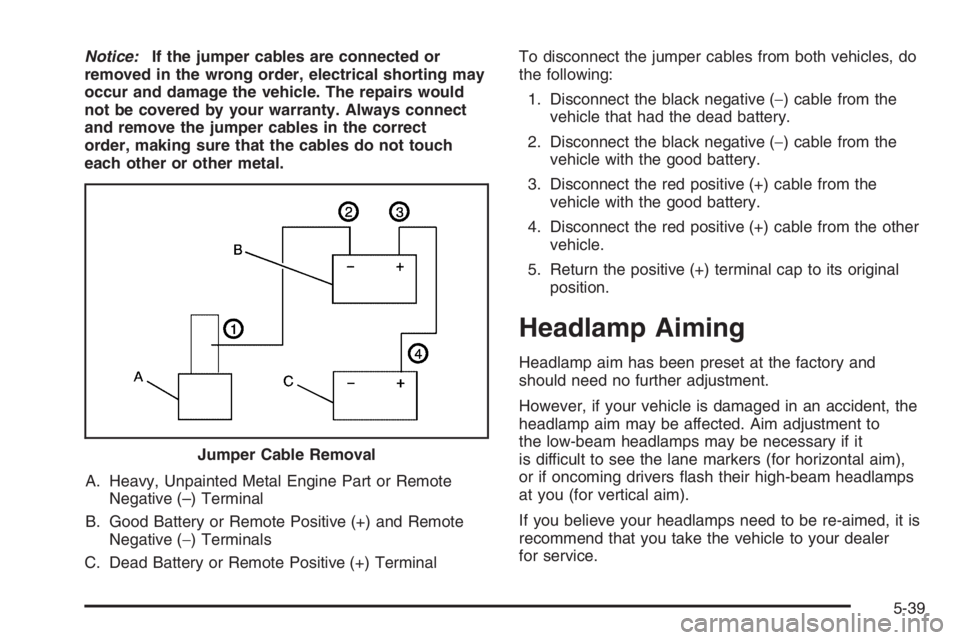
A. Heavy, Unpainted Metal Engine Part or Remote
Negative (–) Terminal
B. Good Battery or Remote Positive (+) and Remote
Negative (−) Terminals
C. Dead Battery or Remote Positive (+) TerminalTo disconnect the jumper cables from both vehicles, do
the following:
1. Disconnect the black negative (−) cable from the
vehicle that had the dead battery.
2. Disconnect the black negative (−) cable from the
vehicle with the good battery.
3. Disconnect the red positive (+) cable from the
vehicle with the good battery.
4. Disconnect the red positive (+) cable from the other
vehicle.
5. Return the positive (+) terminal cap to its original
position.
Headlamp Aiming
Headlamp aim has been preset at the factory and
should need no further adjustment.
However, if your vehicle is damaged in an accident, the
headlamp aim may be affected. Aim adjustment to
the low-beam headlamps may be necessary if it
is difficult to see the lane markers (for horizontal aim),
or if oncoming drivers flash their high-beam headlamps
at you (for vertical aim).
If you believe your headlamps need to be re-aimed, it is
recommend that you take the vehicle to your dealer
for service. Jumper Cable Removal
5-39
Page 4376 of 5127
DESCRIPTION AND OPERATION
INSTRUMENT PANEL DESCRIPTION
Cigar Lighter
The cigar lighter is located in the front portion of the floor console. To use the lighter, push it in completely.
When the lighter is hot, it will release itself from contact with the heating element. The lighter and the heating
element can be damaged if the lighter is not allowed to release itself fully from the heating element.
Ashtray
The ashtray is located below the audio system. To access the ashtray, pull it out from the center console. The
ashtray lamp will go ON when the parking lamps or the headlamps are turned ON.
Instrument Panel Vents
The center and the side vents in the instrument panel can be adjusted up and down and from side to side. The
side vents can also be aimed toward the side windows in order to defog them.
Glove Box
The glove box can be opened by pulling up on the latch handle. The glove box must be removed in order to gain
access to the passenger's side air bag module.
Digital Clock
The digital clock is located in the instrument panel, above the audio system. The clock is capable of a 12-hour
or a 24-hour display.
Instrument Cluster
The instrument cluster is located above the steering column and in the instrument cluster trim panel. The
instrument cluster contains the instruments that provide the driver with vehicle performance information. The
instrument cluster contains a speedometer, an odometer, a trip odometer, a temperature gage, a fuel gage, and
several indicator lamps. For replacement of the indicator lamp bulbs contained in the instrument cluster, refer to
Bulb Usage Specifications
and Instrument Cluster Lamp Replacement .
Speedometer/Odometer/Trip Odometer
The speedometer measures the speed of the vehicle in km/h (mph). It consists of an instrument cluster gage
connected to the vehicle speed sensor (VSS) on the transaxle output shaft.
The odometer measures in kilometers (miles) the total distance the vehicle has traveled since it was
manufactured. It consists of an instrument cluster gage connected to the VSS on the transaxle output shaft.
The trip odometer measures the distance the vehicle has traveled since the odometer was last reset. It consists of
2005 Chevrolet Aveo
2005 ACCESSORIES & EQUIPMENT Instrument Panel, Gages, & Console - Aveo
Microsoft
Friday, July 31, 2009 1:07:03 PMPage 83 © 2005 Mitchell Repair Information Company, LLC.
Page 4377 of 5127
an instrument cluster gage connected to the VSS on the transaxle output shaft. The trip odometer can be reset to
zero at any time so that the driver can record the distance traveled from any starting point.
Fuel Gage
The fuel gage consists of an instrument cluster gage connected to a sending unit in the fuel tank.
The fuel gage indicates the quantity of fuel in the tank only when the ignition switch is turned to ON or ACC.
When the ignition is turned to LOCK or START, the pointer may come to rest at any position.
Temperature Gage
The temperature gage consists of an instrument cluster gage connected to a temperature sensor that is in contact
with the circulating engine coolant.
The temperature gage indicates the temperature of the coolant. Prolonged driving or idling in very hot weather
may cause the pointer to move beyond the center of the gage. The engine is overheating if the pointer moves
into the red zone at the upper limit of the gage.
Instrument Cluster Indicator Lamps
The instrument cluster contains indicator lamps that indicate the function of certain systems or the existence of
potential problems with the operation of the vehicle. The indicator lamps are replaceable. For replacement of
the indicator lamps contained in the instrument cluster, refer to Bulb Usage Specifications
and Instrument
Cluster Lamp Replacement .
Chime Module
The chime module is located above the instrument panel fuse block and will sound in order to bring attention to
one or more of the following conditions:
The lamps are ON, the door is ajar, and the ignition switch is not in ACC, ON, or START.
The seat belt is unbuckled when the ignition switch is in ON or START.
The door is open when the ignition switch is in ON or START.
The key is left in the ignition switch when the ignition is in LOCK and the door is open.
2005 Chevrolet Aveo
2005 ACCESSORIES & EQUIPMENT Instrument Panel, Gages, & Console - Aveo
Microsoft
Friday, July 31, 2009 1:07:03 PMPage 84 © 2005 Mitchell Repair Information Company, LLC.