lock CHEVROLET AVEO 2002 Service Repair Manual
[x] Cancel search | Manufacturer: CHEVROLET, Model Year: 2002, Model line: AVEO, Model: CHEVROLET AVEO 2002Pages: 5127, PDF Size: 41.82 MB
Page 4308 of 5127
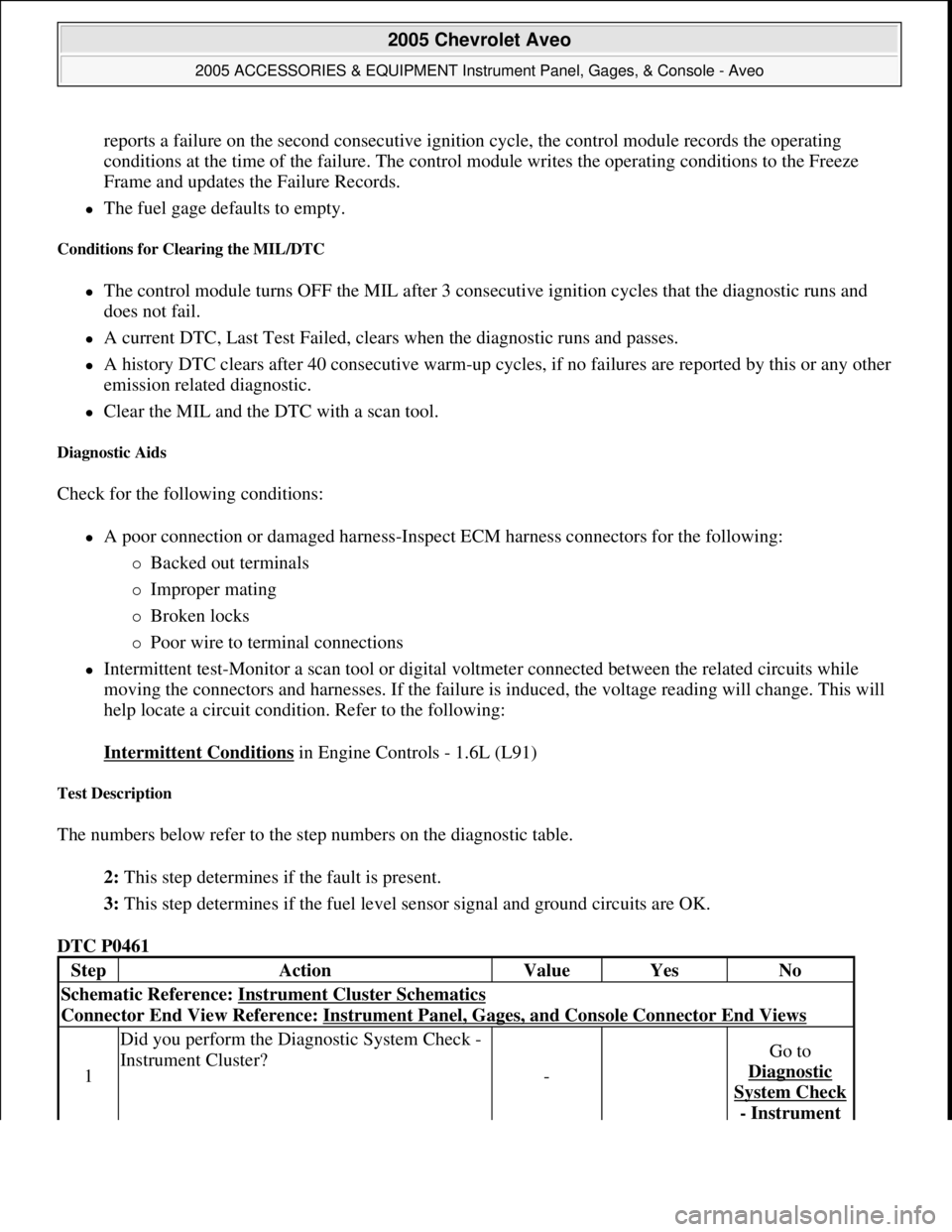
reports a failure on the second consecutive ignition cycle, the control module records the operating
conditions at the time of the failure. The control module writes the operating conditions to the Freeze
Frame and updates the Failure Records.
The fuel gage defaults to empty.
Conditions for Clearing the MIL/DTC
The control module turns OFF the MIL after 3 consecutive ignition cycles that the diagnostic runs and
does not fail.
A current DTC, Last Test Failed, clears when the diagnostic runs and passes.
A history DTC clears after 40 consecutive warm-up cycles, if no failures are reported by this or any other
emission related diagnostic.
Clear the MIL and the DTC with a scan tool.
Diagnostic Aids
Check for the following conditions:
A poor connection or damaged harness-Inspect ECM harness connectors for the following:
Backed out terminals
Improper mating
Broken locks
Poor wire to terminal connections
Intermittent test-Monitor a scan tool or digital voltmeter connected between the related circuits while
moving the connectors and harnesses. If the failure is induced, the voltage reading will change. This will
help locate a circuit condition. Refer to the following:
Intermittent Conditions
in Engine Controls - 1.6L (L91)
Test Description
The numbers below refer to the step numbers on the diagnostic table.
2: This step determines if the fault is present.
3: This step determines if the fuel level sensor signal and ground circuits are OK.
DTC P0461
StepActionValueYesNo
Schematic Reference: Instrument Cluster Schematics
Connector End View Reference: Instrument Panel, Gages, and Console Connector End Views
1
Did you perform the Diagnostic System Check -
Instrument Cluster?
-
Go to
Diagnostic
System Check
- Instrument
2005 Chevrolet Aveo
2005 ACCESSORIES & EQUIPMENT Instrument Panel, Gages, & Console - Aveo
Microsoft
Friday, July 31, 2009 1:07:02 PMPage 15 © 2005 Mitchell Repair Information Company, LLC.
Page 4320 of 5127
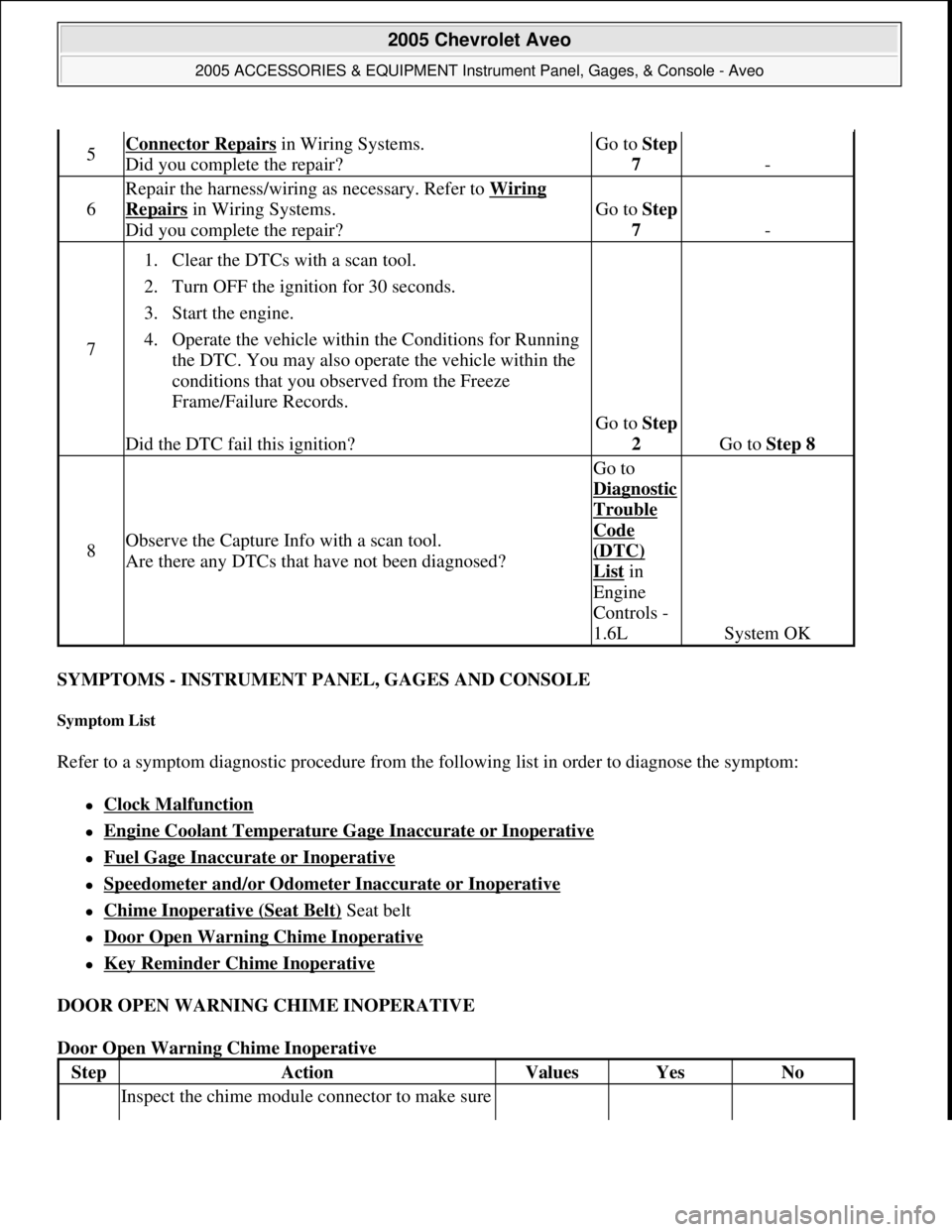
SYMPTOMS - INSTRUMENT PANEL, GAGES AND CONSOLE
Symptom List
Refer to a symptom diagnostic procedure from the following list in order to diagnose the symptom:
Clock Malfunction
Engine Coolant Temperature Gage Inaccurate or Inoperative
Fuel Gage Inaccurate or Inoperative
Speedometer and/or Odometer Inaccurate or Inoperative
Chime Inoperative (Seat Belt) Seat belt
Door Open Warning Chime Inoperative
Key Reminder Chime Inoperative
DOOR OPEN WARNING CHIME INOPERATIVE
Door Open Warning Chime Inoperative
5Connector Repairs in Wiring Systems.
Did you complete the repair?Go to Step
7
-
6
Repair the harness/wiring as necessary. Refer to Wiring
Repairs in Wiring Systems.
Did you complete the repair?Go to Step
7
-
7
1. Clear the DTCs with a scan tool.
2. Turn OFF the ignition for 30 seconds.
3. Start the engine.
4. Operate the vehicle within the Conditions for Running
the DTC. You may also operate the vehicle within the
conditions that you observed from the Freeze
Frame/Failure Records.
Did the DTC fail this ignition?
Go to Step
2
Go to Step 8
8Observe the Capture Info with a scan tool.
Are there any DTCs that have not been diagnosed?
Go to
Dia
gnostic
Trouble
Code
(DTC)
List in
Engine
Controls -
1.6L
System OK
StepActionValuesYesNo
Inspect the chime module connector to make sure
2005 Chevrolet Aveo
2005 ACCESSORIES & EQUIPMENT Instrument Panel, Gages, & Console - Aveo
Microsoft
Friday, July 31, 2009 1:07:02 PMPage 27 © 2005 Mitchell Repair Information Company, LLC.
Page 4323 of 5127
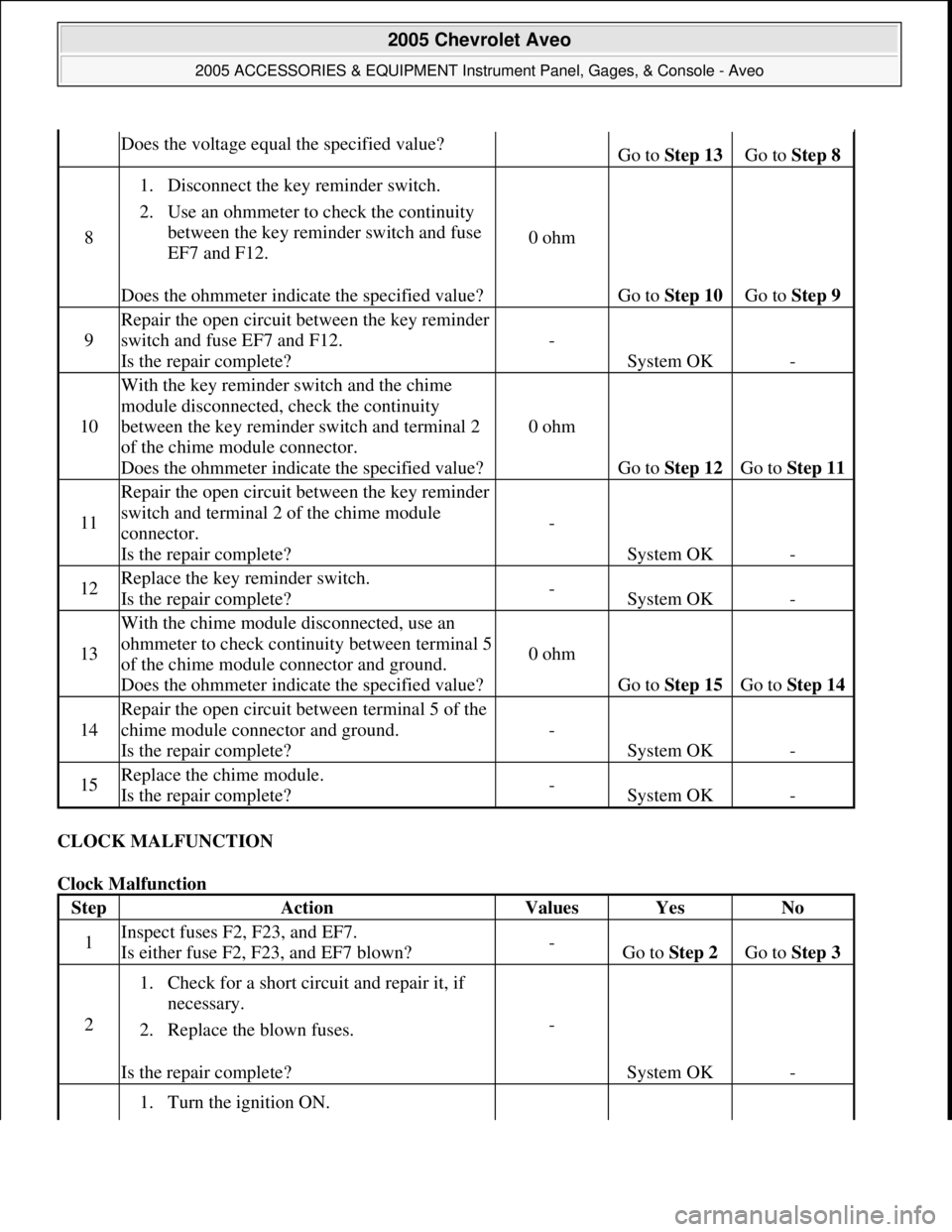
CLOCK MALFUNCTION
Clock Malfunction
Does the voltage equal the specified value?Go to Step 13 Go to Step 8
8
1. Disconnect the key reminder switch.
2. Use an ohmmeter to check the continuity
between the key reminder switch and fuse
EF7 and F12.
Does the ohmmeter indicate the specified value?
0 ohm
Go to Step 10 Go to Step 9
9
Repair the open circuit between the key reminder
switch and fuse EF7 and F12.
Is the repair complete?
-
System OK-
10
With the key reminder switch and the chime
module disconnected, check the continuity
between the key reminder switch and terminal 2
of the chime module connector.
Does the ohmmeter indicate the specified value?
0 ohm
Go to Step 12 Go to Step 11
11
Repair the open circuit between the key reminder
switch and terminal 2 of the chime module
connector.
Is the repair complete?
-
System OK-
12Replace the key reminder switch.
Is the repair complete?-System OK-
13
With the chime module disconnected, use an
ohmmeter to check continuity between terminal 5
of the chime module connector and ground.
Does the ohmmeter indicate the specified value?
0 ohm
Go to Step 15 Go to Step 14
14
Repair the open circuit between terminal 5 of the
chime module connector and ground.
Is the repair complete?
-
System OK-
15Replace the chime module.
Is the repair complete?-System OK-
StepActionValuesYesNo
1Inspect fuses F2, F23, and EF7.
Is either fuse F2, F23, and EF7 blown?-Go to Step 2 Go to Step 3
2
1. Check for a short circuit and repair it, if
necessary.
2. Replace the blown fuses.
Is the repair complete?
-
System OK-
1. Turn the ignition ON.
2005 Chevrolet Aveo
2005 ACCESSORIES & EQUIPMENT Instrument Panel, Gages, & Console - Aveo
Microsoft
Friday, July 31, 2009 1:07:02 PMPage 30 © 2005 Mitchell Repair Information Company, LLC.
Page 4324 of 5127
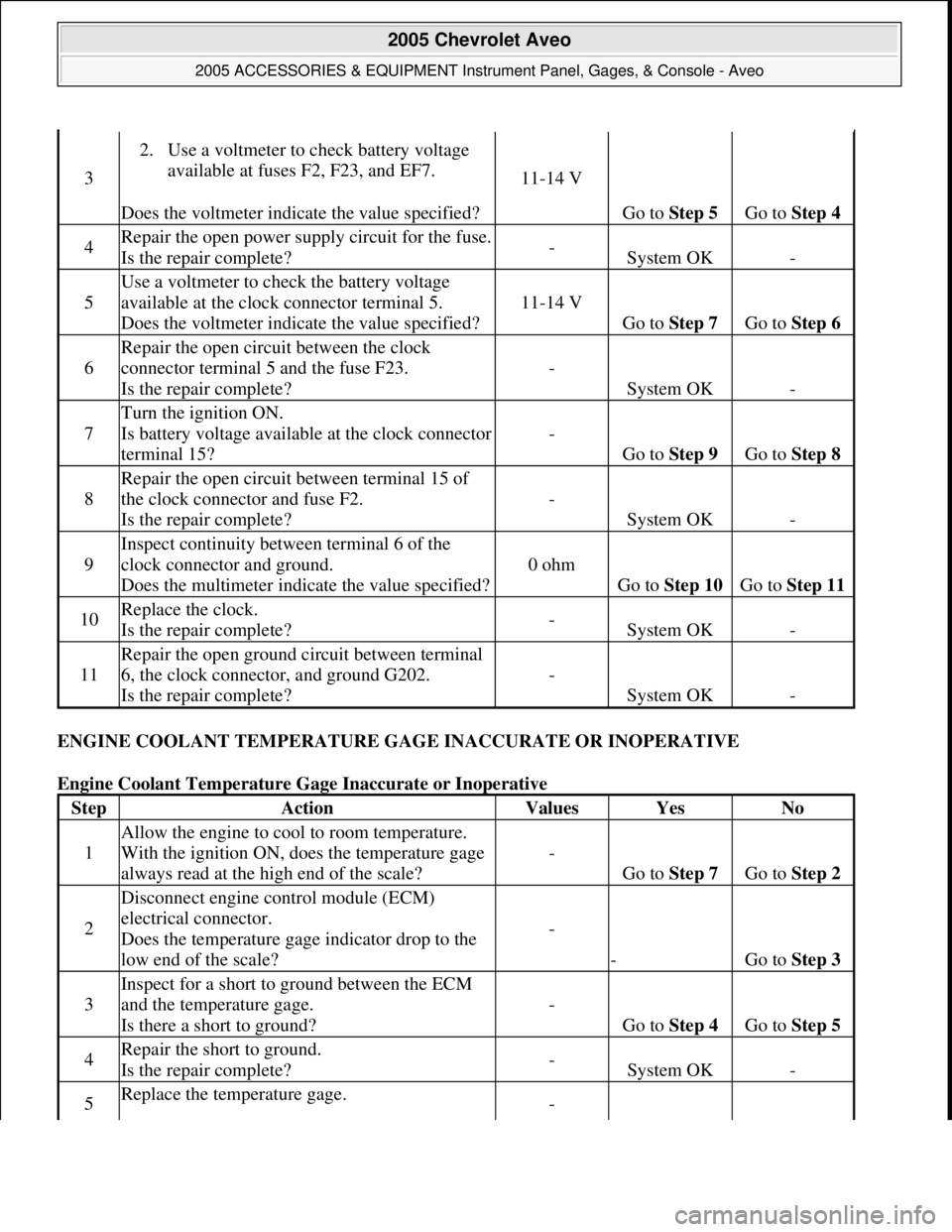
ENGINE COOLANT TEMPERATURE GAGE INACCURATE OR INOPERATIVE
Engine Coolant Temperature Gage Inaccurate or Inoperative
3
2. Use a voltmeter to check battery voltage
available at fuses F2, F23, and EF7.
Does the voltmeter indicate the value specified?
11-14 V
Go to Step 5 Go to Step 4
4Repair the open power supply circuit for the fuse.
Is the repair complete?-System OK-
5
Use a voltmeter to check the battery voltage
available at the clock connector terminal 5.
Does the voltmeter indicate the value specified?
11-14 V
Go to Step 7 Go to Step 6
6
Repair the open circuit between the clock
connector terminal 5 and the fuse F23.
Is the repair complete?
-
System OK-
7
Turn the ignition ON.
Is battery voltage available at the clock connector
terminal 15?
-
Go to Step 9 Go to Step 8
8
Repair the open circuit between terminal 15 of
the clock connector and fuse F2.
Is the repair complete?
-
System OK-
9
Inspect continuity between terminal 6 of the
clock connector and ground.
Does the multimeter indicate the value specified?
0 ohm
Go to Step 10 Go to Step 11
10Replace the clock.
Is the repair complete?-System OK-
11
Repair the open ground circuit between terminal
6, the clock connector, and ground G202.
Is the repair complete?
-
System OK-
StepActionValuesYesNo
1
Allow the engine to cool to room temperature.
With the ignition ON, does the temperature gage
always read at the high end of the scale?
-
Go to Step 7 Go to Step 2
2
Disconnect engine control module (ECM)
electrical connector.
Does the temperature gage indicator drop to the
low end of the scale?
-
-Go to Step 3
3
Inspect for a short to ground between the ECM
and the temperature gage.
Is there a short to ground?
-
Go to Step 4 Go to Step 5
4Repair the short to ground.
Is the repair complete?-System OK-
5Replace the temperature gage. -
2005 Chevrolet Aveo
2005 ACCESSORIES & EQUIPMENT Instrument Panel, Gages, & Console - Aveo
Microsoft
Friday, July 31, 2009 1:07:02 PMPage 31 © 2005 Mitchell Repair Information Company, LLC.
Page 4357 of 5127
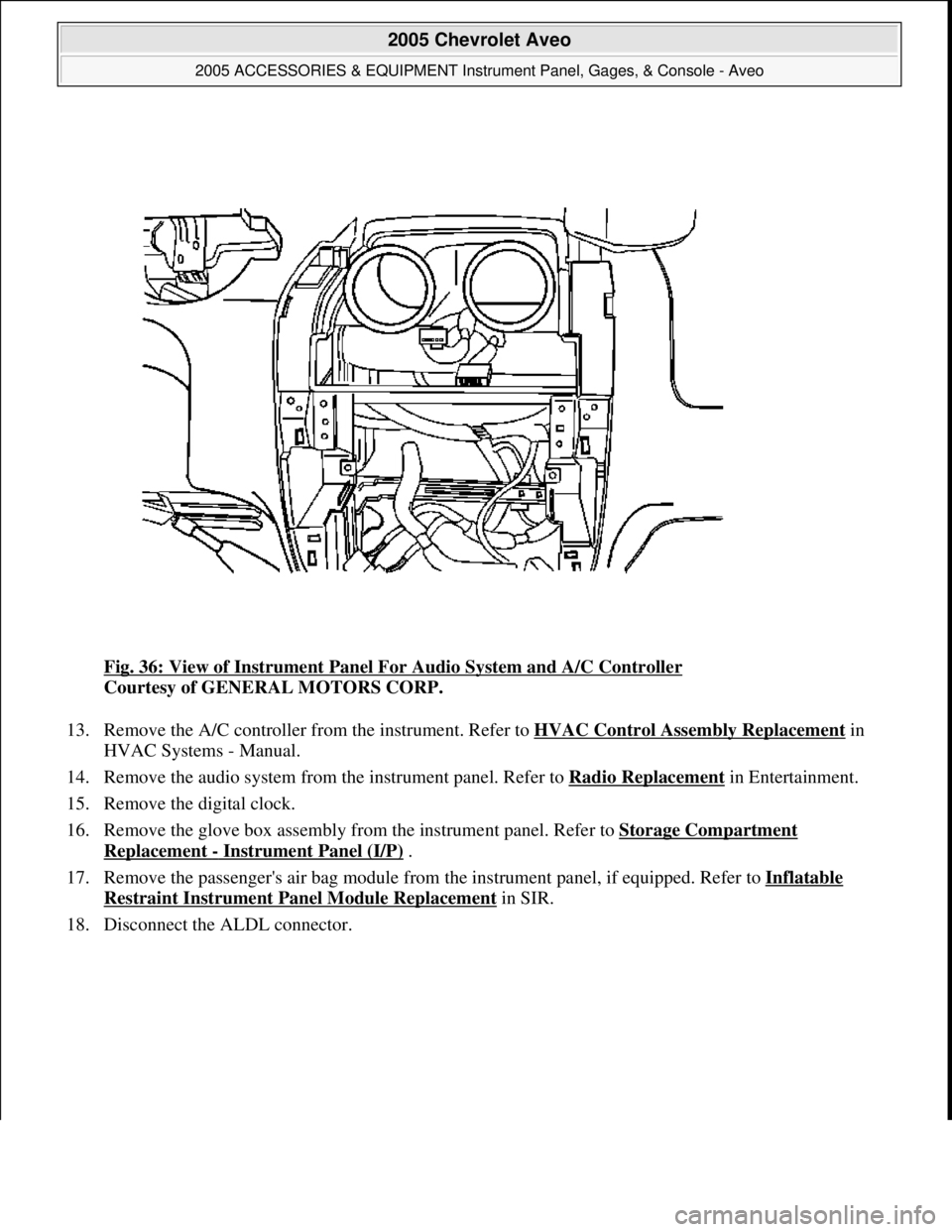
Fig. 36: View of Instrument Panel For Audio System and A/C Controller
Courtesy of GENERAL MOTORS CORP.
13. Remove the A/C controller from the instrument. Refer to HVAC Control Assembly Replacement
in
HVAC Systems - Manual.
14. Remove the audio system from the instrument panel. Refer to Radio Replacement
in Entertainment.
15. Remove the digital clock.
16. Remove the glove box assembly from the instrument panel. Refer to Storage Compartment
Replacement - Instrument Panel (I/P) .
17. Remove the passenger's air bag module from the instrument panel, if equipped. Refer to Inflatable
Restraint Instrument Panel Module Replacement in SIR.
18. Disconnect the ALDL connector.
2005 Chevrolet Aveo
2005 ACCESSORIES & EQUIPMENT Instrument Panel, Gages, & Console - Aveo
Microsoft
Friday, July 31, 2009 1:07:03 PMPage 64 © 2005 Mitchell Repair Information Company, LLC.
Page 4361 of 5127
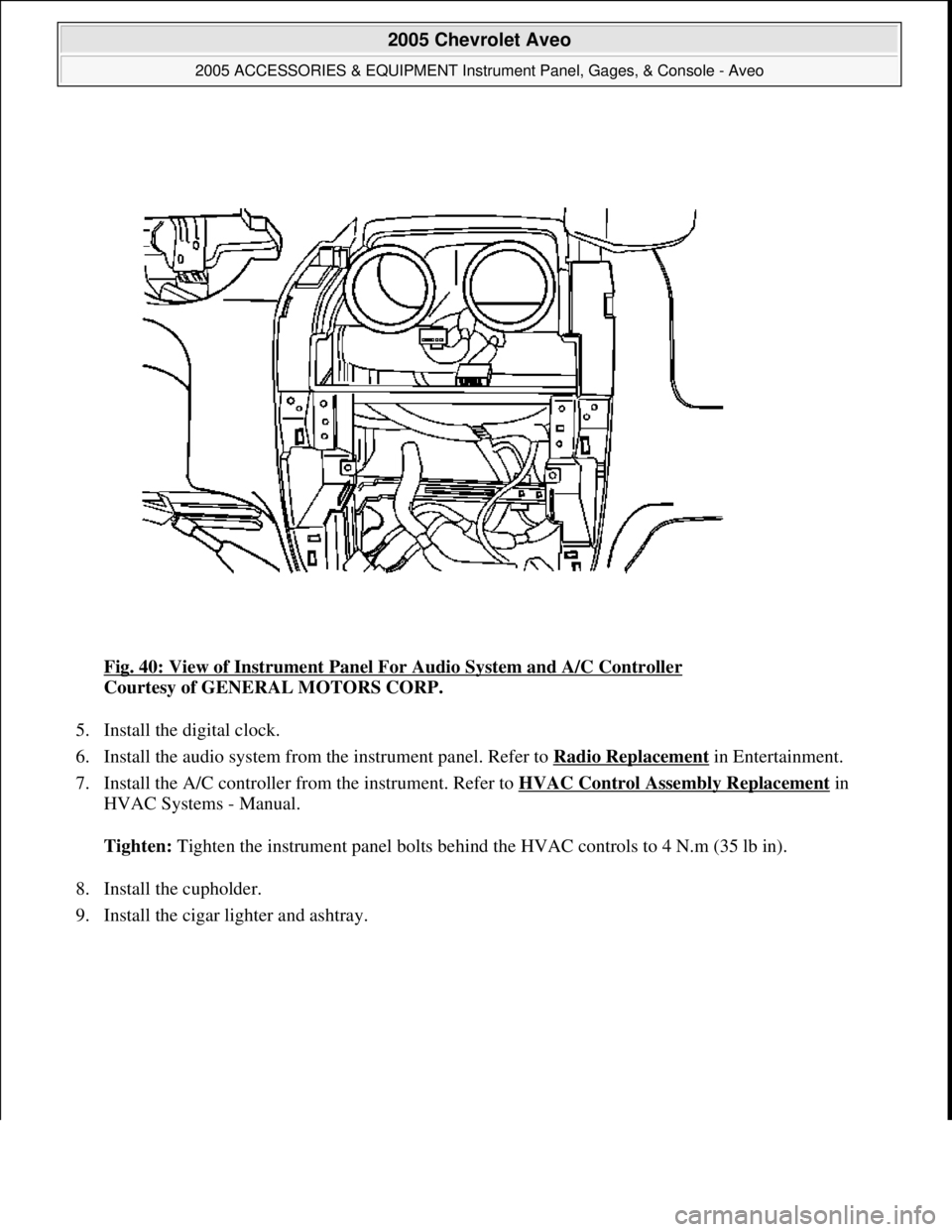
Fig. 40: View of Instrument Panel For Audio System and A/C Controller
Courtesy of GENERAL MOTORS CORP.
5. Install the digital clock.
6. Install the audio system from the instrument panel. Refer to Radio Replacement
in Entertainment.
7. Install the A/C controller from the instrument. Refer to HVAC Control Assembly Replacement
in
HVAC Systems - Manual.
Tighten: Tighten the instrument panel bolts behind the HVAC controls to 4 N.m (35 lb in).
8. Install the cupholder.
9. Install the ci
gar lighter and ashtray.
2005 Chevrolet Aveo
2005 ACCESSORIES & EQUIPMENT Instrument Panel, Gages, & Console - Aveo
Microsoft
Friday, July 31, 2009 1:07:03 PMPage 68 © 2005 Mitchell Repair Information Company, LLC.
Page 4365 of 5127
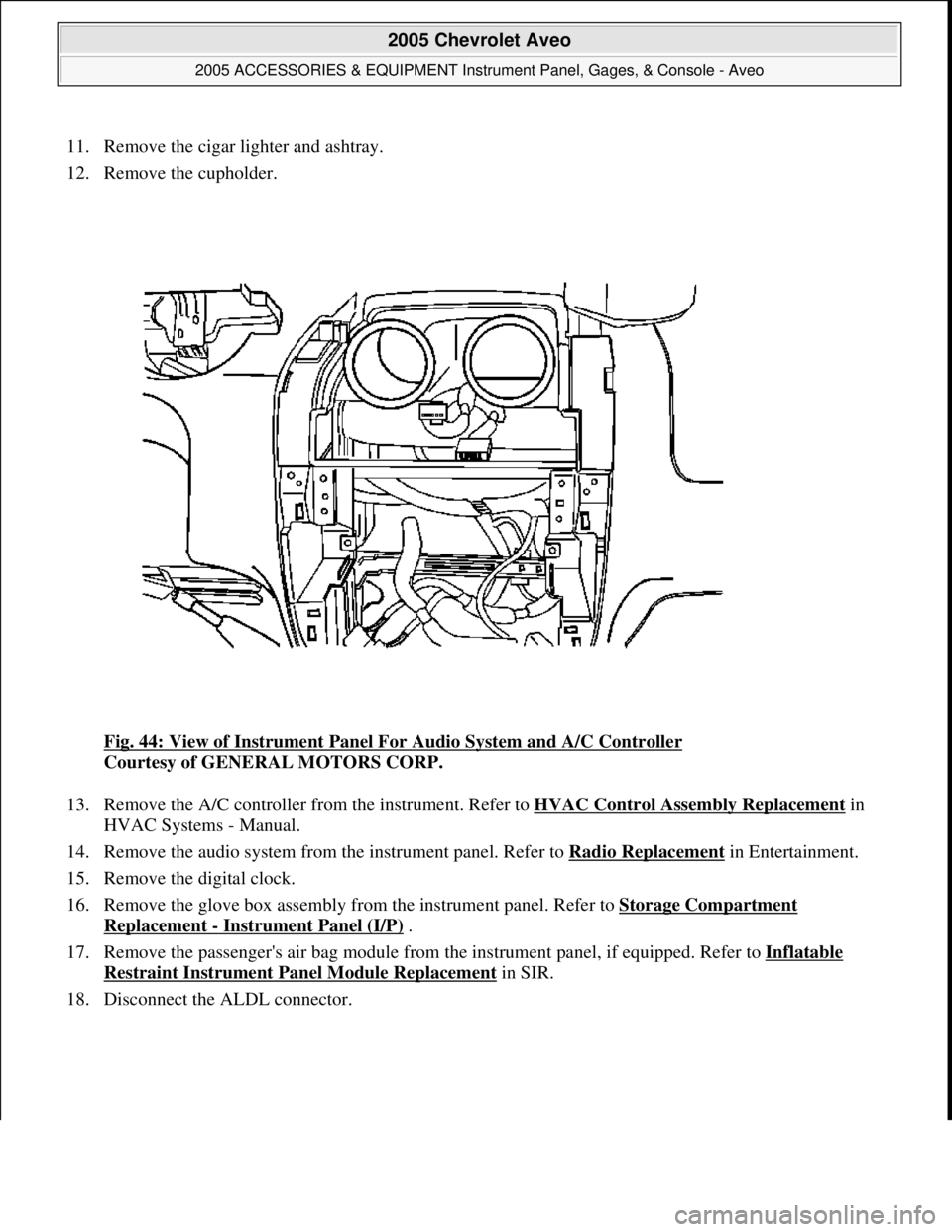
11. Remove the cigar lighter and ashtray.
12. Remove the cupholder.
Fig. 44: View of Instrument Panel For Audio System and A/C Controller
Courtesy of GENERAL MOTORS CORP.
13. Remove the A/C controller from the instrument. Refer to HVAC Control Assembly Replacement
in
HVAC Systems - Manual.
14. Remove the audio system from the instrument panel. Refer to Radio Replacement
in Entertainment.
15. Remove the digital clock.
16. Remove the glove box assembly from the instrument panel. Refer to Storage Compartment
Replacement - Instrument Panel (I/P) .
17. Remove the passenger's air bag module from the instrument panel, if equipped. Refer to Inflatable
Restraint Instrument Panel Module Replacement in SIR.
18. Disconnect the ALDL connector.
2005 Chevrolet Aveo
2005 ACCESSORIES & EQUIPMENT Instrument Panel, Gages, & Console - Aveo
Microsoft
Friday, July 31, 2009 1:07:03 PMPage 72 © 2005 Mitchell Repair Information Company, LLC.
Page 4369 of 5127
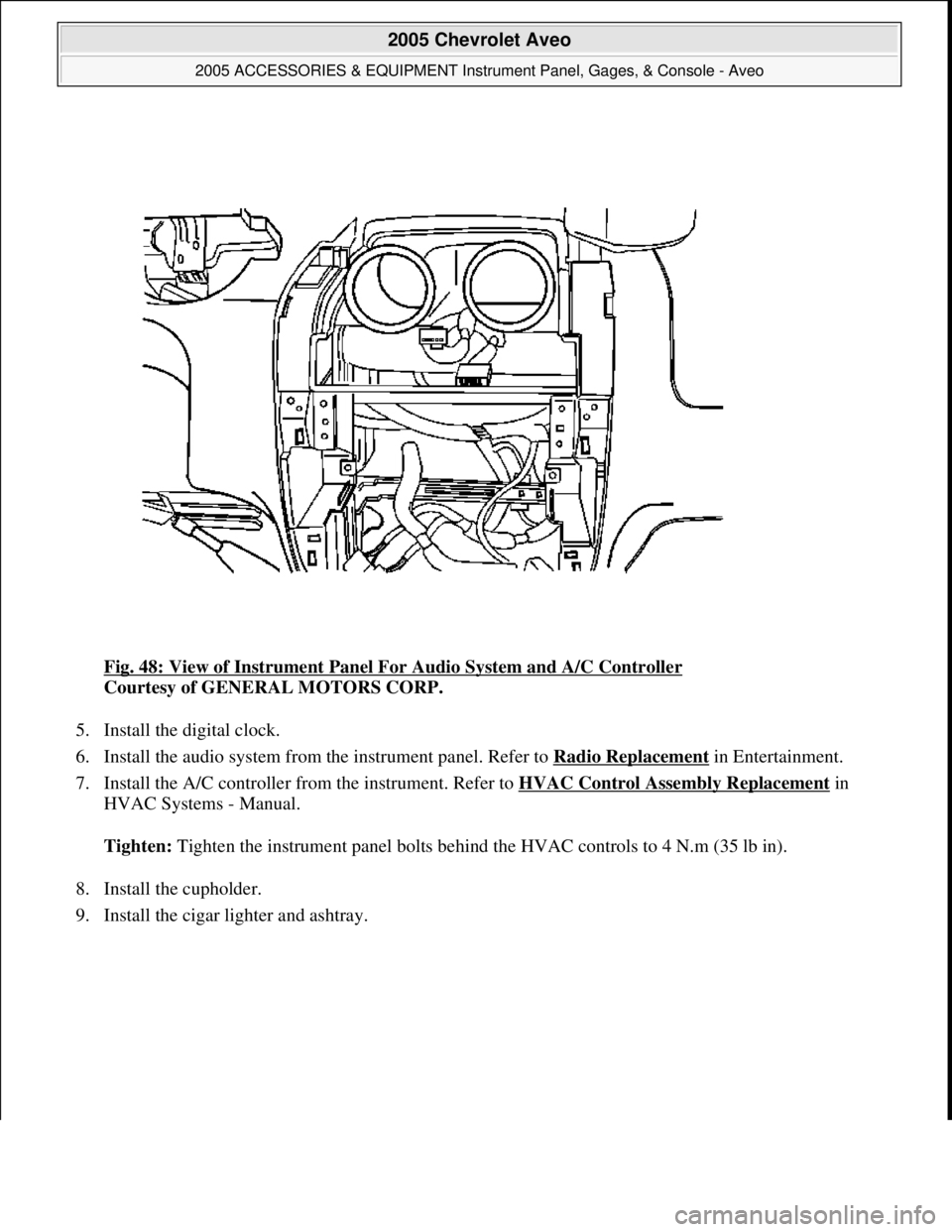
Fig. 48: View of Instrument Panel For Audio System and A/C Controller
Courtesy of GENERAL MOTORS CORP.
5. Install the digital clock.
6. Install the audio system from the instrument panel. Refer to Radio Replacement
in Entertainment.
7. Install the A/C controller from the instrument. Refer to HVAC Control Assembly Replacement
in
HVAC Systems - Manual.
Tighten: Tighten the instrument panel bolts behind the HVAC controls to 4 N.m (35 lb in).
8. Install the cupholder.
9. Install the ci
gar lighter and ashtray.
2005 Chevrolet Aveo
2005 ACCESSORIES & EQUIPMENT Instrument Panel, Gages, & Console - Aveo
Microsoft
Friday, July 31, 2009 1:07:03 PMPage 76 © 2005 Mitchell Repair Information Company, LLC.
Page 4371 of 5127
18. Install the driver's air bag module from the steering wheel, if equipped. Refer to Inflatable Restraint
Steering Wheel Module Replacement in SIR.
19. Connect the negative battery cable.
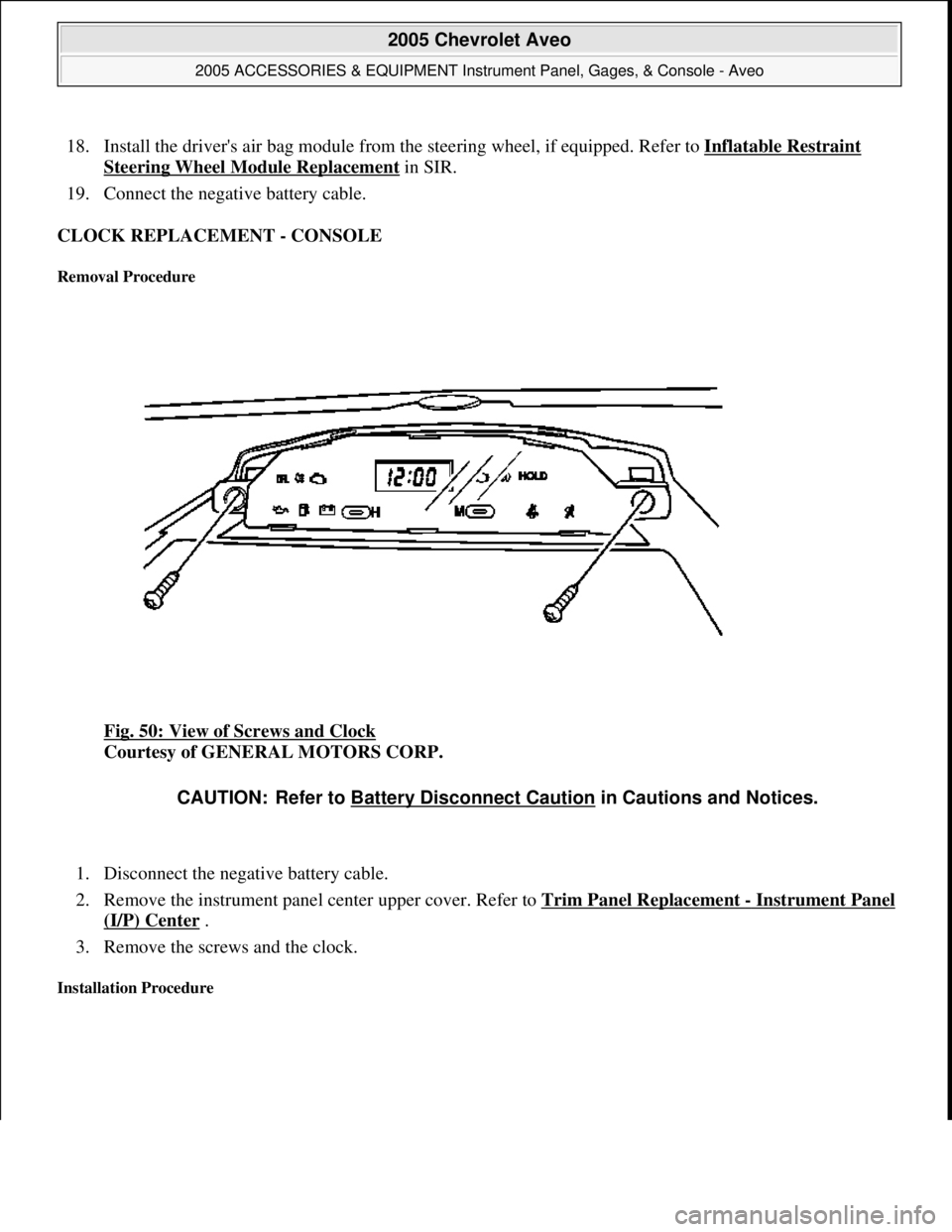
CLOCK REPLACEMENT - CONSOLE
Removal Procedure
Fig. 50: View of Screws and Clock
Courtesy of GENERAL MOTORS CORP.
1. Disconnect the negative battery cable.
2. Remove the instrument panel center upper cover. Refer to Trim Panel Replacement
- Instrument Panel
(I/P) Center .
3. Remove the screws and the clock.
Installation Procedure
CAUTION: Refer to Battery Disconnect Caution in Cautions and Notices.
2005 Chevrolet Aveo
2005 ACCESSORIES & EQUIPMENT Instrument Panel, Gages, & Console - Aveo
Microsoft
Friday, July 31, 2009 1:07:03 PMPage 78 © 2005 Mitchell Repair Information Company, LLC.
Page 4372 of 5127
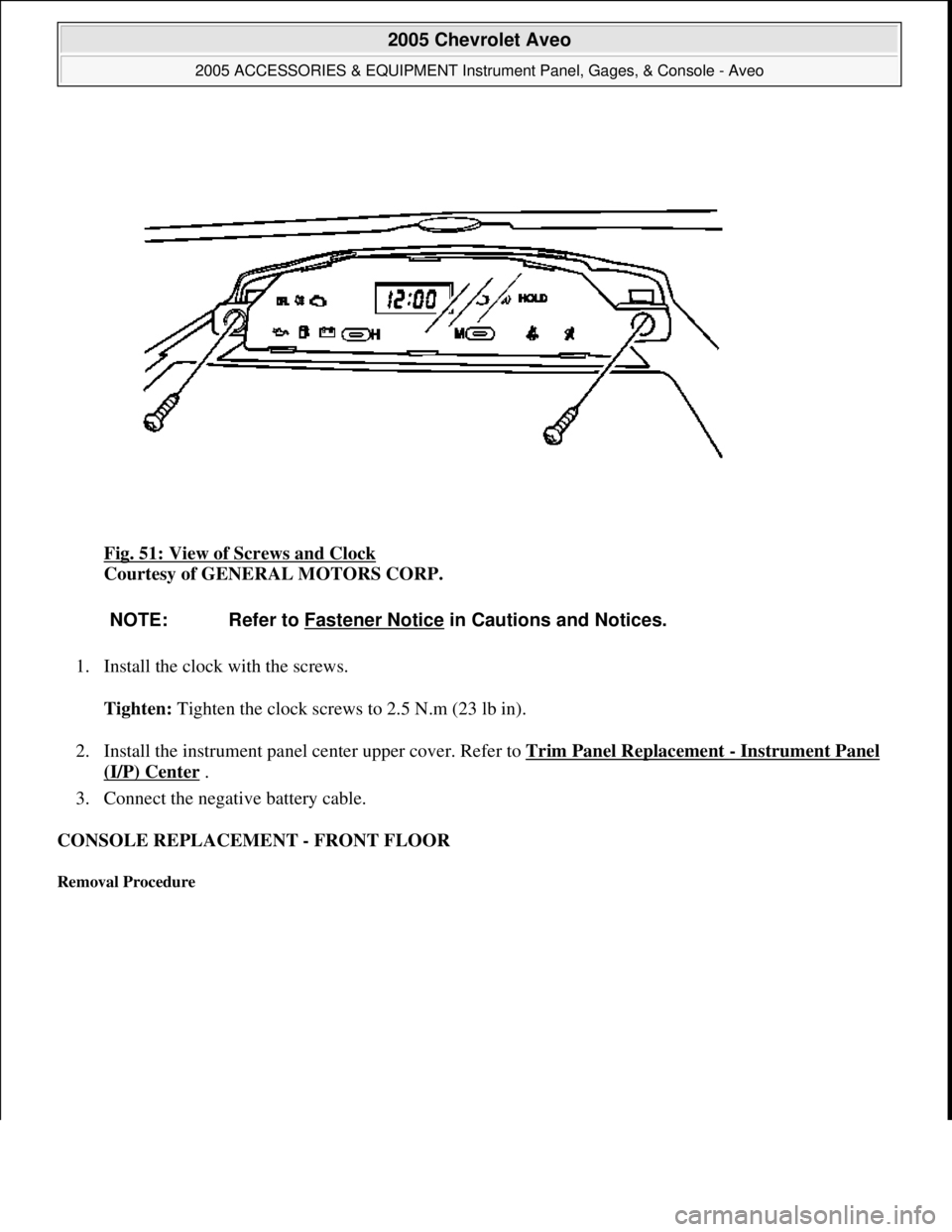
Fig. 51: View of Screws and Clock
Courtesy of GENERAL MOTORS CORP.
1. Install the clock with the screws.
Tighten: Tighten the clock screws to 2.5 N.m (23 lb in).
2. Install the instrument panel center upper cover. Refer to Trim Panel Replacement
- Instrument Panel
(I/P) Center .
3. Connect the negative battery cable.
CONSOLE REPLACEMENT - FRONT FLOOR
Removal Procedure
NOTE: Refer to Fastener Notice in Cautions and Notices.
2005 Chevrolet Aveo
2005 ACCESSORIES & EQUIPMENT Instrument Panel, Gages, & Console - Aveo
Microsoft
Friday, July 31, 2009 1:07:03 PMPage 79 © 2005 Mitchell Repair Information Company, LLC.