light CHEVROLET AVEO 2008 1.G Owner's Manual
[x] Cancel search | Manufacturer: CHEVROLET, Model Year: 2008, Model line: AVEO, Model: CHEVROLET AVEO 2008 1.GPages: 384, PDF Size: 6.67 MB
Page 115 of 384
Instrument Panel Overview...............................3-4
Hazard Warning Flashers................................3-8
Other Warning Devices...................................3-8
Horn.............................................................3-8
Tilt Wheel.....................................................3-9
Turn Signal/Multifunction Lever.........................3-9
Turn and Lane-Change Signals.......................3-10
Headlamp High/Low-Beam Changer.................3-10
Flash-to-Pass...............................................3-10
Windshield Wipers........................................3-11
Windshield Washer.......................................3-12
Rear Window Wiper/Washer (Hatchback).........3-12
Cruise Control..............................................3-13
Exterior Lamps.............................................3-15
Headlamps on Reminder................................3-16
Daytime Running Lamps (DRL).......................3-16
Fog Lamps..................................................3-17
Instrument Panel Brightness...........................3-17
Dome Lamp.................................................3-18
Inadvertent Power Battery Saver.....................3-18
Accessory Power Outlet(s).............................3-18
Ashtray(s) and Cigarette Lighter......................3-19
Clock..........................................................3-20Climate Controls............................................3-20
Climate Control System.................................3-20
Outlet Adjustment.........................................3-24
Passenger Compartment Air Filter...................3-24
Warning Lights, Gages, and Indicators............3-26
Instrument Panel Cluster................................3-27
Speedometer and Odometer...........................3-29
Trip Odometer..............................................3-29
Tachometer.................................................3-29
Safety Belt Reminders...................................3-30
Airbag Readiness Light.................................
.3-30
Passenger Airbag Status Indicator (Sedan).......3-31
Charging System Light..................................3-33
Brake System Warning Light..........................3-33
Antilock Brake System Warning Light...............3-34
Hold Mode Light...........................................3-35
Engine Coolant Temperature Gage..................3-35
Tire Pressure Light.......................................3-36
Malfunction Indicator Lamp.............................3-36
Oil Pressure Light.........................................3-39
Fog Lamp Light............................................3-40
Cruise Control Light......................................3-40
Section 3 Instrument Panel
3-1
Page 116 of 384
Highbeam On Light.......................................3-40
Daytime Running Lamps (DRL) Indicator Light.....3-40
Door Ajar Light.............................................3-41
Fuel Gage...................................................3-41
Low Fuel Warning Light.................................3-42
Secondary Information Center (SIC).................3-43
Secondary Information Center (SIC)
(Hatchback Only).......................................3-43
Clock (Hatchback Only).................................3-44
Safety Belt Reminders...................................3-44
Airbag Readiness Light..................................3-45
Passenger Airbag Status Indicator
(Hatchback)..............................................3-46
Charging System Light..................................3-47
Antilock Brake System Warning Light...............3-48
Hold Mode Light...........................................3-48
Malfunction Indicator Lamp.............................3-49Oil Pressure Light.........................................3-52
Fog Lamp Light............................................3-53
Cruise Control Light......................................3-53
Door Ajar Light.............................................3-53
Audio System(s).............................................3-54
AM-FM Radio (Single Display, Base Level).......3-55
AM-FM Radio (Double Display, Base Level).....3-56
Radio with CD (MP3/WMA)............................3-60
Radio with Six-Disc CD (MP3/WMA)................3-66
Using an MP3 (Radio with CD Player).............3-72
Using an MP3 (Radio with Six-Disc Player)......3-75
Audio Steering Wheel Controls.......................3-78
Radio Reception...........................................3-79
Care of Your CDs.........................................3-79
Care of the CD Player...................................3-79
Fixed Mast Antenna (Hatchback).....................3-80
Backglass Antenna (Sedan)...........................3-80
Section 3 Instrument Panel
3-2
Page 119 of 384
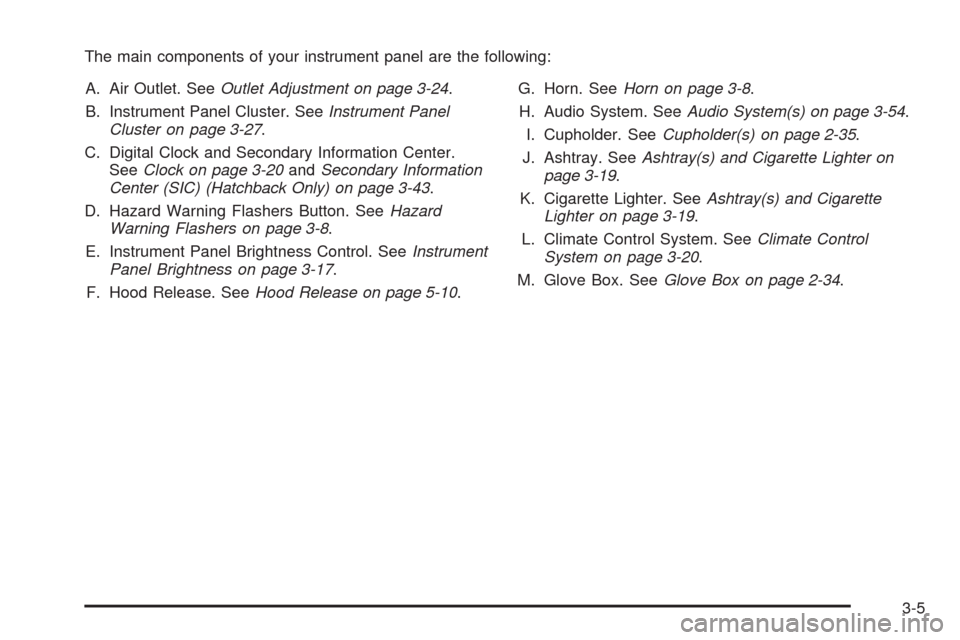
The main components of your instrument panel are the following:
A. Air Outlet. SeeOutlet Adjustment on page 3-24.
B. Instrument Panel Cluster. SeeInstrument Panel
Cluster on page 3-27.
C. Digital Clock and Secondary Information Center.
SeeClock on page 3-20andSecondary Information
Center (SIC) (Hatchback Only) on page 3-43.
D. Hazard Warning Flashers Button. SeeHazard
Warning Flashers on page 3-8.
E. Instrument Panel Brightness Control. SeeInstrument
Panel Brightness on page 3-17.
F. Hood Release. SeeHood Release on page 5-10.G. Horn. SeeHorn on page 3-8.
H. Audio System. SeeAudio System(s) on page 3-54.
I. Cupholder. SeeCupholder(s) on page 2-35.
J. Ashtray. SeeAshtray(s) and Cigarette Lighter on
page 3-19.
K. Cigarette Lighter. SeeAshtray(s) and Cigarette
Lighter on page 3-19.
L. Climate Control System. SeeClimate Control
System on page 3-20.
M. Glove Box. SeeGlove Box on page 2-34.
3-5
Page 121 of 384
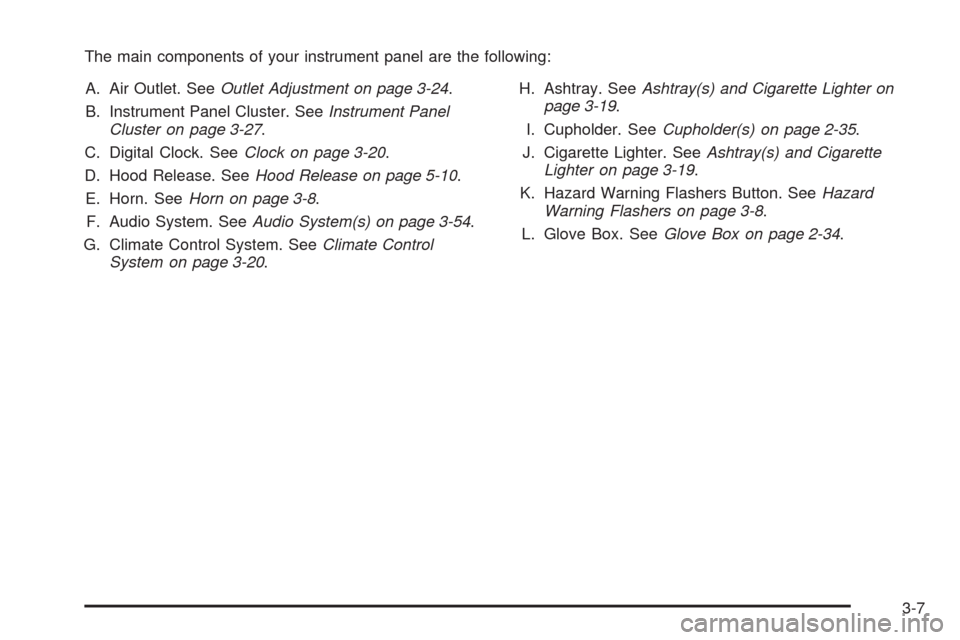
The main components of your instrument panel are the following:
A. Air Outlet. SeeOutlet Adjustment on page 3-24.
B. Instrument Panel Cluster. SeeInstrument Panel
Cluster on page 3-27.
C. Digital Clock. SeeClock on page 3-20.
D. Hood Release. SeeHood Release on page 5-10.
E. Horn. SeeHorn on page 3-8.
F. Audio System. SeeAudio System(s) on page 3-54.
G. Climate Control System. SeeClimate Control
System on page 3-20.H. Ashtray. SeeAshtray(s) and Cigarette Lighter on
page 3-19.
I. Cupholder. SeeCupholder(s) on page 2-35.
J. Cigarette Lighter. SeeAshtray(s) and Cigarette
Lighter on page 3-19.
K. Hazard Warning Flashers Button. SeeHazard
Warning Flashers on page 3-8.
L. Glove Box. SeeGlove Box on page 2-34.
3-7
Page 123 of 384
Tilt Wheel
Your vehicle has a tilt wheel which allows you to adjust
the steering wheel before you drive. You can raise it
to the highest level to give your legs more room when
you exit and enter the vehicle.
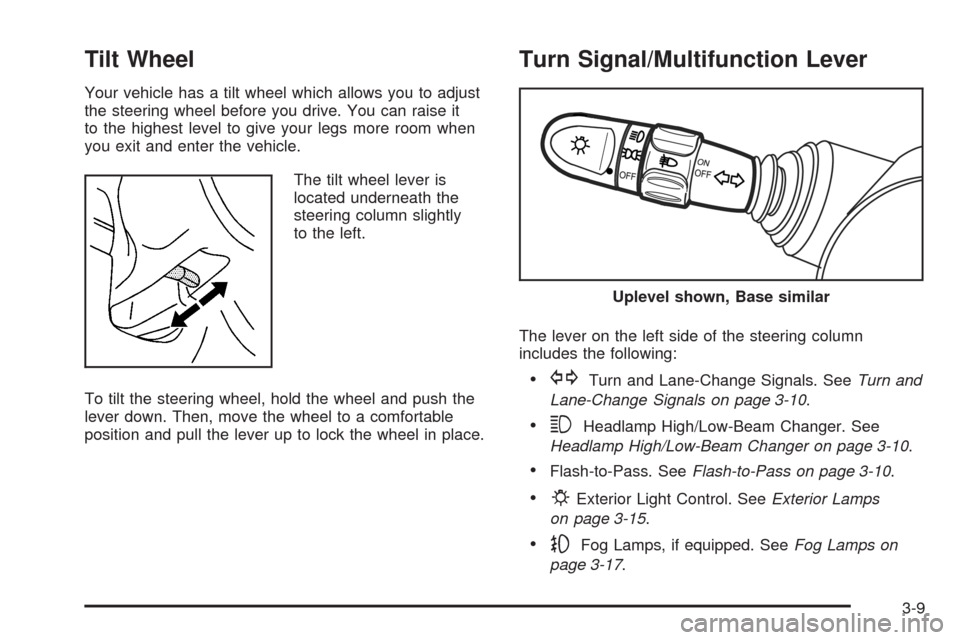
The tilt wheel lever is
located underneath the
steering column slightly
to the left.
To tilt the steering wheel, hold the wheel and push the
lever down. Then, move the wheel to a comfortable
position and pull the lever up to lock the wheel in place.
Turn Signal/Multifunction Lever
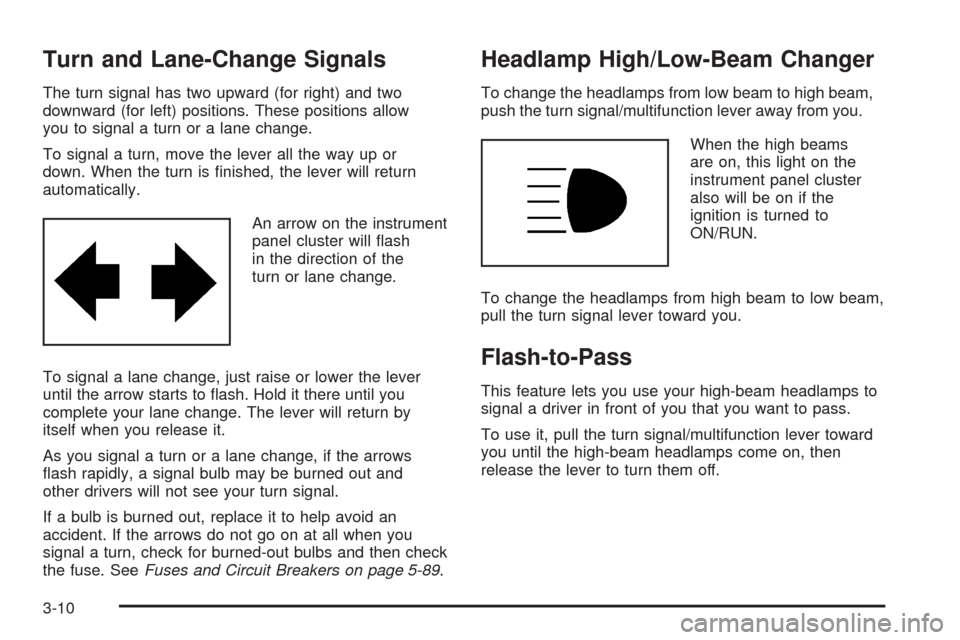
The lever on the left side of the steering column
includes the following:
•GTurn and Lane-Change Signals. SeeTurn and
Lane-Change Signals on page 3-10.
•3Headlamp High/Low-Beam Changer. See
Headlamp High/Low-Beam Changer on page 3-10.
•Flash-to-Pass. SeeFlash-to-Pass on page 3-10.
•PExterior Light Control. SeeExterior Lamps
on page 3-15.
•-Fog Lamps, if equipped. SeeFog Lamps on
page 3-17.
Uplevel shown, Base similar
3-9
Page 124 of 384
Turn and Lane-Change Signals
The turn signal has two upward (for right) and two
downward (for left) positions. These positions allow
you to signal a turn or a lane change.
To signal a turn, move the lever all the way up or
down. When the turn is finished, the lever will return
automatically.
An arrow on the instrument
panel cluster will flash
in the direction of the
turn or lane change.
To signal a lane change, just raise or lower the lever
until the arrow starts to flash. Hold it there until you
complete your lane change. The lever will return by
itself when you release it.
As you signal a turn or a lane change, if the arrows
flash rapidly, a signal bulb may be burned out and
other drivers will not see your turn signal.
If a bulb is burned out, replace it to help avoid an
accident. If the arrows do not go on at all when you
signal a turn, check for burned-out bulbs and then check
the fuse. SeeFuses and Circuit Breakers on page 5-89.
Headlamp High/Low-Beam Changer
To change the headlamps from low beam to high beam,
push the turn signal/multifunction lever away from you.
When the high beams
are on, this light on the
instrument panel cluster
also will be on if the
ignition is turned to
ON/RUN.
To change the headlamps from high beam to low beam,
pull the turn signal lever toward you.
Flash-to-Pass
This feature lets you use your high-beam headlamps to
signal a driver in front of you that you want to pass.
To use it, pull the turn signal/multifunction lever toward
you until the high-beam headlamps come on, then
release the lever to turn them off.
3-10
Page 128 of 384
3. Press the SET button and release it. The cruise
control light will come on in the instrument panel
cluster to show that the cruise control is on.
4. Take your foot off the accelerate pedal.
Resuming a Set Speed
Suppose the cruise control is set to a desired speed
and then the brakes are applied, or the clutch pedal
if you have a manual transmission. This shuts off
the cruise control. But it does not need to be reset.
Once the vehicle is going about 24 mph (39 km/h)
or more, briefly press the RESUME button.
The vehicle returns to the chosen speed and
stays there.
If the RESUME button is held longer, the vehicle keeps
going faster until the button is released or the brake
pedal is applied. Do not hold in the RESUME button,
unless you want the vehicle to go faster.
Increasing Speed While Using Cruise
Control
There are two ways to go to a higher speed.
•Use the accelerator pedal to get to a higher speed.
Press the SET button, then release the button and
the accelerator pedal. The vehicle will now
cruise at the higher speed.
•Press the RESUME button. Hold it there until the
desired speed is reached, and then release the
button. To increase the vehicle’s speed in very small
amounts, briefly press the RESUME button and
then release it. Each time this is done, the vehicle
goes about 1 mph (1.6 km/h) faster.
The accelerate feature only works after the cruise
control is turned on by pressing the SET button.
Reducing Speed While Using Cruise
Control
There are two ways to reduce the vehicle’s speed while
using cruise control:
•Press the SET button until the lower speed desired
is reached, then release it.
•To slow down in very small amounts, briefly press
the SET button. Each time this is done, the vehicle
goes about 1 mph (1.6 km/h) slower.
3-14
Page 129 of 384
Passing Another Vehicle While Using
Cruise Control
Use the accelerator pedal to increase the vehicle’s
speed. When you take your foot off the pedal, the
vehicle will slow down to the cruise control speed
set earlier.
Using Cruise Control on Hills
How well the cruise control works on hills depends upon
the vehicle speed, load, and the steepness of the hills.
When going up steep hills, you might have to step on the
accelerator pedal to maintain the vehicle’s speed. When
going downhill, you might have to brake or shift to a lower
gear to keep the vehicle’s speed down. Applying the
brake pedal will turn off the cruise control. Many drivers
find this to be too much trouble and do not use cruise
control on steep hills.
Ending Cruise Control
There are two ways to turn off the cruise control:
•Step lightly on the brake pedal, or press the clutch
pedal, if you have a manual transmission.
•Press the ON OFF button on the cruise control pad.
Erasing Speed Memory
The cruise control set speed memory is erased, when
the cruise control or the ignition is turned off.
Exterior Lamps
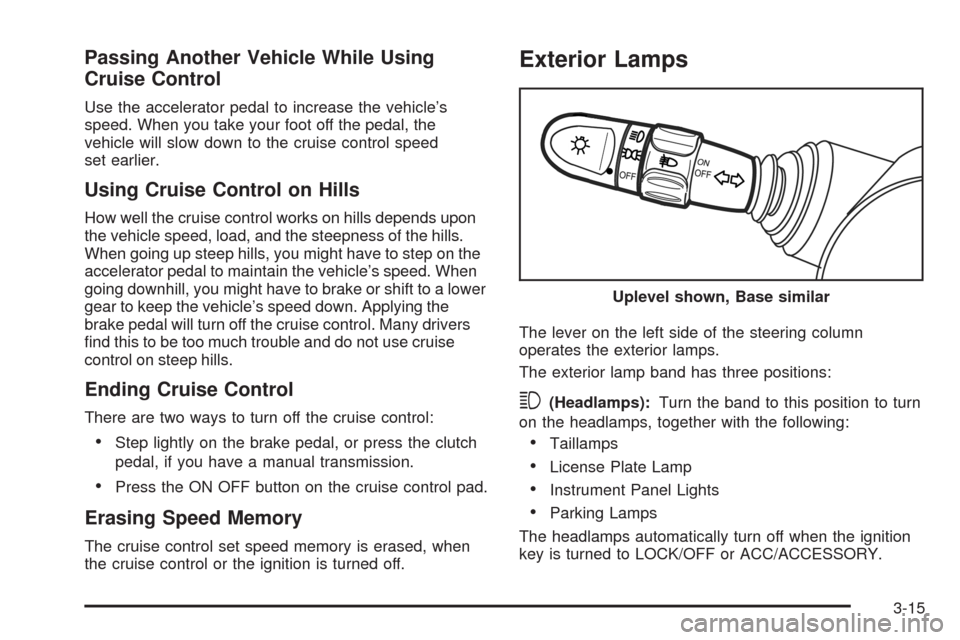
The lever on the left side of the steering column
operates the exterior lamps.
The exterior lamp band has three positions:
3(Headlamps):Turn the band to this position to turn
on the headlamps, together with the following:
•Taillamps
•License Plate Lamp
•Instrument Panel Lights
•Parking Lamps
The headlamps automatically turn off when the ignition
key is turned to LOCK/OFF or ACC/ACCESSORY.Uplevel shown, Base similar
3-15
Page 130 of 384
;(Parking Lamps):Turn the band to this position to
turn on the parking lamps, together with the taillamps,
license plate lamp, and instrument panel lights.
OFF:Turn the band to this position to turn all lamps off,
except the Daytime Running Lamps (DRL).
Headlamps on Reminder
If the driver’s door is opened while the ignition is turned
to LOCK/OFF or ACC/ACCESSORY with the lamps
left on, a warning chime will sound.
Daytime Running Lamps (DRL)
Daytime Running Lamps (DRL) can make it easier
for others to see the front of your vehicle during the day.
DRL can be helpful in many different driving conditions,
but they can be especially helpful in the short periods
after dawn and before sunset. Fully functional daytime
running lamps are required on all vehicles first sold
in Canada.The DRL system will make your low-beam headlamps
come on when the following conditions are met:
•The ignition is on.
•The exterior lamp band is in OFF or in the parking
lamp position.
•The parking brake is released.
An indicator light on instrument panel cluster will come
on when the DRL system is on.
When the DRL system is on, the taillamps, sidemarker
lamps, parking lamps and instrument panel lights will not
be illuminated unless you have turned the exterior lamps
control to the parking lamp or headlamp position.
The DRL system will turn off when one of the following
conditions are met:
•The ignition is off.
•The parking brake is on.
•The high-beam headlamps are on.
•The low-beam headlamps are on.
•The flash-to-pass feature is used.
As with any vehicle, you should turn on the regular
headlamp system when you need it.
3-16
Page 131 of 384
Fog Lamps
If your vehicle has fog lamps, use them for better
visibility in foggy or misty conditions. The band located
on the middle of the turn signal/multifunction lever
controls the fog lamps.
While using the fog lamps, the ignition must be turned
to ON/RUN and the low-beam headlamps or parking
lamps must be on.
Turn the band to ON to turn the fog lamps on. An
indicator light comes on in the secondary information
center on the hatchback or in the instrument panel
cluster on the sedan, when the fog lamps are on.
SeeFog Lamp Light on page 3-53.
Turn the band to OFF to turn the fog lamps off. The fog
lamps will also turn off when the high-beam headlamps
are turned on. When the high-beam headlamps are
turned off, the fog lamps will turn on again.
Some localities have laws that require the headlamps to
be on along with the fog lamps.
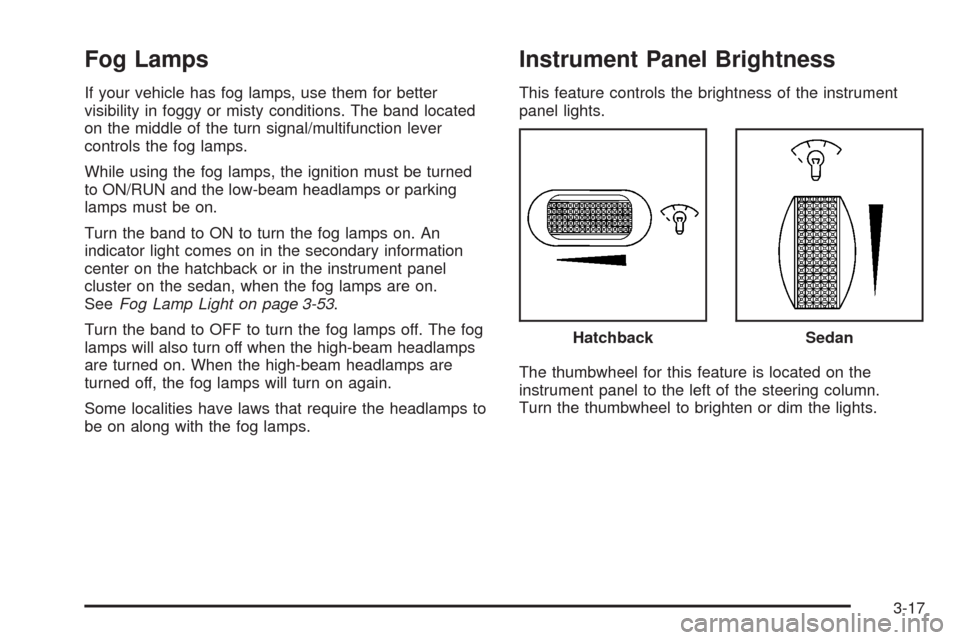
Instrument Panel Brightness
This feature controls the brightness of the instrument
panel lights.
The thumbwheel for this feature is located on the
instrument panel to the left of the steering column.
Turn the thumbwheel to brighten or dim the lights.Hatchback
Sedan
3-17