radio CHEVROLET AVEO 2009 1.G Owners Manual
[x] Cancel search | Manufacturer: CHEVROLET, Model Year: 2009, Model line: AVEO, Model: CHEVROLET AVEO 2009 1.GPages: 354, PDF Size: 2.07 MB
Page 83 of 354
page 2-15for additional information. If a replacement
key or an additional key is needed, it must be purchased
from your dealer/retailer or certied locksmith.
Notice:If you ever lock your keys in the vehicle,
you may have to damage the vehicle to get in.
Be sure you have spare keys.
In an emergency, contact Roadside Assistance.
SeeRoadside Assistance Program on page 7-7for
more information.
Remote Keyless Entry (RKE)
System
If this vehicle has the Remote Keyless Entry (RKE)
system, it operates on a radio frequency subject
to Federal Communications Commission (FCC) Rules
and with Industry Canada.
This device complies with Part 15 of the FCC Rules.
Operation is subject to the following two conditions:
1. This device may not cause interference.
2. This device must accept any interference received,
including interference that may cause undesired
operation of the device.This device complies with RSS-210 of Industry Canada.
Operation is subject to the following two conditions:
1. This device may not cause interference.
2. This device must accept any interference received,
including interference that may cause undesired
operation of the device.
Changes or modications to this system by other than
an authorized service facility could void authorization to
use this equipment.
If there is a decrease in the RKE operating range,
try this:
Check the distance. The transmitter may be too far
from the vehicle. Stand closer during rainy or snowy
weather.
Check the location. Other vehicles or objects may be
blocking the signal. Take a few steps to the left or
right, hold the transmitter higher, and try again.
Check the transmitter’s battery. See “Battery
Replacement” later in this section.
If the transmitter is still not working correctly,
see your dealer/retailer or a qualied technician
for service.
2-3
Page 99 of 354
Notice:Using a tool to force the key to turn in the
ignition could cause damage to the switch or break
the key. Use the correct key, make sure it is all the
way in, and turn it only with your hand. If the key
cannot be turned by hand, see your dealer/retailer.
LOCK/OFF:This position locks the steering wheel,
ignition, shift lever and transmission. This is the
only position in which you can insert or remove the key.
The steering can bind with the wheels turned off
center. If this happens, move the steering wheel from
right to left while turning the key to ACC/ACCESSORY.
If this doesn’t work, then the vehicle needs service.
ACC/ACCESSORY:This position operates some of the
electrical accessories, such as the radio, but not the
climate control system.
ON/RUN:This position can be used to operate the
electrical accessories, and to display some instrument
panel cluster warning and indicator lights. The switch
stays in this position when the engine is running. If you
leave the key in the ACC/ACCESSORY or ON/RUN
position with the engine off, the battery could be drained.
You may not be able to start the vehicle if the battery
is allowed to drain for an extended period of time.
START:This is the position that starts the engine.
When the engine starts, release the key. The ignition
switch returns to ON/RUN for driving. Do not turn
the key to START if the engine is running.Starting the Engine
Automatic Transmission
Move the shift lever to P (Park) or N (Neutral).
The engine will not start in any other position.
To restart the engine when the vehicle is already
moving, use N (Neutral) only.
Notice:Do not try to shift to P (Park) if the vehicle
is moving. If you do, you could damage the
transmission. Shift to P (Park) only when the
vehicle is stopped.
Manual Transmission
The shift lever should be in N (Neutral) and the parking
brake engaged. Hold the clutch pedal to the oor
and start the engine. The vehicle will not start if the
clutch pedal is not all the way down.
2-19
Page 118 of 354
OnStar Virtual Advisor
OnStar Virtual Advisor is a feature of OnStar Hands-Free
Calling that uses minutes to access location-based
weather, local traffic reports, and stock quotes. Press the
phone button and give a few simple voice commands to
browse through the various topics. See the OnStar
Owner’s Guide for more information. This feature is only
available in the continental U.S.
How OnStar Service Works
The OnStar system can record and transmit vehicle
information. This information is automatically sent to an
OnStar Call Center when the OnStar button is pressed,
the emergency button is pressed, or if the airbags or
AACN system deploy. This information usually includes
the vehicle’s GPS location and, in the event of a crash,
additional information regarding the crash that the vehicle
was involved in (e.g. the direction from which the vehicle
was hit). When the Virtual Advisor feature of OnStar
Hands-Free Calling is used, the vehicle also sends
OnStar the vehicle’s GPS location so they can provide
services where it is located.
OnStar service cannot work unless the vehicle is
in a place where OnStar has an agreement with a
wireless service provider for service in that area.
OnStar service also cannot work unless the vehicle is in
a place where the wireless service provider OnStarhas hired for that area has coverage, network capacity
and reception when the service is needed, and
technology that is compatible with the OnStar service.
Not all services are available everywhere, particularly in
remote or enclosed areas, or at all times.
Location information about the vehicle is only available
if the GPS satellite signals are unobstructed and
available.
The vehicle must have a working electrical system,
including adequate battery power, for the OnStar
equipment to operate. There are other problems OnStar
cannot control that may prevent OnStar from providing
OnStar service at any particular time or place. Some
examples are damage to important parts of the vehicle
in a crash, hills, tall buildings, tunnels, weather or
wireless phone network congestion.
Your Responsibility
Increase the volume of the radio if the OnStar advisor
cannot be heard. If the light next to the OnStar buttons
is red, the system may not be functioning properly.
Press the OnStar button and request a vehicle
diagnostic. If the light appears clear (no light is
appearing), your OnStar subscription has expired and
all services have been deactivated. Press the OnStar
button to conrm that the OnStar equipment is active.
2-38
Page 122 of 354
Change Engine Oil Light................................3-35
Fog Lamp Light............................................3-35
Cruise Control Light......................................3-36
Highbeam On Light.......................................3-36
Daytime Running Lamps (DRL)
Indicator Light...........................................3-36
Door Ajar Light.............................................3-36
Fuel Gage...................................................3-37
Low Fuel Warning Light.................................3-38
Trip Computer................................................3-38Audio System(s).............................................3-40
AM-FM Radio...............................................3-41
Radio with CD..............................................3-46
Using an MP3..............................................3-54
XM Radio Messages.....................................3-56
Audio Steering Wheel Controls.......................3-57
Radio Reception...........................................3-58
Fixed Mast Antenna (Hatchback).....................3-58
Backglass Antenna (Sedan)...........................3-59
Multi-Band Antenna.......................................3-59
Section 3 Instrument Panel
3-2
Page 148 of 354
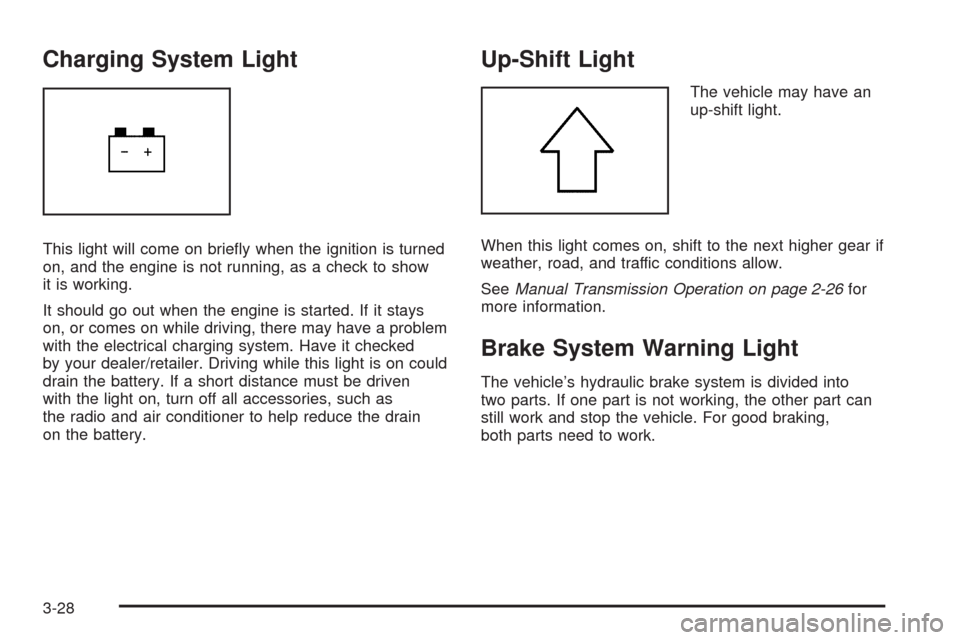
Charging System Light
This light will come on briey when the ignition is turned
on, and the engine is not running, as a check to show
it is working.
It should go out when the engine is started. If it stays
on, or comes on while driving, there may have a problem
with the electrical charging system. Have it checked
by your dealer/retailer. Driving while this light is on could
drain the battery. If a short distance must be driven
with the light on, turn off all accessories, such as
the radio and air conditioner to help reduce the drain
on the battery.
Up-Shift Light
The vehicle may have an
up-shift light.
When this light comes on, shift to the next higher gear if
weather, road, and traffic conditions allow.
SeeManual Transmission Operation on page 2-26for
more information.
Brake System Warning Light
The vehicle’s hydraulic brake system is divided into
two parts. If one part is not working, the other part can
still work and stop the vehicle. For good braking,
both parts need to work.
3-28
Page 160 of 354
Audio System(s)
Determine which radio the vehicle has and read the
following pages to become familiar with its features.
{CAUTION:
Taking your eyes off the road for extended periods
could cause a crash resulting in injury or death to
you or others. Do not give extended attention to
entertainment tasks while driving.
This system provides access to many audio and non
audio listings.To minimize taking your eyes off the road while driving,
do the following while the vehicle is parked:
Become familiar with the operation and controls of
the audio system.
Set up the tone, speaker adjustments, and preset
radio stations.
For more information, seeDefensive Driving on
page 4-2.
Notice:Contact your dealer/retailer before adding
any equipment.
Adding audio or communication equipment could
interfere with the operation of the vehicle’s engine,
radio, or other systems, and could damage them.
Follow federal rules covering mobile radio and
telephone equipment.
3-40
Page 161 of 354
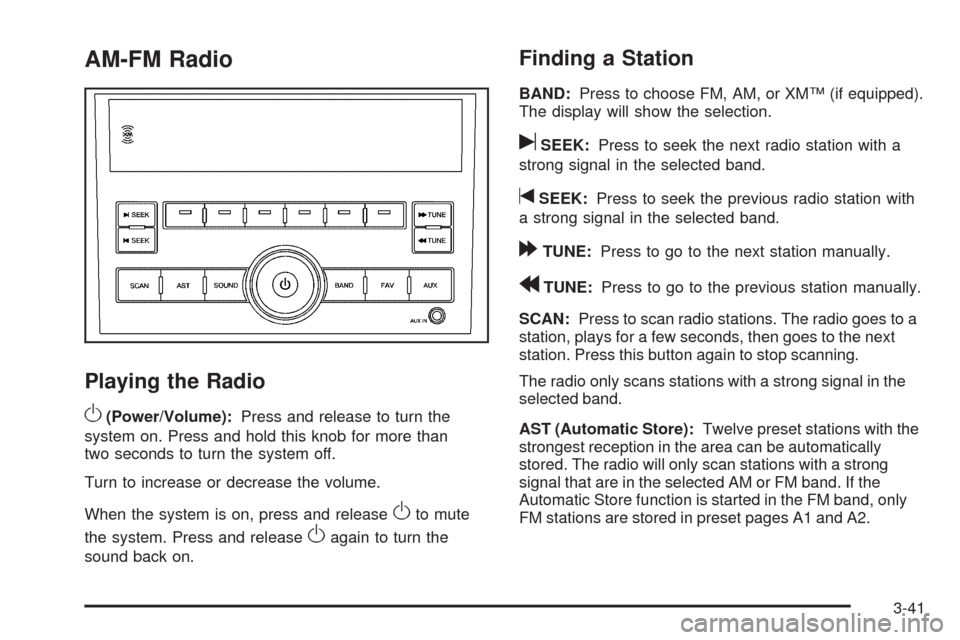
AM-FM Radio
Playing the Radio
O
(Power/Volume):Press and release to turn the
system on. Press and hold this knob for more than
two seconds to turn the system off.
Turn to increase or decrease the volume.
When the system is on, press and release
Oto mute
the system. Press and release
Oagain to turn the
sound back on.
Finding a Station
BAND:Press to choose FM, AM, or XM™ (if equipped).
The display will show the selection.
uSEEK:Press to seek the next radio station with a
strong signal in the selected band.
tSEEK:Press to seek the previous radio station with
a strong signal in the selected band.
[TUNE:Press to go to the next station manually.
rTUNE:Press to go to the previous station manually.
SCAN:Press to scan radio stations. The radio goes to a
station, plays for a few seconds, then goes to the next
station. Press this button again to stop scanning.
The radio only scans stations with a strong signal in the
selected band.
AST (Automatic Store):Twelve preset stations with the
strongest reception in the area can be automatically
stored. The radio will only scan stations with a strong
signal that are in the selected AM or FM band. If the
Automatic Store function is started in the FM band, only
FM stations are stored in preset pages A1 and A2.
3-41
Page 162 of 354
If the Automatic Store function is started in the AM band,
only AM stations are stored in A1 and A2. A combination
of AM, FM and XM (if equipped) stations can be stored
manually into the other four favorite pages.
To use Automatic Store:
1. Press and hold AST to use Auto Store mode.
2. Press the pushbutton below the ON tab on the radio
display.
3. Automatic Store searches for radio stations with a
strong signal and automatically set presets A1 and
A2 with new stations.
4. After all stations are set, press the pushbutton below
the arrow tab on the radio display to return to the
main radio screen
To reset the automatically stored radio stations, press
and hold AST. Then press the pushbutton below
the RESE tab on the radio display. If no stations are
stored on preset pages A1 and A2, the RESE option
does not appear in the radio display. When the
Automatic Store function is used, any stations that were
previously set will be deleted and replaced with new
stations.Storing a Radio Station
Drivers are encouraged to set up radio station favorites
while the vehicle is in P (Park). Tune to favorite
stations using the pushbuttons, favorites button, and
steering wheel controls. SeeDefensive Driving on
page 4-2.
A maximum of 36 stations can be programmed as
favorites using the six pushbuttons positioned below the
radio station frequency labels and by using the radio
favorites page button (FAV button). Press the FAV
button to go through up to six pages of favorites,
each having six favorite stations available per page.
If Automatic Store is used, then four pages of favorites
are available. Each page of favorites can contain
any combination of AM, FM, or XM™ (if equipped)
stations. To store a station as a favorite:
1. Tune in the desired station.
2. Press and release the FAV button to display the
page where the station is to be stored.
3. Press and hold one of the six numbered
pushbuttons until a beep sounds. When the
pushbutton is pressed and released, the station that
was set will return.
4. Repeat the Steps 1 through 3 for each radio station
to be stored as a favorite.
3-42
Page 163 of 354
To setup the number of favorites pages:
1. Press and hold FAV until the radio setup menu
displays.
2. Select the desired number of favorites pages by
pressing the pushbutton located below the
displayed page numbers.
3. Press FAV to return to the original main radio
screen showing the radio station frequency tabs and
to begin the process of programming favorites for
the chosen amount of numbered pages.
Setting the Tone (Bass/Mid/Treble)
SOUND (Bass/Mid/Treble):Press to adjust the bass,
midrange, or treble.
Adjusting the Bass
To adjust the bass:
1. Press SOUND.
2. Press the pushbutton below the Bass tab on the
display.
3. Turn
Oto adjust the setting.
4. The settings are saved after ve seconds.
Adjusting the Midrange
To adjust the midrange:
1. Press SOUND.
2. Press the pushbutton below the Mid tab on the
display.
3. Turn
Oto adjust the setting.
4. The settings are saved after ve seconds.
Adjusting the Treble
To adjust the treble:
1. Press SOUND.
2. Press the pushbutton below the Treb tab on the
display.
3. Turn
Oto adjust the setting.
4. The settings are saved after ve seconds.
3-43
Page 165 of 354
XM Satellite Radio Service
XM is a satellite radio service that is based in the
48 contiguous United States and 10 Canadian
provinces. XM Satellite Radio has a wide variety of
programming and commercial-free music, coast-to-coast,
and in digital-quality sound. During your trial or when you
subscribe, you will get unlimited access to XM Radio
Online for when you are not in the vehicle. A service fee
is required to receive the XM service. For more
information, contact XM at xmradio.com or call
1-800-929-2100 in the U.S. and xmradio.ca or call
1-877-438-9677 in Canada.
Radio Messages for XM Only
SeeXM Radio Messages on page 3-56later in this
section for further detail.
Using the Auxiliary Input Jack
The radio system has an auxiliary input jack located on
the lower right side of the faceplate. This is not an
audio output; do not plug the headphone set into the
front auxiliary input jack. An external audio device such
as an iPod
®, laptop computer, MP3 player, CD changer,
etc. can be connected to the auxiliary input jack for
use as another audio source.Drivers are encouraged to set up any auxiliary device
while the vehicle is in P (Park). SeeDefensive
Driving on page 4-2for more information on driver
distraction.
To use a portable audio player, connect a 3.5 mm
(1/8 inch) cable to the radio’s front auxiliary input jack.
When a device is connected, press the radio CD/AUX
button to begin playing audio from the device over
the vehicle speakers.
O(Power/Volume):Turn to adjust the volume.
Additional volume adjustments may have to be made
from the portable device if the volume is too quiet or
too loud.
AUX (Auxiliary):Press to listen to the radio while a
portable audio device is playing. Press again and
the system begins playing audio from the connected
portable audio player. If a portable audio player is
not connected, No Aux Input Device Found may display.
3-45