automatic transmission CHEVROLET AVEO 2011 1.G Owners Manual
[x] Cancel search | Manufacturer: CHEVROLET, Model Year: 2011, Model line: AVEO, Model: CHEVROLET AVEO 2011 1.GPages: 328, PDF Size: 5.37 MB
Page 1 of 328

Black plate (1,1)Chevrolet Aveo Owner Manual - 2011
2011 Chevrolet Aveo Owner ManualM
In Brief. . . . . . . . . . . . . . . . . . . . . . . . 1-1
Instrument Panel . . . . . . . . . . . . . . 1-2
Initial Drive Information . . . . . . . . 1-3
Vehicle Features . . . . . . . . . . . . . 1-16
Performance and Maintenance . . . . . . . . . . . . . . . . 1-21
Keys, Doors and Windows . . . 2-1
Keys and Locks . . . . . . . . . . . . . . . 2-2
Doors . . . . . . . . . . . . . . . . . . . . . . . . . . 2-7
Vehicle Security . . . . . . . . . . . . . . 2-10
Exterior Mirrors . . . . . . . . . . . . . . . 2-13
Interior Mirrors . . . . . . . . . . . . . . . . 2-14
Windows . . . . . . . . . . . . . . . . . . . . . 2-14
Roof . . . . . . . . . . . . . . . . . . . . . . . . . . 2-16
Seats and Restraints . . . . . . . . . 3-1
Head Restraints . . . . . . . . . . . . . . . 3-2
Front Seats . . . . . . . . . . . . . . . . . . . . 3-3
Rear Seats . . . . . . . . . . . . . . . . . . . . 3-6
Safety Belts . . . . . . . . . . . . . . . . . . 3-11
Airbag System . . . . . . . . . . . . . . . . 3-24
Child Restraints . . . . . . . . . . . . . . 3-38 Storage
. . . . . . . . . . . . . . . . . . . . . . . 4-1
Storage Compartments . . . . . . . . 4-1
Instruments and Controls . . . . 5-1
Controls . . . . . . . . . . . . . . . . . . . . . . . 5-1
Warning Lights, Gauges, and Indicators . . . . . . . . . . . . . . . . . . . . 5-7
Trip Computer . . . . . . . . . . . . . . . . 5-21
Lighting . . . . . . . . . . . . . . . . . . . . . . . 6-1
Exterior Lighting . . . . . . . . . . . . . . . 6-1
Interior Lighting . . . . . . . . . . . . . . . . 6-4
Lighting Features . . . . . . . . . . . . . . 6-5
Infotainment System . . . . . . . . . 7-1
Introduction . . . . . . . . . . . . . . . . . . . . 7-1
Radio . . . . . . . . . . . . . . . . . . . . . . . . . . 7-3
Audio Players . . . . . . . . . . . . . . . . 7-10
Climate Controls . . . . . . . . . . . . . 8-1
Climate Control Systems . . . . . . 8-1
Air Vents . . . . . . . . . . . . . . . . . . . . . . . 8-4
Maintenance . . . . . . . . . . . . . . . . . . . 8-5 Driving and Operating
. . . . . . . . 9-1
Driving Information . . . . . . . . . . . . . 9-2
Starting and Operating . . . . . . . 9-17
Engine Exhaust . . . . . . . . . . . . . . 9-24
Automatic Transmission . . . . . . 9-25
Manual Transmission . . . . . . . . . 9-29
Brakes . . . . . . . . . . . . . . . . . . . . . . . 9-30
Cruise Control . . . . . . . . . . . . . . . . 9-32
Fuel . . . . . . . . . . . . . . . . . . . . . . . . . . 9-34
Towing . . . . . . . . . . . . . . . . . . . . . . . 9-39
Conversions and Add-Ons . . . 9-40
Vehicle Care . . . . . . . . . . . . . . . . . 10-1
General Information . . . . . . . . . . 10-3
Vehicle Checks . . . . . . . . . . . . . . . 10-5
Headlamp Aiming . . . . . . . . . . . 10-30
Bulb Replacement . . . . . . . . . . 10-31
Electrical System . . . . . . . . . . . . 10-36
Wheels and Tires . . . . . . . . . . . 10-42
Jump Starting . . . . . . . . . . . . . . . 10-70
Towing . . . . . . . . . . . . . . . . . . . . . . 10-74
Appearance Care . . . . . . . . . . . 10-76
Page 20 of 328
Black plate (14,1)Chevrolet Aveo Owner Manual - 2011
1-14 In Brief
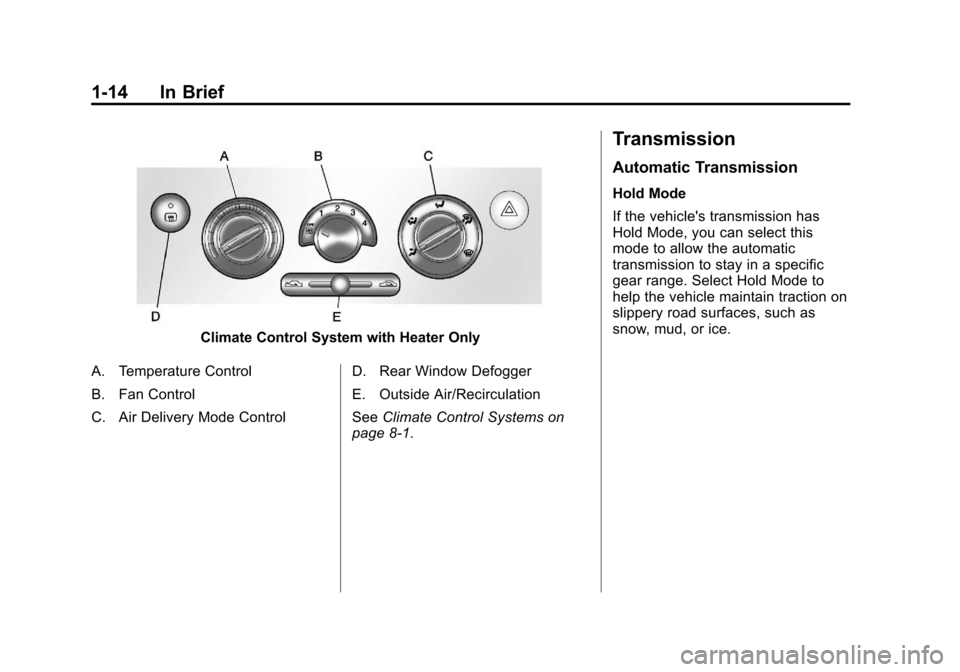
Climate Control System with Heater Only
A. Temperature Control
B. Fan Control
C. Air Delivery Mode Control D. Rear Window Defogger
E. Outside Air/Recirculation
See
Climate Control Systems on
page 8‑1.
Transmission
Automatic Transmission
Hold Mode
If the vehicle's transmission has
Hold Mode, you can select this
mode to allow the automatic
transmission to stay in a specific
gear range. Select Hold Mode to
help the vehicle maintain traction on
slippery road surfaces, such as
snow, mud, or ice.
Page 21 of 328
Black plate (15,1)Chevrolet Aveo Owner Manual - 2011
In Brief 1-15
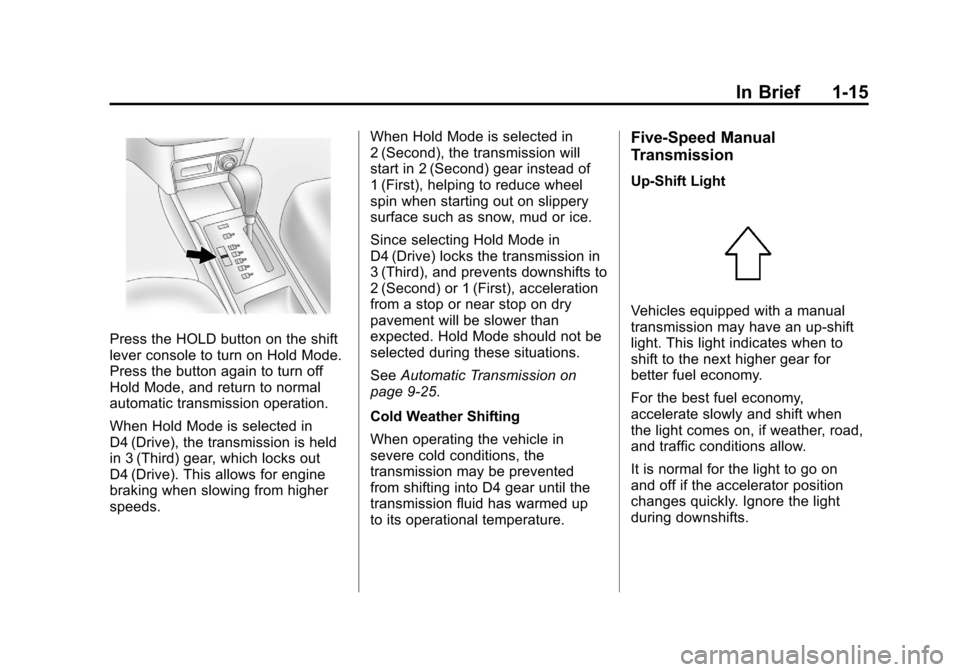
Press the HOLD button on the shift
lever console to turn on Hold Mode.
Press the button again to turn off
Hold Mode, and return to normal
automatic transmission operation.
When Hold Mode is selected in
D4 (Drive), the transmission is held
in 3 (Third) gear, which locks out
D4 (Drive). This allows for engine
braking when slowing from higher
speeds.When Hold Mode is selected in
2 (Second), the transmission will
start in 2 (Second) gear instead of
1 (First), helping to reduce wheel
spin when starting out on slippery
surface such as snow, mud or ice.
Since selecting Hold Mode in
D4 (Drive) locks the transmission in
3 (Third), and prevents downshifts to
2 (Second) or 1 (First), acceleration
from a stop or near stop on dry
pavement will be slower than
expected. Hold Mode should not be
selected during these situations.
See
Automatic Transmission on
page 9‑25.
Cold Weather Shifting
When operating the vehicle in
severe cold conditions, the
transmission may be prevented
from shifting into D4 gear until the
transmission fluid has warmed up
to its operational temperature.
Five-Speed Manual
Transmission
Up‐Shift Light
Vehicles equipped with a manual
transmission may have an up-shift
light. This light indicates when to
shift to the next higher gear for
better fuel economy.
For the best fuel economy,
accelerate slowly and shift when
the light comes on, if weather, road,
and traffic conditions allow.
It is normal for the light to go on
and off if the accelerator position
changes quickly. Ignore the light
during downshifts.
Page 22 of 328
Black plate (16,1)Chevrolet Aveo Owner Manual - 2011
1-16 In Brief
Reverse Lockout
The manual transmission is
equipped with a lock ring to prevent
shifting into R (Reverse). To shift
into R (Reverse), press down the
clutch pedal, lift up the ring on
the shift lever, and shift into
R (Reverse). Let up on the clutch
pedal slowly while pressing the
accelerator pedal.
SeeManual Transmission on
page 9‑29.Vehicle Features
Radio(s)
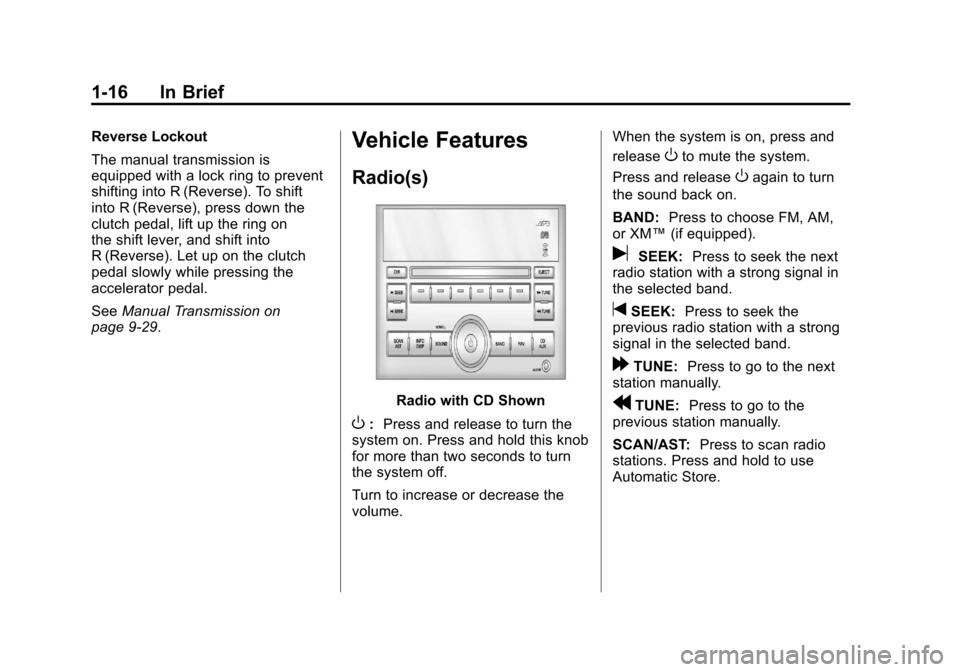
Radio with CD Shown
O: Press and release to turn the
system on. Press and hold this knob
for more than two seconds to turn
the system off.
Turn to increase or decrease the
volume. When the system is on, press and
release
Oto mute the system.
Press and release
Oagain to turn
the sound back on.
BAND: Press to choose FM, AM,
or XM™ (if equipped).
uSEEK:Press to seek the next
radio station with a strong signal in
the selected band.
tSEEK: Press to seek the
previous radio station with a strong
signal in the selected band.
[TUNE: Press to go to the next
station manually.
rTUNE: Press to go to the
previous station manually.
SCAN/AST: Press to scan radio
stations. Press and hold to use
Automatic Store.
Page 120 of 328
Black plate (8,1)Chevrolet Aveo Owner Manual - 2011
5-8 Instruments and Controls
Instrument Cluster
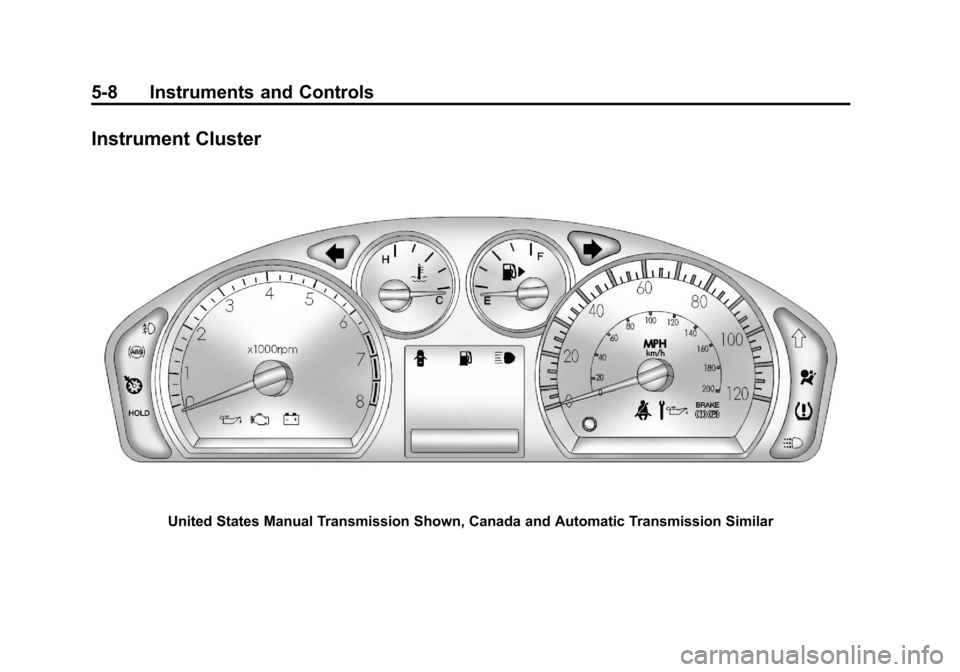
United States Manual Transmission Shown, Canada and Automatic Transmission Similar
Page 130 of 328
Black plate (18,1)Chevrolet Aveo Owner Manual - 2011
5-18 Instruments and Controls
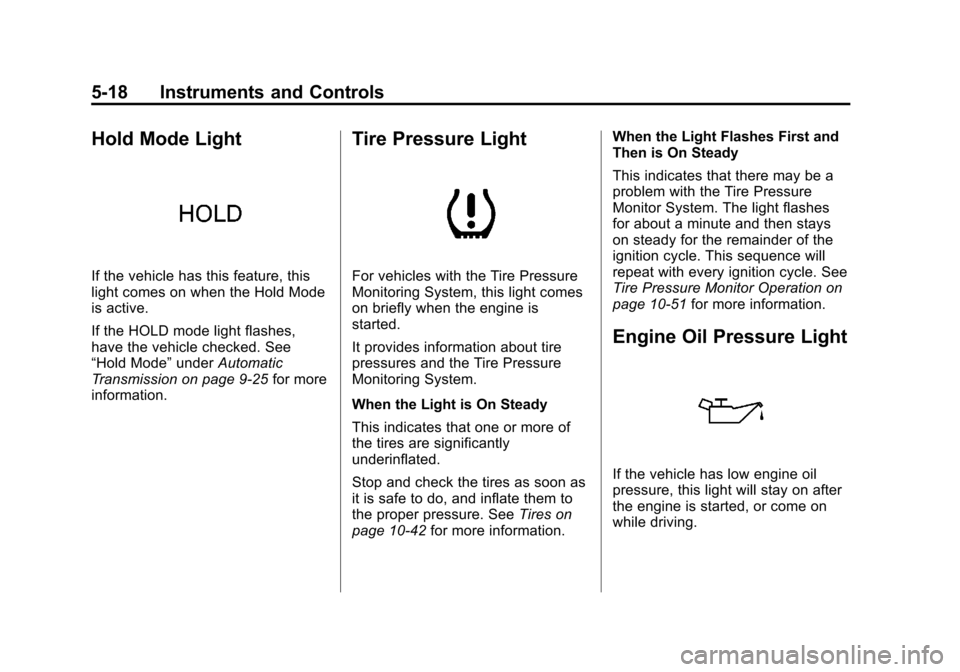
Hold Mode Light
If the vehicle has this feature, this
light comes on when the Hold Mode
is active.
If the HOLD mode light flashes,
have the vehicle checked. See
“Hold Mode”underAutomatic
Transmission on page 9‑25 for more
information.
Tire Pressure Light
For vehicles with the Tire Pressure
Monitoring System, this light comes
on briefly when the engine is
started.
It provides information about tire
pressures and the Tire Pressure
Monitoring System.
When the Light is On Steady
This indicates that one or more of
the tires are significantly
underinflated.
Stop and check the tires as soon as
it is safe to do, and inflate them to
the proper pressure. See Tires on
page 10‑42 for more information. When the Light Flashes First and
Then is On Steady
This indicates that there may be a
problem with the Tire Pressure
Monitor System. The light flashes
for about a minute and then stays
on steady for the remainder of the
ignition cycle. This sequence will
repeat with every ignition cycle. See
Tire Pressure Monitor Operation on
page 10‑51
for more information.
Engine Oil Pressure Light
If the vehicle has low engine oil
pressure, this light will stay on after
the engine is started, or come on
while driving.
Page 163 of 328
Black plate (1,1)Chevrolet Aveo Owner Manual - 2011
Driving and Operating 9-1
Driving and
Operating
Driving Information
Defensive Driving . . . . . . . . . . . . . 9-2
Drunk Driving . . . . . . . . . . . . . . . . . 9-2
Control of a Vehicle . . . . . . . . . . . 9-3
Braking . . . . . . . . . . . . . . . . . . . . . . . 9-3
Steering . . . . . . . . . . . . . . . . . . . . . . . 9-4
Off-Road Recovery . . . . . . . . . . . . 9-5
Loss of Control . . . . . . . . . . . . . . . . 9-5
Driving on Wet Roads . . . . . . . . . 9-7
Highway Hypnosis . . . . . . . . . . . . 9-8
Hill and Mountain Roads . . . . . . 9-8
Winter Driving . . . . . . . . . . . . . . . . . 9-9
If the Vehicle is Stuck . . . . . . . . 9-11
Vehicle Load Limits . . . . . . . . . . 9-12
Starting and Operating
New Vehicle Break-In . . . . . . . . 9-17
Ignition Positions . . . . . . . . . . . . 9-17
Starting the Engine . . . . . . . . . . 9-19
Engine Heater . . . . . . . . . . . . . . . 9-20Shifting Into Park (Automatic
Transmission) . . . . . . . . . . . . . . 9-21
Shifting Out of Park . . . . . . . . . . 9-23
Parking (Manual Transmission) . . . . . . . . . . . . . . 9-23
Parking Over Things That Burn . . . . . . . . . . . . . . . . . . 9-24
Engine Exhaust
Engine Exhaust . . . . . . . . . . . . . . 9-24
Running the Vehicle WhileParked . . . . . . . . . . . . . . . . . . . . . 9-25
Automatic Transmission
Automatic Transmission . . . . . 9-25
Manual Transmission
Manual Transmission . . . . . . . . 9-29
Brakes
Antilock BrakeSystem (ABS) . . . . . . . . . . . . . . 9-30
Parking Brake . . . . . . . . . . . . . . . 9-31
Cruise Control
Cruise Control . . . . . . . . . . . . . . . 9-32
Fuel
Fuel . . . . . . . . . . . . . . . . . . . . . . . . . 9-34
Recommended Fuel . . . . . . . . . 9-35
Gasoline Specifications (U.S. and Canada Only) . . . . . . . . . . 9-35
California Fuel
Requirements . . . . . . . . . . . . . . 9-35
Fuels in Foreign Countries . . . 9-36
Fuel Additives . . . . . . . . . . . . . . . 9-36
Filling the Tank . . . . . . . . . . . . . . 9-37
Filling a Portable Fuel Container . . . . . . . . . . . . . . . . . . . 9-39
Towing
General TowingInformation . . . . . . . . . . . . . . . . . 9-39
Conversions and Add-Ons
Add-On ElectricalEquipment . . . . . . . . . . . . . . . . . 9-40
Page 180 of 328
Black plate (18,1)Chevrolet Aveo Owner Manual - 2011
9-18 Driving and Operating
LOCK (STOPPING THE ENGINE/
LOCK/OFF):When the vehicle is
stopped, turn the ignition switch to
LOCK/OFF to turn the engine off.
This position locks the steering
wheel, ignition, shift lever and
transmission. This is the only
position in which you can insert or
remove the key.
Do not turn the engine off when the
vehicle is moving. This will cause a
loss of power assist in the brake
and steering systems and disable
the airbags.
In an emergency:
1. Brake using a firm and steady pressure. Do not pump the
brakes repeatedly. This may
deplete power assist, requiring
increased brake pedal force.
2. Shift the vehicle to neutral. This can be done while the vehicle is
moving. After shifting to neutral,
firmly apply the brakes and steer
the vehicle to a safe location. 3. Come to a complete stop. Shift
to P (Park) with an automatic
transmission, or neutral with a
manual transmission. Turn the
ignition to LOCK/OFF.
4. Set the parking brake. See Parking Brake on page 9‑31.
The steering can bind with the
wheels turned off center. If this
happens, move the steering wheel
from right to left while turning the
key to ACC/ACCESSORY. If this
doesn't work, then the vehicle needs
service.
ACC (ACC/ACCESSORY): This
position operates some of the
electrical accessories, such as the
radio, but not the climate control
system. ON (ON/RUN):
This position can
be used to operate the electrical
accessories, and to display some
instrument panel cluster warning
and indicator lights. The switch
stays in this position when the
engine is running. If you leave the
key in the ACC/ACCESSORY or
ON/RUN position with the engine
off, the battery could be drained.
You may not be able to start the
vehicle if the battery is allowed to
drain for an extended period of time.
START: This is the position that
starts the engine. When the engine
cranks, release the key. The ignition
switch returns to ON/RUN for
driving. Do not turn the key to
START if the engine is running.
Page 181 of 328
Black plate (19,1)Chevrolet Aveo Owner Manual - 2011
Driving and Operating 9-19
Starting the Engine
Automatic Transmission
Move the shift lever to P (Park) or
N (Neutral). The engine will not start
in any other position. To restart the
engine when the vehicle is already
moving, use N (Neutral) only.
Notice:Do not try to shift to
P (Park) if the vehicle is moving.
If you do, you could damage the
transmission. Shift to P (Park)
only when the vehicle is stopped.
Manual Transmission
The shift lever should be in
N (Neutral) and the parking brake
engaged. Hold the clutch pedal to
the floor and start the engine. The
vehicle will not start if the clutch
pedal is not all the way down.
Starting Procedure
1. With your foot off the accelerator pedal, turn the ignition to START.
When the engine cranks, let go
of the key. The idle speed will go
down as the engine gets warm.
The vehicle has a Computer‐
Controlled Cranking System.
It assists in starting the engine
and protects components. If the
ignition key is turned to START
and then released when the
engine begins cranking, the
engine will continue cranking for
a few seconds or until the engine
starts. If the engine does not
start and the key is held in
START, cranking will be stopped
after 15 seconds to prevent
damage. To prevent gear
damage, cranking is not allowed
if the engine is running. Engine
cranking can be stopped by
turning the ignition key to ACC/
ACCESSORY or LOCK/OFF. Notice:
Holding the key in START
for longer than 15 seconds at a
time will cause the battery to be
drained much sooner. And the
excessive heat can damage
the starter motor. Wait about
15 seconds between each try to
help avoid draining the battery or
damaging the starter.
2. If the engine does not start, wait
about 15 seconds and try again.
Wait about 15 seconds between
each try.
When the engine has run about
10 seconds to warm up, the
vehicle is ready to be driven. Do
not run the engine at high speed
when it is cold.
If the weather is below freezing
(0°C or 32°F), let the engine run
for a few minutes to warm up.
Page 183 of 328
Black plate (21,1)Chevrolet Aveo Owner Manual - 2011
Driving and Operating 9-21
3. Plug it into a normal, grounded110-volt AC outlet.
{WARNING
Plugging the cord into an
ungrounded outlet could cause an
electrical shock. Also, the wrong
kind of extension cord could
overheat and cause a fire. You
could be seriously injured. Plug
the cord into a properly grounded
three-prong 110-volt AC outlet.
If the cord will not reach, use a
heavy-duty three-prong extension
cord rated for at least 15 amps.
4. Before starting the engine, be sure to unplug and store the
cord as it was before to keep it
away from moving engine parts.
If you do not it could be
damaged. The length of time the heater should
remain plugged in depends on
several factors. Ask a dealer in the
area where you will be parking the
vehicle for the best advice on this.
Shifting Into Park
(Automatic Transmission)
{WARNING
It can be dangerous to get out of
the vehicle if the shift lever is not
fully in P (Park) with the parking
brake firmly set. The vehicle can
roll. If you have left the engine
running, the vehicle can move
suddenly. You or others could be
injured. To be sure the vehicle will
(Continued)
WARNING (Continued)
not move, even when you are on
fairly level ground, use the steps
that follow.
1. Hold the brake pedal down and set the parking brake. See
Parking Brake on page 9‑31 for
more information.
2. Move the shift lever into P (Park) by pressing the button on the
shift lever and pushing the lever
all the way toward the front of
the vehicle.
3. Turn the ignition key to LOCK/OFF.
4. Remove the key and take it with you. If you can leave the vehicle
with the ignition key in your
hand, the vehicle is in P (Park).