change wheel CHEVROLET BLAZER 2020 User Guide
[x] Cancel search | Manufacturer: CHEVROLET, Model Year: 2020, Model line: BLAZER, Model: CHEVROLET BLAZER 2020Pages: 390, PDF Size: 6.5 MB
Page 135 of 390
Chevrolet Blazer Owner Manual (GMNA-Localizing-U.S./Canada/Mexico-
13557845) - 2020 - CRC - 3/24/20
134 Instruments and Controls
per hour (mph). This average is
calculated based on the various
vehicle speeds recorded since the
last reset of this value.
Press and hold the thumbwheel
while this display is active to reset
the trip odometer, the average fuel
economy, and the average speed.
Or press
Tand select reset in
the menu.
Fuel Range and Instantaneous
Fuel Economy : Shows the
approximate distance the vehicle
can be driven without refueling.
LOW will be displayed when the
vehicle is low on fuel. The fuel
range estimate is based on an
average of the vehicle's fuel
economy over recent driving history
and the amount of fuel remaining in
the fuel tank.
The Instantaneous Fuel Economy
display shows the current fuel
economy in either liters per
100 kilometers (L/100 km) or miles
per gallon (mpg). This number
reflects only the approximate fuel economy that the vehicle has right
now and changes frequently as
driving conditions change.
Timer and Fuel Used :
Can be
used as a timer. To start the timer,
press the thumbwheel while this
display is active. The display will
show the amount of time that has
passed since the timer was last
reset. To stop the timer, press the
thumbwheel briefly while this display
is active and the timer is running. To
reset the timer to zero, press and
hold the thumbwheel while this
display is active.
This also shows the number of
liters (L) or gallons (gal) of fuel used
since the last reset of this
menu item.
Oil Life : Shows an estimate of the
oil's remaining useful life.
If REMAINING OIL LIFE 99% is
displayed, that means 99% of the
current oil life remains.
When the remaining oil life is low,
the CHANGE ENGINE OIL SOON
message will appear on the display.
The oil should be changed as soon
as possible. See Engine Oil0253. In addition to the engine oil life
system monitoring the oil life,
additional maintenance is
recommended. See
Maintenance
Schedule 0339.
The Oil Life display must be reset
after each oil change. It will not
reset itself. Do not to reset the Oil
Life display at any time other than
when the oil has just been changed.
It cannot be reset accurately until
the next oil change. To reset the
engine oil life system, press and
hold the thumbwheel for several
seconds while the Oil Life display is
active. See Engine Oil Life System
0 255.
Air Filter Life : Shows an estimate
of the engine air filter ’s remaining
useful life and the state of the
system. Engine Air Filter Life 95%
means 95% of the current air filter
life remains. Messages will display
based on the engine air filter life and
the state of the system. When the
REPLACE AT NEXT OIL CHANGE
message displays, the engine air
filter should be replaced at the time
of the next oil change. When the
Page 136 of 390
Chevrolet Blazer Owner Manual (GMNA-Localizing-U.S./Canada/Mexico-
13557845) - 2020 - CRC - 3/24/20
Instruments and Controls 135
REPLACE SOON message
displays, the engine air filter should
be replaced at the earliest
convenience.
The Air Filter Life display must be
reset after the engine air filter
replacement. To reset, seeEngine
Air Filter Life System 0257.
Tire Pressure : Shows the
approximate pressures of all four
tires. Tire pressure is displayed in
either kilopascal (kPa) or in pounds
per square inch (psi). If the pressure
is low, the value for that tire is
shown in amber. See Tire Pressure
Monitor System 0293 and
Tire Pressure Monitor Operation
0 294.
Best Fuel Economy : Displays
average fuel economy, the best fuel
economy over the selected
distance, and a bar graph showing
instantaneous fuel economy.
Press
Tto change the selected
distance. Press and hold the
thumbwheel while this display is
active to reset the best fuel economy and average fuel
economy. This display can also be
reset by selecting reset in the menu.
Top Consumers :
Shows a list of
the features that are currently
impacting the fuel economy, in order
from highest to lowest. If a feature is
turned off, it will be removed from
the list.
Economy Trend : Shows history of
the Average Fuel Economy from the
last 50 km (30 mi). Each bar
represents about 5 km (3 mi) of
driving. During driving the bars will
shift to always reflect the most
recent distance on the right side.
Press and hold the thumbwheel to
clear the graph or press
Tto reset
through the menu.
Speed Signs : Shows sign
information, which comes from a
roadway database in the onboard
navigation. Off Road :
Displays vehicle pitch
and roll information, road wheel
angle, and four-wheel drive (4WD)
status.
Following Distance : The following
distance to a moving vehicle ahead
in your path is indicated in following
time in seconds. See Forward
Collision Alert (FCA) System 0215.
Transmission Fluid Temperature
Gauge : Shows the temperature of
the automatic transmission fluid in
either degrees Celsius (°C) or
degrees Fahrenheit (°F).
Blank Page : Shows no
information.
Page 142 of 390

Chevrolet Blazer Owner Manual (GMNA-Localizing-U.S./Canada/Mexico-
13557845) - 2020 - CRC - 3/24/20
Instruments and Controls 141
Remote Left in Vehicle Alert
This feature sounds an alert when
the RKE transmitter is left in the
vehicle. This menu also enables the
Remote No Longer in Vehicle Alert.
Touch Off or On.
Seating Position
Touch and the following may
display:
.Seat Entry Memory
. Seat Exit Memory
Seat Entry Memory
This feature automatically recalls
the previously stored 1 or 2 button
positions when the ignition is
changed from off to on or ACC/
ACCESSORY. See Memory Seats
0 45.
Touch Off or On.
Seat Exit Memory
This feature automatically recalls
the previously stored exit button
positions when the ignition is
changed from on or ACC/ ACCESSORY to off if the driver
door is open or opened. See
Memory Seats
045.
Touch Off or On.
Teen Driver
See “Teen Driver” under“Settings”
in the infotainment manual.
Valet Mode
This will lock the infotainment
system and steering wheel controls.
It may also limit access to vehicle
storage locations, if equipped.
To enable valet mode:
1. Enter a four-digit code on the keypad.
2. Select Enter to go to the confirmation screen.
3. Re-enter the four-digit code.
Touch Lock or Unlock to lock or
unlock the system. Touch Back to
go back to the previous menu.
Universal Remote
System
See Radio Frequency Statement
0 365.
Universal Remote System
Programming
If equipped, these buttons are in the
overhead console.
This system can replace up to three
remote control transmitters used to
activate devices such as garage
door openers, security systems, and
home automation devices. These
Page 162 of 390
Chevrolet Blazer Owner Manual (GMNA-Localizing-U.S./Canada/Mexico-
13557845) - 2020 - CRC - 3/24/20
Driving and Operating 161
Driving and
Operating
Driving Information
Driving for Better FuelEconomy . . . . . . . . . . . . . . . . . . . . 162
Distracted Driving . . . . . . . . . . . . 162
Defensive Driving . . . . . . . . . . . . . 163
Drunk Driving . . . . . . . . . . . . . . . . . 163
Control of a Vehicle . . . . . . . . . . . 164
Braking . . . . . . . . . . . . . . . . . . . . . . . 164
Steering . . . . . . . . . . . . . . . . . . . . . . 164
Off-Road Recovery . . . . . . . . . . . 165
Loss of Control . . . . . . . . . . . . . . . 165
Off-Road Driving . . . . . . . . . . . . . 166
Driving on Wet Roads . . . . . . . . 170
Hill and Mountain Roads . . . . . 171
Winter Driving . . . . . . . . . . . . . . . . 172
If the Vehicle Is Stuck . . . . . . . . 173
Vehicle Load Limits . . . . . . . . . . . 174
Starting and Operating
New Vehicle Break-In . . . . . . . . . 178
Ignition Positions . . . . . . . . . . . . . 178
Starting the Engine . . . . . . . . . . . 180
Stop/Start System . . . . . . . . . . . . 181
Engine Heater . . . . . . . . . . . . . . . . 182 Retained Accessory
Power (RAP) . . . . . . . . . . . . . . . . 184
Shifting Into Park . . . . . . . . . . . . . 184
Shifting out of Park . . . . . . . . . . . 185
Parking over Things That Burn . . . . . . . . . . . . . . . . . . . 185
Active Fuel Management . . . . . 185
Extended Parking . . . . . . . . . . . . 186
Engine Exhaust
Engine Exhaust . . . . . . . . . . . . . . 186
Running the Vehicle While Parked . . . . . . . . . . . . . . . . . . . . . . 187
Automatic Transmission
Automatic Transmission . . . . . . 187
Manual Mode . . . . . . . . . . . . . . . . . 189
Tow/Haul Mode . . . . . . . . . . . . . . . 190
Drive Systems
All-Wheel Drive . . . . . . . . . . . . . . . 191
Brakes
Electric Brake Boost . . . . . . . . . . 191
Antilock BrakeSystem (ABS) . . . . . . . . . . . . . . . 191
Electric Parking Brake . . . . . . . . 192
Brake Assist . . . . . . . . . . . . . . . . . . 193
Hill Start Assist (HSA) . . . . . . . . 194
Ride Control Systems
Traction Control/Electronic Stability Control . . . . . . . . . . . . . 194
Driver Mode Control . . . . . . . . . . 196
Cruise Control
Cruise Control . . . . . . . . . . . . . . . . 198
Adaptive Cruise Control . . . . . . 200
Driver Assistance Systems
Driver Assistance Systems . . . 209
Assistance Systems for Parking or Backing . . . . . . . . . . 210
Assistance Systems for Driving . . . . . . . . . . . . . . . . . . . . . . 215
Forward Collision Alert (FCA) System . . . . . . . . . . . . . . . . . . . . . . 215
Automatic Emergency Braking (AEB) . . . . . . . . . . . . . . . 217
Front Pedestrian Braking (FPB) System . . . . . . . . . . . . . . . 219
Side Blind Zone Alert (SBZA) . . . . . . . . . . . . . . . . 221
Lane Change Alert (LCA) . . . . . 221
Lane Keep Assist (LKA) . . . . . . 223
Fuel
Top Tier Fuel . . . . . . . . . . . . . . . . . 225
Recommended Fuel . . . . . . . . . . 226
Prohibited Fuels . . . . . . . . . . . . . . 226
Fuels in Foreign Countries . . . 226
Page 167 of 390

Chevrolet Blazer Owner Manual (GMNA-Localizing-U.S./Canada/Mexico-
13557845) - 2020 - CRC - 3/24/20
166 Driving and Operating
Defensive drivers avoid most skids
by taking reasonable care suited to
existing conditions, and by not
overdriving those conditions. But
skids are always possible.
If the vehicle starts to slide, follow
these suggestions:
.Ease your foot off the
accelerator pedal and steer the
way you want the vehicle to go.
The vehicle may straighten out.
Be ready for a second skid if it
occurs.
. Slow down and adjust your
driving according to weather
conditions. Stopping distance
can be longer and vehicle
control can be affected when
traction is reduced by water,
snow, ice, gravel, or other
material on the road. Learn to
recognize warning clues —such
as enough water, ice, or packed
snow on the road to make a
mirrored surface —and slow
down when you have any doubt.
. Try to avoid sudden steering,
acceleration, or braking,
including reducing vehicle speed by shifting to a lower gear. Any
sudden changes could cause
the tires to slide.
Remember: Antilock brakes help
avoid only the braking skid.
Off-Road Driving
All-Wheel Drive (AWD) vehicles can
be used for off-road driving.
Vehicles without AWD and vehicles
not equipped with All Terrain (AT) or
On-Off Road (OOR) tires must not
be driven off-road except on a level,
solid surface. To contact the tire
manufacturer for more information
about the original equipment tires,
see the warranty manual.
Controlling the vehicle is the key to
successful off-road driving. One of
the best ways to control the vehicle
is to control the speed.
{Warning
When driving off-road, bouncing
and quick changes in direction
can easily throw you out of (Continued)
Warning (Continued)
position. This could cause you to
lose control and crash. You and
your passengers should always
wear seat belts.
Before Driving Off-Road
.Have all necessary maintenance
and service work completed.
. Fuel the vehicle, fill fluid levels,
and check inflation pressure in
all tires, including the spare,
if equipped.
. Read all the information about
AWD vehicles in this manual.
. Make sure all underbody
shields, if equipped, are properly
attached.
. Know the local laws that apply to
off-road driving.
To gain more ground clearance if
needed, it may be necessary to
remove the front fascia lower air
dam. However, driving without the
air dam reduces fuel economy.
Page 170 of 390
Chevrolet Blazer Owner Manual (GMNA-Localizing-U.S./Canada/Mexico-
13557845) - 2020 - CRC - 3/24/20
Driving and Operating 169
3. If the vehicle cannot berestarted after stalling, set the
parking brake, shift into
P (Park), and turn the
vehicle off.
3.1. Leave the vehicle and seek help.
3.2. Stay clear of the path the vehicle would take if it
rolled downhill.
. Avoid turns that take the vehicle
across the incline of the hill.
A hill that can be driven straight
up or down might be too steep to
drive across. Driving across an
incline puts more weight on the
downhill wheels which could
cause a downhill slide or a
rollover.
. Surface conditions can be a
problem. Loose gravel, muddy
spots, or even wet grass can
cause the tires to slip sideways,
downhill. If the vehicle slips
sideways, it can hit something
that will trip it —a rock, a rut,
etc. —and roll over. .
Hidden obstacles can make the
steepness of the incline more
severe. If a rock is driven across
with the uphill wheels, or if the
downhill wheels drop into a rut
or depression, the vehicle can tilt
even more.
. If an incline must be driven
across, and the vehicle starts to
slide, turn downhill. This should
help straighten out the vehicle
and prevent the side slipping.
{Warning
Getting out of the vehicle on the
downhill side when stopped
across an incline is dangerous.
If the vehicle rolls over, you could
be crushed or killed. Always get
out on the uphill side of the
vehicle and stay well clear of the
rollover path.
Driving in Mud, Sand, Snow,
or Ice
Use a low gear when driving in mud
—the deeper the mud, the lower
the gear. Keep the vehicle moving
to avoid getting stuck.
Traction changes when driving on
sand. On loose sand, such as on
beaches or sand dunes, the tires
tend to sink into the sand. This
affects steering, accelerating, and
braking. Drive at a reduced speed
and avoid sharp turns or abrupt
maneuvers.
Traction is reduced on hard packed
snow and ice and it is easy to lose
control. Reduce vehicle speed when
driving on hard packed snow
and ice.
{Warning
Driving on frozen lakes, ponds,
or rivers can be dangerous. Ice
conditions vary greatly and the
vehicle could fall through the ice;
(Continued)
Page 175 of 390
Chevrolet Blazer Owner Manual (GMNA-Localizing-U.S./Canada/Mexico-
13557845) - 2020 - CRC - 3/24/20
174 Driving and Operating
between R (Reverse) and a low
forward gear, spinning the wheels
as little as possible. To prevent
transmission wear, wait until the
wheels stop spinning before shifting
gears. Release the accelerator
pedal while shifting, and press
lightly on the accelerator pedal
when the transmission is in gear.
Slowly spinning the wheels in the
forward and reverse directions
causes a rocking motion that could
free the vehicle. If that does not get
the vehicle out after a few tries, it
might need to be towed out. If the
vehicle does need to be towed out,
seeTowing the Vehicle 0323.
Vehicle Load Limits
It is very important to know how
much weight the vehicle can
carry. This weight is called the
vehicle capacity weight and
includes the weight of all
occupants, cargo, and all
nonfactory-installed options.
Two labels on the vehicle may
show how much weight it may properly carry, the Tire and
Loading Information label and
the Certification/Tire label.
{Warning
Do not load the vehicle any
heavier than the Gross
Vehicle Weight Rating
(GVWR), or either the
maximum front or rear Gross
Axle Weight Rating (GAWR).
This can cause systems to
break and change the way the
vehicle handles. This could
cause loss of control and a
crash. Overloading can also
reduce stopping distance,
damage the tires, and shorten
the life of the vehicle.
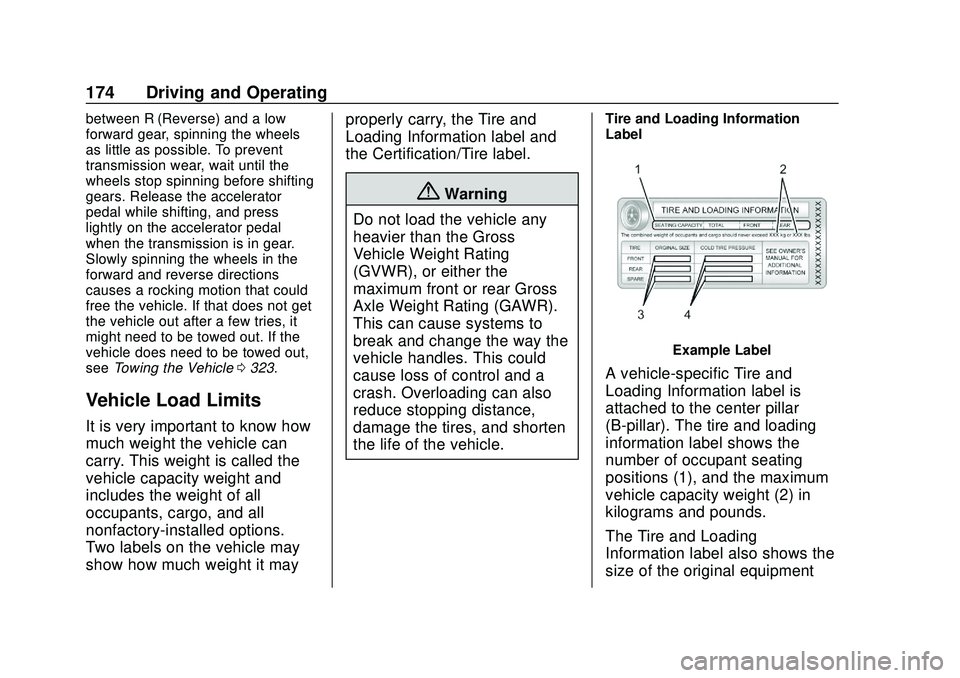
Tire and Loading Information
Label
Example Label
A vehicle-specific Tire and
Loading Information label is
attached to the center pillar
(B-pillar). The tire and loading
information label shows the
number of occupant seating
positions (1), and the maximum
vehicle capacity weight (2) in
kilograms and pounds.
The Tire and Loading
Information label also shows the
size of the original equipment
Page 192 of 390

Chevrolet Blazer Owner Manual (GMNA-Localizing-U.S./Canada/Mexico-
13557845) - 2020 - CRC - 3/24/20
Driving and Operating 191
Drive Systems
All-Wheel Drive
Vehicles with this feature can
operate in All-Wheel
Drive (AWD) Mode.
Turn the knob to4to select AWD.See
Driver Mode Control 0196.
When operated in two-wheel drive,
the vehicle will deliver power to the
front wheels only and may provide
better fuel economy.
When using a compact spare tire on
an AWD vehicle, the system
automatically detects the compact
spare and reduces AWD
performance to protect the system.
To restore full AWD operation and
prevent excessive wear on the
system, replace the compact spare
with a full-size tire as soon as
possible. See Compact Spare Tire
0 320.
Brakes
Electric Brake Boost
Vehicles equipped with electric
brake boost have hydraulic brake
circuits that are electronically
controlled when the brake pedal is
applied during normal operation.
The system performs routine tests
and turns off within a few minutes
after the vehicle is shutdown. Noise
may be heard during this time. If the
brake pedal is pressed during the
tests or when the electric brake
boost system is off, a noticeable
change in pedal force and travel
may be felt. This is normal.
Antilock Brake
System (ABS)
The Antilock Brake System (ABS)
helps prevent a braking skid and
maintain steering while
braking hard.
ABS performs a system check when
the vehicle is first driven.
A momentary motor or clicking noise
Page 199 of 390
Chevrolet Blazer Owner Manual (GMNA-Localizing-U.S./Canada/Mexico-
13557845) - 2020 - CRC - 3/24/20
198 Driving and Operating
Cruise Control
{Warning
Cruise control can be dangerous
where you cannot drive safely at
a steady speed. Do not use
cruise control on winding roads or
in heavy traffic.
Cruise control can be dangerous
on slippery roads. On such roads,
fast changes in tire traction can
cause excessive wheel slip, and
you could lose control. Do not use
cruise control on slippery roads.
With cruise control, a speed of
about 40 km/h (25 mph) or more can
be maintained without keeping your
foot on the accelerator. Cruise
control does not work at speeds
below about 40 km/h (25 mph).
If the Traction Control System (TCS)
or StabiliTrak/Electronic Stability
Control (ESC) system begins to limit
wheel spin while using cruise
control, the cruise control automatically disengages. See
Traction Control/Electronic Stability
Control
0194. If a collision alert
occurs when cruise control is
activated, cruise control is
disengaged. See Forward Collision
Alert (FCA) System 0215. When
road conditions allow the cruise
control to be safely used, cruise
control can be turned back on.
Turning off the TCS or StabiliTrak/
ESC system will disengage the
cruise control.
If the brakes are applied, cruise
control disengages.
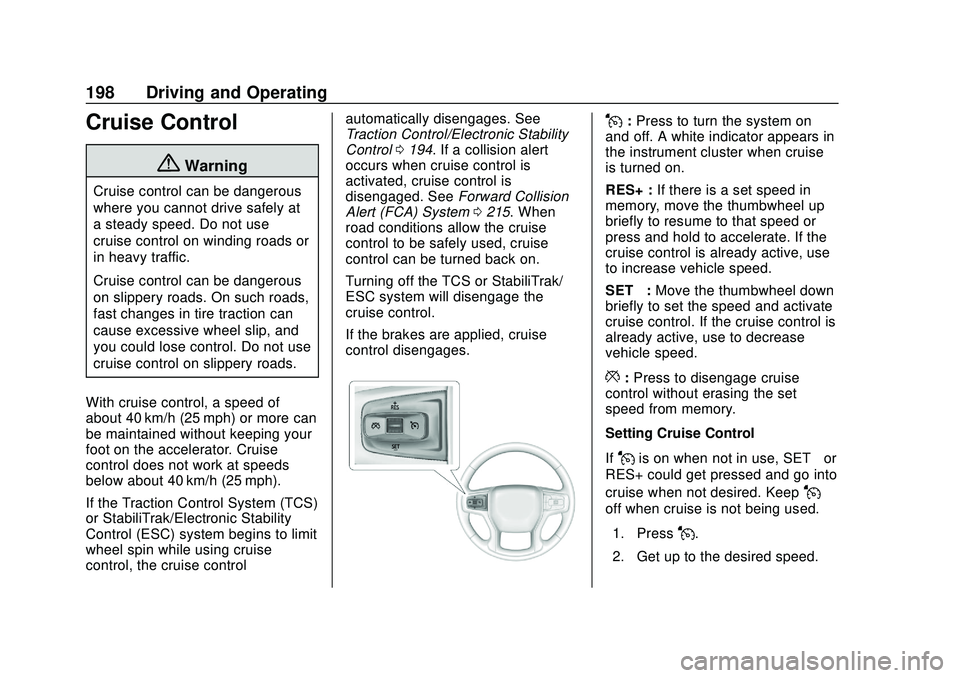
J: Press to turn the system on
and off. A white indicator appears in
the instrument cluster when cruise
is turned on.
RES+ : If there is a set speed in
memory, move the thumbwheel up
briefly to resume to that speed or
press and hold to accelerate. If the
cruise control is already active, use
to increase vehicle speed.
SET− :Move the thumbwheel down
briefly to set the speed and activate
cruise control. If the cruise control is
already active, use to decrease
vehicle speed.
*: Press to disengage cruise
control without erasing the set
speed from memory.
Setting Cruise Control
If
Jis on when not in use, SET− or
RES+ could get pressed and go into
cruise when not desired. Keep
J
off when cruise is not being used.
1. Press
J.
2. Get up to the desired speed.
Page 202 of 390
Chevrolet Blazer Owner Manual (GMNA-Localizing-U.S./Canada/Mexico-
13557845) - 2020 - CRC - 3/24/20
Driving and Operating 201
{Warning
ACC will not detect or brake for
children, pedestrians, animals,
or other objects.
Do not use ACC when:. On winding and hilly roads
or when the sensors are
blocked by snow, ice, or dirt.
The system may not detect
a vehicle ahead. Keep the
entire front of the vehicle
clean.
. Visibility is low, such as in
fog, rain, or snow
conditions. ACC
performance is limited under
these conditions.
. On slippery roads where
fast changes in tire traction
can cause excessive
wheel slip.
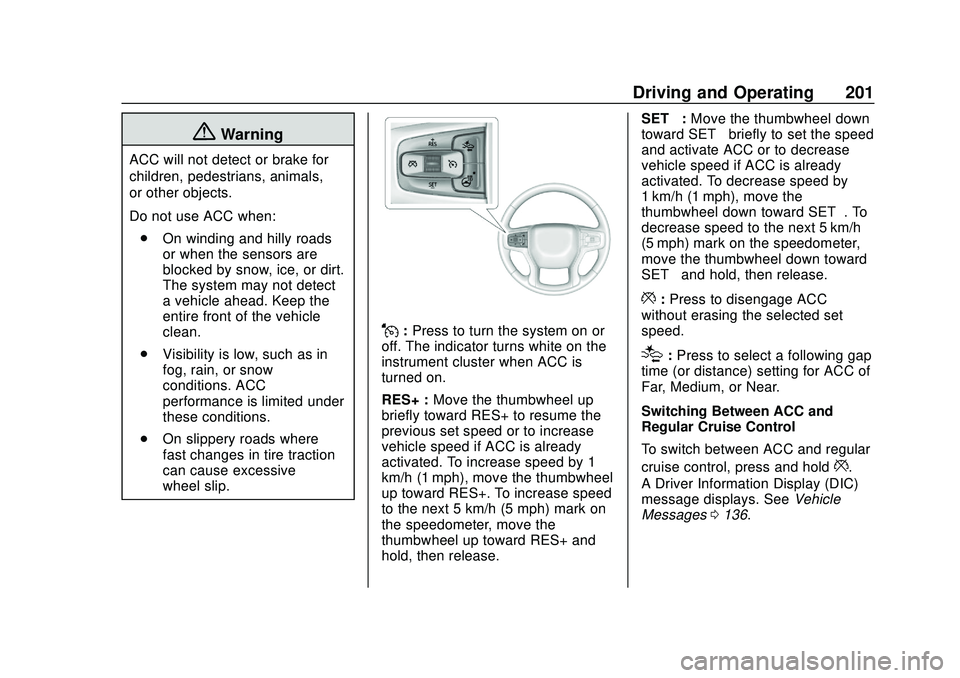
J:Press to turn the system on or
off. The indicator turns white on the
instrument cluster when ACC is
turned on.
RES+ : Move the thumbwheel up
briefly toward RES+ to resume the
previous set speed or to increase
vehicle speed if ACC is already
activated. To increase speed by 1
km/h (1 mph), move the thumbwheel
up toward RES+. To increase speed
to the next 5 km/h (5 mph) mark on
the speedometer, move the
thumbwheel up toward RES+ and
hold, then release. SET–
:Move the thumbwheel down
toward SET– briefly to set the speed
and activate ACC or to decrease
vehicle speed if ACC is already
activated. To decrease speed by
1 km/h (1 mph), move the
thumbwheel down toward SET–. To
decrease speed to the next 5 km/h
(5 mph) mark on the speedometer,
move the thumbwheel down toward
SET– and hold, then release.
*:Press to disengage ACC
without erasing the selected set
speed.
[: Press to select a following gap
time (or distance) setting for ACC of
Far, Medium, or Near.
Switching Between ACC and
Regular Cruise Control
To switch between ACC and regular
cruise control, press and hold
*.
A Driver Information Display (DIC)
message displays. See Vehicle
Messages 0136.