keyless entry CHEVROLET BLAZER 2020 User Guide
[x] Cancel search | Manufacturer: CHEVROLET, Model Year: 2020, Model line: BLAZER, Model: CHEVROLET BLAZER 2020Pages: 390, PDF Size: 6.5 MB
Page 46 of 390
Chevrolet Blazer Owner Manual (GMNA-Localizing-U.S./Canada/Mexico-
13557845) - 2020 - CRC - 3/24/20
Seats and Restraints 45
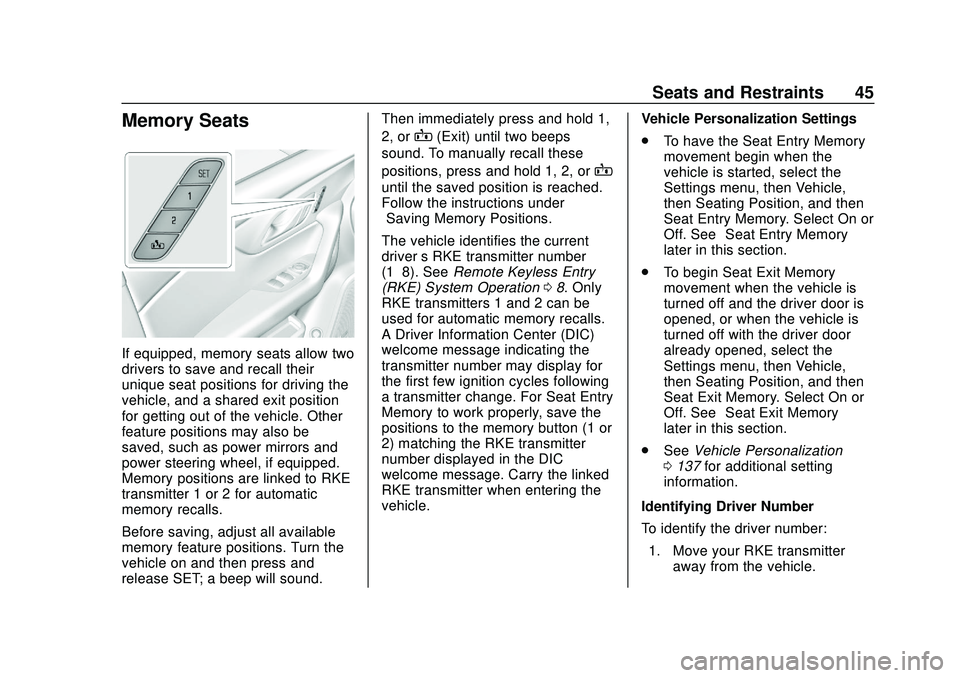
Memory Seats
If equipped, memory seats allow two
drivers to save and recall their
unique seat positions for driving the
vehicle, and a shared exit position
for getting out of the vehicle. Other
feature positions may also be
saved, such as power mirrors and
power steering wheel, if equipped.
Memory positions are linked to RKE
transmitter 1 or 2 for automatic
memory recalls.
Before saving, adjust all available
memory feature positions. Turn the
vehicle on and then press and
release SET; a beep will sound.Then immediately press and hold 1,
2, or
B(Exit) until two beeps
sound. To manually recall these
positions, press and hold 1, 2, or
B
until the saved position is reached.
Follow the instructions under
“Saving Memory Positions.”
The vehicle identifies the current
driver ’s RKE transmitter number
(1–8). See Remote Keyless Entry
(RKE) System Operation 08. Only
RKE transmitters 1 and 2 can be
used for automatic memory recalls.
A Driver Information Center (DIC)
welcome message indicating the
transmitter number may display for
the first few ignition cycles following
a transmitter change. For Seat Entry
Memory to work properly, save the
positions to the memory button (1 or
2) matching the RKE transmitter
number displayed in the DIC
welcome message. Carry the linked
RKE transmitter when entering the
vehicle. Vehicle Personalization Settings
.
To have the Seat Entry Memory
movement begin when the
vehicle is started, select the
Settings menu, then Vehicle,
then Seating Position, and then
Seat Entry Memory. Select On or
Off. See “Seat Entry Memory”
later in this section.
. To begin Seat Exit Memory
movement when the vehicle is
turned off and the driver door is
opened, or when the vehicle is
turned off with the driver door
already opened, select the
Settings menu, then Vehicle,
then Seating Position, and then
Seat Exit Memory. Select On or
Off. See “Seat Exit Memory”
later in this section.
. See Vehicle Personalization
0 137 for additional setting
information.
Identifying Driver Number
To identify the driver number: 1. Move your RKE transmitter away from the vehicle.
Page 47 of 390
Chevrolet Blazer Owner Manual (GMNA-Localizing-U.S./Canada/Mexico-
13557845) - 2020 - CRC - 3/24/20
46 Seats and Restraints
2. Start the vehicle with anotherkey or RKE transmitter. The
DIC should display the driver
number for the other RKE
transmitter. Turn the vehicle off
and remove the key or RKE
transmitter from the vehicle.
3. Start the vehicle with the initial key or RKE transmitter. The
DIC should display the driver
number of your RKE
transmitter.
Saving Memory Positions
Read these instructions completely
before saving memory positions.
To save preferred driving positions
1 and 2: 1. Turn the vehicle on or to ACC/ ACCESSORY.
A DIC welcome message may
indicate driver number 1 or 2.
2. Adjust all available memory features to the desired driving
position.
3. Press and release SET; a beep will sound. 4. Immediately press and hold the
1 or 2 memory button matching
the above DIC welcome
message until two beeps
sound.
If too much time passes
between releasing SET and
pressing 1 or 2, the memory
position will not be saved and
two beeps will not sound.
Repeat Steps 3 and 4.
1 or 2 corresponds to the driver
number. See “Identifying Driver
Number” previously in this
section.
5. Repeat Steps 1–4 for a second driver using 1 or 2.
To save the position for
Band Seat
Exit Memory features, repeat
Steps 1–4 using
B. This saves the
position for getting out of the
vehicle.
Save preferred memory feature
positions to both 1 and 2 if you are
the only driver. Manually Recalling Memory
Positions
Press and hold 1, 2, or
Bto recall
the previously saved memory
positions if you are driver 1 or 2
identified in the DIC welcome
message.
To stop Manual Memory recall
movement, release 1, 2, or
Bor
press any of the following controls:
. Power seat
. Memory SET
. Power mirror, with the driver or
passenger side mirror selected
. Power steering wheel,
if equipped
Seat Entry Memory
The vehicle identifies the number of
the current driver ’s RKE transmitter
(1–8). See Remote Keyless Entry
(RKE) System Operation 08. If the
RKE transmitter is 1 or 2, and Seat
Entry Memory is enabled in vehicle
personalization, the positions saved
to the same memory button number
1 or 2 are automatically recalled
Page 140 of 390
Chevrolet Blazer Owner Manual (GMNA-Localizing-U.S./Canada/Mexico-
13557845) - 2020 - CRC - 3/24/20
Instruments and Controls 139
Chime Volume
This determines the chime volume
level.
Touch the controls on the
infotainment display to adjust the
volume.
Hands Free Liftgate/Trunk Control
The liftgate may be operated with a
kicking motion under the left side of
the rear bumper. SeeLiftgate021.
Touch Off, On-Open and Close,
or On-Open Only.
Reverse Tilt Mirror
When on, the driver and/or
passenger mirrors will tilt downward
when the vehicle is shifted to
R (Reverse) to improve visibility of
the ground near the rear wheels.
They will return to their previous
driving position when the vehicle is
shifted out of R (Reverse) or the
engine is turned off. See Reverse
Tilt Mirrors 031.
Touch Off, On - Driver and
Passenger, On - Driver, or On -
Passenger. Auto Wipe in Reverse Gear
When on and the front wiper is on,
the rear wiper will automatically
activate when the vehicle is shifted
to R (Reverse).
Touch Off or On.
Lighting
Touch and the following may
display:
.
Vehicle Locator Lights
. Exit Lighting
Vehicle Locator Lights
This feature will flash the exterior
lamps and allows some of the
exterior lamps and most of the
interior lamps to turn on briefly when
Kon the Remote Keyless Entry
(RKE) transmitter is pressed to
locate the vehicle.
Touch Off or On.
Exit Lighting
This allows the selection of how
long the exterior lamps stay on
when leaving the vehicle when it is
dark outside. Touch Off, 30 Seconds, 60 Seconds,
or 120 Seconds.
Power Door Locks
Touch and the following may
display:
.
Open Door Anti Lockout
. Auto Door Unlock
. Delayed Door Lock
Open Door Anti Lock Out
When on, this feature will keep the
driver door from locking when the
door is open. If Off is selected, the
Delayed Door Lock menu will be
available.
Touch Off or On.
Auto Door Unlock
This allows selection of which of the
doors will automatically unlock when
the vehicle is shifted into P (Park).
Touch Off, All Doors, or Driver Door.
Page 141 of 390
Chevrolet Blazer Owner Manual (GMNA-Localizing-U.S./Canada/Mexico-
13557845) - 2020 - CRC - 3/24/20
140 Instruments and Controls
Delayed Door Lock
When on, this feature will delay the
locking of the doors. To override the
delay, press the power door lock
switch on the door.
Touch Off or On.
Remote Lock, Unlock, Start
Touch and the following may
display:
.Remote Unlock Light Feedback
. Remote Lock Feedback
. Remote Door Unlock
. Remote Start Auto Cool Seats
. Remote Start Auto Heat Seats
. Remote Window Operation
. Passive Door Unlock
. Passive Door Lock
. Remote Left in Vehicle Alert
Remote Unlock Light Feedback
When on, the exterior lamps will
flash when unlocking the vehicle
with the RKE transmitter.
Touch Off or Flash Lights. Remote Lock Feedback
This allows selection of what type of
feedback is given when locking the
vehicle with the RKE transmitter.
Touch Off, Lights and Horn, Lights
Only, or Horn Only.
Remote Door Unlock
This allows selection of which doors
will unlock when pressing
Kon the
RKE transmitter.
Touch All Doors or Driver Door.
Remote Start Auto Cool Seats
If equipped and turned on, this
feature will turn on the ventilated
seats when using remote start on
warm days. See Heated and
Ventilated Front Seats 047 and
Remote Vehicle Start 015.
Touch Off or On.
Remote Start Auto Heat Seats
If equipped and turned on, this
feature will turn on the heated seats
when using remote start on cold days. See
Heated and
Ventilated Front Seats 047 and
Remote Vehicle Start 015.
Touch Off or On.
Remote Window Operation
This allows the windows to be
opened when pressing and holding
Kon the RKE transmitter. See
Remote Keyless Entry (RKE)
System Operation 08.
Touch Off or On.
Passive Door Unlock
This allows the selection of what
doors will unlock when using the
button on the driver door to unlock
the vehicle.
Touch Off, All Doors, or Driver
Door Only.
Passive Door Lock
This allows passive locking to be
turned on or off and selects
feedback. See Remote Keyless
Entry (RKE) System Operation 08.
Touch Off, On with Horn
Chirp, or On.
Page 152 of 390
Chevrolet Blazer Owner Manual (GMNA-Localizing-U.S./Canada/Mexico-
13557845) - 2020 - CRC - 3/24/20
Lighting 151
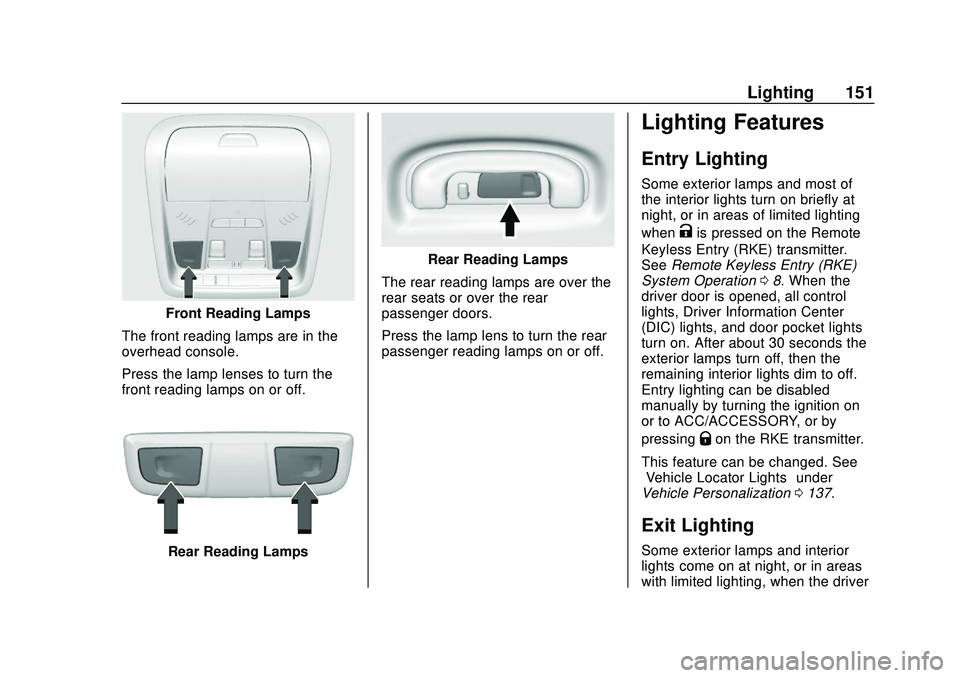
Front Reading Lamps
The front reading lamps are in the
overhead console.
Press the lamp lenses to turn the
front reading lamps on or off.
Rear Reading Lamps
Rear Reading Lamps
The rear reading lamps are over the
rear seats or over the rear
passenger doors.
Press the lamp lens to turn the rear
passenger reading lamps on or off.
Lighting Features
Entry Lighting
Some exterior lamps and most of
the interior lights turn on briefly at
night, or in areas of limited lighting
when
Kis pressed on the Remote
Keyless Entry (RKE) transmitter.
See Remote Keyless Entry (RKE)
System Operation 08. When the
driver door is opened, all control
lights, Driver Information Center
(DIC) lights, and door pocket lights
turn on. After about 30 seconds the
exterior lamps turn off, then the
remaining interior lights dim to off.
Entry lighting can be disabled
manually by turning the ignition on
or to ACC/ACCESSORY, or by
pressing
Qon the RKE transmitter.
This feature can be changed. See
“Vehicle Locator Lights” under
Vehicle Personalization 0137.
Exit Lighting
Some exterior lamps and interior
lights come on at night, or in areas
with limited lighting, when the driver
Page 180 of 390
Chevrolet Blazer Owner Manual (GMNA-Localizing-U.S./Canada/Mexico-
13557845) - 2020 - CRC - 3/24/20
Driving and Operating 179
The Remote Keyless Entry (RKE)
transmitter must be in the vehicle for
the system to operate. If the
pushbutton start is not working, the
vehicle may be near a strong radio
antenna signal causing interference
to the Keyless Access system. See
Remote Keyless Entry (RKE)
System Operation08.
To shift out of P (Park), the ignition
must be on or in Service Mode and
the brake pedal must be applied.
Stopping the Engine/OFF (No
Indicator Lights) : When the
vehicle is stopped, press ENGINE
START/STOP once to turn the
engine off.
If the vehicle is in P (Park), the
ignition will turn off, and Retained
Accessory Power (RAP) will remain
active. See Retained Accessory
Power (RAP) 0184.
If the vehicle is not in P (Park), the
ignition will return to ACC/
ACCESSORY and display the
message SHIFT TO PARK in the
Driver Information Center (DIC).
When the vehicle is shifted into
P (Park), the ignition will turn off. Do not turn the engine off when the
vehicle is moving. This will cause a
loss of power assist in the brake
and steering systems and disable
the airbags.
If the vehicle must be shut off in an
emergency:
1. Brake using a firm and steady pressure. Do not pump the
brakes repeatedly. This may
deplete power assist, requiring
increased brake pedal force.
2. Shift the vehicle to N (Neutral). This can be done while the
vehicle is moving. After shifting
to N (Neutral), firmly apply the
brakes and steer the vehicle to
a safe location.
3. Come to a complete stop, shift to P (Park), and turn the
ignition off. The shift lever must
be in P (Park) to turn the
ignition off.
4. Set the parking brake. See Electric Parking Brake 0192.
{Warning
Turning off the vehicle while
moving may cause loss of power
assist in the brake and steering
systems and disable the airbags.
While driving, only shut the
vehicle off in an emergency.
If the vehicle cannot be pulled over,
and must be shut off while driving,
press and hold ENGINE START/
STOP for longer than two seconds,
or press twice in five seconds.
ACC/ACCESSORY (Amber
Indicator Light) : This mode allows
some electrical accessories to be
used when the engine is off.
With the ignition off, pressing the
button one time without the brake
pedal applied will place the ignition
system in ACC/ACCESSORY.
The ignition will switch from ACC/
ACCESSORY to OFF after
five minutes to prevent battery
rundown.
Page 384 of 390
Chevrolet Blazer Owner Manual (GMNA-Localizing-U.S./Canada/Mexico-
13557845) - 2020 - CRC - 3/24/20
Index 383
HooksShopping Bag . . . . . . . . . . . . . . . . . . 93
Horn . . . . . . . . . . . . . . . . . . . . . . . . . . . . 100
How to Wear Seat Belts Properly . . . . . . . . . . . . . . . . . . . . . . . . 53
HVAC . . . . . . . . . . . . . . . . . . . . . . . . . . . 155
I
Ignition Positions . . . . . . . . . . . . . . . 178
Immobilizer . . . . . . . . . . . . . . . . . . . . . . 29
Indicator Pedestrian Ahead . . . . . . . . . . . . 125
Vehicle Ahead . . . . . . . . . . . . . . . . 124
Infants and Young Children, Restraints . . . . . . . . . . . . . . . . . . . . . . 73
Information Publication Ordering . . . . . . . . . . 364
Infotainment . . . . . . . . . . . . . . . . . . . . 154
Infotainment System . . . . . . . . . . . . 368
Instrument Cluster . . . . . . . . . 108, 112
Instrument Panel Overview . . . . . . . 5
Interior Rearview Mirrors . . . . . . . . . 31
Introduction . . . . . . . . . . . . . . . . . . . . . . . 2
J
Jump Starting - North America . . . . . . . . . . . . . . . . . . . . . . . 321
K
Keyless Entry
Remote (RKE) System . . . . . . . . . . 8
Keys . . . . . . . . . . . . . . . . . . . . . . . . . . . . . . 7
L
Labeling, Tire Sidewall . . . . . . . . . . 286
Lamps Courtesy . . . . . . . . . . . . . . . . . . . . . . 150
Daytime Running (DRL) . . . . . . 147
Dome . . . . . . . . . . . . . . . . . . . . . . . . . 150
Exterior Controls . . . . . . . . . . . . . . 145
Exterior Lamps OffReminder . . . . . . . . . . . . . . . . . . . 147
Exterior Lighting Battery
Saver . . . . . . . . . . . . . . . . . . . . . . . 153
Malfunction Indicator (Check Engine) . . . . . . . . . . . . . 120
On Reminder . . . . . . . . . . . . . . . . . 128
Reading . . . . . . . . . . . . . . . . . . . . . . 150
Lane Change Alert (LCA) . . . . . . . 221
Lane Keep Assist (LKA) . . . . . . . . 223
Lane Keep Assist Light . . . . . . . . . 124
Lap-Shoulder Belt . . . . . . . . . . . . . . . 55
LATCH System Replacing Parts after aCrash . . . . . . . . . . . . . . . . . . . . . . . . . 85 LATCH, Lower Anchors and
Tethers for Children . . . . . . . . . . . . 79
LED Lighting . . . . . . . . . . . . . . . . . . . . 273
Liftgate . . . . . . . . . . . . . . . . . . . . . . . . . . 21
Lighting Entry . . . . . . . . . . . . . . . . . . . . . . . . . 151
Exit . . . . . . . . . . . . . . . . . . . . . . . . . . . 151
Illumination Control . . . . . . . . . . . 150
LED . . . . . . . . . . . . . . . . . . . . . . . . . . 273
Lights Airbag Readiness . . . . . . . . . . . . . .119
Antilock Brake System
(ABS) Warning . . . . . . . . . . . . . . 123
Brake System Warning . . . . . . . 122
Charging System . . . . . . . . . . . . . 120
Check Engine (Malfunction Indicator) . . . . . . . . . . . . . . . . . . . . 120
Cruise Control . . . . . . . . . . . . . . . . 128
Door Ajar . . . . . . . . . . . . . . . . . . . . . 129
Electric Parking Brake . . . . . . . . 123
Engine Coolant Temperature Warning . . . . . . . 126
Engine Oil Pressure . . . . . . . . . . 127
Flash-to-Pass . . . . . . . . . . . . . . . . . 147
High-Beam On . . . . . . . . . . . . . . . . 128
High/Low Beam Changer . . . . . 147
Lane Keep Assist . . . . . . . . . . . . . 124
Low Fuel Warning . . . . . . . . . . . . 127
Page 386 of 390
Chevrolet Blazer Owner Manual (GMNA-Localizing-U.S./Canada/Mexico-
13557845) - 2020 - CRC - 3/24/20
Index 385
OutletsPower . . . . . . . . . . . . . . . . . . . . . . . . 102
Overheating, Engine . . . . . . . . . . . . 264
Overview Instrument Panel . . . . . . . . . . . . . . . . 5
P
ParkShifting Out of . . . . . . . . . . . . . . . . 185
Park Assist . . . . . . . . . . . . . . . . . . . . . 210
Parking Brake and P (Park)
Mechanism Check . . . . . . . . . . 269
Extended . . . . . . . . . . . . . . . . . . . . . 186
Over Things That Burn . . . . . . . 185
Parking or Backing Assistance Systems . . . . . . . . . . 210
Passenger Airbag Status Indicator . . . . . . . . . . . . . . . . . . . . . . 119
Passenger Compartment Air Filter . . . . . . . . . . . . . . . . . . . . . . . . . . 160
Passenger Sensing System . . . . . 66
Pedestrian Ahead Indicator . . . . . 125
Perchlorate Materials Requirements, California . . . . . . 245
Personalization
Vehicle . . . . . . . . . . . . . . . . . . . . . . . 137 Power
Door Locks . . . . . . . . . . . . . . . . . . . . . 19
Mirrors . . . . . . . . . . . . . . . . . . . . . . . . . . 30
Outlets . . . . . . . . . . . . . . . . . . . . . . . 102
Protection, Battery . . . . . . . . . . . . 152
Retained Accessory (RAP) . . . 184
Seat Adjustment . . . . . . . . . . . . . . . . 42
Windows . . . . . . . . . . . . . . . . . . . . . . . 34
Pregnancy, Using Seat Belts . . . . 58
Privacy Vehicle Data Recording . . . . . . . 367
Program Courtesy Transportation . . . . . . 361
Prohibited Fuels . . . . . . . . . . . . . . . . 226
Proposition 65 Warning,
California . . . . . . . . . . . .244, 268, 321,
Back Cover
Publication Ordering Information . . . . . . . . . . . . . . . . . . . . 364
R
Radio Frequency Statement . . . . 365
Reading Lamps . . . . . . . . . . . . . . . . . 150
Rear Camera Mirror . . . . . . . . . . . . . 32
Rear Seats . . . . . . . . . . . . . . . . . . . . . . 49Heated . . . . . . . . . . . . . . . . . . . . . . . . . 51
Rear Storage . . . . . . . . . . . . . . . . . . . . 92 Rear Vision Camera (RVC) . . . . . 210
Rear Window Washer/Wiper . . . . 101
Rearview Mirrors . . . . . . . . . . . . . . . . 31
Automatic Dimming . . . . . . . . . . . . . 31
Reclining Seatbacks . . . . . . . . . . . . . 43
Recommended Fuel . . . . . . . . . . . . . . . . . . . . . . . . . . 226
Recommended Fluids and Lubricants . . . . . . . . . . . . . . . . . . . . . 348
Records Maintenance . . . . . . . . . . . . . . . . . . 350
Recreational Vehicle Towing . . . . 324
Reimbursement Program, GM Mobility . . . . . . . . . . . . . . . . . . . 359
Remote Keyless Entry (RKE) System . . . . . . . . . . . . . . . . . . . . . . . . . . 8
Remote Vehicle Start . . . . . . . . . . . . 15
Replacement Parts Airbags . . . . . . . . . . . . . . . . . . . . . . . . . 71
Maintenance . . . . . . . . . . . . . . . . . . 349
Replacing Airbag System . . . . . . . . 71
Replacing LATCH System
Parts after a Crash . . . . . . . . . . . . . 85
Replacing Seat Belt System Parts after a Crash . . . . . . . . . . . . . 59
Reporting Safety Defects Canadian Government . . . . . . . . 366
General Motors . . . . . . . . . . . . . . . 366