center console CHEVROLET BLAZER 2021 Owner's Manual
[x] Cancel search | Manufacturer: CHEVROLET, Model Year: 2021, Model line: BLAZER, Model: CHEVROLET BLAZER 2021Pages: 380, PDF Size: 9.1 MB
Page 26 of 380
Chevrolet Blazer Owner Manual (GMNA-Localizing-U.S./Canada/Mexico-
14608203) - 2021 - CRC - 10/29/20
Keys, Doors, and Windows 25
If the engine does not start and the security
light stays on, there is a problem with the
system. Turn the ignition off and try again.
If the ignition will not change from off to
on or ACC/ACCESSORY, and the RKE
transmitter appears to be undamaged, try
another transmitter. Or, you may try placing
the transmitter in the cupholder in the
center console. SeeRemote Keyless Entry
(RKE) System Operation 07.
If the vehicle will not start with the other
transmitter, or with the transmitter in the
cupholder, the vehicle needs service. If the
vehicle does start, the first transmitter may
be faulty. See your dealer who can service
the theft-deterrent system and have a new
RKE transmitter programmed to the vehicle.
It is possible for the immobilizer system to
learn new or replacement RKE transmitters.
Up to eight transmitters can be
programmed to the vehicle. To program
additional transmitters, see “Programming
Transmitters to the Vehicle” underRemote
Keyless Entry (RKE) System Operation 07.
Do not leave the transmitter or device that
disarms or deactivates the theft-deterrent
system in the vehicle.Exterior Mirrors
Convex Mirrors
{Warning
A convex mirror can make things, like
other vehicles, look farther away than
they really are. If you cut too sharply
into the right lane, you could hit a
vehicle on the right. Check the inside
mirror or glance over your shoulder
before changing lanes.
The passenger side mirror is convex shaped.
A convex mirror's surface is curved so more
can be seen from the driver seat.
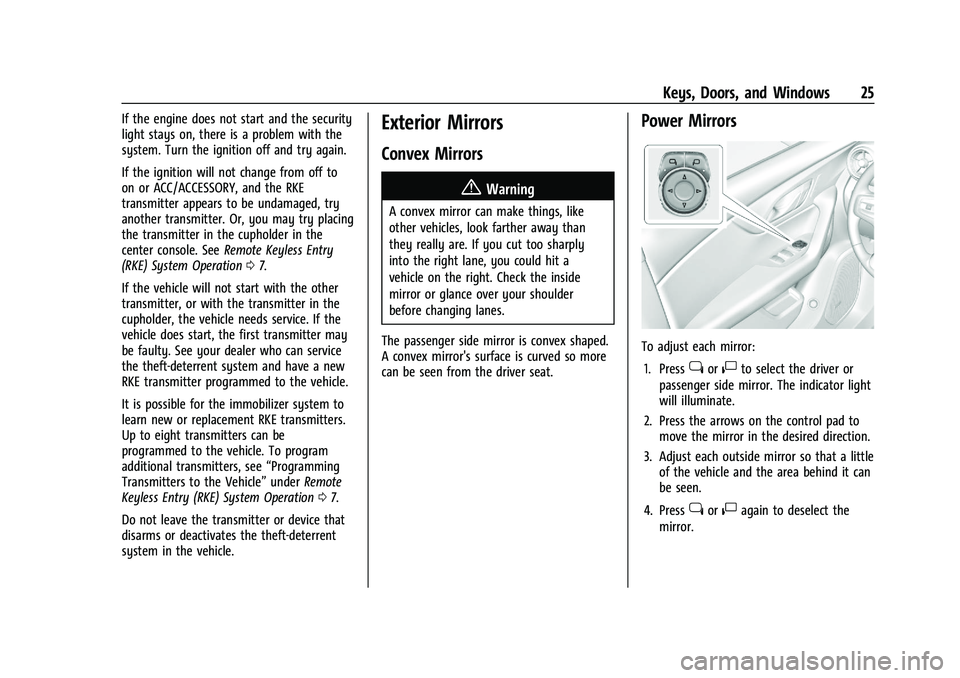
Power Mirrors
To adjust each mirror: 1. Press
jor|to select the driver or
passenger side mirror. The indicator light
will illuminate.
2. Press the arrows on the control pad to move the mirror in the desired direction.
3. Adjust each outside mirror so that a little of the vehicle and the area behind it can
be seen.
4. Press
jor|again to deselect the
mirror.
Page 77 of 380
Chevrolet Blazer Owner Manual (GMNA-Localizing-U.S./Canada/Mexico-
14608203) - 2021 - CRC - 10/29/20
76 Storage
Storage
Storage Compartments
Storage Compartments . . . . . . . . . . . . . . . . . 76
Glove Box . . . . . . . . . . . . . . . . . . . . . . . . . . . . . . 76
Sunglasses Storage . . . . . . . . . . . . . . . . . . . . . 76
Armrest Storage . . . . . . . . . . . . . . . . . . . . . . . . 77
Rear Storage . . . . . . . . . . . . . . . . . . . . . . . . . . . . 77
Center Console Storage . . . . . . . . . . . . . . . . . 77
Additional Storage Features
Shopping Bag Hooks . . . . . . . . . . . . . . . . . . . 78
Cargo Tie-Downs . . . . . . . . . . . . . . . . . . . . . . . 78
Cargo Management System . . . . . . . . . . . . 79
Roof Rack System
Roof Rack System . . . . . . . . . . . . . . . . . . . . . . . 81
Storage Compartments{
Warning
Do not store heavy or sharp objects in
storage compartments. In a crash, these
objects may cause the cover to open and
could result in injury.
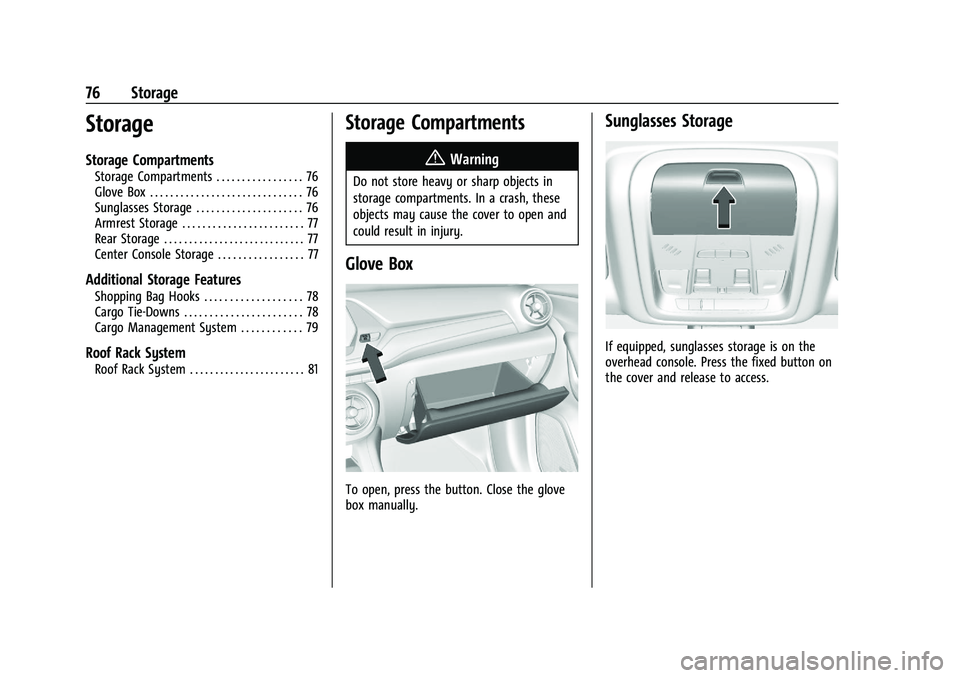
Glove Box
To open, press the button. Close the glove
box manually.
Sunglasses Storage
If equipped, sunglasses storage is on the
overhead console. Press the fixed button on
the cover and release to access.
Page 78 of 380
Chevrolet Blazer Owner Manual (GMNA-Localizing-U.S./Canada/Mexico-
14608203) - 2021 - CRC - 10/29/20
Storage 77
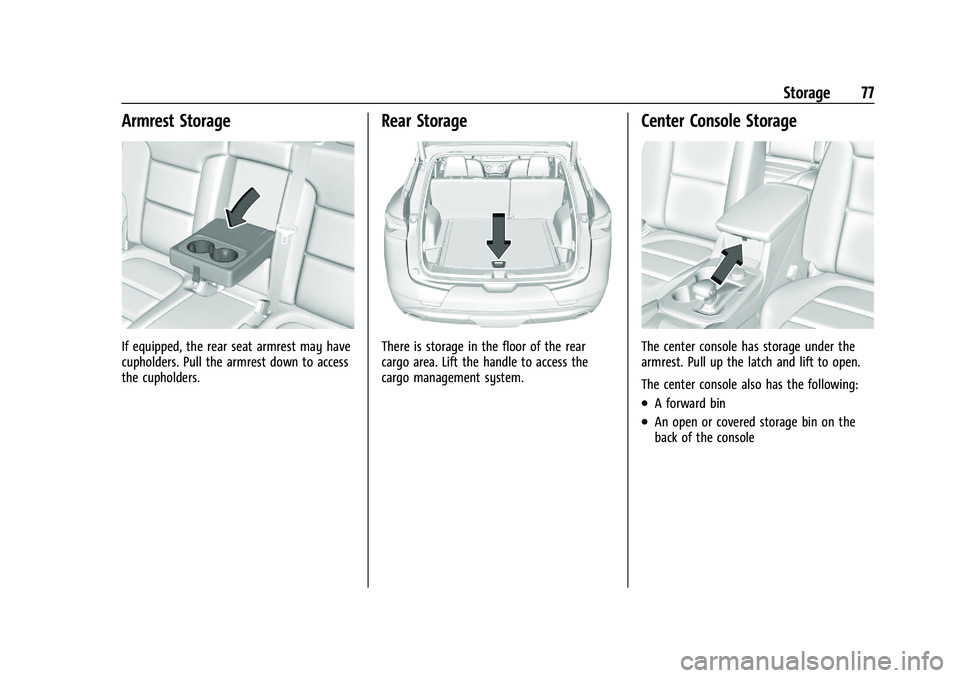
Armrest Storage
If equipped, the rear seat armrest may have
cupholders. Pull the armrest down to access
the cupholders.
Rear Storage
There is storage in the floor of the rear
cargo area. Lift the handle to access the
cargo management system.
Center Console Storage
The center console has storage under the
armrest. Pull up the latch and lift to open.
The center console also has the following:
.A forward bin
.An open or covered storage bin on the
back of the console
Page 79 of 380
Chevrolet Blazer Owner Manual (GMNA-Localizing-U.S./Canada/Mexico-
14608203) - 2021 - CRC - 10/29/20
78 Storage
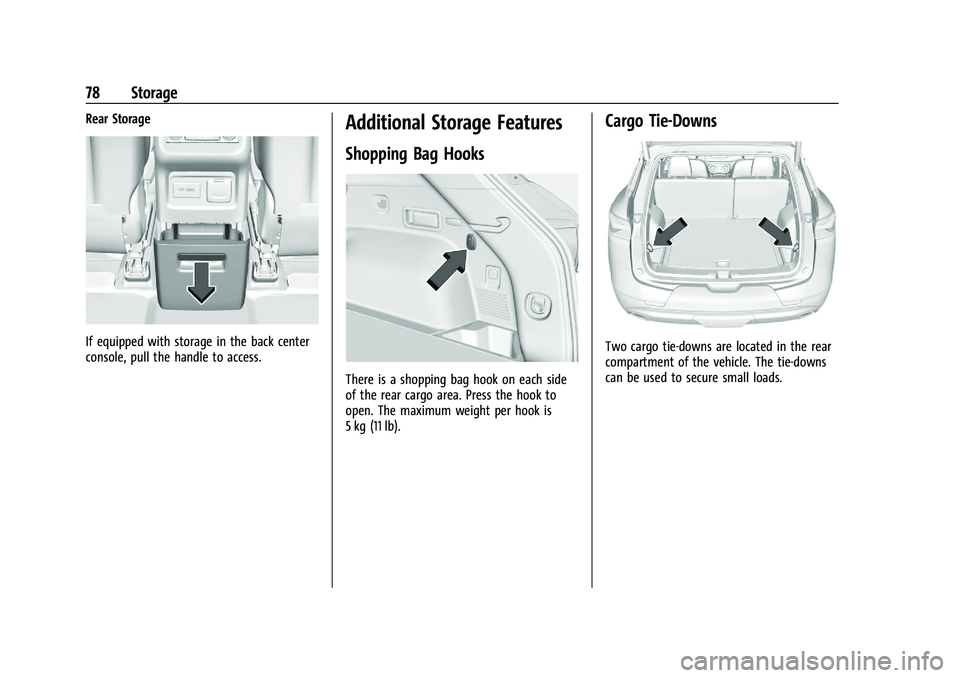
Rear Storage
If equipped with storage in the back center
console, pull the handle to access.
Additional Storage Features
Shopping Bag Hooks
There is a shopping bag hook on each side
of the rear cargo area. Press the hook to
open. The maximum weight per hook is
5 kg (11 lb).
Cargo Tie-Downs
Two cargo tie-downs are located in the rear
compartment of the vehicle. The tie-downs
can be used to secure small loads.
Page 87 of 380
Chevrolet Blazer Owner Manual (GMNA-Localizing-U.S./Canada/Mexico-
14608203) - 2021 - CRC - 10/29/20
86 Instruments and Controls
signal. The compass system will
automatically determine when a GPS signal
is restored and provide a heading again.
Clock
Set the time and date using the
infotainment system. See "Time / Date"
underSettings 0164.
Power Outlets
Power Outlets 12-Volt Direct Current
The vehicle is equipped with 12-volt outlets
that can be used to plug in electrical
equipment, such as a cell phone or MP3
player.
The power outlets are located:
.Inside the center console storage
compartment.
.In the rear cargo area.
Lift the cover to access the outlet and
replace when not in use.
There are also charging only USB ports on
the rear of the center console.
{Warning
Power is always supplied to the rear
cargo power outlet. Do not leave
electrical equipment plugged in when the
vehicle is not in use because the vehicle
could catch fire and cause injury or
death.
Caution
Leaving electrical equipment plugged in
for an extended period of time while the
ignition is off will drain the battery.
Always unplug electrical equipment when
not in use and do not plug in equipment
that exceeds the maximum 15 amp
rating.
Certain accessory plugs may not be
compatible with the accessory power outlet
and could overload vehicle and adapter
fuses. If a problem is experienced, see your
dealer.
When adding electrical equipment, be sure
to follow the proper installation instructions
included with the equipment. See Add-On
Electrical Equipment 0252.
Caution
Hanging heavy equipment from the
power outlet can cause damage not
covered by the vehicle warranty. The
power outlets are designed for accessory
power plugs only, such as cell phone
charge cords.
Power Outlet 110-V/120-V Alternating
Current
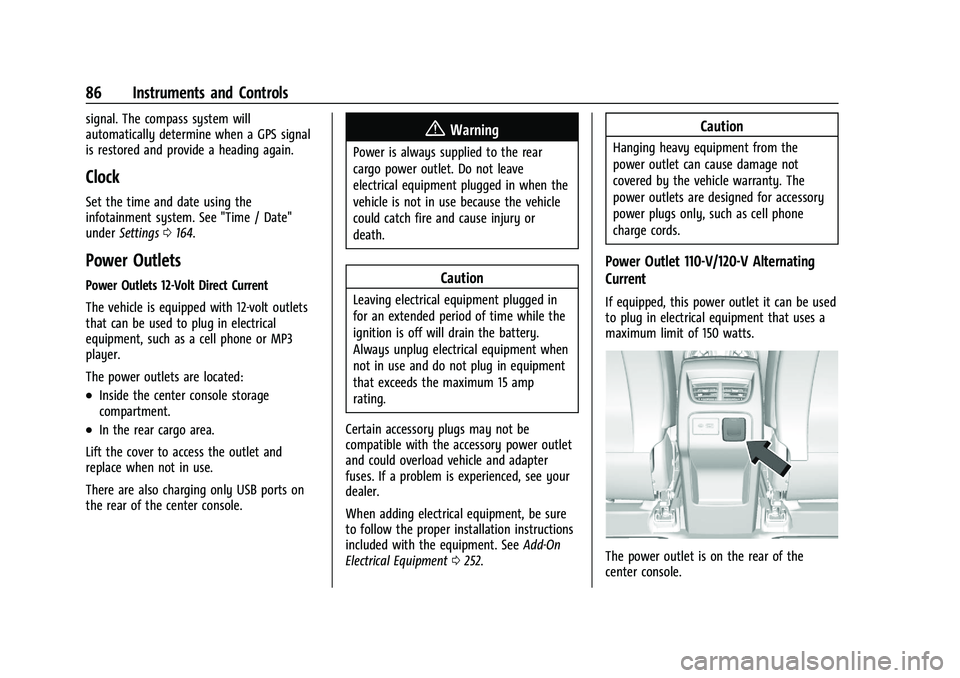
If equipped, this power outlet it can be used
to plug in electrical equipment that uses a
maximum limit of 150 watts.
The power outlet is on the rear of the
center console.
Page 100 of 380
Chevrolet Blazer Owner Manual (GMNA-Localizing-U.S./Canada/Mexico-
14608203) - 2021 - CRC - 10/29/20
Instruments and Controls 99
The airbag readiness light comes on for
several seconds when the vehicle is started.
If the light does not come on then, have it
fixed immediately.
{Warning
If the airbag readiness light stays on
after the vehicle is started or comes on
while driving, it means the airbag system
might not be working properly. The
airbags in the vehicle might not inflate in
a crash, or they could even inflate
without a crash. To help avoid injury,
have the vehicle serviced right away.
If there is a problem with the airbag
system, a Driver Information Center (DIC)
message may also come on.
Passenger Airbag Status Indicator
The vehicle has a passenger sensing system.
See Passenger Sensing System 055 for
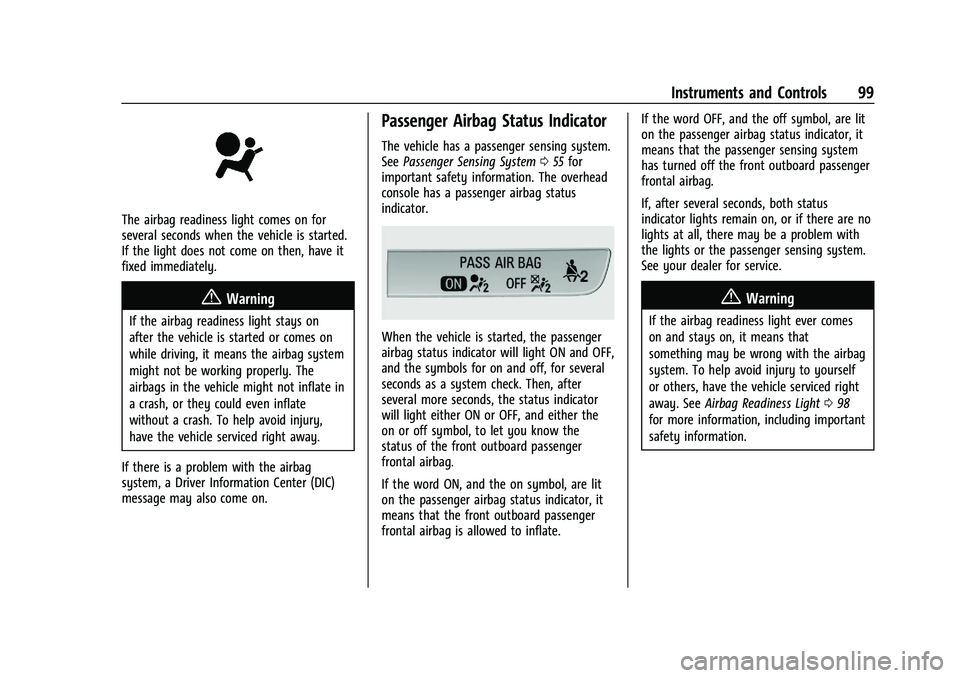
important safety information. The overhead
console has a passenger airbag status
indicator.
When the vehicle is started, the passenger
airbag status indicator will light ON and OFF,
and the symbols for on and off, for several
seconds as a system check. Then, after
several more seconds, the status indicator
will light either ON or OFF, and either the
on or off symbol, to let you know the
status of the front outboard passenger
frontal airbag.
If the word ON, and the on symbol, are lit
on the passenger airbag status indicator, it
means that the front outboard passenger
frontal airbag is allowed to inflate. If the word OFF, and the off symbol, are lit
on the passenger airbag status indicator, it
means that the passenger sensing system
has turned off the front outboard passenger
frontal airbag.
If, after several seconds, both status
indicator lights remain on, or if there are no
lights at all, there may be a problem with
the lights or the passenger sensing system.
See your dealer for service.
{Warning
If the airbag readiness light ever comes
on and stays on, it means that
something may be wrong with the airbag
system. To help avoid injury to yourself
or others, have the vehicle serviced right
away. See
Airbag Readiness Light 098
for more information, including important
safety information.
Page 115 of 380
Chevrolet Blazer Owner Manual (GMNA-Localizing-U.S./Canada/Mexico-
14608203) - 2021 - CRC - 10/29/20
114 Instruments and Controls
4. Touch9orRto turn a feature off or on.
5. Touch
zto go to the top level of the
Settings menu.
The menu may contain the following:
Rear Seat Reminder
This allows for a chime and a message when
the rear door has been opened before or
during operation of the vehicle.
Touch Off or On.
Climate and Air Quality
Touch and the following may display:
.Auto Fan Speed
.Auto Cooled Seats
.Auto Heated Seats
.Auto Defog
.Auto Rear Defog
Auto Fan Speed
This setting specifies the amount of airflow
when the climate control fan setting is
Auto Fan.
Touch Low, Medium, or High. Auto Cooled Seats
When enabled, this feature will
automatically activate ventilated seats at
the level required by the interior
temperature. See
Heated and Ventilated
Front Seats 040.
Touch Off or On.
Auto Heated Seats
When enabled, this feature will
automatically activate the heated seats at
the level required by the interior
temperature. The auto heated seats can be
turned off by using the heated seat buttons
on the center console. See Heated and
Ventilated Front Seats 040.
Touch Off or On.
Auto Defog
This setting automatically turns the front
defogger on when the engine is started.
Touch Off or On.
Auto Rear Defog
This setting automatically turns the rear
defogger on when the engine is started.
Touch Off or On.
Collision/Detection Systems
Touch and the following may display:
.Alert Type
.Forward Collision System
.Front Pedestrian Detection
.Adaptive Cruise Go Notifier
.Lane Change Alert
.Rear Camera Park Assist Symbols
.Rear Cross Traffic Alert
Alert Type
This feature will set the type of alert
received from the driver assistance systems
to help avoid crashes, either Beeps or Safety
Alert Seat vibration pulses.
Touch Beeps or Safety Alert Seat.
Forward Collision System
This setting can alert of a potential crash
with a detected vehicle ahead and can apply
brakes to help reduce a collision’s severity.
Touch Off, Alert, or Alert and Brake.
Front Pedestrian Detection
This feature may help avoid or reduce the
harm caused by front-end crashes with
nearby pedestrians.
Page 139 of 380
Chevrolet Blazer Owner Manual (GMNA-Localizing-U.S./Canada/Mexico-
14608203) - 2021 - CRC - 10/29/20
138 Infotainment System
The vehicle may be equipped with two USB
ports in the center console under the
armrest and another two on the center
stack. These ports are for data and charging.
There may also be two USB ports for
charging only at the rear of the center
console.
Caution
To avoid vehicle damage, unplug all
accessories and disconnect all accessory
cables from the vehicle when not in use.
Accessory cables left plugged into the
vehicle, unconnected to a device, could be
damaged or cause an electrical short if
the unconnected end comes in contact
with liquids or another power source such
as the accessory power outlet.
Playing from a USB
A USB mass storage device can be connected
to the USB port.
Audio extensions supported by the USB may
include:
.MP3
.AAC
.OGG
.3GPGracenote
When plugging in a USB device, Gracenote
service builds voice tags for music. Voice
tags allow artists, albums with hard to
pronounce names, and nicknames to be used
to play music through voice recognition,
if equipped.
While indexing, infotainment features may
be available.
My Media Library
MyMedia is only available when more than
one indexed device is connected. It allows
access to content from all indexed media
sources. MyMedia will show as an available
source in the Source page.
USB MP3 Player and USB Devices
The USB MP3 players and USB devices
connected must comply with the USB Mass
Storage Class specification (USB MSC).
To play a USB device:
1. Connect the USB.
2. Touch Audio from the Home Page.
3. Touch the More option and then touch the USB device.
Use the following when playing an active
USB source:
p: Touch to play the current media source.
j: Touch to pause playback of the current
media source.
7:
.Touch to seek the beginning of the
current or previous track.
.Touch and hold to reverse quickly
through playback. Release to return to
playing speed. Elapsed time displays.
6:
.Touch to seek the next track.
.Touch and hold to advance quickly
through playback. Release to return to
playing speed. Elapsed time displays.
Shuffle : Touch the shuffle icon to play
music in random order.
USB Sound Menu
See “Infotainment System Sound Menu”
under AM-FM Radio 0134.
USB Browse Menu
When a list of songs, albums, artists,
or other types of media displays, the up and
down arrows and A-Z appear on the left
Page 215 of 380
Chevrolet Blazer Owner Manual (GMNA-Localizing-U.S./Canada/Mexico-
14608203) - 2021 - CRC - 10/29/20
214 Driving and Operating
Ifdcomes on and stays on, the vehicle
may need more time to diagnose the
problem. If the condition persists, see your
dealer.
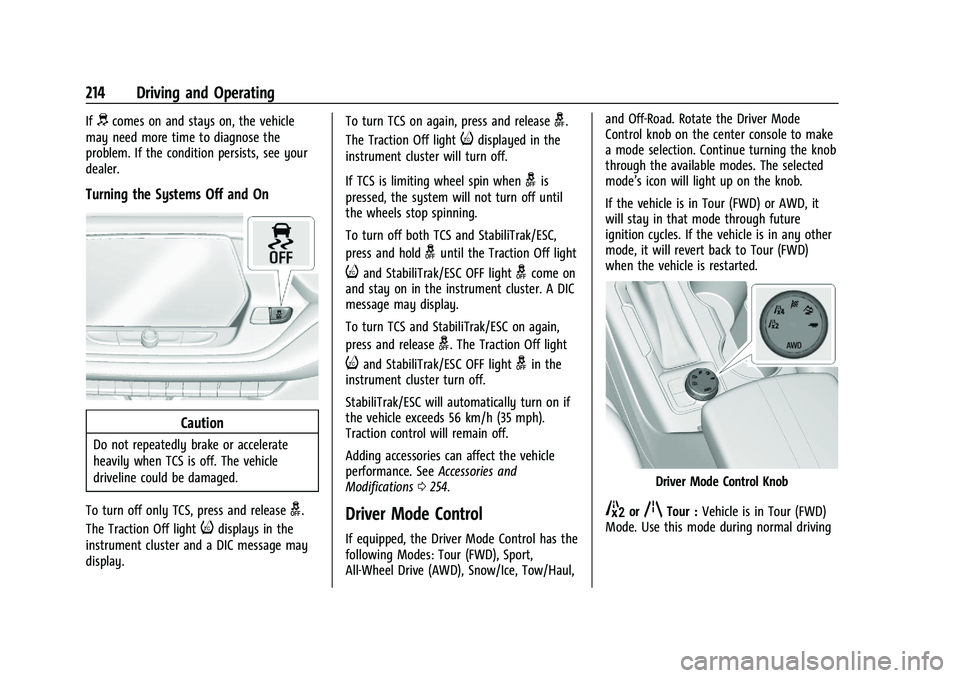
Turning the Systems Off and On
Caution
Do not repeatedly brake or accelerate
heavily when TCS is off. The vehicle
driveline could be damaged.
To turn off only TCS, press and release
g.
The Traction Off light
idisplays in the
instrument cluster and a DIC message may
display. To turn TCS on again, press and release
g.
The Traction Off light
idisplayed in the
instrument cluster will turn off.
If TCS is limiting wheel spin when
gis
pressed, the system will not turn off until
the wheels stop spinning.
To turn off both TCS and StabiliTrak/ESC,
press and hold
guntil the Traction Off light
iand StabiliTrak/ESC OFF lightgcome on
and stay on in the instrument cluster. A DIC
message may display.
To turn TCS and StabiliTrak/ESC on again,
press and release
g. The Traction Off light
iand StabiliTrak/ESC OFF lightgin the
instrument cluster turn off.
StabiliTrak/ESC will automatically turn on if
the vehicle exceeds 56 km/h (35 mph).
Traction control will remain off.
Adding accessories can affect the vehicle
performance. See Accessories and
Modifications 0254.
Driver Mode Control
If equipped, the Driver Mode Control has the
following Modes: Tour (FWD), Sport,
All-Wheel Drive (AWD), Snow/Ice, Tow/Haul, and Off-Road. Rotate the Driver Mode
Control knob on the center console to make
a mode selection. Continue turning the knob
through the available modes. The selected
mode’s icon will light up on the knob.
If the vehicle is in Tour (FWD) or AWD, it
will stay in that mode through future
ignition cycles. If the vehicle is in any other
mode, it will revert back to Tour (FWD)
when the vehicle is restarted.
Driver Mode Control Knob
5orqTour :
Vehicle is in Tour (FWD)
Mode. Use this mode during normal driving
Page 231 of 380
Chevrolet Blazer Owner Manual (GMNA-Localizing-U.S./Canada/Mexico-
14608203) - 2021 - CRC - 10/29/20
230 Driving and Operating
Blocked sensors will not detect objects and
can also cause false detections. Keep the
sensors clean of mud, dirt, snow, ice, and
slush; and clean sensors after a car wash in
freezing temperatures.
{Warning
The Park Assist system does not detect
children, pedestrians, bicyclists, animals,
or objects below the bumper or that are
too close or too far from the vehicle. It is
not available at speeds greater than
8 km/h (5 mph). To prevent injury, death,
or vehicle damage, even with Park Assist,
always check the area around the vehicle
and check all mirrors before backing.
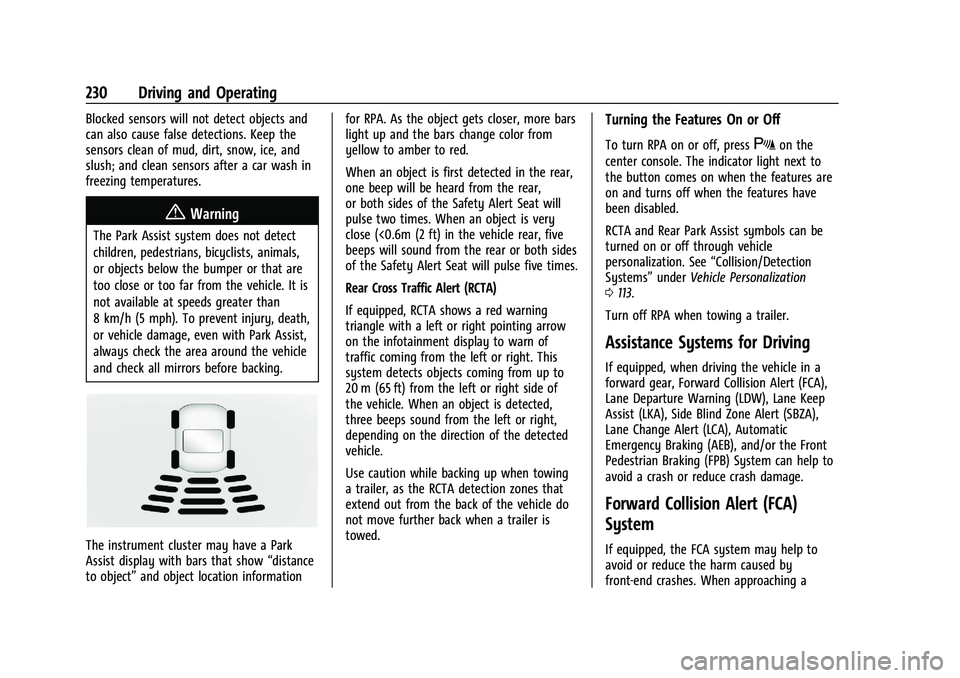
The instrument cluster may have a Park
Assist display with bars that show“distance
to object” and object location information for RPA. As the object gets closer, more bars
light up and the bars change color from
yellow to amber to red.
When an object is first detected in the rear,
one beep will be heard from the rear,
or both sides of the Safety Alert Seat will
pulse two times. When an object is very
close (<0.6m (2 ft) in the vehicle rear, five
beeps will sound from the rear or both sides
of the Safety Alert Seat will pulse five times.
Rear Cross Traffic Alert (RCTA)
If equipped, RCTA shows a red warning
triangle with a left or right pointing arrow
on the infotainment display to warn of
traffic coming from the left or right. This
system detects objects coming from up to
20 m (65 ft) from the left or right side of
the vehicle. When an object is detected,
three beeps sound from the left or right,
depending on the direction of the detected
vehicle.
Use caution while backing up when towing
a trailer, as the RCTA detection zones that
extend out from the back of the vehicle do
not move further back when a trailer is
towed.
Turning the Features On or Off
To turn RPA on or off, pressXon the
center console. The indicator light next to
the button comes on when the features are
on and turns off when the features have
been disabled.
RCTA and Rear Park Assist symbols can be
turned on or off through vehicle
personalization. See “Collision/Detection
Systems” underVehicle Personalization
0 113.
Turn off RPA when towing a trailer.
Assistance Systems for Driving
If equipped, when driving the vehicle in a
forward gear, Forward Collision Alert (FCA),
Lane Departure Warning (LDW), Lane Keep
Assist (LKA), Side Blind Zone Alert (SBZA),
Lane Change Alert (LCA), Automatic
Emergency Braking (AEB), and/or the Front
Pedestrian Braking (FPB) System can help to
avoid a crash or reduce crash damage.
Forward Collision Alert (FCA)
System
If equipped, the FCA system may help to
avoid or reduce the harm caused by
front-end crashes. When approaching a