hood release CHEVROLET BLAZER 2023 Owners Manual
[x] Cancel search | Manufacturer: CHEVROLET, Model Year: 2023, Model line: BLAZER, Model: CHEVROLET BLAZER 2023Pages: 360, PDF Size: 17.34 MB
Page 6 of 360
Chevrolet Blazer Owner Manual (GMNA-Localizing-U.S./Canada/Mexico-
16401961) - 2023 - CRC - 5/17/22
Introduction 5
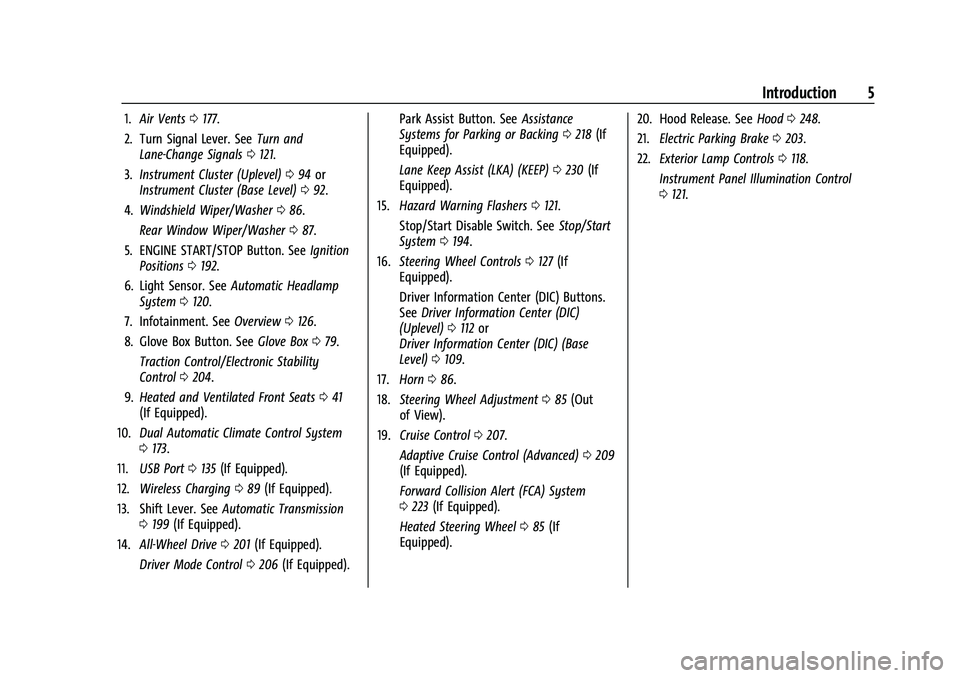
1.Air Vents 0177.
2. Turn Signal Lever. See Turn and
Lane-Change Signals 0121.
3. Instrument Cluster (Uplevel) 094 or
Instrument Cluster (Base Level) 092.
4. Windshield Wiper/Washer 086.
Rear Window Wiper/Washer 087.
5. ENGINE START/STOP Button. See Ignition
Positions 0192.
6. Light Sensor. See Automatic Headlamp
System 0120.
7. Infotainment. See Overview0126.
8. Glove Box Button. See Glove Box079.
Traction Control/Electronic Stability
Control 0204.
9. Heated and Ventilated Front Seats 041
(If Equipped).
10. Dual Automatic Climate Control System
0173.
11. USB Port 0135 (If Equipped).
12. Wireless Charging 089 (If Equipped).
13. Shift Lever. See Automatic Transmission
0 199 (If Equipped).
14. All-Wheel Drive 0201 (If Equipped).
Driver Mode Control 0206 (If Equipped). Park Assist Button. See
Assistance
Systems for Parking or Backing 0218 (If
Equipped).
Lane Keep Assist (LKA) (KEEP) 0230 (If
Equipped).
15. Hazard Warning Flashers 0121.
Stop/Start Disable Switch. See Stop/Start
System 0194.
16. Steering Wheel Controls 0127 (If
Equipped).
Driver Information Center (DIC) Buttons.
See Driver Information Center (DIC)
(Uplevel) 0112 or
Driver Information Center (DIC) (Base
Level) 0109.
17. Horn 086.
18. Steering Wheel Adjustment 085 (Out
of View).
19. Cruise Control 0207.
Adaptive Cruise Control (Advanced) 0209
(If Equipped).
Forward Collision Alert (FCA) System
0 223 (If Equipped).
Heated Steering Wheel 085 (If
Equipped). 20. Hood Release. See
Hood0248.
21. Electric Parking Brake 0203.
22. Exterior Lamp Controls 0118.
Instrument Panel Illumination Control
0 121.
Page 87 of 360
Chevrolet Blazer Owner Manual (GMNA-Localizing-U.S./Canada/Mexico-
16401961) - 2023 - CRC - 5/17/22
86 Instruments and Controls
To turn this feature on or off, select Settings
> Vehicle > Comfort and Convenience >
Heated Steering Wheel > Select ON or OFF.
Horn
Pressaon the steering wheel pad to
sound the horn.
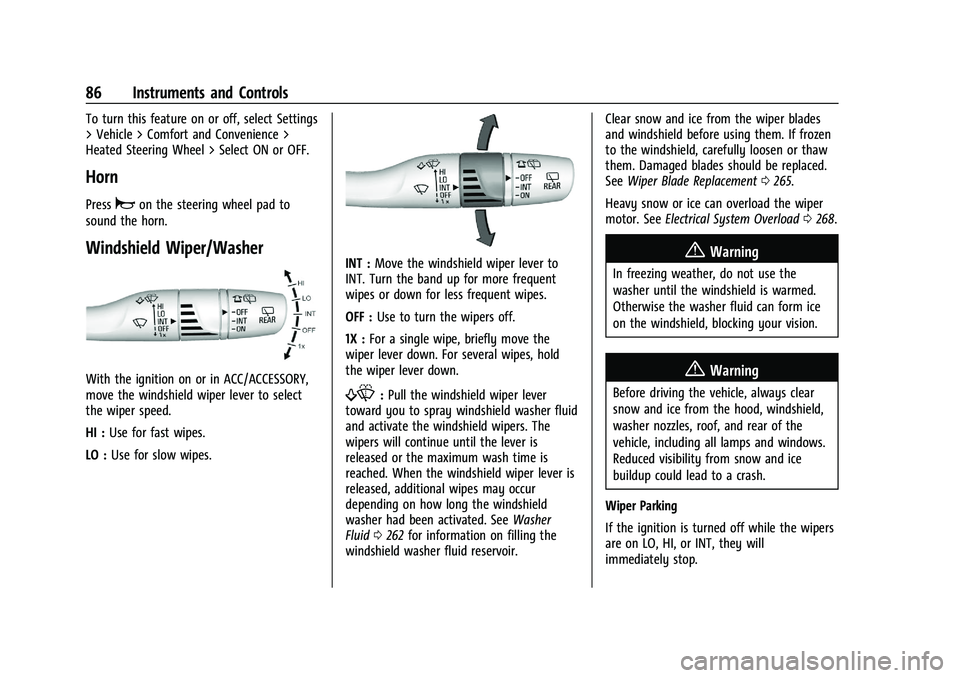
Windshield Wiper/Washer
With the ignition on or in ACC/ACCESSORY,
move the windshield wiper lever to select
the wiper speed.
HI : Use for fast wipes.
LO : Use for slow wipes.
INT : Move the windshield wiper lever to
INT. Turn the band up for more frequent
wipes or down for less frequent wipes.
OFF : Use to turn the wipers off.
1X : For a single wipe, briefly move the
wiper lever down. For several wipes, hold
the wiper lever down.
f: Pull the windshield wiper lever
toward you to spray windshield washer fluid
and activate the windshield wipers. The
wipers will continue until the lever is
released or the maximum wash time is
reached. When the windshield wiper lever is
released, additional wipes may occur
depending on how long the windshield
washer had been activated. See Washer
Fluid 0262 for information on filling the
windshield washer fluid reservoir. Clear snow and ice from the wiper blades
and windshield before using them. If frozen
to the windshield, carefully loosen or thaw
them. Damaged blades should be replaced.
See
Wiper Blade Replacement 0265.
Heavy snow or ice can overload the wiper
motor. See Electrical System Overload 0268.
{Warning
In freezing weather, do not use the
washer until the windshield is warmed.
Otherwise the washer fluid can form ice
on the windshield, blocking your vision.
{Warning
Before driving the vehicle, always clear
snow and ice from the hood, windshield,
washer nozzles, roof, and rear of the
vehicle, including all lamps and windows.
Reduced visibility from snow and ice
buildup could lead to a crash.
Wiper Parking
If the ignition is turned off while the wipers
are on LO, HI, or INT, they will
immediately stop.
Page 249 of 360
Chevrolet Blazer Owner Manual (GMNA-Localizing-U.S./Canada/Mexico-
16401961) - 2023 - CRC - 5/17/22
248 Vehicle Care
This vehicle has an airbag system. Before
attempting to do your own service work,
seeServicing the Airbag-Equipped Vehicle
0 60.
If equipped with remote vehicle start, open
the hood before performing any service
work to prevent remote starting the vehicle
accidentally. See Remote Vehicle Start 014.
Keep a record with all parts receipts and list
the mileage and the date of any service
work performed. See Maintenance Records
0 324.
Caution
Even small amounts of contamination can
cause damage to vehicle systems. Do not
allow contaminants to contact the fluids,
reservoir caps, or dipsticks.
Hood
{Warning
For vehicles with auto engine stop/start,
turn the vehicle off before opening the
hood. If the vehicle is on, the engine will
start when the hood is opened. You or
others could be injured.
{Warning
Components under the hood can get hot
from running the engine. To help avoid
the risk of burning unprotected skin,
never touch these components until they
have cooled, and always use a glove or
towel to avoid direct skin contact.
Clear any snow from the hood before
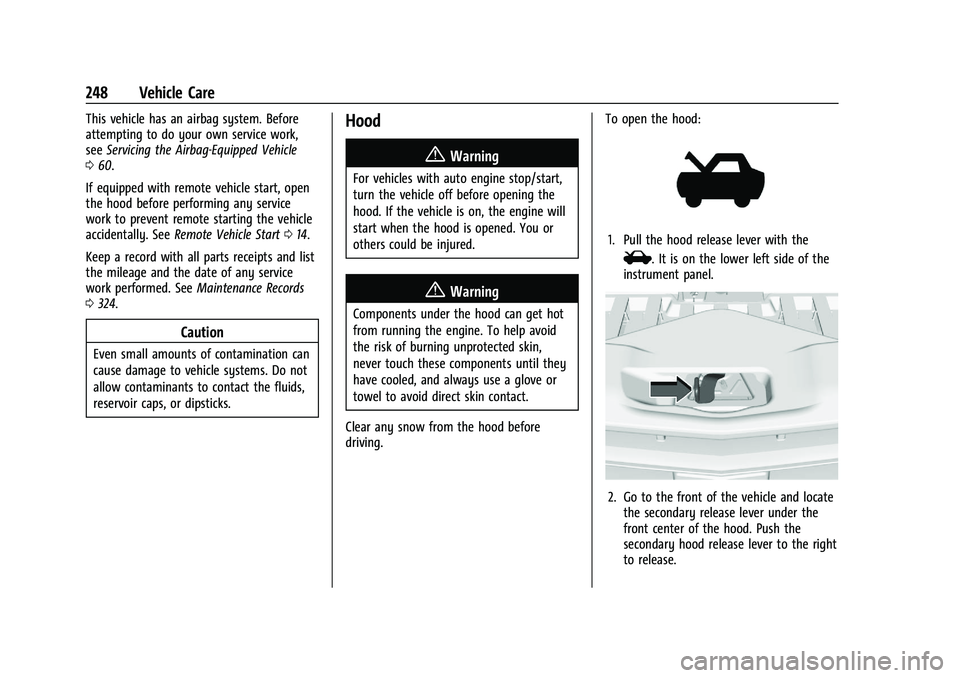
driving. To open the hood:
1. Pull the hood release lever with the
i. It is on the lower left side of the
instrument panel.
2. Go to the front of the vehicle and locate the secondary release lever under the
front center of the hood. Push the
secondary hood release lever to the right
to release.
Page 262 of 360
Chevrolet Blazer Owner Manual (GMNA-Localizing-U.S./Canada/Mexico-
16401961) - 2023 - CRC - 5/17/22
Vehicle Care 261
6. Verify coolant level after the engine isshut off and the coolant is cold.
If necessary, repeat coolant fill procedure
Steps 1–6.
If the coolant still is not at the proper
level when the system cools down again,
see your dealer.
Caution
If the pressure cap is not tightly installed,
coolant loss and engine damage may
occur. Be sure the cap is properly and
tightly secured.
2.0L L4 Engine Only - Automatic Coolant
Service Fill Instructions
If equipped, this feature assists in filling and
removing air from the cooling system after
service of components or when coolant is
added after being too low.
To activate the fill and air removal process:
1. With a cold system, add coolant to the indicated mark on the surge tank.
2. Replace the cap on the surge tank.
3. Connect the vehicle to a battery charger.
4. Turn the ignition to Service Mode. See Ignition Positions 0192. 5. Turn off the air conditioning.
6. Set the parking brake.
7. At the same time, press the accelerator
and the brake for two seconds, then
release.
At the end of the cycle, check the coolant
level in the surge tank and add coolant if it
is low. Turn off the vehicle, allow the
Electronic Control Module (ECM) to go to
sleep, about two minutes, and repeat
Steps 4–7.
Listen for pump activation and movement of
the control valves while watching the level
of the coolant in the surge tank. If the tank
empties, turn the ignition off, carefully
remove the surge tank cap, refill to the
indicated mark, and repeat Steps 4–7. The
fill and air removal process will run for
approximately 10 minutes.
Engine Overheating
The vehicle has several indicators to warn of
the engine overheating.
There is an engine coolant temperature
gauge on the instrument cluster. See Engine
Coolant Temperature Gauge 097. The
vehicle may also display a message on the
Driver Information Center (DIC). If the decision is made not to lift the hood
when this warning appears, get service help
right away. See
Roadside Assistance Program
0 332.
If the decision is made to lift the hood,
make sure the vehicle is parked on a level
surface. Then check to see if the engine
cooling fan is running. If the engine is
overheating, the fan should be running. If it
is not, do not continue to run the engine.
Have the vehicle serviced.
Caution
Do not run the engine if there is a leak
in the engine cooling system. This can
cause a loss of all coolant and can
damage the system and vehicle. Have
any leaks fixed right away.
If Steam Is Coming from the Engine
Compartment
{Warning
Steam and scalding liquids from a hot
cooling system are under pressure.
Turning the pressure cap, even a little,
can cause them to come out at high (Continued)
Page 307 of 360
Chevrolet Blazer Owner Manual (GMNA-Localizing-U.S./Canada/Mexico-
16401961) - 2023 - CRC - 5/17/22
306 Vehicle Care
3. Start the engine and let it idle for morethan three minutes before driving the
vehicle.
Caution
Too much or too little fluid can damage
the transmission. Be sure that the
transmission fluid is at the proper level
before towing with all four wheels on the
ground.
Caution
Do not tow a vehicle with the front drive
wheels on the ground if one of the front
tires is a compact spare tire. Towing with
two different tire sizes on the front of
the vehicle can cause severe damage to
the transmission.
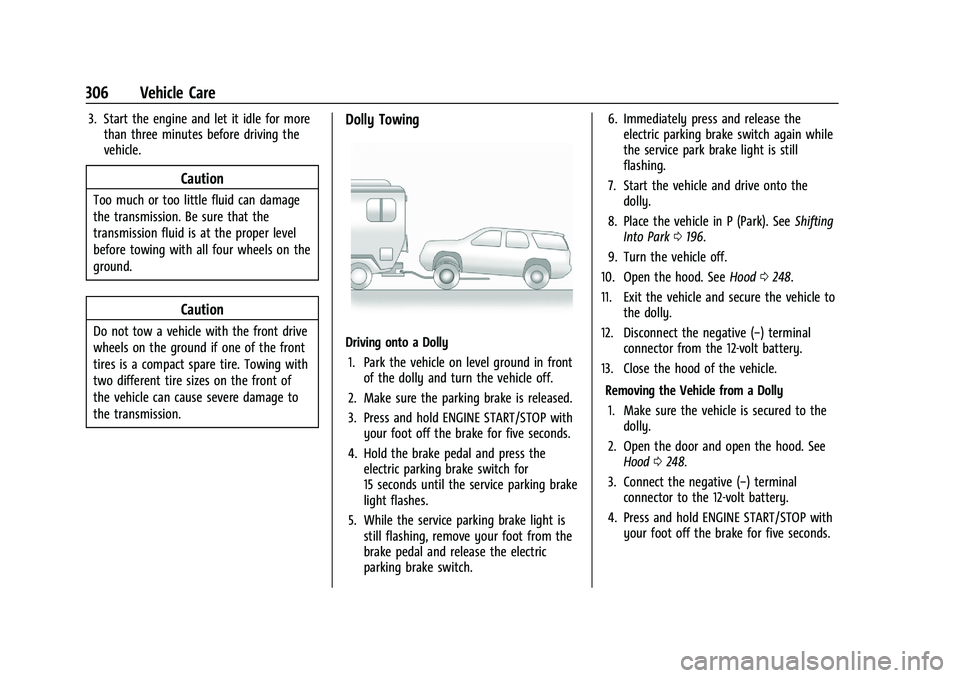
Dolly Towing
Driving onto a Dolly
1. Park the vehicle on level ground in front of the dolly and turn the vehicle off.
2. Make sure the parking brake is released.
3. Press and hold ENGINE START/STOP with your foot off the brake for five seconds.
4. Hold the brake pedal and press the electric parking brake switch for
15 seconds until the service parking brake
light flashes.
5. While the service parking brake light is still flashing, remove your foot from the
brake pedal and release the electric
parking brake switch. 6. Immediately press and release the
electric parking brake switch again while
the service park brake light is still
flashing.
7. Start the vehicle and drive onto the dolly.
8. Place the vehicle in P (Park). See Shifting
Into Park 0196.
9. Turn the vehicle off.
10. Open the hood. See Hood0248.
11. Exit the vehicle and secure the vehicle to the dolly.
12. Disconnect the negative (−) terminal connector from the 12-volt battery.
13. Close the hood of the vehicle.
Removing the Vehicle from a Dolly1. Make sure the vehicle is secured to the dolly.
2. Open the door and open the hood. See Hood 0248.
3. Connect the negative (−) terminal connector to the 12-volt battery.
4. Press and hold ENGINE START/STOP with your foot off the brake for five seconds.
Page 322 of 360
Chevrolet Blazer Owner Manual (GMNA-Localizing-U.S./Canada/Mexico-
16401961) - 2023 - CRC - 5/17/22
Service and Maintenance 321
Recommended Fluids, Lubricants, and Parts
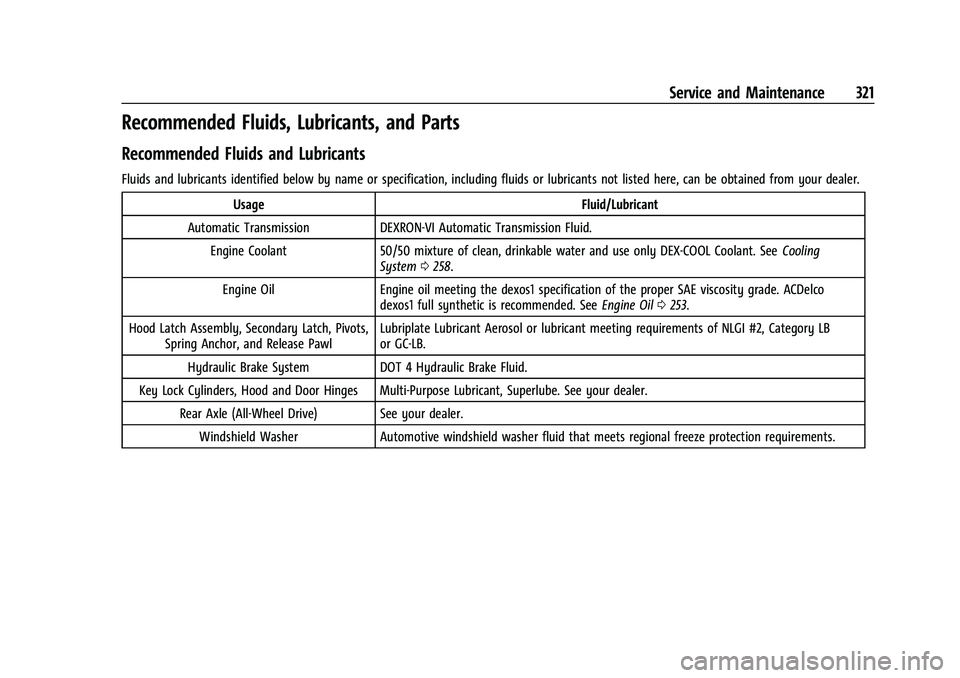
Recommended Fluids and Lubricants
Fluids and lubricants identified below by name or specification, including fluids or lubricants not listed here, can be obtained from your dealer.Usage Fluid/Lubricant
Automatic Transmission DEXRON-VI Automatic Transmission Fluid. Engine Coolant 50/50 mixture of clean, drinkable water and use only DEX-COOL Coolant. See Cooling
System 0258.
Engine Oil Engine oil meeting the dexos1 specification of the proper SAE viscosity grade. ACDelco
dexos1 full synthetic is recommended. See Engine Oil0253.
Hood Latch Assembly, Secondary Latch, Pivots, Spring Anchor, and Release Pawl Lubriplate Lubricant Aerosol or lubricant meeting requirements of NLGI #2, Category LB
or GC-LB.
Hydraulic Brake System DOT 4 Hydraulic Brake Fluid.
Key Lock Cylinders, Hood and Door Hinges Multi-Purpose Lubricant, Superlube. See your dealer. Rear Axle (All-Wheel Drive) See your dealer.Windshield Washer Automotive windshield washer fluid that meets regional freeze protection requirements.