radio controls CHEVROLET BOLT EV 2017 User Guide
[x] Cancel search | Manufacturer: CHEVROLET, Model Year: 2017, Model line: BOLT EV, Model: CHEVROLET BOLT EV 2017Pages: 361, PDF Size: 4.89 MB
Page 144 of 361
Chevrolet Bolt EV Owner Manual (GMNA-Localizing-U.S./Canada/Mexico-
10122739) - 2017 - CRC - 10/3/16
Instruments and Controls 143
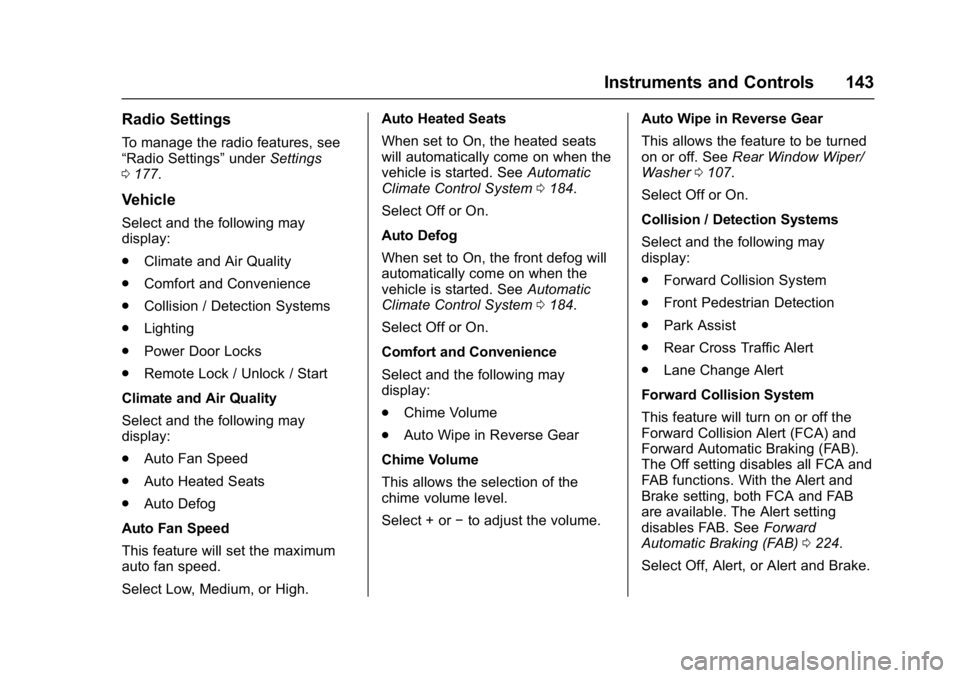
Radio Settings
To manage the radio features, see
“Radio Settings”underSettings
0 177.
Vehicle
Select and the following may
display:
.
Climate and Air Quality
. Comfort and Convenience
. Collision / Detection Systems
. Lighting
. Power Door Locks
. Remote Lock / Unlock / Start
Climate and Air Quality
Select and the following may
display:
. Auto Fan Speed
. Auto Heated Seats
. Auto Defog
Auto Fan Speed
This feature will set the maximum
auto fan speed.
Select Low, Medium, or High. Auto Heated Seats
When set to On, the heated seats
will automatically come on when the
vehicle is started. See
Automatic
Climate Control System 0184.
Select Off or On.
Auto Defog
When set to On, the front defog will
automatically come on when the
vehicle is started. See Automatic
Climate Control System 0184.
Select Off or On.
Comfort and Convenience
Select and the following may
display:
. Chime Volume
. Auto Wipe in Reverse Gear
Chime Volume
This allows the selection of the
chime volume level.
Select + or −to adjust the volume. Auto Wipe in Reverse Gear
This allows the feature to be turned
on or off. See
Rear Window Wiper/
Washer 0107.
Select Off or On.
Collision / Detection Systems
Select and the following may
display:
. Forward Collision System
. Front Pedestrian Detection
. Park Assist
. Rear Cross Traffic Alert
. Lane Change Alert
Forward Collision System
This feature will turn on or off the
Forward Collision Alert (FCA) and
Forward Automatic Braking (FAB).
The Off setting disables all FCA and
FAB functions. With the Alert and
Brake setting, both FCA and FAB
are available. The Alert setting
disables FAB. See Forward
Automatic Braking (FAB) 0224.
Select Off, Alert, or Alert and Brake.
Page 148 of 361

Chevrolet Bolt EV Owner Manual (GMNA-Localizing-U.S./Canada/Mexico-
10122739) - 2017 - CRC - 10/3/16
Instruments and Controls 147
Symbols
Select to turn Off or On.
Guidelines Lines
Select to turn Off or On.
Return to Factory Settings
Select and the following may
display:
.Reset Vehicle Settings
. Clear All Private Data
. Restore Radio Settings
Reset Vehicle Settings
This allows vehicle settings to be
reset.
Select Continue or Cancel.
Clear All Private Data
This allows all private information
from the vehicle to be cleared.
Select Continue or Cancel.
Restore Radio Settings
This allows radio settings
preferences to be restored to the
default.
Select Continue or Cancel.
Audible Touch Feedback
Select to turn Off or On.
Text Scroll
Select to turn Off or On.
Software Information
Select and the following may
display:
. Open Source
. Software Update
. Update Preference
Open Source
Select to view the infotainment
system current software information.
Software Update
This allows the ability to search for
updates when connected to Wi-Fi if
updates are available.
Update Preference
Select to download new software
updates in the background.
Select Off or On.
Page 156 of 361
Chevrolet Bolt EV Owner Manual (GMNA-Localizing-U.S./Canada/Mexico-
10122739) - 2017 - CRC - 10/3/16
Infotainment System 155
Infotainment
System
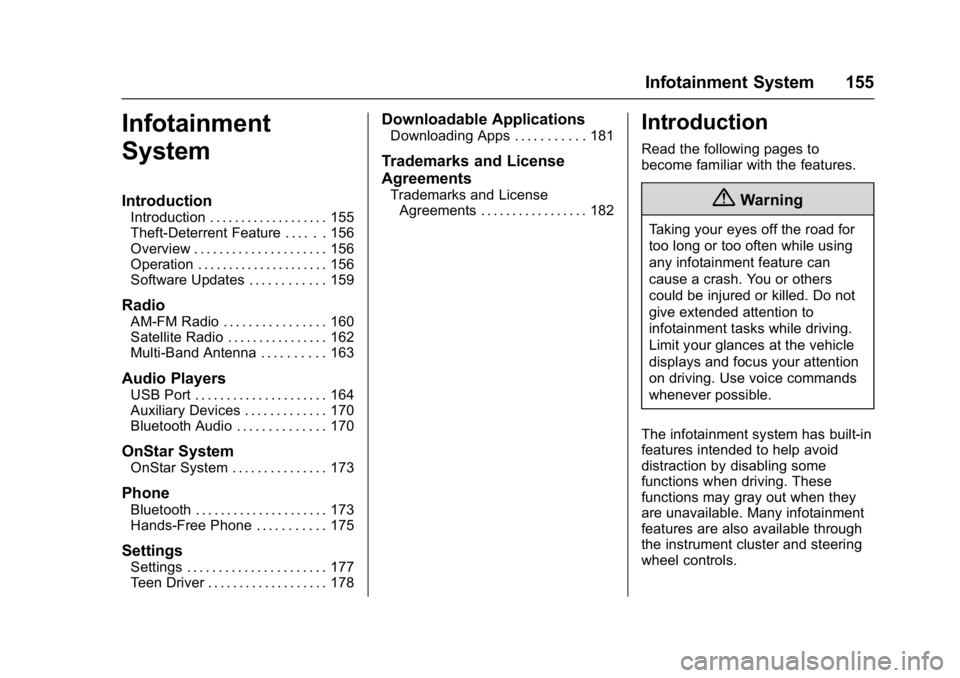
Introduction
Introduction . . . . . . . . . . . . . . . . . . . 155
Theft-Deterrent Feature . . . . . . 156
Overview . . . . . . . . . . . . . . . . . . . . . 156
Operation . . . . . . . . . . . . . . . . . . . . . 156
Software Updates . . . . . . . . . . . . 159
Radio
AM-FM Radio . . . . . . . . . . . . . . . . 160
Satellite Radio . . . . . . . . . . . . . . . . 162
Multi-Band Antenna . . . . . . . . . . 163
Audio Players
USB Port . . . . . . . . . . . . . . . . . . . . . 164
Auxiliary Devices . . . . . . . . . . . . . 170
Bluetooth Audio . . . . . . . . . . . . . . 170
OnStar System
OnStar System . . . . . . . . . . . . . . . 173
Phone
Bluetooth . . . . . . . . . . . . . . . . . . . . . 173
Hands-Free Phone . . . . . . . . . . . 175
Settings
Settings . . . . . . . . . . . . . . . . . . . . . . 177
Teen Driver . . . . . . . . . . . . . . . . . . . 178
Downloadable Applications
Downloading Apps . . . . . . . . . . . 181
Trademarks and License
Agreements
Trademarks and LicenseAgreements . . . . . . . . . . . . . . . . . 182
Introduction
Read the following pages to
become familiar with the features.
{Warning
Taking your eyes off the road for
too long or too often while using
any infotainment feature can
cause a crash. You or others
could be injured or killed. Do not
give extended attention to
infotainment tasks while driving.
Limit your glances at the vehicle
displays and focus your attention
on driving. Use voice commands
whenever possible.
The infotainment system has built-in
features intended to help avoid
distraction by disabling some
functions when driving. These
functions may gray out when they
are unavailable. Many infotainment
features are also available through
the instrument cluster and steering
wheel controls.
Page 157 of 361
Chevrolet Bolt EV Owner Manual (GMNA-Localizing-U.S./Canada/Mexico-
10122739) - 2017 - CRC - 10/3/16
156 Infotainment System
Before driving:
.Become familiar with the
operation of the center stack
controls and the infotainment
system.
. Set up the audio by presetting
favorite stations, setting the
tone, and adjusting the
speakers.
. Set up phone numbers in
advance so they can be called
easily by pressing a single
control or by using a single voice
command if equipped with
Bluetooth phone capability.
See Defensive Driving 0192.
To play the infotainment system with
the vehicle off, see Retained
Accessory Power (RAP) 0203.
Theft-Deterrent Feature
The infotainment system has an
electronic security system installed
to prevent theft. The infotainment system only works
in the vehicle in which it was first
installed, and cannot be used in
another vehicle.
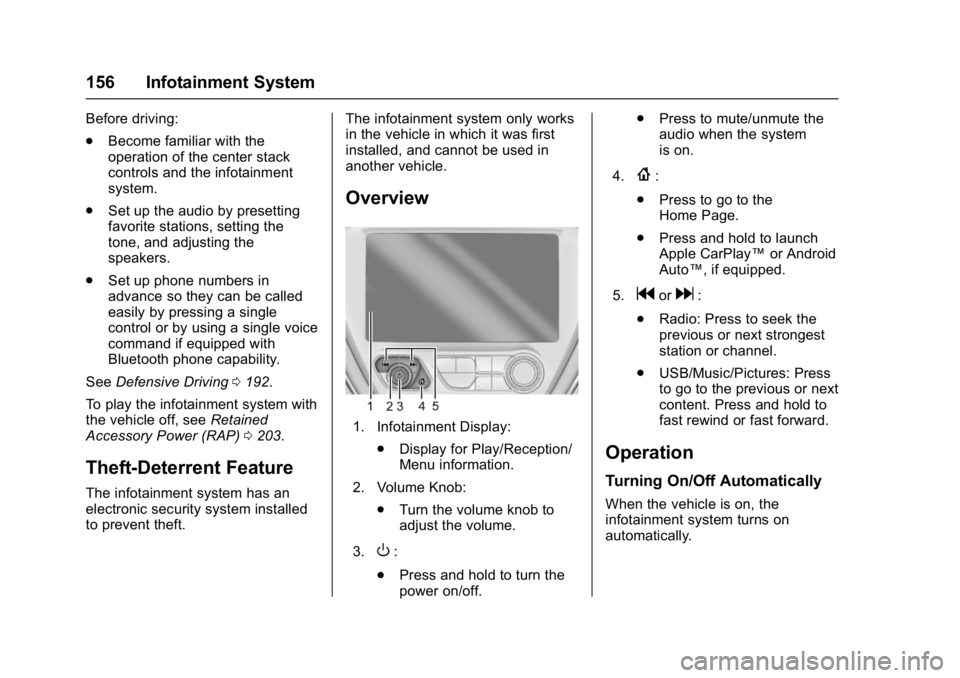
Overview
1. Infotainment Display:
.Display for Play/Reception/
Menu information.
2. Volume Knob: .Turn the volume knob to
adjust the volume.
3.
O:
. Press and hold to turn the
power on/off. .
Press to mute/unmute the
audio when the system
is on.
4.
{:
. Press to go to the
Home Page.
. Press and hold to launch
Apple CarPlay™ or Android
Auto™, if equipped.
5.
gord:
. Radio: Press to seek the
previous or next strongest
station or channel.
. USB/Music/Pictures: Press
to go to the previous or next
content. Press and hold to
fast rewind or fast forward.
Operation
Turning On/Off Automatically
When the vehicle is on, the
infotainment system turns on
automatically.
Page 161 of 361
Chevrolet Bolt EV Owner Manual (GMNA-Localizing-U.S./Canada/Mexico-
10122739) - 2017 - CRC - 10/3/16
160 Infotainment System
Radio
AM-FM Radio
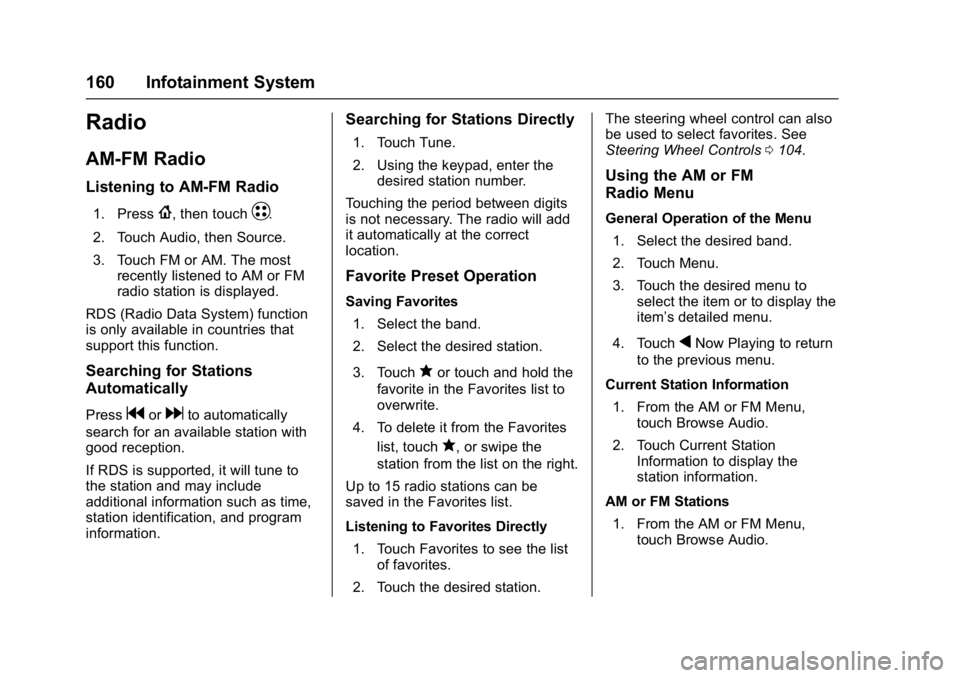
Listening to AM-FM Radio
1. Press{, then touchT.
2. Touch Audio, then Source.
3. Touch FM or AM. The most recently listened to AM or FM
radio station is displayed.
RDS (Radio Data System) function
is only available in countries that
support this function.
Searching for Stations
Automatically
Pressgordto automatically
search for an available station with
good reception.
If RDS is supported, it will tune to
the station and may include
additional information such as time,
station identification, and program
information.
Searching for Stations Directly
1. Touch Tune.
2. Using the keypad, enter the desired station number.
Touching the period between digits
is not necessary. The radio will add
it automatically at the correct
location.
Favorite Preset Operation
Saving Favorites 1. Select the band.
2. Select the desired station.
3. Touch
qor touch and hold the
favorite in the Favorites list to
overwrite.
4. To delete it from the Favorites list, touch
q, or swipe the
station from the list on the right.
Up to 15 radio stations can be
saved in the Favorites list.
Listening to Favorites Directly 1. Touch Favorites to see the list of favorites.
2. Touch the desired station. The steering wheel control can also
be used to select favorites. See
Steering Wheel Controls
0104.
Using the AM or FM
Radio Menu
General Operation of the Menu
1. Select the desired band.
2. Touch Menu.
3. Touch the desired menu to select the item or to display the
item’s detailed menu.
4. Touch
qNow Playing to return
to the previous menu.
Current Station Information 1. From the AM or FM Menu, touch Browse Audio.
2. Touch Current Station Information to display the
station information.
AM or FM Stations 1. From the AM or FM Menu, touch Browse Audio.
Page 188 of 361
Chevrolet Bolt EV Owner Manual (GMNA-Localizing-U.S./Canada/Mexico-
10122739) - 2017 - CRC - 10/3/16
Climate Controls 187
Caution
Do not try to clear frost or other
material from the inside of the
front windshield and rear window
with a razor blade or anything
else that is sharp. This may
damage the rear window
defogger grid and affect the
radio's ability to pick up stations
clearly. The repairs would not be
covered by the vehicle warranty.
Remote Start : The climate control
system may be started by using the
Remote Keyless Entry (RKE)
transmitter. The climate control
system will default to an appropriate
heating or cooling mode. See
Remote Start 039.
The rear window defogger turns on
if it is cold outside.
Sensors
Indicator Light and Solar
Sensor (ILSS)
The ILSS is on top of the instrument
panel, near the windshield, where it
monitors solar intensity.
The climate control system uses the
sensor information to adjust the
temperature, fan speed,
recirculation, and air delivery mode
for best comfort.
Do not cover the sensor; otherwise
the automatic climate control system
may not work properly. Humidity Sensor
The humidity sensor is near the
base of the inside rearview mirror.
The climate control system uses the
sensor information to adjust the
temperature and recirculation for
best comfort.
Outside Air Temperature Sensor
The outside air temperature sensor
is behind the front grille of the
vehicle. The vehicle uses the sensor
information to display outside air
temperature. The climate control
system uses the information to
adjust the climate system operation.
Page 270 of 361
Chevrolet Bolt EV Owner Manual (GMNA-Localizing-U.S./Canada/Mexico-
10122739) - 2017 - CRC - 10/3/16
Vehicle Care 269
FusesUsage
F29 Trailer interface
module 2
F30 Headlamp leveling
device
F31 OnStar
F32 –
F33 Heating, ventilation,
and air conditioning
module
F34 –
F35 Instrument cluster 1
F36 Radio (Silverbox
radio)
F37 –
F38 –
F39 –
F40 –
F41 – Fuses
Usage
F42 –
F43 Body control module 7
F44 Sensing and
diagnostic module
F45 Front camera module
F46 Vehicle integration
control module
F47 Single power inverter
module 2
F48 Electric steering
column lock
F49 Auxiliary jack
F50 Steering wheel
controls
F51 Steering wheel
controls backlighting
F52 Smartphone remote
function module
F53 Auxiliary power outlet Fuses
Usage
F54 –
F55 Logistic
F56 –
F57 –
F58 Logistics relay
F59 –
F60 Accessory/Retained
accessory power relay
Page 281 of 361
Chevrolet Bolt EV Owner Manual (GMNA-Localizing-U.S./Canada/Mexico-
10122739) - 2017 - CRC - 10/3/16
280 Vehicle Care
other than those recommended
could prevent the TPMS from
functioning properly. SeeBuying
New Tires 0283.
. Operating electronic devices or
being near facilities using radio
wave frequencies similar to the
TPMS could cause the TPMS
sensors to malfunction.
If the TPMS is not functioning
properly it cannot detect or signal a
low tire condition. See your dealer
for service if the TPMS malfunction
light and DIC message comes on
and stays on.
TPMS Sensor Matching
Process
Each TPMS sensor has a unique
identification code. The identification
code needs to be matched to a new
tire/wheel position after rotating the
vehicle’s tires or replacing one or
more of the TPMS sensors. The
TPMS sensor matching process
should also be performed after
replacing a spare tire with a road
tire containing the TPMS sensor.
The malfunction light and the DIC
message should go off at the next ignition cycle using POWER
O.
The sensors are matched to the tire/
wheel positions, using a TPMS
relearn tool, in the following
order: driver side front tire,
passenger side front tire, passenger
side rear tire, and driver side rear.
See your dealer for service or to
purchase a relearn tool. A TPMS
relearn tool can also be purchased.
See Tire Pressure Monitor
Sensor Activation Tool at
www.gmtoolsandequipment.com
or call 1-800-GM TOOLS
(1-800-468-6657).
There are two minutes to match the
first tire/wheel position, and
five minutes overall to match all four
tire/wheel positions. If it takes
longer, the matching process stops
and must be restarted.
The TPMS sensor matching
process is:
1. Set the parking brake.
2. Press POWER
Oto start the
vehicle. See Power Button
0 201. 3. Make sure the Tire Pressure
info page option is turned on.
The info pages on the DIC can
be turned on and off through
the Settings menu. See Driver
Information Center (DIC) 0133.
4. Use the DIC controls on the right side of the steering wheel
to scroll to the Tire Pressure
screen under the DIC
info page.
5. Press and hold
Vin the center
of the DIC controls.
The horn sounds twice to
signal the receiver is in relearn
mode and the TIRE
LEARNING ACTIVE message
displays on the DIC screen.
6. Start with the driver side front tire.
7. Place the relearn tool against the tire sidewall, near the valve
stem. Then press the button to
activate the TPMS sensor.
A horn chirp confirms that the
sensor identification code has
been matched to this tire and
wheel position.
Page 354 of 361

Chevrolet Bolt EV Owner Manual (GMNA-Localizing-U.S./Canada/Mexico-
10122739) - 2017 - CRC - 10/3/16
Index 353
Driver Efficiency Gauge . . . . . . . . 115
Driver InformationCenter (DIC) . . . . . . . . . . . . . . . . . . 133
Driver Selected Operating Modes . . . . . . . . . . . . . . . . . . . . . . . . 205
Driving Assistance Systems . . . . . . . . . . 222
Defensive . . . . . . . . . . . . . . . . . . . . . 192
Drunk . . . . . . . . . . . . . . . . . . . . . . . . . 193
Hill and Mountain Roads . . . . . . 196
If the Vehicle is Stuck . . . . . . . . . 197
Loss of Control . . . . . . . . . . . . . . . 194
Off-Road Recovery . . . . . . . . . . . 194
Vehicle Load Limits . . . . . . . . . . . 197
Wet Roads . . . . . . . . . . . . . . . . . . . 195
Winter . . . . . . . . . . . . . . . . . . . . . . . . 196
Driving for Better Energy Efficiency . . . . . . . . . . . . . . . . . . . . . . 29
E
Electric Drive Unit . . . . . . . . . . . . . . 206
Electric Drive Unit Messages . . . 137
Electric Parking Brake . . . . . . . . . . 210
Electric Parking Brake Light . . . . 119
Electrical Equipment,Add-On . . . . . . . . . . . . . . . . . . . . . . . 247
Electrical Requirements for Battery Charging . . . . . . . . . . . . . . 246 Electrical System
Instrument Panel Fuse
Block . . . . . . . . . . . . . . . . . . . . . . . . 268
Overload . . . . . . . . . . . . . . . . . . . . . 263
Emergency OnStar
®. . . . . . . . . . . . . . . . . . . . . . 341
Energy Efficiency
Driving . . . . . . . . . . . . . . . . . . . . . . . . . . 29
Energy Information . . . . . . . . . . . . . 131
Energy Settings . . . . . . . . . . . . . . . . 132
Engine Cooling System . . . . . . . . . . . . . . . 254
Entry Lighting . . . . . . . . . . . . . . . . . . . 153
Event Data Recorders . . . . . . . . . . 338
Exit Lighting . . . . . . . . . . . . . . . . . . . . 153
Extended Parking . . . . . . . . . . . . . . . 205
Extender, Safety Belt . . . . . . . . . . . . 67
Exterior Lamp Controls . . . . . . . . . 148
Exterior Lamps Off Reminder . . . 150
F
Flash-to-Pass . . . . . . . . . . . . . . . . . . . 150
Flashers, Hazard Warning . . . . . . 151
Flat Tire . . . . . . . . . . . . . . . . . . . . . . . . 288
Floor Mats . . . . . . . . . . . . . . . . . . . . . . 308
Fluid Brakes . . . . . . . . . . . . . . . . . . . . . . . . 257
Washer . . . . . . . . . . . . . . . . . . . . . . . 255
Folding Mirrors . . . . . . . . . . . . . . . . . . 49 Forward Automatic Braking . . . . . 224
Forward Collision Alert
(FCA) System . . . . . . . . . . . . . . . . . 222
Frequency Statement Radio . . . . . . . . . . . . . . . . . . . . . . . . . 336
Front Pedestrian Braking (FPB) System . . . . . . . . . . . . . . . . . 225
Front Seats Adjustment . . . . . . . . . . . . . . . . . . . . . 56
Heated . . . . . . . . . . . . . . . . . . . . . . . . . 58
Fuses
Instrument Panel FuseBlock . . . . . . . . . . . . . . . . . . . . . . . . 268
Underhood Compartment . . . . . 264
G
Gauges Battery . . . . . . . . . . . . . . . . . . . . . . . .115
Driver Efficiency . . . . . . . . . . . . . . .115
Odometer . . . . . . . . . . . . . . . . . . . . . .114
Power Indicator . . . . . . . . . . . . . . . .116
Speedometer . . . . . . . . . . . . . . . . . .114
Trip Odometer . . . . . . . . . . . . . . . . .114
Warning Lights andIndicators . . . . . . . . . . . . . . . . . . . . 111
General Information
Service and Maintenance . . . . . 310
Towing . . . . . . . . . . . . . . . . . . . . . . . . 246