service schedule CHEVROLET BOLT EV 2017 Owner's Manual
[x] Cancel search | Manufacturer: CHEVROLET, Model Year: 2017, Model line: BOLT EV, Model: CHEVROLET BOLT EV 2017Pages: 361, PDF Size: 4.89 MB
Page 45 of 361
Chevrolet Bolt EV Owner Manual (GMNA-Localizing-U.S./Canada/Mexico-
10122739) - 2017 - CRC - 10/3/16
44 Keys, Doors, and Windows
Caution
Pulling the inside door handle
while the rear door safety locks
are engaged could damage your
vehicle. Do not pull the inside
door handle while the rear door
safety locks are engaged.
KeyPass
If equipped, this feature allows a
smartphone to be connected to the
vehicle and remote vehicle functions
to be requested. Features vary
depending on availability.
Features include:
.Remote commands –Use to
lock/unlock the vehicle, remote
start for the cabin climate,
or sound or cancel the horn and
flash the lights.
. Vehicle status –View the
vehicle’s range and battery level,
charging status, and tire
pressure.
. Welcome lighting –Request light
when approaching the vehicle. .
Location services –Save the
parked location or start
navigation at the vehicle’s GPS
coordinates.
Setup Function
. KeyPass Setup
‐Managing Priority Setting
‐ Modifying Priority Setting
. Revocation
Active Remote Function
. Door Lock/Unlock
. Remote Start/Stop
. Panic Alarm Activation/
Termination
. Remote Charge Termination
. High Voltage Charge Functions
‐Temporary Charging Override
Update
‐ Change the Charging Mode
Permanently
‐ Update Departure Time
Schedule
‐ High Voltage Priority Charging
Activate and De-activate ‐
Select Charge Level/Limit
Preference Screen
. Vehicle Locator
. Routing w/Available Mileage
Passive Function
Approach Detection/Welcome
Lighting
Visual Display for Vehicle
Information
. Low Battery Indication
. Tire Pressure
. Remote Engine Start Status
. Odometer Reading
. Rear Closure Ajar Switch Status
. Electric Parking Brake Status
. Hood Status
. High Voltage Battery State of
Charge Status
. GPS Signal for End of Trip
. Charge Mode Status
‐Available Mileage
‐ Charge Start and End Times
Status
Page 81 of 361
Chevrolet Bolt EV Owner Manual (GMNA-Localizing-U.S./Canada/Mexico-
10122739) - 2017 - CRC - 10/3/16
80 Seats and Restraints
If the vehicle has rollover roof-rail
airbags, seeDifferent Size Tires
and Wheels 0284 for additional
important information.
If you have to modify your vehicle
because you have a disability and
you have questions about whether
the modifications will affect the
vehicle's airbag system, or if you
have questions about whether the
airbag system will be affected if the
vehicle is modified for any other
reason, call Customer Assistance.
See Customer Assistance Offices
0 325.
Airbag System Check
The airbag system does not need
regularly scheduled maintenance or
replacement. Make sure the airbag
readiness light is working. See
Airbag Readiness Light 0117.
Caution
If an airbag covering is damaged,
opened, or broken, the airbag
may not work properly. Do not
(Continued)
Caution (Continued)
open or break the airbag
coverings. If there are any
opened or broken airbag
coverings, have the airbag
covering and/or airbag module
replaced. For the location of the
airbags, seeWhere Are the
Airbags? 070. See your dealer
for service.
Replacing Airbag System
Parts after a Crash
{Warning
A crash can damage the airbag
systems in the vehicle.
A damaged airbag system may
not properly protect you and your
passenger(s) in a crash, resulting
in serious injury or even death. To
help make sure the airbag
systems are working properly
after a crash, have them
(Continued)
Warning (Continued)
inspected and any necessary
replacements made as soon as
possible.
If an airbag inflates, you will need to
replace airbag system parts. See
your dealer for service.
If the airbag readiness light stays on
after the vehicle is started or comes
on when you are driving, the airbag
system may not work properly. Have
the vehicle serviced right away. See
Airbag Readiness Light 0117.
Page 311 of 361
Chevrolet Bolt EV Owner Manual (GMNA-Localizing-U.S./Canada/Mexico-
10122739) - 2017 - CRC - 10/3/16
310 Service and Maintenance
Service and
Maintenance
General Information
General Information . . . . . . . . . . 310
Maintenance Schedule
Maintenance Schedule . . . . . . . 311
Owner Checks and Services
Owner Checks andServices . . . . . . . . . . . . . . . . . . . . 313
Additional Maintenance
and Care
Additional Maintenanceand Care . . . . . . . . . . . . . . . . . . . . 314
Recommended Fluids,
Lubricants, and Parts
Recommended Fluids andLubricants . . . . . . . . . . . . . . . . . . . 316
Maintenance Replacement Parts . . . . . . . . . . . . . . . . . . . . . . . . 317
Maintenance Records
Maintenance Records . . . . . . . . 318
General Information
Your vehicle is an important
investment. This section describes
the required maintenance for the
vehicle. Follow this schedule to help
protect against major repair
expenses resulting from neglect or
inadequate maintenance. It may
also help to maintain the value of
the vehicle if it is sold. It is the
responsibility of the owner to have
all required maintenance performed.
Your dealer has trained technicians
who can perform required
maintenance using genuine
replacement parts. They have
up-to-date tools and equipment for
fast and accurate diagnostics. Many
dealers have extended evening and
Saturday hours, courtesy
transportation, and online
scheduling to assist with service
needs. Your dealer recognizes the
importance of providing
competitively priced maintenance
and repair services. With trained
technicians, the dealer is the place
for routine maintenance such as tire
rotations and additional
maintenance items like tires, brakes,
batteries, and wiper blades.
Caution
Damage caused by improper
maintenance can lead to costly
repairs and may not be covered
by the vehicle warranty.
Maintenance intervals, checks,
inspections, recommended fluids,
and lubricants are important to
keep the vehicle in good working
condition.
Page 312 of 361
Chevrolet Bolt EV Owner Manual (GMNA-Localizing-U.S./Canada/Mexico-
10122739) - 2017 - CRC - 10/3/16
Service and Maintenance 311
The Tire Rotation and Required
Services are the responsibility of the
vehicle owner. It is recommended to
have your dealer perform these
services every 12 000 km/7,500 mi.
Proper vehicle maintenance helps to
keep the vehicle in good working
condition.
The Additional Required Services
are for vehicles that:
.Carry passengers and cargo
within recommended limits on
the Tire and Loading Information
label. See Vehicle Load Limits
0 197.
. Are driven on reasonable road
surfaces within legal driving
limits. Refer to the information in the
Maintenance Schedule Additional
Required Services chart.
{Warning
Performing maintenance work can
be dangerous and can cause
serious injury. Perform
maintenance work only if the
required information, proper tools,
and equipment are available.
If they are not, see your dealer to
have a trained technician do the
work. See
Doing Your Own
Service Work 0250.
Maintenance
Schedule
Owner Checks and Services
Once a Month
.
Check the tire inflation
pressures. See Tire Pressure
0 276.
. Inspect the tires for wear. See
Tire Inspection 0281.
. Check the windshield washer
fluid level. See Washer Fluid
0 255.
Page 314 of 361
Chevrolet Bolt EV Owner Manual (GMNA-Localizing-U.S./Canada/Mexico-
10122739) - 2017 - CRC - 10/3/16
Service and Maintenance 313
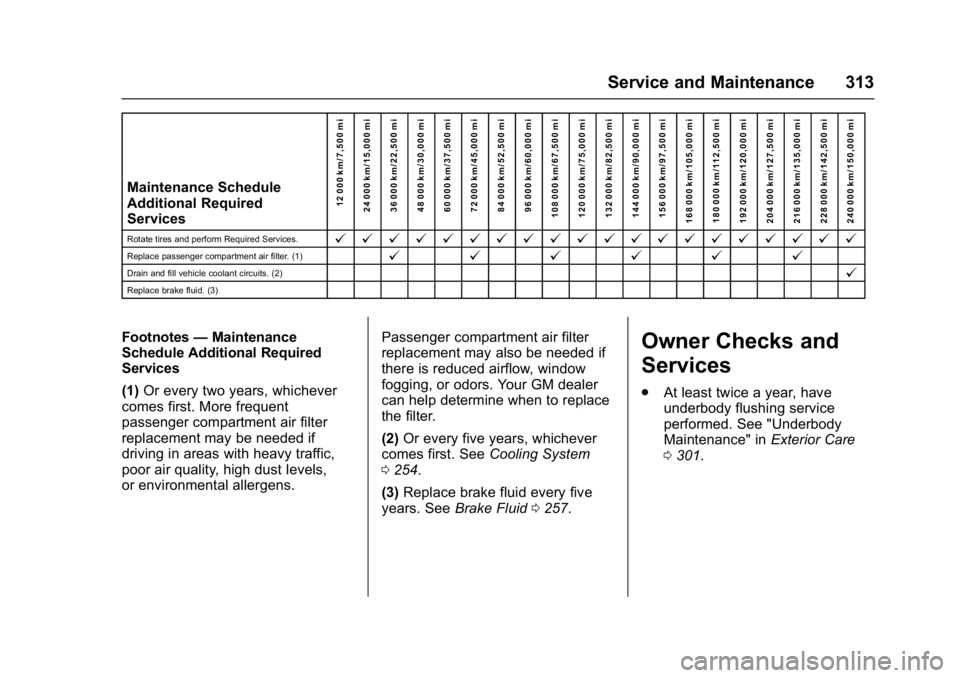
Maintenance Schedule
Additional Required
Services12 000 km/7,500 mi
24 000 km/15,000 mi
36 000 km/22,500 mi
48 000 km/30,000 mi
60 000 km/37,500 mi
72 000 km/45,000 mi
84 000 km/52,500 mi
96 000 km/60,000 mi
108 000 km/67,500 mi
120 000 km/75,000 mi
132 000 km/82,500 mi
144 000 km/90,000 mi
156 000 km/97,500 mi
168 000 km/105,000 mi 180 000 km/112,500 mi
192 000 km/120,000 mi
204 000 km/127,500 mi
216 000 km/135,000 mi
228 000 km/142,500 mi
240 000 km/150,000 mi
Rotate tires and perform Required Services.@ @ @ @ @ @ @ @ @ @ @ @ @ @ @ @ @ @ @ @
Replace passenger compartment air filter. (1)@ @@@@@
Drain and fill vehicle coolant circuits. (2)@
Replace brake fluid. (3)
Footnotes—Maintenance
Schedule Additional Required
Services
(1) Or every two years, whichever
comes first. More frequent
passenger compartment air filter
replacement may be needed if
driving in areas with heavy traffic,
poor air quality, high dust levels,
or environmental allergens. Passenger compartment air filter
replacement may also be needed if
there is reduced airflow, window
fogging, or odors. Your GM dealer
can help determine when to replace
the filter.
(2)
Or every five years, whichever
comes first. See Cooling System
0 254.
(3) Replace brake fluid every five
years. See Brake Fluid 0257.Owner Checks and
Services
.
At least twice a year, have
underbody flushing service
performed. See "Underbody
Maintenance" in Exterior Care
0 301.
Page 319 of 361
Chevrolet Bolt EV Owner Manual (GMNA-Localizing-U.S./Canada/Mexico-
10122739) - 2017 - CRC - 10/3/16
318 Service and Maintenance
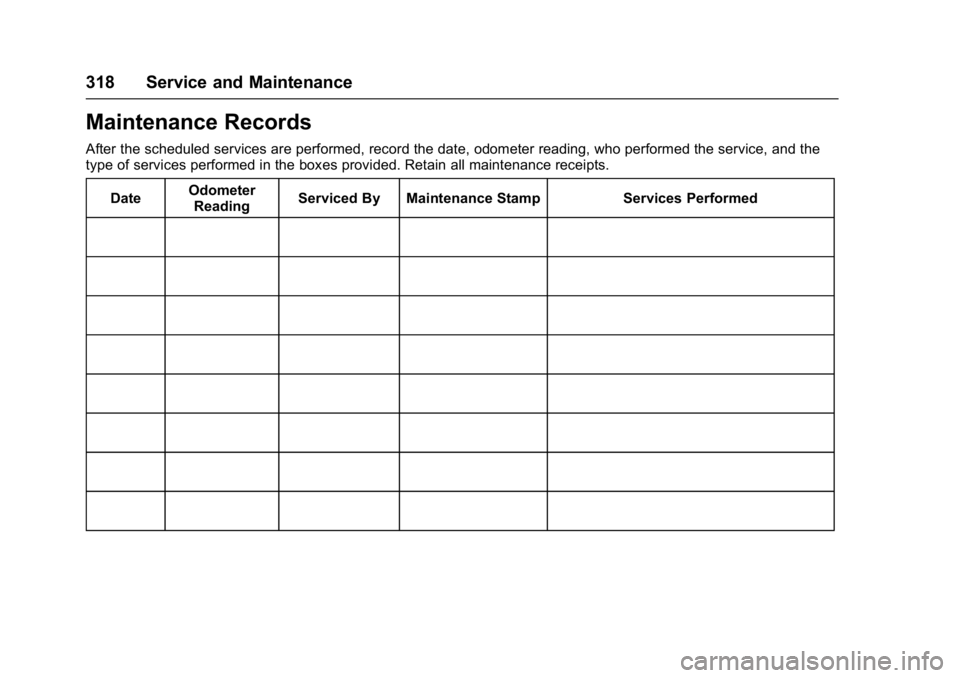
Maintenance Records
After the scheduled services are performed, record the date, odometer reading, who performed the service, and the
type of services performed in the boxes provided. Retain all maintenance receipts.Date Odometer
Reading Serviced By Maintenance Stamp Services Performed
Page 327 of 361
Chevrolet Bolt EV Owner Manual (GMNA-Localizing-U.S./Canada/Mexico-
10122739) - 2017 - CRC - 10/3/16
326 Customer Information
Canada
General Motors of Canada
Company
Customer Care Centre,
Mail Code: CA1-163-005
1908 Colonel Sam Drive
Oshawa, Ontario L1H 8P7
www.gm.ca
1-800-263-3777 (English)
1-800-263-7854 (French)
1-800-263-3830 (For Text
Telephone devices (TTYs))
Roadside Assistance:
1-800-268-6800
Overseas
Please contact the local General
Motors Business Unit.
Customer Assistance for
Text Telephone (TTY)
Users
To assist customers who are deaf,
hard of hearing, or speech-impaired
and who use Text Telephones
(TTYs), Chevrolet has TTY
equipment available at its Customer
Assistance Center. Any TTY user inthe U.S. can communicate with
Chevrolet by dialing:
1-800-833-2438. TTY users in
Canada can dial 1-800-263-3830.
Online Owner Center
Online Owner Experience
(U.S.) my.chevrolet.com
The Chevrolet online owner
experience allows interaction with
Chevrolet and keeps important
vehicle-specific information in one
place.
Membership Benefits
E:
Download owner manuals and
view vehicle-specific how-to videos.
G: View maintenance schedules,
alerts, and OnStar Vehicle
Diagnostic Information. Schedule
service appointments.
I: View and print dealer-recorded
service records and self-recorded
service records.
D: Select a preferred dealer and
view locations, maps, phone
numbers, and hours.
r: Track your vehicle’s warranty
information.
J: View active recalls by Vehicle
Identification Number (VIN). See
Vehicle Identification Number (VIN)
0 319.
H:View GM Card, SiriusXM
Satellite radio (if equipped), and
OnStar account information.
F: Chat with online help
representatives.
See my.chevrolet.com to register
your vehicle.
Chevrolet Owner Centre
(Canada) chevroletowner.ca
Visit the Chevrolet Owner Centre:
. Chat live with online help
representatives.
. Locate owner resources such as
lease-end, financing, and
warranty information.
. Retrieve your favorite articles,
quizzes, tips, and multimedia
galleries organized into the
Featured Articles and Auto Care
Sections.
Page 333 of 361
Chevrolet Bolt EV Owner Manual (GMNA-Localizing-U.S./Canada/Mexico-
10122739) - 2017 - CRC - 10/3/16
332 Customer Information
United States
1-866-466-8901
Canada
1-800-268-6800
E-mail
[email protected]
Chevrolet reserves the right to make
any changes or discontinue the
Roadside Assistance program at
any time without notification.
Scheduling Service
Appointments
When the vehicle requires warranty
service, contact your dealer and
request an appointment. By
scheduling a service appointment
and advising the service consultant
of your transportation needs, your
dealer can help minimize your
inconvenience.
If the vehicle cannot be scheduled
into the service department
immediately, keep driving it until it
can be scheduled for service,
unless, of course, the problem issafety related. If it is, please call
your dealership, let them know this,
and ask for instructions.
If your dealer requests you to bring
the vehicle for service, you are
urged to do so as early in the work
day as possible to allow for
same-day repair.
Courtesy Transportation
Program
To enhance your ownership
experience, we and our participating
dealers are proud to offer Courtesy
Transportation, a customer support
program for vehicles with the
Bumper-to-Bumper (Base Warranty
Coverage period in Canada), and
extended powertrain in both the
U.S. and Canada.
Several Courtesy Transportation
options are available to assist in
reducing inconvenience when
warranty repairs are required.
Courtesy Transportation is not a
part of the New Vehicle Limited
Warranty. A separate booklet
entitled
“Limited Warranty and Owner Assistance Information”
furnished with each new vehicle
provides detailed warranty coverage
information.
Transportation Options
Warranty service can generally be
completed while you wait. However,
if you are unable to do so, your
dealer may offer the following
transportation options:
Shuttle Service
This includes one-way or round-trip
shuttle service within reasonable
time and distance parameters of
your dealer's area.
Public Transportation
If overnight warranty repairs are
needed, and public transportation is
used, the expense must be
supported by original receipts and
within the maximum amount allowed
by GM for shuttle service. Claim
amounts should reflect actual costs
and be supported by original
receipts. See your dealer for
information.
Page 336 of 361
Chevrolet Bolt EV Owner Manual (GMNA-Localizing-U.S./Canada/Mexico-
10122739) - 2017 - CRC - 10/3/16
Customer Information 335
In a crash, the sensing system may
shut down the high voltage system.
SeeBattery - North America 0257
for important safety information.
If an airbag has inflated, see What
Will You See after an Airbag
Inflates? 073.
If the vehicle is damaged from a
crash, flood, fire, or other event it
may be necessary to have the
vehicle inspected. SeeBattery -
North America 0257 andHigh
Voltage Safety Information 022 for
important safety information.
Managing the Vehicle Damage
Repair Process
In the event that the vehicle requires
damage repairs, GM recommends
that you take an active role in its
repair. If you have a pre-determined
repair facility of choice, take the
vehicle there, or have it towed there.
Specify to the facility that any
required replacement collision parts
be original equipment parts, either
new Genuine GM parts or recycled
original GM parts. Remember,
recycled parts will not be covered by
the GM vehicle warranty. Insurance pays the bill for the repair,
but you must live with the repair.
Depending on your policy limits,
your insurance company may
initially value the repair using
aftermarket parts. Discuss this with
the repair professional, and insist on
Genuine GM parts. Remember,
if the vehicle is leased, you may be
obligated to have the vehicle
repaired with Genuine GM parts,
even if your insurance coverage
does not pay the full cost.
If another party's insurance
company is paying for the repairs,
you are not obligated to accept a
repair valuation based on that
insurance company's collision policy
repair limits, as you have no
contractual limits with that company.
In such cases, you can have control
of the repair and parts choices as
long as the cost stays within
reasonable limits.
Service Publications
Ordering Information
Service Manuals
Service Manuals have the diagnosis
and repair information on the
electric drive unit, axle, suspension,
brakes, electrical, steering,
body, etc.
Owner Information
Owner publications are written
specifically for owners and intended
to provide basic operational
information about the vehicle. The
Owner Manual includes the
Maintenance Schedule for all
models.
In-Portfolio: Includes a Portfolio,
Owner Manual, and Warranty
Booklet.
RETAIL SELL PRICE: $35.00 to
$40.00 (U.S.) plus handling and
shipping fees.
Without Pouch: Owner Manual only.
RETAIL SELL PRICE:
$25.00 (U.S.) plus handling and
shipping fees.
Page 344 of 361
Chevrolet Bolt EV Owner Manual (GMNA-Localizing-U.S./Canada/Mexico-
10122739) - 2017 - CRC - 10/3/16
OnStar 343
.Change the default name of the
SSID (Service Set Identifier).
This is your network’s name that
is visible to other wireless
devices. Choose a unique name
and avoid family names or
vehicle descriptions.
OnStar Wi-Fi
®Hotspot (If
Equipped)
The vehicle may have a built-in
Wi-Fi hotspot that provides access
to the Internet and web content at
4G LTE speed. Up to seven mobile
devices can be connected. A data
plan is required. Use the in-vehicle
controls only when it is safe to
do so.
1. To retrieve Wi-Fi hotspot information, press
=, wait for
the prompt, then say “Wi-Fi
settings.” On some vehicles,
touch Wi-Fi Settings on the
screen.
2. The Wi-Fi settings will display the Wi-Fi hotspot name (SSID),
password, and on some
vehicles, the connection type (no Internet connection, 3G,
4G, 4G LTE), and signal quality
(poor, good, excellent).
3. To change the SSID or password, press
Qor call
1-888-4ONSTAR to connect
with an Advisor.
After initial set-up, your vehicle’s
Wi-Fi hotspot will connect
automatically to your mobile
devices. Manage data usage by
turning Wi-Fi on or off on your
mobile device, using the
myChevrolet mobile App, or by
contacting an OnStar Advisor.
myChevrolet Mobile App (If
Available)
Download the myChevrolet mobile
App to compatible Apple
®iOS and
Android™ smartphones. OnStar®
Subscribers can access the
following services from a
smartphone:
.
Remotely start/stop the vehicle,
if factory-equipped.
. Lock/unlock doors, if equipped
with automatic locks. .
Activate the horn and lamps.
. Check the vehicle’s energy level,
range or tire pressure,
if factory-equipped with the Tire
Pressure Monitor System.
. Send destinations to the vehicle.
. Locate the vehicle on a map
(U.S. only).
. Turn the vehicle's Wi-Fi
®hotspot
on/off, manage settings, and
monitor data consumption,
if equipped.
. Locate a dealer and schedule
service.
. Request roadside assistance.
. Set a parking reminder with pin
drop, take a photo, make a note,
and set a timer.
. Connect with Chevrolet on social
media
An active OnStar service,
compatible device, factory-installed
remote start and power locks are
required. Data rates apply. Visit
onstar.com for details and system
limitations.