charging CHEVROLET BOLT EV 2018 Owner's Guide
[x] Cancel search | Manufacturer: CHEVROLET, Model Year: 2018, Model line: BOLT EV, Model: CHEVROLET BOLT EV 2018Pages: 370, PDF Size: 5.14 MB
Page 194 of 370
Chevrolet BOLT EV Owner Manual (GMNA-Localizing-U.S./Canada/Mexico-
11434431) - 2018 - crc - 2/14/18
Driving and Operating 193
Driving and
Operating
Driving Information
Distracted Driving . . . . . . . . . . . . 194
Defensive Driving . . . . . . . . . . . . . 194
Drunk Driving . . . . . . . . . . . . . . . . . 195
Control of a Vehicle . . . . . . . . . . . 195
Braking . . . . . . . . . . . . . . . . . . . . . . . 195
Steering . . . . . . . . . . . . . . . . . . . . . . 195
Off-Road Recovery . . . . . . . . . . . 196
Loss of Control . . . . . . . . . . . . . . . 196
Driving on Wet Roads . . . . . . . . 197
Hill and Mountain Roads . . . . . 198
Winter Driving . . . . . . . . . . . . . . . . 198
If the Vehicle Is Stuck . . . . . . . . 199
Vehicle Load Limits . . . . . . . . . . . 200
Starting and Operating
New Vehicle Break-In . . . . . . . . . 203
Power Button . . . . . . . . . . . . . . . . . 204
Starting and Stopping theVehicle . . . . . . . . . . . . . . . . . . . . . . 205
Retained Accessory Power (RAP) . . . . . . . . . . . . . . . . 206
Shifting Into Park . . . . . . . . . . . . . 206
Shifting out of Park . . . . . . . . . . . 207
Extended Parking . . . . . . . . . . . . 207
Electric Vehicle Operating
Modes
Driver Selected Operating Modes . . . . . . . . . . . . . . . . . . . . . . 208
Electric Drive Unit
Electric Drive Unit . . . . . . . . . . . . 208
Brakes
Antilock BrakeSystem (ABS) . . . . . . . . . . . . . . . 213
Electric Parking Brake . . . . . . . . 213
Brake Assist . . . . . . . . . . . . . . . . . . 215
Hill Start Assist (HSA) . . . . . . . . 215
Regenerative Braking . . . . . . . . 215
Ride Control Systems
Traction Control/Electronic Stability Control . . . . . . . . . . . . . 217
Cruise Control
Cruise Control . . . . . . . . . . . . . . . . 219
Driver Assistance Systems
Driver Assistance Systems . . . 221
Assistance Systems forParking or Backing . . . . . . . . . . 222
Assistance Systems for Driving . . . . . . . . . . . . . . . . . . . . . . 225
Forward Collision Alert (FCA) System . . . . . . . . . . . . . . . . . . . . . . 225 Forward Automatic
Braking (FAB) . . . . . . . . . . . . . . . 227
Front Pedestrian Braking (FPB) System . . . . . . . . . . . . . . . 229
Side Blind Zone
Alert (SBZA) . . . . . . . . . . . . . . . . 231
Lane Change Alert (LCA) . . . . . 231
Lane Departure Warning (LDW) . . . . . . . . . . . . . 233
Lane Keep Assist (LKA) . . . . . . 233
Charging
When to Charge . . . . . . . . . . . . . . 235
Plug-In Charging . . . . . . . . . . . . . 235
Delayed Charging Override . . . 239
Charging Status Feedback . . . 240
Charge Cord . . . . . . . . . . . . . . . . . 243
Utility Interruption of Charging . . . . . . . . . . . . . . . . . . . . 250
Electrical Requirements for Battery Charging . . . . . . . . . . . . 251
Trailer Towing
General TowingInformation . . . . . . . . . . . . . . . . . . 252
Conversions and Add-Ons
Add-On ElectricalEquipment . . . . . . . . . . . . . . . . . . 252
Page 208 of 370
Chevrolet BOLT EV Owner Manual (GMNA-Localizing-U.S./Canada/Mexico-
11434431) - 2018 - crc - 2/14/18
Driving and Operating 207
see the P (Park) indicator in
instrument cluster, it means that the
vehicle has not shifted to P (Park).
Shifting out of Park
To shift out of P (Park), the vehicle
must be on, the brake pedal must
be applied, and the charge cord
must be unplugged.
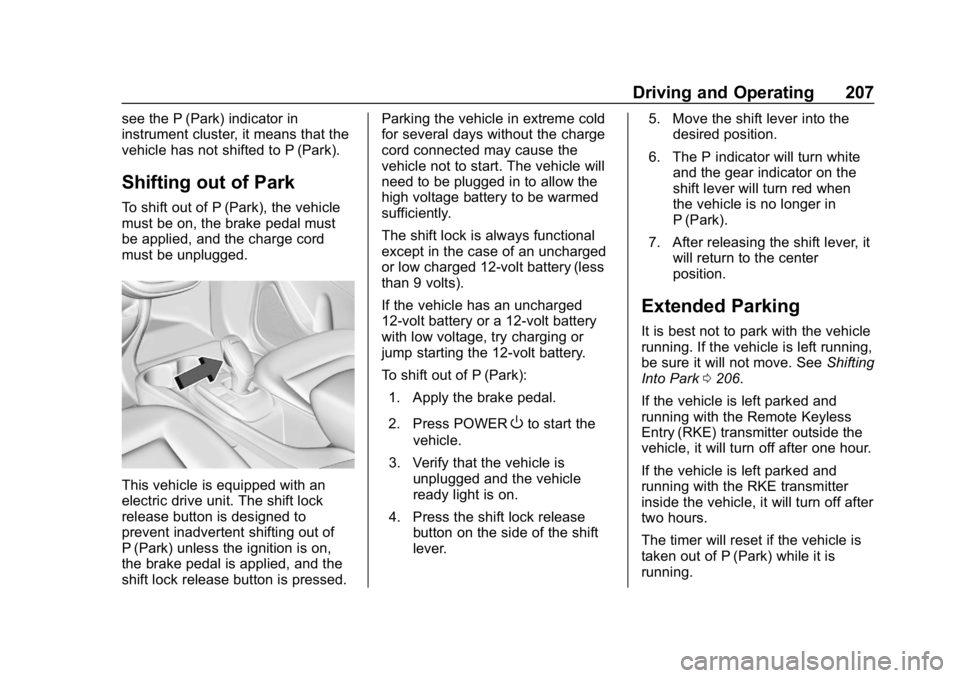
This vehicle is equipped with an
electric drive unit. The shift lock
release button is designed to
prevent inadvertent shifting out of
P (Park) unless the ignition is on,
the brake pedal is applied, and the
shift lock release button is pressed.Parking the vehicle in extreme cold
for several days without the charge
cord connected may cause the
vehicle not to start. The vehicle will
need to be plugged in to allow the
high voltage battery to be warmed
sufficiently.
The shift lock is always functional
except in the case of an uncharged
or low charged 12-volt battery (less
than 9 volts).
If the vehicle has an uncharged
12-volt battery or a 12-volt battery
with low voltage, try charging or
jump starting the 12-volt battery.
To shift out of P (Park):
1. Apply the brake pedal.
2. Press POWER
Oto start the
vehicle.
3. Verify that the vehicle is unplugged and the vehicle
ready light is on.
4. Press the shift lock release button on the side of the shift
lever. 5. Move the shift lever into the
desired position.
6. The P indicator will turn white and the gear indicator on the
shift lever will turn red when
the vehicle is no longer in
P (Park).
7. After releasing the shift lever, it will return to the center
position.
Extended Parking
It is best not to park with the vehicle
running. If the vehicle is left running,
be sure it will not move. See Shifting
Into Park 0206.
If the vehicle is left parked and
running with the Remote Keyless
Entry (RKE) transmitter outside the
vehicle, it will turn off after one hour.
If the vehicle is left parked and
running with the RKE transmitter
inside the vehicle, it will turn off after
two hours.
The timer will reset if the vehicle is
taken out of P (Park) while it is
running.
Page 217 of 370
Chevrolet BOLT EV Owner Manual (GMNA-Localizing-U.S./Canada/Mexico-
11434431) - 2018 - crc - 2/14/18
216 Driving and Operating
Regen on Demand
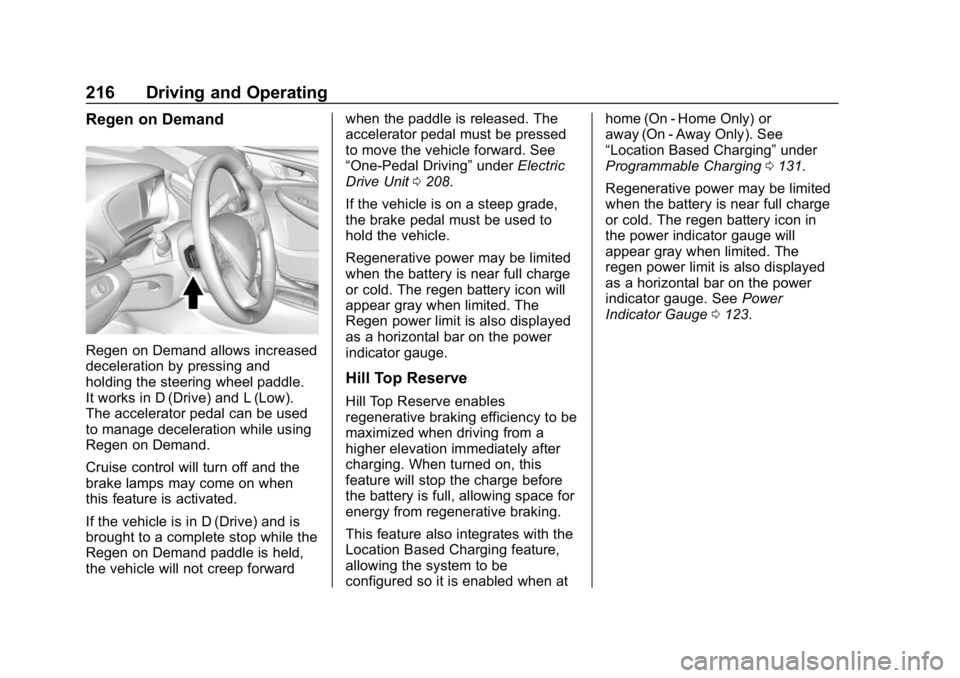
Regen on Demand allows increased
deceleration by pressing and
holding the steering wheel paddle.
It works in D (Drive) and L (Low).
The accelerator pedal can be used
to manage deceleration while using
Regen on Demand.
Cruise control will turn off and the
brake lamps may come on when
this feature is activated.
If the vehicle is in D (Drive) and is
brought to a complete stop while the
Regen on Demand paddle is held,
the vehicle will not creep forwardwhen the paddle is released. The
accelerator pedal must be pressed
to move the vehicle forward. See
“One-Pedal Driving”
underElectric
Drive Unit 0208.
If the vehicle is on a steep grade,
the brake pedal must be used to
hold the vehicle.
Regenerative power may be limited
when the battery is near full charge
or cold. The regen battery icon will
appear gray when limited. The
Regen power limit is also displayed
as a horizontal bar on the power
indicator gauge.
Hill Top Reserve
Hill Top Reserve enables
regenerative braking efficiency to be
maximized when driving from a
higher elevation immediately after
charging. When turned on, this
feature will stop the charge before
the battery is full, allowing space for
energy from regenerative braking.
This feature also integrates with the
Location Based Charging feature,
allowing the system to be
configured so it is enabled when at home (On - Home Only) or
away (On - Away Only). See
“Location Based Charging”
under
Programmable Charging 0131.
Regenerative power may be limited
when the battery is near full charge
or cold. The regen battery icon in
the power indicator gauge will
appear gray when limited. The
regen power limit is also displayed
as a horizontal bar on the power
indicator gauge. See Power
Indicator Gauge 0123.
Page 236 of 370
Chevrolet BOLT EV Owner Manual (GMNA-Localizing-U.S./Canada/Mexico-
11434431) - 2018 - crc - 2/14/18
Driving and Operating 235
Charging
When to Charge
When the high voltage battery is
getting low, charging messages may
display.
The CHARGE VEHICLE SOON
message indicates that the driving
range is low and the vehicle needs
to be charged soon. As the charge
level drops, the PROPULSION
POWER IS REDUCED message is
displayed and the accelerator pedal
response is reduced. In addition, the
remaining range value will change
to LOW indicating the vehicle
should be charged immediately.
When the energy is fully depleted,
the OUT OF ENERGY, CHARGE
VEHICLE NOW message displays
and the vehicle slows to a stop.
Brake and steering assist will still
operate. Once the vehicle has
stopped, turn the vehicle off.
Plug-In Charging
This section explains the process
for charging the high voltage battery.
Do not allow the vehicle to remain in
temperature extremes for long
periods without being driven or
plugged in. It is recommended that
the vehicle be plugged in when
temperatures are below 0 °C (32 °F)
and above 32 °C (90 °F) to
maximize high voltage battery life.
When using a 120-volt AC electrical
outlet, it will take approximately
50 hours to charge the vehicle from
a fully depleted battery with the
12 amp AC current setting, allowing
approximately 6 km (4 mi) for every
hour of charging.
When using a 240-volt charging
station, it will take approximately
9.5 hours to charge the vehicle with
the 32 amp setting, allowing
approximately 40 km (25 mi) for
every hour of charging.Charge times will vary based on
battery condition, charge level, and
outside temperature. See
Programmable Charging
0131 for
charge mode selection.
If equipped, the vehicle can be
charged using DC charging
equipment typically found at service
stations and other public locations.
When using a DC charging station
with at least 80 kW of available
power, it will take approximately
30 minutes to recharge from a
depleted battery to an estimated
145 km (90 mi) of driving range.
This time estimate is applicable to
nominal temperature ranges. In
extreme hot or cold conditions, this
time may be lengthened. A full
charge will take additional time.
The charging system may run fans
and pumps that result in sounds
from the vehicle while it is turned
off. Additionally, clicking sounds
may be caused by the electrical
devices used while charging.
Page 237 of 370
Chevrolet BOLT EV Owner Manual (GMNA-Localizing-U.S./Canada/Mexico-
11434431) - 2018 - crc - 2/14/18
236 Driving and Operating
The vehicle does not require indoor
charging area ventilation before,
during, or after charging.
The vehicle cannot be driven while
the charge cord is plugged into the
vehicle.
Charging Override
A CHARGING OVERRIDE/
INTERRUPTION OCCURRED
message may display to indicate
that a charging override or
interruption has occurred due to one
or more of the following events:
.Override of the charge settings
by the owner.
. Unintended interruption of AC
power at the vehicle's
charge port.
. Interruption of charging by the
utility company.
There are several screens that will
display depending on the current
charging status. See Programmable
Charging 0131. A loss of AC power alert may sound
for a short time if AC power is lost
for over one minute. This sound
alert can be turned off. See
Vehicle
Personalization 0143.
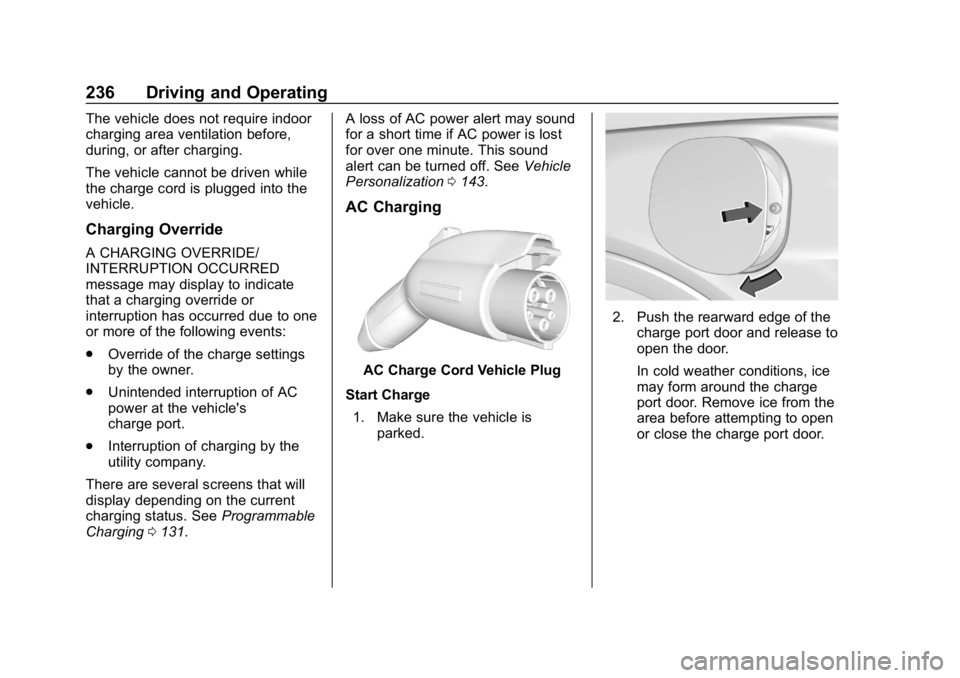
AC Charging
AC Charge Cord Vehicle Plug
Start Charge 1. Make sure the vehicle is parked.
2. Push the rearward edge of the
charge port door and release to
open the door.
In cold weather conditions, ice
may form around the charge
port door. Remove ice from the
area before attempting to open
or close the charge port door.
Page 238 of 370
Chevrolet BOLT EV Owner Manual (GMNA-Localizing-U.S./Canada/Mexico-
11434431) - 2018 - crc - 2/14/18
Driving and Operating 237
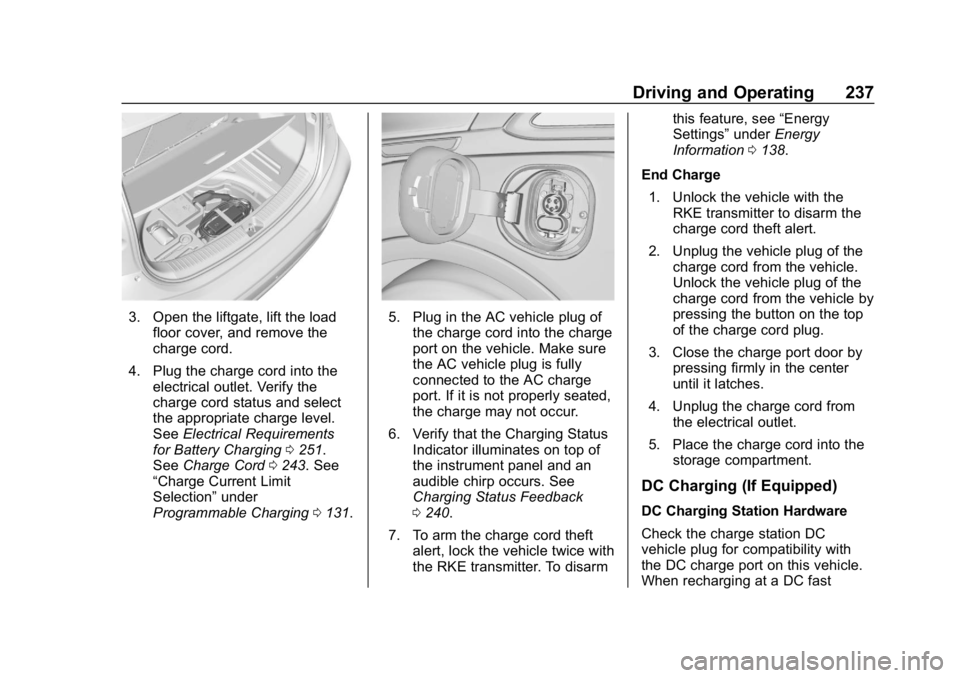
3. Open the liftgate, lift the loadfloor cover, and remove the
charge cord.
4. Plug the charge cord into the electrical outlet. Verify the
charge cord status and select
the appropriate charge level.
See Electrical Requirements
for Battery Charging 0251.
See Charge Cord 0243. See
“Charge Current Limit
Selection” under
Programmable Charging 0131.5. Plug in the AC vehicle plug of
the charge cord into the charge
port on the vehicle. Make sure
the AC vehicle plug is fully
connected to the AC charge
port. If it is not properly seated,
the charge may not occur.
6. Verify that the Charging Status Indicator illuminates on top of
the instrument panel and an
audible chirp occurs. See
Charging Status Feedback
0240.
7. To arm the charge cord theft alert, lock the vehicle twice with
the RKE transmitter. To disarm this feature, see
“Energy
Settings” underEnergy
Information 0138.
End Charge 1. Unlock the vehicle with the RKE transmitter to disarm the
charge cord theft alert.
2. Unplug the vehicle plug of the charge cord from the vehicle.
Unlock the vehicle plug of the
charge cord from the vehicle by
pressing the button on the top
of the charge cord plug.
3. Close the charge port door by pressing firmly in the center
until it latches.
4. Unplug the charge cord from the electrical outlet.
5. Place the charge cord into the storage compartment.
DC Charging (If Equipped)
DC Charging Station Hardware
Check the charge station DC
vehicle plug for compatibility with
the DC charge port on this vehicle.
When recharging at a DC fast
Page 239 of 370
Chevrolet BOLT EV Owner Manual (GMNA-Localizing-U.S./Canada/Mexico-
11434431) - 2018 - crc - 2/14/18
238 Driving and Operating
charge station, the power cable
connected to the vehicle must be
less than 10 m (33 ft) in length.
Follow the steps listed on the
charging station to perform a DC
vehicle charge.
If for any reason DC charging does
not begin or is interrupted, check
the DC charge station display for
messages. Unplug to restart the DC
charge process.
Start Charge1. Make sure the vehicle is parked.
2. Push the rearward edge of the charge port door and release to
open the door.
In cold weather conditions, ice
may form around the charge
port door. The charge port door
may not open on the first
attempt. Remove ice from the
area and repeat attempting to
open the charge port door.
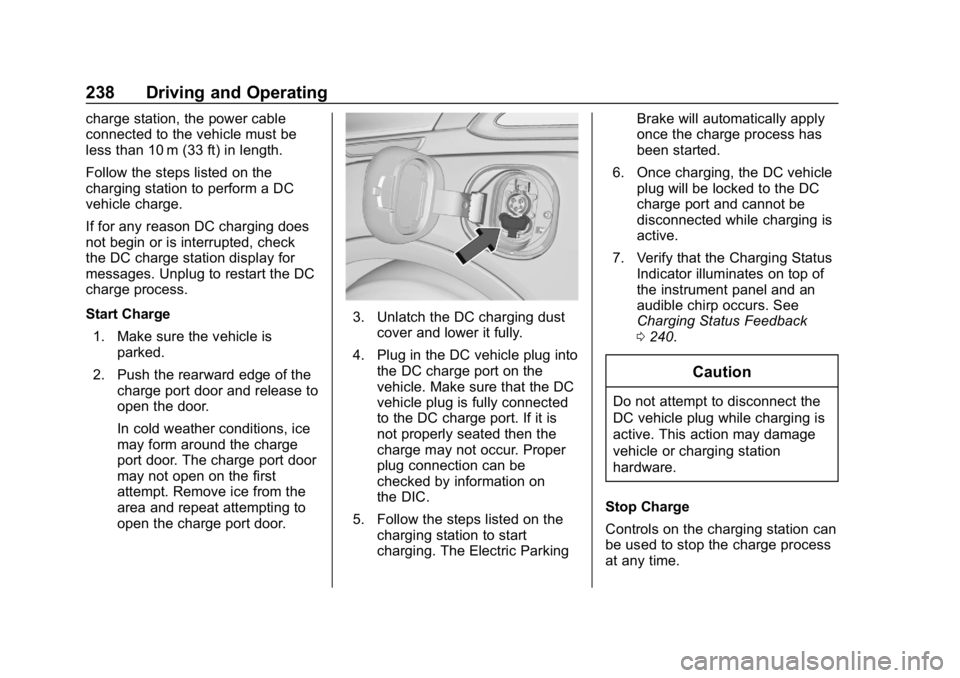
3. Unlatch the DC charging dustcover and lower it fully.
4. Plug in the DC vehicle plug into the DC charge port on the
vehicle. Make sure that the DC
vehicle plug is fully connected
to the DC charge port. If it is
not properly seated then the
charge may not occur. Proper
plug connection can be
checked by information on
the DIC.
5. Follow the steps listed on the charging station to start
charging. The Electric Parking Brake will automatically apply
once the charge process has
been started.
6. Once charging, the DC vehicle plug will be locked to the DC
charge port and cannot be
disconnected while charging is
active.
7. Verify that the Charging Status Indicator illuminates on top of
the instrument panel and an
audible chirp occurs. See
Charging Status Feedback
0240.
Caution
Do not attempt to disconnect the
DC vehicle plug while charging is
active. This action may damage
vehicle or charging station
hardware.
Stop Charge
Controls on the charging station can
be used to stop the charge process
at any time.
Page 240 of 370
Chevrolet BOLT EV Owner Manual (GMNA-Localizing-U.S./Canada/Mexico-
11434431) - 2018 - crc - 2/14/18
Driving and Operating 239
To stop the charge when inside the
vehicle, you may use the stop
charging button on the Charging
screen. SeeProgrammable
Charging 0131.
There is also an available mobile
app with several charging functions.
See KeyPass 045.
Stop Charge —Automatic
When the vehicle no longer needs
to use power from the charging
station, it will stop charging and the
DC vehicle plug will be unlocked
from the DC charge port.
Energy can still be consumed from
the charging station when the
vehicle’s displays and indicators
show that the battery is fully
charged. This is to ensure the
battery is in optimal temperature
operating range to maximize vehicle
range. See Programmable Charging
0 131. End Charge
1. Wait until the charging process has been fully stopped, the
vehicle plug is unlocked, and
the Charging Status Indicator is
solid green or off.
If the vehicle plug does not
unlock from the vehicle charge
port after a charge, contact
Roadside Assistance for
assistance. See Roadside
Assistance Program 0336.
2. Unplug the DC vehicle plug from the DC charge port on the
vehicle and close the dust
cover.
3. Close the charge port door by pressing firmly in the center
until it latches.
4. The Electric Parking Brake should be manually
disengaged before driving the
vehicle.
5. To start another DC charge, remove the DC vehicle plug
and reconnect.Delayed Charging
Override
To temporarily override a delayed
charge event, unplug the charge
cord from the charge port and then
plug it back in within five seconds.
A single audible chirp will sound
and charging will begin immediately.
To cancel a temporary override,
unplug the charge cord, wait for
10 seconds, and then plug the
charge cord back in. A double
audible chirp will sound and
charging will be delayed.
See Programmable Charging 0131
for advanced charge scheduling
options.
Page 241 of 370
Chevrolet BOLT EV Owner Manual (GMNA-Localizing-U.S./Canada/Mexico-
11434431) - 2018 - crc - 2/14/18
240 Driving and Operating
Charging Status
Feedback
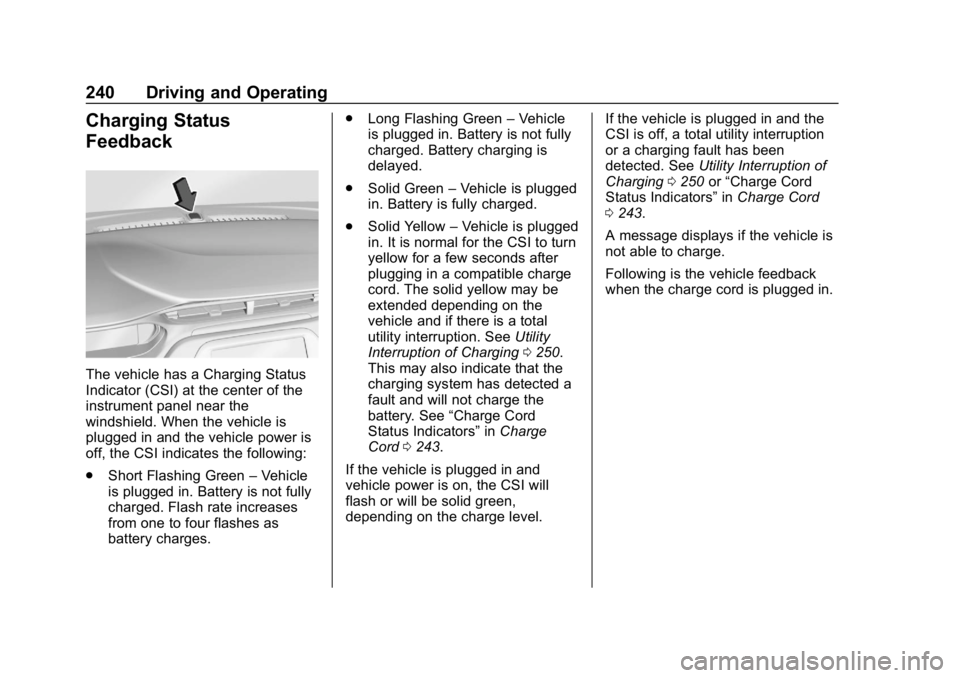
The vehicle has a Charging Status
Indicator (CSI) at the center of the
instrument panel near the
windshield. When the vehicle is
plugged in and the vehicle power is
off, the CSI indicates the following:
.Short Flashing Green –Vehicle
is plugged in. Battery is not fully
charged. Flash rate increases
from one to four flashes as
battery charges. .
Long Flashing Green –Vehicle
is plugged in. Battery is not fully
charged. Battery charging is
delayed.
. Solid Green –Vehicle is plugged
in. Battery is fully charged.
. Solid Yellow –Vehicle is plugged
in. It is normal for the CSI to turn
yellow for a few seconds after
plugging in a compatible charge
cord. The solid yellow may be
extended depending on the
vehicle and if there is a total
utility interruption. See Utility
Interruption of Charging 0250.
This may also indicate that the
charging system has detected a
fault and will not charge the
battery. See “Charge Cord
Status Indicators” inCharge
Cord 0243.
If the vehicle is plugged in and
vehicle power is on, the CSI will
flash or will be solid green,
depending on the charge level. If the vehicle is plugged in and the
CSI is off, a total utility interruption
or a charging fault has been
detected. See
Utility Interruption of
Charging 0250 or“Charge Cord
Status Indicators” inCharge Cord
0 243.
A message displays if the vehicle is
not able to charge.
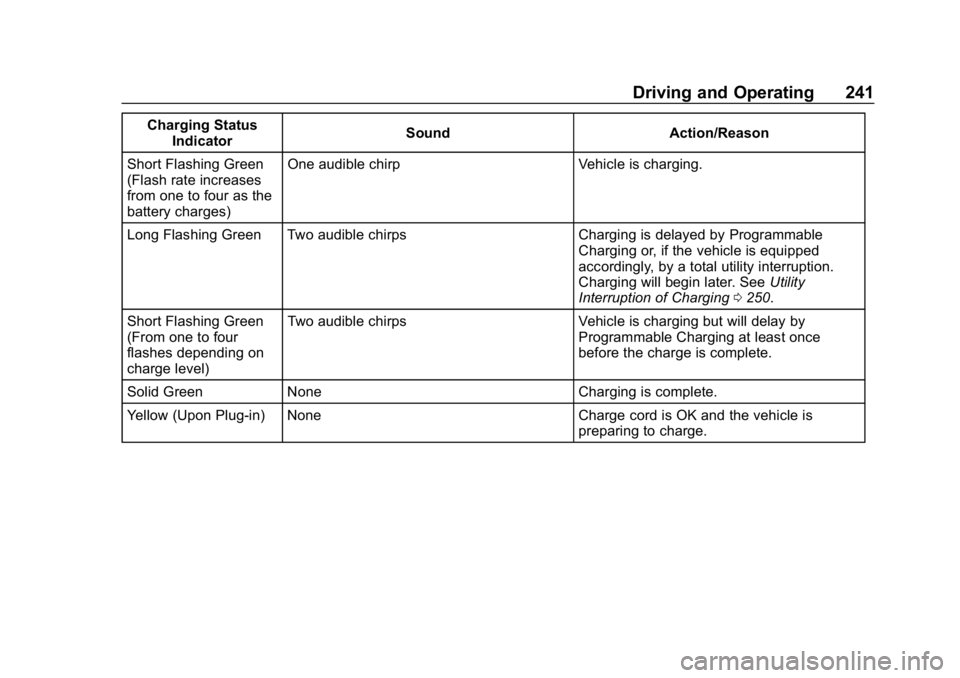
Following is the vehicle feedback
when the charge cord is plugged in.
Page 242 of 370
Chevrolet BOLT EV Owner Manual (GMNA-Localizing-U.S./Canada/Mexico-
11434431) - 2018 - crc - 2/14/18
Driving and Operating 241
Charging StatusIndicator Sound Action/Reason
Short Flashing Green
(Flash rate increases
from one to four as the
battery charges) One audible chirp Vehicle is charging.
Long Flashing Green Two audible chirps Charging is delayed by Programmable Charging or, if the vehicle is equipped
accordingly, by a total utility interruption.
Charging will begin later. SeeUtility
Interruption of Charging 0250.
Short Flashing Green
(From one to four
flashes depending on
charge level) Two audible chirps Vehicle is charging but will delay by
Programmable Charging at least once
before the charge is complete.
Solid Green None Charging is complete.
Yellow (Upon Plug-in) None Charge cord is OK and the vehicle is preparing to charge.