seat CHEVROLET BOLT EV 2018 Owner's Manual
[x] Cancel search | Manufacturer: CHEVROLET, Model Year: 2018, Model line: BOLT EV, Model: CHEVROLET BOLT EV 2018Pages: 370, PDF Size: 5.14 MB
Page 2 of 370
Chevrolet BOLT EV Owner Manual (GMNA-Localizing-U.S./Canada/Mexico-
11434431) - 2018 - crc - 2/14/18
ContentsIntroduction . . . . . . . . . . . . . . . . . . . . . . 2
In Brief . . . . . . . . . . . . . . . . . . . . . . . . . . . 5
Keys, Doors, and Windows . . . . . 32
Seats and Restraints . . . . . . . . . . . 56
Storage . . . . . . . . . . . . . . . . . . . . . . . 105
Instruments and Controls . . . . . . 108
Lighting . . . . . . . . . . . . . . . . . . . . . . . 150
Infotainment System . . . . . . . . . . 157
Climate Controls . . . . . . . . . . . . . . 186
Driving and Operating . . . . . . . . . 193
Vehicle Care . . . . . . . . . . . . . . . . . . 254
Service and Maintenance . . . . . 321
Technical Data . . . . . . . . . . . . . . . . 330
Customer Information . . . . . . . . . 332
Reporting Safety Defects . . . . . . 342
OnStar . . . . . . . . . . . . . . . . . . . . . . . . 346
Index . . . . . . . . . . . . . . . . . . . . 358
Page 5 of 370
Chevrolet BOLT EV Owner Manual (GMNA-Localizing-U.S./Canada/Mexico-
11434431) - 2018 - crc - 2/14/18
4 Introduction
_:High Voltage
j: ISOFIX/LATCH System Child
Restraints
O: Power
/:Remote Vehicle Start
>:Seat Belt Reminders
Z: Service Vehicle Soon
7:Tire Pressure Monitor
d:Traction Control/StabiliTrak
a:Under Pressure
]:Vehicle Ready
M: Windshield Washer Fluid
Page 6 of 370
Chevrolet BOLT EV Owner Manual (GMNA-Localizing-U.S./Canada/Mexico-
11434431) - 2018 - crc - 2/14/18
In Brief 5
In Brief
Instrument Panel
Instrument Panel . . . . . . . . . . . . . . . . 6
Initial Drive Information
Initial Drive Information . . . . . . . . . . 8
Remote Keyless Entry (RKE)System . . . . . . . . . . . . . . . . . . . . . . . . 8
Remote Start . . . . . . . . . . . . . . . . . . . . 8
Door Locks . . . . . . . . . . . . . . . . . . . . . 9
Liftgate . . . . . . . . . . . . . . . . . . . . . . . . 10
Windows . . . . . . . . . . . . . . . . . . . . . . . 11
Seat Adjustment . . . . . . . . . . . . . . . 11
Heated Seats . . . . . . . . . . . . . . . . . . 12
Head Restraint Adjustment . . . . 13
Seat Belts . . . . . . . . . . . . . . . . . . . . . 13
Passenger Sensing System . . . 13
Mirror Adjustment . . . . . . . . . . . . . . 14
Steering Wheel Adjustment . . . . 14
Interior Lighting . . . . . . . . . . . . . . . . 14
Exterior Lighting . . . . . . . . . . . . . . . 15
Windshield Wiper/Washer . . . . . . 16
Climate Controls . . . . . . . . . . . . . . . 17
Vehicle Features
Radio(s) . . . . . . . . . . . . . . . . . . . . . . . 17
Satellite Radio . . . . . . . . . . . . . . . . . 18
Portable Audio Devices . . . . . . . . 18 Bluetooth . . . . . . . . . . . . . . . . . . . . . . 18
Steering Wheel Controls . . . . . . . 18
Cruise Control . . . . . . . . . . . . . . . . . 19
Driver Information
Center (DIC) . . . . . . . . . . . . . . . . . 20
Forward Collision Alert (FCA) System . . . . . . . . . . . . . . . . . . . . . . . 20
Forward Automatic Braking (FAB) . . . . . . . . . . . . . . . . 20
Front Pedestrian Braking (FPB) System . . . . . . . . . . . . . . . . . . . . . . . 20
Lane Keep Assist (LKA) . . . . . . . 21
Lane Change Alert (LCA) . . . . . . 21
Rear Vision Camera (RVC) . . . . 21
Rear Cross Traffic Alert (RCTA) System . . . . . . . . . . . . . . . . . . . . . . . 21
Parking Assist . . . . . . . . . . . . . . . . . 21
Power Outlets . . . . . . . . . . . . . . . . . 22
Battery and Efficiency
High Voltage Safety Information . . . . . . . . . . . . . . . . . . . 22
Charging . . . . . . . . . . . . . . . . . . . . . . . 23
Regenerative Braking . . . . . . . . . . 28
Service . . . . . . . . . . . . . . . . . . . . . . . . 28
Performance and Maintenance
Traction Control/Electronic Stability Control . . . . . . . . . . . . . . 29
Tire Pressure Monitor . . . . . . . . . . 29 Driving for Better Energy
Efficiency . . . . . . . . . . . . . . . . . . . . . 30
Roadside Assistance Program . . . . . . . . . . . . . . . . . . . . . . 31
Page 8 of 370

Chevrolet BOLT EV Owner Manual (GMNA-Localizing-U.S./Canada/Mexico-
11434431) - 2018 - crc - 2/14/18
In Brief 7
1.Air Vents 0190.
2. Turn and Lane-Change Signals
0154.
IntelliBeam System Button (If
Equipped). See Exterior Lamp
Controls 0150.
3. Instrument Cluster 0118.
Driver Information Center (DIC)
0 141.
4. Windshield Wiper/Washer
0111.
5. Charging Status Feedback
0240.
Automatic Headlamp System
0 153.
Indicator Light and Solar
Sensor (ILSS). See “Sensors”
under Automatic Climate
Control System 0186.
6. Infotainment System. See AM-FM Radio 0162.
Heated Front Seats 060 (If
Equipped).
7. Automatic Climate Control
System 0186. 8.
Storage Compartments 0105.
9. Shift Lever. See Electric Drive
Unit 0208.
10. Electric Parking Brake 0213.
11. Power Outlets 0114.
12. Hazard Warning Flashers
0153.
Traction Control/Electronic
Stability Control 0217.
Driver Selected Operating
Modes 0208.
13. Power Button 0204.
14. Steering Wheel Controls 0109
(If Equipped).
15. Horn 0110.
16. Steering Wheel Adjustment
0109 (Out of View).
17. Steering Wheel Controls 0109
(If Equipped).
18. Regen on Demand (Out of View). See Regenerative
Braking 0215.
19. Cruise Control 0219. Heated Steering Wheel
0110
(If Equipped).
Forward Collision Alert (FCA)
System 0225 (If Equipped).
Lane Keep Assist (LKA) 0233
(If Equipped).
20. Instrument Panel Fuse Block
0276.
21. Data Link Connector (DLC) (Out of View). See Service
Vehicle Soon Light 0126.
22. Exterior Lamp Controls 0150.
23. Instrument Panel Illumination
Control 0154.
Page 12 of 370
Chevrolet BOLT EV Owner Manual (GMNA-Localizing-U.S./Canada/Mexico-
11434431) - 2018 - crc - 2/14/18
In Brief 11
Windows
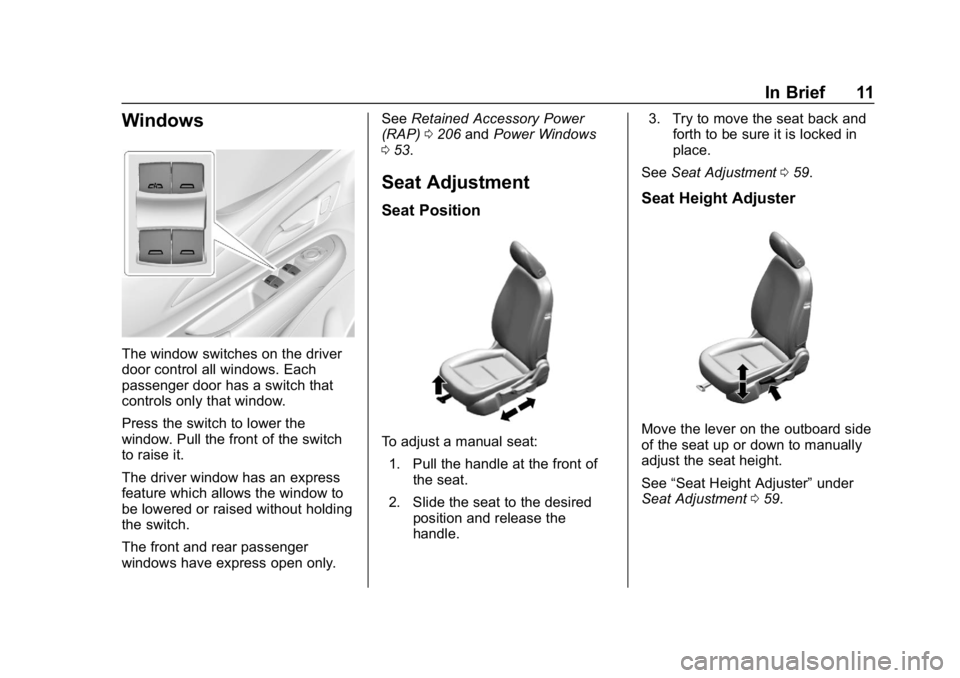
The window switches on the driver
door control all windows. Each
passenger door has a switch that
controls only that window.
Press the switch to lower the
window. Pull the front of the switch
to raise it.
The driver window has an express
feature which allows the window to
be lowered or raised without holding
the switch.
The front and rear passenger
windows have express open only.See
Retained Accessory Power
(RAP) 0206 andPower Windows
0 53.
Seat Adjustment
Seat Position
To adjust a manual seat:
1. Pull the handle at the front of the seat.
2. Slide the seat to the desired position and release the
handle. 3. Try to move the seat back and
forth to be sure it is locked in
place.
See Seat Adjustment 059.
Seat Height Adjuster
Move the lever on the outboard side
of the seat up or down to manually
adjust the seat height.
See “Seat Height Adjuster” under
Seat Adjustment 059.
Page 13 of 370
Chevrolet BOLT EV Owner Manual (GMNA-Localizing-U.S./Canada/Mexico-
11434431) - 2018 - crc - 2/14/18
12 In Brief
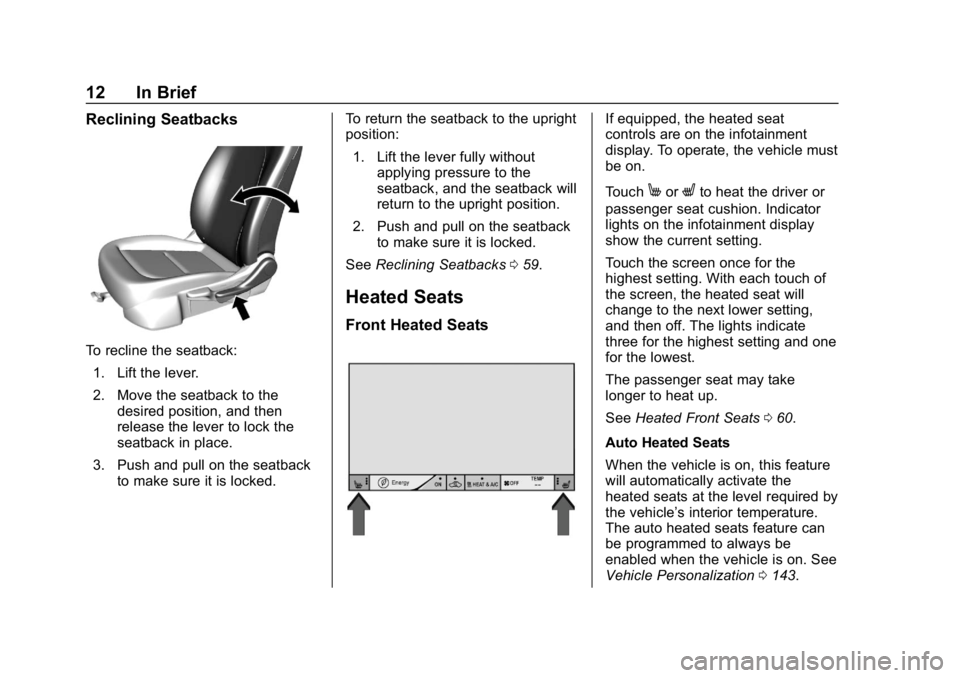
Reclining Seatbacks
To recline the seatback:1. Lift the lever.
2. Move the seatback to the desired position, and then
release the lever to lock the
seatback in place.
3. Push and pull on the seatback to make sure it is locked. To return the seatback to the upright
position:
1. Lift the lever fully without applying pressure to the
seatback, and the seatback will
return to the upright position.
2. Push and pull on the seatback to make sure it is locked.
See Reclining Seatbacks 059.
Heated Seats
Front Heated Seats
If equipped, the heated seat
controls are on the infotainment
display. To operate, the vehicle must
be on.
Touch
MorLto heat the driver or
passenger seat cushion. Indicator
lights on the infotainment display
show the current setting.
Touch the screen once for the
highest setting. With each touch of
the screen, the heated seat will
change to the next lower setting,
and then off. The lights indicate
three for the highest setting and one
for the lowest.
The passenger seat may take
longer to heat up.
See Heated Front Seats 060.
Auto Heated Seats
When the vehicle is on, this feature
will automatically activate the
heated seats at the level required by
the vehicle’ s interior temperature.
The auto heated seats feature can
be programmed to always be
enabled when the vehicle is on. See
Vehicle Personalization 0143.
Page 14 of 370
Chevrolet BOLT EV Owner Manual (GMNA-Localizing-U.S./Canada/Mexico-
11434431) - 2018 - crc - 2/14/18
In Brief 13
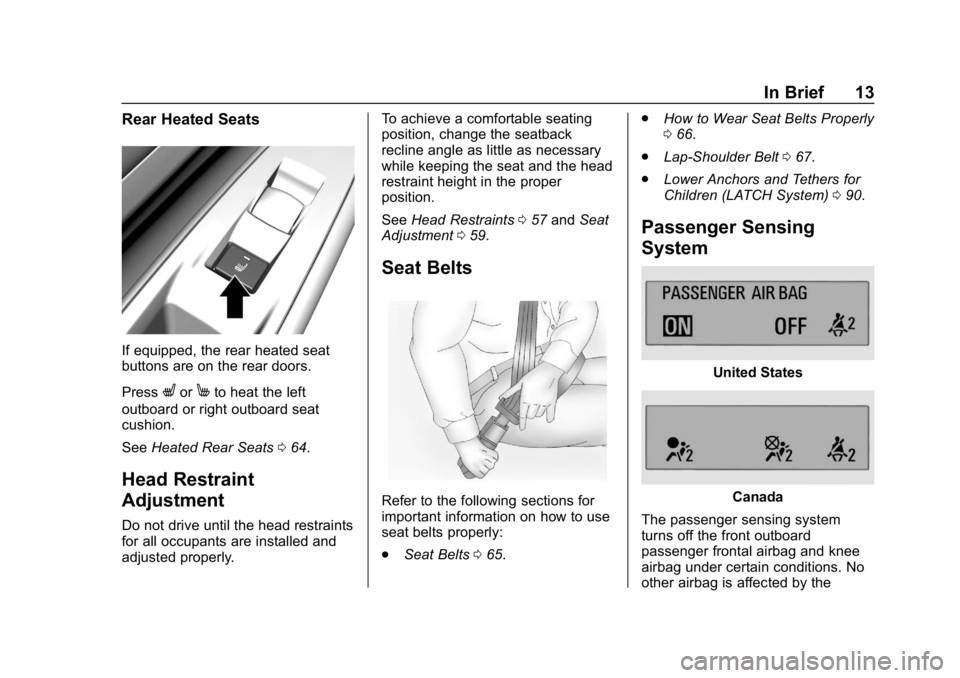
Rear Heated Seats
If equipped, the rear heated seat
buttons are on the rear doors.
Press
LorMto heat the left
outboard or right outboard seat
cushion.
See Heated Rear Seats 064.
Head Restraint
Adjustment
Do not drive until the head restraints
for all occupants are installed and
adjusted properly. To achieve a comfortable seating
position, change the seatback
recline angle as little as necessary
while keeping the seat and the head
restraint height in the proper
position.
See
Head Restraints 057 and Seat
Adjustment 059.
Seat Belts
Refer to the following sections for
important information on how to use
seat belts properly:
.
Seat Belts 065. .
How to Wear Seat Belts Properly
066.
. Lap-Shoulder Belt 067.
. Lower Anchors and Tethers for
Children (LATCH System) 090.
Passenger Sensing
System
United States
Canada
The passenger sensing system
turns off the front outboard
passenger frontal airbag and knee
airbag under certain conditions. No
other airbag is affected by the
Page 15 of 370
Chevrolet BOLT EV Owner Manual (GMNA-Localizing-U.S./Canada/Mexico-
11434431) - 2018 - crc - 2/14/18
14 In Brief
passenger sensing system. See
Passenger Sensing System077 for
important information.
The passenger airbag status
indicator will be visible on the
overhead console when the vehicle
is started. See Passenger Airbag
Status Indicator 0125.
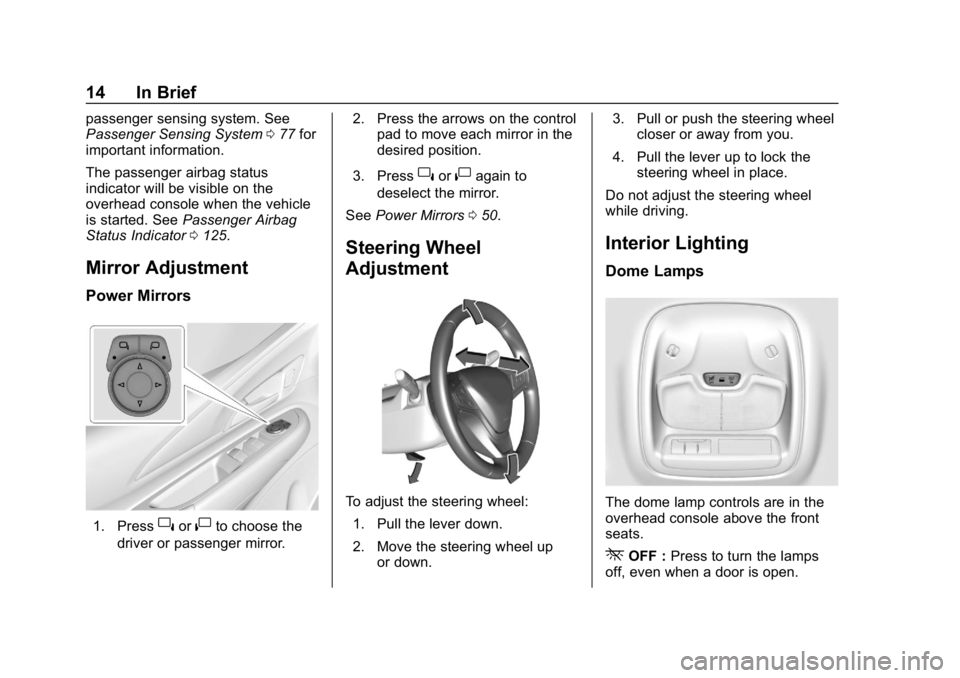
Mirror Adjustment
Power Mirrors
1. Press}or|to choose the
driver or passenger mirror. 2. Press the arrows on the control
pad to move each mirror in the
desired position.
3. Press
}or|again to
deselect the mirror.
See Power Mirrors 050.
Steering Wheel
Adjustment
To adjust the steering wheel:
1. Pull the lever down.
2. Move the steering wheel up or down. 3. Pull or push the steering wheel
closer or away from you.
4. Pull the lever up to lock the steering wheel in place.
Do not adjust the steering wheel
while driving.
Interior Lighting
Dome Lamps
The dome lamp controls are in the
overhead console above the front
seats.
*OFF : Press to turn the lamps
off, even when a door is open.
Page 18 of 370
Chevrolet BOLT EV Owner Manual (GMNA-Localizing-U.S./Canada/Mexico-
11434431) - 2018 - crc - 2/14/18
In Brief 17
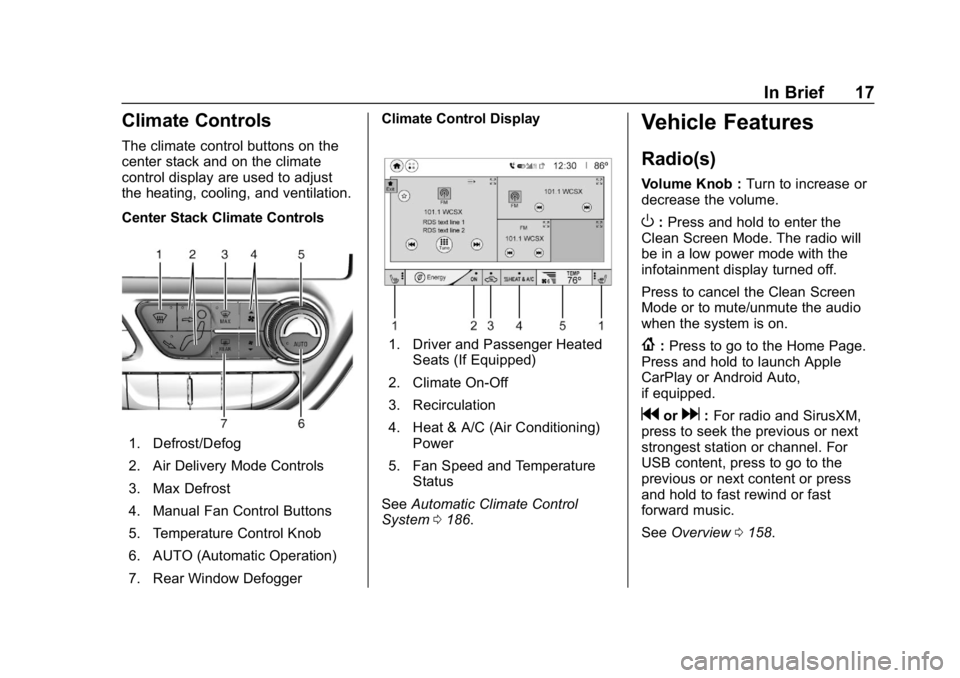
Climate Controls
The climate control buttons on the
center stack and on the climate
control display are used to adjust
the heating, cooling, and ventilation.
Center Stack Climate Controls
1. Defrost/Defog
2. Air Delivery Mode Controls
3. Max Defrost
4. Manual Fan Control Buttons
5. Temperature Control Knob
6. AUTO (Automatic Operation)
7. Rear Window DefoggerClimate Control Display
1. Driver and Passenger Heated
Seats (If Equipped)
2. Climate On-Off
3. Recirculation
4. Heat & A/C (Air Conditioning) Power
5. Fan Speed and Temperature Status
See Automatic Climate Control
System 0186.
Vehicle Features
Radio(s)
Volume Knob : Turn to increase or
decrease the volume.
O: Press and hold to enter the
Clean Screen Mode. The radio will
be in a low power mode with the
infotainment display turned off.
Press to cancel the Clean Screen
Mode or to mute/unmute the audio
when the system is on.
{: Press to go to the Home Page.
Press and hold to launch Apple
CarPlay or Android Auto,
if equipped.
gord: For radio and SirusXM,
press to seek the previous or next
strongest station or channel. For
USB content, press to go to the
previous or next content or press
and hold to fast rewind or fast
forward music.
See Overview 0158.
Page 26 of 370
Chevrolet BOLT EV Owner Manual (GMNA-Localizing-U.S./Canada/Mexico-
11434431) - 2018 - crc - 2/14/18
In Brief 25
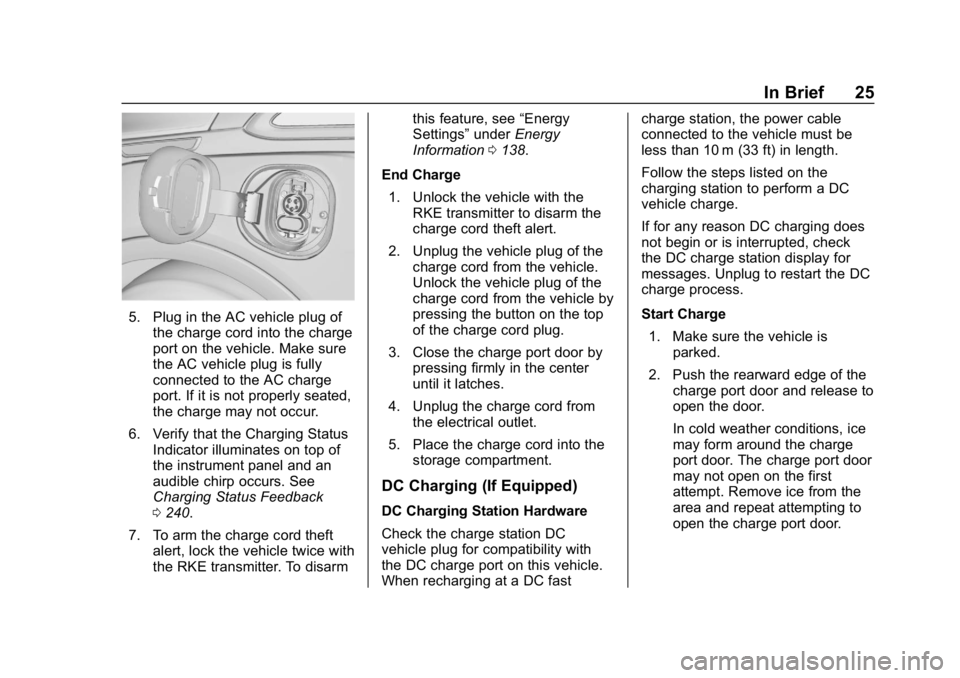
5. Plug in the AC vehicle plug ofthe charge cord into the charge
port on the vehicle. Make sure
the AC vehicle plug is fully
connected to the AC charge
port. If it is not properly seated,
the charge may not occur.
6. Verify that the Charging Status Indicator illuminates on top of
the instrument panel and an
audible chirp occurs. See
Charging Status Feedback
0240.
7. To arm the charge cord theft alert, lock the vehicle twice with
the RKE transmitter. To disarm this feature, see
“Energy
Settings” underEnergy
Information 0138.
End Charge 1. Unlock the vehicle with the RKE transmitter to disarm the
charge cord theft alert.
2. Unplug the vehicle plug of the charge cord from the vehicle.
Unlock the vehicle plug of the
charge cord from the vehicle by
pressing the button on the top
of the charge cord plug.
3. Close the charge port door by pressing firmly in the center
until it latches.
4. Unplug the charge cord from the electrical outlet.
5. Place the charge cord into the storage compartment.
DC Charging (If Equipped)
DC Charging Station Hardware
Check the charge station DC
vehicle plug for compatibility with
the DC charge port on this vehicle.
When recharging at a DC fast charge station, the power cable
connected to the vehicle must be
less than 10 m (33 ft) in length.
Follow the steps listed on the
charging station to perform a DC
vehicle charge.
If for any reason DC charging does
not begin or is interrupted, check
the DC charge station display for
messages. Unplug to restart the DC
charge process.
Start Charge
1. Make sure the vehicle is parked.
2. Push the rearward edge of the charge port door and release to
open the door.
In cold weather conditions, ice
may form around the charge
port door. The charge port door
may not open on the first
attempt. Remove ice from the
area and repeat attempting to
open the charge port door.