display CHEVROLET BOLT EV 2019 User Guide
[x] Cancel search | Manufacturer: CHEVROLET, Model Year: 2019, Model line: BOLT EV, Model: CHEVROLET BOLT EV 2019Pages: 371, PDF Size: 5.51 MB
Page 29 of 371
Chevrolet BOLT EV Owner Manual (GMNA-Localizing-U.S./Canada/Mexico-
12163003) - 2019 - crc - 5/18/18
28 In Brief
Danger (Continued)
.Do not use an electrical
outlet that is worn or
damaged, or will not hold
the plug firmly in place.
. Do not use an electrical
outlet that is not properly
grounded.
. Do not use an electrical
outlet that is on a circuit with
other electrical loads.
Charge Cord Status Indicators
See Charge Cord 0246.
Charge Level Selection
Charge level selection can be made
using the Charge Mode tab on the
Charging screen on the infotainment
display. See “Charge Limit
Selection” underProgrammable
Charging 0132.
{Warning
Using a charge level that exceeds
the electrical circuit or electrical
outlet capacity may start a fire or
damage the electrical circuit. Use
the lowest charge level until a
qualified electrician inspects the
electrical circuit capacity. Use the
lowest charge level if the
electrical circuit or electrical outlet
capacity is not known.
Regenerative Braking
Regenerative braking takes some of
the energy from the moving vehicle
and turns it back into electrical
energy. This energy is then stored in
the high voltage battery system,
contributing to increased energy
efficiency.
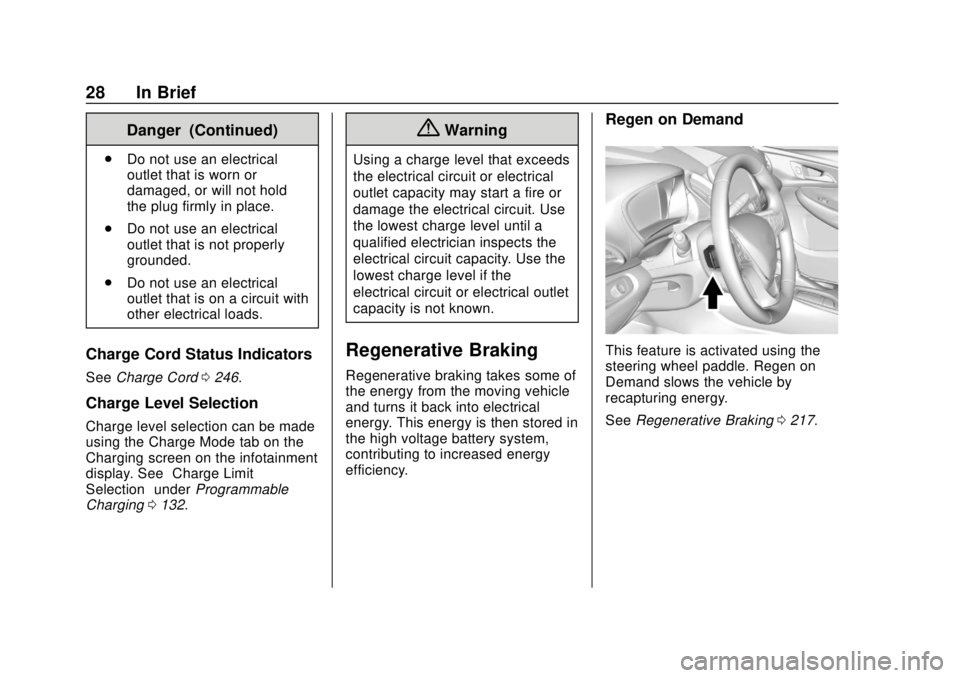
Regen on Demand
This feature is activated using the
steering wheel paddle. Regen on
Demand slows the vehicle by
recapturing energy.
See Regenerative Braking 0217.
Page 37 of 371
Chevrolet BOLT EV Owner Manual (GMNA-Localizing-U.S./Canada/Mexico-
12163003) - 2019 - crc - 5/18/18
36 Keys, Doors, and Windows
Passive Locking
The Keyless Access system will
lock the vehicle several seconds
after all doors are closed, if the
vehicle is off and at least one RKE
transmitter has been removed from
the interior or none remain in the
interior.
If other electronic devices interfere
with the RKE transmitter signal, the
vehicle may not detect the RKE
transmitter inside the vehicle.
If passive locking is enabled, the
doors may lock with the RKE
transmitter inside the vehicle. Do
not leave the RKE transmitter in an
unattended vehicle.
To customize doors to automatically
lock when exiting the vehicle, see
Vehicle Personalization0146.
Temporary Disable of Passive
Locking
Temporarily disable passive locking
by pressing and holding
Kon the
interior door switch with a door open
for at least four seconds, or until
three chimes are heard. Passive locking will then remain disabled
until
Qon the interior door is
pressed, or until the vehicle is
started.
Remote Left In Vehicle Alert
When the vehicle is turned off and
an RKE transmitter is left in the
vehicle, the horn will chirp three
times after all doors are closed.
To turn on or off see Vehicle
Personalization 0146.
Remote No Longer In Vehicle Alert
If the vehicle is on with a door open,
and then all doors are closed, the
vehicle will check for RKE
transmitters inside. If an RKE
transmitter is not detected, the
Driver Information Center (DIC) will
display NO REMOTE DETECTED
and the horn will chirp three times.
This occurs only once each time the
vehicle is driven.
See Vehicle Personalization 0146. Keyless Liftgate Opening
Press the touch pad on the
underside of the liftgate glass and
lift up to open if the RKE transmitter
is within 1 m (3 ft) and the doors are
locked. If the doors are unlocked,
the transmitter is not required to
open the liftgate. See
Liftgate047.
Key Access
To access a vehicle with a weak
transmitter battery, see Door Locks
0 41.
Programming Transmitters to
the Vehicle
Only RKE transmitters programmed
to the vehicle will work. If a
transmitter is lost or stolen, a
replacement can be purchased and
programmed through your dealer.
The vehicle can be reprogrammed
so that lost or stolen transmitters no
longer work. Any remaining
transmitters will need to be
reprogrammed. Each vehicle can
have up to eight transmitters
matched to it.
Page 38 of 371
Chevrolet BOLT EV Owner Manual (GMNA-Localizing-U.S./Canada/Mexico-
12163003) - 2019 - crc - 5/18/18
Keys, Doors, and Windows 37
Programming with Two
Recognized Transmitters
A new transmitter can be
programmed to the vehicle when
there are two recognized
transmitters. To program, the vehicle
must be off and all of the
transmitters, both currently
recognized and new, must be
with you.
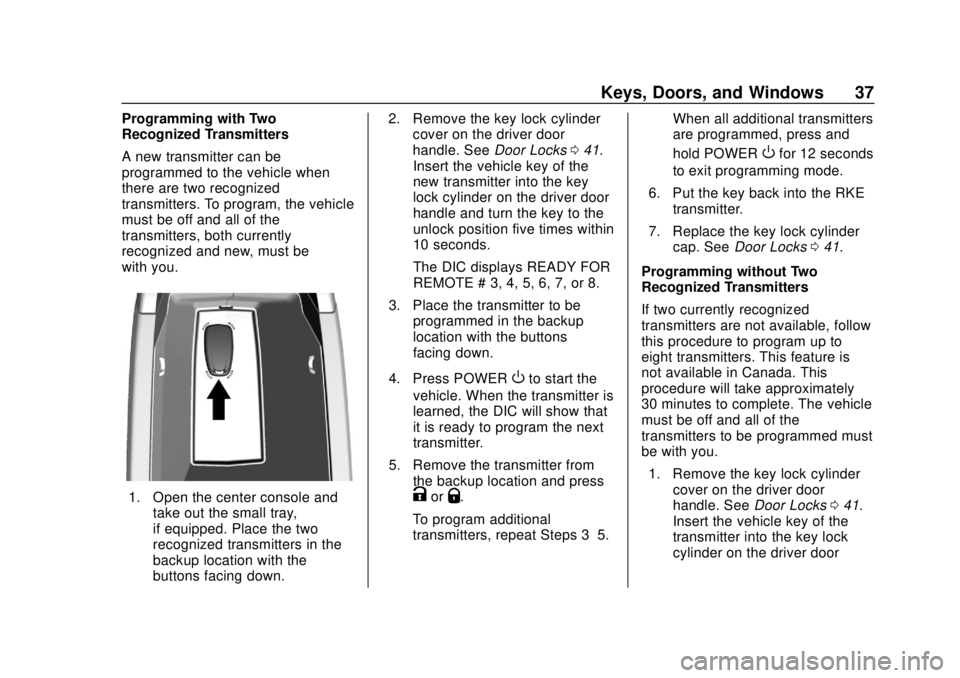
1. Open the center console andtake out the small tray,
if equipped. Place the two
recognized transmitters in the
backup location with the
buttons facing down. 2. Remove the key lock cylinder
cover on the driver door
handle. See Door Locks041.
Insert the vehicle key of the
new transmitter into the key
lock cylinder on the driver door
handle and turn the key to the
unlock position five times within
10 seconds.
The DIC displays READY FOR
REMOTE # 3, 4, 5, 6, 7, or 8.
3. Place the transmitter to be programmed in the backup
location with the buttons
facing down.
4. Press POWER
Oto start the
vehicle. When the transmitter is
learned, the DIC will show that
it is ready to program the next
transmitter.
5. Remove the transmitter from the backup location and press
KorQ.
To program additional
transmitters, repeat Steps 3–5. When all additional transmitters
are programmed, press and
hold POWER
Ofor 12 seconds
to exit programming mode.
6. Put the key back into the RKE transmitter.
7. Replace the key lock cylinder cap. See Door Locks 041.
Programming without Two
Recognized Transmitters
If two currently recognized
transmitters are not available, follow
this procedure to program up to
eight transmitters. This feature is
not available in Canada. This
procedure will take approximately
30 minutes to complete. The vehicle
must be off and all of the
transmitters to be programmed must
be with you. 1. Remove the key lock cylinder cover on the driver door
handle. See Door Locks041.
Insert the vehicle key of the
transmitter into the key lock
cylinder on the driver door
Page 39 of 371
Chevrolet BOLT EV Owner Manual (GMNA-Localizing-U.S./Canada/Mexico-
12163003) - 2019 - crc - 5/18/18
38 Keys, Doors, and Windows
handle and turn the key to the
unlock position five times within
10 seconds.
The DIC displays REMOTE
LEARN PENDING,
PLEASE WAIT.
2. Wait for 10 minutes until the DIC displays PRESS ENGINE
START BUTTON TO LEARN
and then press POWER
O.
The DIC will again show
REMOTE LEARN PENDING,
PLEASE WAIT.
3. Repeat Step 2 two additional times. After the third time, all
previously known transmitters
will no longer work with the
vehicle. Remaining transmitters
can be relearned during the
next steps.
The DIC should now show
READY FOR REMOTE # 1.
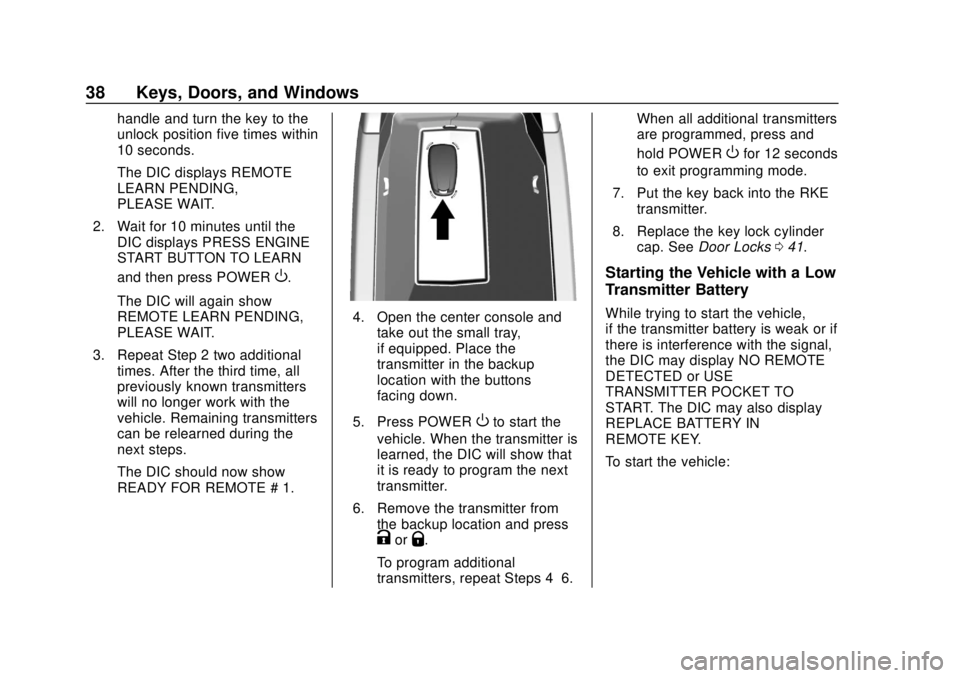
4. Open the center console andtake out the small tray,
if equipped. Place the
transmitter in the backup
location with the buttons
facing down.
5. Press POWER
Oto start the
vehicle. When the transmitter is
learned, the DIC will show that
it is ready to program the next
transmitter.
6. Remove the transmitter from the backup location and press
KorQ.
To program additional
transmitters, repeat Steps 4–6. When all additional transmitters
are programmed, press and
hold POWER
Ofor 12 seconds
to exit programming mode.
7. Put the key back into the RKE transmitter.
8. Replace the key lock cylinder cap. See Door Locks 041.
Starting the Vehicle with a Low
Transmitter Battery
While trying to start the vehicle,
if the transmitter battery is weak or if
there is interference with the signal,
the DIC may display NO REMOTE
DETECTED or USE
TRANSMITTER POCKET TO
START. The DIC may also display
REPLACE BATTERY IN
REMOTE KEY.
To start the vehicle:
Page 40 of 371
Chevrolet BOLT EV Owner Manual (GMNA-Localizing-U.S./Canada/Mexico-
12163003) - 2019 - crc - 5/18/18
Keys, Doors, and Windows 39
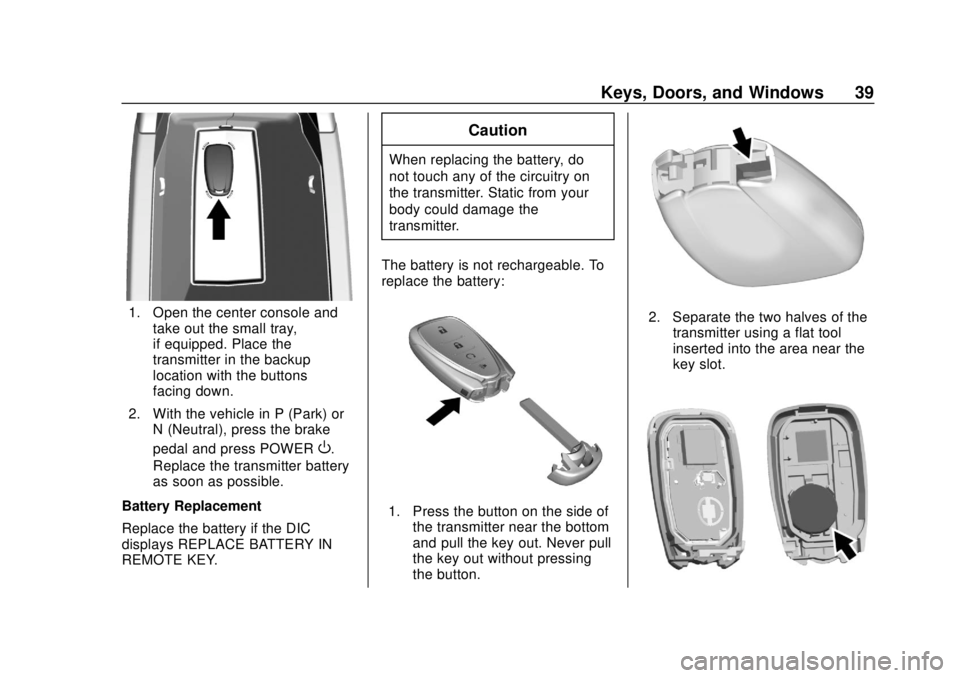
1. Open the center console andtake out the small tray,
if equipped. Place the
transmitter in the backup
location with the buttons
facing down.
2. With the vehicle in P (Park) or N (Neutral), press the brake
pedal and press POWER
O.
Replace the transmitter battery
as soon as possible.
Battery Replacement
Replace the battery if the DIC
displays REPLACE BATTERY IN
REMOTE KEY.
Caution
When replacing the battery, do
not touch any of the circuitry on
the transmitter. Static from your
body could damage the
transmitter.
The battery is not rechargeable. To
replace the battery:
1. Press the button on the side of the transmitter near the bottom
and pull the key out. Never pull
the key out without pressing
the button.
2. Separate the two halves of thetransmitter using a flat tool
inserted into the area near the
key slot.
Page 47 of 371
Chevrolet BOLT EV Owner Manual (GMNA-Localizing-U.S./Canada/Mexico-
12163003) - 2019 - crc - 5/18/18
46 Keys, Doors, and Windows
.Remote Charge Termination
. High Voltage Charge Functions
‐Temporary Charging Override
Update
‐ Change the Charging Mode
Permanently
‐ Update Departure Time
Schedule
‐ High Voltage Priority Charging
Activate and De-activate
‐ Select Charge Level/Limit
Preference Screen
. Vehicle Locator
. Routing w/Available Mileage
Passive Function
Approach Detection/Welcome
Lighting
Visual Display for Vehicle
Information
. Low Battery Indication
. Tire Pressure
. Remote Start Status
. Odometer Reading .
Rear Closure Ajar Switch Status
. Electric Parking Brake Status
. Hood Status
. High Voltage Battery State of
Charge Status
. GPS Signal for End of Trip
. Charge Mode Status
‐Available Mileage
‐ Charge Start and End Times
Status
‐ Full Week of Time Based
Delayed Charging Status
‐ Disable Rate Based and
Delayed Charging Status
‐ High Voltage Charging System
Fault (Unable to Charge)
‐ High Voltage Charger Power
Level
‐ High Voltage Battery Charge
Cord Connected Indication
‐ Charge Complete
‐ Usable State of Charge
‐ High Voltage Depletion Mode
Range ‐
High Voltage Battery State of
Charge Status
Pairing
A smartphone must be paired to the
KeyPass Module and then it must
be connected to the vehicle before it
can be used.
Setup Information
. Up to three smartphones can be
set up and connected to the
vehicle.
. Setup is disabled when the
vehicle is moving.
. Pairing only needs to be
completed once per smartphone,
unless the pairing information on
the smartphone changes or the
smartphone is deleted.
Setup Process 1. Enable the KeyPass function through vehicle
personalization. See Vehicle
Personalization 0146.
2. Download the myChevrolet app to the smartphone from the
appropriate app store.
Page 48 of 371
Chevrolet BOLT EV Owner Manual (GMNA-Localizing-U.S./Canada/Mexico-
12163003) - 2019 - crc - 5/18/18
Keys, Doors, and Windows 47
3. The vehicle must be on and inP (Park).
4. Open the app and touch Search for New Vehicles.
5. Choose your vehicle and touch Done.
6. Aim the smartphone camera at the QR code on the
infotainment display to scan
the security key. If the camera
is not working, the QR code
can be entered manually.
7. The infotainment display provides confirmation that the
pairing process was completed
successfully.
Deleting a Paired Smartphone 1. Select Settings from the Home Page on the infotainment
display.
2. Select KeyPass.
3. Select Manage KeyPass Devices.
4. Touch Delete next to the smartphone to be deleted, and
follow the prompts.Doors
Liftgate
Caution
To avoid damage to the liftgate or
liftgate glass, make sure the area
above and behind the liftgate is
clear before opening it.
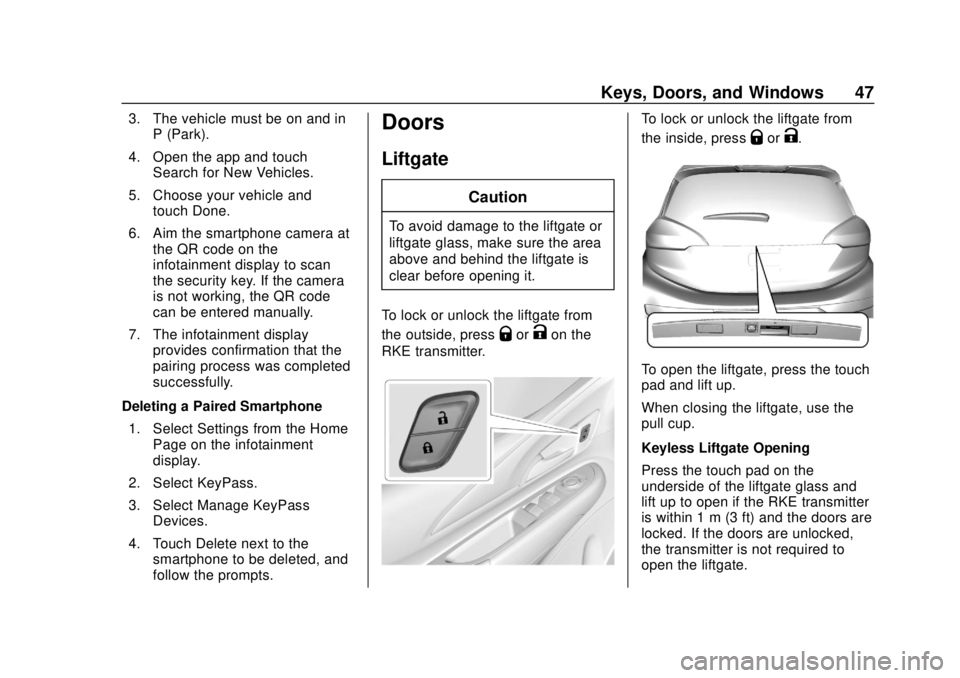
To lock or unlock the liftgate from
the outside, press
QorKon the
RKE transmitter.
To lock or unlock the liftgate from
the inside, press
QorK.
To open the liftgate, press the touch
pad and lift up.
When closing the liftgate, use the
pull cup.
Keyless Liftgate Opening
Press the touch pad on the
underside of the liftgate glass and
lift up to open if the RKE transmitter
is within 1 m (3 ft) and the doors are
locked. If the doors are unlocked,
the transmitter is not required to
open the liftgate.
Page 52 of 371
Chevrolet BOLT EV Owner Manual (GMNA-Localizing-U.S./Canada/Mexico-
12163003) - 2019 - crc - 5/18/18
Keys, Doors, and Windows 51
Interior Mirrors
Interior Rearview Mirrors
Adjust the rearview mirror for a clear
view of the area behind your
vehicle.
Do not spray glass cleaner directly
on the mirror. Use a soft towel
dampened with water.
Manual Rearview Mirror
Push the tab forward for daytime
use and pull it rearward for
nighttime use to avoid glare of the
headlamps from behind.
Automatic Dimming
Rearview Mirror
If equipped, automatic dimming
reduces the glare of headlamps
from behind. The dimming feature
comes on when the vehicle is
started.
Rear Camera Mirror
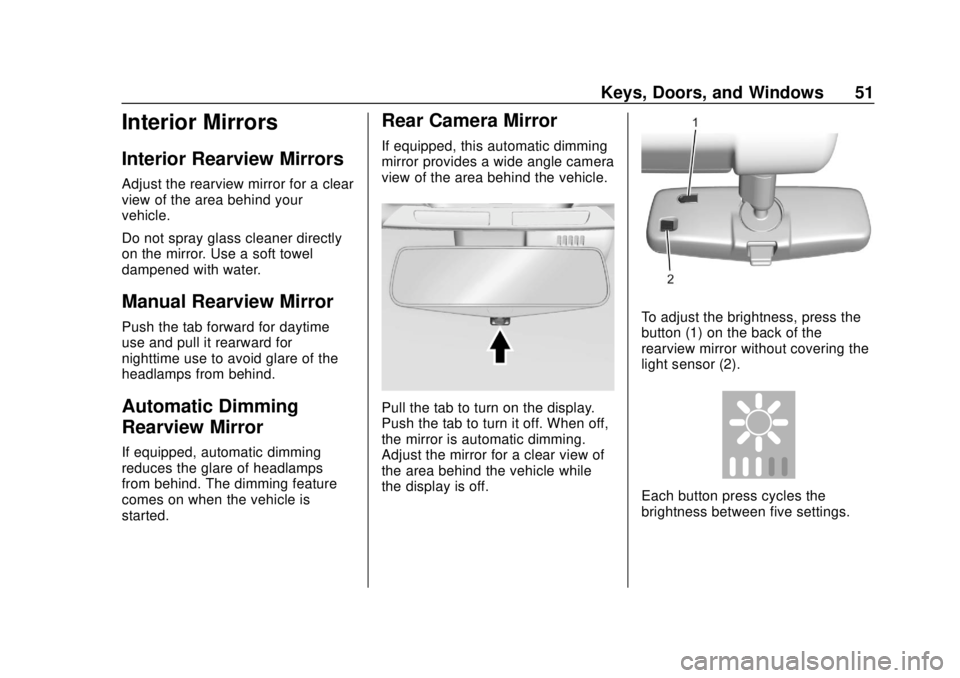
If equipped, this automatic dimming
mirror provides a wide angle camera
view of the area behind the vehicle.
Pull the tab to turn on the display.
Push the tab to turn it off. When off,
the mirror is automatic dimming.
Adjust the mirror for a clear view of
the area behind the vehicle while
the display is off.
To adjust the brightness, press the
button (1) on the back of the
rearview mirror without covering the
light sensor (2).
Each button press cycles the
brightness between five settings.
Page 53 of 371
Chevrolet BOLT EV Owner Manual (GMNA-Localizing-U.S./Canada/Mexico-
12163003) - 2019 - crc - 5/18/18
52 Keys, Doors, and Windows
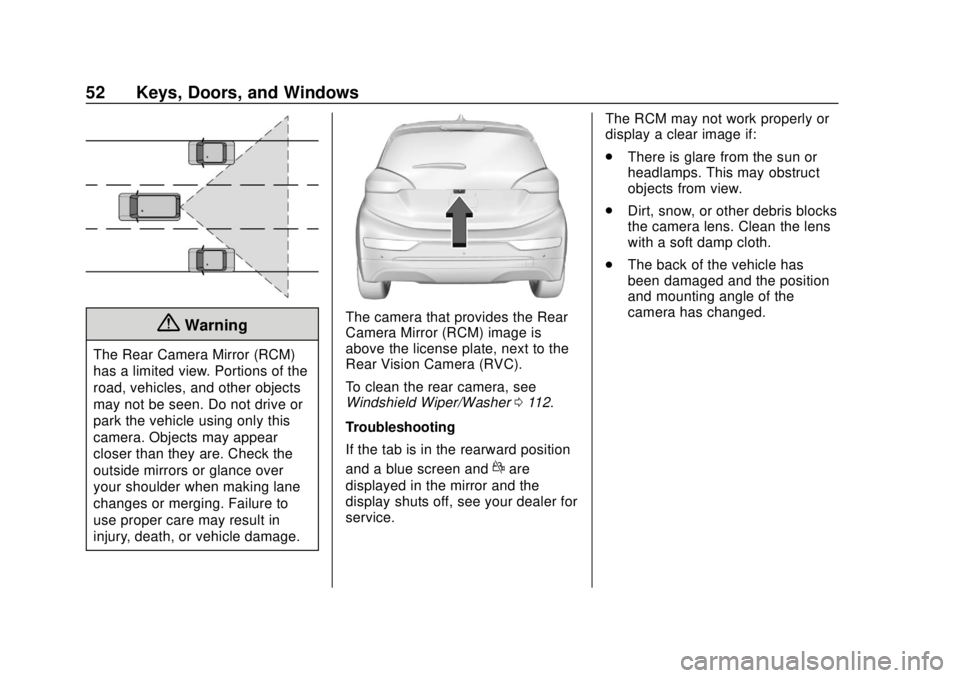
{Warning
The Rear Camera Mirror (RCM)
has a limited view. Portions of the
road, vehicles, and other objects
may not be seen. Do not drive or
park the vehicle using only this
camera. Objects may appear
closer than they are. Check the
outside mirrors or glance over
your shoulder when making lane
changes or merging. Failure to
use proper care may result in
injury, death, or vehicle damage.
The camera that provides the Rear
Camera Mirror (RCM) image is
above the license plate, next to the
Rear Vision Camera (RVC).
To clean the rear camera, see
Windshield Wiper/Washer0112.
Troubleshooting
If the tab is in the rearward position
and a blue screen and
dare
displayed in the mirror and the
display shuts off, see your dealer for
service. The RCM may not work properly or
display a clear image if:
.
There is glare from the sun or
headlamps. This may obstruct
objects from view.
. Dirt, snow, or other debris blocks
the camera lens. Clean the lens
with a soft damp cloth.
. The back of the vehicle has
been damaged and the position
and mounting angle of the
camera has changed.
Page 62 of 371
Chevrolet BOLT EV Owner Manual (GMNA-Localizing-U.S./Canada/Mexico-
12163003) - 2019 - crc - 5/18/18
Seats and Restraints 61
Warning (Continued)
heat, such as a blanket, cushion,
cover, or similar item. This may
cause the seat heater to
overheat. An overheated seat
heater may cause a burn or may
damage the seat.
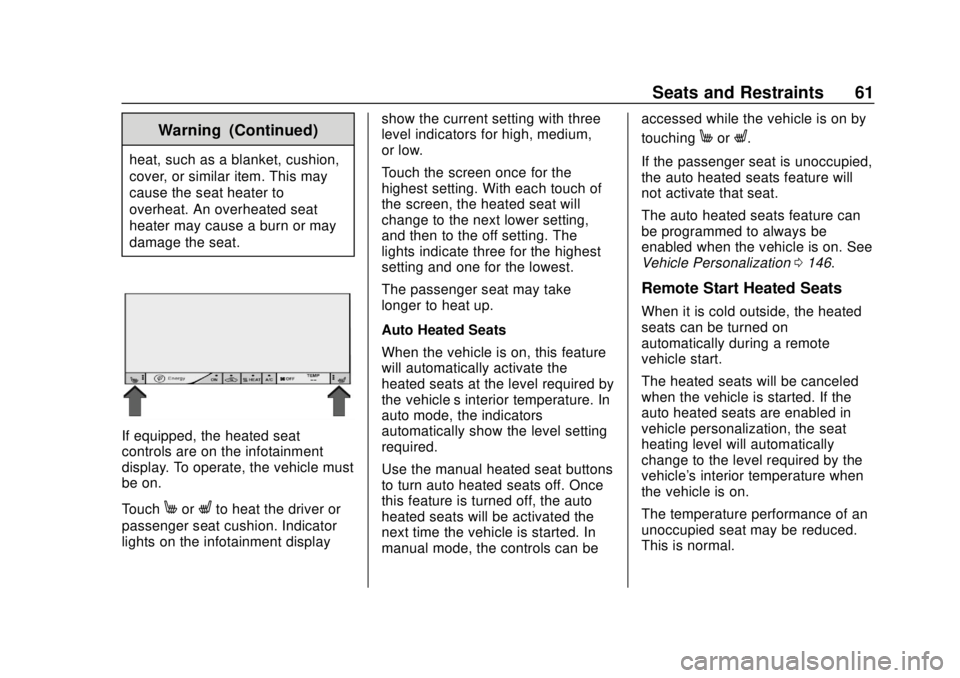
If equipped, the heated seat
controls are on the infotainment
display. To operate, the vehicle must
be on.
Touch
MorLto heat the driver or
passenger seat cushion. Indicator
lights on the infotainment display show the current setting with three
level indicators for high, medium,
or low.
Touch the screen once for the
highest setting. With each touch of
the screen, the heated seat will
change to the next lower setting,
and then to the off setting. The
lights indicate three for the highest
setting and one for the lowest.
The passenger seat may take
longer to heat up.
Auto Heated Seats
When the vehicle is on, this feature
will automatically activate the
heated seats at the level required by
the vehicle’
s interior temperature. In
auto mode, the indicators
automatically show the level setting
required.
Use the manual heated seat buttons
to turn auto heated seats off. Once
this feature is turned off, the auto
heated seats will be activated the
next time the vehicle is started. In
manual mode, the controls can be accessed while the vehicle is on by
touching
MorL.
If the passenger seat is unoccupied,
the auto heated seats feature will
not activate that seat.
The auto heated seats feature can
be programmed to always be
enabled when the vehicle is on. See
Vehicle Personalization 0146.
Remote Start Heated Seats
When it is cold outside, the heated
seats can be turned on
automatically during a remote
vehicle start.
The heated seats will be canceled
when the vehicle is started. If the
auto heated seats are enabled in
vehicle personalization, the seat
heating level will automatically
change to the level required by the
vehicle's interior temperature when
the vehicle is on.
The temperature performance of an
unoccupied seat may be reduced.
This is normal.