display CHEVROLET BOLT EV 2019 Owner's Guide
[x] Cancel search | Manufacturer: CHEVROLET, Model Year: 2019, Model line: BOLT EV, Model: CHEVROLET BOLT EV 2019Pages: 371, PDF Size: 5.51 MB
Page 63 of 371
Chevrolet BOLT EV Owner Manual (GMNA-Localizing-U.S./Canada/Mexico-
12163003) - 2019 - crc - 5/18/18
62 Seats and Restraints
The heated seats will not turn on
during a remote start unless the
heated seat feature is enabled. See
Vehicle Personalization0146.Rear Seats
Rear Seat Reminder
If equipped, the message REAR
SEAT REMINDER LOOK IN REAR
SEAT displays under certain
conditions indicating there may be
an item or passenger in the rear
seat. Check before exiting the
vehicle.
This feature will activate when a
second row door is opened while
the vehicle is on or up to 10 minutes
before the vehicle is turned on.
There will be an alert when the
vehicle is turned off. The alert does
not directly detect objects in the rear
seat; instead, under certain
conditions, it detects when a rear
door is opened and closed,
indicating that there may be
something in the rear seat.
The feature is active only once each
time the vehicle is turned on and off,
and will require reactivation by
opening and closing the second row
doors. There may be an alert even
when there is nothing in the rear
seat; for example, if a child entered the vehicle through the rear door
and left the vehicle without the
vehicle being shut off.
The feature can be turned on or off.
See
Vehicle Personalization 0146.
Folding the Seatback
Either side of the seatback can be
folded down for more cargo space.
Fold a seatback only when the
vehicle is not moving.
Caution
Folding a rear seat with the seat
belts still fastened may cause
damage to the seat or the seat
belts. Always unbuckle the seat
belts and return them to their
normal stowed position before
folding a rear seat.
To fold the seatback down:
Page 110 of 371
Chevrolet BOLT EV Owner Manual (GMNA-Localizing-U.S./Canada/Mexico-
12163003) - 2019 - crc - 5/18/18
Instruments and Controls 109
Instruments and
Controls
Controls
Steering Wheel Adjustment . . . 110
Steering Wheel Controls . . . . . . 110
Heated Steering Wheel . . . . . . . 111
Horn . . . . . . . . . . . . . . . . . . . . . . . . . . 111
Pedestrian Safety Signal . . . . . . 111
Windshield Wiper/Washer . . . . 112
Rear Window Wiper/Washer . . . . . . . . . . . . . . . . . . . . . . 113
Compass . . . . . . . . . . . . . . . . . . . . . 114
Clock . . . . . . . . . . . . . . . . . . . . . . . . . 114
Power Outlets . . . . . . . . . . . . . . . . 115
Wireless Charging . . . . . . . . . . . . 116
Warning Lights, Gauges, and
Indicators
Warning Lights, Gauges, and Indicators . . . . . . . . . . . . . . . . . . . 118
Instrument Cluster . . . . . . . . . . . . 119
Speedometer . . . . . . . . . . . . . . . . . 122
Odometer . . . . . . . . . . . . . . . . . . . . . 122
Trip Odometer . . . . . . . . . . . . . . . . 122
Battery Gauge (High Voltage) . . . . . . . . . . . . . . . . . . . . . 123
Driver Efficiency Gauge . . . . . . 123 Power Indicator Gauge . . . . . . . 124
Seat Belt Reminders . . . . . . . . . 124
Airbag Readiness Light . . . . . . . 125
Passenger Airbag Status
Indicator . . . . . . . . . . . . . . . . . . . . 125
Charging System Light (12-Volt Battery) . . . . . . . . . . . . . . . . . . . . . 126
Service Vehicle Soon Light . . . 127
Brake System Warning Light . . . . . . . . . . . . . . . . . . . . . . . . 127
Electric Parking Brake Light . . . . . . . . . . . . . . . . . . . . . . . . 127
Service Electric Parking Brake Light . . . . . . . . . . . . . . . . . . . . . . . . 128
Antilock Brake System (ABS) Warning Light . . . . . . . . . . . . . . . 128
Sport Mode Light . . . . . . . . . . . . . 128
Lane Keep Assist (LKA) Light . . . . . . . . . . . . . . . . . . . . . . . . 128
Vehicle Ahead Indicator . . . . . . 129
Pedestrian Ahead Indicator . . . 129
Traction Off Light . . . . . . . . . . . . . 129
StabiliTrak OFF Light . . . . . . . . . 129
Traction Control System (TCS)/ StabiliTrak Light . . . . . . . . . . . . . 130
Tire Pressure Light . . . . . . . . . . . 130
Security Light . . . . . . . . . . . . . . . . . 130
Vehicle Ready Light . . . . . . . . . . 131
High-Beam On Light . . . . . . . . . . 131
Lamps On Reminder . . . . . . . . . 131 Cruise Control Light . . . . . . . . . . 131
Door Ajar Light . . . . . . . . . . . . . . . 131
Information Displays
Power Flows . . . . . . . . . . . . . . . . . 132
Programmable Charging . . . . . . 132
Energy Information . . . . . . . . . . . 140
Charging Options . . . . . . . . . . . . . 142
Driver Information
Center (DIC) . . . . . . . . . . . . . . . . 143
Vehicle Messages
Vehicle Messages . . . . . . . . . . . . 145
Propulsion PowerMessages . . . . . . . . . . . . . . . . . . . 145
Vehicle Speed Messages . . . . . 145
Vehicle Personalization
Vehicle Personalization . . . . . . . 146
Page 111 of 371
Chevrolet BOLT EV Owner Manual (GMNA-Localizing-U.S./Canada/Mexico-
12163003) - 2019 - crc - 5/18/18
110 Instruments and Controls
Controls
Steering Wheel
Adjustment
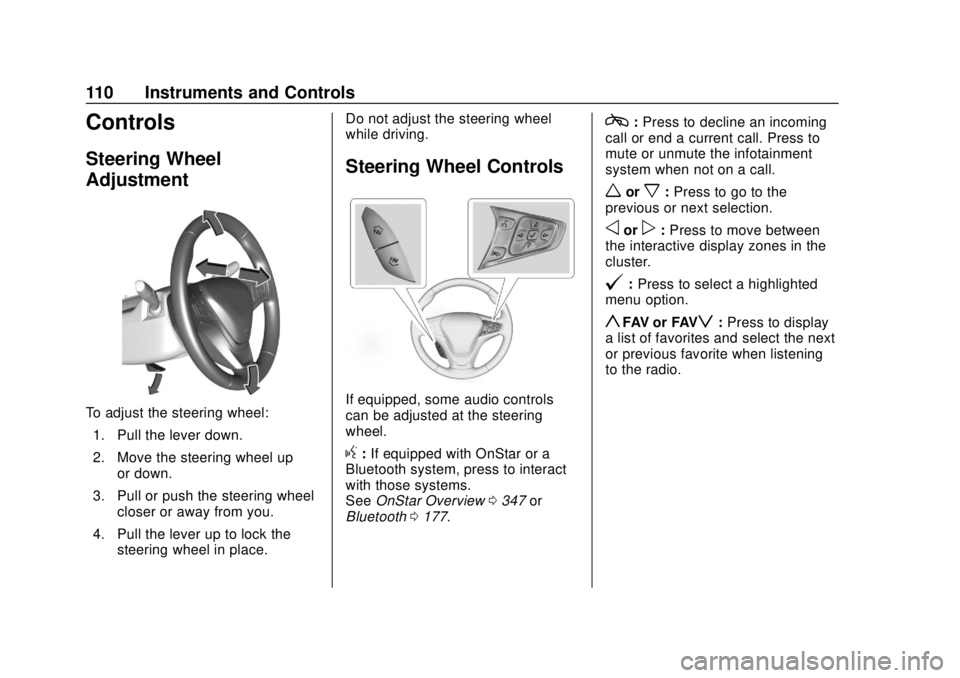
To adjust the steering wheel:1. Pull the lever down.
2. Move the steering wheel up or down.
3. Pull or push the steering wheel closer or away from you.
4. Pull the lever up to lock the steering wheel in place. Do not adjust the steering wheel
while driving.
Steering Wheel Controls
If equipped, some audio controls
can be adjusted at the steering
wheel.
g:
If equipped with OnStar or a
Bluetooth system, press to interact
with those systems.
See OnStar Overview 0347 or
Bluetooth 0177.
c:Press to decline an incoming
call or end a current call. Press to
mute or unmute the infotainment
system when not on a call.
worx: Press to go to the
previous or next selection.
oorp: Press to move between
the interactive display zones in the
cluster.
@: Press to select a highlighted
menu option.
yFAV or FAVz: Press to display
a list of favorites and select the next
or previous favorite when listening
to the radio.
Page 112 of 371
Chevrolet BOLT EV Owner Manual (GMNA-Localizing-U.S./Canada/Mexico-
12163003) - 2019 - crc - 5/18/18
Instruments and Controls 111
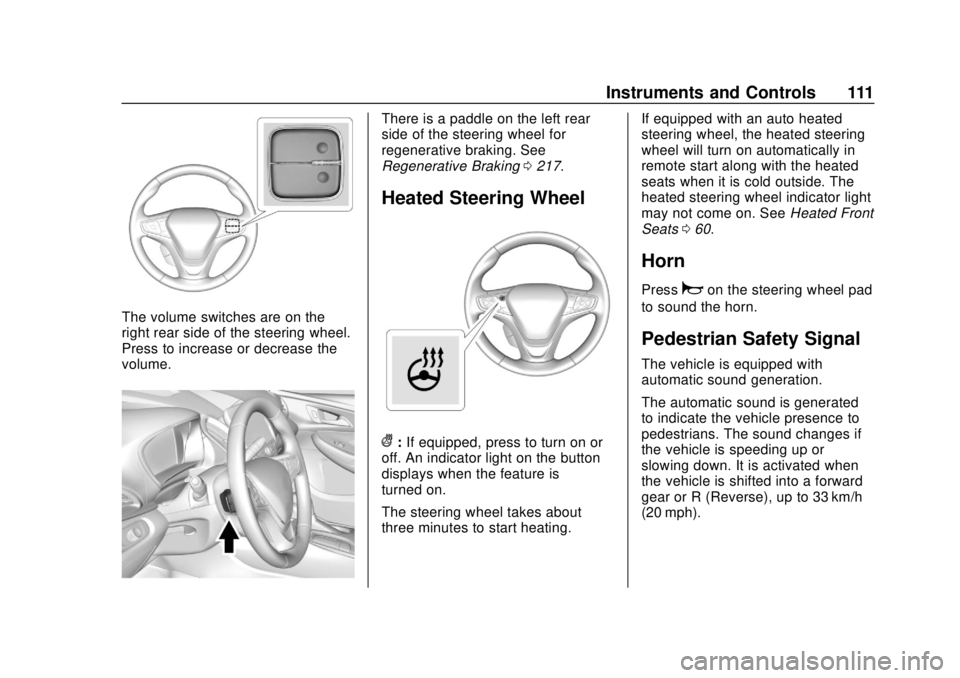
The volume switches are on the
right rear side of the steering wheel.
Press to increase or decrease the
volume.
There is a paddle on the left rear
side of the steering wheel for
regenerative braking. See
Regenerative Braking0217.
Heated Steering Wheel
(:If equipped, press to turn on or
off. An indicator light on the button
displays when the feature is
turned on.
The steering wheel takes about
three minutes to start heating. If equipped with an auto heated
steering wheel, the heated steering
wheel will turn on automatically in
remote start along with the heated
seats when it is cold outside. The
heated steering wheel indicator light
may not come on. See
Heated Front
Seats 060.
Horn
Pressaon the steering wheel pad
to sound the horn.
Pedestrian Safety Signal
The vehicle is equipped with
automatic sound generation.
The automatic sound is generated
to indicate the vehicle presence to
pedestrians. The sound changes if
the vehicle is speeding up or
slowing down. It is activated when
the vehicle is shifted into a forward
gear or R (Reverse), up to 33 km/h
(20 mph).
Page 115 of 371
Chevrolet BOLT EV Owner Manual (GMNA-Localizing-U.S./Canada/Mexico-
12163003) - 2019 - crc - 5/18/18
114 Instruments and Controls
{Warning
In freezing weather, do not use
the washer until the windshield is
warmed. Otherwise the washer
fluid can form ice on the
windshield, blocking your vision.
Auto Wipe in Reverse Gear
If the rear wiper control is off, the
rear wiper will automatically operate
continuously when the vehicle is in
R (Reverse), and the front
windshield wiper is performing low
or high speed wipes. If the rear
wiper control is off, the vehicle is in
R (Reverse), and the front
windshield wiper is performing
intermittent wipes, then the rear
wiper automatically performs
intermittent wipes.
This feature can be turned on or off.
See Vehicle Personalization 0146. The windshield washer reservoir is
used for the windshield and the rear
window. Check the fluid level in the
reservoir if either washer is not
working.
Rear Wiper Arm Assembly
Protection
Wiper operation returns to normal
when the shift lever is no longer in
N (Neutral) or the vehicle speed
increases. The rear wiper will also
stop when the liftgate is open.
When using an automatic car wash,
move the rear wiper control to OFF
to disable the rear wiper. If the shift
lever is in N (Neutral) and the
vehicle speed is very slow, the rear
wiper will automatically stop at the
base of the rear window.
Compass
The vehicle has a compass display
in the instrument cluster above the
speedometer. The compass
receives its heading and other
information from the Global
Positioning System (GPS) antenna
and vehicle speed information. The compass system has automatic
calibration and zone adjustment
features.
Avoid covering the GPS antenna for
long periods of time with objects
that may interfere with the antenna's
ability to receive a satellite signal.
The compass system is designed to
operate for a certain number of
miles or degrees of turn before
needing a signal from the GPS
satellites. The compass system will
automatically determine when a
GPS signal is restored and provide
a heading.
Clock
The infotainment system controls
are used to access the time and
date settings through the menu.
This can also be changed by
touching the clock, then touch
8to
go to the Time and Date
Settings menu.
D: Press to access the
Home Page.
T: Touch to access the Icon View.
Page 118 of 371
Chevrolet BOLT EV Owner Manual (GMNA-Localizing-U.S./Canada/Mexico-
12163003) - 2019 - crc - 5/18/18
Instruments and Controls 117
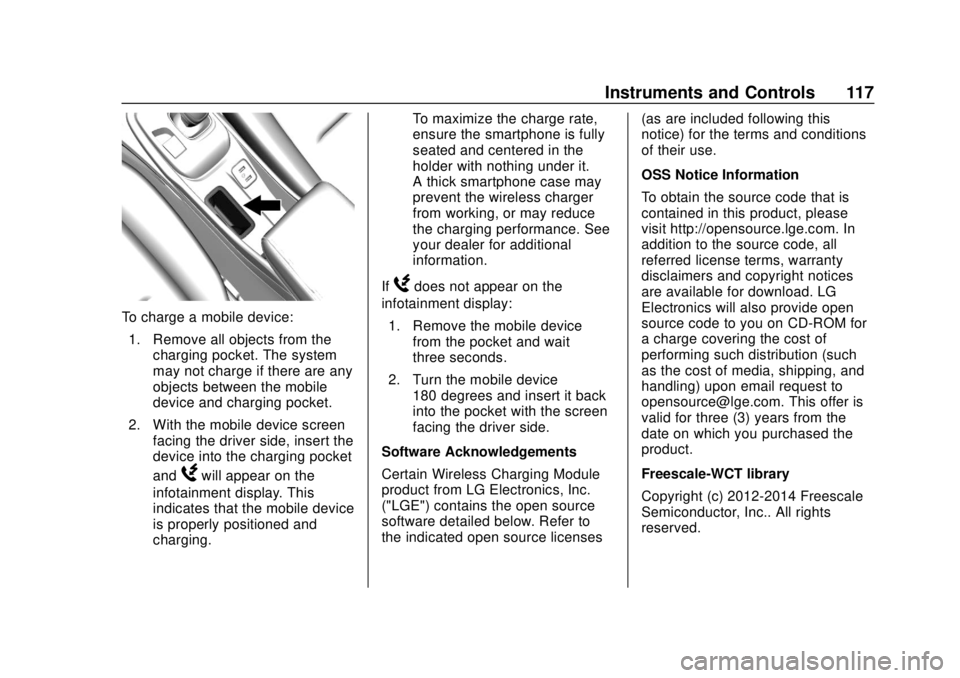
To charge a mobile device:1. Remove all objects from the charging pocket. The system
may not charge if there are any
objects between the mobile
device and charging pocket.
2. With the mobile device screen facing the driver side, insert the
device into the charging pocket
and
Wwill appear on the
infotainment display. This
indicates that the mobile device
is properly positioned and
charging. To maximize the charge rate,
ensure the smartphone is fully
seated and centered in the
holder with nothing under it.
A thick smartphone case may
prevent the wireless charger
from working, or may reduce
the charging performance. See
your dealer for additional
information.
If
Wdoes not appear on the
infotainment display:
1. Remove the mobile device from the pocket and wait
three seconds.
2. Turn the mobile device 180 degrees and insert it back
into the pocket with the screen
facing the driver side.
Software Acknowledgements
Certain Wireless Charging Module
product from LG Electronics, Inc.
("LGE") contains the open source
software detailed below. Refer to
the indicated open source licenses (as are included following this
notice) for the terms and conditions
of their use.
OSS Notice Information
To obtain the source code that is
contained in this product, please
visit http://opensource.lge.com. In
addition to the source code, all
referred license terms, warranty
disclaimers and copyright notices
are available for download. LG
Electronics will also provide open
source code to you on CD-ROM for
a charge covering the cost of
performing such distribution (such
as the cost of media, shipping, and
handling) upon email request to
[email protected]. This offer is
valid for three (3) years from the
date on which you purchased the
product.
Freescale-WCT library
Copyright (c) 2012-2014 Freescale
Semiconductor, Inc.. All rights
reserved.
Page 120 of 371
Chevrolet BOLT EV Owner Manual (GMNA-Localizing-U.S./Canada/Mexico-
12163003) - 2019 - crc - 5/18/18
Instruments and Controls 119
Instrument Cluster
The instrument cluster displays a
preview of information that includes
electric range, charging, odometer,
and battery status. This happens
upon entry when the driver door is
opened, before starting the vehicle.
This preview will dismiss after
starting the vehicle or soon after
closing the driver door.
Page 122 of 371
Chevrolet BOLT EV Owner Manual (GMNA-Localizing-U.S./Canada/Mexico-
12163003) - 2019 - crc - 5/18/18
Instruments and Controls 121
Reconfigurable Instrument
Cluster
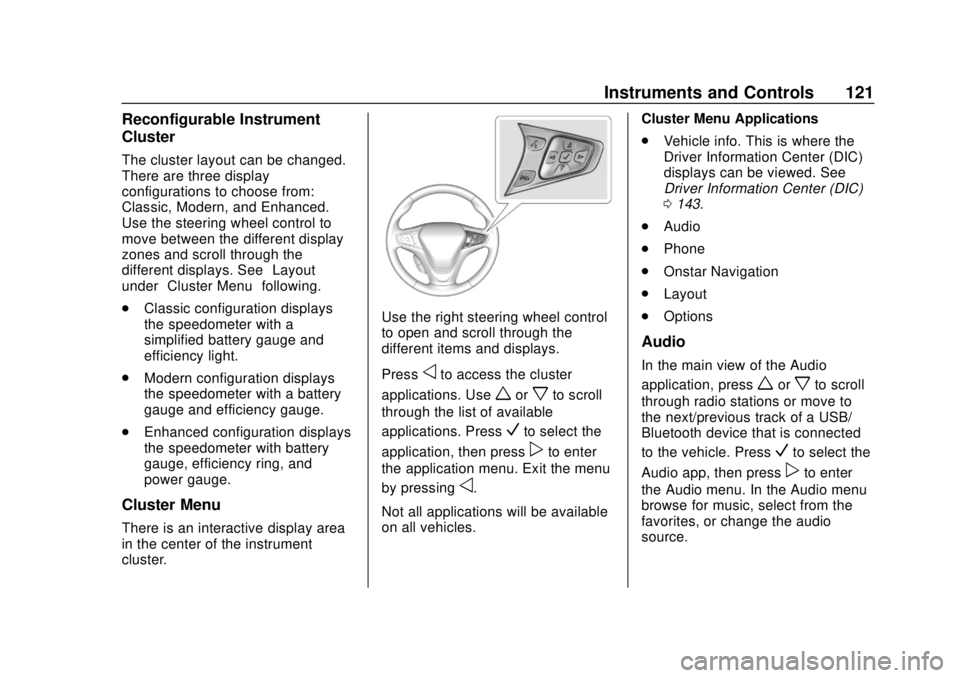
The cluster layout can be changed.
There are three display
configurations to choose from:
Classic, Modern, and Enhanced.
Use the steering wheel control to
move between the different display
zones and scroll through the
different displays. See“Layout”
under “Cluster Menu” following.
. Classic configuration displays
the speedometer with a
simplified battery gauge and
efficiency light.
. Modern configuration displays
the speedometer with a battery
gauge and efficiency gauge.
. Enhanced configuration displays
the speedometer with battery
gauge, efficiency ring, and
power gauge.
Cluster Menu
There is an interactive display area
in the center of the instrument
cluster.
Use the right steering wheel control
to open and scroll through the
different items and displays.
Press
oto access the cluster
applications. Use
worxto scroll
through the list of available
applications. Press
Vto select the
application, then press
pto enter
the application menu. Exit the menu
by pressing
o.
Not all applications will be available
on all vehicles. Cluster Menu Applications
.
Vehicle info. This is where the
Driver Information Center (DIC)
displays can be viewed. See
Driver Information Center (DIC)
0143.
. Audio
. Phone
. Onstar Navigation
. Layout
. Options
Audio
In the main view of the Audio
application, press
worxto scroll
through radio stations or move to
the next/previous track of a USB/
Bluetooth device that is connected
to the vehicle. Press
Vto select the
Audio app, then press
pto enter
the Audio menu. In the Audio menu
browse for music, select from the
favorites, or change the audio
source.
Page 123 of 371
Chevrolet BOLT EV Owner Manual (GMNA-Localizing-U.S./Canada/Mexico-
12163003) - 2019 - crc - 5/18/18
122 Instruments and Controls
Phone
In the Phone menu, if there is no
active phone call, view recent calls,
scroll through contacts, or select
from the favorites. If there is an
active call, mute or unmute the
phone or switch to handset or
handsfree operation.
Onstar Navigation
This display is used for OnStar
Turn-by-Turn guidance, if equipped.
Layout
Choose Classic, Modern,
or Enhanced layout by pressing
V
while the desired item is highlighted.
Exit the Layout menu by
pressing
o.
Options
PressVto select the Options app.
Use
worxto scroll through the
items in the Options menu. Exit the
Options menu by pressing
o. Units :
Press
pwhile Units is
displayed to enter the Units menu.
Use
worxto scroll through the
items. Choose U.S., Metric,
or Imperial by pressing
Vwhile the
desired item is highlighted.
Speed Warning : The speed
warning display allows the driver to
set a speed that they do not want to
exceed. To set the speed warning,
press
Vwhen Speed Warning is
displayed. Press
worxto adjust
the value. Press
Vto set the speed.
Once set, this feature can be turned
off by pressing
Vwhile viewing this
page. If the selected speed limit is
exceeded, a pop-up warning is
displayed and a chime may sound.
Help : Press
pwhile Help is
displayed to enter the Help menu.
Use
worxto scroll through the
items in the Help menu.
Open Source Software : Press
V
while Open Source Software is
highlighted to display open source
software information.
Speedometer
The speedometer shows the
vehicle's speed in either kilometers
per hour (km/h) or miles per
hour (mph).
Odometer
The odometer shows how far the
vehicle has been driven, in either
kilometers or miles.
Trip Odometer
The trip odometer shows how far
the vehicle has been driven since
the trip odometer was last reset.
The trip odometer is accessed and
reset through the Driver Information
Center (DIC). SeeDriver
Information Center (DIC) 0143.
Page 124 of 371
Chevrolet BOLT EV Owner Manual (GMNA-Localizing-U.S./Canada/Mexico-
12163003) - 2019 - crc - 5/18/18
Instruments and Controls 123
Battery Gauge (High
Voltage)
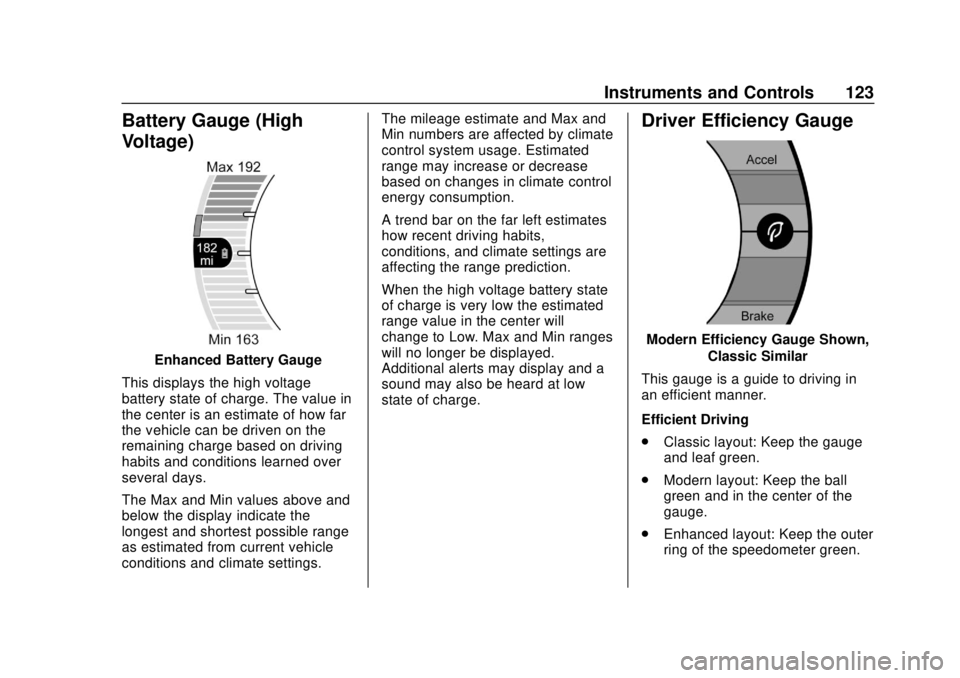
Enhanced Battery Gauge
This displays the high voltage
battery state of charge. The value in
the center is an estimate of how far
the vehicle can be driven on the
remaining charge based on driving
habits and conditions learned over
several days.
The Max and Min values above and
below the display indicate the
longest and shortest possible range
as estimated from current vehicle
conditions and climate settings. The mileage estimate and Max and
Min numbers are affected by climate
control system usage. Estimated
range may increase or decrease
based on changes in climate control
energy consumption.
A trend bar on the far left estimates
how recent driving habits,
conditions, and climate settings are
affecting the range prediction.
When the high voltage battery state
of charge is very low the estimated
range value in the center will
change to Low. Max and Min ranges
will no longer be displayed.
Additional alerts may display and a
sound may also be heard at low
state of charge.
Driver Efficiency Gauge
Modern Efficiency Gauge Shown,
Classic Similar
This gauge is a guide to driving in
an efficient manner.
Efficient Driving
. Classic layout: Keep the gauge
and leaf green.
. Modern layout: Keep the ball
green and in the center of the
gauge.
. Enhanced layout: Keep the outer
ring of the speedometer green.