reset CHEVROLET BOLT EV 2019 User Guide
[x] Cancel search | Manufacturer: CHEVROLET, Model Year: 2019, Model line: BOLT EV, Model: CHEVROLET BOLT EV 2019Pages: 371, PDF Size: 5.51 MB
Page 145 of 371
Chevrolet BOLT EV Owner Manual (GMNA-Localizing-U.S./Canada/Mexico-
12163003) - 2019 - crc - 5/18/18
144 Instruments and Controls
Trip and Average Electrical
Energy Economy :The Trip display
shows the current distance traveled,
in either kilometers (km) or
miles (mi), since the trip odometer
was last reset. The trip odometer
can be reset by pressing and
holding
Vwhile this display is
active.
The Average Electrical Energy
Economy display shows the
approximate average kWh per
100 kilometers (kWh/100 km) or
miles per kWh. This number is
calculated based on the number of
kWh/100 km recorded since the last
time this menu item was reset. This
number reflects only the
approximate average electrical
energy economy that the vehicle
has right now, and will change as
driving conditions change. The
Average Electrical Energy Economy
can be reset along with the trip
odometer by pressing and holding
Vwhile this display is active. Tire Pressure :
Shows the
approximate pressures of all four
tires. Tire pressure is displayed in
either kilopascal (kPa) or in pounds
per square inch (psi). If the pressure
is low, the value for that tire is
shown in amber.
Average Speed : Shows the
average speed of the vehicle in
kilometers per hour (km/h) or miles
per hour (mph). This average is
calculated based on the various
vehicle speeds recorded since the
last reset of this value. The average
speed can be reset by pressing and
holding
Vwhile this display is
active.
Timer : This display can be used as
a timer. To start the timer, press
V
while this display is active. The
display will show the amount of time
that has passed since the timer was
last reset. To stop the timer, press
V
briefly while this display is active
and the timer is running. To reset
the timer to zero, press and hold
V
while this display is active. Follow Distance Indicator :
The
current follow time to the vehicle
ahead is displayed as a time value
on this page.
Blank Page : The Blank Page
display allows for no information to
be displayed in the cluster info
display areas.
Page 152 of 371
Chevrolet BOLT EV Owner Manual (GMNA-Localizing-U.S./Canada/Mexico-
12163003) - 2019 - crc - 5/18/18
Instruments and Controls 151
Rear Camera
Select and the following may
display:
.Symbols
. Guidelines
Symbols
Select to turn Off or On.
Guidelines
Select to turn Off or On.
Return to Factory Settings
Select and the following may
display:
. Reset Vehicle Settings
. Clear All Private Data
. Restore Radio Settings
Reset Vehicle Settings
This allows vehicle settings to be
reset.
Select Continue or Cancel. Clear All Private Data
This allows all private information
from the vehicle to be cleared.
Select Continue or Cancel.
Restore Radio Settings
This allows radio settings
preferences to be restored to the
default.
Select Continue or Cancel.
Audible Touch Feedback
Select to turn Off or On.
Text Scroll
Select to turn Off or On.
Software Information
Select and the following may
display:
.
Open Source
. Software Update
. Update Preference
Open Source
Select to view the infotainment
system current software information. Software Update
This allows the ability to search for
available vehicle software updates
when Internet connectivity is
available through the vehicle’
s built
in OnStar connection, if equipped,
or a secure Wi-Fi hotspot, such as a
mobile hotspot, home or public
network. Applicable data rates may
apply.
Update Preference
Select to download new vehicle
software updates in the background.
Select Off or On. Software
downloads require Internet
connectivity through the vehicle’s
built-in OnStar connection,
if equipped, or a secure Wi-Fi
hotspot, such as a mobile hotspot,
home or public network. Applicable
data rates may apply.
Page 161 of 371
Chevrolet BOLT EV Owner Manual (GMNA-Localizing-U.S./Canada/Mexico-
12163003) - 2019 - crc - 5/18/18
160 Infotainment System
Before driving:
.Become familiar with the
operation, center stack controls,
and infotainment display
controls.
. Set up the audio by presetting
favorite stations, setting the
tone, and adjusting the
speakers.
. Set up phone numbers in
advance so they can be called
easily by pressing a single
control or by using a single voice
command if equipped with
Bluetooth phone capability.
See Defensive Driving 0196.
To play the infotainment system with
the ignition off, see Retained
Accessory Power (RAP) 0208.
Active Noise Cancellation (ANC)
If equipped, ANC reduces engine
noise in the vehicle’s interior. ANC
requires the factory-installed audio
system, radio, speakers, amplifier (if
equipped), induction system, and
exhaust system to work properly. Deactivation is required by your
dealer if related aftermarket
equipment is installed.
Theft-Deterrent Feature
The infotainment system has an
electronic security system installed
to prevent theft.
The infotainment system only works
in the vehicle in which it was first
installed, and cannot be used in
another vehicle.
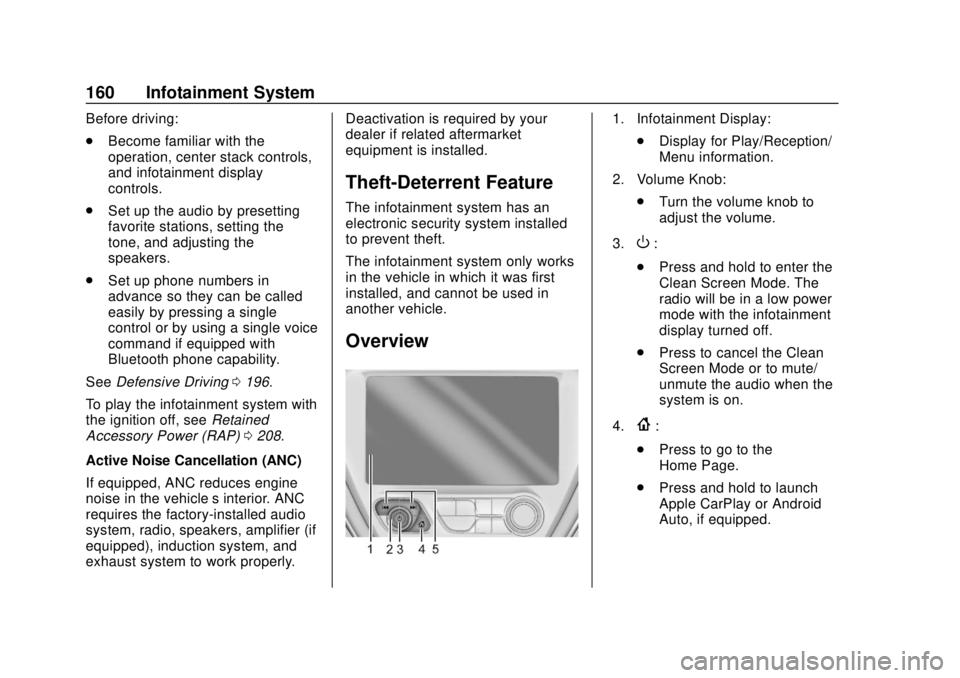
Overview
1. Infotainment Display:
.Display for Play/Reception/
Menu information.
2. Volume Knob: .Turn the volume knob to
adjust the volume.
3.
O:
. Press and hold to enter the
Clean Screen Mode. The
radio will be in a low power
mode with the infotainment
display turned off.
. Press to cancel the Clean
Screen Mode or to mute/
unmute the audio when the
system is on.
4.
{:
. Press to go to the
Home Page.
. Press and hold to launch
Apple CarPlay or Android
Auto, if equipped.
Page 165 of 371
Chevrolet BOLT EV Owner Manual (GMNA-Localizing-U.S./Canada/Mexico-
12163003) - 2019 - crc - 5/18/18
164 Infotainment System
Radio
AM-FM Radio
Listening to AM-FM Radio
1. TouchT.
2. Touch Audio, then Source.
3. Touch FM or AM. The most recently listened to AM or FM
radio station is displayed.
RDS (Radio Data System) function
is only available in countries that
support this function.
Searching for Stations
Automatically
Pressgordto automatically
search for an available station with
good reception.
If RDS is supported, it will tune to
the station and may include
additional information such as time,
station identification, and program
information.
Searching for Stations Directly
1. Touch Tune. 2. Using the keypad, enter the
desired station number.
Touching the period between digits
is not necessary. The radio will add
it automatically at the correct
location.
Favorite Preset Operation
Saving Favorites 1. Select the band.
2. Select the desired station.
3. Touch
qor touch and hold the
favorite in the Favorites list to
overwrite.
4. To delete it from the Favorites list, touch
q, or swipe the
station from the list on the right.
Up to 15 radio stations can be
saved in the Favorites list.
Listening to Favorites Directly 1. Touch Favorites to see the list of favorites.
2. Touch the desired station. The steering wheel controls can
also be used to select favorites. See
Steering Wheel Controls
0110.
Using the AM or FM
Radio Menu
General Operation of the Menu
1. Select the desired band.
2. Touch Menu.
3. Touch the desired menu to select the item or to display the
item’s detailed menu.
4. Touch
qNow Playing to return
to the previous menu.
Current Station Information 1. From the FM Menu, touch Browse Audio.
2. Touch Current Station Information to display the
station information.
AM or FM Stations 1. From the AM or FM Menu, touch Browse Audio.
Page 186 of 371
Chevrolet BOLT EV Owner Manual (GMNA-Localizing-U.S./Canada/Mexico-
12163003) - 2019 - crc - 5/18/18
Infotainment System 185
Report Card
The vehicle owner must secure the
driver’s consent to record certain
vehicle data when the vehicle is
driven with a registered Teen Driver
key. There is one Report Card per
vehicle. Data is not recorded when
Teen Driver is not active.
The Report Card data is collected
from the time Teen Driver is
activated or the last time the Report
Card was reset. The following items
may be recorded:
. Distance Driven –the total
distance driven.
. Maximum Speed –the maximum
vehicle speed recorded.
. Overspeed Warnings –the
number of times the speed
warning setting was exceeded.
. Forward Collision Alerts –the
number of times the driver was
notified when approaching a
vehicle ahead too quickly and at
potential risk for a crash. .
Forward Collision Avoidance
Braking –the number of times
the vehicle detected that a
forward collision was imminent
and applied the brakes. Also
referred to as Forward Automatic
Braking.
. Stability Control –the number of
events which required the use of
electronic stability control.
. ABS Active –the number of
Antilock Brake System
activations.
. Tailgating Alerts –the number of
times the driver was alerted for
following the vehicle ahead too
closely.
. Traction Control –the number of
times the Traction Control
System activated to reduce
wheel spin or loss of traction.
. Wide Open Throttle –the
number of times the accelerator
pedal was pressed nearly all the
way down. Delete Report Card Data
Data is saved for all trips until the
data is deleted using the PIN or until
the maximum count is exceeded.
Each item will report a maximum of
1,000 counts. The distance driven
will report a maximum of 64,374 km
(40,000 mi).
To delete Report Card data, do one
of the following:
.
From the Report Card display,
select Reset.
. Select Clear All Teen Keys/PIN
from the Teen Driver menu. This
will also unregister any Teen
Driver keys and delete the PIN.
Forgotten PIN
See your dealer to reset the PIN.
Page 210 of 371
Chevrolet BOLT EV Owner Manual (GMNA-Localizing-U.S./Canada/Mexico-
12163003) - 2019 - crc - 5/18/18
Driving and Operating 209
Parking the vehicle in extreme cold
for several days without the charge
cord connected may cause the
vehicle not to start. The vehicle will
need to be plugged in to allow the
high voltage battery to be warmed
sufficiently.
The shift lock is always functional
except in the case of an uncharged
or low charged 12-volt battery (less
than 9 volts).
If the vehicle has an uncharged
12-volt battery or a 12-volt battery
with low voltage, try charging or
jump starting the 12-volt battery.
To shift out of P (Park):1. Apply the brake pedal.
2. Press POWER
Oto start the
vehicle.
3. Verify that the vehicle is unplugged and the vehicle
ready light is on. 4. Press the shift lock release
button on the side of the shift
lever.
5. Move the shift lever into the desired position.
6. The P indicator will turn white and the gear indicator on the
shift lever will turn red when
the vehicle is no longer in
P (Park).
7. After releasing the shift lever, it will return to the center
position.
Extended Parking
It is best not to park with the vehicle
running. If the vehicle is left running,
be sure it will not move and there is
adequate ventilation.
See Shifting Into Park 0208.
If the vehicle is left parked and
running with the RKE transmitter
outside the vehicle, it will continue
to run for up to an hour. If the vehicle is left parked and
running with the RKE transmitter
inside the vehicle, it will continue to
run for up to two hour.
The timer will reset if the vehicle is
taken out of P (Park) while it is
running.
Page 250 of 371
Chevrolet BOLT EV Owner Manual (GMNA-Localizing-U.S./Canada/Mexico-
12163003) - 2019 - crc - 5/18/18
Driving and Operating 249
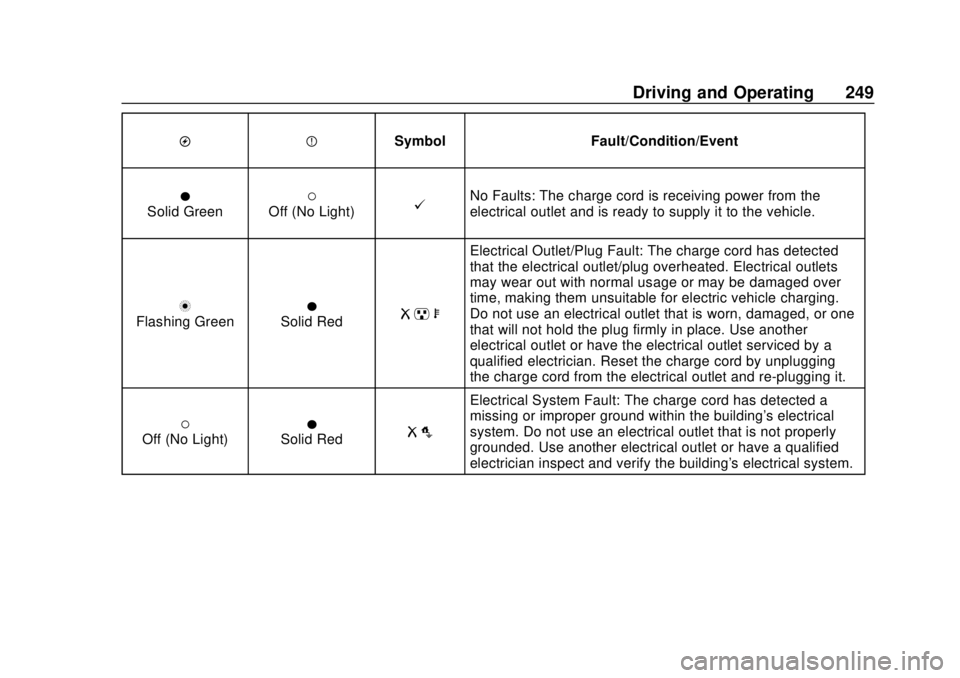
OPSymbol Fault/Condition/Event
OSolid Green(Off (No Light)@No Faults: The charge cord is receiving power from the
electrical outlet and is ready to supply it to the vehicle.
nFlashing GreenOSolid RedR pb
Electrical Outlet/Plug Fault: The charge cord has detected
that the electrical outlet/plug overheated. Electrical outlets
may wear out with normal usage or may be damaged over
time, making them unsuitable for electric vehicle charging.
Do not use an electrical outlet that is worn, damaged, or one
that will not hold the plug firmly in place. Use another
electrical outlet or have the electrical outlet serviced by a
qualified electrician. Reset the charge cord by unplugging
the charge cord from the electrical outlet and re-plugging it.
(Off (No Light)OSolid RedR o
Electrical System Fault: The charge cord has detected a
missing or improper ground within the building's electrical
system. Do not use an electrical outlet that is not properly
grounded. Use another electrical outlet or have a qualified
electrician inspect and verify the building's electrical system.
Page 251 of 371
Chevrolet BOLT EV Owner Manual (GMNA-Localizing-U.S./Canada/Mexico-
12163003) - 2019 - crc - 5/18/18
250 Driving and Operating
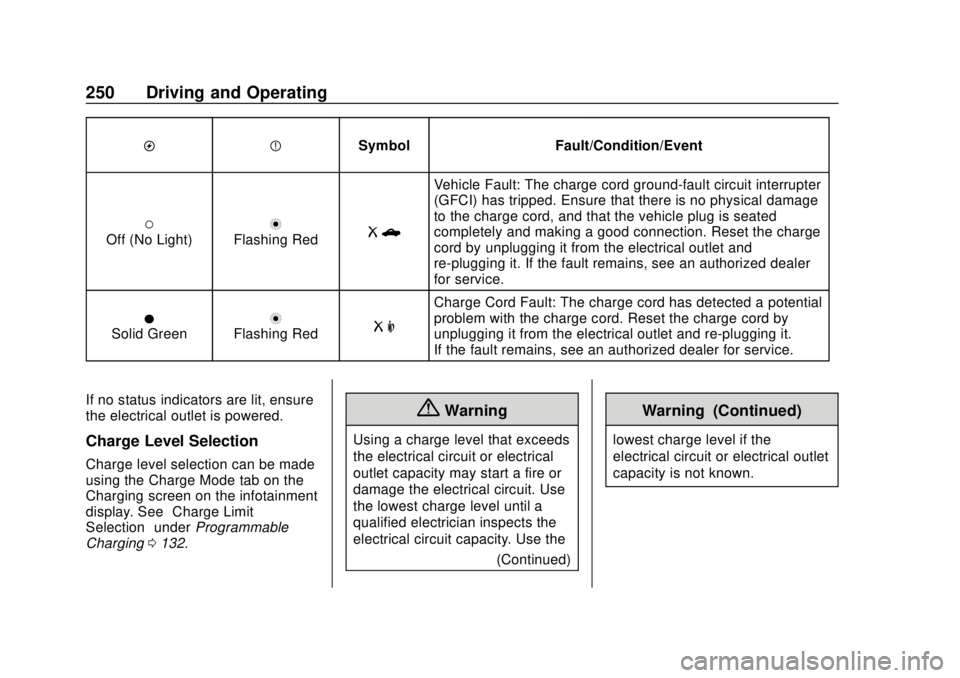
OPSymbol Fault/Condition/Event
(Off (No Light)nFlashing RedRb
Vehicle Fault: The charge cord ground-fault circuit interrupter
(GFCI) has tripped. Ensure that there is no physical damage
to the charge cord, and that the vehicle plug is seated
completely and making a good connection. Reset the charge
cord by unplugging it from the electrical outlet and
re-plugging it. If the fault remains, see an authorized dealer
for service.
OSolid GreennFlashing RedR m
Charge Cord Fault: The charge cord has detected a potential
problem with the charge cord. Reset the charge cord by
unplugging it from the electrical outlet and re-plugging it.
If the fault remains, see an authorized dealer for service.
If no status indicators are lit, ensure
the electrical outlet is powered.
Charge Level Selection
Charge level selection can be made
using the Charge Mode tab on the
Charging screen on the infotainment
display. See “Charge Limit
Selection” underProgrammable
Charging 0132.
{Warning
Using a charge level that exceeds
the electrical circuit or electrical
outlet capacity may start a fire or
damage the electrical circuit. Use
the lowest charge level until a
qualified electrician inspects the
electrical circuit capacity. Use the
(Continued)
Warning (Continued)
lowest charge level if the
electrical circuit or electrical outlet
capacity is not known.
Page 271 of 371
Chevrolet BOLT EV Owner Manual (GMNA-Localizing-U.S./Canada/Mexico-
12163003) - 2019 - crc - 5/18/18
270 Vehicle Care
Headlamp Aiming
Headlamp aim has been preset and
should need no further adjustment.
If the vehicle is damaged in a crash,
the headlamp aim may be affected.
If adjustment to the headlamps is
necessary, see your dealer.
Bulb Replacement
For the proper type of replacement
bulbs, or any bulb changing
procedure not listed in this section,
contact your dealer.
Caution
Do not replace incandescent
bulbs with aftermarket LED
replacement bulbs. This can
cause damage to the vehicle
electrical system.
Halogen Bulbs
{Warning
Halogen bulbs have pressurized
gas inside and can burst if you
drop or scratch the bulb. You or
others could be injured. Be sure
to read and follow the instructions
on the bulb package.
High Intensity Discharge
(HID) Lighting
{Warning
The High Intensity Discharge
(HID) lighting system operates at
a very high voltage. If you try to
service any of the system
components, you could be
seriously injured. Have your
dealer or a qualified technician
service them.
This vehicle has several HID lamps.
For replacement of any HID lighting
assembly, contact your dealer.
After an HID headlamp bulb has
been replaced, the beam might be a
slightly different shade than it was
originally. This is normal.
LED Lighting
This vehicle has several LED lamps.
For replacement of any LED lighting
assembly, contact your dealer.
Page 293 of 371
Chevrolet BOLT EV Owner Manual (GMNA-Localizing-U.S./Canada/Mexico-
12163003) - 2019 - crc - 5/18/18
292 Vehicle Care
Tire Rotation
Tires should be rotated every
12 000 km (7,500 mi). See
Maintenance Schedule0323.
Tires are rotated to achieve a
uniform wear for all tires. The
first rotation is the most
important.
Anytime unusual wear is
noticed, rotate the tires as soon
as possible, check for proper tire
inflation pressure, and check for
damaged tires or wheels. If the
unusual wear continues after the
rotation, check the wheel
alignment.
See When It Is Time for New
Tires 0293 andWheel
Replacement 0297.
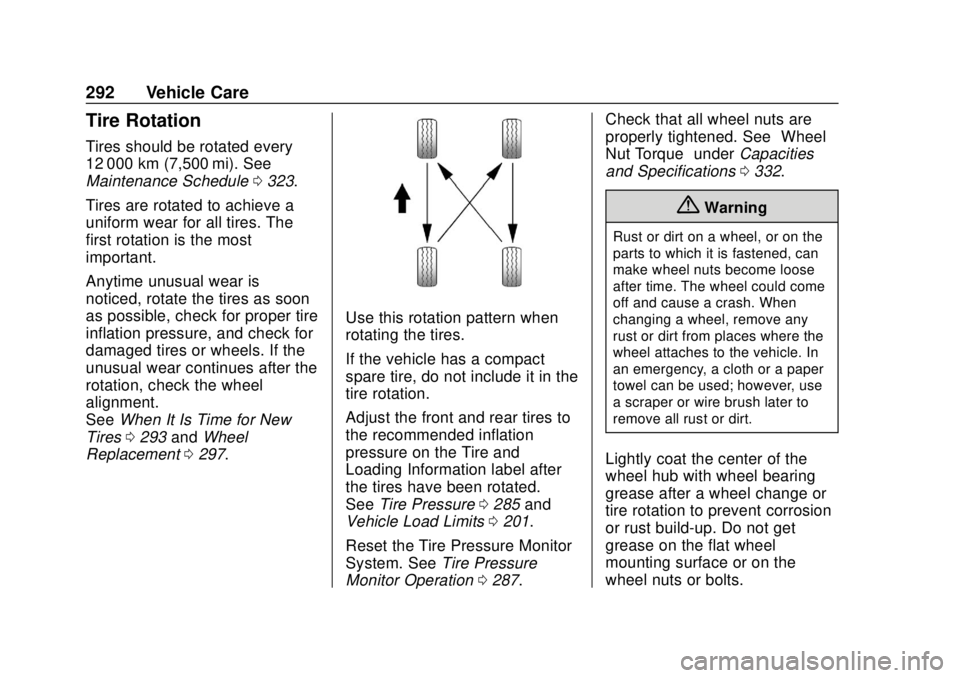
Use this rotation pattern when
rotating the tires.
If the vehicle has a compact
spare tire, do not include it in the
tire rotation.
Adjust the front and rear tires to
the recommended inflation
pressure on the Tire and
Loading Information label after
the tires have been rotated.
See Tire Pressure 0285 and
Vehicle Load Limits 0201.
Reset the Tire Pressure Monitor
System. See Tire Pressure
Monitor Operation 0287. Check that all wheel nuts are
properly tightened. See
“Wheel
Nut Torque” underCapacities
and Specifications 0332.
{Warning
Rust or dirt on a wheel, or on the
parts to which it is fastened, can
make wheel nuts become loose
after time. The wheel could come
off and cause a crash. When
changing a wheel, remove any
rust or dirt from places where the
wheel attaches to the vehicle. In
an emergency, a cloth or a paper
towel can be used; however, use
a scraper or wire brush later to
remove all rust or dirt.
Lightly coat the center of the
wheel hub with wheel bearing
grease after a wheel change or
tire rotation to prevent corrosion
or rust build-up. Do not get
grease on the flat wheel
mounting surface or on the
wheel nuts or bolts.