warning CHEVROLET BOLT EV 2019 Service Manual
[x] Cancel search | Manufacturer: CHEVROLET, Model Year: 2019, Model line: BOLT EV, Model: CHEVROLET BOLT EV 2019Pages: 371, PDF Size: 5.51 MB
Page 100 of 371
Chevrolet BOLT EV Owner Manual (GMNA-Localizing-U.S./Canada/Mexico-
12163003) - 2019 - crc - 5/18/18
Seats and Restraints 99
be no more than 2.5 cm (1 in) of
movement for proper
installation.
Head Restraint Removal and
Reinstallation
The rear outboard head restraints
can be removed if they interfere with
the proper installation of the child
restraint.
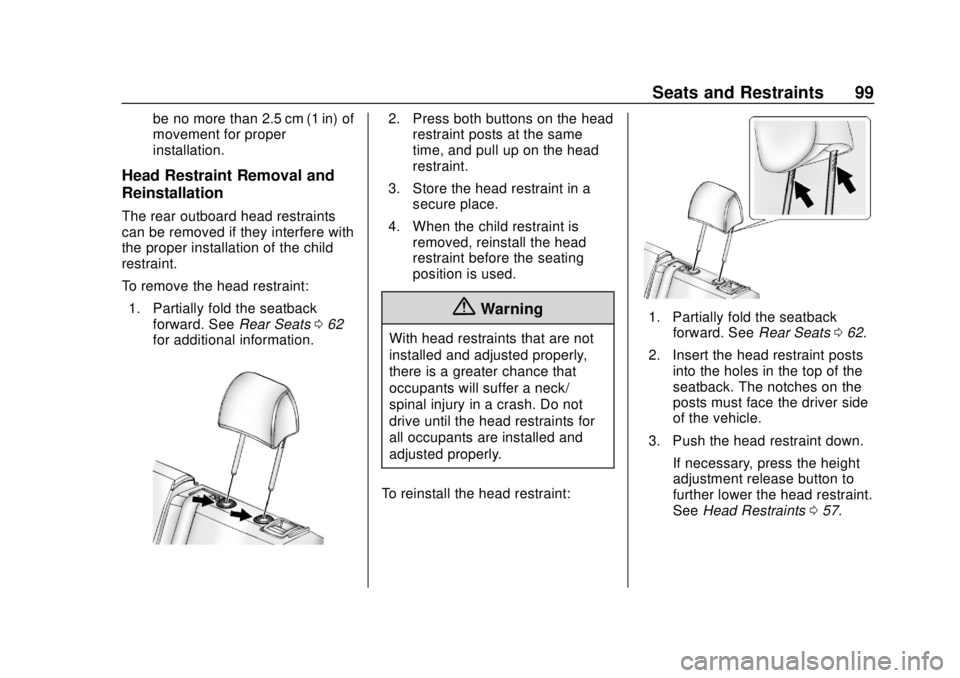
To remove the head restraint:1. Partially fold the seatback forward. See Rear Seats062
for additional information.
2. Press both buttons on the head restraint posts at the same
time, and pull up on the head
restraint.
3. Store the head restraint in a secure place.
4. When the child restraint is removed, reinstall the head
restraint before the seating
position is used.
{Warning
With head restraints that are not
installed and adjusted properly,
there is a greater chance that
occupants will suffer a neck/
spinal injury in a crash. Do not
drive until the head restraints for
all occupants are installed and
adjusted properly.
To reinstall the head restraint:
1. Partially fold the seatback forward. See Rear Seats062.
2. Insert the head restraint posts into the holes in the top of the
seatback. The notches on the
posts must face the driver side
of the vehicle.
3. Push the head restraint down. If necessary, press the height
adjustment release button to
further lower the head restraint.
See Head Restraints 057.
Page 101 of 371
Chevrolet BOLT EV Owner Manual (GMNA-Localizing-U.S./Canada/Mexico-
12163003) - 2019 - crc - 5/18/18
100 Seats and Restraints
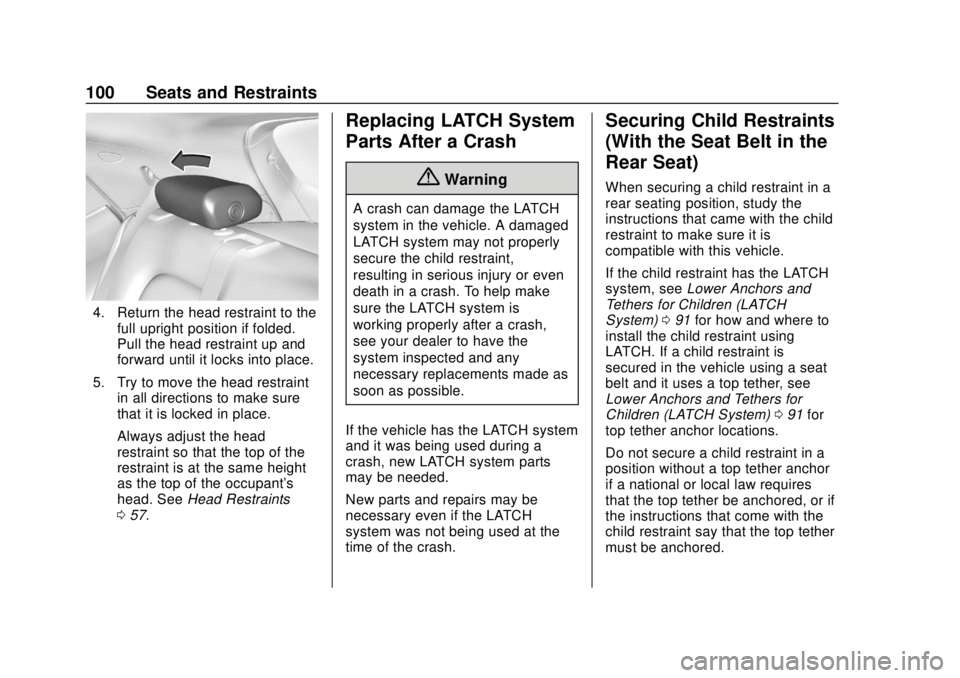
4. Return the head restraint to thefull upright position if folded.
Pull the head restraint up and
forward until it locks into place.
5. Try to move the head restraint in all directions to make sure
that it is locked in place.
Always adjust the head
restraint so that the top of the
restraint is at the same height
as the top of the occupant's
head. See Head Restraints
0 57.
Replacing LATCH System
Parts After a Crash
{Warning
A crash can damage the LATCH
system in the vehicle. A damaged
LATCH system may not properly
secure the child restraint,
resulting in serious injury or even
death in a crash. To help make
sure the LATCH system is
working properly after a crash,
see your dealer to have the
system inspected and any
necessary replacements made as
soon as possible.
If the vehicle has the LATCH system
and it was being used during a
crash, new LATCH system parts
may be needed.
New parts and repairs may be
necessary even if the LATCH
system was not being used at the
time of the crash.
Securing Child Restraints
(With the Seat Belt in the
Rear Seat)
When securing a child restraint in a
rear seating position, study the
instructions that came with the child
restraint to make sure it is
compatible with this vehicle.
If the child restraint has the LATCH
system, see Lower Anchors and
Tethers for Children (LATCH
System) 091 for how and where to
install the child restraint using
LATCH. If a child restraint is
secured in the vehicle using a seat
belt and it uses a top tether, see
Lower Anchors and Tethers for
Children (LATCH System) 091 for
top tether anchor locations.
Do not secure a child restraint in a
position without a top tether anchor
if a national or local law requires
that the top tether be anchored, or if
the instructions that come with the
child restraint say that the top tether
must be anchored.
Page 104 of 371
Chevrolet BOLT EV Owner Manual (GMNA-Localizing-U.S./Canada/Mexico-
12163003) - 2019 - crc - 5/18/18
Seats and Restraints 103
{Warning
A child in a rear-facing child
restraint can be seriously injured
or killed if the front outboard
passenger frontal airbag inflates.
This is because the back of the
rear-facing child restraint would
be very close to the inflating
airbag. A child in a forward-facing
child restraint can be seriously
injured or killed if the front
outboard passenger frontal airbag
inflates and the passenger seat is
in a forward position.
Even if the passenger sensing
system has turned off the front
outboard passenger airbag(s), no
system is fail-safe. No one can
guarantee that an airbag will not
deploy under some unusual
circumstance, even though the
airbag(s) are off.
Secure rear-facing child restraints
in a rear seat, even if the
airbag(s) are off. If you secure a(Continued)
Warning (Continued)
forward-facing child restraint in
the front outboard passenger
seat, always move the seat as far
back as it will go. It is better to
secure the child restraint in a
rear seat.
SeePassenger Sensing System
0 78 for additional information.
If the vehicle does not have a rear
seat that will accommodate a
rear-facing child restraint, a
rear-facing child restraint should not
be installed in the vehicle, even if
the airbag is off.
If the child restraint uses a top
tether, see Lower Anchors and
Tethers for Children (LATCH
System) 091 for top tether anchor
locations.
Do not secure a child restraint in a
position without a top tether anchor
if a national or local law requires
that the top tether be anchored, or if the instructions that come with the
child restraint say that the top tether
must be anchored.
In Canada, the law requires that
forward-facing child restraints have
a top tether, and that the tether be
attached.
When using the lap-shoulder belt to
secure the child restraint in this
position, follow the instructions that
came with the child restraint and the
following instructions:
1. Move the seat as far back as it will go before securing the
forward-facing child restraint.
Move the seat upward or the
seatback to an upright position,
if needed, to get a tight
installation of the child
restraint.
When the passenger sensing
system has turned off the front
outboard passenger frontal
airbag and knee airbag, the
OFF indicator on the
passenger airbag status
indicator should light and stay
Page 107 of 371
Chevrolet BOLT EV Owner Manual (GMNA-Localizing-U.S./Canada/Mexico-
12163003) - 2019 - crc - 5/18/18
106 Storage
Storage
Storage Compartments
Storage Compartments . . . . . . . 106
Instrument Panel Storage . . . . 106
Cupholders . . . . . . . . . . . . . . . . . . . 106
Center Console Storage . . . . . . 107
Additional Storage Features
Cargo Cover . . . . . . . . . . . . . . . . . . 107
Cargo ManagementSystem . . . . . . . . . . . . . . . . . . . . . . 108
Storage
Compartments
{Warning
Do not store heavy or sharp
objects in storage compartments.
In a crash, these objects may
cause the cover to open and
could result in injury.
Instrument Panel Storage
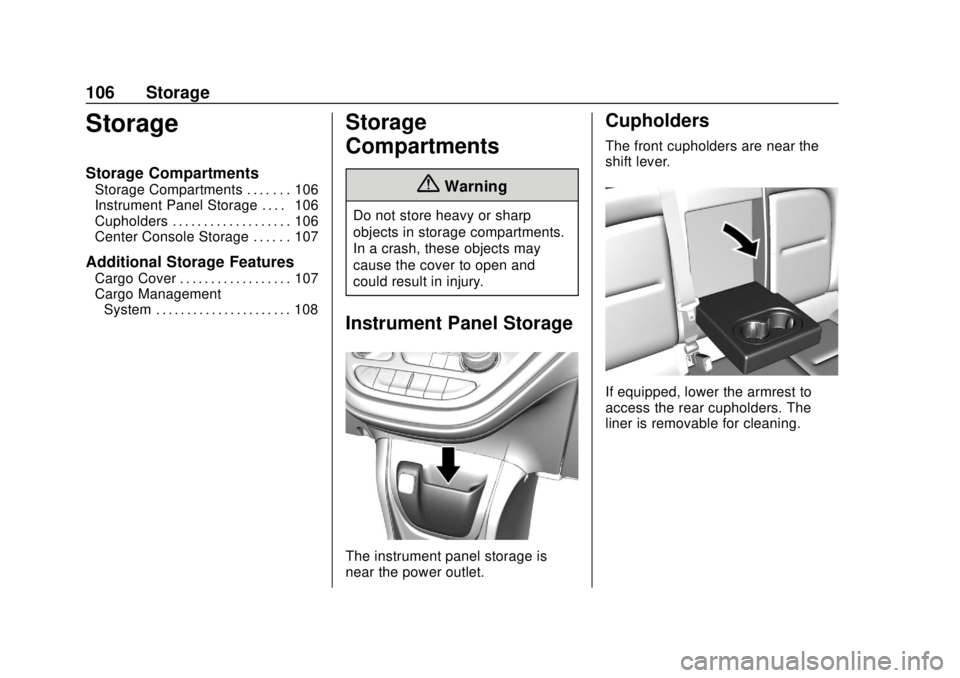
The instrument panel storage is
near the power outlet.
Cupholders
The front cupholders are near the
shift lever.
If equipped, lower the armrest to
access the rear cupholders. The
liner is removable for cleaning.
Page 108 of 371
Chevrolet BOLT EV Owner Manual (GMNA-Localizing-U.S./Canada/Mexico-
12163003) - 2019 - crc - 5/18/18
Storage 107
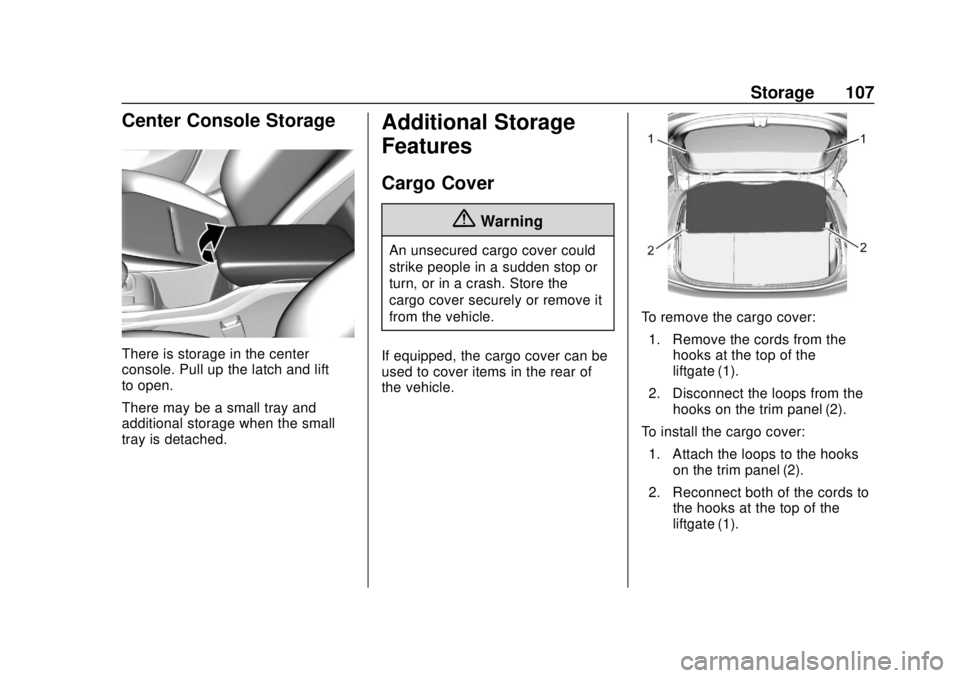
Center Console Storage
There is storage in the center
console. Pull up the latch and lift
to open.
There may be a small tray and
additional storage when the small
tray is detached.
Additional Storage
Features
Cargo Cover
{Warning
An unsecured cargo cover could
strike people in a sudden stop or
turn, or in a crash. Store the
cargo cover securely or remove it
from the vehicle.
If equipped, the cargo cover can be
used to cover items in the rear of
the vehicle.
To remove the cargo cover: 1. Remove the cords from the hooks at the top of the
liftgate (1).
2. Disconnect the loops from the hooks on the trim panel (2).
To install the cargo cover: 1. Attach the loops to the hooks on the trim panel (2).
2. Reconnect both of the cords to the hooks at the top of the
liftgate (1).
Page 110 of 371
Chevrolet BOLT EV Owner Manual (GMNA-Localizing-U.S./Canada/Mexico-
12163003) - 2019 - crc - 5/18/18
Instruments and Controls 109
Instruments and
Controls
Controls
Steering Wheel Adjustment . . . 110
Steering Wheel Controls . . . . . . 110
Heated Steering Wheel . . . . . . . 111
Horn . . . . . . . . . . . . . . . . . . . . . . . . . . 111
Pedestrian Safety Signal . . . . . . 111
Windshield Wiper/Washer . . . . 112
Rear Window Wiper/Washer . . . . . . . . . . . . . . . . . . . . . . 113
Compass . . . . . . . . . . . . . . . . . . . . . 114
Clock . . . . . . . . . . . . . . . . . . . . . . . . . 114
Power Outlets . . . . . . . . . . . . . . . . 115
Wireless Charging . . . . . . . . . . . . 116
Warning Lights, Gauges, and
Indicators
Warning Lights, Gauges, and Indicators . . . . . . . . . . . . . . . . . . . 118
Instrument Cluster . . . . . . . . . . . . 119
Speedometer . . . . . . . . . . . . . . . . . 122
Odometer . . . . . . . . . . . . . . . . . . . . . 122
Trip Odometer . . . . . . . . . . . . . . . . 122
Battery Gauge (High Voltage) . . . . . . . . . . . . . . . . . . . . . 123
Driver Efficiency Gauge . . . . . . 123 Power Indicator Gauge . . . . . . . 124
Seat Belt Reminders . . . . . . . . . 124
Airbag Readiness Light . . . . . . . 125
Passenger Airbag Status
Indicator . . . . . . . . . . . . . . . . . . . . 125
Charging System Light (12-Volt Battery) . . . . . . . . . . . . . . . . . . . . . 126
Service Vehicle Soon Light . . . 127
Brake System Warning Light . . . . . . . . . . . . . . . . . . . . . . . . 127
Electric Parking Brake Light . . . . . . . . . . . . . . . . . . . . . . . . 127
Service Electric Parking Brake Light . . . . . . . . . . . . . . . . . . . . . . . . 128
Antilock Brake System (ABS) Warning Light . . . . . . . . . . . . . . . 128
Sport Mode Light . . . . . . . . . . . . . 128
Lane Keep Assist (LKA) Light . . . . . . . . . . . . . . . . . . . . . . . . 128
Vehicle Ahead Indicator . . . . . . 129
Pedestrian Ahead Indicator . . . 129
Traction Off Light . . . . . . . . . . . . . 129
StabiliTrak OFF Light . . . . . . . . . 129
Traction Control System (TCS)/ StabiliTrak Light . . . . . . . . . . . . . 130
Tire Pressure Light . . . . . . . . . . . 130
Security Light . . . . . . . . . . . . . . . . . 130
Vehicle Ready Light . . . . . . . . . . 131
High-Beam On Light . . . . . . . . . . 131
Lamps On Reminder . . . . . . . . . 131 Cruise Control Light . . . . . . . . . . 131
Door Ajar Light . . . . . . . . . . . . . . . 131
Information Displays
Power Flows . . . . . . . . . . . . . . . . . 132
Programmable Charging . . . . . . 132
Energy Information . . . . . . . . . . . 140
Charging Options . . . . . . . . . . . . . 142
Driver Information
Center (DIC) . . . . . . . . . . . . . . . . 143
Vehicle Messages
Vehicle Messages . . . . . . . . . . . . 145
Propulsion PowerMessages . . . . . . . . . . . . . . . . . . . 145
Vehicle Speed Messages . . . . . 145
Vehicle Personalization
Vehicle Personalization . . . . . . . 146
Page 114 of 371
Chevrolet BOLT EV Owner Manual (GMNA-Localizing-U.S./Canada/Mexico-
12163003) - 2019 - crc - 5/18/18
Instruments and Controls 113
The wipers will continue until the
lever is released or the maximum
wash time is reached. When the
lever is released, additional wipes
may occur depending on how long
the windshield washer had been
activated. SeeWasher Fluid0262
for information on filling the
windshield washer fluid reservoir.
{Warning
In freezing weather, do not use
the washer until the windshield is
warmed. Otherwise the washer
fluid can form ice on the
windshield, blocking your vision.
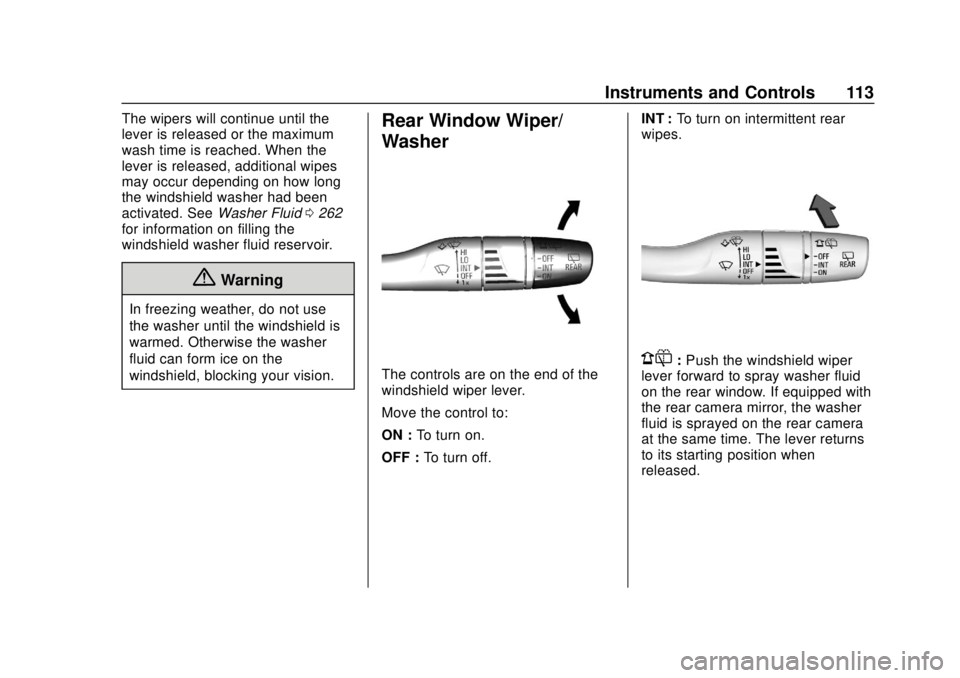
Rear Window Wiper/
Washer
The controls are on the end of the
windshield wiper lever.
Move the control to:
ON : To turn on.
OFF : To turn off. INT :
To turn on intermittent rear
wipes.1: Push the windshield wiper
lever forward to spray washer fluid
on the rear window. If equipped with
the rear camera mirror, the washer
fluid is sprayed on the rear camera
at the same time. The lever returns
to its starting position when
released.
Page 115 of 371
Chevrolet BOLT EV Owner Manual (GMNA-Localizing-U.S./Canada/Mexico-
12163003) - 2019 - crc - 5/18/18
114 Instruments and Controls
{Warning
In freezing weather, do not use
the washer until the windshield is
warmed. Otherwise the washer
fluid can form ice on the
windshield, blocking your vision.
Auto Wipe in Reverse Gear
If the rear wiper control is off, the
rear wiper will automatically operate
continuously when the vehicle is in
R (Reverse), and the front
windshield wiper is performing low
or high speed wipes. If the rear
wiper control is off, the vehicle is in
R (Reverse), and the front
windshield wiper is performing
intermittent wipes, then the rear
wiper automatically performs
intermittent wipes.
This feature can be turned on or off.
See Vehicle Personalization 0146. The windshield washer reservoir is
used for the windshield and the rear
window. Check the fluid level in the
reservoir if either washer is not
working.
Rear Wiper Arm Assembly
Protection
Wiper operation returns to normal
when the shift lever is no longer in
N (Neutral) or the vehicle speed
increases. The rear wiper will also
stop when the liftgate is open.
When using an automatic car wash,
move the rear wiper control to OFF
to disable the rear wiper. If the shift
lever is in N (Neutral) and the
vehicle speed is very slow, the rear
wiper will automatically stop at the
base of the rear window.
Compass
The vehicle has a compass display
in the instrument cluster above the
speedometer. The compass
receives its heading and other
information from the Global
Positioning System (GPS) antenna
and vehicle speed information. The compass system has automatic
calibration and zone adjustment
features.
Avoid covering the GPS antenna for
long periods of time with objects
that may interfere with the antenna's
ability to receive a satellite signal.
The compass system is designed to
operate for a certain number of
miles or degrees of turn before
needing a signal from the GPS
satellites. The compass system will
automatically determine when a
GPS signal is restored and provide
a heading.
Clock
The infotainment system controls
are used to access the time and
date settings through the menu.
This can also be changed by
touching the clock, then touch
8to
go to the Time and Date
Settings menu.
D: Press to access the
Home Page.
T: Touch to access the Icon View.
Page 117 of 371
Chevrolet BOLT EV Owner Manual (GMNA-Localizing-U.S./Canada/Mexico-
12163003) - 2019 - crc - 5/18/18
116 Instruments and Controls
Certain accessory power plugs may
not be compatible with the
accessory power outlet and could
overload vehicle or adapter fuses.
If a problem is experienced, see
your dealer.
When adding electrical equipment,
be sure to follow the proper
installation instructions included with
the equipment. SeeAdd-On
Electrical Equipment 0254.
Caution
Hanging heavy equipment from
the power outlet can cause
damage not covered by the
vehicle warranty. The power
outlets are designed for
accessory power plugs only, such
as cell phone charge cords.
Wireless Charging
The vehicle may have a wireless
charging pocket outside the armrest
of the center console. The system
operates at 145 kHz and wirelessly
charges one Qi compatible mobile device. The power output of the
system is capable of charging at a
rate up to 3 amp (19.5W), as
requested by the compatible mobile
device. See
Radio Frequency
Statement 0343.
{Warning
Wireless charging can affect the
operation of an implanted
pacemaker or other medical
devices. If you have one, it is
recommended to consult with
your doctor before using the
wireless charging system.
The vehicle must be on, in Service
Mode, or Retained Accessory
Power (RAP) must be active. The
wireless charging feature may not
correctly indicate charging when the
vehicle is in RAP. See Retained
Accessory Power (RAP) 0208.
The operating temperature is −20 °C
(−4 °F) to 60 °C (140 °F) for the
charging system and 0 °C (32 °F) to
35 °C (95 °F) for the mobile phone.
{Warning
Remove all objects from the
charging pocket before charging
your mobile phone. Objects, such
as coins, keys, rings, paper clips,
or cards, between the mobile
phone and the charger will
become very hot. On the rare
occasion that the charging system
does not detect an object, and the
object gets wedged between the
mobile phone and the charger,
remove the mobile phone and
allow the object to cool before
removing it from the charging
pocket, to prevent burns.
Page 119 of 371
Chevrolet BOLT EV Owner Manual (GMNA-Localizing-U.S./Canada/Mexico-
12163003) - 2019 - crc - 5/18/18
118 Instruments and Controls
1. Redistributions of source codemust retain the above copyright
notice, this list of conditions
and the following disclaimer.
2. Redistributions in binary form must reproduce the above
copyright notice, this list of
conditions and the following
disclaimer in the
documentation and/or other
materials provided with the
distribution.
3. Neither the name of the copyright holder nor the names
of its contributors may be used
to endorse or promote products
derived from this software
without specific prior written
permission.
THIS SOFTWARE IS PROVIDED
BY THE COPYRIGHT HOLDERS
AND CONTRIBUTORS "AS IS"
AND ANY EXPRESS OR IMPLIED
WARRANTIES, INCLUDING, BUT
NOT LIMITED TO, THE IMPLIED
WARRANTIES OF MERCHANTABILITY AND FITNESS
FOR A PARTICULAR PURPOSE
ARE DISCLAIMED. IN NO EVENT
SHALL THE COPYRIGHT HOLDER
OR CONTRIBUTORS BE LIABLE
FOR ANY DIRECT, INDIRECT,
INCIDENTAL, SPECIAL,
EXEMPLARY, OR
CONSEQUENTIAL DAMAGES
(INCLUDING, BUT NOT LIMITED
TO, PROCUREMENT OF
SUBSTITUTE GOODS OR
SERVICES; LOSS OF USE, DATA,
OR PROFITS; OR BUSINESS
INTERRUPTION) HOWEVER
CAUSED AND ON ANY THEORY
OF LIABILITY, WHETHER IN
CONTRACT, STRICT LIABILITY,
OR TORT (INCLUDING
NEGLIGENCE OR OTHERWISE)
ARISING IN ANY WAY OUT OF
THE USE OF THIS SOFTWARE,
EVEN IF ADVISED OF THE
POSSIBILITY OF SUCH DAMAGE.Warning Lights,
Gauges, and
Indicators
Warning lights and gauges can
signal that something is wrong
before it becomes serious enough
to cause an expensive repair or
replacement. Paying attention to the
warning lights and gauges could
prevent injury.
Some warning lights come on briefly
when the propulsion system is
started to indicate they are working.
When one of the warning lights
comes on and stays on while
driving, or when one of the gauges
shows there may be a problem,
check the section that explains what
to do. Waiting to do repairs can be
costly and even dangerous.