display CHEVROLET BOLT EV 2021 Workshop Manual
[x] Cancel search | Manufacturer: CHEVROLET, Model Year: 2021, Model line: BOLT EV, Model: CHEVROLET BOLT EV 2021Pages: 293, PDF Size: 9.21 MB
Page 133 of 293
Chevrolet Bolt EV Owner Manual (GMNA-Localizing-U.S./Canada-
14637856) - 2021 - CRC - 10/2/20
132 Infotainment System
Android Auto
1. TouchT.
2. Touch Settings and find Android Auto.
3. Select On or Off.
Even if Projection is set to Off, connecting
the device and touching Projection on the
Home Page will display a pop-up message:
.For Apple CarPlay function: “While active,
Apple CarPlay will be displayed on this
screen.”
.For Android Auto function: “While active,
Android Auto will be displayed on this
screen.”
When the device is first connected, the
device projection privacy consent pop-up
message will be displayed.
.Touch Continue to activate the projection
feature.
.Touch Disable and the device is
charging only.
If Android Auto is not activated, make sure
the mobile phone’s USB connection mode is
set to MTP.
If the device has not previously been paired,
the consent pop-up will display when
touching continue.
Teen Driver
If equipped, this allows multiple keys to be
registered for beginner drivers, to encourage
safe driving habits. When the vehicle is
started with a Teen Driver key, it will
automatically activate certain safety
systems, allow setting of some features, and
limit the use of others. The Report Card will
record vehicle data about driving behavior
that can be viewed later. When the vehicle
is started with a registered key, the Driver
Information Center (DIC) displays a message
that Teen Driver is active.
To access: 1. Touch Settings on the Home Page, then touch Teen Driver.
2. Create a Personal Identification Number (PIN) by choosing a four-digit PIN.
Re-enter the PIN to confirm. To change
the PIN, select Change PIN.
The PIN is required to:
.Register or unregister keys.
.Change Teen Driver settings.
.Change or clear the Teen Driver PIN.
.Access or delete Report Card data. Register keys to activate:
Any vehicle key can be registered, up to a
maximum of eight keys. Label the key to
tell it apart from the other keys.
1. Start the vehicle.
2. The vehicle must be in P (Park).
3. From the Settings menu, select Teen Driver.
4. Enter the PIN.
5. Place the Remote Keyless Entry (RKE) transmitter key in the transmitter
pocket. See Remote Keyless Entry (RKE)
System Operation 07for the transmitter
pocket location.
6. From the Teen Driver Menu, select Key Registration.
.If the transmitter key is in the
transmitter pocket, it will identify
whether the transmitter key is
registered or unregistered.
.If the transmitter key is not
registered, the option to register
displays. Select Register and a
confirmation message displays.
.If the transmitter key is already
registered, the option to unregister
displays. If Unregister is selected, the
Page 134 of 293
Chevrolet Bolt EV Owner Manual (GMNA-Localizing-U.S./Canada-
14637856) - 2021 - CRC - 10/2/20
Infotainment System 133
transmitter key is no longer
registered and a confirmation
message displays.
If a Teen Driver transmitter key and a
non-Teen Driver transmitter key are both
present at start up, the vehicle will
recognize the non-Teen Driver transmitter
key to start the vehicle. The Teen Driver
settings will not be active.
Manage Settings
Use the PIN to change the following
settings:
Audio Volume Limit : Allows a maximum
radio volume to be set. Turn the audio
volume limit On or Off, and if equipped,
choose the maximum level for the audio
volume.
Teen Driver Speed Warning : Allows for
setting a visual and audible warning when a
certain speed is exceeded. The speed
warning is selectable from 64 km/h
(40 mph) to 120 km/h (75 mph). The speed
warning does not limit the speed of the
vehicle.
Teen Driver Speed Limiter (If Equipped) :
Allows the maximum speed of the vehicle to
be limited to 137 km/h (85 mph). When the
speed limiter is turned On and the vehicle is started with a Teen Driver key, the DIC
displays a message that the top speed is
limited to 137 km/h (85 mph).
When Teen Driver is Active:
.The radio will mute when the driver seat
belt is not fastened, and in some vehicles,
when the right front passenger seat belt
is not fastened. The audio from any
device paired to the vehicle will also be
muted.
.Certain electronic devices placed on the
front passenger seat could cause the
passenger sensing system to falsely sense
an unbuckled front passenger and mute
the radio. See
Passenger Sensing System
0 44.
.Some safety systems, such as Automatic
Emergency Braking, if equipped and
supported, cannot be turned off.
.The gap setting for the Forward Collision
Alert, if equipped, cannot be changed.
Report Card
The vehicle owner must secure the driver’s
consent to record certain vehicle data when
the vehicle is driven with a registered Teen
Driver key. There is one Report Card per
vehicle. Data is not recorded when Teen
Driver is not active. The Report Card data is collected from the
time Teen Driver is activated or the last
time the Report Card was reset. The
following items may be recorded:
.Distance Driven
–the total distance
driven.
.Maximum Speed –the maximum vehicle
speed recorded.
.Overspeed Warnings –the number of
times the speed warning setting was
exceeded.
.Forward Collision Alerts –the number of
times the driver was notified when
approaching a vehicle ahead too quickly
and at potential risk for a crash.
.Forward Collision Avoidance Braking –the
number of times the vehicle detected that
a forward collision was imminent and
applied the brakes. Also referred to as
Automatic Emergency Braking.
.Stability Control –the number of events
which required the use of electronic
stability control.
.ABS Active –the number of Antilock
Brake System activations.
.Tailgating Alerts –the number of times
the driver was alerted for following the
vehicle ahead too closely.
Page 135 of 293
Chevrolet Bolt EV Owner Manual (GMNA-Localizing-U.S./Canada-
14637856) - 2021 - CRC - 10/2/20
134 Infotainment System
.Traction Control–the number of times
the Traction Control System activated to
reduce wheel spin or loss of traction.
.Wide Open Throttle –the number of
times the accelerator pedal was pressed
nearly all the way down.
Delete Report Card Data
Data is saved for all trips until the data is
deleted using the PIN or until the maximum
count is exceeded. Each item will report a
maximum of 1,000 counts. The distance
driven will report a maximum of 64,374 km
(40,000 mi).
To delete Report Card data, do one of the
following:
.From the Report Card display, select
Reset.
.Select Clear All Teen Keys/PIN from the
Teen Driver menu. This will also
unregister any Teen Driver keys and
delete the PIN.
Forgotten PIN
See your dealer to reset the PIN.
Trademarks and License
Agreements
FCC Information
See Radio Frequency Statement 0271.
"Made for iPod," and "Made for iPhone,"
mean that an electronic accessory has been
designed to connect specifically to iPod or
iPhone, respectively, and has been certified
by the developer to meet Apple
performance standards. Apple is not
responsible for the operation of this device
or its compliance with safety and regulatory
standards. Please note that the use of this
accessory with iPod or iPhone may affect
wireless performance. iPhone, iPod, iPod
classic, iPod nano, iPod shuffle, and iPod
touch are trademarks of Apple Inc.,
registered in the U.S. and other countries.
If you decide to continue service after your
trial, your selected subscription plan will
automatically renew thereafter. You will be
charged at then-current rates. Fees and taxes
apply. Please see the SiriusXM Customer
Agreement at siriusxm.com for complete
terms and how to cancel, which includes
calling SiriusXM at 1-866-635-2349. All fees
and programming are subject to change.
Fees and Taxes: Subscription fee, taxes, one
time activation fee, and other fees may
apply. Subscription fee is consumer only. All
fees and programming subject to change.
Subscriptions subject to Customer
Agreement available at www.siriusxm.com.
SiriusXM service is only available in the
48 contiguous United States and Canada.
In Canada: Some deterioration of service
may occur in extreme northern latitudes.
This is beyond the control of SiriusXM
Satellite Radio.
Page 139 of 293
Chevrolet Bolt EV Owner Manual (GMNA-Localizing-U.S./Canada-
14637856) - 2021 - CRC - 10/2/20
138 Infotainment System
Unicode
Copyright © 1991-2010 Unicode, Inc. All
rights reserved. Distributed under the Terms
of Use in http://www.unicode.org/
copyright.html.
Free Type Project
Portions of this software are copyright ©
2010 The FreeType Project
(http://www.freetype.org). All rights
reserved.
Open Source SW
Further information concerning the OSS
licenses is shown in the infotainment
display.
QNX
Portions of this software are copyright ©
2008-2011, QNX Software Systems. All rights
reserved.
Part C–EULA
Copyright © 2011, Software Systems GmbH
& Co. KG. All Rights Reserved.
The product you have purchased ("Product")
contains Software (Runtime Configuration
No. 505962; "Software") which is distributed
by or on behalf of the Product manufacturer
"Manufacturer") under license from Software Systems Co. ("QSSC"). You may only use the
Software in the Product and in compliance
with the license terms below.
Subject to the terms and conditions of this
License, QSSC hereby grants you a limited,
non-exclusive, non-transferable license to use
the Software in the Product for the purpose
intended by the Manufacturer. If permitted
by the Manufacturer, or by applicable law,
you may make one backup copy of the
Software as part of the Product software.
QSSC and its licensors reserve all license+C31
rights not expressly granted herein, and
retain all right, title and interest in and to
all copies of the Software, including all
intellectual property rights therein. Unless
required by applicable law you may not
reproduce, distribute or transfer,
or de-compile, disassemble or otherwise
attempt to unbundle, reverse engineer,
modify or create derivative works of, the
Software. You agree: (1) not to remove,
cover or alter any proprietary notices, labels
or marks in or on the Software, and to
ensure that all copies bear any notice
contained on the original; and (2) not to
export the Product or the Software in
contravention of applicable export
control laws.
EXCEPT TO THE EXTENT OTHERWISE
REQUIRED BY APPLICABLE LAW, QSSC AND
ITS LICENSORS PROVIDE THE SOFTWARE ON
AN "AS IS" BASIS, WITHOUT WARRANTIES OR
CONDITIONS OF ANY KIND, EITHER EXPRESS
OR IMPLIED INCLUDING, WITHOUT
LIMITATION, ANY WARRANTIES OR
CONDITIONS OF TITLE, NON-INFRINGEMENT,
MERCHANTABILITY OR FITNESS FOR A
PARTICULAR PURPOSE. ANY WARRANTIES OR
OTHER PROVISIONS OFFERED BY THE
MANUFACTURER OR ITS DISTRIBUTOR(S)
THAT DIFFER FROM THIS LICENSE ARE
OFFERED BY THE MANUFACTURER OR ITS
DISTRIBUTOR(S) ALONE AND NOT BY QSSC,
ITS AFFILIATES OR THEIR LICENSORS. YOU
ASSUME ANY RISKS ASSOCIATED WITH YOUR
USE OF THE SOFTWARE UNDER THIS LICENSE.
EXCEPT TO THE EXTENT OTHERWISE
REQUIRED BY APPLICABLE LAW (SUCH AS IN
THE CASE OF DELIBERATE OR GROSSLY
NEGLIGENT ACTS), IN NO EVENT SHALL QSSC,
ITS AFFILIATES OR THEIR LICENSORS BE
LIABLE TO YOU UNDER ANY LEGAL THEORY,
WHETHER IN TORT (INCLUDING NEGLIGENCE),
CONTRACT OR OTHERWISE, FOR DAMAGES,
INCLUDING ANY DIRECT, INDIRECT, SPECIAL,
INCIDENTAL, OR CONSEQUENTIAL DAMAGES
OF ANY CHARACTER ARISING AS A RESULT OF
THIS LICENSE OR OUT OF THE USE OR
Page 140 of 293
Chevrolet Bolt EV Owner Manual (GMNA-Localizing-U.S./Canada-
14637856) - 2021 - CRC - 10/2/20
Infotainment System 139
INABILITY TO USE THE PRODUCT (INCLUDING
BUT NOT LIMITED TO DAMAGES FOR LOSS
OF GOODWILL, WORK STOPPAGE, PRODUCT
FAILURE OR MALFUNCTION, OR ANY AND ALL
OTHER COMMERCIAL DAMAGES OR LOSSES),
EVEN IF QSSC, ITS AFFILIATES OR THEIR
LICENSORS HAVE BEEN ADVISED OF THE
POSSIBILITY OF SUCH DAMAGES.
WMA
This product is protected by certain
intellectual property rights of Microsoft. Use
or distribution of such technology outside of
this product is prohibited without a license
from Microsoft.
For more information on the Software,
including any open source software license
terms (and available source code) as well as
copyright attributions applicable to the
Runtime Configuration indicated above,
please contact the Manufacturer or contact
QSSC at 175 Terence Matthews Crescent,
Kanata, Ontario, Canada K2M 1W8
([email protected]).Linotype
Helvetica is a trademark of Linotype Corp.
registered in the U.S. Patent and Trademark
Office and may be registered in certain
other jurisdictions in the name of Linotype
Corp. or its licensee Linotype GmbH.
Usage in text form of each of the Licensed
Trademarks is:
The trademark attribution requirements for
the Licensed Trademarks may be viewed at
http://www.linotype.com/2061-19414/
trademarks.html.
END USER NOTICE
The marks of companies displayed by this
product to indicate business locations are
the marks of their respective owners. The
use of such marks in this product does not
imply any sponsorship, approval,
or endorsement by such companies of this
product.
Page 141 of 293
Chevrolet Bolt EV Owner Manual (GMNA-Localizing-U.S./Canada-
14637856) - 2021 - CRC - 10/2/20
140 Climate Controls
Climate Controls
Climate Control Systems
Automatic Climate Control System . . . . 140
Air Vents
Air Vents . . . . . . . . . . . . . . . . . . . . . . . . . . . . . . 143
Maintenance
Air Intake . . . . . . . . . . . . . . . . . . . . . . . . . . . . . 144
Passenger Compartment Air Filter . . . . . 144
Air Conditioning Regular Operation . . . . 145
Service . . . . . . . . . . . . . . . . . . . . . . . . . . . . . . . . . 145
Climate Control Systems
Automatic Climate Control System
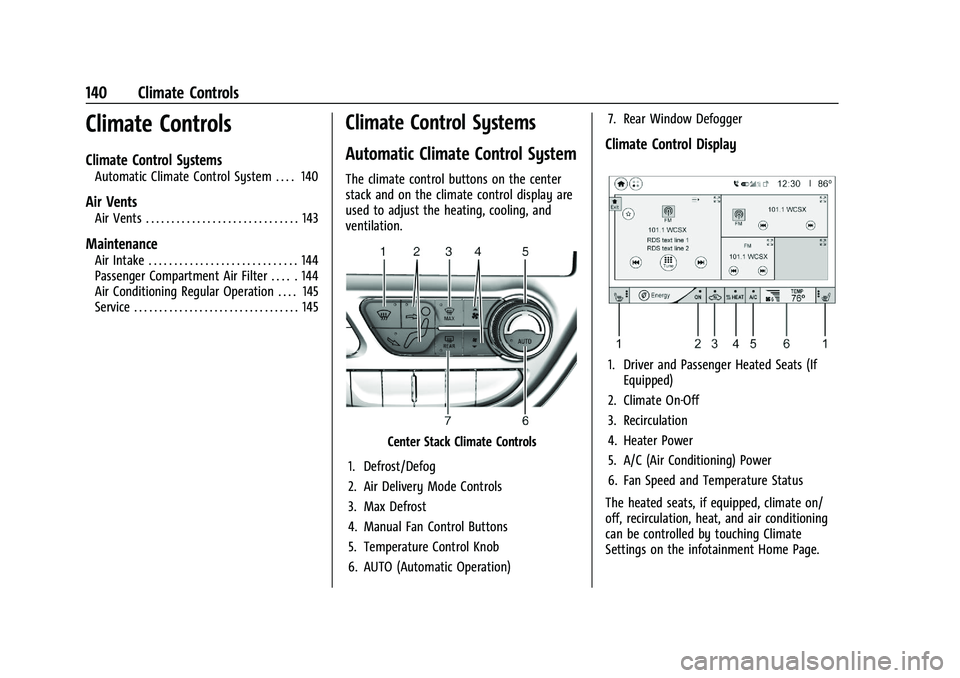
The climate control buttons on the center
stack and on the climate control display are
used to adjust the heating, cooling, and
ventilation.
Center Stack Climate Controls
1. Defrost/Defog
2. Air Delivery Mode Controls
3. Max Defrost
4. Manual Fan Control Buttons
5. Temperature Control Knob
6. AUTO (Automatic Operation) 7. Rear Window Defogger
Climate Control Display
1. Driver and Passenger Heated Seats (If
Equipped)
2. Climate On-Off
3. Recirculation
4. Heater Power
5. A/C (Air Conditioning) Power
6. Fan Speed and Temperature Status
The heated seats, if equipped, climate on/
off, recirculation, heat, and air conditioning
can be controlled by touching Climate
Settings on the infotainment Home Page.
Page 142 of 293
Chevrolet Bolt EV Owner Manual (GMNA-Localizing-U.S./Canada-
14637856) - 2021 - CRC - 10/2/20
Climate Controls 141
A selection can then be made on the climate
settings page.
Automatic Operation
The system automatically controls the fan
speed, air delivery, air conditioning, electric
heating, and recirculation to heat or cool the
vehicle to the selected temperature.
When AUTO is lit, all five functions operate
automatically. Each function can also be
manually set and the selected setting is
displayed or the indicator is lit. Functions
not manually set will continue to be
automatically controlled, even if the AUTO
indicator is not lit.
For automatic operation:1. Press AUTO.
2. Set the temperature. An initial setting of 22 °C (72 °F) is recommended. Allow the
system time to stabilize. Adjust the
temperature as needed.
Manual Operation
ON : Touch to turn the climate control
system on and off. The climate control system will turn on
when any climate control button is pressed
on the center stack or touched on the
climate control display. To turn the system
off, touch ON again.
DorC:
Press the buttons to increase or
decrease the fan speed. The fan speed
setting appears on the climate control
display. Manually adjusting the fan speed
cancels automatic fan control. Press AUTO to
return to automatic operation. Touch ON to
turn off the fan and the climate control
system.
Temperature Control : Turn the knob
clockwise or counterclockwise to increase or
decrease the temperature setting.
Air Delivery Mode Control : Press
c,
d, or0on the center stack to change
the direction of airflow. Any combination of
the three buttons can be selected. The
selected air delivery mode button indicator
is lit.
Pressing any button cancels automatic air
delivery control and the direction of the
airflow can be controlled manually. Press
AUTO to return to automatic operation.
0: Air is directed to the windshield.
d:Air is directed to the instrument panel
outlets.
c: Air is directed to the floor outlets.
0MAX : Air is directed to the windshield
and the fan runs at a higher speed. Fog or
frost is cleared from the windshield more
quickly. When the button is pressed again,
the system returns to the previous mode
setting.
For best results, clear all snow and ice from
the windshield before defrosting.
L: Touch to turn on recirculation.
An indicator light comes on. Air is
recirculated to quickly cool the inside of the
vehicle or to reduce the entry of outside air
and odors. Using the recirculation mode for
extended periods may cause the windows to
fog. If this happens, select the defrost mode.
Using air conditioning and recirculation
together for long periods of time may cause
the air inside the vehicle to become too dry.
To prevent this from happening, after the
air in the vehicle has cooled, turn the
recirculation mode off.
Page 143 of 293
Chevrolet Bolt EV Owner Manual (GMNA-Localizing-U.S./Canada-
14637856) - 2021 - CRC - 10/2/20
142 Climate Controls
Touching this button cancels automatic
recirculation. Press AUTO to return to
automatic operation; recirculation runs
automatically as needed.
vHEAT :Touch to turn the heater on when
the fan is on.
A/C : Touch to turn the air conditioning on
when the fan is on.
Auto Defog : The system will monitor high
humidity inside the vehicle. When high
humidity is detected, the climate control
system may adjust to outside air supply and
turn on the air conditioner or the heater.
The fan speed may slightly increase to help
prevent fogging. When high humidity is no
longer detected, the system will return to
its prior operation. To turn Auto Defog off
or on, see “Climate and Air Quality” under
Vehicle Personalization 0101.
Auto Heated Seats : If equipped, when the
vehicle is on, this feature will automatically
activate the heated seats at the level
required by the vehicle’s interior
temperature. In auto mode, the indicators
automatically show the level setting
required. Use the manual heated seat buttons on the
infotainment display to turn auto heated
seats off. Once this feature is turned off, the
auto heated seats will be activated the next
time the vehicle is turned on.
In manual mode, the controls can be
accessed while the vehicle is on by touching
(orMwith three level indicators high,
medium, low or off on the climate control
display. If the passenger seat is unoccupied,
the auto heated seats feature will not
activate that seat. See Heated Front Seats
0 29 and
Vehicle Personalization 0101.
Rear Window Defogger
K:Press to turn the rear window defogger
on or off. An indicator light on the button
comes on to show that the rear window
defogger is on.
The defogger only works when the vehicle is
on. The defogger will turn off if the vehicle
is turned off.
Caution
Do not try to clear frost or other material
from the inside of the front windshield
and rear window with a razor blade or
(Continued)
Caution (Continued)
anything else that is sharp. This may
damage the rear window defogger grid
and affect the radio's ability to pick up
stations clearly. The repairs would not be
covered by the vehicle warranty.
Remote Start : The climate control system
may be started by using the Remote Keyless
Entry (RKE) transmitter. The climate control
system will default to an appropriate
heating or cooling mode. See Remote Start
0 13.
The rear window defogger turns on if it is
cold outside.
Mobile Application Feature
If equipped, this feature allows a
smartphone to set the start-up climate
control settings. The following features can
be set:
.Temperature
.Fan Speed
.Air Delivery Mode
.Climate Mode
.Recirculation
Page 144 of 293
Chevrolet Bolt EV Owner Manual (GMNA-Localizing-U.S./Canada-
14637856) - 2021 - CRC - 10/2/20
Climate Controls 143
Once the settings are saved through the
application, the vehicle will use these
settings when turned on. After the vehicle is
turned on, use the climate controls if
additional adjustments are desired.
Sensors
Indicator Light and Solar Sensor (ILSS)
The ILSS is on top of the instrument panel,
near the windshield, where it monitors solar
intensity.
The climate control system uses the sensor
information to adjust the temperature, fan
speed, recirculation, and air delivery mode
for best comfort.
Do not cover the sensor; otherwise the
automatic climate control system may not
work properly.
Humidity Sensor
The humidity sensor is near the base of the
inside rearview mirror. The climate control
system uses the sensor information to
adjust the temperature and recirculation for
best comfort.Outside Air Temperature Sensor
The outside air temperature sensor is behind
the front grille of the vehicle. The vehicle
uses the sensor information to display
outside air temperature. The climate control
system uses the information to adjust the
climate system operation.
Air Vents
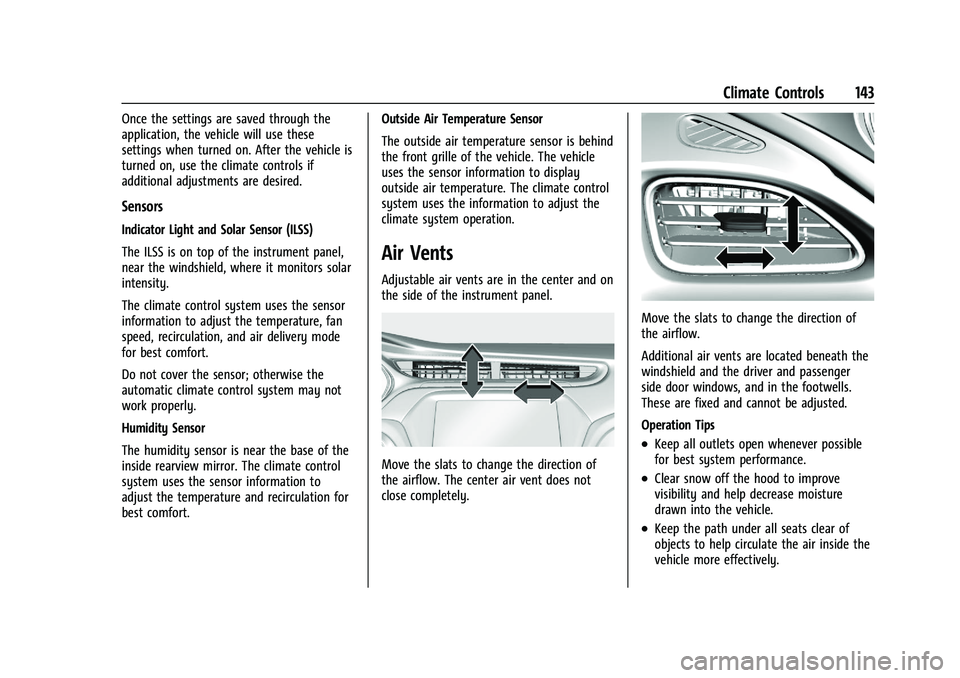
Adjustable air vents are in the center and on
the side of the instrument panel.
Move the slats to change the direction of
the airflow. The center air vent does not
close completely.
Move the slats to change the direction of
the airflow.
Additional air vents are located beneath the
windshield and the driver and passenger
side door windows, and in the footwells.
These are fixed and cannot be adjusted.
Operation Tips
.Keep all outlets open whenever possible
for best system performance.
.Clear snow off the hood to improve
visibility and help decrease moisture
drawn into the vehicle.
.Keep the path under all seats clear of
objects to help circulate the air inside the
vehicle more effectively.
Page 159 of 293
Chevrolet Bolt EV Owner Manual (GMNA-Localizing-U.S./Canada-
14637856) - 2021 - CRC - 10/2/20
158 Driving and Operating
If the RKE transmitter is not in the vehicle
or something is interfering with the
transmitter, a message displays in the Driver
Information Center (DIC).
If the vehicle will not start due to a low RKE
transmitter battery, the vehicle can still be
driven. SeeRemote Keyless Entry (RKE)
System Operation 07.
A vehicle ready light displays in the lower
right corner of the instrument cluster when
the vehicle is ready to be driven.
The instrument cluster also displays an
active battery gauge when the vehicle is
ready to be driven.
Restarting Procedure
If the vehicle must be restarted while it is
still moving, move the shift lever to
N (Neutral) and press POWER
Otwice
without pressing the brake pedal. The
propulsion system will not restart in any
other position. A chime will sound if the driver door is
opened while the vehicle is on. Always press
POWER
Oto turn the vehicle off before
exiting.
Stopping Procedure
For information on how to turn the vehicle
off, see Power Button 0156.
Retained Accessory Power (RAP)
The following features will operate for up to
10 minutes or until the driver door is
opened:
.Audio System
.Accessory Power Outlets
.Power Windows
Shifting Into Park
To shift into P (Park):
1. Hold the brake pedal down and set the parking brake. See Electric Parking Brake
0 164.
2. Press the button on top of the shift lever to shift into P (Park). See Electric Drive
Unit 0160.
3. The P indicator on the shift lever will turn red when the vehicle is in P (Park).
4. Turn the vehicle off.
Leaving the Vehicle with the Propulsion
System On
{Warning
It is dangerous to get out of the vehicle
if the P (Park) button is not pressed with
the parking brake set. The vehicle
can roll.
Do not leave the vehicle when the
propulsion system is running. If you have
left the propulsion system running, the
vehicle can move suddenly. You or others
could be injured. To be sure the vehicle
will not move, even when you are on
fairly level ground, always set the
parking brake and press the P (Park)
button.
If the vehicle must be left with the
propulsion system on, be sure that the
vehicle is in P (Park) with the parking brake
set, before leaving the vehicle. After pressing
the P (Park) button, hold down the regular
brake pedal. If you cannot see the P (Park)
indicator in instrument cluster, it means that
the vehicle has not shifted to P (Park).