change time CHEVROLET BOLT EV 2021 Owner's Manual
[x] Cancel search | Manufacturer: CHEVROLET, Model Year: 2021, Model line: BOLT EV, Model: CHEVROLET BOLT EV 2021Pages: 293, PDF Size: 9.21 MB
Page 30 of 293
Chevrolet Bolt EV Owner Manual (GMNA-Localizing-U.S./Canada-
14637856) - 2021 - CRC - 10/2/20
Seats and Restraints 29
Reclining Seatbacks
{Warning
If either seatback is not locked, it could
move forward in a sudden stop or crash.
That could cause injury to the person
sitting there. Always push and pull on
the seatbacks to be sure they are locked.
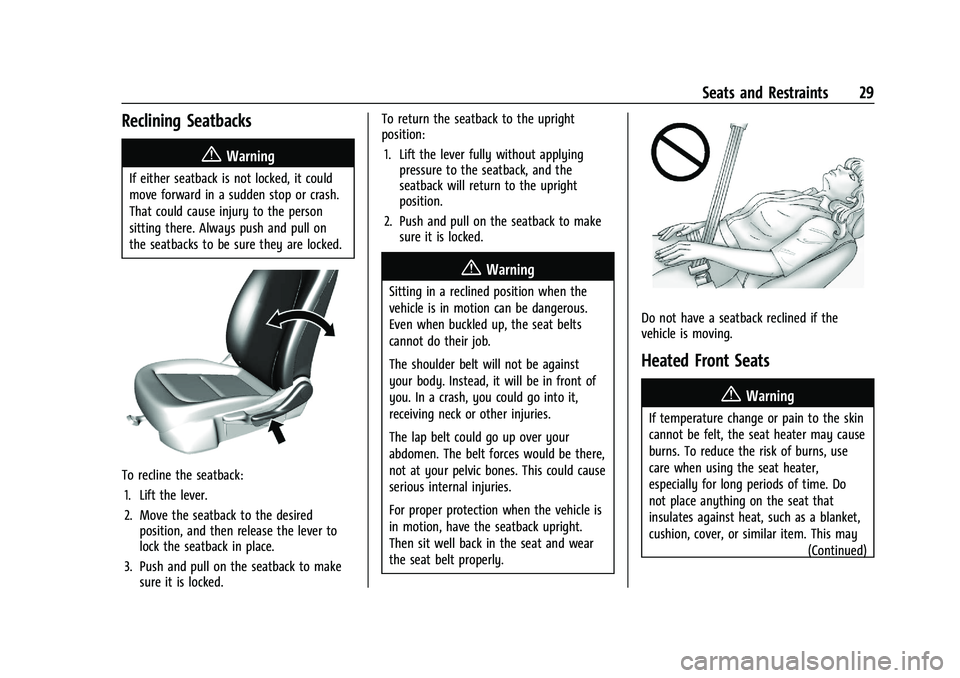
To recline the seatback:1. Lift the lever.
2. Move the seatback to the desired position, and then release the lever to
lock the seatback in place.
3. Push and pull on the seatback to make sure it is locked. To return the seatback to the upright
position:
1. Lift the lever fully without applying pressure to the seatback, and the
seatback will return to the upright
position.
2. Push and pull on the seatback to make sure it is locked.
{Warning
Sitting in a reclined position when the
vehicle is in motion can be dangerous.
Even when buckled up, the seat belts
cannot do their job.
The shoulder belt will not be against
your body. Instead, it will be in front of
you. In a crash, you could go into it,
receiving neck or other injuries.
The lap belt could go up over your
abdomen. The belt forces would be there,
not at your pelvic bones. This could cause
serious internal injuries.
For proper protection when the vehicle is
in motion, have the seatback upright.
Then sit well back in the seat and wear
the seat belt properly.
Do not have a seatback reclined if the
vehicle is moving.
Heated Front Seats
{Warning
If temperature change or pain to the skin
cannot be felt, the seat heater may cause
burns. To reduce the risk of burns, use
care when using the seat heater,
especially for long periods of time. Do
not place anything on the seat that
insulates against heat, such as a blanket,
cushion, cover, or similar item. This may
(Continued)
Page 31 of 293
Chevrolet Bolt EV Owner Manual (GMNA-Localizing-U.S./Canada-
14637856) - 2021 - CRC - 10/2/20
30 Seats and Restraints
Warning (Continued)
cause the seat heater to overheat. An
overheated seat heater may cause a burn
or may damage the seat.
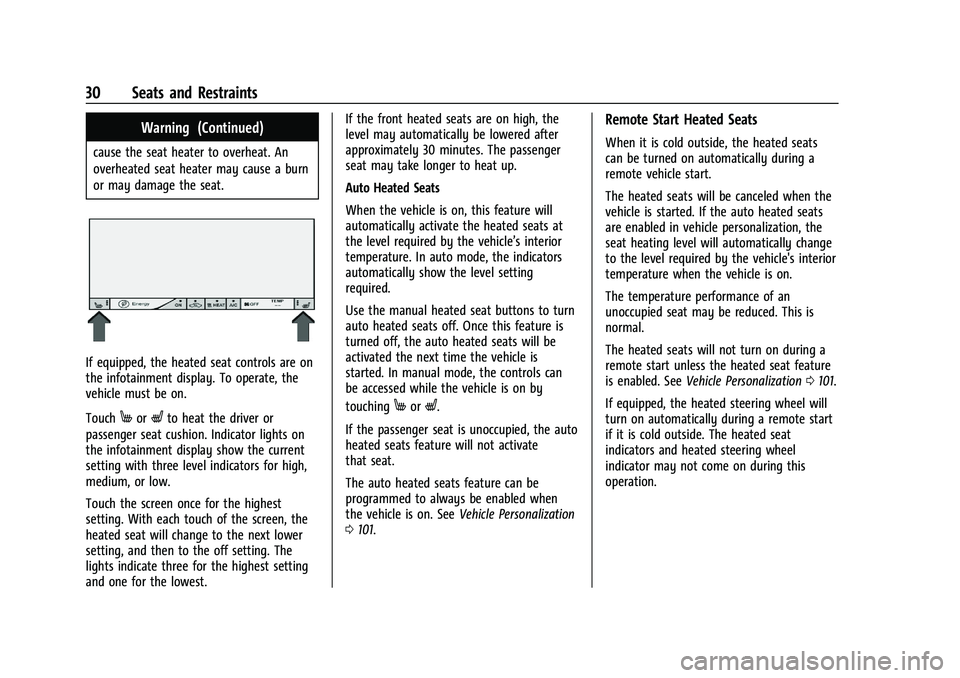
If equipped, the heated seat controls are on
the infotainment display. To operate, the
vehicle must be on.
Touch
MorLto heat the driver or
passenger seat cushion. Indicator lights on
the infotainment display show the current
setting with three level indicators for high,
medium, or low.
Touch the screen once for the highest
setting. With each touch of the screen, the
heated seat will change to the next lower
setting, and then to the off setting. The
lights indicate three for the highest setting
and one for the lowest. If the front heated seats are on high, the
level may automatically be lowered after
approximately 30 minutes. The passenger
seat may take longer to heat up.
Auto Heated Seats
When the vehicle is on, this feature will
automatically activate the heated seats at
the level required by the vehicle’s interior
temperature. In auto mode, the indicators
automatically show the level setting
required.
Use the manual heated seat buttons to turn
auto heated seats off. Once this feature is
turned off, the auto heated seats will be
activated the next time the vehicle is
started. In manual mode, the controls can
be accessed while the vehicle is on by
touchingMorL.
If the passenger seat is unoccupied, the auto
heated seats feature will not activate
that seat.
The auto heated seats feature can be
programmed to always be enabled when
the vehicle is on. See Vehicle Personalization
0 101.
Remote Start Heated Seats
When it is cold outside, the heated seats
can be turned on automatically during a
remote vehicle start.
The heated seats will be canceled when the
vehicle is started. If the auto heated seats
are enabled in vehicle personalization, the
seat heating level will automatically change
to the level required by the vehicle's interior
temperature when the vehicle is on.
The temperature performance of an
unoccupied seat may be reduced. This is
normal.
The heated seats will not turn on during a
remote start unless the heated seat feature
is enabled. See Vehicle Personalization 0101.
If equipped, the heated steering wheel will
turn on automatically during a remote start
if it is cold outside. The heated seat
indicators and heated steering wheel
indicator may not come on during this
operation.
Page 51 of 293
Chevrolet Bolt EV Owner Manual (GMNA-Localizing-U.S./Canada-
14637856) - 2021 - CRC - 10/2/20
50 Seats and Restraints
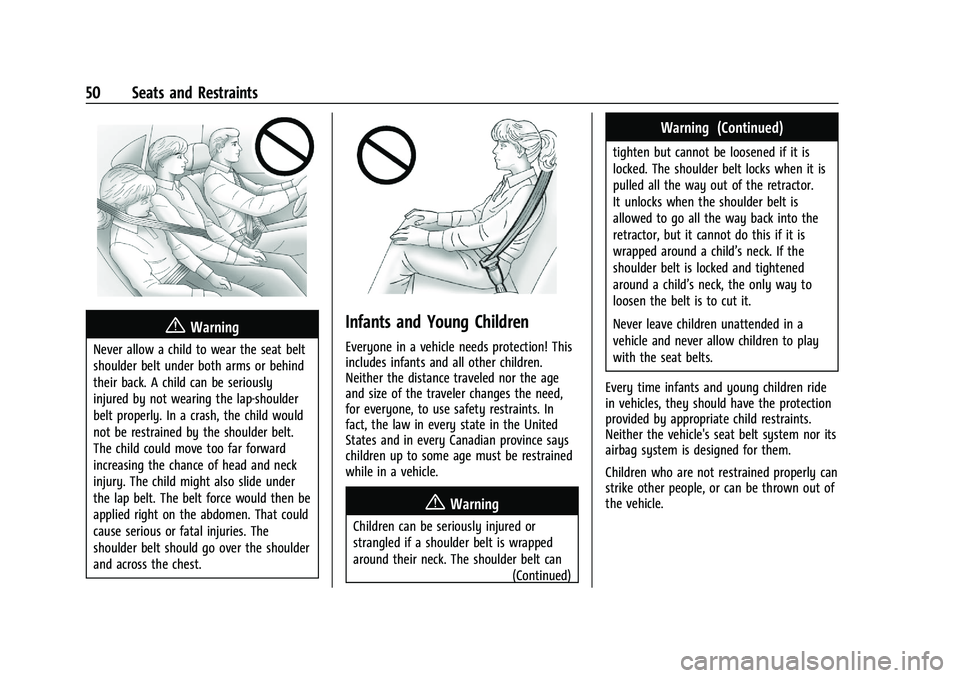
{Warning
Never allow a child to wear the seat belt
shoulder belt under both arms or behind
their back. A child can be seriously
injured by not wearing the lap-shoulder
belt properly. In a crash, the child would
not be restrained by the shoulder belt.
The child could move too far forward
increasing the chance of head and neck
injury. The child might also slide under
the lap belt. The belt force would then be
applied right on the abdomen. That could
cause serious or fatal injuries. The
shoulder belt should go over the shoulder
and across the chest.
Infants and Young Children
Everyone in a vehicle needs protection! This
includes infants and all other children.
Neither the distance traveled nor the age
and size of the traveler changes the need,
for everyone, to use safety restraints. In
fact, the law in every state in the United
States and in every Canadian province says
children up to some age must be restrained
while in a vehicle.
{Warning
Children can be seriously injured or
strangled if a shoulder belt is wrapped
around their neck. The shoulder belt can(Continued)
Warning (Continued)
tighten but cannot be loosened if it is
locked. The shoulder belt locks when it is
pulled all the way out of the retractor.
It unlocks when the shoulder belt is
allowed to go all the way back into the
retractor, but it cannot do this if it is
wrapped around a child’s neck. If the
shoulder belt is locked and tightened
around a child’s neck, the only way to
loosen the belt is to cut it.
Never leave children unattended in a
vehicle and never allow children to play
with the seat belts.
Every time infants and young children ride
in vehicles, they should have the protection
provided by appropriate child restraints.
Neither the vehicle's seat belt system nor its
airbag system is designed for them.
Children who are not restrained properly can
strike other people, or can be thrown out of
the vehicle.
Page 77 of 293
Chevrolet Bolt EV Owner Manual (GMNA-Localizing-U.S./Canada-
14637856) - 2021 - CRC - 10/2/20
76 Instruments and Controls
Compass
The vehicle has a compass display in the
instrument cluster above the speedometer.
The compass receives its heading and other
information from the Global Positioning
System (GPS) antenna and vehicle speed
information.
The compass system has automatic
calibration and zone adjustment features.
Avoid covering the GPS antenna for long
periods of time with objects that may
interfere with the antenna's ability to
receive a satellite signal. The compass
system is designed to operate for a certain
number of miles or degrees of turn before
needing a signal from the GPS satellites. The
compass system will automatically
determine when a GPS signal is restored and
provide a heading.
Clock
The infotainment system controls are used
to access the time and date settings through
the menu. This can also be changed by
touching the clock, then touch
8to go to
the Time and Date Settings menu.
D: Press to access the Home Page.
T:Touch to access the Icon View.
Y: Drag the scroll bar to navigate the list.
yorz:Touch to set up items.
0:Touch to exit or return to the
previous screen or menu.
Setting the Time
When Auto Set is enabled, the time cannot
be manually set.
1. Press
D, then touchT.
2. Touch Settings.
3. Touch Time and Date, then touch Set Time.
4. Touch + or −to adjust the value.
5. Touch
yorzto adjust AM or PM for
12 hour format.
6. Touch
0.
Setting the Date
1. PressD, then touchT.
2. Touch Settings.
3. Touch Time and Date, then touch Set Date.
4. Touch + or −to adjust the value. 5. Touch
0.
Auto Set
1. PressD, then touchT.
2. Touch Settings.
3. Touch Time and Date, then touch Auto Set.
4. Select from the available options.
5. Touch
0.
Setting the 12/24 Hour Format
1. PressD, then touchT.
2. Touch Settings.
3. Touch Time and Date, then touch Set Time.
4. Select 12 hr or 24 hr format.
5. Touch
0.
Power Outlets
The accessory power outlet can be used to
plug in electrical equipment, such as a
mobile phone or MP3 player. The accessory
power outlet only works with the vehicle
turned on.
Page 92 of 293
Chevrolet Bolt EV Owner Manual (GMNA-Localizing-U.S./Canada-
14637856) - 2021 - CRC - 10/2/20
Instruments and Controls 91
vehicle is plugged in and in moderate
temperature conditions. Also, to get an
accurate time estimate, the vehicle uses an
internal clock for Programmable Charging,
not the clock in the center stack.
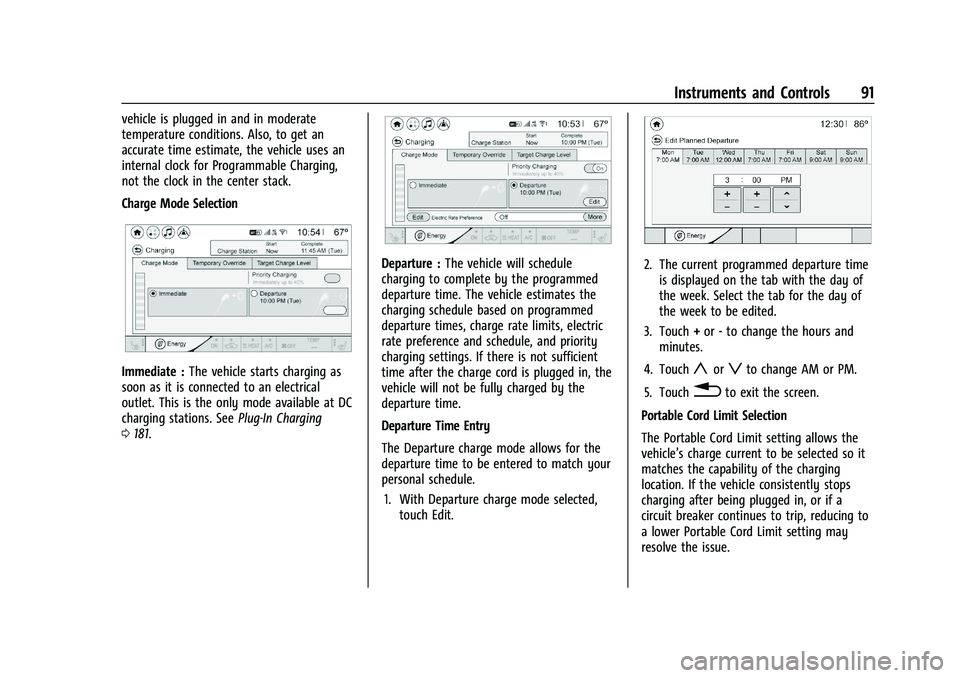
Charge Mode Selection
Immediate :The vehicle starts charging as
soon as it is connected to an electrical
outlet. This is the only mode available at DC
charging stations. See Plug-In Charging
0 181.
Departure : The vehicle will schedule
charging to complete by the programmed
departure time. The vehicle estimates the
charging schedule based on programmed
departure times, charge rate limits, electric
rate preference and schedule, and priority
charging settings. If there is not sufficient
time after the charge cord is plugged in, the
vehicle will not be fully charged by the
departure time.
Departure Time Entry
The Departure charge mode allows for the
departure time to be entered to match your
personal schedule.
1. With Departure charge mode selected, touch Edit.2. The current programmed departure timeis displayed on the tab with the day of
the week. Select the tab for the day of
the week to be edited.
3. Touch +or -to change the hours and
minutes.
4. Touch
yorzto change AM or PM.
5. Touch
0to exit the screen.
Portable Cord Limit Selection
The Portable Cord Limit setting allows the
vehicle’s charge current to be selected so it
matches the capability of the charging
location. If the vehicle consistently stops
charging after being plugged in, or if a
circuit breaker continues to trip, reducing to
a lower Portable Cord Limit setting may
resolve the issue.
Page 93 of 293
Chevrolet Bolt EV Owner Manual (GMNA-Localizing-U.S./Canada-
14637856) - 2021 - CRC - 10/2/20
92 Instruments and Controls
The Portable Cord Limit setting should be
configured to match the electrical current
rating for the electrical outlet that the
charge cord is connected to. On the Charge
Mode tab, toggle the Portable Cord Limit
selection between:
.12 amps
.8 amps
Exact current levels may vary from the
values shown in this manual. Check the
vehicle for the current available levels. When
the vehicle is plugged into a charging
station, the Portable Cord Limit option on
the Charge Mode tab will not be available.
The Portable Cord Limit can be changed and
saved using Location Based Charging
settings. The default value is the lower
Portable Cord Limit. The Portable Cord Limit
will reset to the lower value when the
vehicle is shifted from P (Park) unless the
Location Based Charging feature is active
and set to retain this preference. See
“Location Based Charging” later in this
section.
{Warning
Using a charge level that exceeds the
electrical circuit or electrical outlet
capacity may start a fire or damage the
electrical circuit. Use the lowest charge
level until a qualified electrician inspects
the electrical circuit capacity. Use the
lowest charge level if the electrical circuit
or electrical outlet capacity is not known.
Electric Rate Preference
The vehicle estimates the charging start
time based on the utility rate schedule,
utility rate preference, and programmed
departure time for the current day of the
week. The vehicle will charge during the
least expensive rate periods to achieve a full
battery charge by the departure time.
Electrical rate information from the utility
company for the charging location is
required for this mode. If the selected
charge mode is Departure, then electric rate
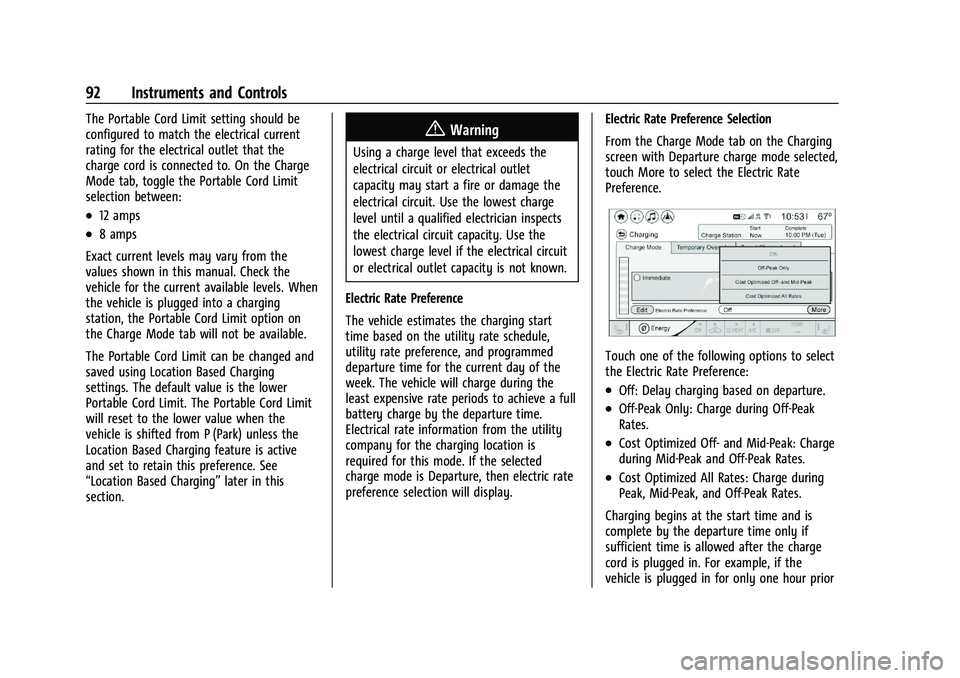
preference selection will display. Electric Rate Preference Selection
From the Charge Mode tab on the Charging
screen with Departure charge mode selected,
touch More to select the Electric Rate
Preference.
Touch one of the following options to select
the Electric Rate Preference:
.Off: Delay charging based on departure.
.Off-Peak Only: Charge during Off-Peak
Rates.
.Cost Optimized Off- and Mid-Peak: Charge
during Mid-Peak and Off-Peak Rates.
.Cost Optimized All Rates: Charge during
Peak, Mid-Peak, and Off-Peak Rates.
Charging begins at the start time and is
complete by the departure time only if
sufficient time is allowed after the charge
cord is plugged in. For example, if the
vehicle is plugged in for only one hour prior
Page 94 of 293
Chevrolet Bolt EV Owner Manual (GMNA-Localizing-U.S./Canada-
14637856) - 2021 - CRC - 10/2/20
Instruments and Controls 93
to the departure time, and the battery is
completely discharged, the vehicle will not
be fully charged by the departure time
regardless of the rate selection.
Also, if the selected electric rate settings
result in a very long charge completion
time, the vehicle will start charging
immediately upon plug-in. For example,
if the electric rate table is set up with all
Peak rates and the rate preference is to
charge during Off-Peak rates only, then the
vehicle will start charging immediately upon
plug-in.
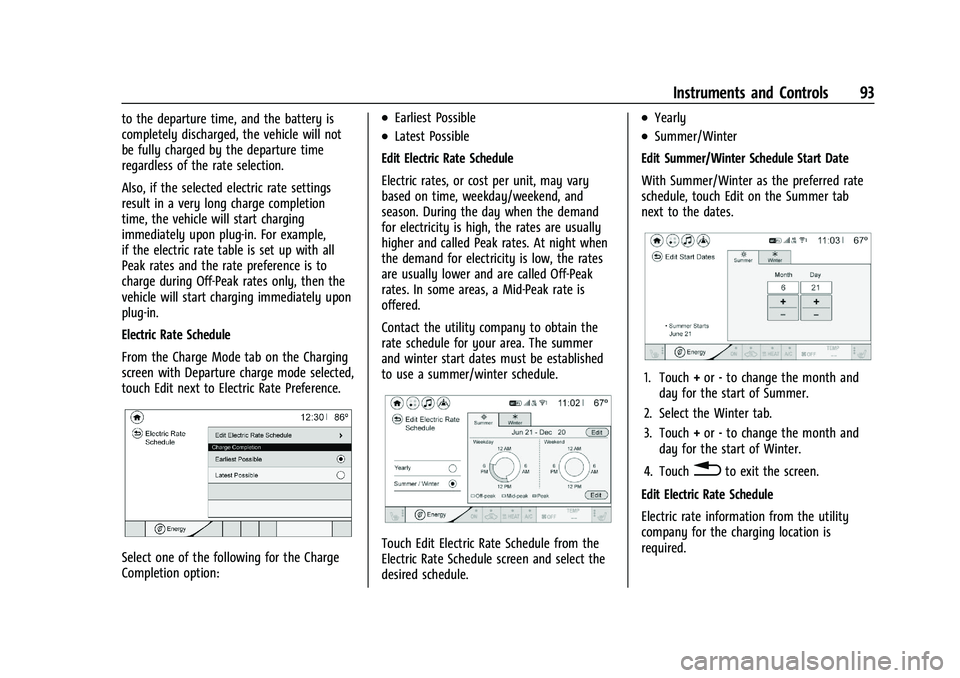
Electric Rate Schedule
From the Charge Mode tab on the Charging
screen with Departure charge mode selected,
touch Edit next to Electric Rate Preference.
Select one of the following for the Charge
Completion option:
.Earliest Possible
.Latest Possible
Edit Electric Rate Schedule
Electric rates, or cost per unit, may vary
based on time, weekday/weekend, and
season. During the day when the demand
for electricity is high, the rates are usually
higher and called Peak rates. At night when
the demand for electricity is low, the rates
are usually lower and are called Off-Peak
rates. In some areas, a Mid-Peak rate is
offered.
Contact the utility company to obtain the
rate schedule for your area. The summer
and winter start dates must be established
to use a summer/winter schedule.
Touch Edit Electric Rate Schedule from the
Electric Rate Schedule screen and select the
desired schedule.
.Yearly
.Summer/Winter
Edit Summer/Winter Schedule Start Date
With Summer/Winter as the preferred rate
schedule, touch Edit on the Summer tab
next to the dates.
1. Touch +or -to change the month and
day for the start of Summer.
2. Select the Winter tab.
3. Touch +or -to change the month and
day for the start of Winter.
4. Touch
0to exit the screen.
Edit Electric Rate Schedule
Electric rate information from the utility
company for the charging location is
required.
Page 95 of 293
Chevrolet Bolt EV Owner Manual (GMNA-Localizing-U.S./Canada-
14637856) - 2021 - CRC - 10/2/20
94 Instruments and Controls
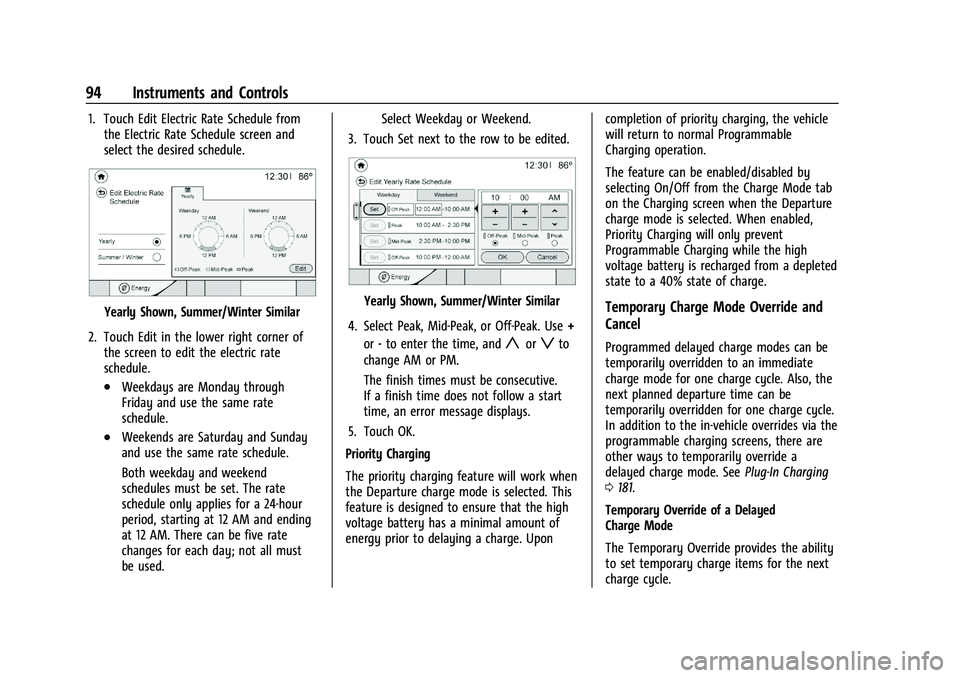
1. Touch Edit Electric Rate Schedule fromthe Electric Rate Schedule screen and
select the desired schedule.
Yearly Shown, Summer/Winter Similar
2. Touch Edit in the lower right corner of the screen to edit the electric rate
schedule.
.Weekdays are Monday through
Friday and use the same rate
schedule.
.Weekends are Saturday and Sunday
and use the same rate schedule.
Both weekday and weekend
schedules must be set. The rate
schedule only applies for a 24-hour
period, starting at 12 AM and ending
at 12 AM. There can be five rate
changes for each day; not all must
be used. Select Weekday or Weekend.
3. Touch Set next to the row to be edited.
Yearly Shown, Summer/Winter Similar
4. Select Peak, Mid-Peak, or Off-Peak. Use +
or -to enter the time, and
yorzto
change AM or PM.
The finish times must be consecutive.
If a finish time does not follow a start
time, an error message displays.
5. Touch OK.
Priority Charging
The priority charging feature will work when
the Departure charge mode is selected. This
feature is designed to ensure that the high
voltage battery has a minimal amount of
energy prior to delaying a charge. Upon completion of priority charging, the vehicle
will return to normal Programmable
Charging operation.
The feature can be enabled/disabled by
selecting On/Off from the Charge Mode tab
on the Charging screen when the Departure
charge mode is selected. When enabled,
Priority Charging will only prevent
Programmable Charging while the high
voltage battery is recharged from a depleted
state to a 40% state of charge.
Temporary Charge Mode Override and
Cancel
Programmed delayed charge modes can be
temporarily overridden to an immediate
charge mode for one charge cycle. Also, the
next planned departure time can be
temporarily overridden for one charge cycle.
In addition to the in-vehicle overrides via the
programmable charging screens, there are
other ways to temporarily override a
delayed charge mode. See
Plug-In Charging
0 181.
Temporary Override of a Delayed
Charge Mode
The Temporary Override provides the ability
to set temporary charge items for the next
charge cycle.
Page 97 of 293
Chevrolet Bolt EV Owner Manual (GMNA-Localizing-U.S./Canada-
14637856) - 2021 - CRC - 10/2/20
96 Instruments and Controls
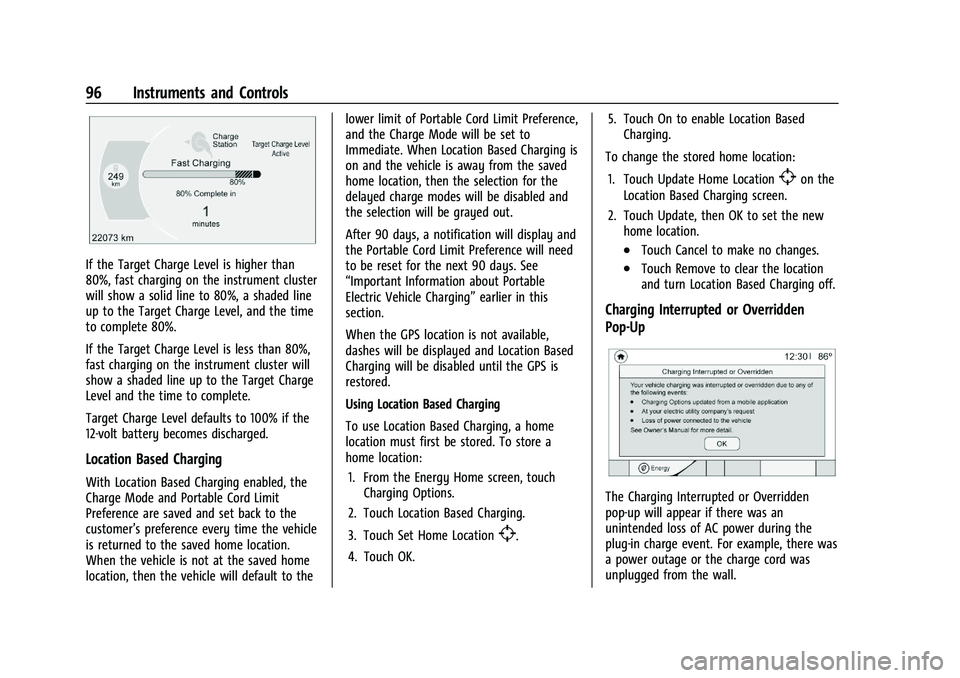
If the Target Charge Level is higher than
80%, fast charging on the instrument cluster
will show a solid line to 80%, a shaded line
up to the Target Charge Level, and the time
to complete 80%.
If the Target Charge Level is less than 80%,
fast charging on the instrument cluster will
show a shaded line up to the Target Charge
Level and the time to complete.
Target Charge Level defaults to 100% if the
12-volt battery becomes discharged.
Location Based Charging
With Location Based Charging enabled, the
Charge Mode and Portable Cord Limit
Preference are saved and set back to the
customer’s preference every time the vehicle
is returned to the saved home location.
When the vehicle is not at the saved home
location, then the vehicle will default to thelower limit of Portable Cord Limit Preference,
and the Charge Mode will be set to
Immediate. When Location Based Charging is
on and the vehicle is away from the saved
home location, then the selection for the
delayed charge modes will be disabled and
the selection will be grayed out.
After 90 days, a notification will display and
the Portable Cord Limit Preference will need
to be reset for the next 90 days. See
“Important Information about Portable
Electric Vehicle Charging”
earlier in this
section.
When the GPS location is not available,
dashes will be displayed and Location Based
Charging will be disabled until the GPS is
restored.
Using Location Based Charging
To use Location Based Charging, a home
location must first be stored. To store a
home location:
1. From the Energy Home screen, touch Charging Options.
2. Touch Location Based Charging.
3. Touch Set Home Location
[.
4. Touch OK. 5. Touch On to enable Location Based
Charging.
To change the stored home location:
1. Touch Update Home Location
[on the
Location Based Charging screen.
2. Touch Update, then OK to set the new home location.
.Touch Cancel to make no changes.
.Touch Remove to clear the location
and turn Location Based Charging off.
Charging Interrupted or Overridden
Pop-Up
The Charging Interrupted or Overridden
pop-up will appear if there was an
unintended loss of AC power during the
plug-in charge event. For example, there was
a power outage or the charge cord was
unplugged from the wall.
Page 99 of 293
Chevrolet Bolt EV Owner Manual (GMNA-Localizing-U.S./Canada-
14637856) - 2021 - CRC - 10/2/20
98 Instruments and Controls
This screen displays a graph showing the
energy efficiency that has been used over
the last 50 km (50 mi). The Present point
provides the average energy efficiency for
the current 5 km (5 mi).
Touch Reset to clear the history data.
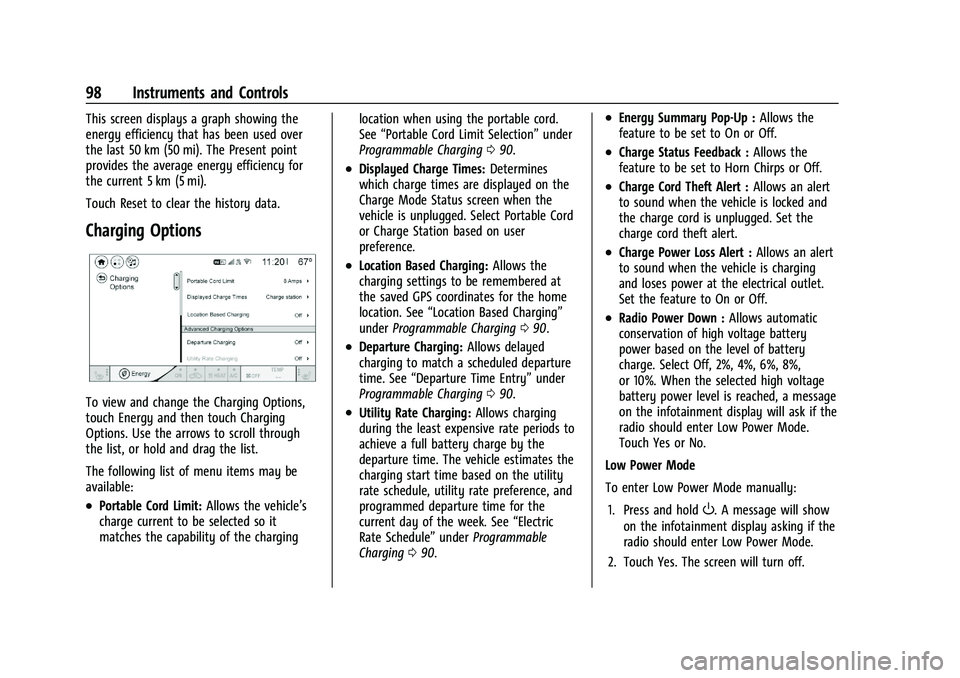
Charging Options
To view and change the Charging Options,
touch Energy and then touch Charging
Options. Use the arrows to scroll through
the list, or hold and drag the list.
The following list of menu items may be
available:
.Portable Cord Limit:Allows the vehicle’s
charge current to be selected so it
matches the capability of the charging location when using the portable cord.
See
“Portable Cord Limit Selection” under
Programmable Charging 090.
.Displayed Charge Times: Determines
which charge times are displayed on the
Charge Mode Status screen when the
vehicle is unplugged. Select Portable Cord
or Charge Station based on user
preference.
.Location Based Charging: Allows the
charging settings to be remembered at
the saved GPS coordinates for the home
location. See “Location Based Charging”
under Programmable Charging 090.
.Departure Charging: Allows delayed
charging to match a scheduled departure
time. See “Departure Time Entry” under
Programmable Charging 090.
.Utility Rate Charging: Allows charging
during the least expensive rate periods to
achieve a full battery charge by the
departure time. The vehicle estimates the
charging start time based on the utility
rate schedule, utility rate preference, and
programmed departure time for the
current day of the week. See “Electric
Rate Schedule” underProgrammable
Charging 090.
.Energy Summary Pop-Up : Allows the
feature to be set to On or Off.
.Charge Status Feedback : Allows the
feature to be set to Horn Chirps or Off.
.Charge Cord Theft Alert : Allows an alert
to sound when the vehicle is locked and
the charge cord is unplugged. Set the
charge cord theft alert.
.Charge Power Loss Alert : Allows an alert
to sound when the vehicle is charging
and loses power at the electrical outlet.
Set the feature to On or Off.
.Radio Power Down : Allows automatic
conservation of high voltage battery
power based on the level of battery
charge. Select Off, 2%, 4%, 6%, 8%,
or 10%. When the selected high voltage
battery power level is reached, a message
on the infotainment display will ask if the
radio should enter Low Power Mode.
Touch Yes or No.
Low Power Mode
To enter Low Power Mode manually:
1. Press and hold
O. A message will show
on the infotainment display asking if the
radio should enter Low Power Mode.
2. Touch Yes. The screen will turn off.