mirror CHEVROLET BOLT EV 2021 Owner's Manual
[x] Cancel search | Manufacturer: CHEVROLET, Model Year: 2021, Model line: BOLT EV, Model: CHEVROLET BOLT EV 2021Pages: 293, PDF Size: 9.21 MB
Page 7 of 293
Chevrolet Bolt EV Owner Manual (GMNA-Localizing-U.S./Canada-
14637856) - 2021 - CRC - 10/2/20
6 Keys, Doors, and Windows
Keys, Doors, and
Windows
Keys and Locks
Keys . . . . . . . . . . . . . . . . . . . . . . . . . . . . . . . . . . . . . 6
Remote Keyless Entry (RKE) System . . . . . 7
Remote Keyless Entry (RKE) SystemOperation . . . . . . . . . . . . . . . . . . . . . . . . . . . . . . 7
Remote Start . . . . . . . . . . . . . . . . . . . . . . . . . . . 13
Door Locks . . . . . . . . . . . . . . . . . . . . . . . . . . . . . . 14
Power Door Locks . . . . . . . . . . . . . . . . . . . . . . . 16
Delayed Locking . . . . . . . . . . . . . . . . . . . . . . . . 16
Automatic Door Locks . . . . . . . . . . . . . . . . . . . 17
Lockout Protection . . . . . . . . . . . . . . . . . . . . . . 17
Safety Locks . . . . . . . . . . . . . . . . . . . . . . . . . . . . 17
Doors
Liftgate . . . . . . . . . . . . . . . . . . . . . . . . . . . . . . . . . 18
Vehicle Security
Vehicle Security . . . . . . . . . . . . . . . . . . . . . . . . 18
Vehicle Alarm System . . . . . . . . . . . . . . . . . . 18
Immobilizer . . . . . . . . . . . . . . . . . . . . . . . . . . . . . 19
Immobilizer Operation . . . . . . . . . . . . . . . . . . 19
Exterior Mirrors
Convex Mirrors . . . . . . . . . . . . . . . . . . . . . . . . . 20
Power Mirrors . . . . . . . . . . . . . . . . . . . . . . . . . . 20
Folding Mirrors . . . . . . . . . . . . . . . . . . . . . . . . . 20
Heated Mirrors . . . . . . . . . . . . . . . . . . . . . . . . . 21
Interior Mirrors
Interior Rearview Mirrors . . . . . . . . . . . . . . . 21
Manual Rearview Mirror . . . . . . . . . . . . . . . . 21
Automatic Dimming Rearview Mirror . . . 21
Rear Camera Mirror . . . . . . . . . . . . . . . . . . . . . 21
Windows
Windows . . . . . . . . . . . . . . . . . . . . . . . . . . . . . . . 23
Power Windows . . . . . . . . . . . . . . . . . . . . . . . . 23
Sun Visors . . . . . . . . . . . . . . . . . . . . . . . . . . . . . . 25
Keys and Locks
Keys
{Warning
Leaving children in a vehicle with a
Remote Keyless Entry (RKE) transmitter is
dangerous and children or others could
be seriously injured or killed. They could
operate the power windows or other
controls or make the vehicle move. The
windows will function with the RKE
transmitter in the vehicle, and children or
others could be caught in the path of a
closing window. Do not leave children in
a vehicle with an RKE transmitter.
Page 21 of 293
Chevrolet Bolt EV Owner Manual (GMNA-Localizing-U.S./Canada-
14637856) - 2021 - CRC - 10/2/20
20 Keys, Doors, and Windows
If the RKE transmitter appears to be
undamaged, try another transmitter,
or place the transmitter in the transmitter
pocket.
See“Starting the Vehicle with a Low
Transmitter Battery” underRemote Keyless
Entry (RKE) System Operation 07.
If the vehicle does not start with the other
transmitter or with the transmitter placed in
the transmitter pocket, the vehicle needs
service.
See your dealer who can service the
theft-deterrent system and have a new
transmitter programmed to the vehicle.
Do not leave the transmitter or device that
disarms or deactivates the theft-deterrent
system in the vehicle.
Exterior Mirrors
Convex Mirrors
{Warning
A convex mirror can make things, like
other vehicles, look farther away than
they really are. If you cut too sharply (Continued)
Warning (Continued)
into the right lane, you could hit a
vehicle on the right. Check the inside
mirror or glance over your shoulder
before changing lanes.
The passenger side mirror is convex shaped.
A convex mirror's surface is curved so more
can be seen from the driver seat.
Power Mirrors
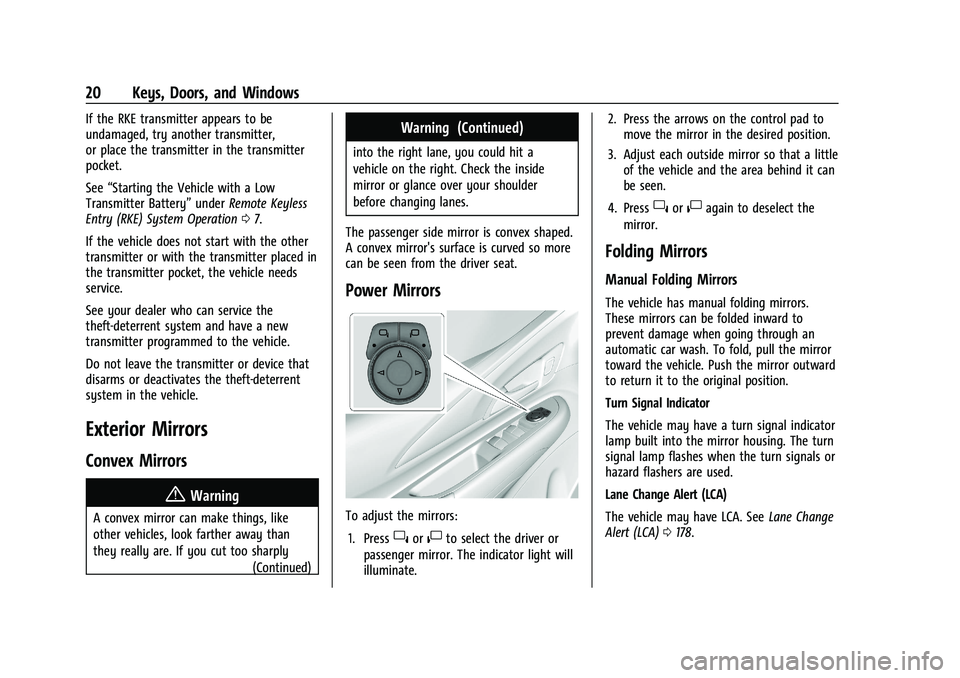
To adjust the mirrors: 1. Press
}or|to select the driver or
passenger mirror. The indicator light will
illuminate. 2. Press the arrows on the control pad to
move the mirror in the desired position.
3. Adjust each outside mirror so that a little of the vehicle and the area behind it can
be seen.
4. Press
}or|again to deselect the
mirror.
Folding Mirrors
Manual Folding Mirrors
The vehicle has manual folding mirrors.
These mirrors can be folded inward to
prevent damage when going through an
automatic car wash. To fold, pull the mirror
toward the vehicle. Push the mirror outward
to return it to the original position.
Turn Signal Indicator
The vehicle may have a turn signal indicator
lamp built into the mirror housing. The turn
signal lamp flashes when the turn signals or
hazard flashers are used.
Lane Change Alert (LCA)
The vehicle may have LCA. See Lane Change
Alert (LCA) 0178.
Page 22 of 293
Chevrolet Bolt EV Owner Manual (GMNA-Localizing-U.S./Canada-
14637856) - 2021 - CRC - 10/2/20
Keys, Doors, and Windows 21
Side Blind Zone Alert
The vehicle may have Side Blind Zone Alert.
SeeSide Blind Zone Alert (SBZA) 0178.
Heated Mirrors
The rear window defogger also heats the
outside mirrors, if equipped.
K:Press to heat the outside rearview
mirrors. See “Rear Window Defogger” under
Automatic Climate Control System 0140.
Interior Mirrors
Interior Rearview Mirrors
Adjust the rearview mirror for a clear view
of the area behind your vehicle.
Do not spray glass cleaner directly on the
mirror. Use a soft towel dampened with
water.
Manual Rearview Mirror
Push the tab forward for daytime use and
pull it rearward for nighttime use to avoid
glare of the headlamps from behind.
Automatic Dimming Rearview
Mirror
If equipped, automatic dimming reduces the
glare of headlamps from behind. The
dimming feature comes on when the vehicle
is started.
Rear Camera Mirror
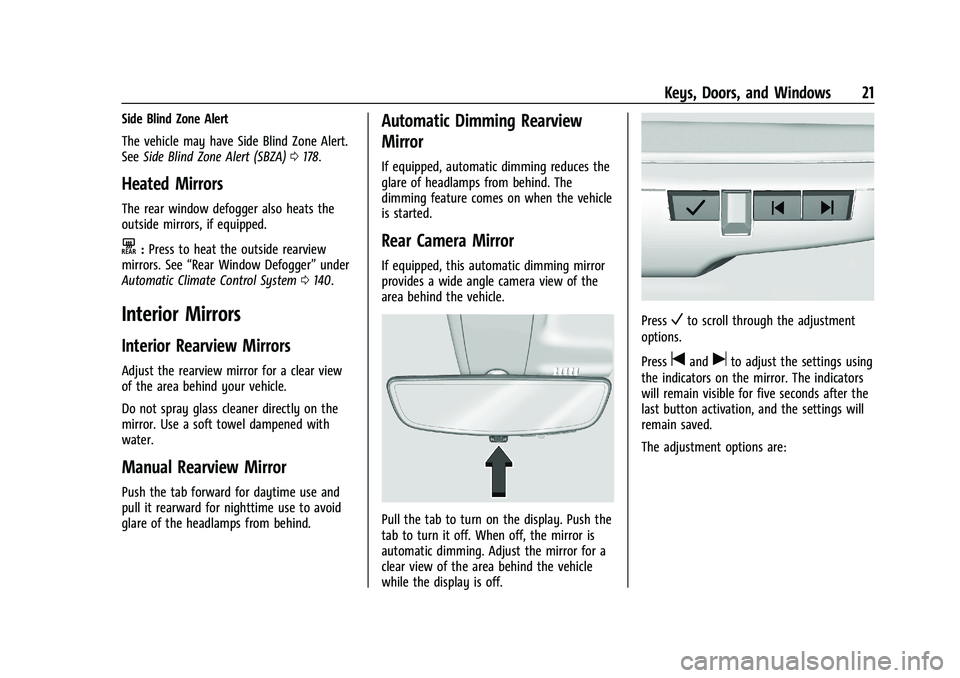
If equipped, this automatic dimming mirror
provides a wide angle camera view of the
area behind the vehicle.
Pull the tab to turn on the display. Push the
tab to turn it off. When off, the mirror is
automatic dimming. Adjust the mirror for a
clear view of the area behind the vehicle
while the display is off.
PressVto scroll through the adjustment
options.
Press
tanduto adjust the settings using
the indicators on the mirror. The indicators
will remain visible for five seconds after the
last button activation, and the settings will
remain saved.
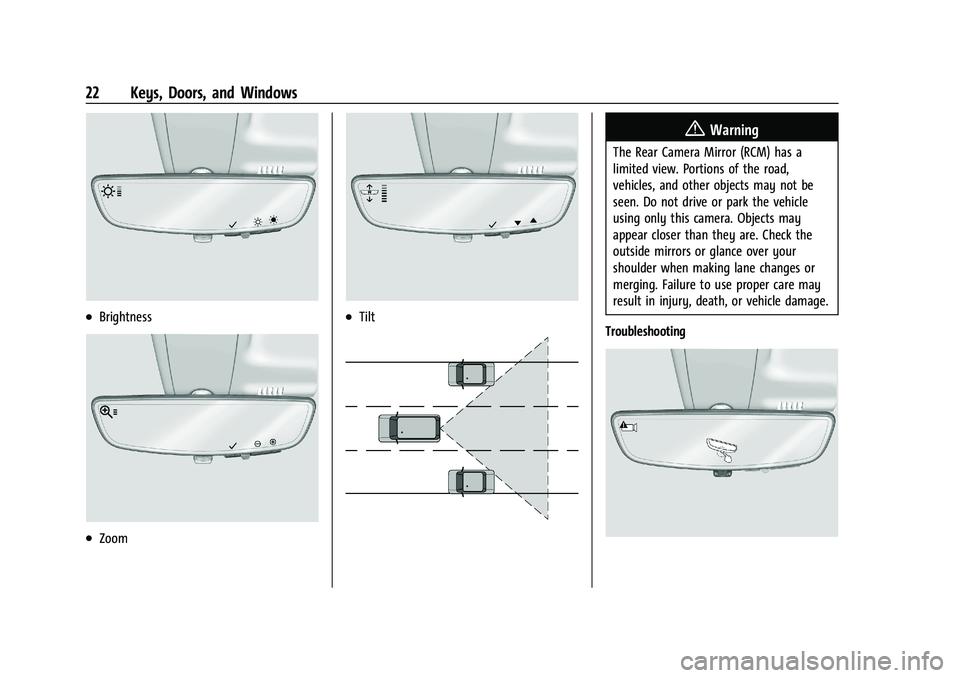
The adjustment options are:
Page 23 of 293
Chevrolet Bolt EV Owner Manual (GMNA-Localizing-U.S./Canada-
14637856) - 2021 - CRC - 10/2/20
22 Keys, Doors, and Windows
.Brightness
.Zoom
.Tilt
{Warning
The Rear Camera Mirror (RCM) has a
limited view. Portions of the road,
vehicles, and other objects may not be
seen. Do not drive or park the vehicle
using only this camera. Objects may
appear closer than they are. Check the
outside mirrors or glance over your
shoulder when making lane changes or
merging. Failure to use proper care may
result in injury, death, or vehicle damage.
Troubleshooting
Page 24 of 293
Chevrolet Bolt EV Owner Manual (GMNA-Localizing-U.S./Canada-
14637856) - 2021 - CRC - 10/2/20
Keys, Doors, and Windows 23
See your dealer for service if a blue screen
and
3are displayed in the mirror, and
the display shuts off. Also, push the tab as
indicated to return to the automatic
dimming mode.
The Rear Camera Mirror may not work
properly or display a clear image if:
.There is glare from the sun or headlamps.
This may obstruct objects from view.
If needed, push the tab to turn off the
display.
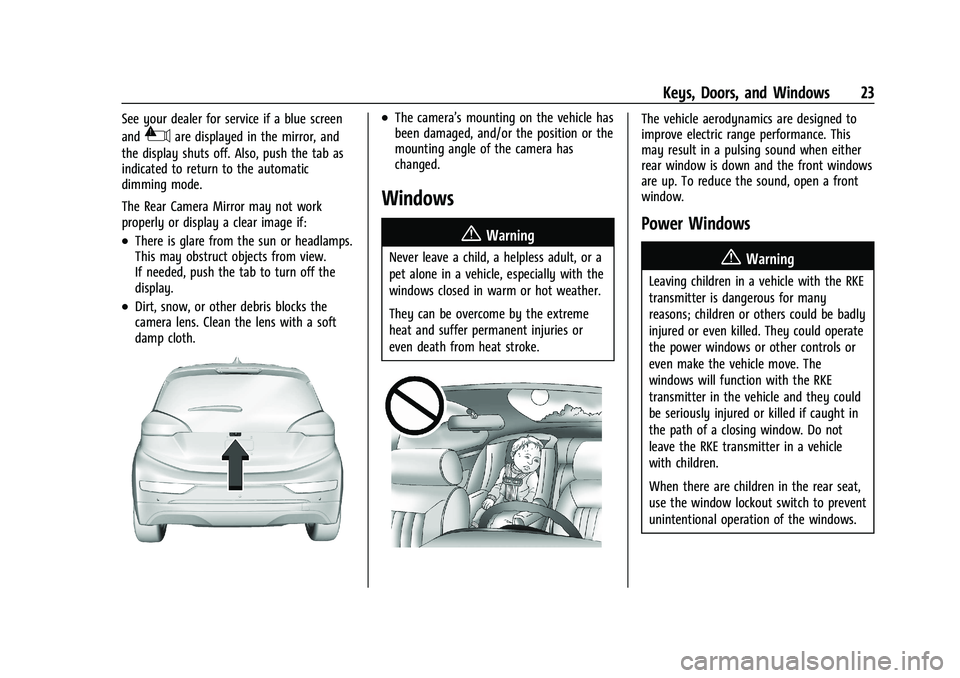
.Dirt, snow, or other debris blocks the
camera lens. Clean the lens with a soft
damp cloth.
.The camera’s mounting on the vehicle has
been damaged, and/or the position or the
mounting angle of the camera has
changed.
Windows
{
Warning
Never leave a child, a helpless adult, or a
pet alone in a vehicle, especially with the
windows closed in warm or hot weather.
They can be overcome by the extreme
heat and suffer permanent injuries or
even death from heat stroke.
The vehicle aerodynamics are designed to
improve electric range performance. This
may result in a pulsing sound when either
rear window is down and the front windows
are up. To reduce the sound, open a front
window.
Power Windows
{Warning
Leaving children in a vehicle with the RKE
transmitter is dangerous for many
reasons; children or others could be badly
injured or even killed. They could operate
the power windows or other controls or
even make the vehicle move. The
windows will function with the RKE
transmitter in the vehicle and they could
be seriously injured or killed if caught in
the path of a closing window. Do not
leave the RKE transmitter in a vehicle
with children.
When there are children in the rear seat,
use the window lockout switch to prevent
unintentional operation of the windows.
Page 26 of 293
Chevrolet Bolt EV Owner Manual (GMNA-Localizing-U.S./Canada-
14637856) - 2021 - CRC - 10/2/20
Keys, Doors, and Windows 25
Press2again to deactivate the window
lockout.
Sun Visors
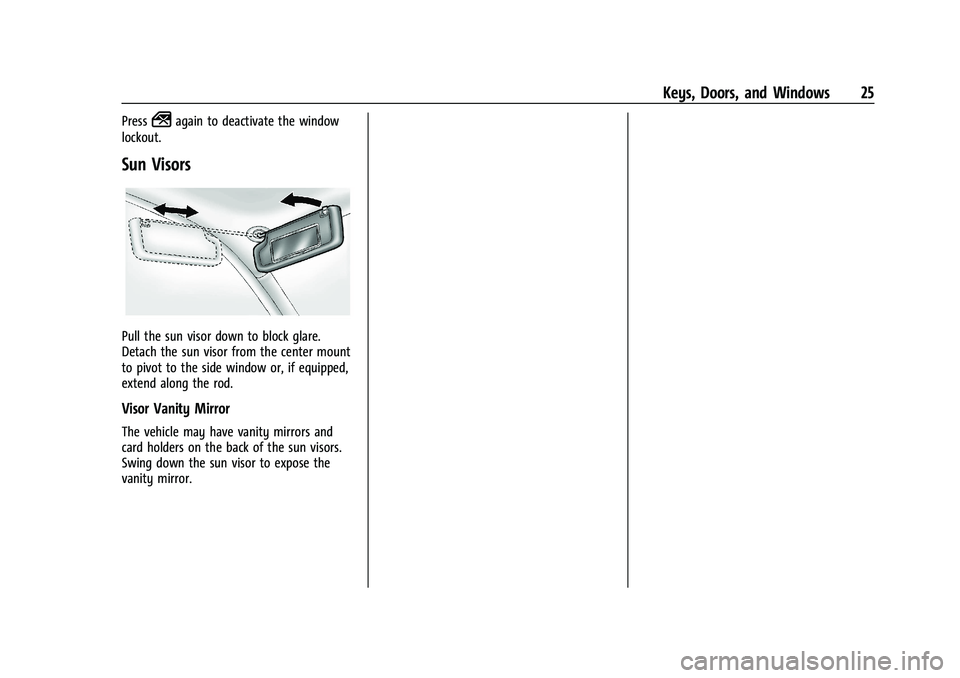
Pull the sun visor down to block glare.
Detach the sun visor from the center mount
to pivot to the side window or, if equipped,
extend along the rod.
Visor Vanity Mirror
The vehicle may have vanity mirrors and
card holders on the back of the sun visors.
Swing down the sun visor to expose the
vanity mirror.
Page 76 of 293
Chevrolet Bolt EV Owner Manual (GMNA-Localizing-U.S./Canada-
14637856) - 2021 - CRC - 10/2/20
Instruments and Controls 75
how long the windshield washer had been
activated. SeeWasher Fluid0202 for
information on filling the windshield washer
fluid reservoir.
Rear Window Wiper/Washer
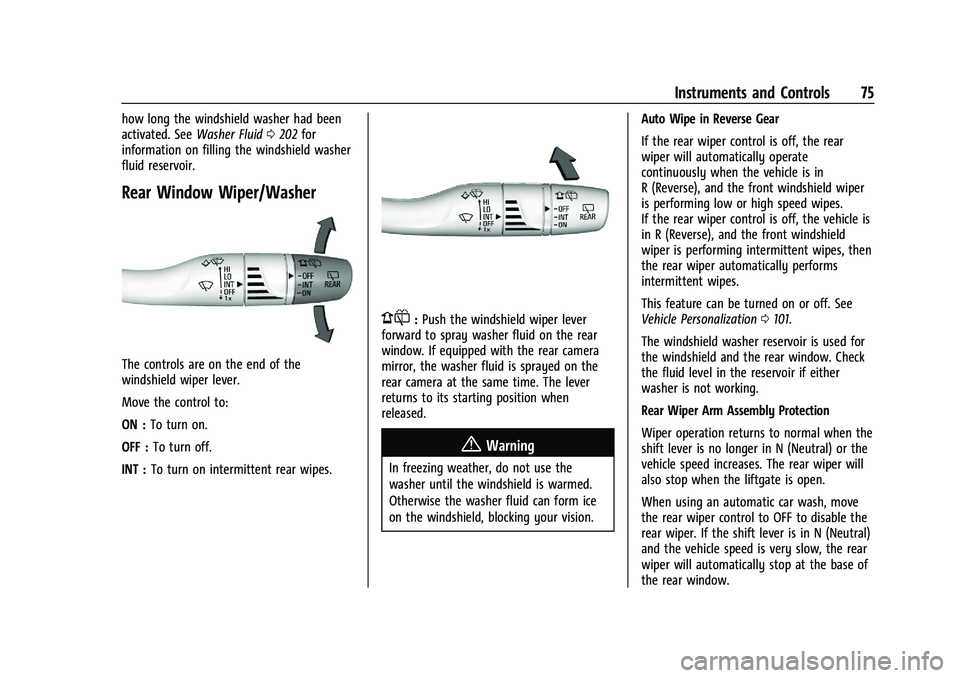
The controls are on the end of the
windshield wiper lever.
Move the control to:
ON : To turn on.
OFF : To turn off.
INT : To turn on intermittent rear wipes.
1:Push the windshield wiper lever
forward to spray washer fluid on the rear
window. If equipped with the rear camera
mirror, the washer fluid is sprayed on the
rear camera at the same time. The lever
returns to its starting position when
released.
{Warning
In freezing weather, do not use the
washer until the windshield is warmed.
Otherwise the washer fluid can form ice
on the windshield, blocking your vision. Auto Wipe in Reverse Gear
If the rear wiper control is off, the rear
wiper will automatically operate
continuously when the vehicle is in
R (Reverse), and the front windshield wiper
is performing low or high speed wipes.
If the rear wiper control is off, the vehicle is
in R (Reverse), and the front windshield
wiper is performing intermittent wipes, then
the rear wiper automatically performs
intermittent wipes.
This feature can be turned on or off. See
Vehicle Personalization
0101.
The windshield washer reservoir is used for
the windshield and the rear window. Check
the fluid level in the reservoir if either
washer is not working.
Rear Wiper Arm Assembly Protection
Wiper operation returns to normal when the
shift lever is no longer in N (Neutral) or the
vehicle speed increases. The rear wiper will
also stop when the liftgate is open.
When using an automatic car wash, move
the rear wiper control to OFF to disable the
rear wiper. If the shift lever is in N (Neutral)
and the vehicle speed is very slow, the rear
wiper will automatically stop at the base of
the rear window.
Page 144 of 293
Chevrolet Bolt EV Owner Manual (GMNA-Localizing-U.S./Canada-
14637856) - 2021 - CRC - 10/2/20
Climate Controls 143
Once the settings are saved through the
application, the vehicle will use these
settings when turned on. After the vehicle is
turned on, use the climate controls if
additional adjustments are desired.
Sensors
Indicator Light and Solar Sensor (ILSS)
The ILSS is on top of the instrument panel,
near the windshield, where it monitors solar
intensity.
The climate control system uses the sensor
information to adjust the temperature, fan
speed, recirculation, and air delivery mode
for best comfort.
Do not cover the sensor; otherwise the
automatic climate control system may not
work properly.
Humidity Sensor
The humidity sensor is near the base of the
inside rearview mirror. The climate control
system uses the sensor information to
adjust the temperature and recirculation for
best comfort.Outside Air Temperature Sensor
The outside air temperature sensor is behind
the front grille of the vehicle. The vehicle
uses the sensor information to display
outside air temperature. The climate control
system uses the information to adjust the
climate system operation.
Air Vents
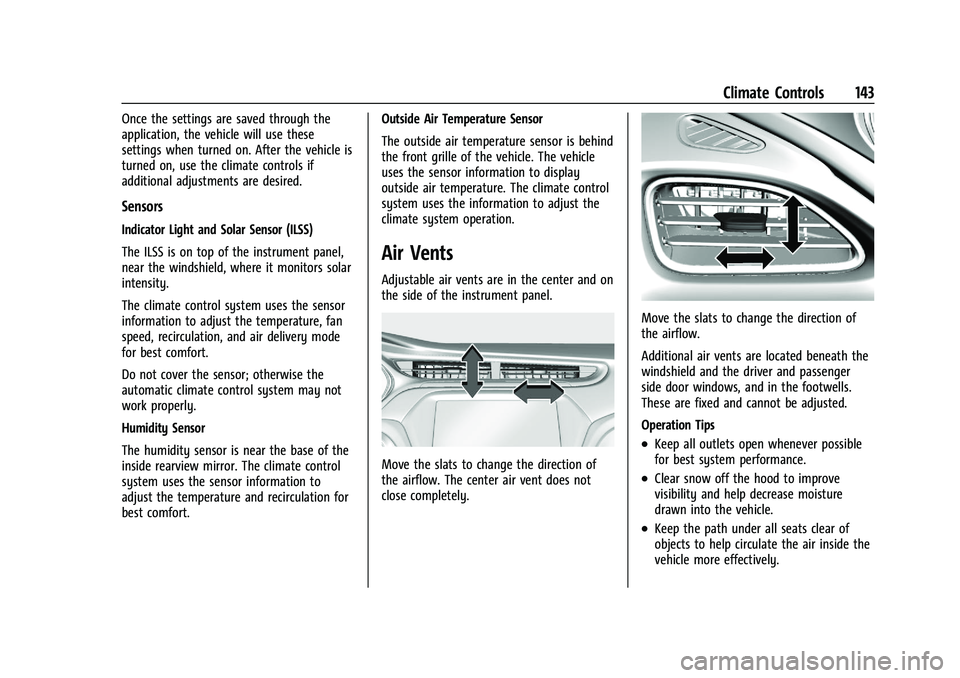
Adjustable air vents are in the center and on
the side of the instrument panel.
Move the slats to change the direction of
the airflow. The center air vent does not
close completely.
Move the slats to change the direction of
the airflow.
Additional air vents are located beneath the
windshield and the driver and passenger
side door windows, and in the footwells.
These are fixed and cannot be adjusted.
Operation Tips
.Keep all outlets open whenever possible
for best system performance.
.Clear snow off the hood to improve
visibility and help decrease moisture
drawn into the vehicle.
.Keep the path under all seats clear of
objects to help circulate the air inside the
vehicle more effectively.
Page 152 of 293
Chevrolet Bolt EV Owner Manual (GMNA-Localizing-U.S./Canada-
14637856) - 2021 - CRC - 10/2/20
Driving and Operating 151
.Slow down and adjust your driving
according to weather conditions. Stopping
distance can be longer and vehicle control
can be affected when traction is reduced
by water, snow, ice, gravel, or other
material on the road. Learn to recognize
warning clues—such as enough water,
ice, or packed snow on the road to make
a mirrored surface —and slow down
when you have any doubt.
.Try to avoid sudden steering, acceleration,
or braking, including reducing vehicle
speed by shifting to a lower gear. Any
sudden changes could cause the tires to
slide.
Remember: Antilock brakes help avoid only
the braking skid.
Driving on Wet Roads
Rain and wet roads can reduce vehicle
traction and affect your ability to stop and
accelerate. Always drive slower in these
types of driving conditions and avoid driving
through large puddles and deep-standing or
flowing water.
{Warning
Wet brakes can cause crashes. They
might not work as well in a quick stop
and could cause pulling to one side. You
could lose control of the vehicle.
After driving through a large puddle of
water or a car/vehicle wash, lightly apply
the brake pedal until the brakes work
normally.
Flowing or rushing water creates strong
forces. Driving through flowing water
could cause the vehicle to be carried
away. If this happens, you and other
vehicle occupants could drown. Do not
ignore police warnings and be very
cautious about trying to drive through
flowing water.
Hydroplaning
Hydroplaning is dangerous. Water can build
up under the vehicle's tires so they actually
ride on the water. This can happen if the
road is wet enough and you are going fast
enough. When the vehicle is hydroplaning, it
has little or no contact with the road. There is no hard and fast rule about
hydroplaning. The best advice is to slow
down when the road is wet.
Other Rainy Weather Tips
Besides slowing down, other wet weather
driving tips include:
.Allow extra following distance.
.Pass with caution.
.Keep windshield wiping equipment in
good shape.
.Keep the windshield washer fluid reservoir
filled.
.Have good tires with proper tread depth.
.Turn off cruise control.
Hill and Mountain Roads
Driving on steep hills or through mountains
is different than driving on flat or rolling
terrain.
.Keep the vehicle serviced and in good
shape.
.Check all fluid levels and brakes, tires,
cooling system, and electric drive unit.
.Keep the vehicle in gear when going
down steep or long hills.
Page 153 of 293
Chevrolet Bolt EV Owner Manual (GMNA-Localizing-U.S./Canada-
14637856) - 2021 - CRC - 10/2/20
152 Driving and Operating
{Warning
Coasting downhill in N (Neutral) or with
the vehicle turned off is dangerous. The
brakes will have to do all the work of
slowing down the vehicle and could
become too hot. Hot brakes may not be
able to slow the vehicle enough to
maintain speed and control. You could
crash. Always have the vehicle running
and in gear when going downhill. This
will allow the electric drive unit to assist
in slowing and maintaining speed.
.Drive at speeds to keep the vehicle in its
own lane. Do not swing wide or cross the
center line.
.Be alert on top of hills. Something could
be in your lane (e.g., stalled car, crash).
.Pay attention to special road signs (e.g.,
falling rocks area, winding roads, long
grades, passing or no-passing zones) and
take appropriate action.
Winter Driving
Driving on Snow or Ice
Snow or ice between the tires and the road
creates less traction or grip, so drive
carefully. Wet ice can occur at about 0 °C
(32 °F) when freezing rain begins to fall.
Avoid driving on wet ice or in freezing rain
until roads can be treated.
For Slippery Road Driving:
.Recommend using D (Drive) in slippery
conditions.
.Accelerate gently. Accelerating too quickly
causes the wheels to spin and makes the
surface under the tires slick.
.Turn on the Traction Control
System (TCS).
.The Antilock Brake System (ABS) improves
vehicle stability during hard stops, but
the brakes should be applied sooner than
when on dry pavement.
.Allow greater following distance and
watch for slippery spots. Icy patches can
occur on otherwise clear roads in shaded
areas. The surface of a curve or an
overpass can remain icy when thesurrounding roads are clear. Avoid sudden
steering maneuvers and braking while
on ice.
.Turn off cruise control.
.Avoid using Regen on Demand paddle.
Blizzard Conditions
Being stuck in snow can be a serious
situation. Stay with the vehicle unless there
is help nearby. If possible, use Roadside
Assistance. See
Roadside Assistance Program
0 266. To get help and keep everyone in
the vehicle safe:
.Turn on the hazard warning flashers.
.Tie a red cloth to an outside mirror.
To save energy, run the vehicle for only
short periods as needed to warm the vehicle
and then shut the vehicle off and partially
close the window. Moving about to keep
warm also helps.
If the Vehicle Is Stuck
Slowly and cautiously spin the wheels to
free the vehicle when stuck in sand, mud,
ice, or snow.