display CHEVROLET BOLT EV 2023 Repair Manual
[x] Cancel search | Manufacturer: CHEVROLET, Model Year: 2023, Model line: BOLT EV, Model: CHEVROLET BOLT EV 2023Pages: 308, PDF Size: 5.18 MB
Page 142 of 308
Chevrolet BOLT EV Owner Manual (GMNA-Localizing-U.S./Canada-
16404388) - 2023 - CRC - 3/7/22
Infotainment System 141
MERCHANTABILITY, FITNESS FOR A
PARTICULAR PURPOSE, TITLE, AND
NON-INFRINGEMENT. GRACENOTE DOES NOT
WARRANT THE RESULTS THAT WILL BE
OBTAINED BY YOUR USE OF THE GRACENOTE
SOFTWARE OR ANY GRACENOTE SERVER. IN
NO CASE WILL GRACENOTE BE LIABLE FOR
ANY CONSEQUENTIAL OR INCIDENTAL
DAMAGES OR FOR ANY LOST PROFITS OR
LOST REVENUES.
© 2014. Gracenote, Inc. All Rights Reserved.
MPEG4–AVC (H.264)
THIS PRODUCT IS LICENSED UNDER THE AVC
PATENT PORTFOLIO LICENSE FOR THE
PERSONAL AND NON-COMMERCIAL USE OF A
CONSUMER TO (i) ENCODE VIDEO IN
COMPLIANCE WITH THE AVC STANDARD
(“AVC VIDEO”) AND/OR (ii) DECODE AVC
VIDEO THAT WAS ENCODED BY A
CONSUMER ENGAGED IN A PERSONAL AND
NON-COMMERCIAL ACTIVITY AND/OR WAS
OBTAINED FROM A VIDEO PROVIDER
LICENSED TO PROVIDE AVC VIDEO. NO
LICENSE IS GRANTED OR SHALL BE IMPLIED
FOR ANY OTHER USE. ADDITIONAL
INFORMATION MAY BE OBTAINED FROM
MPEG LA, LLC. SEE
HTTPS://WWW.MPEGLA.COM.VC-1
THIS PRODUCT IS LICENSED UNDER THE VC-1
PATENT PORTFOLIO LICENSE FOR THE
PERSONAL AND NON-COMMERCIAL USE OF A
CONSUMER TO (i) ENCODE VIDEO IN
COMPLIANCE WITH THE VC-1 STANDARD
(“VC-1 VIDEO”) AND/OR (ii) DECODE VC-1
VIDEO THAT WAS ENCODED BY A
CONSUMER ENGAGED IN A PERSONAL AND
NON-COMMERCIAL ACTIVITY AND/OR WAS
OBTAINED FROM A VIDEO PROVIDER
LICENSED TO PROVIDE VC-1 VIDEO. NO
LICENSE IS GRANTED OR SHALL BE IMPLIED
FOR ANY OTHER USE. ADDITIONAL
INFORMATION MAY BE OBTAINED FROM
MPEG LA, LLC. SEE
HTTPS://WWW.MPEGLA.COM.
MPEG4–Visual
USE OF THIS PRODUCT IN ANY MANNER
THAT COMPLIES WITH THE MPEG-4 VISUAL
STANDARD IS PROHIBITED, EXCEPT FOR USE
BY A CONSUMER ENGAGING IN PERSONAL
AND NON-COMMERCIAL ACTIVITIES.
MP3
MPEG Layer-3 audio coding technology
licensed from Fraunhofer IIS and Thomson.
WMV/WMA
This product includes technology owned by
Microsoft Corporation and under a license
from Microsoft Licensing, GP. Use or
distribution of such technology outside of
this product is prohibited without a license
from Microsoft Corporation and/or Microsoft
Licensing, GP as applicable.
Unicode
Copyright © 1991-2010 Unicode, Inc. All
rights reserved. Distributed under the Terms
of Use in https://www.unicode.org/
copyright.html.
Free Type Project
Portions of this software are copyright ©
2010 The FreeType Project (https://
www.freetype.org). All rights reserved.
Open Source SW
Further information concerning the OSS
licenses is shown in the infotainment
display.
QNX
Portions of this software are copyright ©
2008-2011, QNX Software Systems. All rights
reserved.
Page 144 of 308
Chevrolet BOLT EV Owner Manual (GMNA-Localizing-U.S./Canada-
16404388) - 2023 - CRC - 3/7/22
Infotainment System 143
QSSC at 175 Terence Matthews Crescent,
Kanata, Ontario, Canada K2M 1W8
([email protected]).
Linotype
Helvetica is a trademark of Linotype Corp.
registered in the U.S. Patent and Trademark
Office and may be registered in certain
other jurisdictions in the name of Linotype
Corp. or its licensee Linotype GmbH.
Usage in text form of each of the Licensed
Trademarks is:
The trademark attribution requirements for
the Licensed Trademarks may be viewed at
https://www.linotype.com/2061-19414/
trademarks.html.
END USER NOTICE
The marks of companies displayed by this
product to indicate business locations are
the marks of their respective owners. The
use of such marks in this product does not
imply any sponsorship, approval,
or endorsement by such companies of this
product.
Page 145 of 308
Chevrolet BOLT EV Owner Manual (GMNA-Localizing-U.S./Canada-
16404388) - 2023 - CRC - 3/7/22
144 Climate Controls
Climate Controls
Climate Control Systems
Automatic Climate Control System . . . . 144
Air Vents
Air Vents . . . . . . . . . . . . . . . . . . . . . . . . . . . . . . 147
Maintenance
Air Intake . . . . . . . . . . . . . . . . . . . . . . . . . . . . . 148
Passenger Compartment Air Filter . . . . . 148
Air Conditioning Regular Operation . . . . 149
Service . . . . . . . . . . . . . . . . . . . . . . . . . . . . . . . . 150
Climate Control Systems
Automatic Climate Control System
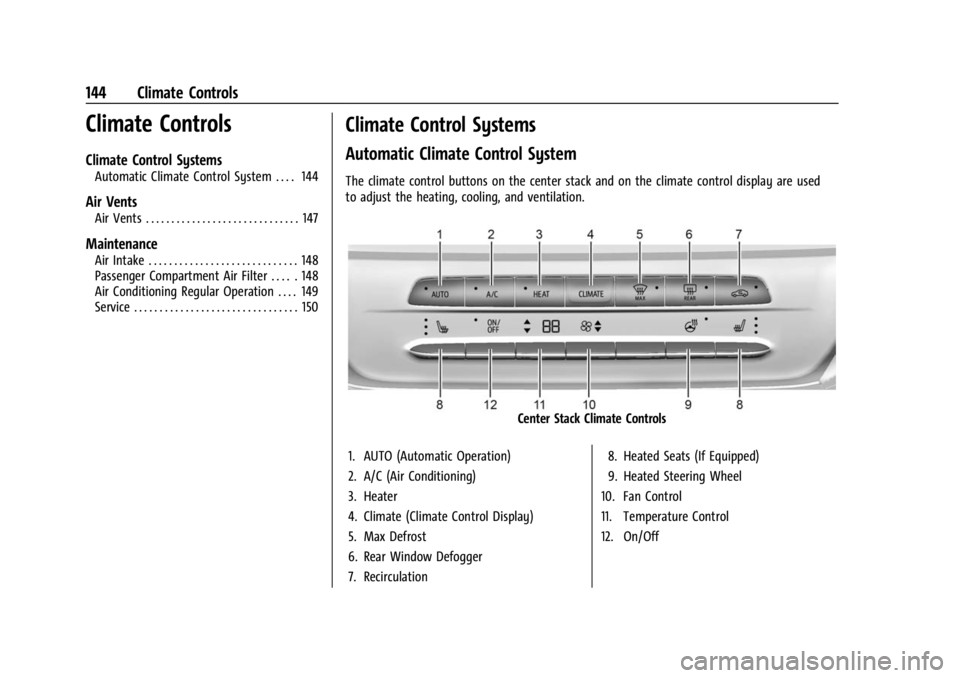
The climate control buttons on the center stack and on the climate control display are used
to adjust the heating, cooling, and ventilation.
Center Stack Climate Controls
1. AUTO (Automatic Operation)
2. A/C (Air Conditioning)
3. Heater
4. Climate (Climate Control Display)
5. Max Defrost
6. Rear Window Defogger
7. Recirculation 8. Heated Seats (If Equipped)
9. Heated Steering Wheel
10. Fan Control
11. Temperature Control
12. On/Off
Page 146 of 308
Chevrolet BOLT EV Owner Manual (GMNA-Localizing-U.S./Canada-
16404388) - 2023 - CRC - 3/7/22
Climate Controls 145
Climate Control Display
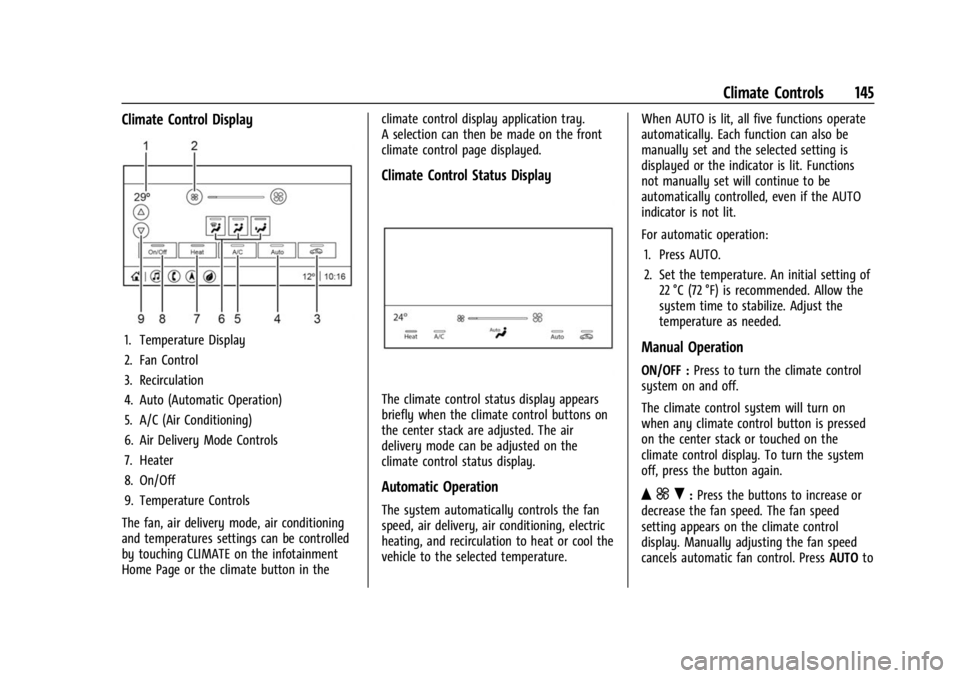
1. Temperature Display
2. Fan Control
3. Recirculation
4. Auto (Automatic Operation)
5. A/C (Air Conditioning)
6. Air Delivery Mode Controls
7. Heater
8. On/Off
9. Temperature Controls
The fan, air delivery mode, air conditioning
and temperatures settings can be controlled
by touching CLIMATE on the infotainment
Home Page or the climate button in the climate control display application tray.
A selection can then be made on the front
climate control page displayed.
Climate Control Status Display
The climate control status display appears
briefly when the climate control buttons on
the center stack are adjusted. The air
delivery mode can be adjusted on the
climate control status display.
Automatic Operation
The system automatically controls the fan
speed, air delivery, air conditioning, electric
heating, and recirculation to heat or cool the
vehicle to the selected temperature.
When AUTO is lit, all five functions operate
automatically. Each function can also be
manually set and the selected setting is
displayed or the indicator is lit. Functions
not manually set will continue to be
automatically controlled, even if the AUTO
indicator is not lit.
For automatic operation:
1. Press AUTO.
2. Set the temperature. An initial setting of 22 °C (72 °F) is recommended. Allow the
system time to stabilize. Adjust the
temperature as needed.
Manual Operation
ON/OFF : Press to turn the climate control
system on and off.
The climate control system will turn on
when any climate control button is pressed
on the center stack or touched on the
climate control display. To turn the system
off, press the button again.
Q ] R:Press the buttons to increase or
decrease the fan speed. The fan speed
setting appears on the climate control
display. Manually adjusting the fan speed
cancels automatic fan control. Press AUTOto
Page 147 of 308
Chevrolet BOLT EV Owner Manual (GMNA-Localizing-U.S./Canada-
16404388) - 2023 - CRC - 3/7/22
146 Climate Controls
return to automatic operation. PressON/OFF
to turn off the fan and the climate control
system.
Q/R: Press to increase or decrease the
temperature.Press and hold to rapidly
increase or decrease the temperature.
The temperatures can also be adjusted by
touching the buttons on the climate control
display.
Air Delivery Mode Control : When the
climate information is displayed, touch the
desired air delivery mode on the climate
control display to change the direction of
the airflow. The selected air delivery mode
button is lit. Touching any of the air
delivery buttons cancels automatic air
delivery control and the direction of the
airflow can be controlled manually. Press
AUTO to return to automatic operation.
To change the current mode, select one of
the following:
Y: Air is directed to the instrument panel
outlets.
\: Air is divided between the instrument
panel outlets and the floor outlets.
[: Air is directed to the floor outlets.
-:Clears the windows of fog or moisture.
Air is directed to the windshield and floor
outlets.
1MAX : Air is directed to the windshield
and the fan runs at a higher speed. Fog or
frost is cleared from the windshield more
quickly. When the button is pressed again,
the system returns to the previous mode
setting. For best results, clear all snow and
ice from the windshield before defrosting.
A/C : Press A/C Mode on the climate control
display to turn the automatic air
conditioning on or off. If the fan is turned
off or the outside temperature falls below
freezing, the air conditioner will not run.
Press AUTO to return to automatic operation
and the air conditioner runs as needed.
Automatic Air Recirculation : When the
AUTO indicator light is on, the air is
automatically recirculated as needed to help
quickly cool the inside of the vehicle.
L: Press to turn on recirculation. Using
air conditioning and recirculation together
for long periods of time may cause the air
inside the vehicle to become too dry. To
prevent this from happening, after the air in
the vehicle has cooled, turn the recirculation
mode off. Pressing this button cancels automatic
recirculation. Press AUTO to return to
automatic operation; recirculation runs
automatically as needed. Manual
recirculation mode is not recommended
when in Defrost or Defog modes.
HEAT :
Press to turn the heater on when the
fan is on.
A/C : Press to turn the air conditioning on
when the fan is on.
Auto Defog : The system will monitor high
humidity inside the vehicle. When high
humidity is detected, the climate control
system may adjust to outside air supply and
turn on the air conditioner or the heater.
The fan speed may slightly increase to help
prevent fogging. When high humidity is no
longer detected, the system will return to
its prior operation. To turn Auto Defog off
or on, select Settings > Climate and Air
Quality > Auto Defog > Select ON or OFF.Rear Window Defogger
K: Press to turn the rear window defogger
on or off. An indicator light on the button
comes on to show that the rear window
defogger is on.
Page 148 of 308
Chevrolet BOLT EV Owner Manual (GMNA-Localizing-U.S./Canada-
16404388) - 2023 - CRC - 3/7/22
Climate Controls 147
The defogger only works when the vehicle is
on. The defogger will turn off if the vehicle
is turned off.
Caution
Do not try to clear frost or other material
from the inside of the front windshield
and rear window with a razor blade or
anything else that is sharp. This may
damage the rear window defogger grid
and affect the radio's ability to pick up
stations clearly. The repairs would not be
covered by the vehicle warranty.
Heated Seats (If Equipped)
Liftxoryto heat the driver or
passenger seat cushion. See Heated Front
Seats 029.
Remote Start Climate Control Operation
If equipped with the remote start feature,
the climate control system may run when
the vehicle is started remotely. The system
uses the driver’s previous settings to heat or
cool the inside of the vehicle. The rear defog
may come on during remote start based on
cold ambient conditions. The rear defog
indicator light does not come on during a
remote start. If equipped, the heated seats will turn on if
it is cold outside. The heated seat indicator
lights may not come on during a remote
start. See
Heated Front Seats 029.
Remote Start : The climate control system
may be started by using the remote key.
The climate control system will default to
an appropriate heating or cooling mode. See
Remote Start 014.
The rear window defogger turns on if it is
cold outside.
Sensors
Indicator Light and Solar Sensor (ILSS)
The ILSS is on top of the instrument panel,
near the windshield, where it monitors solar
intensity.
The climate control system uses the sensor
information to adjust the temperature, fan
speed, recirculation, and air delivery mode
for best comfort.
Do not cover the sensor; otherwise the
automatic climate control system may not
work properly. Humidity Sensor
The humidity sensor is near the base of the
inside rearview mirror. The climate control
system uses the sensor information to
adjust the temperature and recirculation for
best comfort.
Outside Air Temperature Sensor
The outside air temperature sensor is behind
the front grille of the vehicle. The vehicle
uses the sensor information to display
outside air temperature. The climate control
system uses the information to adjust the
climate system operation.
Afterblow Feature
If equipped, under certain conditions, the
fan may stay on or may turn on and off
several times after you turn off and lock the
vehicle. This is normal.
Air Vents
Adjustable air vents are in the center and on
the side of the instrument panel.
Page 164 of 308
Chevrolet BOLT EV Owner Manual (GMNA-Localizing-U.S./Canada-
16404388) - 2023 - CRC - 3/7/22
Driving and Operating 163
The remote key must be in the vehicle.
Press the brake pedal, then press and
release POWER
O.
If the remote key is not in the vehicle or
something is interfering with the key, a
message displays in the Driver Information
Center (DIC).
If the vehicle will not start due to a low
remote key battery, the vehicle can still be
driven. See Remote Key Operation 07.
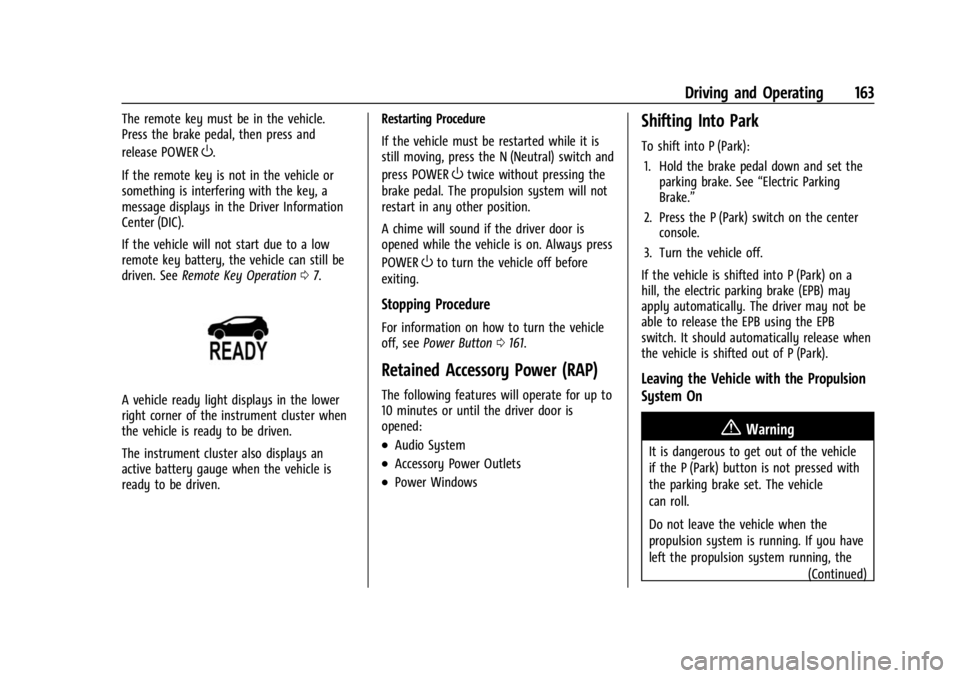
A vehicle ready light displays in the lower
right corner of the instrument cluster when
the vehicle is ready to be driven.
The instrument cluster also displays an
active battery gauge when the vehicle is
ready to be driven. Restarting Procedure
If the vehicle must be restarted while it is
still moving, press the N (Neutral) switch and
press POWER
Otwice without pressing the
brake pedal. The propulsion system will not
restart in any other position.
A chime will sound if the driver door is
opened while the vehicle is on. Always press
POWER
Oto turn the vehicle off before
exiting.
Stopping Procedure
For information on how to turn the vehicle
off, see Power Button 0161.
Retained Accessory Power (RAP)
The following features will operate for up to
10 minutes or until the driver door is
opened:
.Audio System
.Accessory Power Outlets
.Power Windows
Shifting Into Park
To shift into P (Park):
1. Hold the brake pedal down and set the parking brake. See “Electric Parking
Brake.”
2. Press the P (Park) switch on the center console.
3. Turn the vehicle off.
If the vehicle is shifted into P (Park) on a
hill, the electric parking brake (EPB) may
apply automatically. The driver may not be
able to release the EPB using the EPB
switch. It should automatically release when
the vehicle is shifted out of P (Park).
Leaving the Vehicle with the Propulsion
System On
{Warning
It is dangerous to get out of the vehicle
if the P (Park) button is not pressed with
the parking brake set. The vehicle
can roll.
Do not leave the vehicle when the
propulsion system is running. If you have
left the propulsion system running, the (Continued)
Page 165 of 308
Chevrolet BOLT EV Owner Manual (GMNA-Localizing-U.S./Canada-
16404388) - 2023 - CRC - 3/7/22
164 Driving and Operating
Warning (Continued)
vehicle can move suddenly. You or others
could be injured. To be sure the vehicle
will not move, even when you are on
fairly level ground, always set the
parking brake and press the P (Park)
button.
If you have to leave the vehicle with the
propulsion system running, the vehicle must
be in P (Park) with the parking brake set
before leaving the vehicle. After pressing the
P (Park) button, hold down the regular brake
pedal. If you cannot see the P (Park)
indicator in the instrument cluster, the
vehicle has not shifted into P (Park).
Shifting out of Park
This vehicle is equipped with an electric
drive unit. To shift out of P (Park), the
vehicle must be on, the brake pedal must be
applied, and the charge cord must be
unplugged.
Parking the vehicle in extreme cold for
several days without the charge cord
connected may cause the vehicle not to start. The vehicle will need to be plugged in
to allow the high voltage battery to be
warmed sufficiently.
To shift out of P (Park):
1. Apply the brake pedal.
2. Press POWER
Oto start the vehicle.
3. Verify that the vehicle is unplugged and the vehicle ready light is on.
4. Press or pull the desired shift switch on the center console. For N (Neutral) press
and hold the N (Neutral) switch until the
N indicator illuminates red.
The P indicator will turn white and the gear
indicator on the selected shift switch will
turn red when the vehicle is no longer in
P (Park).
If the vehicle cannot shift from P (Park), a
Driver Information Center (DIC) message
may be displayed. Check that the vehicle is
on, the vehicle ready light is on, and the
brake pedal is applied when you are
attempting to shift out of P (Park). If all of
these are met but the vehicle will not shift
out of P (Park), see your dealer for service.
Extended Parking
It is best not to park with the vehicle
running. If the vehicle is left on, be sure it
will not move.
See Shifting Into Park 0163.
If the vehicle is left parked and on with the
remote key outside the vehicle, it will
remain on for up to an hour.
If the vehicle is left parked and on with the
remote key inside the vehicle, it will remain
on for up to two hours.
The timer will reset if the vehicle is taken
out of P (Park) while it is on.
Electric Vehicle Operating
Modes
Driver Selected Operating Modes
Sport Mode
Sport Mode provides more responsive
acceleration than Normal Mode, but can
reduce efficiency. When the SPORT indicator
is not on, the vehicle is in Normal Mode.
Page 166 of 308
Chevrolet BOLT EV Owner Manual (GMNA-Localizing-U.S./Canada-
16404388) - 2023 - CRC - 3/7/22
Driving and Operating 165
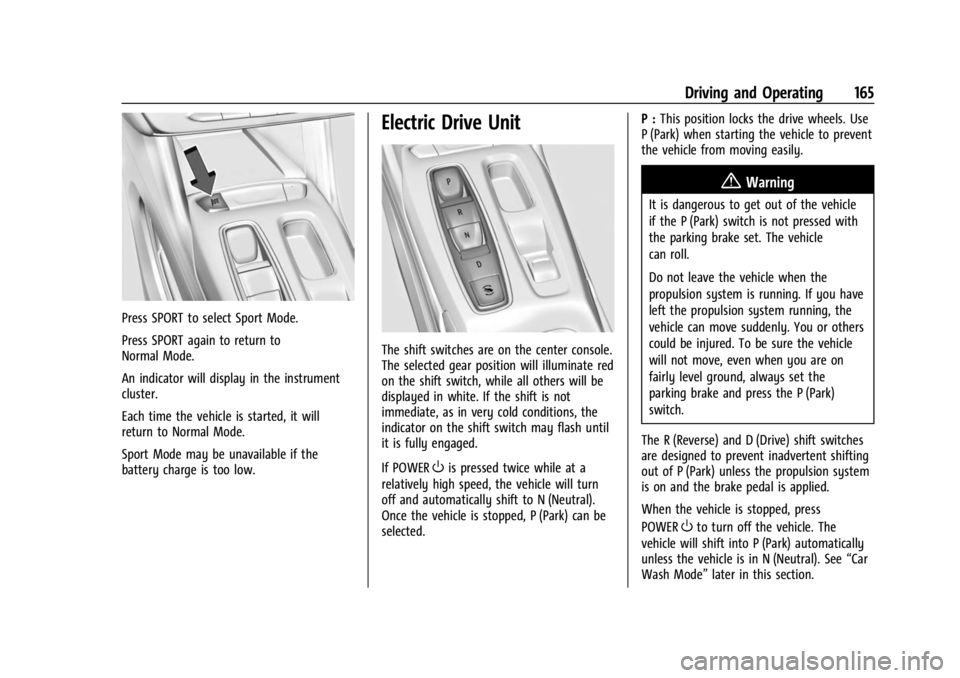
Press SPORT to select Sport Mode.
Press SPORT again to return to
Normal Mode.
An indicator will display in the instrument
cluster.
Each time the vehicle is started, it will
return to Normal Mode.
Sport Mode may be unavailable if the
battery charge is too low.
Electric Drive Unit
The shift switches are on the center console.
The selected gear position will illuminate red
on the shift switch, while all others will be
displayed in white. If the shift is not
immediate, as in very cold conditions, the
indicator on the shift switch may flash until
it is fully engaged.
If POWER
Ois pressed twice while at a
relatively high speed, the vehicle will turn
off and automatically shift to N (Neutral).
Once the vehicle is stopped, P (Park) can be
selected. P :
This position locks the drive wheels. Use
P (Park) when starting the vehicle to prevent
the vehicle from moving easily.
{Warning
It is dangerous to get out of the vehicle
if the P (Park) switch is not pressed with
the parking brake set. The vehicle
can roll.
Do not leave the vehicle when the
propulsion system is running. If you have
left the propulsion system running, the
vehicle can move suddenly. You or others
could be injured. To be sure the vehicle
will not move, even when you are on
fairly level ground, always set the
parking brake and press the P (Park)
switch.
The R (Reverse) and D (Drive) shift switches
are designed to prevent inadvertent shifting
out of P (Park) unless the propulsion system
is on and the brake pedal is applied.
When the vehicle is stopped, press
POWER
Oto turn off the vehicle. The
vehicle will shift into P (Park) automatically
unless the vehicle is in N (Neutral). See “Car
Wash Mode” later in this section.
Page 168 of 308
Chevrolet BOLT EV Owner Manual (GMNA-Localizing-U.S./Canada-
16404388) - 2023 - CRC - 3/7/22
Driving and Operating 167
6. If desired, press POWEROto turn off
the vehicle.
7. Exit the vehicle and close the door. The vehicle is now ready for the car wash.
8. If left on, the vehicle may automatically shift into P (Park) upon re-entry.
D : This position is for normal driving.
If more power is needed for passing, press
the accelerator pedal down.
To shift into D (Drive):
1. Bring the vehicle to a complete stop.
2. Pull the D (Drive) switch on the center console.
To shift out of D (Drive): 1. Bring the vehicle to a complete stop.
2. Shift to the desired gear.
Caution
Spinning the tires excessively may
damage the electric drive unit. The repair
will not be covered by the vehicle
warranty. If you are stuck, do not spin
the tires.
Apply the brakes when stopping or shifting
to P (Park) on a hill to prevent the vehicle
from rolling.
One-Pedal Driving
With One-Pedal Driving, the accelerator
pedal is used to control the deceleration of
the vehicle to a complete stop.
Completely lifting off the accelerator pedal
results in aggressive deceleration. Partially
lifting off the accelerator pedal allows the
deceleration of the vehicle to be adjusted as
desired.
The amount of deceleration may vary under
Regenerative Power Limited condition. See
Power Indicator Gauge 082.
Use the brake pedal if emergency braking is
required.
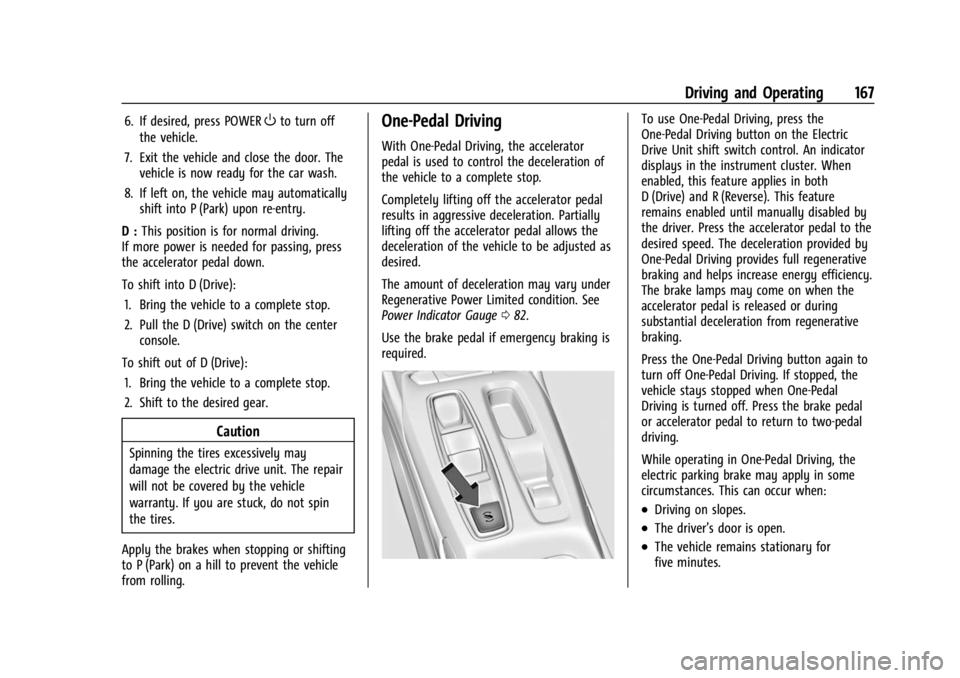
To use One-Pedal Driving, press the
One-Pedal Driving button on the Electric
Drive Unit shift switch control. An indicator
displays in the instrument cluster. When
enabled, this feature applies in both
D (Drive) and R (Reverse). This feature
remains enabled until manually disabled by
the driver. Press the accelerator pedal to the
desired speed. The deceleration provided by
One-Pedal Driving provides full regenerative
braking and helps increase energy efficiency.
The brake lamps may come on when the
accelerator pedal is released or during
substantial deceleration from regenerative
braking.
Press the One-Pedal Driving button again to
turn off One-Pedal Driving. If stopped, the
vehicle stays stopped when One-Pedal
Driving is turned off. Press the brake pedal
or accelerator pedal to return to two-pedal
driving.
While operating in One-Pedal Driving, the
electric parking brake may apply in some
circumstances. This can occur when:
.Driving on slopes.
.The driver’s door is open.
.The vehicle remains stationary for
five minutes.