display CHEVROLET BOLT EV 2023 Owners Manual
[x] Cancel search | Manufacturer: CHEVROLET, Model Year: 2023, Model line: BOLT EV, Model: CHEVROLET BOLT EV 2023Pages: 308, PDF Size: 5.18 MB
Page 209 of 308
Chevrolet BOLT EV Owner Manual (GMNA-Localizing-U.S./Canada-
16404388) - 2023 - CRC - 3/7/22
208 Driving and Operating
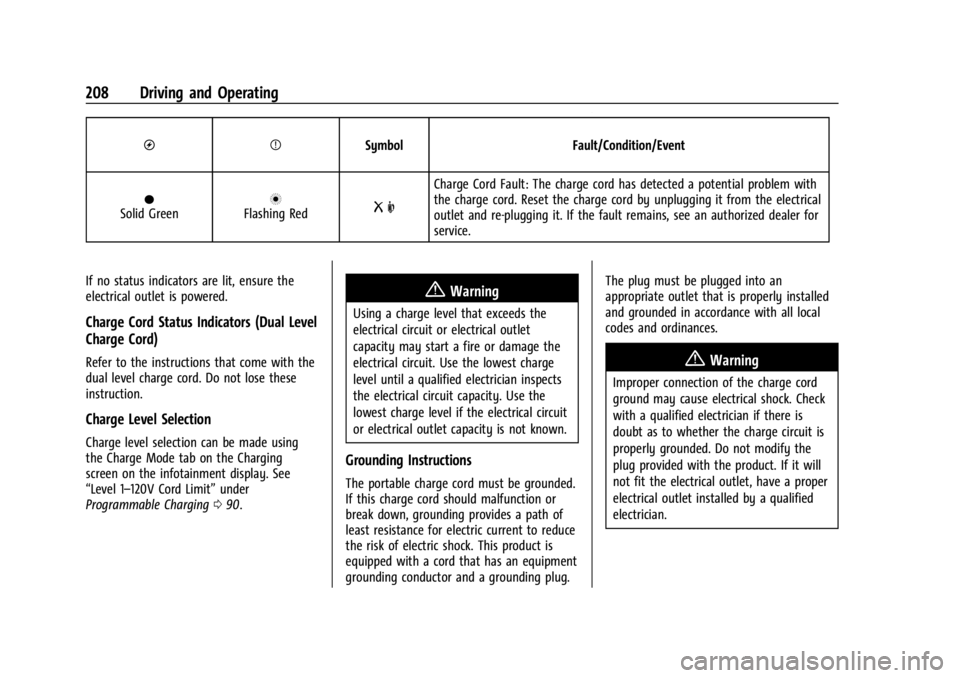
OPSymbol Fault/Condition/Event
OSolid GreennFlashing RedR m
Charge Cord Fault: The charge cord has detected a potential problem with
the charge cord. Reset the charge cord by unplugging it from the electrical
outlet and re-plugging it. If the fault remains, see an authorized dealer for
service.
If no status indicators are lit, ensure the
electrical outlet is powered.
Charge Cord Status Indicators (Dual Level
Charge Cord)
Refer to the instructions that come with the
dual level charge cord. Do not lose these
instruction.
Charge Level Selection
Charge level selection can be made using
the Charge Mode tab on the Charging
screen on the infotainment display. See
“Level 1–120V Cord Limit” under
Programmable Charging 090.
{Warning
Using a charge level that exceeds the
electrical circuit or electrical outlet
capacity may start a fire or damage the
electrical circuit. Use the lowest charge
level until a qualified electrician inspects
the electrical circuit capacity. Use the
lowest charge level if the electrical circuit
or electrical outlet capacity is not known.
Grounding Instructions
The portable charge cord must be grounded.
If this charge cord should malfunction or
break down, grounding provides a path of
least resistance for electric current to reduce
the risk of electric shock. This product is
equipped with a cord that has an equipment
grounding conductor and a grounding plug. The plug must be plugged into an
appropriate outlet that is properly installed
and grounded in accordance with all local
codes and ordinances.
{Warning
Improper connection of the charge cord
ground may cause electrical shock. Check
with a qualified electrician if there is
doubt as to whether the charge circuit is
properly grounded. Do not modify the
plug provided with the product. If it will
not fit the electrical outlet, have a proper
electrical outlet installed by a qualified
electrician.
Page 211 of 308
Chevrolet BOLT EV Owner Manual (GMNA-Localizing-U.S./Canada-
16404388) - 2023 - CRC - 3/7/22
210 Driving and Operating
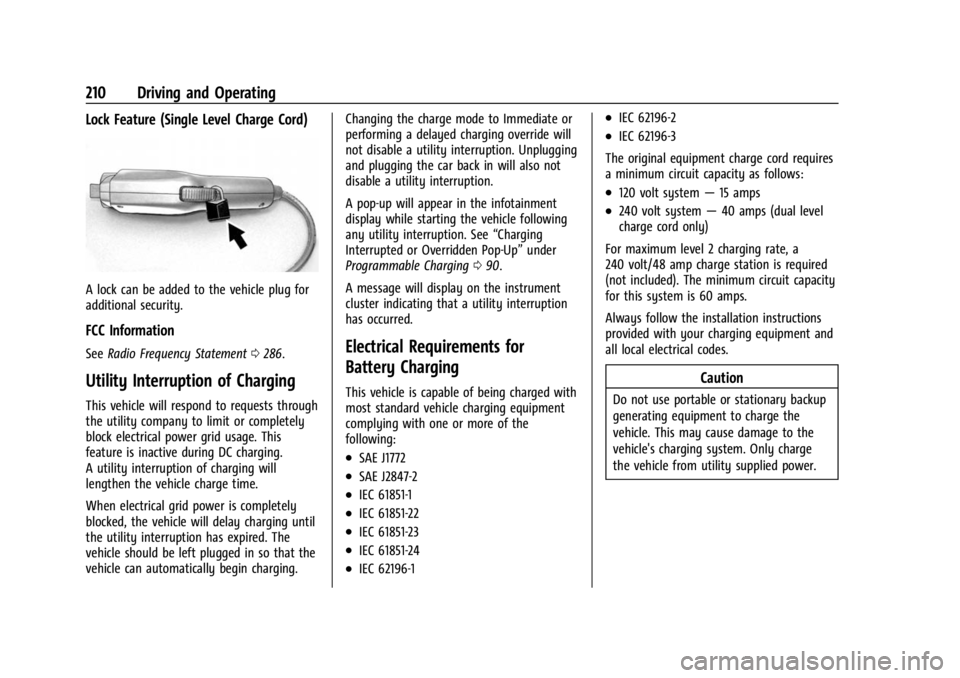
Lock Feature (Single Level Charge Cord)
A lock can be added to the vehicle plug for
additional security.
FCC Information
SeeRadio Frequency Statement 0286.
Utility Interruption of Charging
This vehicle will respond to requests through
the utility company to limit or completely
block electrical power grid usage. This
feature is inactive during DC charging.
A utility interruption of charging will
lengthen the vehicle charge time.
When electrical grid power is completely
blocked, the vehicle will delay charging until
the utility interruption has expired. The
vehicle should be left plugged in so that the
vehicle can automatically begin charging. Changing the charge mode to Immediate or
performing a delayed charging override will
not disable a utility interruption. Unplugging
and plugging the car back in will also not
disable a utility interruption.
A pop-up will appear in the infotainment
display while starting the vehicle following
any utility interruption. See
“Charging
Interrupted or Overridden Pop-Up” under
Programmable Charging 090.
A message will display on the instrument
cluster indicating that a utility interruption
has occurred.
Electrical Requirements for
Battery Charging
This vehicle is capable of being charged with
most standard vehicle charging equipment
complying with one or more of the
following:
.SAE J1772
.SAE J2847-2
.IEC 61851-1
.IEC 61851-22
.IEC 61851-23
.IEC 61851-24
.IEC 62196-1
.IEC 62196-2
.IEC 62196-3
The original equipment charge cord requires
a minimum circuit capacity as follows:
.120 volt system —15 amps
.240 volt system —40 amps (dual level
charge cord only)
For maximum level 2 charging rate, a
240 volt/48 amp charge station is required
(not included). The minimum circuit capacity
for this system is 60 amps.
Always follow the installation instructions
provided with your charging equipment and
all local electrical codes.
Caution
Do not use portable or stationary backup
generating equipment to charge the
vehicle. This may cause damage to the
vehicle's charging system. Only charge
the vehicle from utility supplied power.
Page 222 of 308
Chevrolet BOLT EV Owner Manual (GMNA-Localizing-U.S./Canada-
16404388) - 2023 - CRC - 3/7/22
Vehicle Care 221
Warning (Continued)
structure or anything that can burn.
Ventilate the vehicle by opening a
window or a door.
Contact Customer Assistance as soon as
possible to determine whether an
inspection is needed. SeeCustomer
Assistance Offices 0279.
If the vehicle is in a crash, the sensing
system may shut down the high voltage
system. When this occurs, the high voltage
battery is disconnected and the vehicle will
not start. The SERVICE VEHICLE SOON
message in the Driver Information Center
(DIC) will display. Before the vehicle can
operate again, it must be serviced at your
dealer. If a crash occurs or an airbag(s)
inflates, see “If a Crash Occurs” under
Collision Damage Repair 0283 and
What Will You See after an Airbag Inflates?
0 42 for additional information.
Keep the vehicle plugged in, even when fully
charged, to keep the high voltage battery
temperature ready for the next drive. This is
important when outside temperatures are
extremely hot or cold. Propulsion power may be reduced in
extremely cold temperatures, or if the high
voltage battery is too cold. The message
BATTERY TOO COLD, PLUG IN TO WARM will
display.
A vehicle cover, which can reduce sun
loading on the vehicle and improve high
voltage battery life, is available from your
dealer.
See
Radio Frequency Statement 0286.
Vehicle Storage
The best way to store the vehicle for any
length of time is to plug in the charge cord
and leave it plugged in. The vehicle
monitors and maintains the 12-volt battery
daily. It is okay to leave the vehicle plugged
in for extended periods of time. Once
charged to full, very little energy is required
to maintain the 12-volt battery and high
voltage battery.
If it is not possible to charge the vehicle
with the charge cord left plugged in, be sure
to fully charge the high voltage battery
before storing. The vehicle will stop
maintenance of the 12-volt battery if the
high voltage battery state of charge gets
too low. When storing the vehicle on a long-term
basis:
‐
Keep the high voltage battery state of
charge at 30%.
‐ Attach an AGM/VRLA compatible battery
tender or trickle charger to the 12-volt
battery.
‐ Keep the remote key more than 3 m
(10 ft) away from the vehicle.
12–volt Battery{Warning
Batteries have acid that can burn you and
gas that can explode. You can be badly
hurt if you are not careful. Always wear
eye protection. See Jump Starting - North
America 0256 for tips on working around
a battery without getting hurt.
A trickle charger may be attached to the
12-volt battery terminals or trickle charge
from the underhood remote positive (+) and
negative (–) terminals. See Jump Starting -
North America 0256 for location of these
terminals.
Page 225 of 308
Chevrolet BOLT EV Owner Manual (GMNA-Localizing-U.S./Canada-
16404388) - 2023 - CRC - 3/7/22
224 Vehicle Care
they may display messages, or they may
not work at all. See your dealer for proper
windshield replacement.
Gas Strut(s)
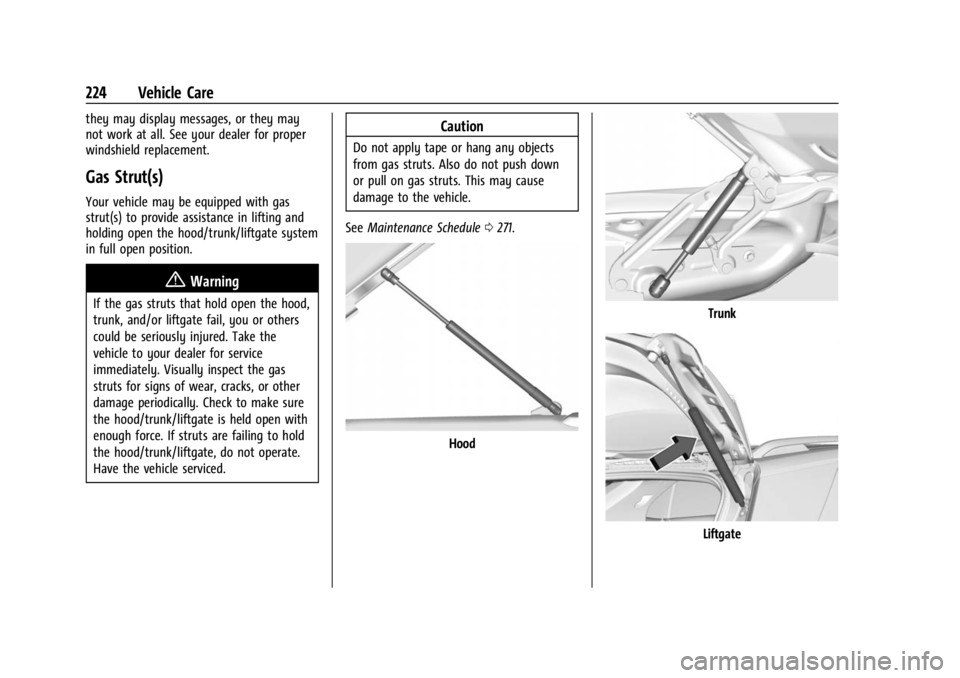
Your vehicle may be equipped with gas
strut(s) to provide assistance in lifting and
holding open the hood/trunk/liftgate system
in full open position.
{Warning
If the gas struts that hold open the hood,
trunk, and/or liftgate fail, you or others
could be seriously injured. Take the
vehicle to your dealer for service
immediately. Visually inspect the gas
struts for signs of wear, cracks, or other
damage periodically. Check to make sure
the hood/trunk/liftgate is held open with
enough force. If struts are failing to hold
the hood/trunk/liftgate, do not operate.
Have the vehicle serviced.
Caution
Do not apply tape or hang any objects
from gas struts. Also do not push down
or pull on gas struts. This may cause
damage to the vehicle.
See Maintenance Schedule 0271.
Hood
Trunk
Liftgate
Page 234 of 308
Chevrolet BOLT EV Owner Manual (GMNA-Localizing-U.S./Canada-
16404388) - 2023 - CRC - 3/7/22
Vehicle Care 233
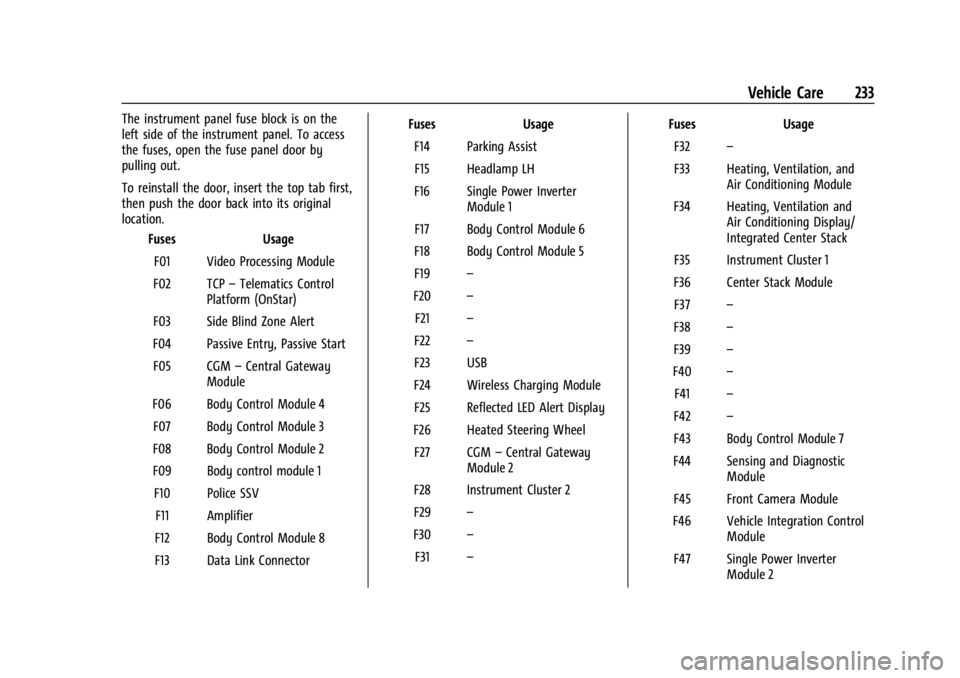
The instrument panel fuse block is on the
left side of the instrument panel. To access
the fuses, open the fuse panel door by
pulling out.
To reinstall the door, insert the top tab first,
then push the door back into its original
location.Fuses Usage
F01 Video Processing Module
F02 TCP –Telematics Control
Platform (OnStar)
F03 Side Blind Zone Alert
F04 Passive Entry, Passive Start F05 CGM –Central Gateway
Module
F06 Body Control Module 4 F07 Body Control Module 3
F08 Body Control Module 2
F09 Body control module 1 F10 Police SSV F11 Amplifier
F12 Body Control Module 8
F13 Data Link Connector Fuses
Usage
F14 Parking Assist F15 Headlamp LH
F16 Single Power Inverter Module 1
F17 Body Control Module 6
F18 Body Control Module 5
F19 –
F20 –
F21 –
F22 –
F23 USB
F24 Wireless Charging Module F25 Reflected LED Alert Display
F26 Heated Steering Wheel F27 CGM –Central Gateway
Module 2
F28 Instrument Cluster 2
F29 –
F30 –
F31 – Fuses
Usage
F32 –
F33 Heating, Ventilation, and Air Conditioning Module
F34 Heating, Ventilation and Air Conditioning Display/
Integrated Center Stack
F35 Instrument Cluster 1
F36 Center Stack Module F37 –
F38 –
F39 –
F40 –
F41 –
F42 –
F43 Body Control Module 7
F44 Sensing and Diagnostic Module
F45 Front Camera Module
F46 Vehicle Integration Control Module
F47 Single Power Inverter Module 2
Page 242 of 308
Chevrolet BOLT EV Owner Manual (GMNA-Localizing-U.S./Canada-
16404388) - 2023 - CRC - 3/7/22
Vehicle Care 241
your vehicle to ensure that the replacement
or alternate tires and wheels allow the
TPMS to continue to function properly.
SeeTire Pressure Monitor Operation 0241.
See Radio Frequency Statement 0286.
Tire Pressure Monitor Operation
This vehicle may have a Tire Pressure
Monitor System (TPMS). The TPMS is
designed to warn the driver when a low tire
pressure condition exists. TPMS sensors are
mounted onto each tire and wheel
assembly, excluding the spare tire and
wheel assembly. The TPMS sensors monitor
the air pressure in the tires and transmits
the tire pressure readings to a receiver
located in the vehicle.
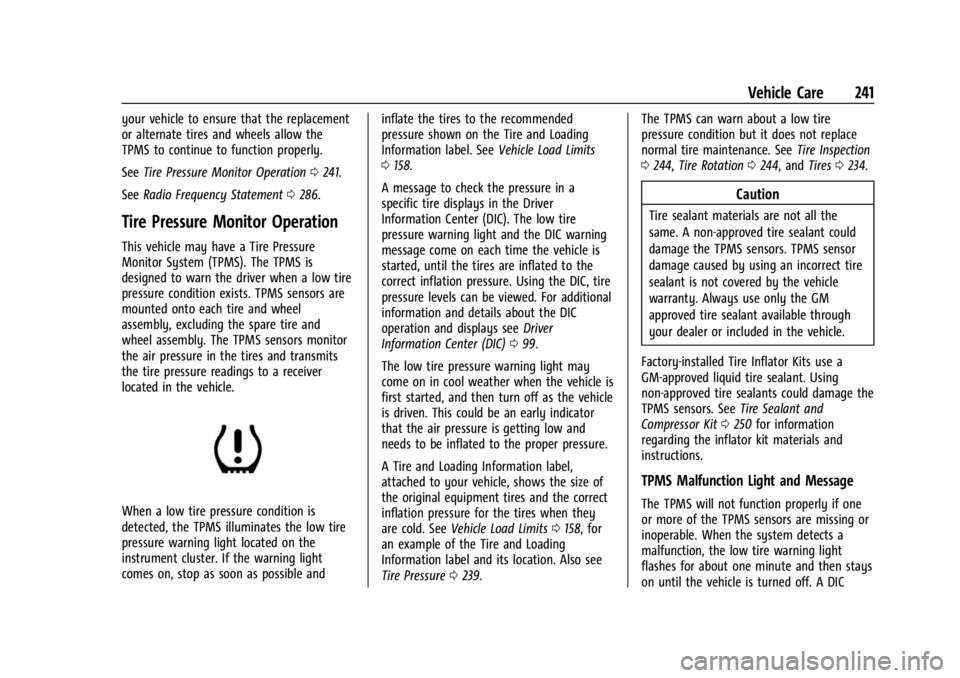
When a low tire pressure condition is
detected, the TPMS illuminates the low tire
pressure warning light located on the
instrument cluster. If the warning light
comes on, stop as soon as possible and inflate the tires to the recommended
pressure shown on the Tire and Loading
Information label. See
Vehicle Load Limits
0 158.
A message to check the pressure in a
specific tire displays in the Driver
Information Center (DIC). The low tire
pressure warning light and the DIC warning
message come on each time the vehicle is
started, until the tires are inflated to the
correct inflation pressure. Using the DIC, tire
pressure levels can be viewed. For additional
information and details about the DIC
operation and displays see Driver
Information Center (DIC) 099.
The low tire pressure warning light may
come on in cool weather when the vehicle is
first started, and then turn off as the vehicle
is driven. This could be an early indicator
that the air pressure is getting low and
needs to be inflated to the proper pressure.
A Tire and Loading Information label,
attached to your vehicle, shows the size of
the original equipment tires and the correct
inflation pressure for the tires when they
are cold. See Vehicle Load Limits 0158, for
an example of the Tire and Loading
Information label and its location. Also see
Tire Pressure 0239. The TPMS can warn about a low tire
pressure condition but it does not replace
normal tire maintenance. See
Tire Inspection
0 244, Tire Rotation 0244, and Tires0234.
Caution
Tire sealant materials are not all the
same. A non-approved tire sealant could
damage the TPMS sensors. TPMS sensor
damage caused by using an incorrect tire
sealant is not covered by the vehicle
warranty. Always use only the GM
approved tire sealant available through
your dealer or included in the vehicle.
Factory-installed Tire Inflator Kits use a
GM-approved liquid tire sealant. Using
non-approved tire sealants could damage the
TPMS sensors. See Tire Sealant and
Compressor Kit 0250 for information
regarding the inflator kit materials and
instructions.
TPMS Malfunction Light and Message
The TPMS will not function properly if one
or more of the TPMS sensors are missing or
inoperable. When the system detects a
malfunction, the low tire warning light
flashes for about one minute and then stays
on until the vehicle is turned off. A DIC
Page 243 of 308
Chevrolet BOLT EV Owner Manual (GMNA-Localizing-U.S./Canada-
16404388) - 2023 - CRC - 3/7/22
242 Vehicle Care
warning message also displays. The
malfunction light and DIC warning message
come on each time the vehicle is started
until the problem is corrected. Some of the
conditions that can cause these to come
on are:
.One of the road tires has been replaced
with the spare tire. The spare tire does
not have a TPMS sensor. The malfunction
light and DIC message should go off after
the road tire is replaced and the sensor
matching process is performed
successfully. See“TPMS Sensor Matching
Process” later in this section.
.The TPMS sensor matching process was
not done or not completed successfully
after rotating the tires. The malfunction
light and the DIC message should go off
after successfully completing the sensor
matching process. See "TPMS Sensor
Matching Process" later in this section.
.One or more TPMS sensors are missing or
damaged. The malfunction light and the
DIC message should go off when the
TPMS sensors are installed and the sensor
matching process is performed
successfully. See your dealer for service.
.Replacement tires or wheels do not match
the original equipment tires or wheels.
Tires and wheels other than those
recommended could prevent the TPMS
from functioning properly. See Buying
New Tires 0246.
.Operating electronic devices or being near
facilities using radio wave frequencies
similar to the TPMS could cause the TPMS
sensors to malfunction.
If the TPMS is not functioning properly it
cannot detect or signal a low tire condition.
See your dealer for service if the TPMS
malfunction light and DIC message come on
and stay on.
Tire Fill Alert (If Equipped)
This feature provides visual and audible
alerts outside the vehicle to help when
inflating an underinflated tire to the
recommended cold tire pressure.
When the low tire pressure warning light
comes on: 1. Park the vehicle in a safe, level place.
2. Set the parking brake firmly.
3. Place the vehicle in P (Park).
4. Add air to the tire that is underinflated. The turn signal lamp will flash. When the recommended pressure is
reached, the horn sounds once and the
turn signal lamp will stop flashing and
briefly turn solid.
Repeat these steps for all underinflated tires
that have illuminated the low tire pressure
warning light.
{Warning
Overinflating a tire could cause the tire
to rupture and you or others could be
injured. Do not exceed the maximum
pressure listed on the tire sidewall. See
Tire Sidewall Labeling 0236 and
Vehicle Load Limits 0158.
If the tire is overinflated by more than
35 kPa (5 psi), the horn will sound multiple
times and the turn signal lamp will continue
to flash for several seconds after filling
stops. To release and correct the pressure,
while the turn signal lamp is still flashing,
briefly press the center of the valve stem.
When the recommended pressure is reached,
the horn sounds once.
If the turn signal lamp does not flash within
15 seconds after starting to inflate the tire,
the tire fill alert has not been activated or is
not working.
Page 244 of 308
Chevrolet BOLT EV Owner Manual (GMNA-Localizing-U.S./Canada-
16404388) - 2023 - CRC - 3/7/22
Vehicle Care 243
If the hazard warning flashers are on, the
tire fill alert visual feedback will not work
properly.
The TPMS will not activate the tire fill alert
properly under the following conditions:
.There is interference from an external
device or transmitter.
.The air pressure from the inflation device
is not sufficient to inflate the tire.
.There is a malfunction in the TPMS.
.There is a malfunction in the horn or turn
signal lamps.
.The identification code of the TPMS
sensor is not registered to the system.
.The battery of the TPMS sensor is low.
If the tire fill alert does not operate due to
TPMS interference, move the vehicle about
1 m (3 ft) back or forward and try again.
If the tire fill alert feature is not working,
use a tire pressure gauge.
TPMS Sensor Matching Process
Each TPMS sensor has a unique
identification code. The identification code
needs to be matched to a new tire/wheel
position after rotating the vehicle’s tires or
replacing one or more of the TPMS sensors.
The TPMS sensor matching process should also be performed after replacing a spare
tire with a road tire containing the TPMS
sensor. The malfunction light and the DIC
message should go off when the vehicle has
been turned off and started again. The
sensors are matched to the tire/wheel
positions, using a TPMS relearn tool, in the
following order: driver side front tire,
passenger side front tire, passenger side rear
tire, and driver side rear. See your dealer for
service or to purchase a relearn tool.
A TPMS relearn tool can also be purchased.
See Tire Pressure Monitor Sensor Activation
Tool at www.gmtoolsandequipment.com or
call 1-800-GM TOOLS (1-800-468-6657).
There are two minutes to match the first
tire/wheel position, and five minutes overall
to match all four tire/wheel positions. If it
takes longer, the matching process stops
and must be restarted.
The TPMS sensor matching process is:
1. Set the parking brake.
2. Press POWEROto start the vehicle. See
Power Button 0161. 3. Make sure the Tire Pressure info page
option is turned on. The info pages on
the DIC can be turned on and off
through the Options menu. See Driver
Information Center (DIC) 099.
4. Use the DIC controls on the right side of the steering wheel to scroll to the Tire
Pressure screen under the DIC info page.
5. Press and hold the thumbwheel in the center of the DIC controls.
A message requesting acceptance of the
process may display.
The horn sounds twice to signal the
receiver is in relearn mode and the TIRE
LEARNING ACTIVE message displays on
the DIC screen.
6. Start with the driver side front tire.
7. Place the relearn tool against the tire sidewall, near the valve stem. Then press
the button to activate the TPMS sensor.
A horn chirp confirms that the sensor
identification code has been matched to
this tire and wheel position.
8. Proceed to the passenger side front tire, and repeat the procedure in Step 7.
9. Proceed to the passenger side rear tire, and repeat the procedure in Step 7.
Page 245 of 308
Chevrolet BOLT EV Owner Manual (GMNA-Localizing-U.S./Canada-
16404388) - 2023 - CRC - 3/7/22
244 Vehicle Care
10. Proceed to the driver side rear tire, andrepeat the procedure in Step 7. The horn
sounds two times to indicate the sensor
identification code has been matched to
the driver side rear tire, and the TPMS
sensor matching process is no longer
active. The TIRE LEARNING ACTIVE
message on the DIC display screen
goes off.
11. Turn the vehicle off.
12. Set all four tires to the recommended air pressure level as indicated on the Tire
and Loading Information label.
Tire Inspection
We recommend that the tires, including
the spare tire, if the vehicle has one, be
inspected for signs of wear or damage
at least once a month.
Replace the tire if:
.The indicators at three or more
places around the tire can be seen.
.There is cord or fabric showing
through the tire's rubber.
.The tread or sidewall is cracked, cut,
or snagged deep enough to show
cord or fabric.
.The tire has a bump, bulge, or split.
.The tire has a puncture, cut, or other
damage that cannot be repaired well
because of the size or location of the
damage.
Tire Rotation
Tires should be rotated according to the
interval listed in the Maintenance
Schedule. See Maintenance Schedule
0 271.
Tires are rotated to achieve a more
uniform wear for all tires. The first
rotation is the most important.
Anytime unusual wear is noticed, rotate
the tires as soon as possible, check for
proper tire inflation pressure, and check
for damaged tires or wheels. If the
unusual wear continues after the
rotation, check the wheel alignment.
See When It Is Time for New Tires 0245
and Wheel Replacement 0248.
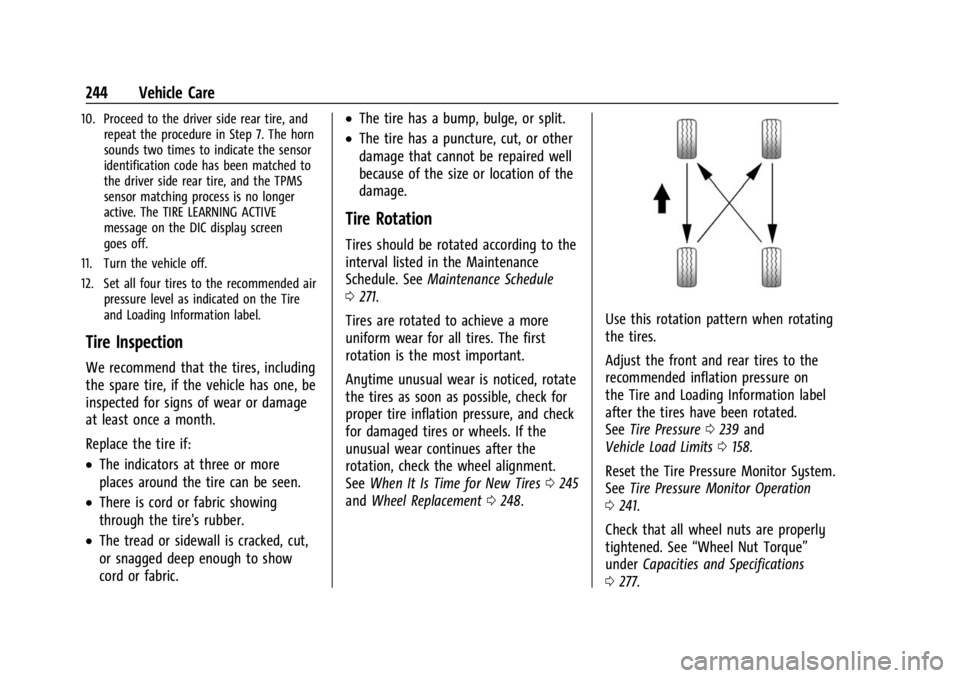
Use this rotation pattern when rotating
the tires.
Adjust the front and rear tires to the
recommended inflation pressure on
the Tire and Loading Information label
after the tires have been rotated.
See Tire Pressure 0239 and
Vehicle Load Limits 0158.
Reset the Tire Pressure Monitor System.
See Tire Pressure Monitor Operation
0 241.
Check that all wheel nuts are properly
tightened. See “Wheel Nut Torque”
under Capacities and Specifications
0 277.
Page 268 of 308
Chevrolet BOLT EV Owner Manual (GMNA-Localizing-U.S./Canada-
16404388) - 2023 - CRC - 3/7/22
Vehicle Care 267
Vinyl/Rubber
If equipped with vinyl floor and rubber floor
mats, use a soft cloth and/or brush
dampened with water to remove dust and
loose dirt. For more thorough cleaning, use
a mild soap and water solution.
{Warning
Do not use cleaners that contain silicone,
wax-based products, or cleaners that
increase gloss on vinyl/rubber floor and
mats. These cleaners can permanently
change the appearance and feel of the
vinyl/rubber and can make the floor
slippery. Your foot could slip while
operating the vehicle, and you could lose
control, resulting in a crash. You or
others could be injured.
Fabric/Carpet/Suede
Start by vacuuming the surface using a soft
brush attachment. If a rotating vacuum
brush attachment is being used, only use it
on the floor carpet. Before cleaning, gently
remove as much of the soil as possible:
.Gently blot liquids with a paper towel.
Continue blotting until no more soil can
be removed.
.For solid soils, remove as much as
possible prior to vacuuming.
To clean: 1. Saturate a clean, lint-free colorfast cloth with water. Microfiber cloth is
recommended to prevent lint transfer to
the fabric or carpet.
2. Remove excess moisture by gently wringing until water does not drip from
the cleaning cloth.
3. Start on the outside edge of the soil and gently rub toward the center. Fold the
cleaning cloth to a clean area frequently
to prevent forcing the soil into the
fabric.
4. Continue gently rubbing the soiled area until there is no longer any color
transfer from the soil to the cleaning
cloth.
5. If the soil is not completely removed, use a mild soap solution followed only
by plain water.
If the soil is not completely removed, it may
be necessary to use a commercial upholstery
cleaner or spot lifter. Test a small hidden
area for colorfastness before using a commercial upholstery cleaner or spot lifter.
If ring formation occurs, clean the entire
fabric or carpet.
After cleaning, use a paper towel to blot
excess moisture.
Cleaning High Gloss Surfaces and Vehicle
Information and Radio Displays
Use a microfiber cloth on high gloss surfaces
or vehicle displays. First, use a soft bristle
brush to remove dirt that can scratch the
surface. Then gently clean by rubbing with a
microfiber cloth. Never use window cleaners
or solvents. Periodically hand wash the
microfiber cloth separately, using mild soap.
Do not use bleach or fabric softener. Rinse
thoroughly and air dry before next use.
Caution
Do not attach a device with a suction cup
to the display. This may cause damage
and would not be covered by the vehicle
warranty.