transmission CHEVROLET CAMARO 1967 1.G Chassis Owners Manual
[x] Cancel search | Manufacturer: CHEVROLET, Model Year: 1967, Model line: CAMARO, Model: CHEVROLET CAMARO 1967 1.GPages: 659, PDF Size: 114.24 MB
Page 448 of 659
STEERING 9-8
DIAL
UPPER COVER
FASTENER
CHEVROLET
SCREW
CHEVELLE
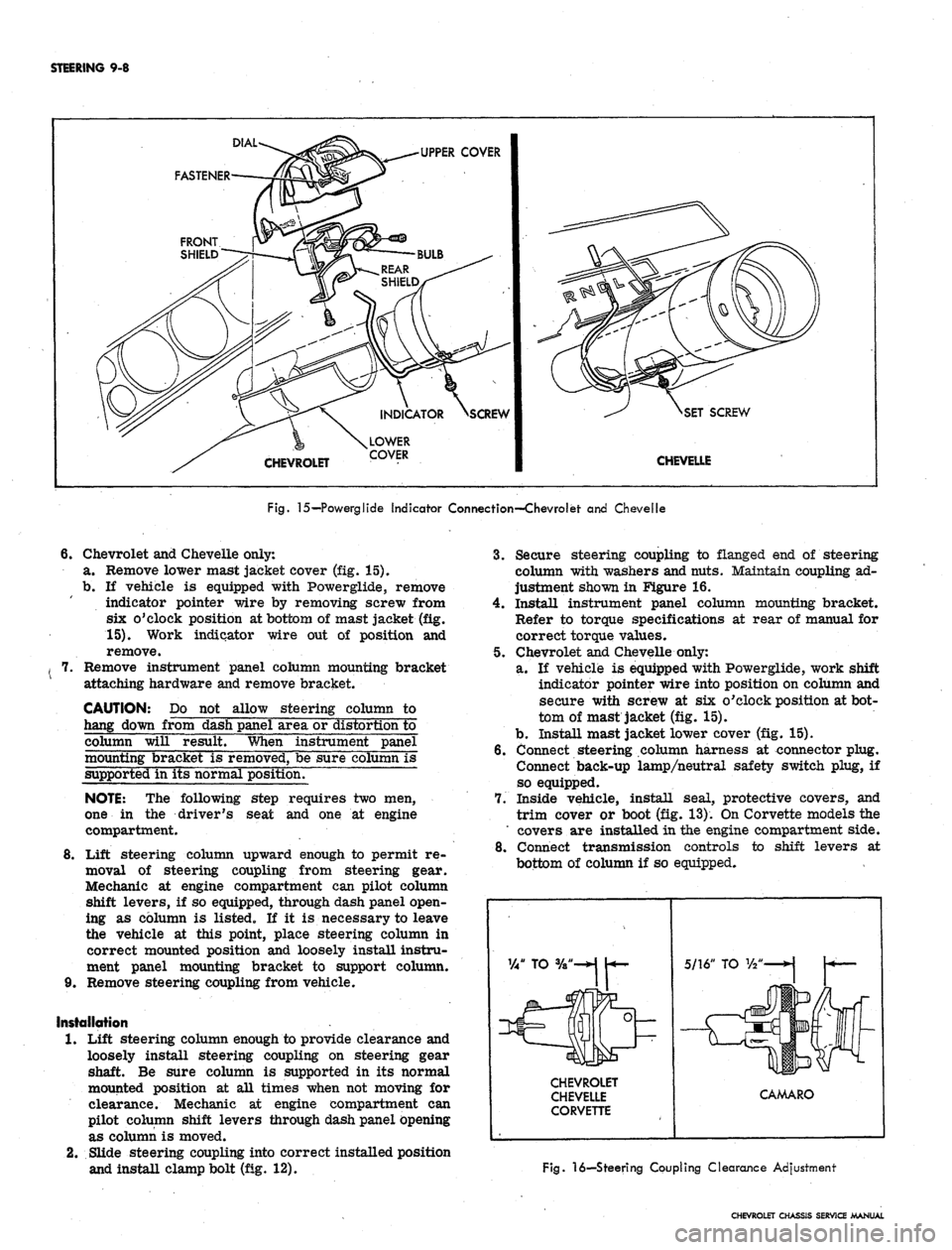
Fig.
15—Powerglide Indicator Connection—Chevrolet and Chevelle
6.
Chevrolet and Chevelle only:
a. Remove lower mast jacket cover (fig. 15).
b.
If vehicle is equipped with Powerglide, remove
indicator pointer wire by removing screw from
six o'clock position at bottom of mast jacket (fig.
15).
Work indicator wire out of position and
remove.
Remove instrument panel column mounting bracket
attaching hardware and remove bracket.
CAUTION: Do not allow steering column to
hang down from dash panel area or distortion to
column will result. When instrument panel
mounting bracket is removed, be sure column is
supported in its normal position.
NOTE:
The following step requires two men,
one in the driver's seat and one at engine
compartment.
8
Lift steering column upward enough to permit re-
moval of steering coupling from steering gear.
Mechanic at engine compartment can pilot column
shift levers, if so equipped, through dash panel open-
ing as column is listed. If it is necessary to leave
the vehicle at this point, place steering column in
correct mounted position and loosely install instru-
ment panel mounting bracket to support column.
9. Remove steering coupling from vehicle.
Installation
1.
Lift steering column enough to provide clearance and
loosely install steering coupling on steering gear
shaft. Be sure column is supported in its normal
mounted position at all times when not moving for
clearance. Mechanic at engine compartment can
pilot column shift levers through dash panel opening
as column is moved.
2.
Slide steering coupling into correct installed position
and install clamp bolt (fig. 12).
3.
Secure steering coupling to flanged end of steering
column with washers and nuts. Maintain coupling ad-
justment shown in Figure 16.
4.
Install instrument panel column mounting bracket.
Refer to torque specifications at rear of manual for
correct torque values.
5. Chevrolet and Chevelle only:
a. If vehicle is equipped with Powerglide, work shift
indicator pointer wire into position on column and
secure with screw at six o'clock position at bot-
tom of mast jacket (fig. 15).
b.
Install mast jacket lower cover (fig. 15).
6. Connect steering column harness at connector plug.
Connect back-up lamp/neutral safety switch plug, if
so equipped.
7. Inside vehicle, install seal, protective covers, and
trim cover or boot (fig. 13). On Corvette models the
' covers are installed in the engine compartment side.
8. Connect transmission controls to shift levers at
bottom of column if so equipped.
CHEVROLET
CHEVELLE
CORVETTE
CAMARO
Fig.
16—Steering Coupling Clearance Adjustment
CHEVROLET CHASSIS SERVICE MANUAL
Page 449 of 659
STEERING 9-9
STEERING GEAR-CHEVROLET, CHEVELLE,
CAMARO, AND CORVETTE (Fig. 12)
Removal
1.
Remove retaining nuts, lock washers, and bolts at
steering coupling. (No bolts are used on Corvette.)
On Corvette, loosen clamp bolt and slide coupling
upper flange upward on steering shaft.
2.
Remove pitman arm nut and washer from sector
shaft and mark relation of arm position to shaft.
3.
Remove pitman arm with Tool J-6632 as shown in
Figure 2.
4.
Chevelle only: . ,
a. Remove stabilizer bar to frame mounting
brackets.
b.
Remove bolt, washer, and nut securing left front
bumper bracket and brace to frame. (See Section
14,
Figure 3.) Scribe a mark around adjustment
washer for position reference, then loosen bolt
at adjustment washer location enough to release
washer from notches in bracket.
NOTE:
On Camaro models, use care not to bend
or fracture brake pipe when removing steering
gear.
5. Remove screws securing steering gear to frame and
remove gear from vehicle.
Installation
1.
Place gear into position so that steering coupling
mounts properly to flanged end of steering shaft.
Secure gear to frame with washers and bolts. On
Corvette models, install gear with bolts, washers,
and nuts. Maintain coupling adjustment shown in
Figure 16.
2.
Chevelle only:
a. Holding front bumper in place, loosely install
bolt, washer, and nut to secure bumper bracket
and brace
to.
frame.
b.
Position .adjustment washer in notches of bumper
bracket' and align washer with mark made during
removal. Tighten mounting bolts.
c. Install stabilizer bar to frame mounting brackets.
Refer to torque specifications at rear of manual
for correct torque values.
3.
Install pitman arm aligning marks made during re-
moval and secure with washer and retaining nut.
4.
Secure steering coupling to flanged end of steering
column with lock washers, and nuts.
CHEVY II (Fig. 17)
Removal
1.
Remove clamp nut and bolt from clamp securing
column to steering gear and loosen clamp.
2.
Remove pitman arm retaining nut and washer. Scribe
mark on arm and shaft, and remove arm using Tool
J-6632.
3.
Remove nuts, washers, and bolts securing steering
gear to frame and remove gear from vehicle.
Installation
NOTE:
Steering assembly alignment must be
checked each time a steering gear is installed.
Proceed with steering alignment and gear in-
stallation as outlined below.
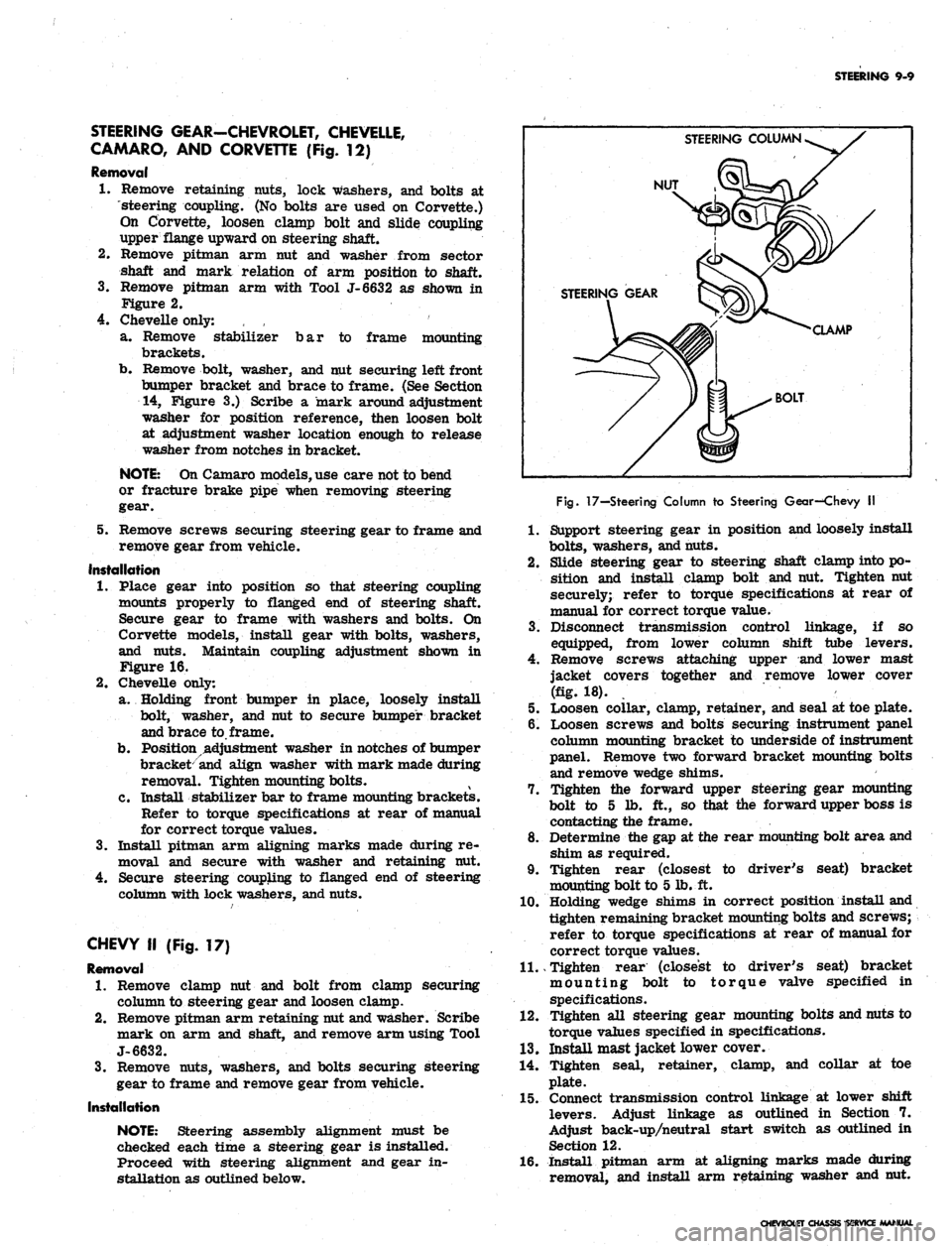
STEERING COLUMN
NUT
STEERING GEAR
CLAMP
BOLT
Fig.
17—Steering Column to Steering Gear—Chevy II
1.
Support steering gear in position and loosely install
bolts,
washers, and nuts.
2.
Slide steering gear to steering shaft clamp into po-
sition and install clamp bolt and nut. Tighten nut
securely; refer to torque specifications at rear of
manual for correct torque value.
3.
Disconnect transmission control linkage, if so
equipped, from lower column shift tube levers.
4.
Remove screws attaching upper and lower mast
jacket covers together and remove lower cover
(fig. 18).
5. Loosen collar, clamp, retainer, and seal at toe plate.
6. Loosen screws and bolts securing instrument panel
column mounting bracket to underside of instrument
panel. Remove two forward bracket mounting bolts
and remove wedge shims.
7. Tighten the forward upper steering gear mounting
bolt to 5 lb. ft., so that the forward upper boss is
contacting the frame.
8. Determine the gap at the rear mounting bolt area and
shim as required.
9. Tighten rear (closest to driver's seat) bracket
mounting bolt to 5 lb. ft.
10.
Holding wedge shims in correct position install and
tighten remaining bracket mounting bolts and screws;
refer to torque specifications at rear of manual for
correct torque values.
11.
Tighten rear (closest to driver's seat) bracket
mounting bolt to torque valve specified in
specifications.
12.
Tighten all steering gear mounting bolts and nuts to
torque values specified in specifications.
13.
Install mast jacket lower cover.
14.
Tighten seal, retainer, clamp, and collar at toe
plate.
15.
Connect transmission control linkage at lower shift
levers. Adjust linkage as outlined in Section 7.
Adjust back-up/neutral start switch as outlined in
Section 12.
16.
Install pitman arm at aligning marks made during
removal, and install arm retaining washer and nut.
CHEVROLET CHASSIS SERVICE MANUAL
Page 450 of 659

STEERING 9-10
SECTOR SHAFT SEAL REPLACEMENT
A faulty seal may be replaced without removal of
steering gear from car by removing pitman arm as out-
lined under Maintenance and Adjustments--Steering Gear
Adjustments and proceed as follows:
1.
Loose lash adjuster lock nut and turn lash adjuster
screw several turns counterclockwise.
2.
Remove three cap screws holding side cover to gear
bushing.
3.
Pull side cover and sector shaft from gear housing
as a unit. Do not separate side cover from sector
shaft.
4.
Pull sector shaft seal from gear housing using
hooked tool or pliers.
5. Coat new seal with chassis grease and position in
sector shaft bore.
6. Place a socket or piece of pipe of suitable diameter
on top of seal and drive seal into bore by tapping
pipe or socket with soft hammer.
7. Install sector shaft side cover assembly, being care-
ful not to damage new seal with splines on end of
shaft; splines may be wrapped with a few turns of
tape to prevent this.
8. Install new side cover gasket and align side cover on
gear housing and install cap screw.
9. Perform steering gear adjustment and install pitman
arm as outlined under Maintenance and Adjustments.
STEERING COLUMN
All models are equipped with new energy absorbing
steering columns. The columns are of five basic designs
as follows:
1.
Syncromesh. The syncromesh column is used on
models with standard, column mounted, conventional
shift levers. The shift tube, within the outer mast
jacket, includes two lower shift levers for connection
to the transmission control linkage.
2.
Automatic and floor shift. This column is used on
models equipped with column mounted powerglide
shift levers, or models with floor shift. If the ve-
hicle has the column mounted powerglide shift con-
trol, the inner shift tube has a single lower shift
lever for connection to the transmission control
linkage. On floor shift models, no lower shift levers
are present on the shift tube.
3.
Tilt wheel option. The upper end and steering shaft
of this column is specially designed to accommodate
the optional tilt steering wheel.
4.
Standard Corvette Column. The standard Corvette
column is similar in design to the Automatic and
Floor Shift column used on other models, except
no shift tube is used. Other differences are pointed
out in the disassembly and assembly procedures for
Standard Corvette column.
5. Telescopic wheel option. The upper end and steering
shaft of this column is specially designed to ac-
commodate the optional telescoping steering wheel.
To perform service procedures on steering column
upper end components, it is not necessary to remove the
column from the vehicle. The steering wheel, horn com-
ponents, turn signal switch, upper housing with bearing,
shift control lever, hazard warning knob, and upper shift
bowl may all be removed with the column remaining in
the vehicle. When servicing the above components, omit
the removal procedure and proceed with the applicable
disassembly procedures. Because of the numerous dif-
ferences in steering column types, be sure to refer to the
set of instructions below which apply to the exact column
to be serviced:
CAUTION: The outer mast jacket, shift tube, _
steering shaft, and instrument panel column
mounting b
racket
are designed as energy ab-
sorbing units. Because of the design of these
components, it is absolutely necessary to handle
the column with care when performing any serv-
ice operation required. Avoid hammering, jar-
ring, dropping, or leaning on any portion of the
column.
Removal
1.
Disconnect steering column harness at connector.
Disconnect neutral safety switch and back-up lamp
switch connectors if so equipped.
Remove steering wheel as outlined in this section.
Remove nuts and washers securing flanged end of
column to steering gear. On Chevy H models, re-
move nut and clamp bolt securing lower end of steer-
ing column to steering gear.
Disconnect transmission control linkage, if so
equipped, from lower column shift tube, levers.
Chevrolet and Chevy II only: Remove screws at-
taching upper and lower mast jacket covers together.
On Chevrolet, remove screws attaching lower cover
to instrument panel (figs. 15 and 18). Remove lower
cover.
Chevelle only: Remove screws securing mast jacket
trim cover to instrument panel and remove cover
(fig. 15).
Corvette, only: Remove screws securing escutcheon
to instrument panel. Remove screws securing upper
and lower covers together and remove covers.
On Chevrolet and Chevelle columns with Powerglide
shift levers, loosen set screw at six o'clock position
at bottom of column and remove the transmission
shift indicator pointer (fig. 15).
9. Chevrolet only (fig. 19):
a. Remove screws securing cover trim to dash
panel and remove cover trim.
2.
3.
4.
5.
6.
7.
8.
Fig.
18—Mast Jacket Cover Attachments—Chevy II
CHEVROLET CHASSIS SERVICE MANUAL
Page 463 of 659
STEERING 9-23
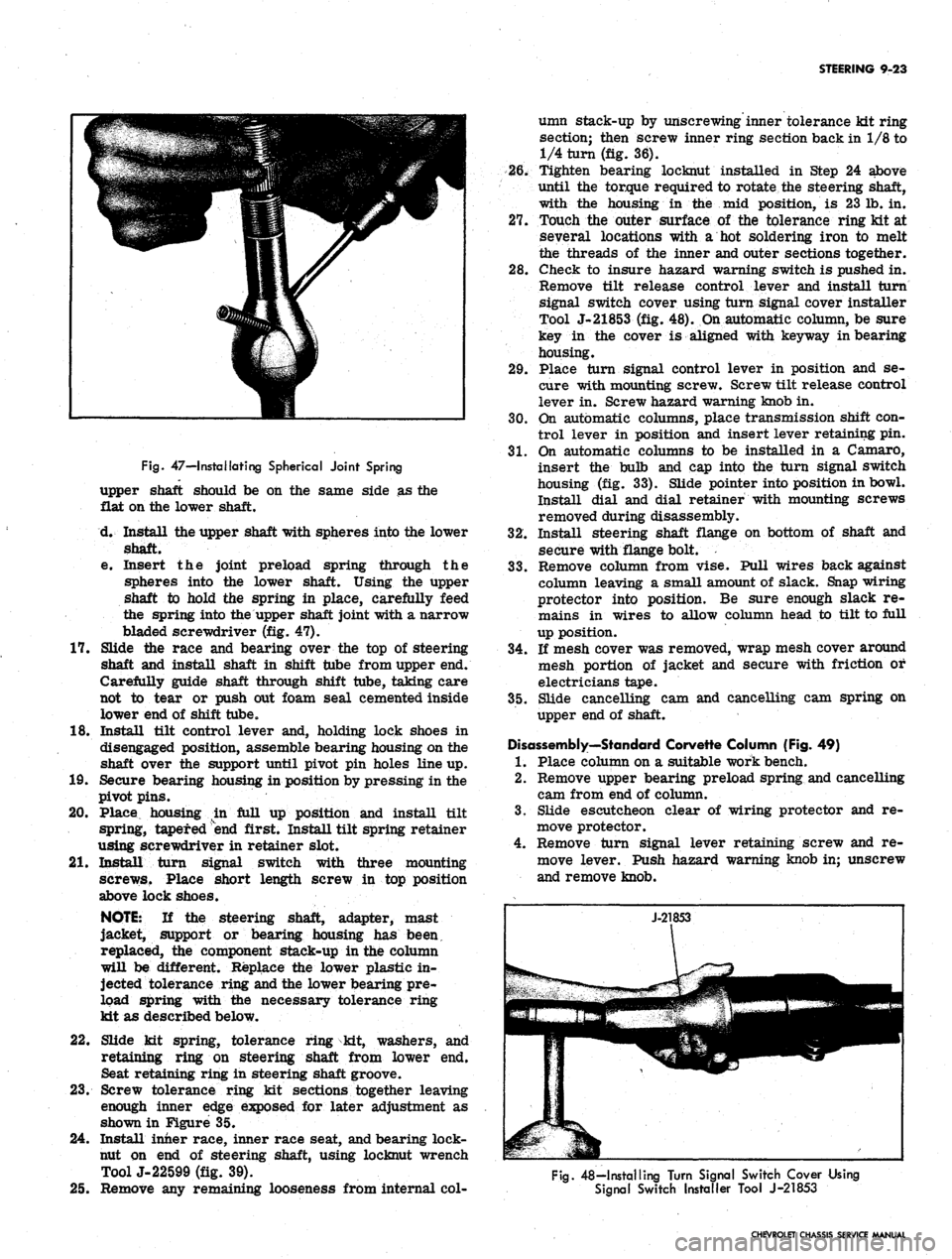
Fig.
47—I retaliating Spherical Joint Spring
upper shaft should be on the same side as the
flat on the lower shaft.
d. Install the upper shaft with spheres into the lower
shaft.
e. Insert the joint preload spring through the
spheres into the lower shaft. Using the upper
shaft to hold the spring in place, carefully feed
the spring into the upper shaft joint with a narrow
bladed screwdriver (fig. 47).
17.
Slide the race and bearing over the top of steering
shaft and install shaft in shift tube from upper end.
Carefully guide shaft through shift tube, taking care
not to tear or push out foam seal cemented inside
lower end of shift tube.
18.
Install tilt control lever and, holding lock shoes in
disengaged position, assemble bearing housing on the
shaft over the support until pivot pin holes line up.
19.
Secure bearing housing in position by pressing in the
pivot pins.
20.
Place housing in full up position and install tilt
spring, tapered end first. Install tilt spring retainer
using screwdriver in retainer slot.
21.
Install turn signal switch with three mounting
screws. Place short length screw in top position
above lock shoes.
NOTE:
If the steering shaft, adapter, mast
jacket, support or bearing housing has been,
replaced, the component stack-up in the column
will be different. Replace the lower plastic in-
jected tolerance ring and the lower bearing pre-
load spring with the necessary tolerance ring
kit as described below.
22.
Slide kit spring, tolerance ring kit, washers, and
retaining ring on steering shaft from lower end.
Seat retaining ring in steering shaft groove.
23.
Screw tolerance ring kit sections together leaving
enough inner edge exposed for later adjustment as
shown in Figure 35.
24.
Install inner race, inner race seat, and bearing lock-
nut on end of steering shaft, using locknut wrench
ToolJ-22599 (fig. 39).
25.
Remove any remaining looseness from internal col-
umn stack-up by unscrewing inner tolerance kit ring
section; then screw inner ring section back in 1/8 to
1/4 turn (fig. 36).
26.
Tighten bearing locknut installed in Step 24 above
until the torque required to rotate the steering shaft,
with the housing in the mid position, is 23 lb. in.
27.
Touch the outer surface of the tolerance ring kit at
several locations with a hot soldering iron to melt
the threads of the inner and outer sections together.
28.
Check to insure hazard warning switch is pushed in.
Remove tilt release control lever and install turn
signal switch cover using turn signal cover installer
Tool J-21853 (fig. 48). On automatic column, be sure
key in the cover is aligned with keyway in bearing
housing.
29.
Place turn signal control lever in position and se-
cure with mounting screw. Screw tilt release control
lever in. Screw hazard warning knob in.
30.
On automatic columns, place transmission shift con-
trol lever in position and insert lever retaining pin.
31.
On automatic columns to be installed in a Camaro,
insert the bulb and cap into the turn signal switch
housing (fig. 33). Slide pointer into position in bowl.
Install dial and dial retainer with mounting screws
removed during disassembly.
32.
Install steering shaft flange on bottom of shaft and
secure with flange bolt.
33.
Remove column from vise. Pull wires back against
column leaving a small amount of slack. Snap wiring
protector into position. Be sure enough slack re-
mains in wires to allow column head to tilt to full
up position.
34.
If mesh cover was removed, wrap mesh cover around
mesh portion of jacket and secure with friction or
electricians tape.
35.
Slide cancelling cam and cancelling cam spring on
upper end of shaft.
Disassembly—Standard Corvette Column (Fig. 49)
1.
Place column on a suitable work bench.
2.
Remove upper bearing preload spring and cancelling
cam from end of column.
3.
Slide escutcheon clear of wiring protector and re-
move protector.
4.
Remove turn signal lever retaining screw and re-
move lever. Push hazard warning knob in; unscrew
and remove knob.
Fig.
48—Installing Turn Signal Switch Cover Using
Signal Switch Installer Tool J-21853
CHEVROLET CHASSIS SERVICE MANUAL
Page 469 of 659

STEERING 9-29
column mounting bracket, and place bracket in cor-
rect position on underside of instrument panel.
Loosely install bracket using bracket to column
mounting screws and bracket to instrument panel
washers and bolts.
NOTE: Steering shaft to gear clamp must be
tightened before column attaching bolts are
torqued. Refer to "Steering Gear-Chevy n",
installation procedure, for correct Chevy II
steering column alignment procedure.
5.
Camaro only (fig. 60):
Lay wedge shim in position on instrument panel
column mounting bracket and place bracket in cor-
rect position on underside of instrument panel.
Loosely install bracket using bracket to column
mounting screws, nuts, and washer and bolt as shown
in Figure 60.
6. Corvette only (fig. 61):
Loosely secure column mounting bracket to sup-
port plate and instrument panel with washers and
bolts.
7.
Secure flanged end of column to steering coupling
with lockwashers and nuts. On Chevy n, connect col-
umn to steering gear with clamp, clamp bolt, and
nut. On Corvette, slide steering shaft flange into
lower coupling
half,
and install upper clamp bolt
loosely; also secure support, seal and clamp loosely
at dash on engine side.
8. Tighten instrument panel mounting bracket bolts and
nuts.
Refer to torque specifications at rear of manual
for correct torque values.
9. Chevrolet only (fig. 15):
Place upper and lower mast jacket covers in po-
sition and secure covers together and to instrument
panel using nuts and screws as shown in Figure 15.
10.
Chevy H only (fig. 18):
Place lower mast jacket cover in position under
mast jacket and secure to upper cover with screws.
11.
CheveUe only (fig. 15):
Place mast jacket trim cover in position over col-
Fig.
61—Instrument Panel Mounting Bracket and
Support Plqte—Corvette
umn on underside of instrument panel and secure
with screws.
12.
Corvette only (fig. 14):
Slide escutcheon into position at instrument panel
and secure with screws. Place upper end lower
covers in position and secure with screws.
13.
On Chevrolet and CheveUe models with column
mounted powerglide controls, secure transmission
shift indicator pointer into position with set screw
(fig. 15). ,
14.
Chevrolet only (fig. 19):
a. Secure seal and cover to dash panel with screws.
b.
Place clamp assembly in position and install
clamp screw.
c. Install dash panel trim cover with mounting
screws.
15.
Chevelle only (fig. 20):
a. Secure seal and inner and outer covers to dash
panel with screws.
b.
Secure inner and outer covers together with
screws.
c. Install trim cover to dash panel with two
retainers.
16.
Chevy H only (fig. 21):
a. Secure seal, retainer, and clamp to dash panel
with screws.
b.
Install clamp screw.
c. Slide collar into position. Pinch and staple upper
tabs together.
17.
Camaro only (fig. 22):
a. Secure seal, upper cover, and lower cover to
dash panel with screws.
b.
Secure upper and lower cover together with
screws.
c. Fold rubber boot over securely against dash panel
to conceal covers.
18.
Corvette only (fig. 23):
a. Secure seal and support assembly to dash panel
on engine compartment side.
b.
Tighten clamp, washer, and clamp bolt on engine
compartment side.
19.
Connect transmission linkage to lower shift tube
levers in engine compartment, if column is so
equipped. Adjust levers as outlined in Section 7.
20.
Install steering wheel as outlined in this section.
21.
Connect directional signal, horn, back-up lamp, and
neutral start switch at wiring harness plugs. Adjust
back-up lamp, neutral start switch as outlined in
Section 12.
22.
Adjust steering gear and align and center steering
wheel as outlined in this section.
STEERING LINKAGE (Fig. 62)
TIE RODS
There are two tie rod assemblies used on all models.
Each assembly is of three piece construction, consisting
of a sleeve and two tie rod ends. The ends are threaded
into the sleeve and locked with clamps. Right and left
hand threads are provided to facilitate toe-in adjustment
and steering gear centering.
The tie rod ends are self-adjusting for wear and re-
quire no attention in service other than periodic lubrica-
tion and occasional inspection to see that ball studs are
tight. Replacement of tie rod ends should be made when
CHEVROLET CHASSIS SERVICE MANUAL
Page 474 of 659
STEERING 9-34
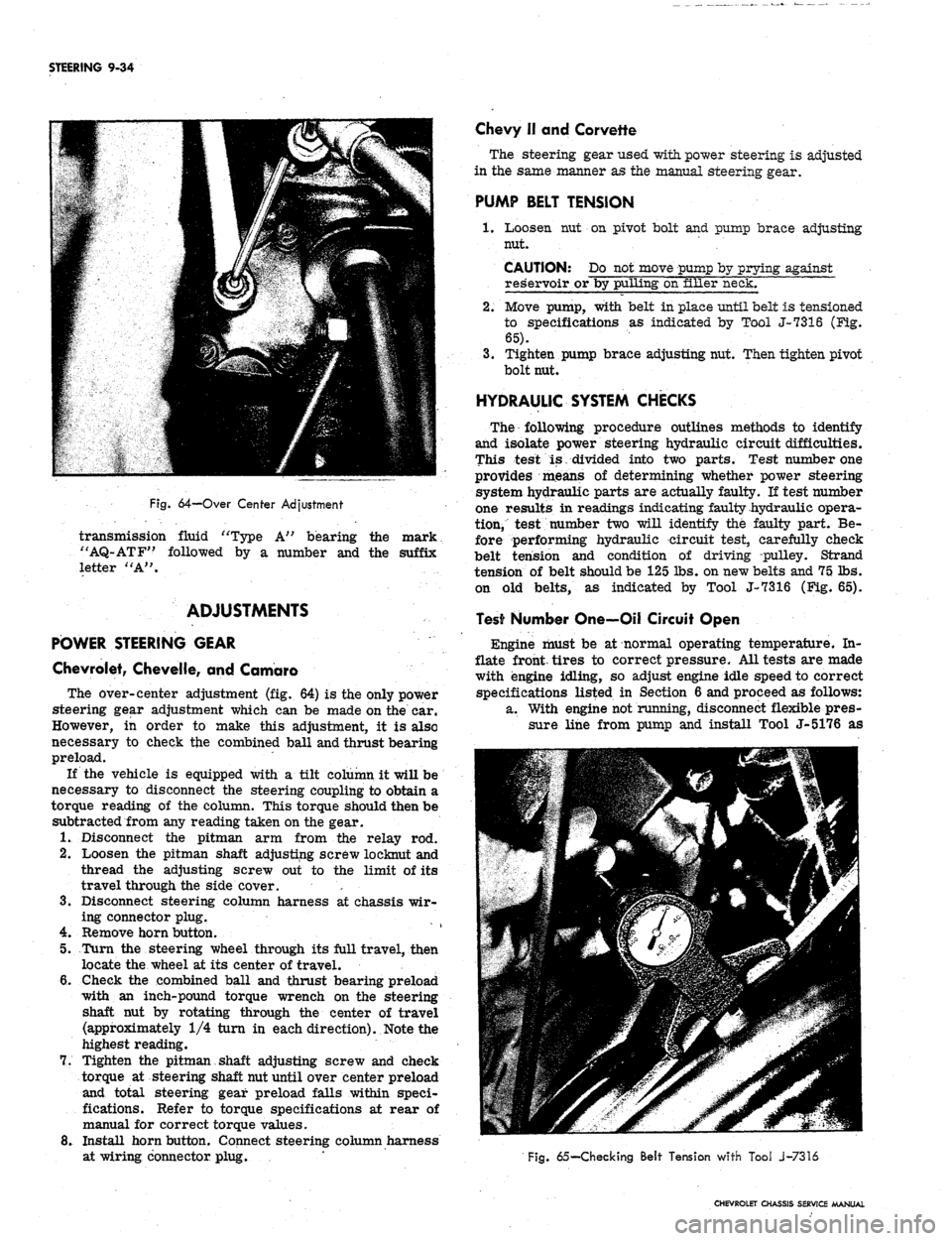
Fig.
64-Over Center Adjustment
transmission fluid "Type A" bearing the mark
"AQ-ATF" followed by a number and the suffix
letter "A".
ADJUSTMENTS
POWER STEERING GEAR
Chevrolet, Chevelle, and Camaro
The over-center adjustment (fig. 64) is the only power
steering gear adjustment which can be made on the car.
However, in order to make this adjustment, it is also
necessary to check the combined ball and thrust bearing
preload.
If the vehicle is equipped with a tilt column it will be
necessary to disconnect the steering coupling to obtain a
torque reading of the column. This torque should then be
subtracted from any reading taken on the gear.
1.
Disconnect the pitman arm from the relay rod.
2.
Loosen the pitman shaft adjusting screw loeknut and
thread the adjusting screw out to the limit of its
travel through the side cover. '. •
3.
Disconnect steering column harness at chassis wir-
ing connector plug.
4.
Remove horn button.
5.
Turn the steering wheel through its full travel, then
locate the wheel at its center of travel.
6. Gheck the combined ball and thrust bearing preload
with an inch-pound torque wrench on the steering
shaft nut by rotating through the center of travel
(approximately 1/4 turn in each direction). Note the
highest reading.
7.
Tighten the pitman shaft adjusting screw and check
torque at steering shaft nut until over center preload
and total steering gear preload falls within speci-
fications. Refer to torque specifications at rear of
manual for correct torque values.
8. Install horn button. Connect steering column harness
at wiring connector plug.
Chevy II and Corvette
The steering gear used with power steering is adjusted
in the same manner as the manual steering gear.
PUMP BELT TENSION
1.
Loosen nut on pivot bolt and pump brace adjusting
nut.
CAUTION: Do not move pump by prying against
reservoir or by pulling on filler neck.
2.
Move pump, with belt in place until belt is tensioned
to specifications as indicated by Tool J-7316 (Fig-.
65).
3.
Tighten pump brace adjusting nut. Then tighten pivot
bolt nut.
HYDRAULIC SYSTEM CHECKS
The following procedure outlines methods to identify
and isolate power steering hydraulic circuit difficulties.
This test is divided into two parts. Test number one
provides means of determining whether power steering
system hydraulic parts are actually faulty. If test number
one results in readings indicating faulty hydraulic opera-
tion, test number two will identify the faulty part. Be-
fore performing hydraulic circuit test, carefully check
belt tension and condition of driving pulley. Strand
tension of belt should be 125 lbs. on new belts and 75 lbs.
on old belts, as indicated by Tool J-7316 (Fig. 65).
Test Number One—Oil Circuit Open
Engine must be at normal operating temperature. In-
flate front, tires to correct pressure. All tests are made
with engine idling, so adjust engine idle speed to correct
specifications listed in Section 6 and proceed as follows:
a. With engine not running, disconnect flexible pres-
sure line from pump and install Tool J-5176 as
Fig.
65— Checking Belt Tension with Tool J-7316
CHEVROLET CHASSIS SERVICE MANUAL
Page 513 of 659
SECTION 12
ELECTRICAL-BODY AND CHASSIS
CONTENTS
OF
THIS
SECTION
Page
Page
System 12-1
Instruments and Gauges 12-21
Directional Signal 12r40
Windshield Wipers and Washers 12-44
Wiring Diagrams 12-56
Special Tools 12-60
LIGHTING SYSTEM
INDEX
Page
General Description
!2-i
Maintenance and Adjustments
•.................. 12-2
Headlamp Adjustment......................
12-3
Headlamp Panel Travel Adjustment.
12-5
Service Operations.
. . .. 12-5
Front Lighting
12-5
Headlamp
. 12_5
Parking Lamp
12-5
Fender Lamp
. 12_^
Headlamp Panel
12-8
Headlamp Panel Motor
^2-9
Rear Lighting
l2-10
Tail, Stop and Directional Lamps
12-10
Page
Backing Lamps
12-14
License Plate Lamp
12-14
Automatic Transmission Quadrant Lamp
12-14
Seat Separator Console Lamps
. 12-15
Lighting Switch
. . 12-15
Wiper Switch.
12-15
Stoplight Switch
12-15
Dimmer Switch
12-15
Backing Lamp Switches
12-15
Neutral Safety Switches
12-17
Parking Brake Alarm Switch
................. 12-19
Instrument Panel Compartment Lamp/Switch
12-19
Cirgarette Lighter
12-19
GENERAL DESCRIPTION
.
The lighting system includes: the main lighting switch,
stop light, dimmer, and backing lamp switches, head-
lamps, parking lamps, stop, tail and directional lamps,
instrument illumination and indicator lamps, and the
necessary wiring to complete the various circuits. A
fuse panel provides convenient power take offs and fuse
clips for the appropriate circuits (fig. 1).
Chevrolet and Chevelle headlamp installation is all
new in that the headlamps are located in the radiator
support with adjusting screws and springs. Eliminating
the need for having separate headlamp housings. Chev-
rolet and Chevelle headlamp retainers and springs are
interchangeable.
Chevy n headlamp housings are new because of revised
front end styling and Corvette front end lighting is basi-
cally carryover.
Front fender lamps have been added as an option for
Chevrolet models and as standard equipment on Caprice
series.
Camaro models use single headlamps and the Rally
Sport model headlamps are covered by a retractable
section of the grille when lamps are not used. The sec-
tion of the grille covering the headlamps folds back when
lights are required; the headlamps are stationary. The
covering is retracted by a small electric motor mounted
to the headlamp housing. The headlamps are automat-
ically uncovered when the headlight switch is pulled "ON"
for illumination. If at any time the electrical circuit
becomes inoperative, the lamps can be uncovered manu-
ally. The ignition switch must be
"ON"
in order to close
the headlamp doors.
Parking lamp for Chevelle and Chevrolet models are
new due to revised front end sheet metal and bumper
styling. Parking lamps are located in the bumper on
Chevrolet, Chevelle and Chevy n models
Camaro parking lamps are located in the radiator
grille except for the Rally Sport models on which the
parking lamps are in the valance panel. For styling
reasons, the lens is white and an amber glass bulb is
used. All Camaro parking lamps require a separate
ground wire to assure a good ground contact because of
the plastic grille and painted contact surfaces.
The Chevrolet tail, stop, and directional lamps are in
one housing with a three section lens design on Impala
and Caprice sedans. The center lens for Impala series
is the back-up lamp. The center lens on the Caprice is
a tail lamp with the back-up lamps being located in the
rear bumper. Chevrolet station wagons have three indi-
vidual housings with three lenses, the center lamp being
the back-up. Biscayne and Bel-Air sedans have a single
housing and lens for tail, stop, and directional lamp with
a similarly constructed back-up lamp inboard and adja-
cent to it.
Chevelle tail, stop, and directional lamps are a single
lens design that follows through with the rear fender
styling. The back-up lamp is located in r.ear bumper.
Camaro models except Rally Sport have tail lamps
with integral back-up lamps mounted inboard of the rear
fenders between the trunk opening and bumper. The
Rally Sport model has dual tail lamps in the rear housing
and valance mounted back-up lamps.
Corvette, Chevy n, and Corvair tail and directional
signal lights are carryover. The Corvette has new back-
up lamps center mounted above the license plate opening.
CHEVROLET CHASSIS SERVICE
Page 526 of 659
ELECTRICAL-BODY AND CHASSIS 12-14
BACKING LAMPS
lamp Housing Replacement (Fig. 19)
Bumper Installation
1.
Remove two screws retaining housing assembly in
the bumper and remove housing.
'2.
Disconnect lamp wire assembly connector from wir-
ing harness.
3.
Remove lens retaining screws, lens and bulb from
housing assembly and transfer to new housing unit.
4.
Connect lamp wiring assembly to harness assembly,
housing and check operation of lamp.
•5.
Position lamp assembly in place and install retaining
screws.
Corvette (Fig. 18)
1.
Remove license plate and bracket assembly.
2.
Remove tailpipe extensions and rear body valance
panel.
3.
Remove backing lamp attaching nuts.
4.
Disengage backing lamp assembly from body opening
and disconnect wiring harness at rear of lamp.
5. Transfer bulb, gasket and lens to replacement
housing.
6. Connect chassis wiring connector to housing and po-
sition lamp assembly to body opening.
7. Attach ground wire to housing and install retaining
nuts to housing.
8. Install body valance panel.
9. Position license plate assembly to body and install
retaining screws.
LICENSE PLATE LAMP SERVICE
Lamp Housing
1.
Remove the lamp assembly retaining screws and re-
move lamp assembly from mounting location (rear
bumper center face bar most models). On Corvette
models remove rear valance panel.
2.
Disconnect lamp wiring from chassis harness con-
nector (inside trunk on some models).
3.
Force grommet and Wiring down through body open-
ing (where applicable) and remove assembly from
vehicle.
4.
To install replacement unit, insert grommet and wir-
ing through body opening where applicable and con-
nect wiring to chassis harness.
5. Position assembly and install retaining screws. On
Corvette models make sure ground wire is properly
installed.
6. Check operation of lamp assembly.
iuib Replacement
1.
Remove lens retaining screws and lens.
NOTE:
On Camaro models loosen housing re-
taining screws.
2.
Remove and replace bulb.
3.
Position lens and install retaining screws.
AUTOMATIC TRANSMISSION
QUADRANT LAMP REPLACEMENT
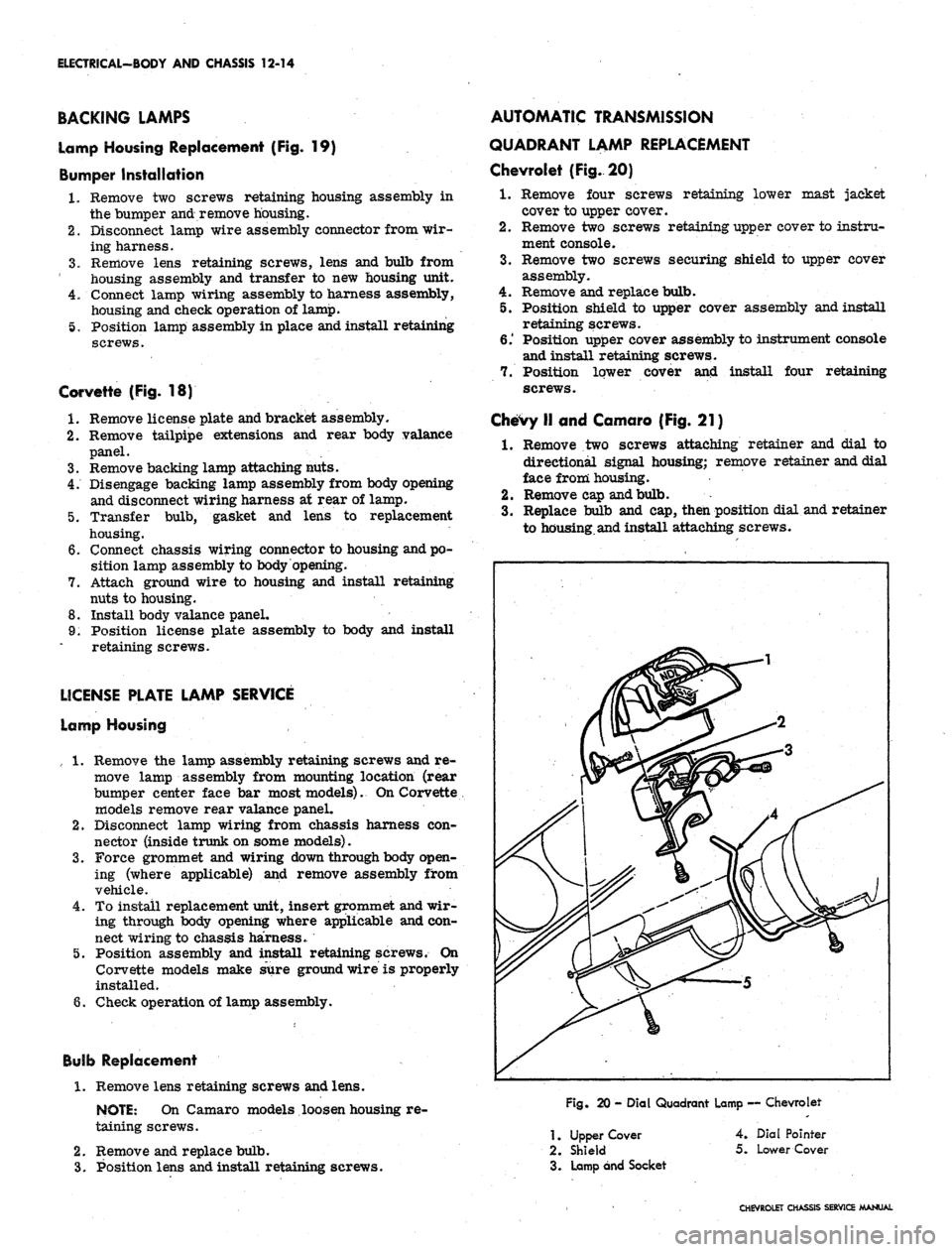
Chevrolet (Fig. 20)
1.
Remove four screws retaining lower mast jacket
cover to upper cover.
2.
Remove two screws retaining upper cover to instru-
ment console.
3.
Remove two screws securing shield to upper cover
assembly.
4.
Remove and replace bulb.
5. Position shield to upper cover assembly and install
retaining screws.
6.' Position upper cover assembly to instrument console
and install retaining screws.
7. Position lower cover and install four retaining
screws.
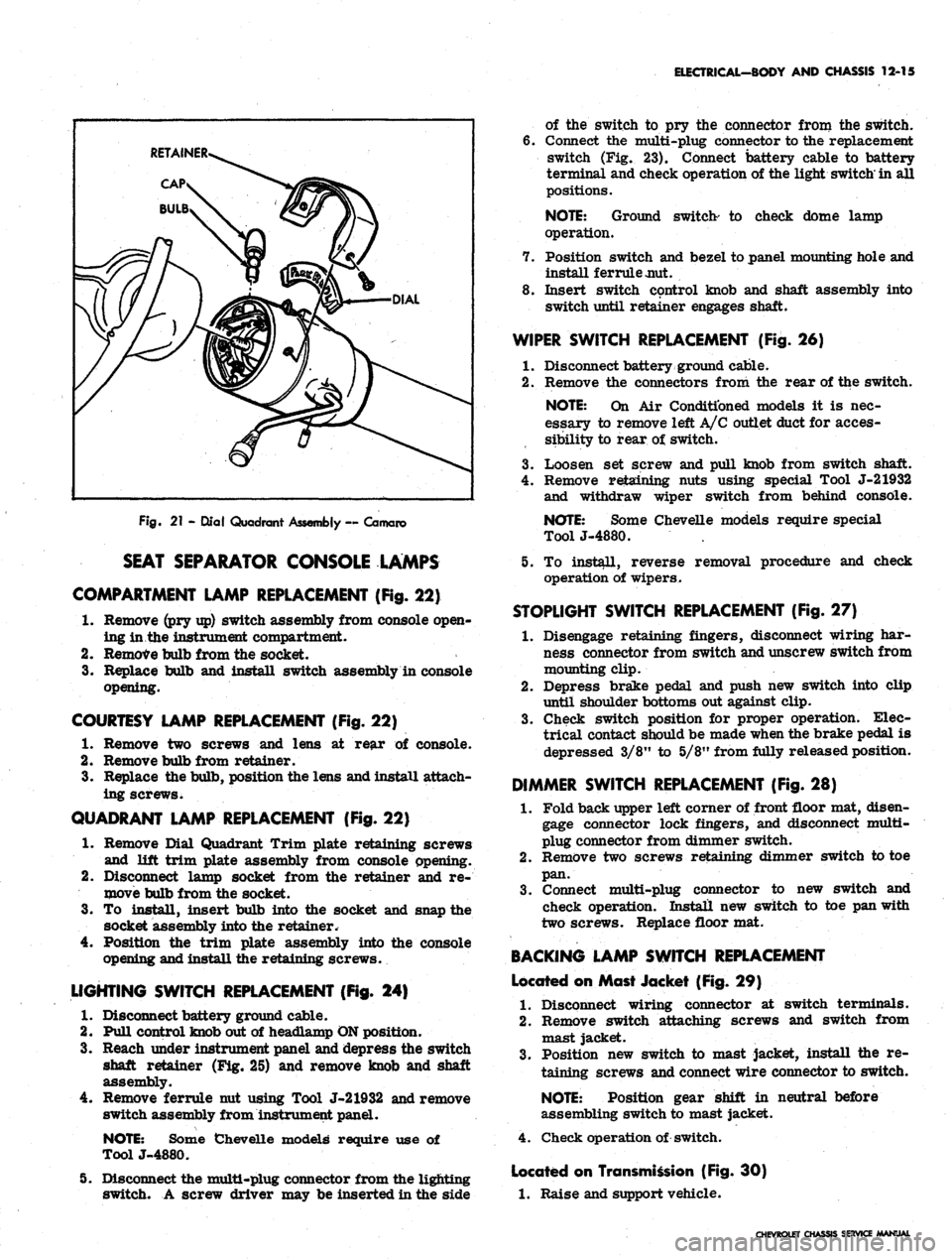
Chevy II and Camaro (Fig. 21)
1.
Remove two screws attaching retainer and dial to
directional signal housing; remove retainer and dial
face from housing.
2.
Remove cap and bulb.
3.
Replace bulb and cap, then position dial and retainer
to housing.and install attaching screws.
Fig.
20 - Dial Quadrant Lamp — Chevrolet
1.
Upper Cover
2.
Shield
3. Lamp and Socket
4.
Dial Pointer
5.
Lower Cover
CHEVROLET CHASSIS SERVICE MANUAL
Page 527 of 659
ELECTRICAL-BODY AND CHASSIS 12-15
Fig.
21 - Qlal Quadrant Assembly ~ Camaro
SEAT SEPARATOR CONSOLE LAMPS
COMPARTMENT LAMP REPLACEMENT (Fig.
22)
1.
Remove (pry up) switch assembly from console open-
ing in.the instrument compartment.
2.
Remove bulb from the socket.
3.
Replace bulb and install switch assembly in console
opening.
COURTESY LAMP REPLACEMENT (Fig. 22)
1.
Remove two screws and lens at rear of console.
2.
Remove bulb from retainer.
3.
Replace the bulb, position the lens and install attach-
ing screws.
QUADRANT LAMP REPLACEMENT (Fig. 22)
1.
Remove Dial Quadrant Trim plate retaining screws
and lift trim plate assembly from console opening.
2.
Disconnect lamp socket from the retainer and re-
move bulb from the socket.
3.
To install, insert bulb into the socket and snap the
socket assembly into the retainer.
Position the trim plate assembly into the console
opening and install the retaining screws.
4.
LIGHTING SWITCH REPLACEMENT (Fig. 24)
1.
Disconnect battery ground cable.
2.
Pull control knob out of headlamp ON position.
3.
Reach under instrument panel and depress the switch
shaft retainer (Fig. 25) and remove knob and shaft
assembly.
4.
Remove ferrule nut using Tool J-21932 and remove
switch assembly from instrument panel.
NOTE:
Some Chevelle models require use of
ToolJ-4880.
5. Disconnect the multi-plug connector from the lighting
switch. A screw driver may be inserted in the side
of the switch to pry the connector from the switch.
6. Connect the multi-plug connector to the replacement
switch (Fig. 23). Connect battery cable to battery
terminal and check operation of the light switch'in all
positions.
NOTE:
Ground switch- to check dome lamp
operation.
7. Position switch and bezel to panel mounting hole and
install ferrule jmt.
8. Insert switch control knob and shaft assembly into
switch until retainer engages shaft.
WIPER SWITCH REPLACEMENT (Fig. 26)
1.
Disconnect battery ground cable.
2.
Remove the connectors from the rear of the switch.
NOTE:
On Air Conditioned models it is nec-
essary to remove left A/C outlet duct for acces-
sibility to rear of switch.
3.
Loosen set screw and pull knob from switch shaft.
4.
Remove retaining nuts using special Tool J-21932
and withdraw wiper switch from behind console.
NOTE:
Some Chevelle models require special
ToolJ-4880.
5. To install, reverse removal procedure and check
operation of wipers.
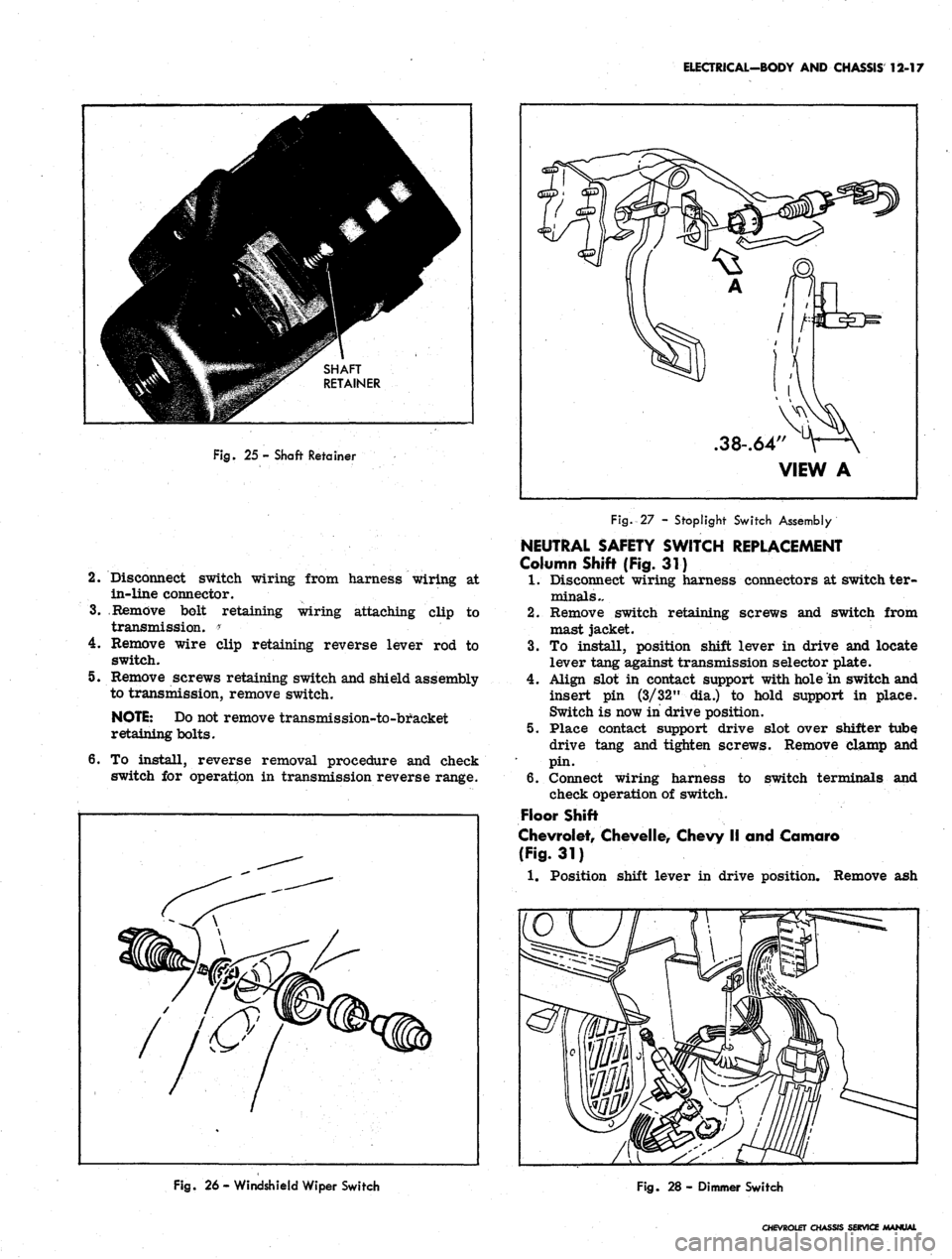
STOPLIGHT SWITCH REPLACEMENT (Fig. 27)
1.
Disengage retaining fingers, disconnect wiring har-
ness connector from switch and unscrew switch from
mounting clip.
2.
Depress brake pedal and push new switch into clip
until shoulder bottoms out against clip.
3.
Check switch position for proper operation. Elec-
trical contact should be made when the brake pedal is
depressed 3/8" to 5/8" from fully released position.
DIMMER SWITCH REPLACEMENT (Fig. 28)
1.
Fold back upper left corner of front floor mat, disen-
gage connector lock fingers, and disconnect multi-
plug connector from dimmer switch.
2.
Remove two screws retaining dimmer switch to toe
pan.
3.
Connect multi-plug connector to new switch and
check operation. Install new switch to toe pan with
two screws. Replace floor mat.
BACKING LAMP SWITCH REPLACEMENT
Located on Mast Jacket (Fig. 29)
1.
Disconnect wiring connector at switch terminals.
2.
Remove switch attaching screws and switch from
mast jacket.
3.
Position new switch to mast jacket, install the re-
taining screws and connect wire connector to switch.
NOTE:
Position gear shift in neutral before
assembling switch to mast jacket.
4.
Check operation of switch.
Located on Transmission (Fig. 30)
1.
Raise and support vehicle.
CHEVROLET CHASSIS SERVICE MANUAL
Page 529 of 659
ELECTRICAL-BODY AND CHASSIS 12-17
Fig.
25 - Shaft Retainer
2.
Disconnect switch wiring from harness wiring at
in-line connector.
3.
Remove bolt retaining wiring attaching clip to
transmission. *
• '
•
4.
Remove wire clip retaining reverse lever rod to
switch.
5. Remove screws retaining switch and shield assembly
to transmission, remove switch.
NOTE:
Do not remove transmission-to-bracket
retaining bolts.
6. To install, reverse removal procedure and check
switch for operation in transmission reverse range.
.38-.64"
VIEW A
Fig.-27 - Stoplight Switch Assembly
NEUTRAL SAFETY SWITCH REPLACEMENT
Column Shift (Fig. 31)
1.
Disconnect wiring harness connectors at switch ter-
minals..
2.
Remove switch retaining screws and switch from
mast jacket.
3.
To install, position shift lever in drive and locate
lever tang against transmission selector plate.
4.
Align slot in contact support with hole in switch and
insert pin (3/32" dia.) to hold support in place.
Switch is now in drive position.
5. Place contact support drive slot over shifter tube
drive tang and tighten screws. Remove clamp and
pin.
6. Connect wiring harness to switch terminals and
check operation of switch.
Floor Shift
Chevrolet, Chevelle, Chevy II and Camaro
(Fig.
31)
1.
Position shift lever in drive position. Remove ash
Fig.
26 - Windshield Wiper Switch
Fig.
28 - Dimmer Switch
CHEVROLET CHASSIS SERVICE MANUAL