key CHEVROLET CAMARO 2010 5.G Owner's Manual
[x] Cancel search | Manufacturer: CHEVROLET, Model Year: 2010, Model line: CAMARO, Model: CHEVROLET CAMARO 2010 5.GPages: 378, PDF Size: 5.75 MB
Page 81 of 378
Black plate (1,1)Chevrolet Camaro Owner Manual - 2010
Storage 3-1
Storage
Storage Compartments
Glove Box . . . . . . . . . . . . . . . . . . . . 3-1
Center Console Storage . . . . . . 3-1
Additional Storage Features
Convenience Net . . . . . . . . . . . . . 3-1
Storage
Compartments
Glove Box
Open the glove box by lifting up on
the lever. Use the key to lock and
unlock the glove box.
Center Console Storage
To open, lift the latch on the
front edge.
There is an Accessory Power Outlet
(APO) and an optional USB/audio
jack located in the storage area.
SeePower Outlets
on page 4‑9andAuxiliary Deviceson page 6‑16for more information.
Additional Storage
Features
Convenience Net
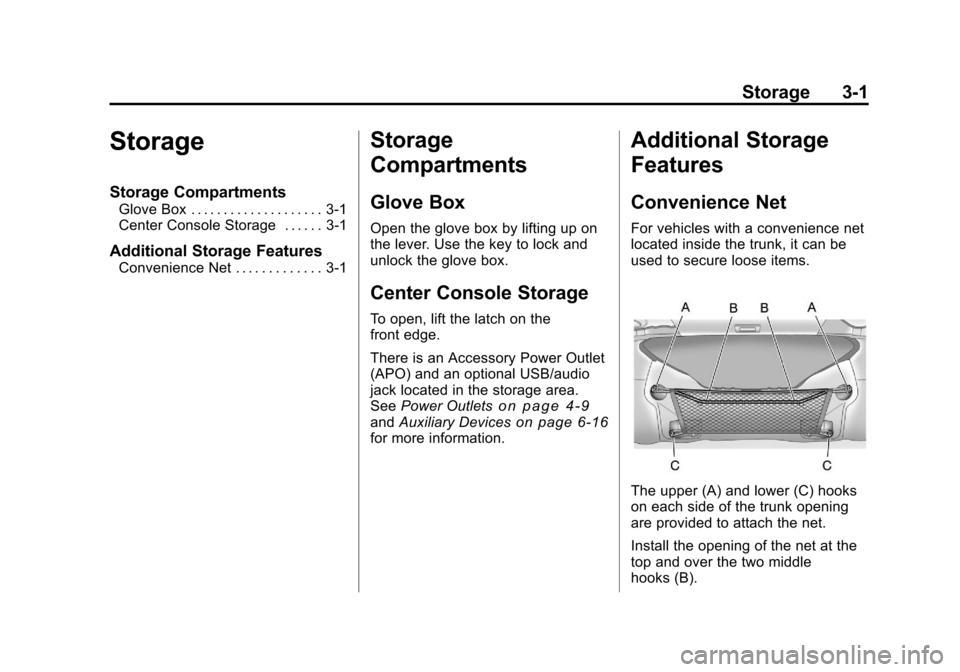
For vehicles with a convenience net
located inside the trunk, it can be
used to secure loose items.
The upper (A) and lower (C) hooks
on each side of the trunk opening
are provided to attach the net.
Install the opening of the net at the
top and over the two middle
hooks (B).
Page 83 of 378
Black plate (1,1)Chevrolet Camaro Owner Manual - 2010
Instruments and Controls 4-1
Instruments and
Controls
Instrument Panel Overview
Instrument Panel Overview . . . . 4-4
Controls
Steering Wheel Adjustment . . . 4-6
Steering Wheel Controls . . . . . . 4-6
Horn . . . . . . . . . . . . . . . . . . . . . . . . . . 4-7
Windshield Wiper/Washer . . . . . 4-7
Compass . . . . . . . . . . . . . . . . . . . . . 4-8
Clock . . . . . . . . . . . . . . . . . . . . . . . . . 4-8
Power Outlets . . . . . . . . . . . . . . . . . 4-9
Warning Lights, Gauges, and
Indicators
Warning Lights, Gauges, andIndicators . . . . . . . . . . . . . . . . . . 4-10
Instrument Cluster . . . . . . . . . . . 4-11
Speedometer . . . . . . . . . . . . . . . . 4-12
Odometer . . . . . . . . . . . . . . . . . . . . 4-12
Trip Odometer . . . . . . . . . . . . . . . 4-12
Tachometer . . . . . . . . . . . . . . . . . . 4-12
Fuel Gauge . . . . . . . . . . . . . . . . . . 4-12
Engine Oil Pressure Gauge . . . . . . . . . . . . . . . . . . . . . . 4-13 Engine Oil Temperature
Gauge . . . . . . . . . . . . . . . . . . . . . . 4-14
Engine Coolant Temperature Gauge . . . . . . . . . . . . . . . . . . . . . . 4-15
Transmission Temperature
Gauge . . . . . . . . . . . . . . . . . . . . . . 4-16
Voltmeter Gauge . . . . . . . . . . . . . 4-17
Safety Belt Reminders . . . . . . . 4-17
Airbag Readiness Light . . . . . . 4-18
Passenger Airbag Status Indicator . . . . . . . . . . . . . . . . . . . . 4-19
Charging System Light . . . . . . 4-20
Malfunction Indicator Lamp . . . . . . . . . . . . . 4-20
Brake System Warning Light . . . . . . . . . . . . . . . . . . . . . . . 4-23
Antilock Brake System (ABS) Warning Light . . . . . . . . . . . . . . 4-24
Traction Off Light . . . . . . . . . . . . 4-24
Traction Control System (TCS)/StabiliTrak®Light . . . . 4-25
Traction Control System (TCS) OFF/StabiliTrak
®OFF
Light . . . . . . . . . . . . . . . . . . . . . . . 4-25
Tire Pressure Light . . . . . . . . . . 4-26
Engine Oil Pressure Light . . . . 4-26
Immobilizer Light . . . . . . . . . . . . 4-27 Fog Lamp Light . . . . . . . . . . . . . . 4-27
Taillamp Indicator Light . . . . . . 4-27
Cruise Control Light . . . . . . . . . 4-27
Information Displays
Driver Information
Center (DIC) . . . . . . . . . . . . . . . 4-28
Vehicle Messages
Vehicle Messages . . . . . . . . . . . 4-31
Battery Voltage and ChargingMessages . . . . . . . . . . . . . . . . . . 4-31
Brake System Messages . . . . 4-32
Compass Messages . . . . . . . . . 4-32
Cruise Control Messages . . . . 4-32
Door Ajar Messages . . . . . . . . . 4-32
Engine Cooling System Messages . . . . . . . . . . . . . . . . . . 4-33
Engine Oil Messages . . . . . . . . 4-33
Engine Power Messages . . . . 4-34
Fuel System Messages . . . . . . 4-34
Key and Lock Messages . . . . . 4-34
Lamp Messages . . . . . . . . . . . . . 4-34
Object Detection System Messages . . . . . . . . . . . . . . . . . . 4-35
Ride Control System Messages . . . . . . . . . . . . . . . . . . 4-35
Airbag System Messages . . . . 4-36
Safety Belt Messages . . . . . . . 4-36
Page 91 of 378
Black plate (9,1)Chevrolet Camaro Owner Manual - 2010
Instruments and Controls 4-9
Setting the Time and Date
1. Press the CONFIG button.
2. Select Time and Date Settings.
3. Select Set Time or Set Date.
4. Turn the MENU/SELECT knob toadjust the highlighted value.
5. Press the MENU/SELECT knob to select the next value.
6. To save the time or date and return to the Time and Date
Settings menu, press the
0BACK button at any time or
press MENU/SELECT knob after
adjusting the minutes or year.
Setting the 12/24 Hour Format
1. Press the CONFIG button.
2. Select Time and Date Settings.
3. Highlight 12/24 Hour Format.
4. Press the MENU/SELECT knob to select the 12 hour or 24 hour
display format.
Setting the Month & Day
Format
1. Press the CONFIG button.
2. Select Time and Date Settings.
3. Highlight Month & Day Format.
4. Press the MENU/SELECT knobto select MM/DD (month/day) or
DD/MM (day/month).
Setting the Auto Time Adjust
1. Press the CONFIG button.
2. Select Time and Date Settings.
3. Highlight Auto Time Adjust.
4. Press the MENU/SELECT knobto turn Auto Time Adjust on
or off.
Power Outlets
The vehicle has two accessory
power outlets; one is located below
the climate control system and the
other is inside the center storage
console.
The accessory power outlets do not
work when the key is removed from
the ignition and the driver door is
opened, this helps to preserve the
battery life of the vehicle.
Certain power accessory plugs may
not be compatible to the accessory
power outlet and could result in
blown vehicle or adapter fuses.
If you experience a problem,
see your dealer for additional
information on the accessory
power plugs.
Page 104 of 378
Black plate (22,1)Chevrolet Camaro Owner Manual - 2010
4-22 Instruments and Controls
.Make sure to fuel the vehicle
with quality fuel. Poor fuel quality
causes the engine not to run as
efficiently as designed and can
cause: stalling after start-up,
stalling when the vehicle is
changed into gear, misfiring,
hesitation on acceleration,
or stumbling on acceleration.
These conditions might go away
once the engine is warmed up.
If one or more of these
conditions occurs, change the
fuel brand used. It will require at
least one full tank of the proper
fuel to turn the light off.See Gasoline Specifications
on
page 8‑44.
If none of the above have made
the light turn off, your dealer can
check the vehicle. The dealer
has the proper test equipment
and diagnostic tools to fix any
mechanical or electrical problems
that might have developed.
Emissions Inspection and
Maintenance Programs
Some state/provincial and local
governments have or might begin
programs to inspect the emission
control equipment on the vehicle.
Failure to pass this inspection
could prevent getting a vehicle
registration.
Here are some things to know to
help the vehicle pass an inspection:
.The vehicle will not pass this
inspection if the check engine
light is on with the engine
running, or if the key is in
ON/RUN and the light is not on.
.The vehicle will not pass
this inspection if the OBD II
(on-board diagnostic) system
determines that critical emission
control systems have not been
completely diagnosed by the
system. The vehicle would
be considered not ready for
inspection. This can happen if
the battery has recently been
replaced or if the battery has run
down. The diagnostic system is
designed to evaluate critical
emission control systems during
normal driving. This can take
several days of routine driving.
If this has been done and the
vehicle still does not pass the
inspection for lack of OBD II
system readiness, your dealer
can prepare the vehicle for
inspection.
Page 105 of 378
Black plate (23,1)Chevrolet Camaro Owner Manual - 2010
Instruments and Controls 4-23
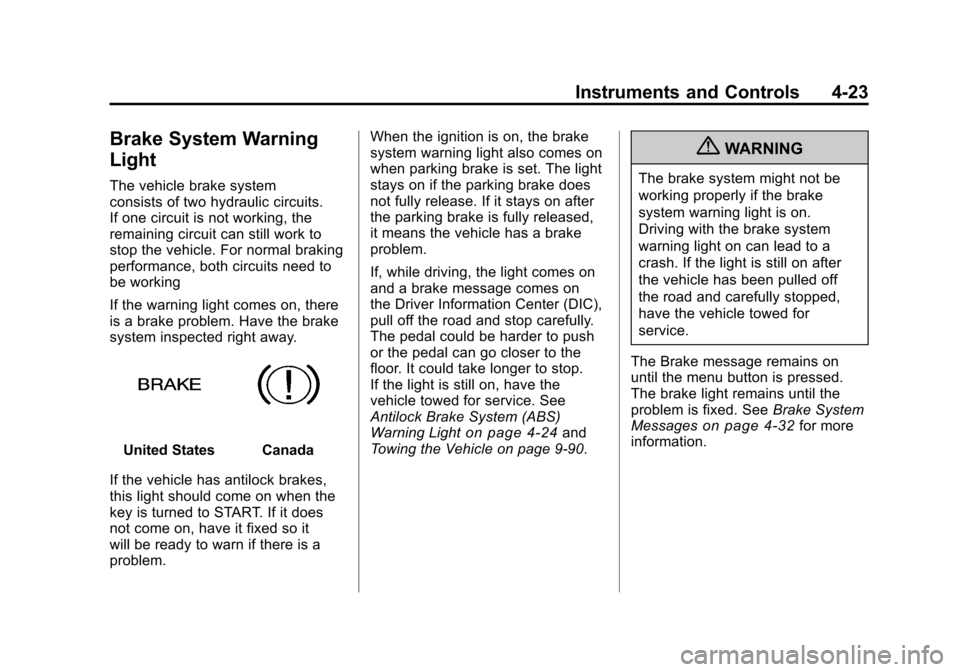
Brake System Warning
Light
The vehicle brake system
consists of two hydraulic circuits.
If one circuit is not working, the
remaining circuit can still work to
stop the vehicle. For normal braking
performance, both circuits need to
be working
If the warning light comes on, there
is a brake problem. Have the brake
system inspected right away.
United StatesCanada
If the vehicle has antilock brakes,
this light should come on when the
key is turned to START. If it does
not come on, have it fixed so it
will be ready to warn if there is a
problem. When the ignition is on, the brake
system warning light also comes on
when parking brake is set. The light
stays on if the parking brake does
not fully release. If it stays on after
the parking brake is fully released,
it means the vehicle has a brake
problem.
If, while driving, the light comes on
and a brake message comes on
the Driver Information Center (DIC),
pull off the road and stop carefully.
The pedal could be harder to push
or the pedal can go closer to the
floor. It could take longer to stop.
If the light is still on, have the
vehicle towed for service. See
Antilock Brake System (ABS)
Warning Light
on page 4‑24and
Towing the Vehicle on page 9‑90.
{WARNING
The brake system might not be
working properly if the brake
system warning light is on.
Driving with the brake system
warning light on can lead to a
crash. If the light is still on after
the vehicle has been pulled off
the road and carefully stopped,
have the vehicle towed for
service.
The Brake message remains on
until the menu button is pressed.
The brake light remains until the
problem is fixed. See Brake System
Messages
on page 4‑32for more
information.
Page 109 of 378
Black plate (27,1)Chevrolet Camaro Owner Manual - 2010
Instruments and Controls 4-27
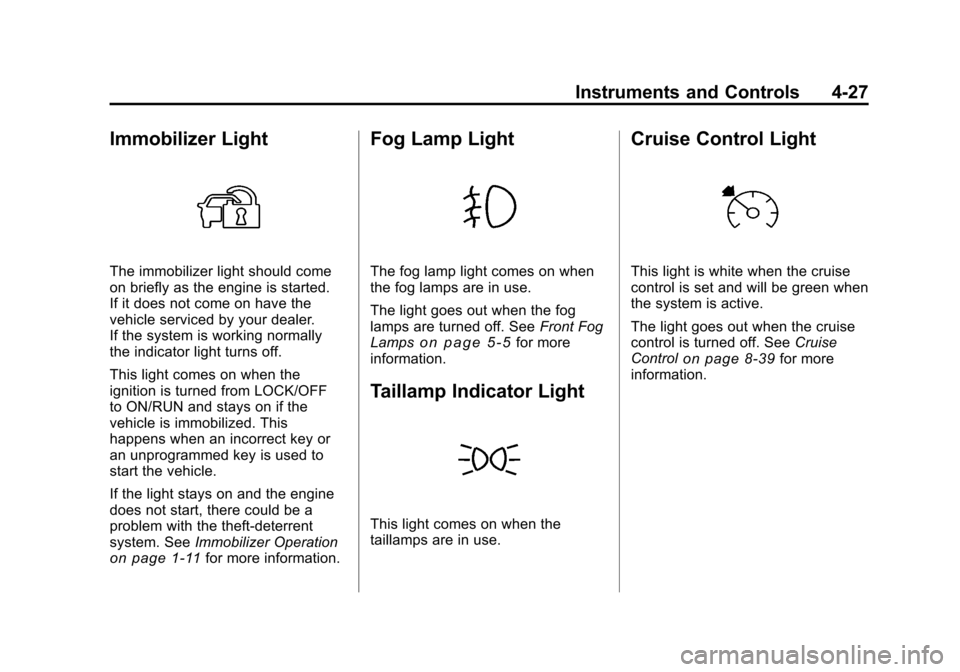
Immobilizer Light
The immobilizer light should come
on briefly as the engine is started.
If it does not come on have the
vehicle serviced by your dealer.
If the system is working normally
the indicator light turns off.
This light comes on when the
ignition is turned from LOCK/OFF
to ON/RUN and stays on if the
vehicle is immobilized. This
happens when an incorrect key or
an unprogrammed key is used to
start the vehicle.
If the light stays on and the engine
does not start, there could be a
problem with the theft-deterrent
system. SeeImmobilizer Operation
on page 1‑11for more information.
Fog Lamp Light
The fog lamp light comes on when
the fog lamps are in use.
The light goes out when the fog
lamps are turned off. See Front Fog
Lamps
on page 5‑5for more
information.
Taillamp Indicator Light
This light comes on when the
taillamps are in use.
Cruise Control Light
This light is white when the cruise
control is set and will be green when
the system is active.
The light goes out when the cruise
control is turned off. See Cruise
Control
on page 8‑39for more
information.
Page 116 of 378
Black plate (34,1)Chevrolet Camaro Owner Manual - 2010
4-34 Instruments and Controls
Oil Pressure Low—Stop
Engine
This message displays if low oil
pressure levels occur. Stop the
vehicle as soon as safely possible
and do not operate it until the cause
of the low oil pressure has been
corrected. Check the oil as soon
as possible and have the vehicle
serviced by your dealer.
Engine Power Messages
Engine Power Is Reduced
This message displays when the
vehicle's engine power is reduced.
Reduced engine power can affect
the vehicle's ability to accelerate.
If this message is on, but there
is no reduction in performance,
proceed to your destination. The
performance may be reduced the
next time the vehicle is driven. The
vehicle may be driven at a reduced
speed while this message is on, but
maximum acceleration and speed
may be reduced. Anytime this message stays on, the vehicle
should be taken to your dealer for
service as soon as possible.
Fuel System Messages
Fuel Level Low
This message displays when the
vehicle is low on fuel. Refuel as
soon as possible
Tighten Gas Cap
This message displays when the
fuel cap is not on tight. Tighten the
fuel cap.
Key and Lock Messages
Number Of Keys Programmed
This message displays when
programming new keys to the
vehicle.
Replace Battery In Remote Key
This message displays when the
battery in the Remote Keyless Entry
(RKE) transmitter needs to be
replaced.
Lamp Messages
Automatic Light Control On
This message is displayed when the
automatic light control has been
turned on. See
Automatic Headlamp
System on page 5‑4.
Automatic Light Control Off
This message is displayed when the
automatic light control has been
turned off. See Automatic Headlamp
System on page 5‑4.
Left Front Turn Indicator
Failure
This message is displayed if the
turn signal bulb needs to be
replaced. See Headlamps, Front
Turn Signal and Parking Lamps
(Base Vehicle)
on page 9‑37or
Headlamps, Front Turn Signal and
Parking Lamps (Up-Level Vehicle)
on page 9‑38and Replacement
Bulbson page 9‑41for more
information.
Page 118 of 378
Black plate (36,1)Chevrolet Camaro Owner Manual - 2010
4-36 Instruments and Controls
Service Stabilitrak
This message displays if there is
a problem with the StabiliTrak®
system. If this message appears, try
to reset the system. Stop; turn off
the engine and remove the key from
the ignition; open and close the
driver door and wait for at least
one minute. During this time you
should notice the lights on the
cluster turn off. After a minute has
passed start the engine again. If this
message still comes on, it means
there is a problem. See your dealer
for service. The vehicle is safe to
drive, however, you do not have the
benefit of StabiliTrak, so reduce
your speed and drive accordingly.
Airbag System Messages
Service Airbag
This message is displayed if there is
a problem with the airbag system.
Take the vehicle to your dealer for
service.
Safety Belt Messages
Buckle Seatbelt
This message displays as a
reminder when the safety belt
is not buckled.
Anti-Theft Alarm System
Messages
Theft Attempted
This message displays if the vehicle
detects a tamper condition.
Service Vehicle Messages
Service AC System
This message is displayed if there is
a problem with the air conditioning
system. Take the vehicle to your
dealer for service.
Service Power Steering
This message is displayed if there is
a problem with the power steering
system. Take the vehicle to your
dealer for service.
Service Vehicle Soon
This message is displayed if there is
a problem with the vehicle. Take the
vehicle to your dealer for service.
Tire Messages
Check XXX Tire Pressure
This message displays if the vehicle
detects low pressure in one or more
tires. The tire with the low pressure
will be shown in the message.
Check the tire pressures.
Service Tire Monitor System
This message displays if there is a
problem with the Tire Pressure
Monitor System (TPMS). SeeTire
Pressure Monitor Operation
on
page 9‑60for more information.
Tire Learning Active
This message displays when the
system is learning new tires. See
Tire Pressure Monitor Operation
on
page 9‑60for more information.
Page 119 of 378
Black plate (37,1)Chevrolet Camaro Owner Manual - 2010
Instruments and Controls 4-37
Tire Pressure System Reset
This message displays when
resetting the TPMS. SeeTire
Pressure Monitor Operation
on
page 9‑60for more information.
Transmission Messages
1 –4 Shift
This message displays when you
can only shift from 1 (First) to
4 (Fourth) instead of 1 (First)
to 2 (Second). See Manual
Transmission
on page 8‑30for more information.
Press Clutch To Start
This message displays when
attempting to start a vehicle with
a manual transmission without
pressing on the clutch pedal.
Service Transmission
This message displays if there is
a problem with the transmission.
See your dealer.
Shift Denied
This message displays when
attempting to use the automatic
transmission manual mode to shift
to too low of a gear. See Manual
Mode
on page 8‑29for more
information.
Shift To Park
This message displays when the
transmission needs to be shifted
to park. This may appear when
attempting to remove the key from
the ignition if the vehicle is not in
P (Park).
Transmission Hot –Idle
Engine
This message displays and a chime
sounds if the transmission fluid in
the vehicle gets hot. Driving with the
transmission fluid temperature high
can cause damage to the vehicle.
Stop the vehicle and let it idle to
allow the transmission to cool.
This message clears when the fluid
temperature reaches a safe level.
Vehicle Reminder
Messages
Ice Possible Drive With Care
This message is displayed when ice
conditions are possible.
Turn Wiper Control to
Intermittent First
This message is displayed when
attempting to adjust the intermittent
wiper speed without intermittent
selected on the wiper control.
See Windshield Wiper/Washer
on
page 4‑7.
Vehicle Speed Messages
Driver Selected Speed Limit
Exceeded
This message is displayed when the
vehicle speed is greater than the set
speed. See “Speed Warning” under
Driver Information Center (DIC)
on
page 4‑28.
Page 121 of 378
Black plate (39,1)Chevrolet Camaro Owner Manual - 2010
Instruments and Controls 4-39
Climate and Air Quality
Select the Climate and Air Quality
menu and the following will be
displayed:
.Remote Start Heated Seats
Remote Start Heated Seats
When on, this feature will turn the
heated seats on when using remote
start.
Press the MENU / SELECT knob
when Remote Start Heated Seats is
highlighted. Turn the knob to select
On or Off. Press the knob to confirm
and go back to the last menu.
Comfort and Convenience
Select the Comfort and
Convenience menu and the
following will be displayed:
.Chime Volume
.Personalization by Driver Chime Volume
This allows the selection of the
chime volume level.
Press the MENU / SELECT knob
when Chime Volume is highlighted.
Turn the knob to select Normal or
High. Press the knob to confirm and
go back to the last menu.
Personalization by Driver
This allows the selection of if the
personalization settings are specific
to each driver or the same no matter
which key was used to enter and
start the vehicle.
Press the MENU / SELECT knob
when Personalization by Driver is
highlighted. Turn the knob to select
On or Off. Press the knob to confirm
and go back to the last menu.
Collision/Detection Systems
Select the Collision/Detection
Systems menu and the following will
be displayed:
.Park AssistPark Assist
This allows the Ultrasonic Parking
Assist feature to be turned on or off.
Press the MENU / SELECT knob
when Park Assist is highlighted.
Turn the knob to select On or Off.
Press the knob to confirm and go
back to the last menu.
Language
Select the Language menu and the
following will be displayed:
.English
.French
.Spanish
Turn the MENU / SELECT knob to
select the language. Press the knob
to confirm and go back to the
last menu.
Lighting
Select the Lighting menu and the
following will be displayed:
.Exit Lighting
.Vehicle Locator Lights