trunk CHEVROLET CAMARO 2013 5.G User Guide
[x] Cancel search | Manufacturer: CHEVROLET, Model Year: 2013, Model line: CAMARO, Model: CHEVROLET CAMARO 2013 5.GPages: 404, PDF Size: 5.45 MB
Page 46 of 404
Black plate (20,1)Chevrolet Camaro Owner Manual (Include Mex) - 2012
2-20 Keys, Doors, and Windows
Notice:If you raise the top
without removing the tonneau
cover you may damage the top
components and the tonneau
cover. Remove the tonneau cover
before operating the
convertible top.
1. Park on a level surface. Place the vehicle in P (Park) with an
automatic transmission and
Neutral with a manual
transmission. Set the parking
brake.
2. Remove the tonneau cover if installed. See Tonneau Cover on
page 4‑3 for more information.
3. Move any objects that have fallen against the convertible top
inside the trunk.
4. Close the trunk.
5. Start the engine.
{WARNING
Placing hands on the top of the
windshield frame when closing
the convertible soft top could
cause fingers to be pinched and
may cause injury. Keep hands
below the windshield frame when
closing the convertible top.
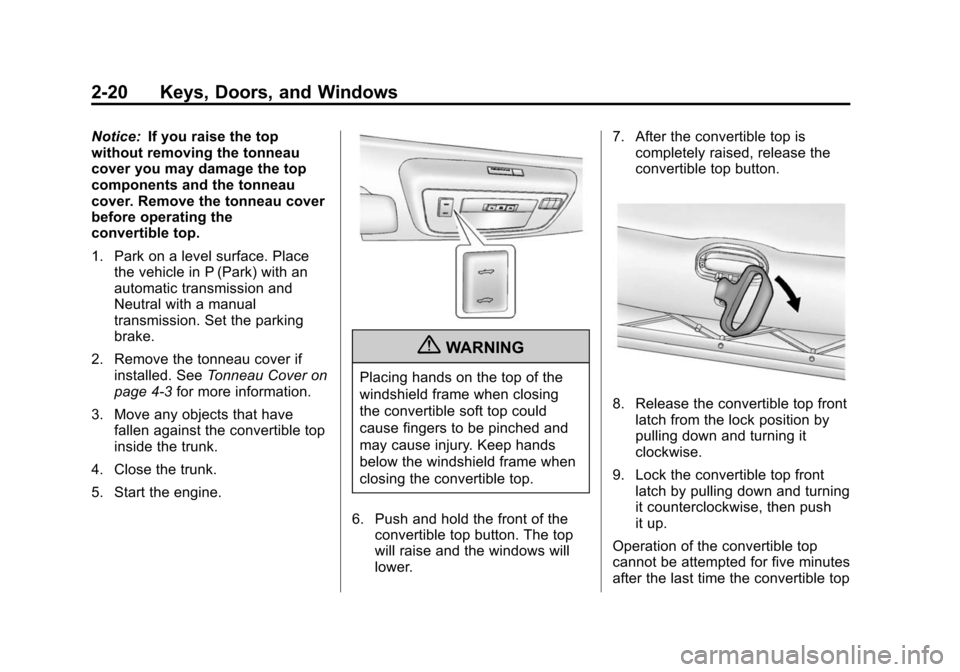
6. Push and hold the front of the convertible top button. The top
will raise and the windows will
lower. 7. After the convertible top is
completely raised, release the
convertible top button.
8. Release the convertible top front
latch from the lock position by
pulling down and turning it
clockwise.
9. Lock the convertible top front latch by pulling down and turning
it counterclockwise, then push
it up.
Operation of the convertible top
cannot be attempted for five minutes
after the last time the convertible top
Page 47 of 404
Black plate (21,1)Chevrolet Camaro Owner Manual (Include Mex) - 2012
Keys, Doors, and Windows 2-21
switch was pressed if the
convertible top was opened
repeatedly within a short time and
the top has stopped functioning.
If the vehicle has lost power, the
convertible top can still be raised by
releasing pressure on the
hydraulic pump.
Never attempt to open or close the
convertible top manually without first
releasing pressure.
Raising the Convertible Top
Manually
Notice:If you raise the top
without removing the tonneau
cover you may damage the top
components and the tonneau
cover. Remove the tonneau cover
before operating the
convertible top.
1. Park on a level surface. Place the vehicle in P (Park) with an
automatic transmission and
Neutral with a manual
transmission. Set the parking
brake. 2. Remove the tonneau cover if
installed. See Tonneau Cover on
page 4‑3 for more information.
3. Move any objects that have fallen against the convertible top
inside the trunk.
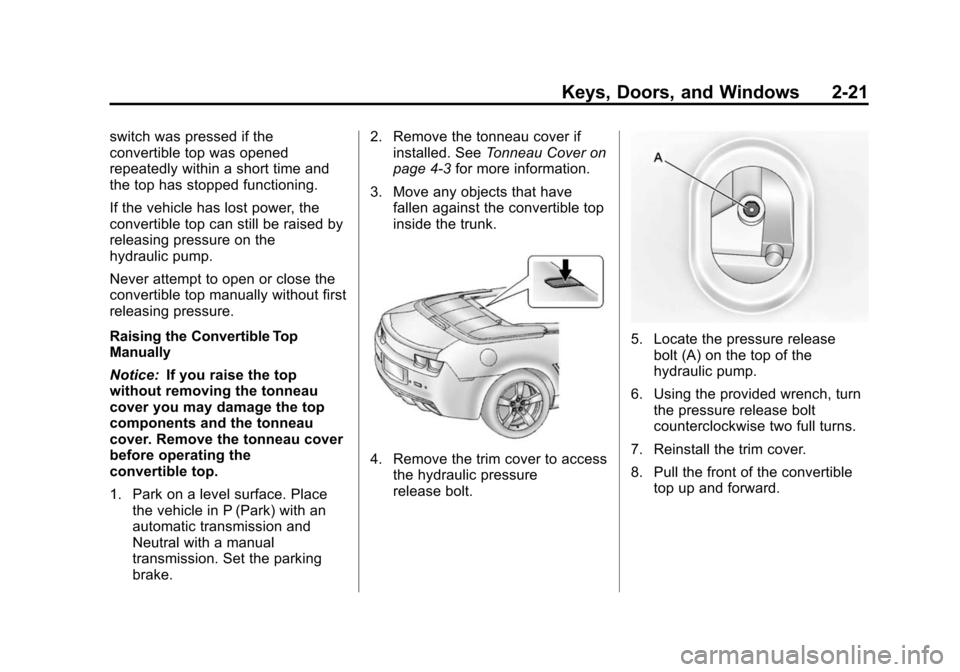
4. Remove the trim cover to accessthe hydraulic pressure
release bolt.
5. Locate the pressure release
bolt (A) on the top of the
hydraulic pump.
6. Using the provided wrench, turn the pressure release bolt
counterclockwise two full turns.
7. Reinstall the trim cover.
8. Pull the front of the convertible top up and forward.
Page 99 of 404
Black plate (1,1)Chevrolet Camaro Owner Manual (Include Mex) - 2012
Storage 4-1
Storage
Storage Compartments
Glove Box . . . . . . . . . . . . . . . . . . . . 4-1
Rear Storage . . . . . . . . . . . . . . . . . 4-1
Center Console Storage . . . . . . 4-2
Additional Storage Features
Tonneau Cover . . . . . . . . . . . . . . . . 4-3
Convenience Net . . . . . . . . . . . . . 4-5
Storage
Compartments
Glove Box
Open the glove box by lifting up on
the lever. Use the key to lock and
unlock the glove box.
Rear Storage
Rear Trunk Partition
The trunk partition keeps cargo
away from the convertible top.
The trunk partition attaches to the
sides of the trunk to protect the
convertible top or can be rolled up
and stored when the convertible top
is up.Fastened Position
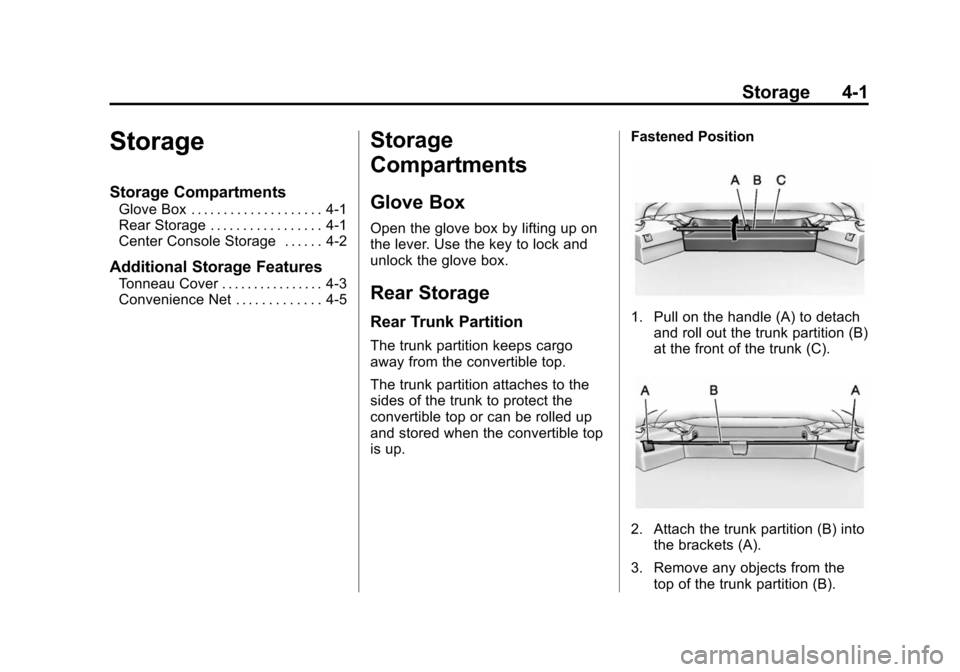
1. Pull on the handle (A) to detach
and roll out the trunk partition (B)
at the front of the trunk (C).
2. Attach the trunk partition (B) into
the brackets (A).
3. Remove any objects from the top of the trunk partition (B).
Page 100 of 404
Black plate (2,1)Chevrolet Camaro Owner Manual (Include Mex) - 2012
4-2 Storage
Stored Position
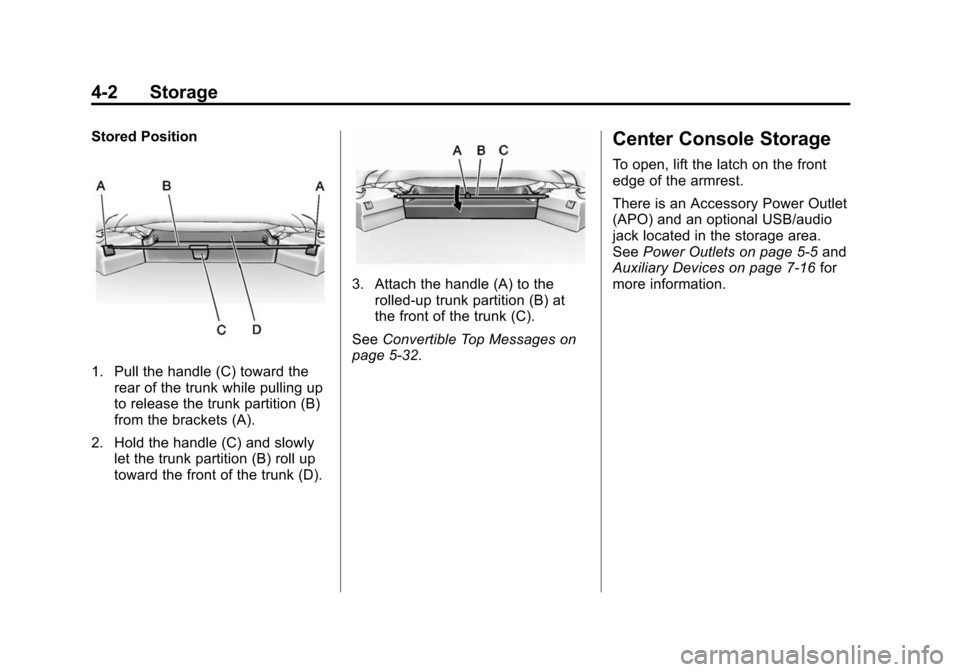
1. Pull the handle (C) toward therear of the trunk while pulling up
to release the trunk partition (B)
from the brackets (A).
2. Hold the handle (C) and slowly let the trunk partition (B) roll up
toward the front of the trunk (D).
3. Attach the handle (A) to therolled‐up trunk partition (B) at
the front of the trunk (C).
See Convertible Top Messages on
page 5‑32.
Center Console Storage
To open, lift the latch on the front
edge of the armrest.
There is an Accessory Power Outlet
(APO) and an optional USB/audio
jack located in the storage area.
See Power Outlets on page 5‑5 and
Auxiliary Devices on page 7‑16 for
more information.
Page 101 of 404
Black plate (3,1)Chevrolet Camaro Owner Manual (Include Mex) - 2012
Storage 4-3
Additional Storage
Features
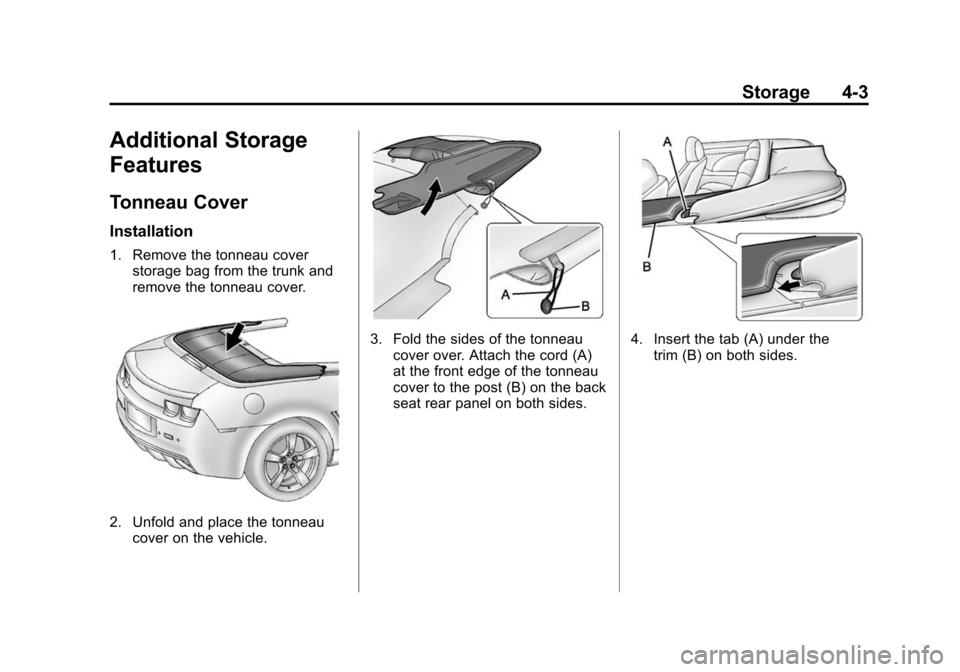
Tonneau Cover
Installation
1. Remove the tonneau coverstorage bag from the trunk and
remove the tonneau cover.
2. Unfold and place the tonneaucover on the vehicle.
3. Fold the sides of the tonneaucover over. Attach the cord (A)
at the front edge of the tonneau
cover to the post (B) on the back
seat rear panel on both sides.4. Insert the tab (A) under thetrim (B) on both sides.
Page 103 of 404
Black plate (5,1)Chevrolet Camaro Owner Manual (Include Mex) - 2012
Storage 4-5
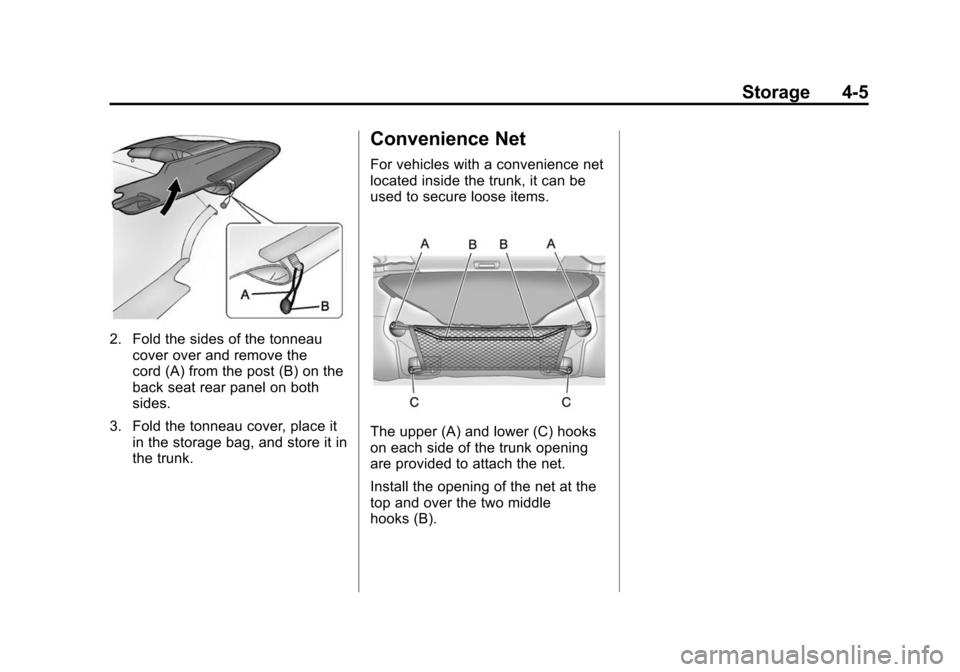
2. Fold the sides of the tonneaucover over and remove the
cord (A) from the post (B) on the
back seat rear panel on both
sides.
3. Fold the tonneau cover, place it in the storage bag, and store it in
the trunk.
Convenience Net
For vehicles with a convenience net
located inside the trunk, it can be
used to secure loose items.
The upper (A) and lower (C) hooks
on each side of the trunk opening
are provided to attach the net.
Install the opening of the net at the
top and over the two middle
hooks (B).
Page 136 of 404
Black plate (32,1)Chevrolet Camaro Owner Manual (Include Mex) - 2012
5-32 Instruments and Controls
Compass Messages
CAL
This message is displayed when the
compass needs to be calibrated.
SeeCompass on page 5‑4.
– – –
Three dashes will be displayed if the
compass needs service. See your
dealer for service.
Convertible Top
Messages
BATTERY VOLTAGE TOO
LOW –TOP DISABLED
This message displays when the
battery voltage is too low to operate
the convertible top.
EXTEND CARGO SHADE TO
OPERATE
This message displays if the rear
trunk partition is not extended and
engaged.
CLOSE TRUNK TO
OPERATE TOP
This message displays if the trunk is
open while you are trying to operate
the convertible top. Make sure the
trunk is closed before operating the
convertible top. See Convertible Top
on page 2‑18.
COMPLETE TOP MOTION TO
OPEN TRUNK
This message displays if attempting
to open the trunk before the top has
been fully opened or closed.
REDUCE VEHICLE SPEED TO
OPERATE TOP
This message is displayed when the
vehicle is moving too fast to safely
operate the convertible top. Reduce
the vehicle speed.
TEMPERATURE TOO
LOW –TOP DISABLED
This message displays and a sound
will be heard when the power
convertible top button is pressed and the power convertible top
pump motor temperature is below
0°C (32°F). Wait for the power
convertible top pump motor to warm
up before using the power
convertible top.
TOP NOT SECURE
This message displays when the
power convertible top is closed
without the convertible top front
latch engaged or when the folding
top is not fully stowed. Press and
hold the convertible top button in the
open direction until a beep is heard
or close the top and engage the
latch.
TOP SYSTEM OVERHEATED,
PLEASE WAIT
This message displays and a sound
will be heard when the power
convertible top button is pressed
and the power convertible top pump
motor is overheated. Wait for the
power convertible top pump motor
to cool down before using the power
convertible top.
Page 137 of 404
Black plate (33,1)Chevrolet Camaro Owner Manual (Include Mex) - 2012
Instruments and Controls 5-33
UNLATCH TOP
This message displays and a sound
will be heard if you try to lower the
convertible top without first
releasing the front latch. See
Convertible Top on page 2‑18.
Cruise Control Messages
CRUISE SET TO XXX
This message displays when the
cruise control is set and shows the
speed it was set to. SeeCruise
Control on page 9‑38 for more
information.
Door Ajar Messages
DRIVER DOOR OPEN
This message will display when the
driver door is open. Close the door
completely.
HOOD OPEN
This message will display when the
hood is open. Close the hood
completely.
PASSENGER DOOR OPEN
This message will display when the
passenger door is open. Close the
door completely.
TRUNK OPEN
This message will display when the
trunk is open. Close the trunk
completely.
Engine Cooling System
Messages
A/C OFF DUE TO HIGH
ENGINE TEMP
This message displays when the
engine coolant becomes hotter than
the normal operating temperature.
To avoid added strain on a hot
engine, the air conditioning
compressor automatically turns off.
When the coolant temperature
returns to normal, the air
conditioning compressor turns back
on. You can continue to drive the
vehicle. If this message continues to appear,
have the system repaired by your
dealer as soon as possible to avoid
damage to the engine.
COOLANT LEVEL LOW ADD
COOLANT
This message will display if the
coolant is low. See
Engine Coolant
on page 10‑19.
ENGINE OVERHEATED —
IDLE ENGINE
This message displays when the
engine coolant temperature is too
hot. Stop and allow the vehicle to
idle until it cools down.
ENGINE OVERHEATED —
STOP ENGINE
This message displays and a
continuous chime sounds if the
engine cooling system reaches
unsafe temperatures for operation.
Stop and turn off the vehicle as
soon as it is safe to do so to avoid
Page 235 of 404
Black plate (41,1)Chevrolet Camaro Owner Manual (Include Mex) - 2012
Driving and Operating 9-41
WARNING (Continued)
URPA, always check behind the
vehicle and check all mirrors
before backing.
How the System Works
URPA comes on automatically when
the shift lever is moved into
R (Reverse). A single tone sounds
to indicate the system is working.
URPA operates only at speeds less
than 8 km/h (5 mph).
An obstacle is indicated by audible
beeps. The interval between the
beeps becomes shorter as the
vehicle gets closer to the obstacle.
When the distance is less than
30 cm (12 in), the beeping is a
continuous tone for five seconds.
To be detected, objects must be at
least 20 cm (8 in) off the ground and
below trunk level. Objects must also
be within 2.5 m (8 ft) from the rearbumper. The distance objects can
be detected may be less during
warmer or humid weather.
Turning the System On and Off
The URPA system can be turned on
and off using the infotainment
system controls. See
Vehicle
Personalization on page 5‑39 for
more information.
When the system is off, PARK
ASSIST OFF displays on the Driver
Information Center (DIC). The
message disappears after a short
period of time.
URPA defaults to the on setting
each time the vehicle is started.
When the System Does Not
Seem to Work Properly
The following messages may be
displayed on the DIC:
SERVICE PARKING ASSIST: If
this message occurs, take the
vehicle to your dealer to repair the
system. PARK ASSIST Off:
If the URPA
system does not activate due to a
temporary condition, the message
displays on the DIC. This can occur
under the following conditions:
.The driver has disabled the
system.
.The ultrasonic sensors are not
clean. Keep the vehicle's rear
bumper free of mud, dirt, snow,
ice, and slush. For cleaning
instructions, see Exterior Care
on page 10‑88.
.The park assist sensors are
covered by frost or ice. Frost or
ice can form around and behind
the sensors and may not always
be seen; this can occur after
washing the vehicle in cold
weather. The message may not
clear until the frost or ice has
melted.
.An object was hanging out of the
trunk during the last drive cycle.
Once the object is removed,
URPA will return to normal
operation.
Page 242 of 404
Black plate (48,1)Chevrolet Camaro Owner Manual (Include Mex) - 2012
9-48 Driving and Operating
Filling a Portable Fuel
Container
{WARNING
Never fill a portable fuel container
while it is in the vehicle. Static
electricity discharge from the
container can ignite the fuel
vapor. You can be badly burned
and the vehicle damaged if this
occurs. To help avoid injury to you
and others:
.Dispense fuel only into
approved containers.
.Do not fill a container while it
is inside a vehicle, in a
vehicle's trunk, pickup bed,
or on any surface other than
the ground.(Continued)
WARNING (Continued)
.Bring the fill nozzle in contact
with the inside of the fill
opening before operating the
nozzle. Contact should be
maintained until the filling is
complete.
.Do not smoke while
pumping fuel.
.Do not use a cellular phone
while pumping fuel.
Towing
General Towing
Information
Only use towing equipment that has
been designed for the vehicle.
Contact your dealer or trailering
dealer for assistance with preparing
the vehicle for towing a trailer.
See the following trailer towing
information in this section:
.For information on driving while
towing a trailer, see “Driving
Characteristics and
Towing Tips.”
.For maximum vehicle and trailer
weights, see “Trailer Towing.”
.For information on equipment to
tow a trailer, see “Towing
Equipment.”
For information on towing a disabled
vehicle, see Towing the Vehicle on
page 10‑87. For information on
towing the vehicle behind another