instrument panel CHEVROLET CAMARO 2013 5.G Owner's Manual
[x] Cancel search | Manufacturer: CHEVROLET, Model Year: 2013, Model line: CAMARO, Model: CHEVROLET CAMARO 2013 5.GPages: 404, PDF Size: 5.45 MB
Page 128 of 404
Black plate (24,1)Chevrolet Camaro Owner Manual (Include Mex) - 2012
5-24 Instruments and Controls
Cruise Control Light
This light is white when the cruise
control is set and green when the
system is active.
The light goes out when the cruise
control is turned off. SeeCruise
Control on page 9‑38 for more
information.
Information Displays
Driver Information
Center (DIC)
The vehicle may have a Driver
Information Center (DIC). The DIC
displays information about your
vehicle. It also displays warning
messages if a system problem is
detected. See Vehicle Messages on
page 5‑31 for more information. All
messages appear in the DIC display
located in the center of the
instrument panel cluster.
The vehicle may also have features
that can be customized through the
controls on the radio. See Vehicle
Personalization on page 5‑39 for
more information.
DIC Operation and Displays
The DIC has different displays
which can be accessed by using the
DIC buttons on the turn signal lever
located on the left side of the
steering wheel. The DIC displays trip, fuel, vehicle system information,
and warning messages if a system
problem is detected.
The bottom of the DIC display
shows what position the shift lever
is in (Automatic Transmission Only),
the odometer, and the direction the
vehicle is driving.
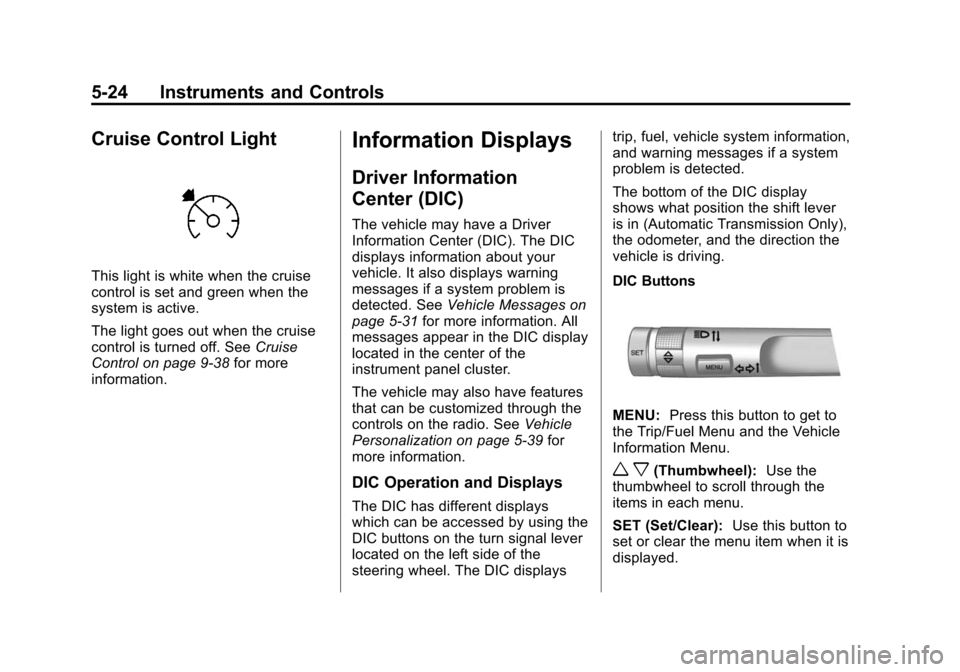
DIC Buttons
MENU:
Press this button to get to
the Trip/Fuel Menu and the Vehicle
Information Menu.
w x(Thumbwheel): Use the
thumbwheel to scroll through the
items in each menu.
SET (Set/Clear): Use this button to
set or clear the menu item when it is
displayed.
Page 131 of 404
Black plate (27,1)Chevrolet Camaro Owner Manual (Include Mex) - 2012
Instruments and Controls 5-27
For example, the display may read
Battery Voltage 15.0 Volts. The
vehicle's charging system regulates
voltage based on the state of the
battery. The battery voltage can
fluctuate while viewing this
information on the DIC. This is
normal. SeeCharging System Light
on page 5‑15 for more information.
If there is a problem with the battery
charging system, the DIC will
display a message. See Battery
Voltage and Charging Messages on
page 5‑31.
Speed Warning
Speed Warning allows the driver to
set a speed that they do not want to
exceed. To set the Speed Warning,
press SET when Speed Warning is
displayed.
Compass
The vehicle may have a compass
display in the Driver Information
Center (DIC). See Compass on
page 5‑4 for more information.
Head-Up Display (HUD)
{WARNING
If the HUD image is too bright or
too high in your field of view, it
may take you more time to see
things you need to see when it is
dark outside. Be sure to keep the
HUD image dim and placed low in
your field of view.
For vehicles with the Head-Up
Display (HUD), some information
concerning the operation of the
vehicle is projected onto the
windshield. This includes the
speedometer reading, rpm reading,
transmission position, outside air
temperature, compass heading, and
a brief display of the current radio
station, including XM information or
CD track. The images are projected
through the HUD lens located on
the driver side of the instrument
panel. Notice:
If you try to use the HUD
image as a parking aid, you may
misjudge the distance and
damage your vehicle. Do not use
the HUD image as a parking aid.
The tap shift gear will also appear
on the HUD if the vehicle has tap
shift and it is active.
The HUD information can be
displayed in one of three languages:
English, French, or Spanish. The
speedometer reading and other
numerical values can be displayed
in either English or metric units.
The language selection is changed
through the radio and the units of
measurement selection is changed
through the trip computer in the
Driver Information Center (DIC).
See AM-FM Radio on page 7‑8 and
Driver Information Center (DIC) on
page 5‑24.
Page 132 of 404
Black plate (28,1)Chevrolet Camaro Owner Manual (Include Mex) - 2012
5-28 Instruments and Controls
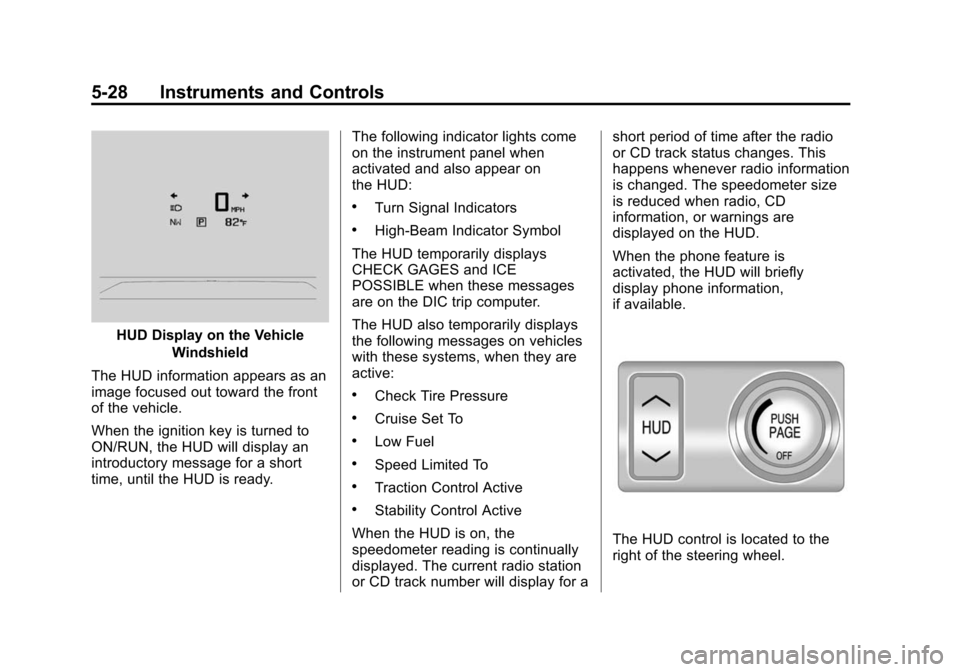
HUD Display on the VehicleWindshield
The HUD information appears as an
image focused out toward the front
of the vehicle.
When the ignition key is turned to
ON/RUN, the HUD will display an
introductory message for a short
time, until the HUD is ready. The following indicator lights come
on the instrument panel when
activated and also appear on
the HUD:
.Turn Signal Indicators
.High-Beam Indicator Symbol
The HUD temporarily displays
CHECK GAGES and ICE
POSSIBLE when these messages
are on the DIC trip computer.
The HUD also temporarily displays
the following messages on vehicles
with these systems, when they are
active:
.Check Tire Pressure
.Cruise Set To
.Low Fuel
.Speed Limited To
.Traction Control Active
.Stability Control Active
When the HUD is on, the
speedometer reading is continually
displayed. The current radio station
or CD track number will display for a short period of time after the radio
or CD track status changes. This
happens whenever radio information
is changed. The speedometer size
is reduced when radio, CD
information, or warnings are
displayed on the HUD.
When the phone feature is
activated, the HUD will briefly
display phone information,
if available.
The HUD control is located to the
right of the steering wheel.
Page 151 of 404
Black plate (1,1)Chevrolet Camaro Owner Manual (Include Mex) - 2012
Lighting 6-1
Lighting
Exterior Lighting
Exterior Lamp Controls . . . . . . . . 6-1
Headlamp High/Low-BeamChanger . . . . . . . . . . . . . . . . . . . . . 6-2
Flash-to-Pass . . . . . . . . . . . . . . . . . 6-2
Daytime Running Lamps (DRL) . . . . . . . . . . . . . . . . 6-2
Automatic Headlamp System . . . . . . . . . . . . . . . . . . . . . . 6-3
Hazard Warning Flashers . . . . . 6-4
Turn and Lane-Change Signals . . . . . . . . . . . . . . . . . . . . . . 6-4
Front Fog Lamps . . . . . . . . . . . . . . 6-5
Interior Lighting
Instrument Panel Illumination Control . . . . . . . . . . . . . . . . . . . . . . 6-5
Dome Lamps . . . . . . . . . . . . . . . . . 6-6
Lighting Features
Entry Lighting . . . . . . . . . . . . . . . . . 6-6
Theater Dimming . . . . . . . . . . . . . . 6-6
Battery Load Management . . . . 6-6
Battery Power Protection . . . . . . 6-7
Exterior Lighting
Exterior Lamp Controls
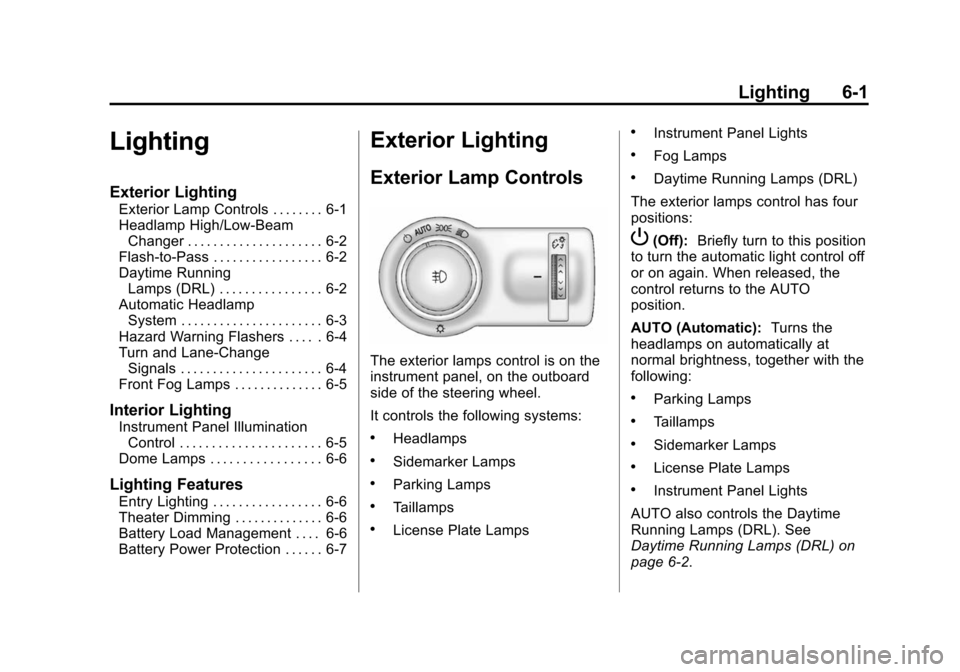
The exterior lamps control is on the
instrument panel, on the outboard
side of the steering wheel.
It controls the following systems:
.Headlamps
.Sidemarker Lamps
.Parking Lamps
.Taillamps
.License Plate Lamps
.Instrument Panel Lights
.Fog Lamps
.Daytime Running Lamps (DRL)
The exterior lamps control has four
positions:
P(Off): Briefly turn to this position
to turn the automatic light control off
or on again. When released, the
control returns to the AUTO
position.
AUTO (Automatic): Turns the
headlamps on automatically at
normal brightness, together with the
following:
.Parking Lamps
.Taillamps
.Sidemarker Lamps
.License Plate Lamps
.Instrument Panel Lights
AUTO also controls the Daytime
Running Lamps (DRL). See
Daytime Running Lamps (DRL) on
page 6‑2.
Page 152 of 404
Black plate (2,1)Chevrolet Camaro Owner Manual (Include Mex) - 2012
6-2 Lighting
;(Parking Lamps):Turns the
parking lamps on together with the
following:
.Taillamps
.Sidemarker Lamps
.License Plate Lamps
.Instrument Panel Lights
A warning chime sounds if the driver
door is opened when the ignition
switch is off and the parking lamps
are on.
5(Headlamps): Turns the
headlamps on together with the
lamps listed below.
.Parking Lamps
.Taillamps
.Sidemarker Lamps
.License Plate Lamps
.Instrument Panel Lights A warning chime sounds if the driver
door is opened when the ignition
switch is off and the headlamps
are on.
#(Front Fog Lamps):
Turns the
fog lamps on or off. The fog lamps
come on together with the following:
.Parking Lamps
.Taillamps
.Sidemarker Lamps
.License Plate Lamps
.Instrument Panel Lights
See Front Fog Lamps on page 6‑5.
Headlamp High/
Low-Beam Changer
Push the turn signal/lane change
lever away from you and release, to
turn the high beams on. To return to
low beams, push the lever again or
pull it toward you and release.
This indicator light turns on in the
instrument panel cluster when the
high‐beam headlamps are on.
Flash-to-Pass
The flash‐to‐pass feature works with
the low beams or Daytime Running
Lamps (DRL) on or off.
To flash the high beams, pull the
turn signal/lane change lever all the
way toward you, then release it.
Daytime Running
Lamps (DRL)
Daytime Running Lamps (DRL) can
make it easier for others to see the
front of your vehicle during the day.
Fully functional Daytime Running
Lamps are required on all vehicles
first sold in Canada.
Page 153 of 404

Black plate (3,1)Chevrolet Camaro Owner Manual (Include Mex) - 2012
Lighting 6-3
A light sensor on top of the
instrument panel makes the DRL
work, so be sure it is not covered.
The DRL system will make the
low‐beam headlamps come on at a
reduced brightness or for vehicles
with High Intensity Discharge (HID)
headlamps, the dedicated DRL
lights will come on when the
following conditions are met:
.The ignition is in the ON/RUN
position.
.The exterior lamps control is in
AUTO, or has been briefly
turned to OFF to turn the
automatic light control on again.
.The engine is running.
When the DRL are on, the
headlamps, taillamps, sidemarker,
instrument panel, and other lamps
will not be on.
The headlamps automatically
change from DRL to the regular
headlamps depending on the darkness of the surroundings. The
other lamps that come on with the
headlamps will also come on.
When it is bright enough outside,
the headlamps will go off and the
DRL will come on.
To turn the DRL off or on again, turn
the exterior lamps control to the off
position and then release. For
vehicles first sold in Canada, the
DRL cannot be turned off.
The regular headlamp system
should be turned on when needed.
Automatic Headlamp
System
When it is dark enough outside and
the headlamp switch is in AUTO,
the automatic headlamp system will
turn on the headlamps at the normal
brightness along with other lamps
such as the taillamps, sidemarker
lamps, parking lamps, license plate
lamps, and the instrument panel
lights. The radio lights will also
be dim.To turn off the automatic headlamp
system, turn the exterior lamps
switch to the off position and then
release. For vehicles first sold in
Canada, the transmission must be
in the P (Park) position, before the
automatic headlamp system can be
turned off.The vehicle has a light sensor
located on the top of the instrument
panel. Do not cover this sensor or
the system will come on whenever
the ignition is on.
The system may also turn on the
headlamps when driving through a
parking garage, heavy overcast
weather, or a tunnel. This is normal.
Page 154 of 404

Black plate (4,1)Chevrolet Camaro Owner Manual (Include Mex) - 2012
6-4 Lighting
There is a delay in the transition
between the daytime and nighttime
operation of the Daytime Running
Lamps (DRL) and the automatic
headlamp systems so that driving
under bridges or bright overhead
street lights does not affect the
system. The DRL and automatic
headlamp system will only be
affected when the light sensor sees
a change in lighting lasting longer
than the delay.
If the vehicle is started in a dark
garage, the automatic headlamp
system comes on immediately. If it
is light outside when the vehicle
leaves the garage, there will be a
slight delay before the automatic
headlamp system changes to
the DRL. During that delay, the
instrument panel cluster may not be
as bright as usual. Make sure the
instrument panel brightness control
is in the full bright position. See
Instrument Panel Illumination
Control on page 6‑5.Hazard Warning Flashers
|Hazard Warning Flasher:
Press this button to make the front
and rear turn signal lamps flash on
and off. This warns others that you
are having trouble. Press again to
turn the flashers off.
Turn and Lane-Change
Signals
An arrow on the instrument panel
cluster flashes in the direction of the
turn or lane change.
Move the lever all the way up or
down to signal a turn.
Raise or lower the lever until the
arrow starts to flash to signal a lane
change. Hold it there until the lane
change is completed. If the lever is
briefly pressed and released, the
turn signal flashes three times.
The lever returns to its starting
position whenever it is released.
If after signaling a turn or lane
change the arrow flashes rapidly or
does not come on, a signal bulb
might be burned out.
Page 155 of 404
Black plate (5,1)Chevrolet Camaro Owner Manual (Include Mex) - 2012
Lighting 6-5
Have the bulbs replaced. If the bulb
is not burned out, check the fuse.
SeeElectrical System Overload on
page 10‑39.
Front Fog Lamps
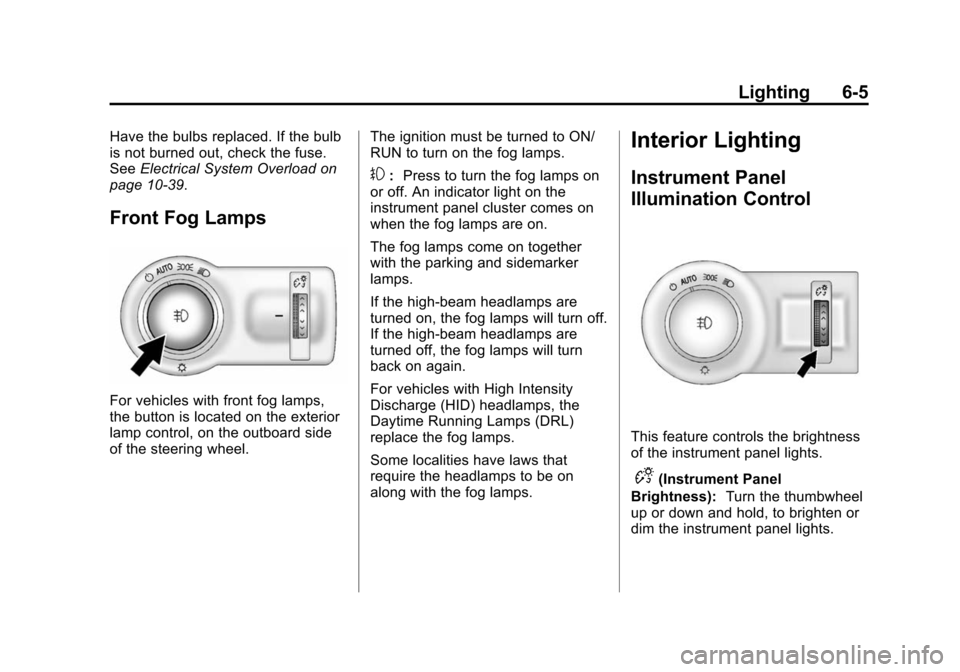
For vehicles with front fog lamps,
the button is located on the exterior
lamp control, on the outboard side
of the steering wheel. The ignition must be turned to ON/
RUN to turn on the fog lamps.
#:
Press to turn the fog lamps on
or off. An indicator light on the
instrument panel cluster comes on
when the fog lamps are on.
The fog lamps come on together
with the parking and sidemarker
lamps.
If the high‐beam headlamps are
turned on, the fog lamps will turn off.
If the high‐beam headlamps are
turned off, the fog lamps will turn
back on again.
For vehicles with High Intensity
Discharge (HID) headlamps, the
Daytime Running Lamps (DRL)
replace the fog lamps.
Some localities have laws that
require the headlamps to be on
along with the fog lamps.
Interior Lighting
Instrument Panel
Illumination Control
This feature controls the brightness
of the instrument panel lights.
D(Instrument Panel
Brightness): Turn the thumbwheel
up or down and hold, to brighten or
dim the instrument panel lights.
Page 192 of 404
Black plate (2,1)Chevrolet Camaro Owner Manual (Include Mex) - 2012
8-2 Climate Controls
#and the air conditioning system
is turned on and air is recirculated
inside the vehicle.
Air Delivery Mode Control: To
change the current mode, press one
of the following:
F (Vent): Air is directed to the
instrument panel outlets.
* (Bi-Level): Air is directed to the
instrument panel outlets and the
floor outlets.
7 (Floor): Air is directed to the
floor outlets.
W(Defog): Clears the windows of
fog or moisture. Air is directed to the
windshield and floor outlets.
0(Defrost): Clears the
windshield of fog or frost more
quickly. Air is directed to the
windshield and side window outlets.
For best results, clear all snow and
ice from the windshield before
defrosting.
Do not drive the vehicle until all
windows are clear.
Air Conditioning
#(Air Conditioning): Press to
turn the air conditioning on or off.
An indicator light turns on. If the
fan is turned off or the outside
temperature falls below freezing,
the air conditioning will not work.
The air conditioning might
automatically come on when
0is
selected.
)(Recirculation): Press to turn
on the recirculation. An indicator
light comes on. Air is recirculated
inside the vehicle. It helps to quickly
cool the air inside the vehicle or
prevent outside air and odors from
entering.
Operation in the recirculation mode
while the air conditioner is off
increases humidity and may cause
the windows to fog.
Recirculation is not available in the
defrost or defog modes.
To improve fuel efficiency and to
cool the vehicle faster, recirculation
may be automatically selected in warm weather. The recirculation
light will not come on. Press the
)
to select recirculation; press it again
to select outside air.
Rear Window Defogger
1(Rear Defogger):
Press to
turn the rear window defogger on
or off. The rear window defogger
turns off automatically after about
12 minutes. It can also be turned off
by turning the ignition to ACC/
ACCESSORY or LOCK/OFF.
If turned on again it runs for about
six minutes before turning off. At
higher vehicle speeds, the rear
defogger can stay on continuously.
Do not drive the vehicle until all
windows are clear.
Notice: Do not use a razor blade
or sharp object to clear the inside
rear window. Do not adhere
anything to the defogger grid
lines in the rear glass. These
actions may damage the rear
defogger. Repairs would not be
covered by your warranty.
Page 193 of 404
Black plate (3,1)Chevrolet Camaro Owner Manual (Include Mex) - 2012
Climate Controls 8-3
L/M(Heated Seats):Press to
turn on or off. See Heated Front
Seats on page 3‑6.
Passenger Compartment Air
Filter
The passenger compartment air
filter removes most of the pollen and
dust from the air that enters the
vehicle. The filter will need to be
replaced periodically. See
Maintenance Schedule on
page 11‑3.
Using the climate control system
without an air filter installed is not
recommended. Water or other
debris could enter the system and
result in leaks or noises. Always
install a new filter when removing
the old filter.
For more information, see your
dealer.
Air Vents
Use the air outlets located in the
center and on the side of the
instrument panel to direct the
airflow. Use the thumbwheels near
the center air outlets to direct airflow
to the left or right.
Operation Tips
.In defog or defrost mode, warm
air flows from some air outlets.
To improve side window
defogging or defrosting, direct
side air outlets toward the side
windows.
.Clear away any ice, snow,
or leaves from air inlets at the
base of the windshield that could
block the flow of air into the
vehicle.
.Keep the path under the front
seats clear of objects to help
circulate the air inside of the
vehicle more effectively.
.Use of non‐GM approved hood
deflectors can adversely affect
the performance of the system.
Check with your dealer before
adding equipment to the outside
of the vehicle.