light CHEVROLET CAMARO 2016 6.G Owner's Manual
[x] Cancel search | Manufacturer: CHEVROLET, Model Year: 2016, Model line: CAMARO, Model: CHEVROLET CAMARO 2016 6.GPages: 383, PDF Size: 6.46 MB
Page 67 of 383
Chevrolet Camaro Owner Manual-Convertible (GMNA-Localizing-U.S./Cana-
da/Mexico-9702260) - 2016 - CRC - 10/28/15
66 Seats and Restraints
Here are the most important things
to know about the airbag system:
{Warning
You can be severely injured or
killed in a crash if you are not
wearing your safety belt, even
with airbags. Airbags are
designed to work with safety
belts, not replace them. Also,
airbags are not designed to inflate
in every crash. In some crashes
safety belts are the only restraint.
SeeWhen Should an Airbag
Inflate? 068.
Wearing your safety belt during a
crash helps reduce the chance of
hitting things inside the vehicle or
being ejected from it. Airbags are
“supplemental restraints” to the
safety belts. Everyone in the
vehicle should wear a safety belt
properly, whether or not there is
an airbag for that person.
{Warning
Because airbags inflate with great
force and faster than the blink of
an eye, anyone who is up
against, or very close to any
airbag when it inflates can be
seriously injured or killed. Do not
sit unnecessarily close to any
airbag, as you would be if sitting
on the edge of the seat or leaning
forward. Safety belts help keep
you in position before and during
a crash. Always wear a safety
belt, even with airbags. The driver
should sit as far back as possible
while still maintaining control of
the vehicle. The safety belts and
the front outboard passenger
airbags are most effective when
you are sitting well back and
upright in the seat with both feet
on the floor.
Occupants should not lean on or
sleep against the door or side
windows in seating positions with
seat-mounted side impact airbags
and/or roof-rail airbags.
{Warning
Children who are up against,
or very close to, any airbag when
it inflates can be seriously injured
or killed. Always secure children
properly in the vehicle. To read
how, see Older Children 078 or
Infants and Young Children 079.
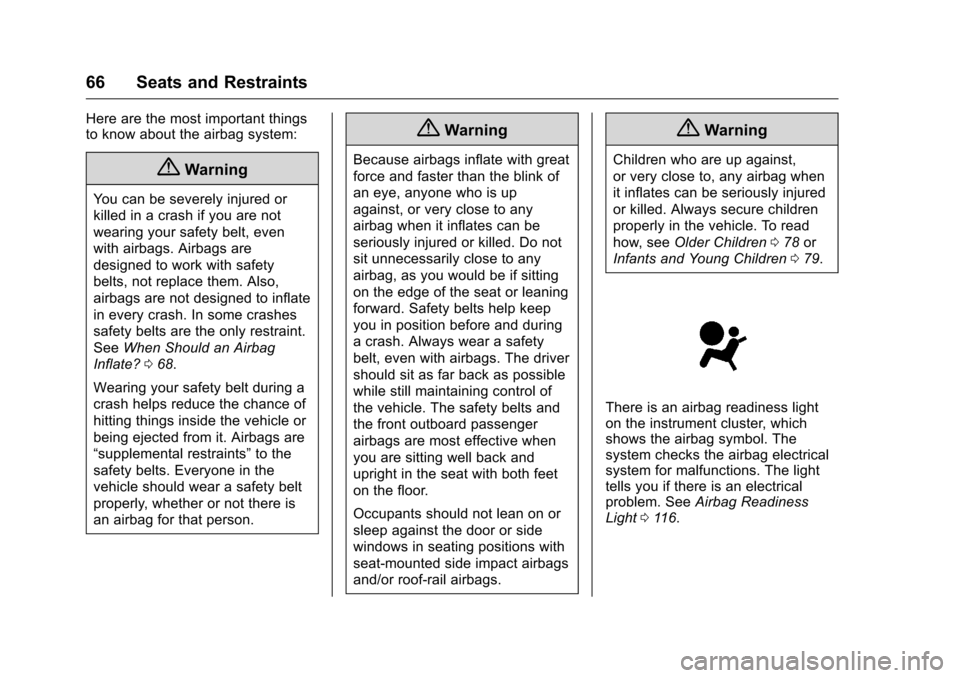
There is an airbag readiness light
on the instrument cluster, which
shows the airbag symbol. The
system checks the airbag electrical
system for malfunctions. The light
tells you if there is an electrical
problem. See Airbag Readiness
Light 0116.
Page 72 of 383
Chevrolet Camaro Owner Manual-Convertible (GMNA-Localizing-U.S./Cana-
da/Mexico-9702260) - 2016 - CRC - 10/28/15
Seats and Restraints 71
Warning (Continued)
by opening a window or a door.
If you experience breathing
problems following an airbag
deployment, you should seek
medical attention.
The vehicle has a feature that may
automatically unlock the doors, turn
on the interior lamps and hazard
warning flashers, and shut off the
fuel system after the airbags inflate.
The feature may also activate,
without airbag inflation, after an
event that exceeds a predetermined
threshold. You can lock the doors,
and turn off the interior lamps and
hazard warning flashers by using
the controls for those features.
{Warning
A crash severe enough to inflate
the airbags may have also
damaged important functions in
the vehicle, such as the fuel (Continued)
Warning (Continued)
system, brake and steering
systems, etc. Even if the vehicle
appears to be drivable after a
moderate crash, there may be
concealed damage that could
make it difficult to safely operate
the vehicle.
Use caution if you should attempt
to restart the engine after a crash
has occurred.
In many crashes severe enough to
inflate the airbag, windshields are
broken by vehicle deformation.
Additional windshield breakage may
also occur from the front outboard
passenger airbag.
. Airbags are designed to inflate
only once. After an airbag
inflates, you will need some new
parts for the airbag system.
If you do not get them, the
airbag system will not be there
to help protect you in another
crash. A new system will include
airbag modules and possibly other parts. The service manual
for the vehicle covers the need
to replace other parts.
. The vehicle has a crash sensing
and diagnostic module which
records information after a
crash. See Vehicle Data
Recording and Privacy 0358
and Event Data
Recorders 0359.
. Let only qualified technicians
work on the airbag systems.
Improper service can mean that
an airbag system will not work
properly. See your dealer for
service.
Passenger Sensing
System
The vehicle has a passenger
sensing system for the front
outboard passenger position. The
passenger airbag status indicator
will light on the overhead console
when the vehicle is started.
Page 74 of 383
Chevrolet Camaro Owner Manual-Convertible (GMNA-Localizing-U.S./Cana-
da/Mexico-9702260) - 2016 - CRC - 10/28/15
Seats and Restraints 73
Warning (Continued)
the front outboard passenger
seat, always move the seat as far
back as it will go. It is better to
secure child restraints in the rear
seat. Consider using another
vehicle to transport the child
when a rear seat is not available.
The passenger sensing system is
designed to turn off the front
outboard passenger frontal airbag
and knee airbag if:
. The front outboard passenger
seat is unoccupied.
. The system determines that an
infant is present in a child
restraint.
. A front outboard passenger
takes his/her weight off of the
seat for a period of time.
. There is a critical problem with
the airbag system or the
passenger sensing system. When the passenger sensing
system has turned off the front
outboard passenger frontal airbag
and knee airbag, the off indicator
will light and stay lit as a reminder
that the airbags are off. See
Passenger Airbag Status
Indicator
0116.
The passenger sensing system is
designed to turn on the front
outboard passenger frontal airbag
and knee airbag anytime the system
senses that a person of adult size is
sitting properly in the front outboard
passenger seat. When the
passenger sensing system has
allowed the airbag(s) to be enabled,
the on indicator will light and stay lit
as a reminder that the airbag(s) are
active.
For some children, including
children in child restraints, and for
very small adults, the passenger
sensing system may or may not turn
off the front outboard passenger
frontal airbag and knee airbag,
depending upon the person’s
seating posture and body build.
Everyone in the vehicle who has
outgrown child restraints should wear a safety belt properly
—
whether or not there is an airbag for
that person.
{Warning
If the airbag readiness light ever
comes on and stays on, it means
that something may be wrong
with the airbag system. To help
avoid injury to yourself or others,
have the vehicle serviced right
away. See Airbag Readiness
Light 0116 for more information,
including important safety
information.
If the On Indicator Is Lit for a
Child Restraint
The passenger sensing system is
designed to turn off the front
outboard passenger frontal airbag
and knee airbag if the system
determines that an infant is present
in a child restraint. If a child restraint
has been installed and the on
indicator is lit:
1. Turn the vehicle off.
Page 75 of 383
Chevrolet Camaro Owner Manual-Convertible (GMNA-Localizing-U.S./Cana-
da/Mexico-9702260) - 2016 - CRC - 10/28/15
74 Seats and Restraints
2. Remove the child restraint fromthe vehicle.
3. Remove any additional items from the seat such as blankets,
cushions, seat covers, seat
heaters, or seat massagers.
4. Reinstall the child restraint following the directions
provided by the child restraint
manufacturer and refer to
Securing Child Restraints
(Rear Seat) 090 orSecuring
Child Restraints (Front
Passenger Seat) 092.
Make sure the safety belt
retractor is locked by pulling
the shoulder belt all the way
out of the retractor when
installing the child restraint,
even if the child restraint is
equipped with a safety belt
lock-off. When the retractor
lock is set, the belt can be
tightened but not pulled out of
the retractor. 5. If, after reinstalling the child
restraint and restarting the
vehicle, the on indicator is still
lit, turn the vehicle off. Then
slightly recline the vehicle
seatback and adjust the seat
cushion, if adjustable, to make
sure that the vehicle seatback
is not pushing the child
restraint into the seat cushion.
Also make sure the child
restraint is not trapped under
the vehicle head restraint.
If this happens, adjust the head
restraint. See Head
Restraints 054.
6. Restart the vehicle.
The passenger sensing system may
or may not turn off the airbags for a
child in a child restraint depending
upon the child’s size. It is better to
secure the child restraint in a rear
seat. Never put a rear-facing child
restraint in the front seat, even if the
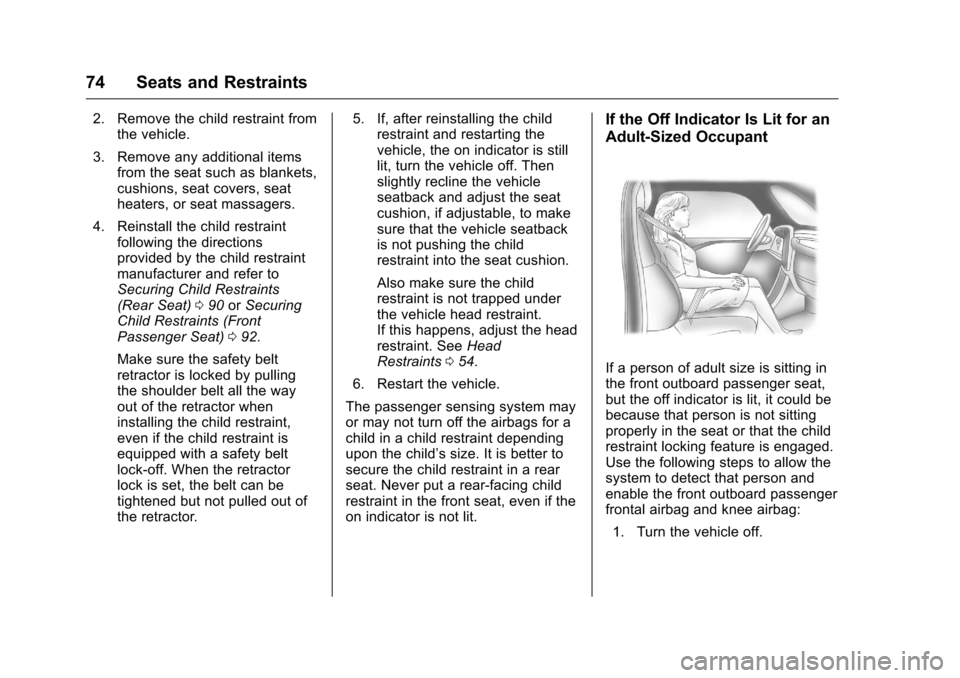
on indicator is not lit.If the Off Indicator Is Lit for an
Adult-Sized Occupant
If a person of adult size is sitting in
the front outboard passenger seat,
but the off indicator is lit, it could be
because that person is not sitting
properly in the seat or that the child
restraint locking feature is engaged.
Use the following steps to allow the
system to detect that person and
enable the front outboard passenger
frontal airbag and knee airbag: 1. Turn the vehicle off.
Page 78 of 383
Chevrolet Camaro Owner Manual-Convertible (GMNA-Localizing-U.S./Cana-
da/Mexico-9702260) - 2016 - CRC - 10/28/15
Seats and Restraints 77
If the vehicle has rollover roof-rail
airbags, seeDifferent Size Tires
and Wheels 0302 for additional
important information.
If you have to modify your vehicle
because you have a disability and
you have questions about whether
the modifications will affect the
vehicle's airbag system, or if you
have questions about whether the
airbag system will be affected if the
vehicle is modified for any other
reason, call Customer Assistance.
See Customer Assistance
Offices 0349.
Airbag System Check
The airbag system does not need
regularly scheduled maintenance or
replacement. Make sure the airbag
readiness light is working. See
Airbag Readiness Light 0116.
Caution
If an airbag covering is damaged,
opened, or broken, the airbag
may not work properly. Do not
(Continued)
Caution (Continued)
open or break the airbag
coverings. If there are any
opened or broken airbag
coverings, have the airbag
covering and/or airbag module
replaced. For the location of the
airbags, seeWhere Are the
Airbags? 067. See your dealer
for service.
Replacing Airbag System
Parts after a Crash
{Warning
A crash can damage the airbag
systems in the vehicle.
A damaged airbag system may
not work properly and may not
protect you and your
passenger(s) in a crash, resulting
in serious injury or even death.
To help make sure the airbag
systems are working properly
(Continued)
Warning (Continued)
after a crash, have them
inspected and any necessary
replacements made as soon as
possible.
If an airbag inflates, you will need to
replace airbag system parts. See
your dealer for service.
If the airbag readiness light stays on
after the vehicle is started or comes
on when you are driving, the airbag
system may not work properly. Have
the vehicle serviced right away. See
Airbag Readiness Light 0116.
Page 94 of 383
Chevrolet Camaro Owner Manual-Convertible (GMNA-Localizing-U.S./Cana-
da/Mexico-9702260) - 2016 - CRC - 10/28/15
Seats and Restraints 93
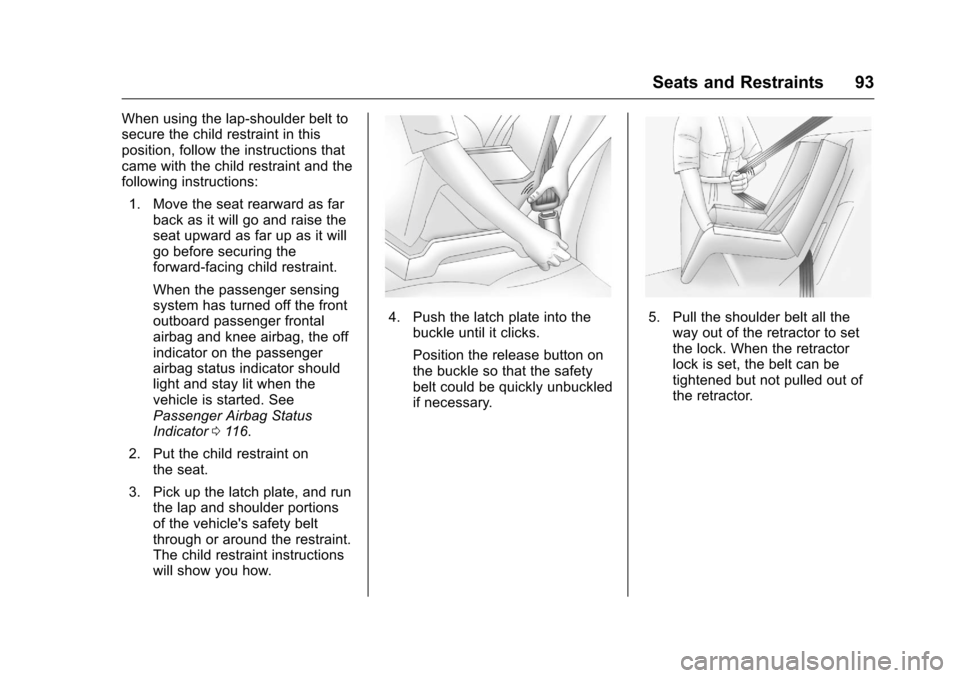
When using the lap-shoulder belt to
secure the child restraint in this
position, follow the instructions that
came with the child restraint and the
following instructions:1. Move the seat rearward as far back as it will go and raise the
seat upward as far up as it will
go before securing the
forward-facing child restraint.
When the passenger sensing
system has turned off the front
outboard passenger frontal
airbag and knee airbag, the off
indicator on the passenger
airbag status indicator should
light and stay lit when the
vehicle is started. See
Passenger Airbag Status
Indicator 0116.
2. Put the child restraint on the seat.
3. Pick up the latch plate, and run the lap and shoulder portions
of the vehicle's safety belt
through or around the restraint.
The child restraint instructions
will show you how.
4. Push the latch plate into the
buckle until it clicks.
Position the release button on
the buckle so that the safety
belt could be quickly unbuckled
if necessary.5. Pull the shoulder belt all theway out of the retractor to set
the lock. When the retractor
lock is set, the belt can be
tightened but not pulled out of
the retractor.
Page 98 of 383
Chevrolet Camaro Owner Manual-Convertible (GMNA-Localizing-U.S./Cana-
da/Mexico-9702260) - 2016 - CRC - 10/28/15
Instruments and Controls 97
Instruments and
Controls
Controls
Steering Wheel Adjustment . . . . 98
Steering Wheel Controls . . . . . . . 99
Heated Steering Wheel . . . . . . . 100
Horn . . . . . . . . . . . . . . . . . . . . . . . . . . 100
Windshield Wiper/Washer . . . . 100
Compass . . . . . . . . . . . . . . . . . . . . . 101
Clock . . . . . . . . . . . . . . . . . . . . . . . . . 101
Power Outlets . . . . . . . . . . . . . . . . 103
Wireless Charging . . . . . . . . . . . . 104
Warning Lights, Gauges, and
Indicators
Warning Lights, Gauges, andIndicators . . . . . . . . . . . . . . . . . . . 105
Instrument Cluster . . . . . . . . . . . . 106
Speedometer . . . . . . . . . . . . . . . . . 110
Odometer . . . . . . . . . . . . . . . . . . . . . 110
Trip Odometer . . . . . . . . . . . . . . . . 110
Tachometer . . . . . . . . . . . . . . . . . . . 110
Fuel Gauge . . . . . . . . . . . . . . . . . . . 111
Boost Gauge (Uplevel Cluster Only) . . . . . . . . . . . . . . . . 112
Engine Oil Pressure Gauge (Uplevel Cluster Only) . . . . . . . 113 Engine Coolant Temperature
Gauge . . . . . . . . . . . . . . . . . . . . . . 114
Voltmeter Gauge . . . . . . . . . . . . . . 115
Safety Belt Reminders . . . . . . . . 115
Airbag Readiness Light . . . . . . . 116
Passenger Airbag Status Indicator . . . . . . . . . . . . . . . . . . . . . 116
Charging System Light . . . . . . . 117
Malfunction Indicator Lamp (Check Engine Light) . . . . . . . . 118
Brake System Warning Light . . . . . . . . . . . . . . . . . . . . . . . . 119
Electric Parking Brake Light . . . . . . . . . . . . . . . . . . . . . . . . 120
Service Electric Parking Brake Light . . . . . . . . . . . . . . . . . . . . . . . . 120
Antilock Brake System (ABS) Warning Light . . . . . . . . . . . . . . . 121
Traction Off Light . . . . . . . . . . . . . 121
StabiliTrak®OFF Light . . . . . . . . 121
Traction Control System (TCS)/ StabiliTrak
®Light . . . . . . . . . . . 122
Tire Pressure Light . . . . . . . . . . . 122
Engine Oil Pressure Light . . . . 122
Low Fuel Warning Light . . . . . . 123
Security Light . . . . . . . . . . . . . . . . . 123
High-Beam On Light . . . . . . . . . . 123
Lamps On Reminder . . . . . . . . . 124
Cruise Control Light . . . . . . . . . . 124
Door Ajar Light . . . . . . . . . . . . . . . 124
Information Displays
Driver Information Center (DIC) . . . . . . . . . . . . . . . . 124
Head-Up Display (HUD) . . . . . . 127
Vehicle Messages
Vehicle Messages . . . . . . . . . . . . 131
Battery Voltage and Charging Messages . . . . . . . . . . . . . . . . . . . 131
Brake System Messages . . . . . 131
Compass Messages . . . . . . . . . . 132
Convertible Top Messages . . . 132
Cruise Control Messages . . . . . 133
Door Ajar Messages . . . . . . . . . . 133
Engine Cooling System Messages . . . . . . . . . . . . . . . . . . . 134
Engine Oil Messages . . . . . . . . . 134
Engine Power Messages . . . . . 134
Fuel System Messages . . . . . . . 135
Key and Lock Messages . . . . . 135
Lamp Messages . . . . . . . . . . . . . . 135
Object Detection System Messages . . . . . . . . . . . . . . . . . . . 136
Ride Control System Messages . . . . . . . . . . . . . . . . . . . 136
Airbag System Messages . . . . 137
Security Messages . . . . . . . . . . . 137
Service Vehicle Messages . . . . 137
Starting the Vehicle Messages . . . . . . . . . . . . . . . . . . . 138
Tire Messages . . . . . . . . . . . . . . . . 138
Page 101 of 383
Chevrolet Camaro Owner Manual-Convertible (GMNA-Localizing-U.S./Cana-
da/Mexico-9702260) - 2016 - CRC - 10/28/15
100 Instruments and Controls
Heated Steering Wheel
(:If equipped, press to turn the
heated steering wheel on or off.
A light next to the button displays
when the feature is turned on.
The steering wheel takes about
three minutes to be fully heated.
Horn
Pressaon the steering wheel pad
to sound the horn.
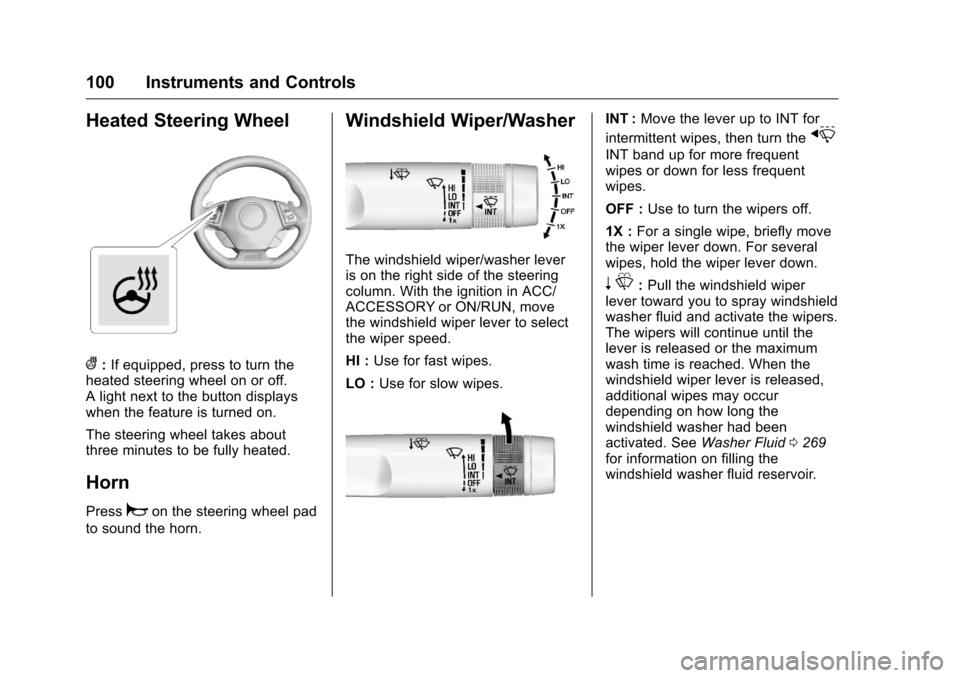
Windshield Wiper/Washer
The windshield wiper/washer lever
is on the right side of the steering
column. With the ignition in ACC/
ACCESSORY or ON/RUN, move
the windshield wiper lever to select
the wiper speed.
HI : Use for fast wipes.
LO : Use for slow wipes.
INT : Move the lever up to INT for
intermittent wipes, then turn the
x
INT band up for more frequent
wipes or down for less frequent
wipes.
OFF : Use to turn the wipers off.
1X : For a single wipe, briefly move
the wiper lever down. For several
wipes, hold the wiper lever down.
n L: Pull the windshield wiper
lever toward you to spray windshield
washer fluid and activate the wipers.
The wipers will continue until the
lever is released or the maximum
wash time is reached. When the
windshield wiper lever is released,
additional wipes may occur
depending on how long the
windshield washer had been
activated. See Washer Fluid0269
for information on filling the
windshield washer fluid reservoir.
Page 106 of 383
Chevrolet Camaro Owner Manual-Convertible (GMNA-Localizing-U.S./Cana-
da/Mexico-9702260) - 2016 - CRC - 10/28/15
Instruments and Controls 105
Warning (Continued)
object gets wedged between the
phone and charger, remove the
phone and allow the metallic
object to cool before removing it
from the charging pad, to
prevent burns.
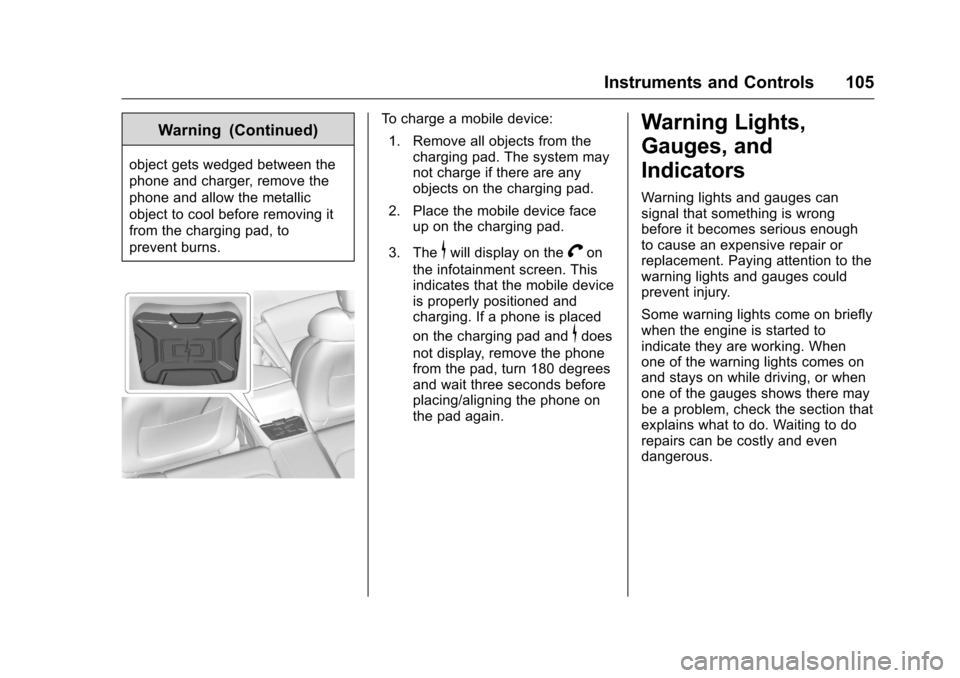
To charge a mobile device:1. Remove all objects from the charging pad. The system may
not charge if there are any
objects on the charging pad.
2. Place the mobile device face up on the charging pad.
3. The
$will display on theVon
the infotainment screen. This
indicates that the mobile device
is properly positioned and
charging. If a phone is placed
on the charging pad and
$does
not display, remove the phone
from the pad, turn 180 degrees
and wait three seconds before
placing/aligning the phone on
the pad again.
Warning Lights,
Gauges, and
Indicators
Warning lights and gauges can
signal that something is wrong
before it becomes serious enough
to cause an expensive repair or
replacement. Paying attention to the
warning lights and gauges could
prevent injury.
Some warning lights come on briefly
when the engine is started to
indicate they are working. When
one of the warning lights comes on
and stays on while driving, or when
one of the gauges shows there may
be a problem, check the section that
explains what to do. Waiting to do
repairs can be costly and even
dangerous.
Page 109 of 383
Chevrolet Camaro Owner Manual-Convertible (GMNA-Localizing-U.S./Cana-
da/Mexico-9702260) - 2016 - CRC - 10/28/15
108 Instruments and Controls
Reconfigurable Instrument
Cluster
To change the theme for the uplevel
cluster:1. Find the Options page in one of the interactive display zones on
the cluster.
2. Press SEL to enter the Options menu.
3. Scroll down to highlight Display Option, then press
pto enter
the Display Option menu.
4. Press SEL to select the desired cluster configuration.
5. Exit the Display Option menu by pressing
o.
Cluster Menu
There is an interactive display area
in the center of the instrument
cluster.
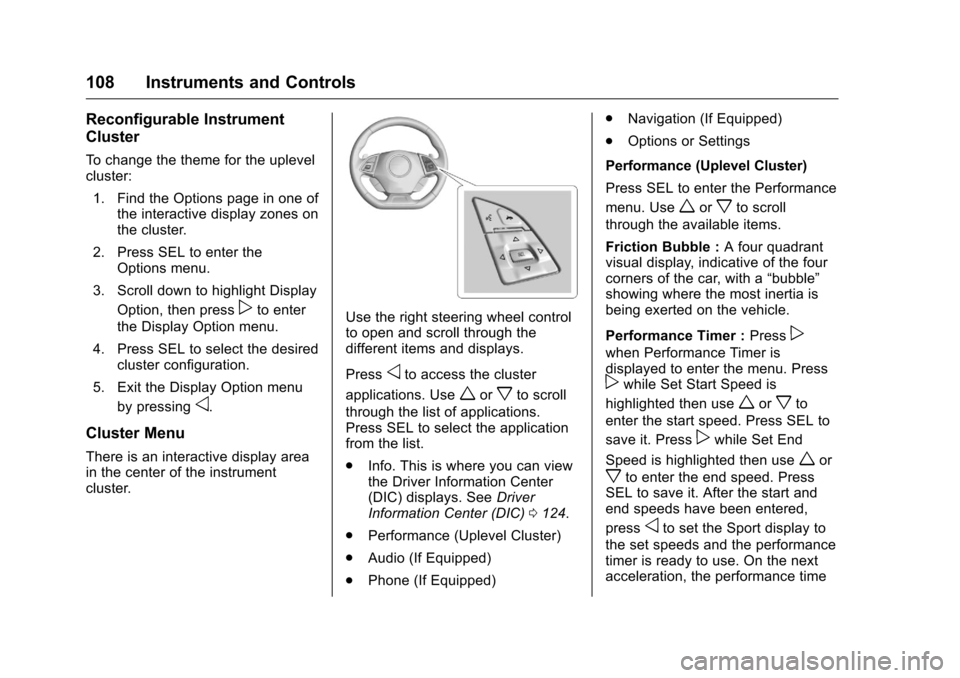
Use the right steering wheel control
to open and scroll through the
different items and displays.
Press
oto access the cluster
applications. Use
worxto scroll
through the list of applications.
Press SEL to select the application
from the list.
. Info. This is where you can view
the Driver Information Center
(DIC) displays. See Driver
Information Center (DIC) 0124.
. Performance (Uplevel Cluster)
. Audio (If Equipped)
. Phone (If Equipped) .
Navigation (If Equipped)
. Options or Settings
Performance (Uplevel Cluster)
Press SEL to enter the Performance
menu. Use
worxto scroll
through the available items.
Friction Bubble : A four quadrant
visual display, indicative of the four
corners of the car, with a “bubble”
showing where the most inertia is
being exerted on the vehicle.
Performance Timer : Press
p
when Performance Timer is
displayed to enter the menu. Press
pwhile Set Start Speed is
highlighted then use
worxto
enter the start speed. Press SEL to
save it. Press
pwhile Set End
Speed is highlighted then use
wor
xto enter the end speed. Press
SEL to save it. After the start and
end speeds have been entered,
press
oto set the Sport display to
the set speeds and the performance
timer is ready to use. On the next
acceleration, the performance time