change wheel CHEVROLET CAMARO 2016 6.G Owners Manual
[x] Cancel search | Manufacturer: CHEVROLET, Model Year: 2016, Model line: CAMARO, Model: CHEVROLET CAMARO 2016 6.GPages: 383, PDF Size: 6.46 MB
Page 5 of 383
Chevrolet Camaro Owner Manual-Convertible (GMNA-Localizing-U.S./Cana-
da/Mexico-9702260) - 2016 - CRC - 10/28/15
4 Introduction
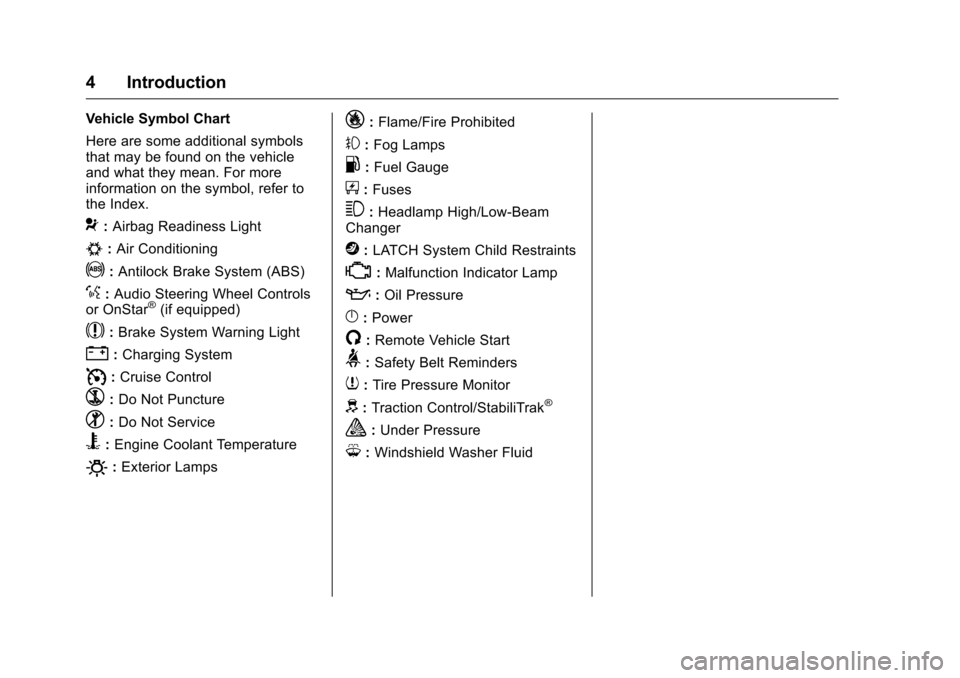
Vehicle Symbol Chart
Here are some additional symbols
that may be found on the vehicle
and what they mean. For more
information on the symbol, refer to
the Index.
9:Airbag Readiness Light
#:Air Conditioning
!:Antilock Brake System (ABS)
%:Audio Steering Wheel Controls
or OnStar®(if equipped)
$: Brake System Warning Light
":Charging System
I: Cruise Control
`:Do Not Puncture
^:Do Not Service
B:Engine Coolant Temperature
O:Exterior Lamps
_: Flame/Fire Prohibited
#:Fog Lamps
.:Fuel Gauge
+: Fuses
3:Headlamp High/Low-Beam
Changer
j: LATCH System Child Restraints
*:Malfunction Indicator Lamp
::Oil Pressure
}:Power
/:Remote Vehicle Start
>: Safety Belt Reminders
7:Tire Pressure Monitor
d:Traction Control/StabiliTrak®
a:Under Pressure
M: Windshield Washer Fluid
Page 6 of 383
Chevrolet Camaro Owner Manual-Convertible (GMNA-Localizing-U.S./Cana-
da/Mexico-9702260) - 2016 - CRC - 10/28/15
In Brief 5
In Brief
Instrument Panel
Instrument Panel . . . . . . . . . . . . . . . . 6
Initial Drive Information
Initial Drive Information . . . . . . . . . . 8
Remote Keyless Entry (RKE)System . . . . . . . . . . . . . . . . . . . . . . . . 8
Remote Vehicle Start . . . . . . . . . . . 8
Door Locks . . . . . . . . . . . . . . . . . . . . . 9
Trunk Release . . . . . . . . . . . . . . . . . . 9
Windows . . . . . . . . . . . . . . . . . . . . . . . 10
Seat Adjustment . . . . . . . . . . . . . . . 10
Memory Features . . . . . . . . . . . . . . 11
Heated and Ventilated Seats . . . 11
Head Restraint Adjustment . . . . 11
Safety Belts . . . . . . . . . . . . . . . . . . . . 12
Passenger Sensing System . . . 12
Mirror Adjustment . . . . . . . . . . . . . . 12
Steering Wheel Adjustment . . . . 13
Interior Lighting . . . . . . . . . . . . . . . . 13
Exterior Lighting . . . . . . . . . . . . . . . 14
Windshield Wiper/Washer . . . . . . 14
Climate Controls . . . . . . . . . . . . . . . 15
Transmission . . . . . . . . . . . . . . . . . . 16
Vehicle Features
Infotainment System . . . . . . . . . . . 17
Radio(s) . . . . . . . . . . . . . . . . . . . . . . . 18 Satellite Radio . . . . . . . . . . . . . . . . . 18
Portable Audio Devices . . . . . . . . 19
Bluetooth
®. . . . . . . . . . . . . . . . . . . . . 19
Steering Wheel Controls . . . . . . . 19
Cruise Control . . . . . . . . . . . . . . . . . 20
Driver Information Center (DIC) . . . . . . . . . . . . . . . . . 21
Lane Change Alert (LCA) . . . . . . 21
Rear Vision Camera (RVC) . . . . 21
Rear Cross Traffic Alert (RCTA) System . . . . . . . . . . . . . . . . . . . . . . . 21
Parking Assist . . . . . . . . . . . . . . . . . 22
Power Outlets . . . . . . . . . . . . . . . . . 22
Universal Remote System . . . . . 22
Sunroof . . . . . . . . . . . . . . . . . . . . . . . . 22
Convertible . . . . . . . . . . . . . . . . . . . . 23
Performance and Maintenance
Traction Control/Electronic Stability Control . . . . . . . . . . . . . . 23
Tire Pressure Monitor . . . . . . . . . . 24
Engine Oil Life System . . . . . . . . 24
Car Wash Guidelines . . . . . . . . . . 24
Driving for Better Fuel Economy . . . . . . . . . . . . . . . . . . . . . 25
Roadside Assistance Program . . . . . . . . . . . . . . . . . . . . . . 25
Page 8 of 383
Chevrolet Camaro Owner Manual-Convertible (GMNA-Localizing-U.S./Cana-
da/Mexico-9702260) - 2016 - CRC - 10/28/15
In Brief 7
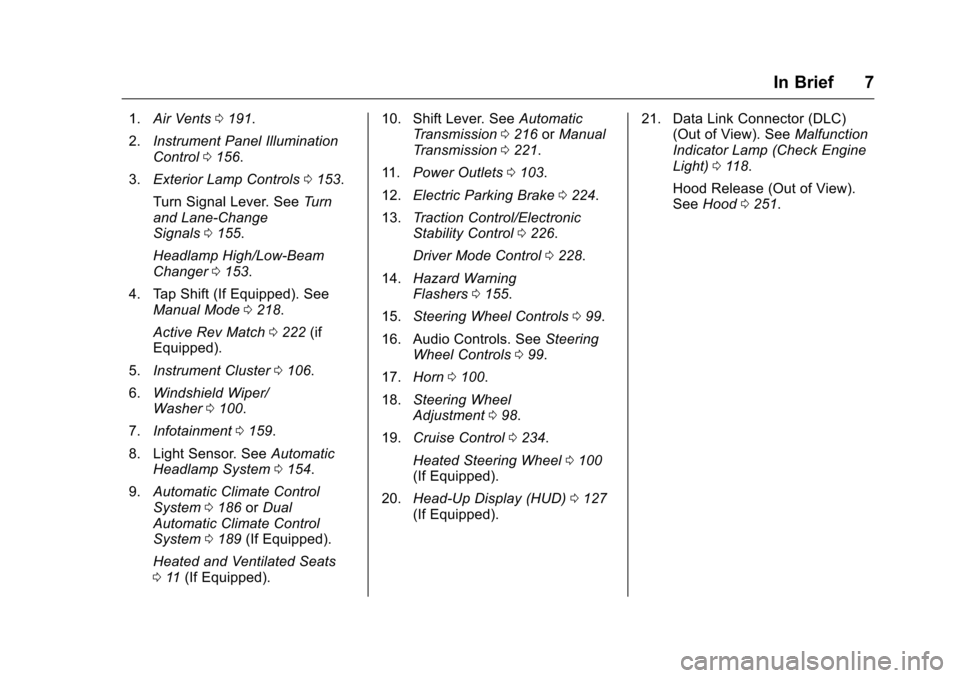
1.Air Vents 0191.
2. Instrument Panel Illumination
Control 0156.
3. Exterior Lamp Controls 0153.
Turn Signal Lever. See Turn
and Lane-Change
Signals 0155.
Headlamp High/Low-Beam
Changer 0153.
4. Tap Shift (If Equipped). See Manual Mode 0218.
Active Rev Match 0222 (if
Equipped).
5. Instrument Cluster 0106.
6. Windshield Wiper/
Washer 0100.
7. Infotainment 0159.
8. Light Sensor. See Automatic
Headlamp System 0154.
9. Automatic Climate Control
System 0186 orDual
Automatic Climate Control
System 0189 (If Equipped).
Heated and Ventilated Seats
0 11 (If Equipped). 10. Shift Lever. See
Automatic
Transmission 0216 orManual
Transmission 0221.
11. Power Outlets 0103.
12. Electric Parking Brake 0224.
13. Traction Control/Electronic
Stability Control 0226.
Driver Mode Control 0228.
14. Hazard Warning
Flashers 0155.
15. Steering Wheel Controls 099.
16. Audio Controls. See Steering
Wheel Controls 099.
17. Horn 0100.
18. Steering Wheel
Adjustment 098.
19. Cruise Control 0234.
Heated Steering Wheel 0100
(If Equipped).
20. Head-Up Display (HUD) 0127
(If Equipped). 21. Data Link Connector (DLC)
(Out of View). See Malfunction
Indicator Lamp (Check Engine
Light) 0118.
Hood Release (Out of View).
See Hood 0251.
Page 25 of 383
Chevrolet Camaro Owner Manual-Convertible (GMNA-Localizing-U.S./Cana-
da/Mexico-9702260) - 2016 - CRC - 10/28/15
24 In Brief
Tire Pressure Monitor
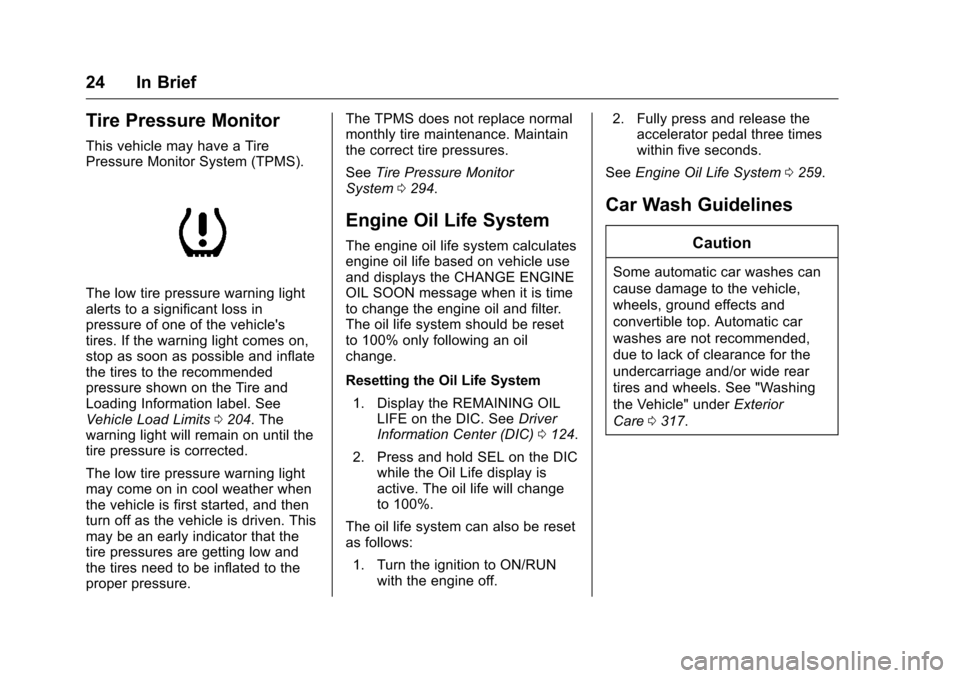
This vehicle may have a Tire
Pressure Monitor System (TPMS).
The low tire pressure warning light
alerts to a significant loss in
pressure of one of the vehicle's
tires. If the warning light comes on,
stop as soon as possible and inflate
the tires to the recommended
pressure shown on the Tire and
Loading Information label. See
Vehicle Load Limits0204. The
warning light will remain on until the
tire pressure is corrected.
The low tire pressure warning light
may come on in cool weather when
the vehicle is first started, and then
turn off as the vehicle is driven. This
may be an early indicator that the
tire pressures are getting low and
the tires need to be inflated to the
proper pressure. The TPMS does not replace normal
monthly tire maintenance. Maintain
the correct tire pressures.
See
Tire Pressure Monitor
System 0294.
Engine Oil Life System
The engine oil life system calculates
engine oil life based on vehicle use
and displays the CHANGE ENGINE
OIL SOON message when it is time
to change the engine oil and filter.
The oil life system should be reset
to 100% only following an oil
change.
Resetting the Oil Life System
1. Display the REMAINING OIL LIFE on the DIC. See Driver
Information Center (DIC) 0124.
2. Press and hold SEL on the DIC while the Oil Life display is
active. The oil life will change
to 100%.
The oil life system can also be reset
as follows: 1. Turn the ignition to ON/RUN with the engine off. 2. Fully press and release the
accelerator pedal three times
within five seconds.
See Engine Oil Life System 0259.
Car Wash Guidelines
Caution
Some automatic car washes can
cause damage to the vehicle,
wheels, ground effects and
convertible top. Automatic car
washes are not recommended,
due to lack of clearance for the
undercarriage and/or wide rear
tires and wheels. See "Washing
the Vehicle" under Exterior
Care 0317.
Page 77 of 383
Chevrolet Camaro Owner Manual-Convertible (GMNA-Localizing-U.S./Cana-
da/Mexico-9702260) - 2016 - CRC - 10/28/15
76 Seats and Restraints
Warning (Continued)
seatback may interfere with the
proper operation of the passenger
sensing system.
Servicing the
Airbag-Equipped Vehicle
Airbags affect how the vehicle
should be serviced. There are parts
of the airbag system in several
places around the vehicle. Your
dealer and the service manual have
information about servicing the
vehicle and the airbag system. To
purchase a service manual, see
Service Publications Ordering
Information0356.
{Warning
For up to 10 seconds after the
vehicle is turned off and the
battery is disconnected, an airbag
can still inflate during improper
service. You can be injured if you
(Continued)
Warning (Continued)
are close to an airbag when it
inflates. Avoid yellow connectors.
They are probably part of the
airbag system. Be sure to follow
proper service procedures, and
make sure the person performing
work for you is qualified to do so.
Adding Equipment to the
Airbag-Equipped Vehicle
Adding accessories that change the
vehicle's frame, bumper system,
height, front end, or side sheet
metal, may keep the airbag system
from working properly. The
operation of the airbag system can
also be affected by changing or
moving any parts of the front seats,
safety belts, the airbag sensing and
diagnostic module, steering wheel,
instrument panel, any of the airbag
modules, ceiling or pillar garnish
trim, overhead console, front
sensors, side impact sensors,
or airbag wiring. Your dealer and the service manual
have information about the location
of the airbag sensors, sensing and
diagnostic module, and airbag
wiring.
In addition, the vehicle has a
passenger sensing system for the
front outboard passenger position,
which includes sensors that are part
of the passenger seat. The
passenger sensing system may not
operate properly if the original seat
trim is replaced with non-GM
covers, upholstery, or trim; or with
GM covers, upholstery, or trim
designed for a different vehicle. Any
object, such as an aftermarket seat
heater or a comfort-enhancing pad
or device, installed under or on top
of the seat fabric, could also
interfere with the operation of the
passenger sensing system. This
could either prevent proper
deployment of the passenger
airbag(s) or prevent the passenger
sensing system from properly
turning off the passenger airbag(s).
See
Passenger Sensing
System 071.
Page 109 of 383
Chevrolet Camaro Owner Manual-Convertible (GMNA-Localizing-U.S./Cana-
da/Mexico-9702260) - 2016 - CRC - 10/28/15
108 Instruments and Controls
Reconfigurable Instrument
Cluster
To change the theme for the uplevel
cluster:1. Find the Options page in one of the interactive display zones on
the cluster.
2. Press SEL to enter the Options menu.
3. Scroll down to highlight Display Option, then press
pto enter
the Display Option menu.
4. Press SEL to select the desired cluster configuration.
5. Exit the Display Option menu by pressing
o.
Cluster Menu
There is an interactive display area
in the center of the instrument
cluster.
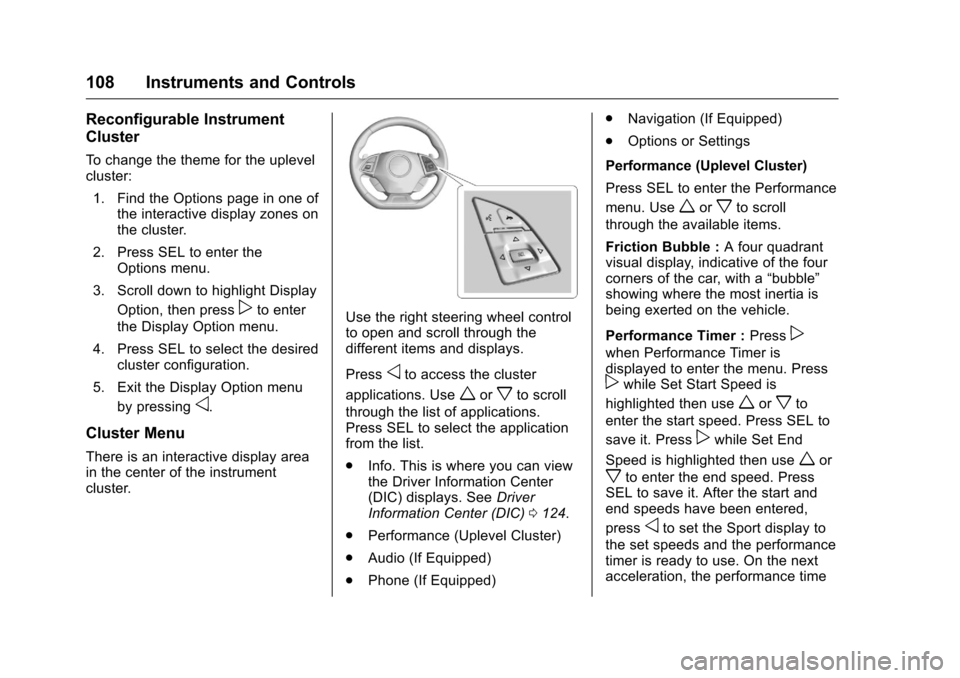
Use the right steering wheel control
to open and scroll through the
different items and displays.
Press
oto access the cluster
applications. Use
worxto scroll
through the list of applications.
Press SEL to select the application
from the list.
. Info. This is where you can view
the Driver Information Center
(DIC) displays. See Driver
Information Center (DIC) 0124.
. Performance (Uplevel Cluster)
. Audio (If Equipped)
. Phone (If Equipped) .
Navigation (If Equipped)
. Options or Settings
Performance (Uplevel Cluster)
Press SEL to enter the Performance
menu. Use
worxto scroll
through the available items.
Friction Bubble : A four quadrant
visual display, indicative of the four
corners of the car, with a “bubble”
showing where the most inertia is
being exerted on the vehicle.
Performance Timer : Press
p
when Performance Timer is
displayed to enter the menu. Press
pwhile Set Start Speed is
highlighted then use
worxto
enter the start speed. Press SEL to
save it. Press
pwhile Set End
Speed is highlighted then use
wor
xto enter the end speed. Press
SEL to save it. After the start and
end speeds have been entered,
press
oto set the Sport display to
the set speeds and the performance
timer is ready to use. On the next
acceleration, the performance time
Page 120 of 383
Chevrolet Camaro Owner Manual-Convertible (GMNA-Localizing-U.S./Cana-
da/Mexico-9702260) - 2016 - CRC - 10/28/15
Instruments and Controls 119
The diagnostic system can
detect if the adapter has been
left installed in the vehicle,
allowing fuel to evaporate into
the atmosphere. A few driving
trips with the adapter removed
may turn off the light.
. Poor fuel quality can cause
inefficient engine operation and
poor driveability, which may go
away once the engine is warmed
up. If this occurs, change the
fuel brand. It may require at
least one full tank of the proper
fuel to turn the light off. See
Fuel 0242.
If the light remains on, see your
dealer.
Emissions Inspection and
Maintenance Programs
If the vehicle requires an Emissions
Inspection/Maintenance test, the
test equipment will likely connect to
the vehicle's Data Link
Connector (DLC).
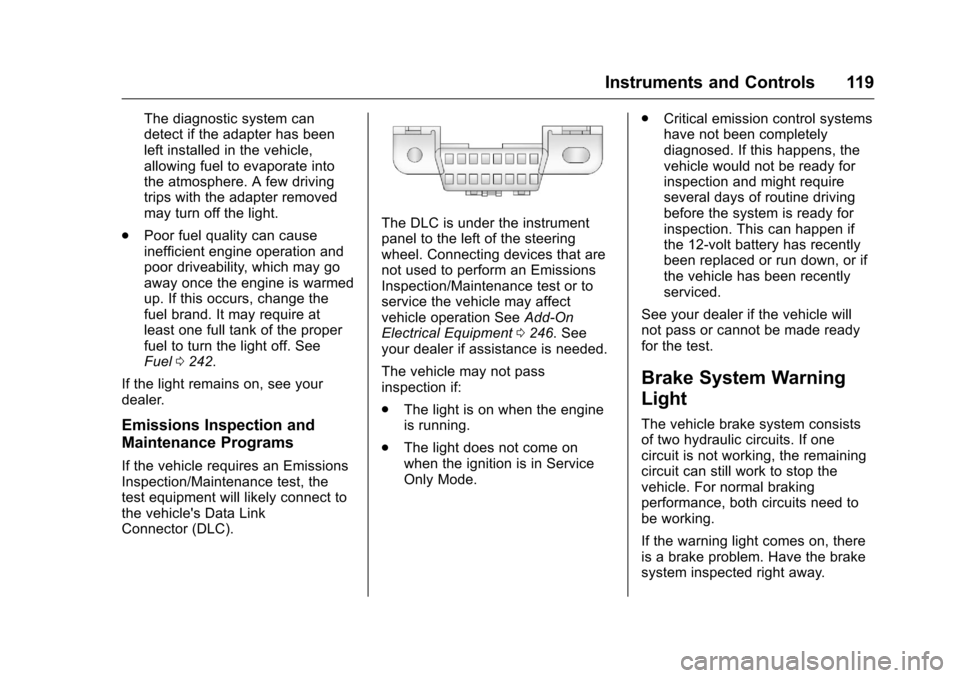
The DLC is under the instrument
panel to the left of the steering
wheel. Connecting devices that are
not used to perform an Emissions
Inspection/Maintenance test or to
service the vehicle may affect
vehicle operation See Add-On
Electrical Equipment 0246. See
your dealer if assistance is needed.
The vehicle may not pass
inspection if:
. The light is on when the engine
is running.
. The light does not come on
when the ignition is in Service
Only Mode. .
Critical emission control systems
have not been completely
diagnosed. If this happens, the
vehicle would not be ready for
inspection and might require
several days of routine driving
before the system is ready for
inspection. This can happen if
the 12-volt battery has recently
been replaced or run down, or if
the vehicle has been recently
serviced.
See your dealer if the vehicle will
not pass or cannot be made ready
for the test.
Brake System Warning
Light
The vehicle brake system consists
of two hydraulic circuits. If one
circuit is not working, the remaining
circuit can still work to stop the
vehicle. For normal braking
performance, both circuits need to
be working.
If the warning light comes on, there
is a brake problem. Have the brake
system inspected right away.
Page 129 of 383
Chevrolet Camaro Owner Manual-Convertible (GMNA-Localizing-U.S./Cana-
da/Mexico-9702260) - 2016 - CRC - 10/28/15
128 Instruments and Controls
The language selection is changed
through the radio and the units of
measurement is changed through
the instrument cluster. SeeVehicle
Personalization 0140 and“Options”
under Instrument Cluster 0106.
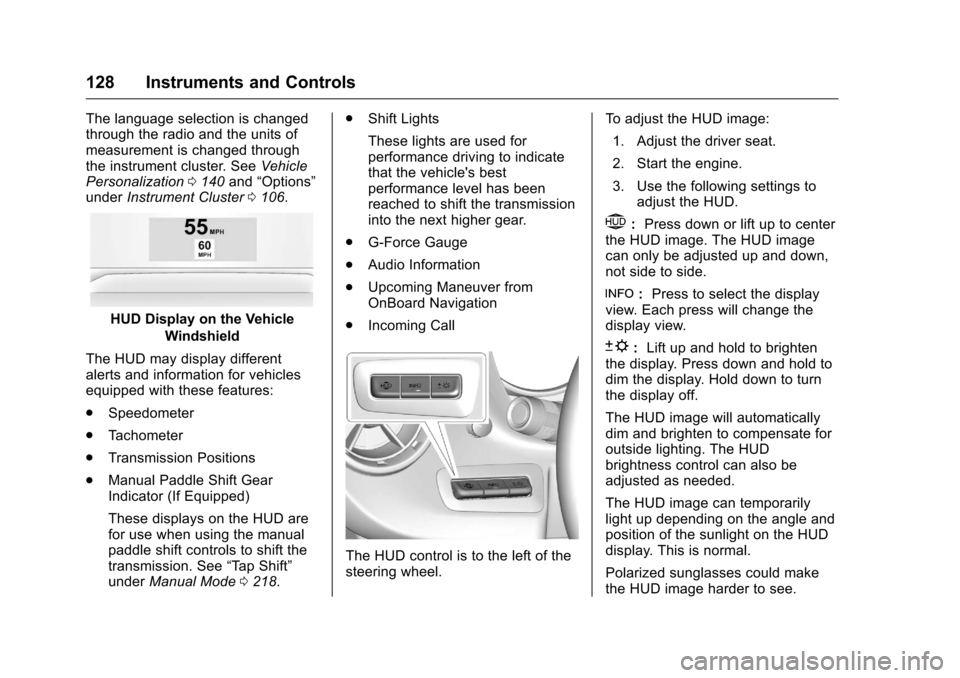
HUD Display on the Vehicle
Windshield
The HUD may display different
alerts and information for vehicles
equipped with these features:
. Speedometer
. Tachometer
. Transmission Positions
. Manual Paddle Shift Gear
Indicator (If Equipped)
These displays on the HUD are
for use when using the manual
paddle shift controls to shift the
transmission. See “Tap Shift”
under Manual Mode 0218. .
Shift Lights
These lights are used for
performance driving to indicate
that the vehicle's best
performance level has been
reached to shift the transmission
into the next higher gear.
. G-Force Gauge
. Audio Information
. Upcoming Maneuver from
OnBoard Navigation
. Incoming Call
The HUD control is to the left of the
steering wheel. To adjust the HUD image:
1. Adjust the driver seat.
2. Start the engine.
3. Use the following settings to adjust the HUD.
$:Press down or lift up to center
the HUD image. The HUD image
can only be adjusted up and down,
not side to side.
!: Press to select the display
view. Each press will change the
display view.
D: Lift up and hold to brighten
the display. Press down and hold to
dim the display. Hold down to turn
the display off.
The HUD image will automatically
dim and brighten to compensate for
outside lighting. The HUD
brightness control can also be
adjusted as needed.
The HUD image can temporarily
light up depending on the angle and
position of the sunlight on the HUD
display. This is normal.
Polarized sunglasses could make
the HUD image harder to see.
Page 138 of 383
Chevrolet Camaro Owner Manual-Convertible (GMNA-Localizing-U.S./Cana-
da/Mexico-9702260) - 2016 - CRC - 10/28/15
Instruments and Controls 137
shocks are in their full soft mode.
Have the vehicle serviced by your
dealer as soon as possible.
To acknowledge the message, press
the SEL button. The message
reappears every 10 minutes until
this condition changes.
SERVICE STABILITRAK
This message displays if there is a
problem with the StabiliTrak system
and the vehicle needs service. The
Traction Control System (TCS)/
StabiliTrak light on the instrument
cluster also turns on and a sound
will be heard. See your dealer.
When this message is displayed,
the system is not working. Adjust
your driving accordingly. See
Traction Control/Electronic Stability
Control0226.
SERVICE TRACTION SYSTEM
If this message displays when you
are driving, there is a problem with
the Traction Control System (TCS)
and the vehicle needs service. See
your dealer. When this message is displayed, the system will not limit
wheel spin. Adjust your driving
accordingly.
The TCS/StabiliTrak light on the
instrument cluster will also turn on
and a sound will be heard.
When this message is displayed,
the computer controlled systems will
not assist the driver in controlling
the vehicle. Have the system
repaired by your dealer as soon as
possible. Adjust your driving
accordingly. See
Traction Control/
Electronic Stability Control 0226.
To acknowledge the message,
press SEL.
SERVICE SUSPENSION
This message displays when a
malfunction is present in the
Magnetic Ride Control system,
if equipped, which is causing the
shocks to be in their full soft mode.
This is a warning to the driver that
the vehicle handling may be
affected. Have the vehicle serviced
by your dealer as soon as possible. To acknowledge the message, press
SEL. The message reappears every
10 minutes until this condition
changes.
Airbag System Messages
SERVICE AIRBAG
This message displays if there is a
problem with the airbag system. See
your dealer for service.
Security Messages
THEFT ATTEMPTED
This message displays if the vehicle
detects a tamper condition.
Service Vehicle Messages
PROGRAM CLUSTER
This message is displayed if there is
a problem with the instrument
cluster. Take the vehicle to your
dealer for service.
SERVICE POWER STEERING
This message displays and a chime
may sound when there may be a
problem with the power steering
Page 144 of 383
Chevrolet Camaro Owner Manual-Convertible (GMNA-Localizing-U.S./Cana-
da/Mexico-9702260) - 2016 - CRC - 10/28/15
Instruments and Controls 143
When high humidity is no longer
detected, the system will return to
its prior operation.
Select On or Off.
Collision/Detection Systems
Select and the following may
display:
.Park Assist
. Lane Change Alert
. Rear Cross Traffic Alert
Park Assist
If equipped, this feature can assist
in backing up and parking the
vehicle. See Assistance Systems for
Parking or Backing 0238.
Select On or Off.
Lane Change Alert
This allows the Lane Change Alert
feature to be turned on or off. See
Lane Change Alert (LCA) 0240.
Select On or Off.
Rear Cross Traffic Alert
This allows the Rear Cross Traffic
Alert feature to be turned on or off. Select On or Off. See
“Rear Cross
Traffic Alert (RCTA)” inAssistance
Systems for Parking or
Backing 0238.
Comfort and Convenience
Select and the following may
display:
. Auto Memory Recall
. Easy Exit Options
. Chime Volume
. Reverse Tilt Mirror
Auto Memory Recall
This feature automatically recalls
the current driver ’s previously stored
1 or 2 button positions when
entering the vehicle. See Memory
Seats 055.
Select Off or On.
Easy Exit Options
This feature automatically recalls
the current driver ’s previously stored
exit button position when exiting the
vehicle. See Memory Seats 055.
Select Off or On. Chime Volume
This allows the selection of the
chime volume level.
Turn the MENU knob, touch + or
−
to adjust the volume, or select
Normal or High.
Reverse Tilt Mirror
When on, both the driver and
passenger outside mirrors will tilt
downward when the vehicle is
shifted to R (Reverse) to improve
visibility of the ground near the rear
wheels. They will return to their
previous driving position when the
vehicle is shifted out of R (Reverse)
or the engine is turned off. See
Reverse Tilt Mirrors 043.
Select Off, On - Driver and
Passenger, On - Driver, or On -
Passenger.
Lighting
Select and the following may
display:
. Vehicle Locator Lights
. Exit Lighting