engine CHEVROLET CAMARO 2016 6.G Service Manual
[x] Cancel search | Manufacturer: CHEVROLET, Model Year: 2016, Model line: CAMARO, Model: CHEVROLET CAMARO 2016 6.GPages: 383, PDF Size: 6.46 MB
Page 142 of 383
Chevrolet Camaro Owner Manual-Convertible (GMNA-Localizing-U.S./Cana-
da/Mexico-9702260) - 2016 - CRC - 10/28/15
Instruments and Controls 141
3. PressSBACK on the
faceplate or touch
0to return
to the previous menu or exit.
Turn the vehicle to ON/RUN to
access the Settings menu, then
select SETTINGS from the Home
page on the infotainment system
display.
Personalization Menus
The following list of menu items may
be available:
. Time and Date
. Driving Mode
. Language (Language)
. Radio
. Vehicle
. Bluetooth
. Apple CarPlay
. Android Auto
. USB Auto Launch
. Voice
. Display
. Rear Camera .
Return to Factory Settings
. Software Information
Detailed information for each menu
follows.
Time and Date
Manually set the time and date. See
Clock 0101.
Driving Mode
Select and the following may
display:
.
Engine Sound Management
Engine Sound Management
Select Engine Sound Management,
then choose from the available
options. See Driver Mode
Control 0228.
Language (Language)
Select Language, then select from
the available language(s).
The selected language will display
on the system, and voice
recognition will reflect the selected
language.
Radio
Press and the following may
display:
.
Manage Favorites
. Number of Favorites Shown
. Audible Touch Feedback
. Text Scroll
. Tone Settings
. Auto Volume
. Maximum Startup Volume
. Audio Cue Volume
Manage Favorites
This allows favorites to be edited.
See “Storing a Station as a
Favorite” inAM-FM Radio 0163 or
“Manage Favorites” in“Settings”
under “Radio” in the infotainment
manual.
Number of Favorites Shown
Press to set the number of favorites
to display.
Page 144 of 383
Chevrolet Camaro Owner Manual-Convertible (GMNA-Localizing-U.S./Cana-
da/Mexico-9702260) - 2016 - CRC - 10/28/15
Instruments and Controls 143
When high humidity is no longer
detected, the system will return to
its prior operation.
Select On or Off.
Collision/Detection Systems
Select and the following may
display:
.Park Assist
. Lane Change Alert
. Rear Cross Traffic Alert
Park Assist
If equipped, this feature can assist
in backing up and parking the
vehicle. See Assistance Systems for
Parking or Backing 0238.
Select On or Off.
Lane Change Alert
This allows the Lane Change Alert
feature to be turned on or off. See
Lane Change Alert (LCA) 0240.
Select On or Off.
Rear Cross Traffic Alert
This allows the Rear Cross Traffic
Alert feature to be turned on or off. Select On or Off. See
“Rear Cross
Traffic Alert (RCTA)” inAssistance
Systems for Parking or
Backing 0238.
Comfort and Convenience
Select and the following may
display:
. Auto Memory Recall
. Easy Exit Options
. Chime Volume
. Reverse Tilt Mirror
Auto Memory Recall
This feature automatically recalls
the current driver ’s previously stored
1 or 2 button positions when
entering the vehicle. See Memory
Seats 055.
Select Off or On.
Easy Exit Options
This feature automatically recalls
the current driver ’s previously stored
exit button position when exiting the
vehicle. See Memory Seats 055.
Select Off or On. Chime Volume
This allows the selection of the
chime volume level.
Turn the MENU knob, touch + or
−
to adjust the volume, or select
Normal or High.
Reverse Tilt Mirror
When on, both the driver and
passenger outside mirrors will tilt
downward when the vehicle is
shifted to R (Reverse) to improve
visibility of the ground near the rear
wheels. They will return to their
previous driving position when the
vehicle is shifted out of R (Reverse)
or the engine is turned off. See
Reverse Tilt Mirrors 043.
Select Off, On - Driver and
Passenger, On - Driver, or On -
Passenger.
Lighting
Select and the following may
display:
. Vehicle Locator Lights
. Exit Lighting
Page 155 of 383
Chevrolet Camaro Owner Manual-Convertible (GMNA-Localizing-U.S./Cana-
da/Mexico-9702260) - 2016 - CRC - 10/28/15
154 Lighting
Flash-to-Pass
The flash-to-pass feature works with
the low beams or Daytime Running
Lamps (DRL) on or off.
To flash the high beams, pull the
turn signal lever all the way toward
you, then release it.
Daytime Running
Lamps (DRL)
DRL can make it easier for others to
see the front of your vehicle during
the day. DRL are required on all
vehicles first sold in Canada.
A light sensor on top of the
instrument panel makes the DRL
work, so be sure it is not covered.
The dedicated DRL will come on
when all of the following conditions
are met:
.The ignition is in the ON/RUN
position.
. The exterior lamps control is in
AUTO, or has been briefly
turned to
Pto turn the
automatic light control on again. .
The engine is running and the
transmission is not in P (Park).
When the DRL are on, the
headlamps, taillamps, sidemarker
lamps, instrument panel lights, and
other lamps will not be on.
The headlamps automatically
change from DRL to the regular
headlamps depending on the
darkness of the surroundings. The
other lamps that come on with the
headlamps will also come on.
When it is bright enough outside,
the headlamps will go off and the
DRL will come on.
To turn the DRL off or on again, turn
the exterior lamps control to
Pand
then release. For vehicles first sold
in Canada, the DRL cannot be
turned off.
The regular headlamp system
should be turned on when needed.
Automatic Headlamp
System
When it is dark enough outside and
the headlamp switch is in AUTO,
the automatic headlamp system will
turn on the headlamps at the normal
brightness along with other lamps
such as the taillamps, sidemarker
lamps, parking lamps, license plate
lamps, and the instrument panel
lights. The radio lights will also
be dim.
To turn off the automatic headlamp
system, turn the exterior lamps
switch to the
Pposition and then
release. For vehicles first sold in
Canada, the transmission must be
in P (Park), before the automatic
headlamp system can be turned off.
Page 156 of 383
Chevrolet Camaro Owner Manual-Convertible (GMNA-Localizing-U.S./Cana-
da/Mexico-9702260) - 2016 - CRC - 10/28/15
Lighting 155
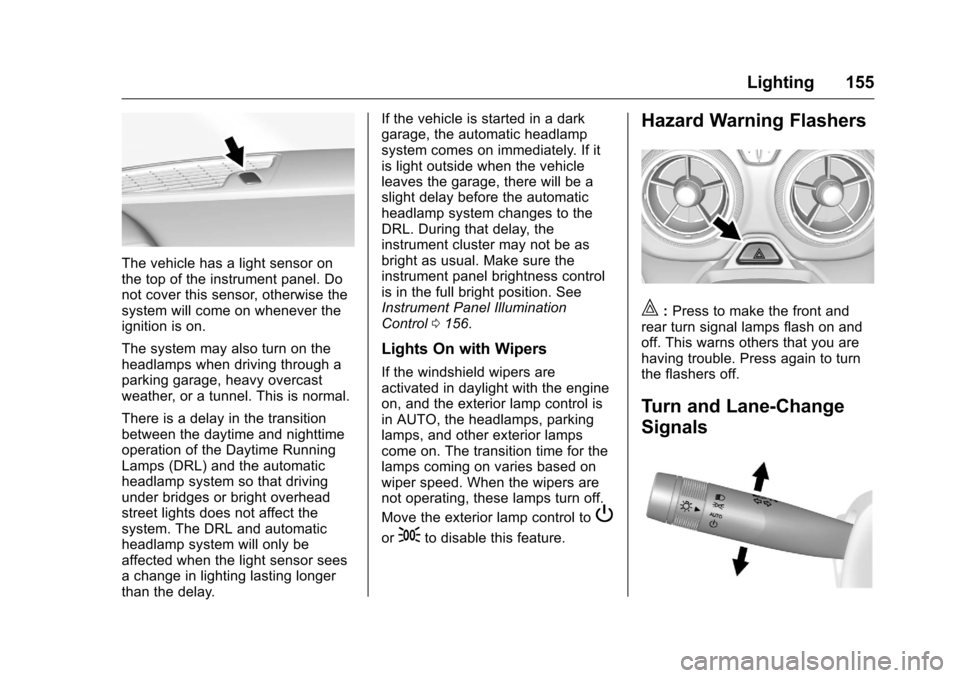
The vehicle has a light sensor on
the top of the instrument panel. Do
not cover this sensor, otherwise the
system will come on whenever the
ignition is on.
The system may also turn on the
headlamps when driving through a
parking garage, heavy overcast
weather, or a tunnel. This is normal.
There is a delay in the transition
between the daytime and nighttime
operation of the Daytime Running
Lamps (DRL) and the automatic
headlamp system so that driving
under bridges or bright overhead
street lights does not affect the
system. The DRL and automatic
headlamp system will only be
affected when the light sensor sees
a change in lighting lasting longer
than the delay.If the vehicle is started in a dark
garage, the automatic headlamp
system comes on immediately. If it
is light outside when the vehicle
leaves the garage, there will be a
slight delay before the automatic
headlamp system changes to the
DRL. During that delay, the
instrument cluster may not be as
bright as usual. Make sure the
instrument panel brightness control
is in the full bright position. See
Instrument Panel Illumination
Control
0156.
Lights On with Wipers
If the windshield wipers are
activated in daylight with the engine
on, and the exterior lamp control is
in AUTO, the headlamps, parking
lamps, and other exterior lamps
come on. The transition time for the
lamps coming on varies based on
wiper speed. When the wipers are
not operating, these lamps turn off.
Move the exterior lamp control to
P
or;to disable this feature.
Hazard Warning Flashers
|:Press to make the front and
rear turn signal lamps flash on and
off. This warns others that you are
having trouble. Press again to turn
the flashers off.
Turn and Lane-Change
Signals
Page 159 of 383
Chevrolet Camaro Owner Manual-Convertible (GMNA-Localizing-U.S./Cana-
da/Mexico-9702260) - 2016 - CRC - 10/28/15
158 Lighting
prevent overcharging. If the vehicle
has a voltmeter gauge or a voltage
display on the Driver Information
Center (DIC), you may see the
voltage move up or down. This is
normal. If there is a problem, an
alert will be displayed.
The battery can be discharged at
idle if the electrical loads are very
high. This is true for all vehicles.
This is because the generator
(alternator) may not be spinning fast
enough at idle to produce all of the
power needed for very high
electrical loads.
A high electrical load occurs when
several of the following are on, such
as: headlamps, high beams, fog
lamps, rear window defogger,
climate control fan at high speed,
heated seats, engine cooling fans,
trailer loads, and loads plugged into
accessory power outlets.EPM works to prevent excessive
discharge of the battery. It does this
by balancing the generator's output
and the vehicle's electrical needs.
It can increase engine idle speed to
generate more power whenever
needed. It can temporarily reduce
the power demands of some
accessories.
Normally, these actions occur in
steps or levels, without being
noticeable. In rare cases at the
highest levels of corrective action,
this action may be noticeable to the
driver. If so, a DIC message might
be displayed, and it is
recommended that the driver reduce
the electrical loads as much as
possible. See
Battery Voltage and
Charging Messages 0131.Battery Power Protection
This feature shuts off the reading
lamps if they are left on for more
than 10 minutes when the ignition is
in OFF. This helps to prevent the
battery from running down.
Exterior Lighting Battery
Saver
The exterior lamps turn off about
10 minutes after the ignition is
turned off, if the parking lamps or
headlamps have been manually left
on. This protects against draining
the battery. To restart the 10-minute
timer, turn the exterior lamp control
to the off position and then back to
the parking lamp or headlamp
position.
To keep the lamps on for more than
10 minutes, the ignition must be in
the ACC/ACCESSORY or ON/RUN
position.
Page 186 of 383
Chevrolet Camaro Owner Manual-Convertible (GMNA-Localizing-U.S./Cana-
da/Mexico-9702260) - 2016 - CRC - 10/28/15
Infotainment System 185
Fees and Taxes: Subscription fee,
taxes, one time activation fee, and
other fees may apply. Subscription
fee is consumer only. All fees and
programming subject to change.
Subscriptions subject to Customer
Agreement available at
www.siriusxm.com. SiriusXM
®
service only available in the
48 contiguous United States and
Canada.
In Canada: Some deterioration of
service may occur in extreme
northern latitudes. This is beyond
the control of SiriusXM
®Satellite
Radio.
It is prohibited to copy, decompile,
disassemble, reverse engineer,
hack, manipulate, or otherwise
make available any technology or
software incorporated in receivers
compatible with the SiriusXM
Satellite Radio System or that
support the SiriusXM website, the
Online Service or any of its content. Furthermore, the AMBER voice
compression software included in
this product is protected by
intellectual property rights including
patent rights, copyrights, and trade
secrets of Digital Voice
Systems, Inc.
General Requirements:
1. A License Agreement from SiriusXM is required for any
product that incorporates
SiriusXM Technology and/or for
use of any of the SiriusXM
marks to be manufactured,
distributed, or marketed in the
SiriusXM Service Area.
2. For products to be distributed, marketed, and/or sold in
Canada, a separate agreement
is required with Canadian
Satellite Radio Inc. (operating
as XM Canada). FreeType 2
Portions of this software are
copyright
®2007-2012 The
FreeType Project
(www.freetype.org). All rights
reserved.
Libjpeg
The navigation software is based in
part on the work of the independent
JPEG Group.
Page 194 of 383
Chevrolet Camaro Owner Manual-Convertible (GMNA-Localizing-U.S./Cana-
da/Mexico-9702260) - 2016 - CRC - 10/28/15
Driving and Operating 193
Driving and
Operating
Driving Information
Distracted Driving . . . . . . . . . . . . 194
Defensive Driving . . . . . . . . . . . . . 194
Drunk Driving . . . . . . . . . . . . . . . . . 194
Control of a Vehicle . . . . . . . . . . . 195
Braking . . . . . . . . . . . . . . . . . . . . . . . 195
Steering . . . . . . . . . . . . . . . . . . . . . . 195
Off-Road Recovery . . . . . . . . . . . 196
Loss of Control . . . . . . . . . . . . . . . 196
Track Events and CompetitiveDriving . . . . . . . . . . . . . . . . . . . . . . 197
Driving on Wet Roads . . . . . . . . 201
Hill and Mountain Roads . . . . . 202
Winter Driving . . . . . . . . . . . . . . . . 202
If the Vehicle Is Stuck . . . . . . . . 204
Vehicle Load Limits . . . . . . . . . . . 204
Starting and Operating
New Vehicle Break-In . . . . . . . . . 207
Ignition Positions . . . . . . . . . . . . . 208
Starting the Engine . . . . . . . . . . . 210
Engine Heater . . . . . . . . . . . . . . . . 212
Retained Accessory Power (RAP) . . . . . . . . . . . . . . . . 213
Shifting Into Park . . . . . . . . . . . . . 213
Shifting out of Park . . . . . . . . . . . 214 Parking . . . . . . . . . . . . . . . . . . . . . . . 215
Parking over Things
That Burn . . . . . . . . . . . . . . . . . . . 215
Active Fuel Management
®. . . . 215
Engine Exhaust
Engine Exhaust . . . . . . . . . . . . . . 215
Running the Vehicle While Parked . . . . . . . . . . . . . . . . . . . . . . 216
Automatic Transmission
Automatic Transmission . . . . . . 216
Manual Mode . . . . . . . . . . . . . . . . . 218
Manual Transmission
Manual Transmission . . . . . . . . . 221
Active Rev Match . . . . . . . . . . . . . 222
Brakes
Antilock BrakeSystem (ABS) . . . . . . . . . . . . . . . 223
Electric Parking Brake . . . . . . . . 224
Brake Assist . . . . . . . . . . . . . . . . . . 226
Hill Start Assist (HSA) . . . . . . . . 226
Ride Control Systems
Traction Control/Electronic Stability Control . . . . . . . . . . . . . 226
Driver Mode Control . . . . . . . . . . 228
Competitive Driving Mode . . . . 232
Limited-Slip Rear Axle . . . . . . . . 234
Cruise Control
Cruise Control . . . . . . . . . . . . . . . . 234
Driver Assistance Systems
Driver Assistance Systems . . . 237
Assistance Systems for Parking or Backing . . . . . . . . . . 238
Side Blind Zone Alert (SBZA) . . . . . . . . . . . . . . . . 240
Lane Change Alert (LCA) . . . . . 240
Fuel
Fuel . . . . . . . . . . . . . . . . . . . . . . . . . . 242
California Fuel Requirements . . . . . . . . . . . . . . . 243
Fuels in Foreign Countries . . . 243
Fuel Additives . . . . . . . . . . . . . . . . 243
Filling the Tank . . . . . . . . . . . . . . . 244
Filling a Portable Fuel Container . . . . . . . . . . . . . . . . . . . 245
Trailer Towing
General TowingInformation . . . . . . . . . . . . . . . . . . 246
Conversions and Add-Ons
Add-On ElectricalEquipment . . . . . . . . . . . . . . . . . . 246
Page 196 of 383
Chevrolet Camaro Owner Manual-Convertible (GMNA-Localizing-U.S./Cana-
da/Mexico-9702260) - 2016 - CRC - 10/28/15
Driving and Operating 195
{Warning
Drinking and then driving is very
dangerous. Your reflexes,
perceptions, attentiveness, and
judgment can be affected by even
a small amount of alcohol. You
can have a serious—or even
fatal —collision if you drive after
drinking.
Do not drink and drive or ride with
a driver who has been drinking.
Ride home in a cab; or if you are
with a group, designate a driver
who will not drink.
Control of a Vehicle
Braking, steering, and accelerating
are important factors in helping to
control a vehicle while driving.
Braking
Braking action involves perception
time and reaction time. Deciding to
push the brake pedal is perception
time. Actually doing it is
reaction time. Average driver reaction time is
about three-quarters of a second.
In that time, a vehicle moving at
100 km/h (60 mph) travels 20 m
(66 ft), which could be a lot of
distance in an emergency.
Helpful braking tips to keep in mind
include:
.
Keep enough distance between
you and the vehicle in front
of you.
. Avoid needless heavy braking.
. Keep pace with traffic.
If the engine ever stops while the
vehicle is being driven, brake
normally but do not pump the
brakes. Doing so could make the
pedal harder to push down. If the
engine stops, there will be some
power brake assist but it will be
used when the brake is applied.
Once the power assist is used up, it
can take longer to stop and the
brake pedal will be harder to push.
Steering
Electric Power Steering
The vehicle has electric power
steering. It does not have power
steering fluid. Regular maintenance
is not required.
If power steering assist is lost due
to a system malfunction, the vehicle
can be steered, but may require
increased effort.
See your dealer if there is a
problem.
If the steering wheel is turned until it
reaches the end of its travel and is
held against that position for an
extended period of time, power
steering assist may be reduced.
If the steering assist is used for an
extended period of time, power
assist may be reduced.
Normal use of the power steering
assist should return when the
system cools down.
See specific vehicle steering
messages under Service Vehicle
Messages 0137. See your dealer if
there is a problem.
Page 198 of 383
Chevrolet Camaro Owner Manual-Convertible (GMNA-Localizing-U.S./Cana-
da/Mexico-9702260) - 2016 - CRC - 10/28/15
Driving and Operating 197
The vehicle may straighten out.
Be ready for a second skid if it
occurs.
. Slow down and adjust your
driving according to weather
conditions. Stopping distance
can be longer and vehicle
control can be affected when
traction is reduced by water,
snow, ice, gravel, or other
material on the road. Learn to
recognize warning clues —such
as enough water, ice, or packed
snow on the road to make a
mirrored surface —and slow
down when you have any doubt.
. Try to avoid sudden steering,
acceleration, or braking,
including reducing vehicle speed
by shifting to a lower gear. Any
sudden changes could cause
the tires to slide.
Remember: Antilock brakes help
avoid only the braking skid.Track Events and
Competitive Driving
Track events or competitive driving
may affect the vehicle warranty. See
the warranty manual before using
the vehicle for racing or other
competitive driving.
The Engine Sound Management
setting (if equipped) should not be
set to “Stealth Mode” during track
events and competitive driving. See
Driver Mode Control 0228.
Engine Oil
Caution
If you use the vehicle for racing or
other competitive driving, the
engine may use more oil than it
would with normal use. Low oil
levels can damage the engine.
For information on how to add oil,
seeEngine Oil 0257.
Be sure to check the oil level
often during racing or other
competitive driving and keep the (Continued)
Caution (Continued)
level at or near the upper mark
that shows the proper operating
range on the engine oil dipstick.
2.0L (LTG) Turbo Engine
Keep the oil level at or near 1 L
(1 qt) above the upper mark on the
engine oil dipstick which shows the
proper operating range.
6.2L (LT1) Engine
Change the engine oil to 0W-40 or
5W-40 that meets the dexos2™
specification. If this oil is not
available, the following oils can be
used as an alternative: Valvoline
®
SYNPOWER MST 5W-40, Mobil®1
ESP Formula M 5W-40. See
Capacities and Specifications 0343.
Automatic Transmission Fluid
Have the transmission fluid set to
the track specific oil level prior to
track usage. Transmission fluid
should be changed after 30 hours of
Page 199 of 383
Chevrolet Camaro Owner Manual-Convertible (GMNA-Localizing-U.S./Cana-
da/Mexico-9702260) - 2016 - CRC - 10/28/15
198 Driving and Operating
track usage. Any transmission level
set or change should be performed
at your dealer.
Rear Axle Fluid
Axles must have 2 400 km
(1,500 mi) before being used in
track driving.
The rear axle fluid temperatures
may be higher than when driving in
severe conditions. Drain and refill
with new fluid after the first racing or
competitive driving event, and then
after every 24 hours of racing or
competitive driving. See
Recommended Fluids and
Lubricants0338.
Caution
During a first time track or
racing event, high rear axle
temperatures can occur. Damage
could be caused to the rear axle
and would not be covered by the
vehicle warranty. Do not drive as
long or as fast the first time the
vehicle is driven on the track or
raced.
Brake Fluid
For track events or competitive
driving, it is recommended that the
brake fluid be replaced with a high
performance brake fluid that has a
dry boiling point greater than 279 °C
(534 °F). After conversion to the
high performance brake fluid, follow
the brake fluid service
recommendations outlined by the
fluid manufacturer. Do not use
silicone or DOT-5 brake fluids.
Brake Burnishing
To prepare the Camaro brake
systems for track events and racing,
complete the appropriate high
performance brake burnishing
procedure described below.
New brake pads must be burnished
before racing or competitive driving.
Caution
These procedures are specific to
the Camaro SS, or LT with Y4Q
Heavy Duty Cooling System that
is equipped with J55 brakes.
(Continued)
Caution (Continued)
This procedure should not be run
on other Camaro models as
damage may result.
Caution
The new vehicle break-in period
should be completed before
performing the brake burnishing
procedure or damage may occur
to the powertrain/engine. See
New Vehicle Break-In0207.
When performed as instructed, this
procedure will not damage the
brakes. During the burnishing
procedure, the brake pads will
smoke and produce an odor. The
braking force and pedal travel may
increase. After the procedure is
complete, the brake pads may
appear white at the rotor contact.
Run this procedure in a safe
manner and in compliance with all
local and state ordinances/laws