radio controls CHEVROLET CAMARO 2017 6.G Owner's Manual
[x] Cancel search | Manufacturer: CHEVROLET, Model Year: 2017, Model line: CAMARO, Model: CHEVROLET CAMARO 2017 6.GPages: 391, PDF Size: 6.65 MB
Page 166 of 391
Chevrolet Camaro Owner Manual (GMNA-Localizing-U.S./Canada/Mexico-
9804281) - 2017 - crc - 4/25/16
Infotainment System 165
.USB/Music/Pictures: Press
to go to the next content.
Press and hold to fast
forward.
5.
5
. Press and release to
access the phone screen,
answer an incoming call,
or access the device home
screen.
Home Page
Touchscreen Buttons
Touchscreen buttons show on the
screen when available. When a
function is unavailable, the button
may gray out. When a function is
selected, the button may highlight.
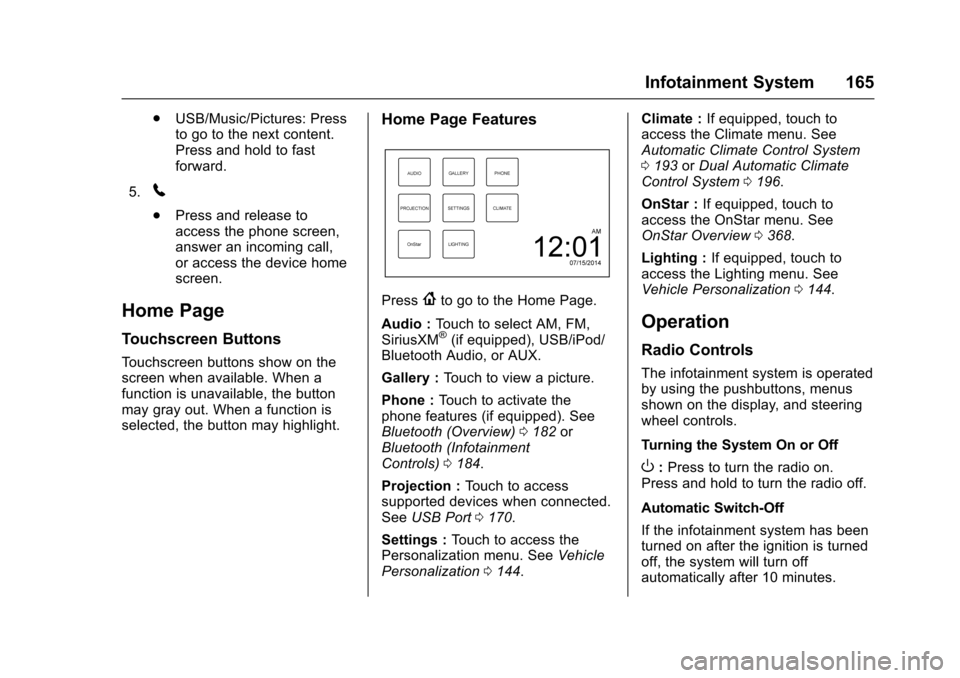
Home Page Features
Press{to go to the Home Page.
Audio : Touch to select AM, FM,
SiriusXM
®(if equipped), USB/iPod/
Bluetooth Audio, or AUX.
Gallery : Touch to view a picture.
Phone : Touch to activate the
phone features (if equipped). See
Bluetooth (Overview) 0182 or
Bluetooth (Infotainment
Controls) 0184.
Projection : Touch to access
supported devices when connected.
See USB Port 0170.
Settings : Touch to access the
Personalization menu. See Vehicle
Personalization 0144. Climate :
If equipped, touch to
access the Climate menu. See
Automatic Climate Control System
0 193 orDual Automatic Climate
Control System 0196.
OnStar : If equipped, touch to
access the OnStar menu. See
OnStar Overview 0368.
Lighting : If equipped, touch to
access the Lighting menu. See
Vehicle Personalization 0144.
Operation
Radio Controls
The infotainment system is operated
by using the pushbuttons, menus
shown on the display, and steering
wheel controls.
Turning the System On or Off
O:Press to turn the radio on.
Press and hold to turn the radio off.
Automatic Switch-Off
If the infotainment system has been
turned on after the ignition is turned
off, the system will turn off
automatically after 10 minutes.
Page 175 of 391
Chevrolet Camaro Owner Manual (GMNA-Localizing-U.S./Canada/Mexico-
9804281) - 2017 - crc - 4/25/16
174 Infotainment System
Changing to Next/Previous Files
.Touch
lto change to the
next file.
. Touch
gwithin five seconds of
the playback time to play the
previous file.
Returning to the Beginning of the
Current File
Touch
gafter five seconds of the
playback time.
Scanning Forward or Backward
Touch and hold
gorlduring
playback to rewind or fast forward.
Release the button to resume
playback at normal speed.
Playing Files Randomly
Touch
Zduring playback.
. ON: Plays all files randomly.
. OFF: Returns to normal
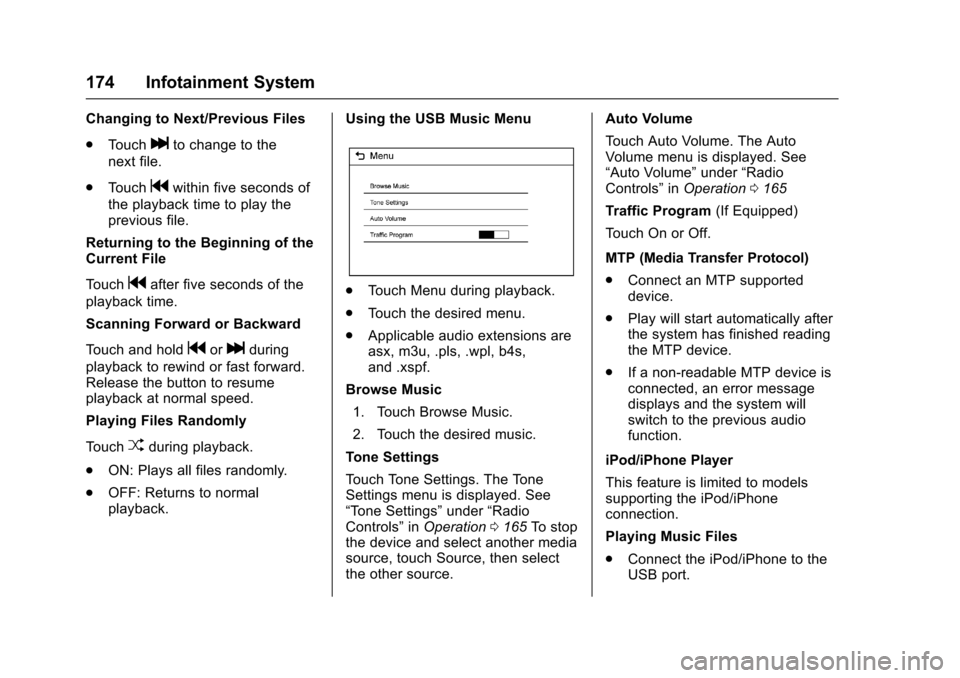
playback. Using the USB Music Menu
.
Touch Menu during playback.
. Touch the desired menu.
. Applicable audio extensions are
asx, m3u, .pls, .wpl, b4s,
and .xspf.
Browse Music 1. Touch Browse Music.
2. Touch the desired music.
Tone Settings
Touch Tone Settings. The Tone
Settings menu is displayed. See
“Tone Settings” under“Radio
Controls” inOperation 0165 To stop
the device and select another media
source, touch Source, then select
the other source. Auto Volume
Touch Auto Volume. The Auto
Volume menu is displayed. See
“Auto Volume”
under“Radio
Controls” inOperation 0165
Traffic Program (If Equipped)
Touch On or Off.
MTP (Media Transfer Protocol)
. Connect an MTP supported
device.
. Play will start automatically after
the system has finished reading
the MTP device.
. If a non-readable MTP device is
connected, an error message
displays and the system will
switch to the previous audio
function.
iPod/iPhone Player
This feature is limited to models
supporting the iPod/iPhone
connection.
Playing Music Files
. Connect the iPod/iPhone to the
USB port.
Page 176 of 391
Chevrolet Camaro Owner Manual (GMNA-Localizing-U.S./Canada/Mexico-
9804281) - 2017 - crc - 4/25/16
Infotainment System 175
.Play will start from the previously
played point after the system
has finished reading the USB
device.
. If a non-readable USB device is
connected, an error message
displays and the system will
switch to the previous audio
function.
If the iPod/iPhone is already
connected:
1. Press
{.
2. Touch AUDIO.
3. Touch Source.
4. Touch iPod.
To stop the device and select
another media source, touch
Source, then select the other
source.
To remove the device, select
another function, then remove the
device.
Pause
. Touch
jto pause.
. Touch
rto resume. Changing to Next/Previous Song
.
Touch
lto change to the
next song.
. Touch
gwithin two seconds of
the playback time to play the
previous file.
Returning to the Beginning of the
Current File
Touch
gafter two seconds of the
playback time.
Scanning Forward or Backward
Touch and hold
gorlduring
playback to rewind or fast forward.
Release the button to resume
playback at normal speed.
Playing Files Randomly
Touch
Zduring playback.
. ON: Plays all files randomly.
. OFF: Returns to normal
playback.
Using the iPod Menu
. Touch Menu during playback.
. Touch the appropriate
play mode. Browse Music
1. Touch Browse Music.
2. Touch the desired music.
Tone Settings
Touch Tone Settings. The Tone
Settings menu is displayed. See
“Tone Settings” under“Radio
Controls” inOperation 0165
Auto Volume
Touch Auto Volume. The Auto
Volume menu is displayed. See
“Auto Volume” under“Radio
Controls” inOperation 0165.
Picture System Information
The infotainment system can view
picture files stored on a USB
storage device and devices that
support Media Transfer
Protocol (MTP).
.
Supported file extensions: .jpg,
.bmp, .png, .gif.
. Animated GIF files are not
supported.
. Some files may not operate due
to a different recording format or
the condition of the file.
Page 292 of 391
Chevrolet Camaro Owner Manual (GMNA-Localizing-U.S./Canada/Mexico-
9804281) - 2017 - crc - 4/25/16
Vehicle Care 291
FusesUsage
F20 Reverse lamps
F21 –
F22 –
F23 Body control module 1
F24 –
F25 –
F26 –
F27 RGB lights
F28 Passive entry/ Passive start
battery 1
F29 Data link connector
F30 Canister vent
F31 Memory seat module folding top
F32 Memory seat module
F33 Wireless charger
F34 Engine control module battery Fuses
Usage
F35 Fuel pump/Fuel system control
module
F36 –
F37 Electric steering column lock
F38 Mirror window module
F39 Rear closure
F40 –
F41 Battery regulated voltage control
F42 SADS
F43 –
F44 Folding top solenoid
F45 Amplifier
F46 FPPM 22
F47 Shunt
F48 –
F49 Steering wheel
F50 Interior rearview mirror Fuses
Usage
F51 Camera module
F52 Rear parking assist
F53 Electronic limited-slip
differential (if
equipped)
F54 Side blind zone alert
F55 Radio controls
F56 Theft deterrent/ Universal remote
system (if equipped)
F57 –
Relays Usage
K1 Rear defogger
K2 Fuel pump
Circuit
Breaker Usage
CB1 –
CB2 Retained accessory power
CB3 –
Page 383 of 391

Chevrolet Camaro Owner Manual (GMNA-Localizing-U.S./Canada/Mexico-
9804281) - 2017 - crc - 4/25/16
382 Index
Door (cont'd)Power Locks . . . . . . . . . . . . . . . . . . . . 38
Drive Belt Routing, Engine . . . . . . 353
Driver Assistance Systems . . . . . 245
Driver Information Center (DIC) . . . . . . . . . . . . . . . . . . 128
Driver Mode Control . . . . . . . . . . . . 236
Driving Competitive . . . . . . . . . . . . . . . . . . . 240
Defensive . . . . . . . . . . . . . . . . . . . . . 201
Drunk . . . . . . . . . . . . . . . . . . . . . . . . . 201
For Better Fuel Economy . . . . . . . 25
Hill and Mountain Roads . . . . . . 209
If the Vehicle is Stuck . . . . . . . . . .211
Loss of Control . . . . . . . . . . . . . . . 203
Off-Road Recovery . . . . . . . . . . . 203
Track Events andCompetitive . . . . . . . . . . . . . . . . . 204
Vehicle Load Limits . . . . . . . . . . . 212
Wet Roads . . . . . . . . . . . . . . . . . . . 208
Winter . . . . . . . . . . . . . . . . . . . . . . . . 210
Dual Automatic Climate Control System . . . . . . . . . . . . . . . . 196
E
Electric Parking Brake . . . . . . . . . . 232
Electric Parking Brake Light . . . . 123
Electrical Equipment,
Add-On . . . . . . . . . . . . . . . . . . . . . . . 254 Electrical System
Engine Compartment Fuse
Block . . . . . . . . . . . . . . . . . . . . . . . . 286
Fuses and Circuit Breakers . . . 286
Overload . . . . . . . . . . . . . . . . . . . . . 285
Rear Compartment Fuse Block . . . . . . . . . . . . . . . . . . . . . . . . 289
Emergency OnStar
®. . . . . . . . . . . . . . . . . . . . . . 370
Engine Air Cleaner/Filter . . . . . . . . . . . . . 268
Check and Service Engine
Soon Light . . . . . . . . . . . . . . . . . . 121
Compartment Overview . . . . . . . 259
Coolant . . . . . . . . . . . . . . . . . . . . . . . 271
Coolant Temperature Gauge . . . . . . . . . . . . . . . . . . . . . . .117
Cooling System . . . . . . . . . . . . . . . 270
Cooling System Messages . . . 137
Drive Belt Routing . . . . . . . . . . . . 353
Exhaust . . . . . . . . . . . . . . . . . . . . . . 224
Heater . . . . . . . . . . . . . . . . . . . . . . . . 220
Oil Life System . . . . . . . . . . . . . . . 266
Oil Messages . . . . . . . . . . . . . . . . . 137
Oil Pressure Gauge . . . . . . . . . . .116
Oil Pressure Light . . . . . . . . . . . . 126
Overheating . . . . . . . . . . . . . . . . . . 274
Power Messages . . . . . . . . . . . . . 138 Engine (cont'd)
Running While Parked . . . . . . . . 224
Starting . . . . . . . . . . . . . . . . . . . . . . . 218
Entry Lighting . . . . . . . . . . . . . . . . . . . 159
Event Data Recorders . . . . . . . . . . 366
Exit Lighting . . . . . . . . . . . . . . . . . . . . 159
Extended Parking . . . . . . . . . . . . . . . 223
Extender, Safety Belt . . . . . . . . . . . . 67
Exterior Lamp Controls . . . . . . . . . 155
Exterior Lighting Battery
Saver . . . . . . . . . . . . . . . . . . . . . . . . . 160
F
FeaturesMemory . . . . . . . . . . . . . . . . . . . . . . . . . 11
Filter, Engine Air Cleaner . . . . . . . . . . . 268
Flash-to-Pass . . . . . . . . . . . . . . . . . . . 156
Flashers, Hazard Warning . . . . . . 157
Flat Tire . . . . . . . . . . . . . . . . . . . . . . . . 312
Floor Mats . . . . . . . . . . . . . . . . . . . . . . 333
Fluid Automatic Transmission . . . . . . 267
Brakes . . . . . . . . . . . . . . . . . . . . . . . . 278
Washer . . . . . . . . . . . . . . . . . . . . . . . 276
Frequency Statement Radio . . . . . . . . . . . . . . . . . . . . . . . . . 364
Front Seats
Heated and Ventilated . . . . . . . . . . 60