center console CHEVROLET CAMARO 2018 User Guide
[x] Cancel search | Manufacturer: CHEVROLET, Model Year: 2018, Model line: CAMARO, Model: CHEVROLET CAMARO 2018Pages: 393, PDF Size: 5.77 MB
Page 124 of 393
Chevrolet Camaro Owner Manual (GMNA-Localizing-U.S./Canada/Mexico-
11348325) - 2018 - CRC - 10/23/17
Instruments and Controls 123
The airbag readiness light comes on
for several seconds when the
vehicle is started. If the light does
not come on then, have it fixed
immediately.
{Warning
If the airbag readiness light stays
on after the vehicle is started or
comes on while driving, it means
the airbag system might not be
working properly. The airbags in
the vehicle might not inflate in a
crash, or they could even inflate
without a crash. To help avoid
injury, have the vehicle serviced
right away.
If there is a problem with the airbag
system, a Driver Information Center
(DIC) message may also come on.
Passenger Airbag Status
Indicator
The vehicle has a passenger
sensing system. See Passenger
Sensing System 079 for important safety information. The overhead
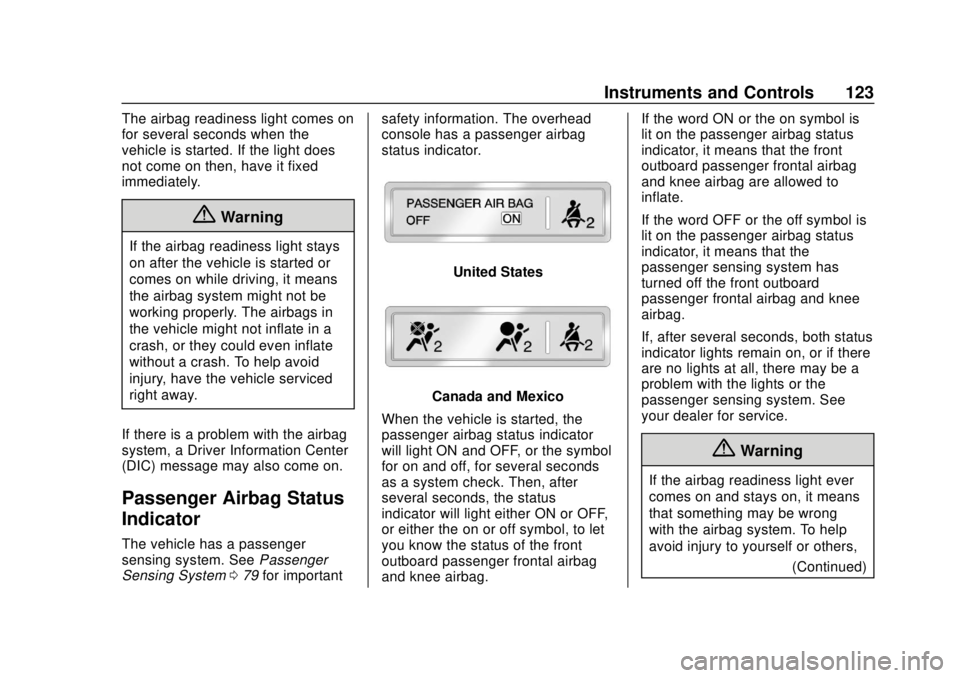
console has a passenger airbag
status indicator.
United States
Canada and Mexico
When the vehicle is started, the
passenger airbag status indicator
will light ON and OFF, or the symbol
for on and off, for several seconds
as a system check. Then, after
several seconds, the status
indicator will light either ON or OFF,
or either the on or off symbol, to let
you know the status of the front
outboard passenger frontal airbag
and knee airbag. If the word ON or the on symbol is
lit on the passenger airbag status
indicator, it means that the front
outboard passenger frontal airbag
and knee airbag are allowed to
inflate.
If the word OFF or the off symbol is
lit on the passenger airbag status
indicator, it means that the
passenger sensing system has
turned off the front outboard
passenger frontal airbag and knee
airbag.
If, after several seconds, both status
indicator lights remain on, or if there
are no lights at all, there may be a
problem with the lights or the
passenger sensing system. See
your dealer for service.
{Warning
If the airbag readiness light ever
comes on and stays on, it means
that something may be wrong
with the airbag system. To help
avoid injury to yourself or others,
(Continued)
Page 167 of 393
Chevrolet Camaro Owner Manual (GMNA-Localizing-U.S./Canada/Mexico-
11348325) - 2018 - CRC - 10/23/17
166 Infotainment System
Caution (Continued)
distort the incoming radio
reception. Any damage caused to
the backglass antenna due to
metallic tinting materials will not
be covered by the vehicle
warranty.
Multi-Band Antenna
The multi-band antenna is on the
roof of the vehicle. The antenna is
used for OnStar, the SiriusXM
Satellite Radio Service System, and
GPS (Global Positioning System),
if the vehicle has these features.
Keep the antenna clear of
obstructions for clear reception.
If the vehicle has a sunroof, and it is
open, reception can also be
affected.
Audio Players
Avoiding Untrusted Media
Devices
When using media devices such as
CDs, DVDs, Blu-ray Discs, SD
cards, USB devices, and mobile
devices, consider the source.
Untrusted media devices could
contain files that affect system
operation or performance. Avoid use
if the content or origin cannot be
trusted.
USB Port
Using the USB Port
The infotainment system can play
music by connecting an auxiliary
device to the USB port.
USB Support
The USB ports are in the center
console, and use the USB 2.0
standard.
USB Supported Devices
.USB Flash Drives .
iPods/iPhones
. Portable USB Hard Drives
Not all iPods and USB drives are
compatible with the USB port.
Make sure the iPod has the latest
firmware from Apple for proper
operation. iPod firmware can be
updated using the latest iTunes
application. See www.apple.com/
itunes.
For help with identifying your iPod,
go to www.apple.com/support.
The USB port can play both lower
and upper case .mp3, .wma, .ogg,
and .wav files stored on a USB
storage device.
Supported Apple Devices
To view supported devices in the
U.S., see www.my.chevrolet.com/
learn.
To view supported devices in
Canada, see
www.chevroletowner.ca.
To view supported devices in
Mexico, see your dealer.
Page 173 of 393
Chevrolet Camaro Owner Manual (GMNA-Localizing-U.S./Canada/Mexico-
11348325) - 2018 - CRC - 10/23/17
172 Infotainment System
Viewing a Previous or Next
Picture
Touch
SorTfrom the picture
screen.
Rotating a Picture
Touch
wfrom the picture screen.
Enlarging a Picture
Touch
xfrom the picture screen.
Using the USB Picture Menu 1. Touch MENU from the picture screen.
2. Touch the appropriate menu: .Slide Show Time: Allows
selection of the slide show
interval.
. Clock, Temp. Display:
Allows selection of On or
Off to show the clock and
temperature on the full
screen. .
Display Settings: Adjusts
for Brightness and Contrast.
3. Touch Back on the infotainment display to exit.
Auxiliary Devices
Using the Auxiliary Input Jack
Settings menus and functions may
vary depending on vehicle options.
The auxiliary input jack can be used
to connect external audio devices
such as an iPod, iPhone, MP3
player, CD player, and other
supported devices for use as
another source for audio listening.
This input jack is not an audio
output; do not plug headphones into
the front auxiliary input jack. The auxiliary input jack is in the
center console. The infotainment
system can play music connected
by the auxiliary device.
Play will begin when the system has
finished reading the information on
the device.
Playing Music
To play music from the device, if the
device is already connected:
1. Press
{.
2. Touch AUDIO.
3. Touch Source.
4. Touch AUX.
5. Touch
0.
To adjust the tone settings, see
“Tone Settings” inOperation 0160.
Page 235 of 393
Chevrolet Camaro Owner Manual (GMNA-Localizing-U.S./Canada/Mexico-
11348325) - 2018 - CRC - 10/23/17
234 Driving and Operating
Driver Mode Control
Driver Mode Control attempts to add
a sportier feel, provide a more
comfortable ride, or assist in
different weather conditions or
terrain. This system simultaneously
changes the software calibration of
various sub-systems. Depending on
the option package, available
features, and mode selected, the
suspension, steering, and
powertrain will change calibrations
to achieve the desired mode
characteristics. If the vehicle is
equipped with Magnetic Ride
Control, selecting the various Driver
Modes adjusts the ride of the
vehicle to enhance the ride
performance for the road conditions
and the selected mode.
While in the Sport and/or Track
Modes, the vehicle monitors driving
behavior and automatically enables
Performance Shift Features in the
automatic transmission when
spirited driving is detected. These
features maintain lower
transmission gears to increase
available engine braking andimprove acceleration response. The
vehicle will exit these features and
return to normal operation after a
short period when no spirited driving
is detected.
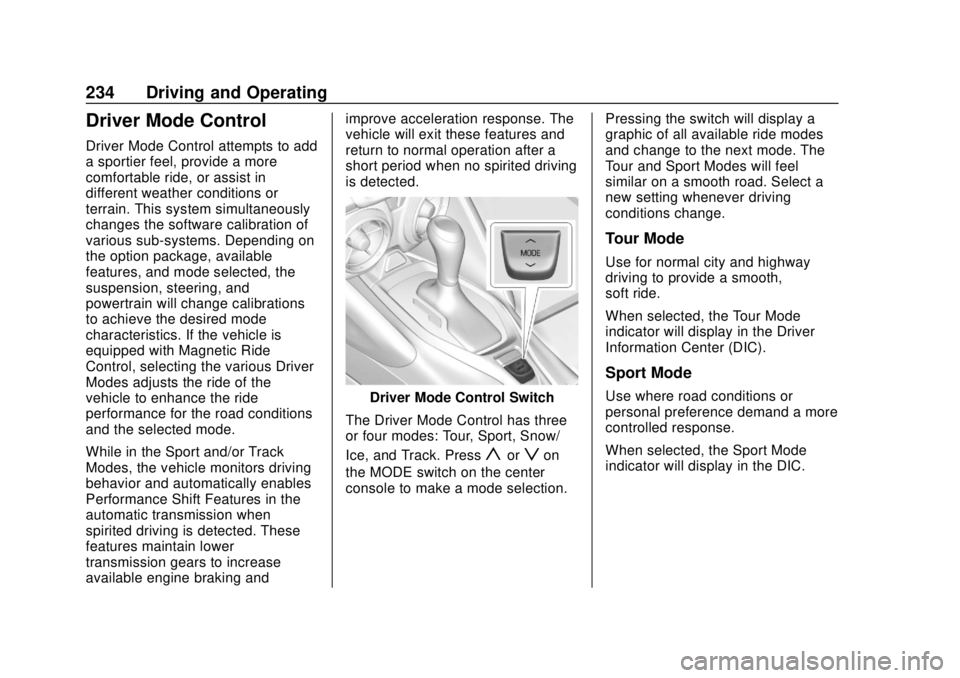
Driver Mode Control Switch
The Driver Mode Control has three
or four modes: Tour, Sport, Snow/
Ice, and Track. Press
yorzon
the MODE switch on the center
console to make a mode selection. Pressing the switch will display a
graphic of all available ride modes
and change to the next mode. The
Tour and Sport Modes will feel
similar on a smooth road. Select a
new setting whenever driving
conditions change.
Tour Mode
Use for normal city and highway
driving to provide a smooth,
soft ride.
When selected, the Tour Mode
indicator will display in the Driver
Information Center (DIC).
Sport Mode
Use where road conditions or
personal preference demand a more
controlled response.
When selected, the Sport Mode
indicator will display in the DIC.
Page 239 of 393
Chevrolet Camaro Owner Manual (GMNA-Localizing-U.S./Canada/Mexico-
11348325) - 2018 - CRC - 10/23/17
238 Driving and Operating
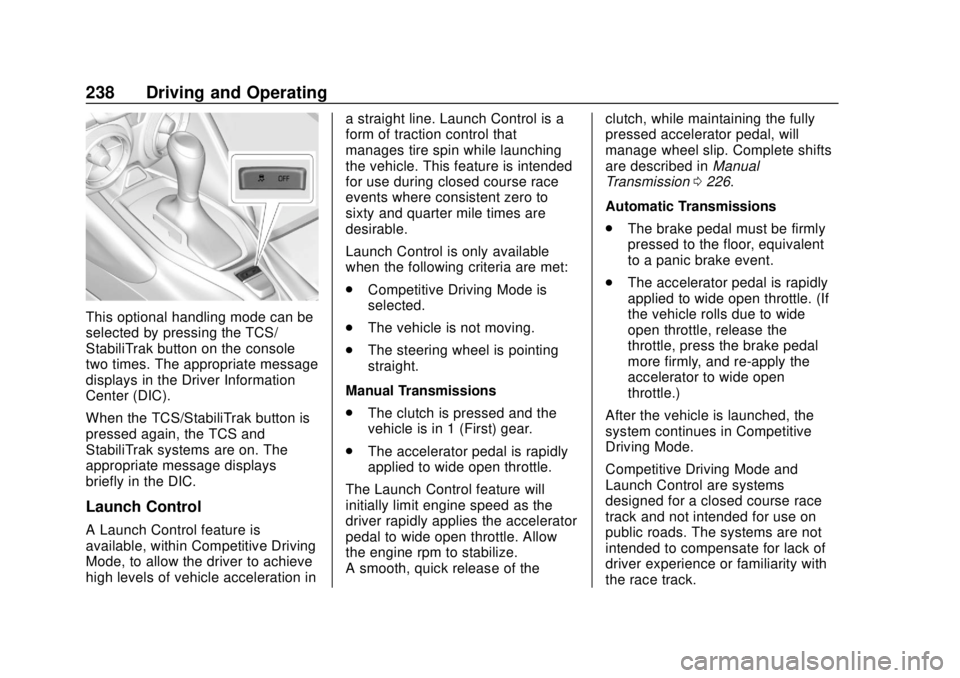
This optional handling mode can be
selected by pressing the TCS/
StabiliTrak button on the console
two times. The appropriate message
displays in the Driver Information
Center (DIC).
When the TCS/StabiliTrak button is
pressed again, the TCS and
StabiliTrak systems are on. The
appropriate message displays
briefly in the DIC.
Launch Control
A Launch Control feature is
available, within Competitive Driving
Mode, to allow the driver to achieve
high levels of vehicle acceleration ina straight line. Launch Control is a
form of traction control that
manages tire spin while launching
the vehicle. This feature is intended
for use during closed course race
events where consistent zero to
sixty and quarter mile times are
desirable.
Launch Control is only available
when the following criteria are met:
.
Competitive Driving Mode is
selected.
. The vehicle is not moving.
. The steering wheel is pointing
straight.
Manual Transmissions
. The clutch is pressed and the
vehicle is in 1 (First) gear.
. The accelerator pedal is rapidly
applied to wide open throttle.
The Launch Control feature will
initially limit engine speed as the
driver rapidly applies the accelerator
pedal to wide open throttle. Allow
the engine rpm to stabilize.
A smooth, quick release of the clutch, while maintaining the fully
pressed accelerator pedal, will
manage wheel slip. Complete shifts
are described in
Manual
Transmission 0226.
Automatic Transmissions
. The brake pedal must be firmly
pressed to the floor, equivalent
to a panic brake event.
. The accelerator pedal is rapidly
applied to wide open throttle. (If
the vehicle rolls due to wide
open throttle, release the
throttle, press the brake pedal
more firmly, and re-apply the
accelerator to wide open
throttle.)
After the vehicle is launched, the
system continues in Competitive
Driving Mode.
Competitive Driving Mode and
Launch Control are systems
designed for a closed course race
track and not intended for use on
public roads. The systems are not
intended to compensate for lack of
driver experience or familiarity with
the race track.
Page 383 of 393

Chevrolet Camaro Owner Manual (GMNA-Localizing-U.S./Canada/Mexico-
11348325) - 2018 - CRC - 10/23/17
382 Index
Apple CarPlay andAndroid Auto . . . . . . . . . . . . . . . . . . 183
Assistance Program, Roadside . . . . . . . . . . . . . . . . . . . . . . 359
Assistance Systems for Parking and Backing . . . . . . . . . . 242
Audio
Theft-Deterrent Feature . . . . . . . 158
Automatic Climate Control System . . . . . . . 188
Dimming Mirrors . . . . . . . . . . . . . . . . 47
Door Locks . . . . . . . . . . . . . . . . . . . . . 40
Headlamp System . . . . . . . . . . . . 151
Transmission . . . . . . . . . . . . . . . . . 221
Transmission Fluid . . . . . . . . . . . 264
Automatic Transmission
Manual Mode . . . . . . . . . . . . . . . . . 224
Shift Lock Control FunctionCheck . . . . . . . . . . . . . . . . . . . . . . . 277
Auxiliary Devices . . . . . . . . . . . . . . . . . . . . . . . 172
Avoiding Untrusted Media Devices . . . . . . . . . . . . . . . . . . . . . . . 166
Axle, Rear . . . . . . . . . . . . . . . . . . . . . . 277
B
Backglass Antenna . . . . . . . . . . . . . 165 Battery
Exterior Lighting Battery
Saver . . . . . . . . . . . . . . . . . . . . . . . 155
Load Management . . . . . . . . . . . . 155
Power Protection . . . . . . . . . . . . . 155
Battery - North America . . . . 276, 320
Blade Replacement, Wiper . . . . . 278
Bluetooth Overview . . . . . . . . . . . . . . . . 178, 179
Boost Gauge . . . . . . . . . . . . . . . . . . . 118
Brake Parking, Electric . . . . . . . . . . . . . . 229
System Warning Light . . . . . . . . 126
Brakes . . . . . . . . . . . . . . . . . . . . . . . . . . 274 Antilock . . . . . . . . . . . . . . . . . . . . . . . 229
Assist . . . . . . . . . . . . . . . . . . . . . . . . . 231
Fluid . . . . . . . . . . . . . . . . . . . . . . . . . . 275
Braking . . . . . . . . . . . . . . . . . . . . . . . . . 198
Break-In, New Vehicle . . . . . . . . . . 212
Bulb Replacement Front Turn Signal Lamps . . . . . 281
Halogen Bulbs . . . . . . . . . . . . . . . . 281
Headlamp Aiming . . . . . . . . . . . . . 281
Headlamps . . . . . . . . . . . . . . . . . . . 281
High Intensity Discharge
(HID) Lighting . . . . . . . . . . . . . . . 281
License Plate Lamps . . . . . . . . . 283 Bulb Replacement (cont'd)
Taillamps, Turn Signal,
Sidemarker, Stoplamps,
and Backup Lamps . . . . . . . . . . 282
Buying New Tires . . . . . . . . . . . . . . . 307
C
Calibration . . . . . . . . . . . . . . . . . . . . . . 108
California Fuel Requirements . . . . . . . . . . . 248
Perchlorate Materials
Requirements . . . . . . . . . . . . . . . 254
California Proposition
65 Warning . . . . . . . . . .253, 276, 320,
Back Cover
Canadian Vehicle Owners . . . . . . . . 2
Capacities and Specifications . . . . . . . . . . . . . . . . . 351
Carbon Monoxide Engine Exhaust . . . . . . . . . . . . . . . 220
Trunk . . . . . . . . . . . . . . . . . . . . . . . . . . . 41
Winter Driving . . . . . . . . . . . . . . . . 206
Caution, Danger, and Warning . . . . 3
Center Console Storage . . . . . . . . 103
Chains, Tire . . . . . . . . . . . . . . . . . . . . 312
Charging Wireless . . . . . . . . . . . . . . . . . . . . . . .110
Page 391 of 393

Chevrolet Camaro Owner Manual (GMNA-Localizing-U.S./Canada/Mexico-
11348325) - 2018 - CRC - 10/23/17
390 Index
Steering (cont'd)Heated Wheel . . . . . . . . . . . . . . . . 107
Wheel Adjustment . . . . . . . . . . . . 105
Wheel Controls . . . . . . . . . . . . . . . 106
Stoplamps and Back-Up Lamps Bulb Replacement . . . . . . . . . . . . 282
Storage Rear . . . . . . . . . . . . . . . . . . . . . . . . . . 102
Storage Areas
Center Console . . . . . . . . . . . . . . . 103
Convenience Net . . . . . . . . . . . . . 103
Glove Box . . . . . . . . . . . . . . . . . . . . 102
Storage Compartments . . . . . . . . . 102
Storing the Tire Sealant and Compressor Kit . . . . . . . . . . . . . . . 320
Struts Gas . . . . . . . . . . . . . . . . . . . . . . . . . . . 279
Stuck Vehicle . . . . . . . . . . . . . . . . . . . 207
Summer Tires . . . . . . . . . . . . . . . . . . 294
Sun Visors . . . . . . . . . . . . . . . . . . . . . . . 51
Sunroof . . . . . . . . . . . . . . . . . . . . . . . . . . 51
Symbols . . . . . . . . . . . . . . . . . . . . . . . . . . 3
System
Infotainment . . . . . . . . . . . . . 157, 368
Systems Driver Assistance . . . . . . . . . . . . . 242T
Tachometer . . . . . . . . . . . . . . . . . . . . . 117
TaillampsBulb Replacement . . . . . . . . . . . . 282
Text Telephone (TTY) Users . . . . 358
Theater Dimming . . . . . . . . . . . . . . . 155
Theft-Deterrent Systems . . . . . . . . . 45
Immobilizer . . . . . . . . . . . . . . . . . . . . . 45
Time . . . . . . . . . . . . . . . . . . . . . . . . . . . . 108
Tires . . . . . . . . . . . . . . . . . . . . . . . . . . . . 291 All-Season . . . . . . . . . . . . . . . . . . . . 292
Buying New Tires . . . . . . . . . . . . . 307
Chains . . . . . . . . . . . . . . . . . . . . . . . . 312
Designations . . . . . . . . . . . . . . . . . 296
Different Size . . . . . . . . . . . . . . . . . 309
If a Tire Goes Flat . . . . . . . . . . . . 312
Inspection . . . . . . . . . . . . . . . . . . . . 305
Low Profile . . . . . . . . . . . . . . . . . . . 294
Pressure . . . . . . . . . . . . . . . . . 299, 300
Pressure Light . . . . . . . . . . . . . . . . 128
Pressure Monitor Operation . . 302
Pressure Monitor System . . . . . 301
Rotation . . . . . . . . . . . . . . . . . . . . . . 305
Run-Flat . . . . . . . . . . . . . . . . . . . . . . 293
Sealant andCompressor Kit . . . . . . . . . . . . . 313
Sealant and Compressor Kit, Storing . . . . . . . . . . . . . . . . . . 320 Tires (cont'd)
Sidewall Labeling . . . . . . . . . . . . . 295
Terminology and Definitions . . 296
Uniform Tire Quality
Grading . . . . . . . . . . . . . . . . . . . . . 309
Wheel Alignment and Tire Balance . . . . . . . . . . . . . . . . . . . . . .311
Wheel Replacement . . . . . . . . . . .311
When It Is Time for New Tires . . . . . . . . . . . . . . . . . . . . . . . . 306
Winter . . . . . . . . . . . . . . . . . . . . . . . . 292
Towing General Information . . . . . . . . . . 251
Recreational Vehicle . . . . . . . . . . 325
Vehicle . . . . . . . . . . . . . . . . . . . . . . . 323
Track Events and Competitive Driving . . . . . . . . . . . 200
Traction
Control System (TCS)/StabiliTrak Light . . . . . . . . . . . . . 128
Limited-Slip Rear Axle . . . . . . . . 239
Off Light . . . . . . . . . . . . . . . . . . . . . . 127
Traction Control/Electronic
Stability Control . . . . . . . . . . . . . . . 232
Trademarks and License Agreements . . . . . . . . . . . . . . . . . . . 186
Transmission Automatic . . . . . . . . . . . . . . . . . . . . . 221