seats CHEVROLET CAMARO 2018 Owner's Manual
[x] Cancel search | Manufacturer: CHEVROLET, Model Year: 2018, Model line: CAMARO, Model: CHEVROLET CAMARO 2018Pages: 393, PDF Size: 5.77 MB
Page 2 of 393

Chevrolet Camaro Owner Manual (GMNA-Localizing-U.S./Canada/Mexico-
11348325) - 2018 - CRC - 10/23/17
ContentsIntroduction . . . . . . . . . . . . . . . . . . . . . . 2
In Brief . . . . . . . . . . . . . . . . . . . . . . . . . . . 5
Keys, Doors, and Windows . . . . . 28
Seats and Restraints . . . . . . . . . . . 58
Storage . . . . . . . . . . . . . . . . . . . . . . . 102
Instruments and Controls . . . . . . 104
Lighting . . . . . . . . . . . . . . . . . . . . . . . 150
Infotainment System . . . . . . . . . . 157
Climate Controls . . . . . . . . . . . . . . 188
Driving and Operating . . . . . . . . . 196
Vehicle Care . . . . . . . . . . . . . . . . . . 252
Service and Maintenance . . . . . 335
Technical Data . . . . . . . . . . . . . . . . 350
Customer Information . . . . . . . . . 355
Reporting Safety Defects . . . . . . 366
OnStar . . . . . . . . . . . . . . . . . . . . . . . . 369
Index . . . . . . . . . . . . . . . . . . . . 381
Page 6 of 393
Chevrolet Camaro Owner Manual (GMNA-Localizing-U.S./Canada/Mexico-
11348325) - 2018 - CRC - 10/23/17
In Brief 5
In Brief
Instrument Panel
Instrument Panel . . . . . . . . . . . . . . . . 6
Initial Drive Information
Initial Drive Information . . . . . . . . . . 8
Remote Keyless Entry (RKE)System . . . . . . . . . . . . . . . . . . . . . . . . 8
Remote Vehicle Start . . . . . . . . . . . 9
Door Locks . . . . . . . . . . . . . . . . . . . . . 9
Trunk Release . . . . . . . . . . . . . . . . . . 9
Windows . . . . . . . . . . . . . . . . . . . . . . . 10
Seat Adjustment . . . . . . . . . . . . . . . 10
Memory Features . . . . . . . . . . . . . . 11
Heated and Ventilated Seats . . . 12
Head Restraint Adjustment . . . . 12
Seat Belts . . . . . . . . . . . . . . . . . . . . . 12
Passenger Sensing System . . . 13
Mirror Adjustment . . . . . . . . . . . . . . 13
Steering Wheel Adjustment . . . . 14
Interior Lighting . . . . . . . . . . . . . . . . 14
Exterior Lighting . . . . . . . . . . . . . . . 14
Windshield Wiper/Washer . . . . . . 15
Climate Controls . . . . . . . . . . . . . . . 16
Transmission . . . . . . . . . . . . . . . . . . 17
Vehicle Features
Infotainment System . . . . . . . . . . . 19
Radio(s) . . . . . . . . . . . . . . . . . . . . . . . 19
Satellite Radio . . . . . . . . . . . . . . . . . 20
Portable Audio Devices . . . . . . . . 20
Bluetooth . . . . . . . . . . . . . . . . . . . . . . 20
Steering Wheel Controls . . . . . . . 21
Cruise Control . . . . . . . . . . . . . . . . . 22
Driver Information Center (DIC) . . . . . . . . . . . . . . . . . 22
Lane Change Alert (LCA) . . . . . . 23
Rear Vision Camera (RVC) . . . . 23
Rear Cross Traffic Alert (RCTA) System . . . . . . . . . . . . . . . . . . . . . . . 23
Parking Assist . . . . . . . . . . . . . . . . . 23
Power Outlets . . . . . . . . . . . . . . . . . 23
Universal Remote System . . . . . 24
Sunroof . . . . . . . . . . . . . . . . . . . . . . . . 24
Convertible . . . . . . . . . . . . . . . . . . . . 25
Performance and Maintenance
Traction Control/Electronic Stability Control . . . . . . . . . . . . . . 25
Tire Pressure Monitor . . . . . . . . . . 25
Fuel (3.6L V6 Engine) . . . . . . . . . . 26
Fuel (2.0L L4 Turbo Engine and 6.2L V8 Engine) . . . . . . . . . . . . . . 26
Fuel (6.2L V8 Supercharged Engine) . . . . . . . . . . . . . . . . . . . . . . . 26
E85 or FlexFuel . . . . . . . . . . . . . . . . 26 Engine Oil Life System . . . . . . . . 26
Car Wash Guidelines . . . . . . . . . . 27
Driving for Better Fuel
Economy . . . . . . . . . . . . . . . . . . . . . 27
Roadside Assistance
Program . . . . . . . . . . . . . . . . . . . . . . 27
Page 8 of 393

Chevrolet Camaro Owner Manual (GMNA-Localizing-U.S./Canada/Mexico-
11348325) - 2018 - CRC - 10/23/17
In Brief 7
1.Air Vents 0194.
2. Instrument Panel Illumination
Control 0153.
3. Exterior Lamp Controls 0150.
Turn Signal Lever. See Turn
and Lane-Change Signals
0 153.
Headlamp High/Low-Beam
Changer 0150.
4. Tap Shift (If Equipped). See Manual Mode 0224.
Active Rev Match 0228 (If
Equipped).
5. Instrument Cluster 0113.
6. Windshield Wiper/Washer
0107.
7. Infotainment 0157.
8. Light Sensor. See Automatic
Headlamp System 0151. 9.
Automatic Climate Control
System 0188 orDual
Automatic Climate Control
System 0191 (If Equipped).
Heated and Ventilated Front
Seats 064 (If Equipped).
10. Shift Lever. See Automatic
Transmission 0221 orManual
Transmission 0226.
11. Power Outlets 0110.
12. Electric Parking Brake 0229.
13. Traction Control/Electronic
Stability Control 0232.
Driver Mode Control 0234.
14. Hazard Warning Flashers
0152.
15. ENGINE START/STOP Button. SeeIgnition Positions 0213.
16. Steering Wheel Controls 0106.
Driver Information Center (DIC)
Controls. See Driver
Information Center (DIC) 0131. 17. Audio Controls. See
Steering
Wheel Controls 0106.
18. Horn 0107.
19. Steering Wheel Adjustment
0105.
20. Cruise Control 0239.
Heated Steering Wheel 0107
(If Equipped).
21. Head-Up Display (HUD) 0134
(If Equipped).
22. Data Link Connector (DLC) (Out of View). See Malfunction
Indicator Lamp 0124.
Hood Release (Out of View).
See Hood 0255.
Page 12 of 393
Chevrolet Camaro Owner Manual (GMNA-Localizing-U.S./Canada/Mexico-
11348325) - 2018 - CRC - 10/23/17
In Brief 11
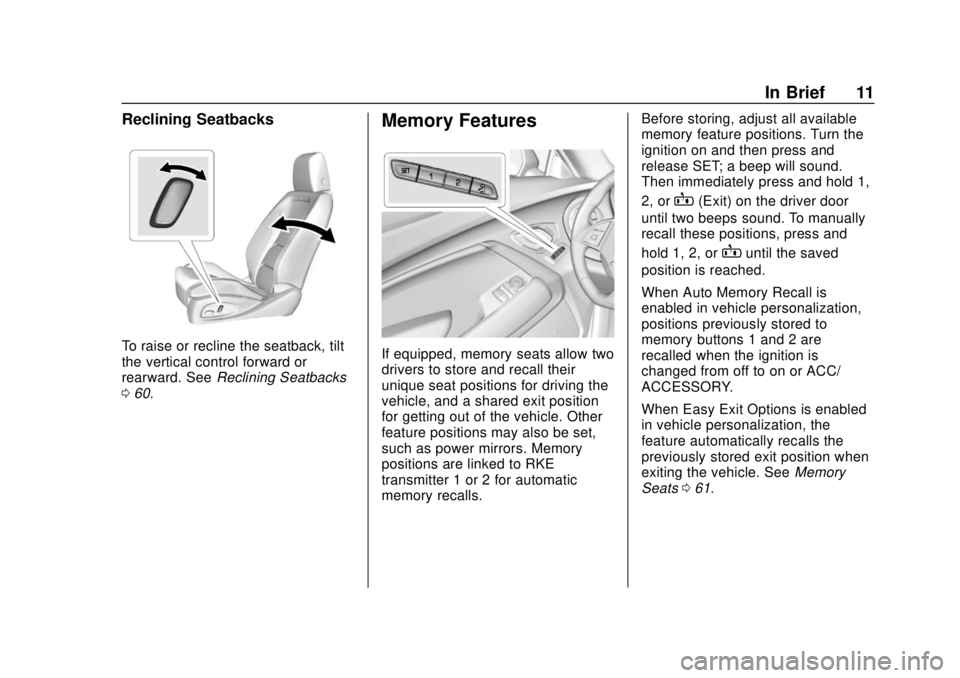
Reclining Seatbacks
To raise or recline the seatback, tilt
the vertical control forward or
rearward. SeeReclining Seatbacks
0 60.
Memory Features
If equipped, memory seats allow two
drivers to store and recall their
unique seat positions for driving the
vehicle, and a shared exit position
for getting out of the vehicle. Other
feature positions may also be set,
such as power mirrors. Memory
positions are linked to RKE
transmitter 1 or 2 for automatic
memory recalls. Before storing, adjust all available
memory feature positions. Turn the
ignition on and then press and
release SET; a beep will sound.
Then immediately press and hold 1,
2, or
B(Exit) on the driver door
until two beeps sound. To manually
recall these positions, press and
hold 1, 2, or
Buntil the saved
position is reached.
When Auto Memory Recall is
enabled in vehicle personalization,
positions previously stored to
memory buttons 1 and 2 are
recalled when the ignition is
changed from off to on or ACC/
ACCESSORY.
When Easy Exit Options is enabled
in vehicle personalization, the
feature automatically recalls the
previously stored exit position when
exiting the vehicle. See Memory
Seats 061.
Page 13 of 393
Chevrolet Camaro Owner Manual (GMNA-Localizing-U.S./Canada/Mexico-
11348325) - 2018 - CRC - 10/23/17
12 In Brief
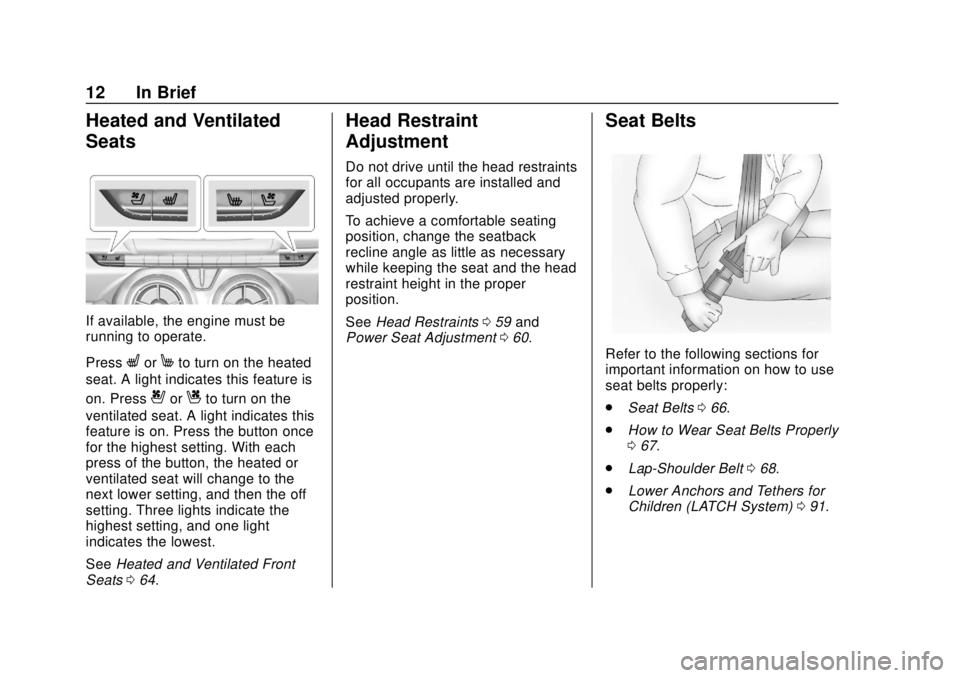
Heated and Ventilated
Seats
If available, the engine must be
running to operate.
Press
LorMto turn on the heated
seat. A light indicates this feature is
on. Press
{orCto turn on the
ventilated seat. A light indicates this
feature is on. Press the button once
for the highest setting. With each
press of the button, the heated or
ventilated seat will change to the
next lower setting, and then the off
setting. Three lights indicate the
highest setting, and one light
indicates the lowest.
See Heated and Ventilated Front
Seats 064.
Head Restraint
Adjustment
Do not drive until the head restraints
for all occupants are installed and
adjusted properly.
To achieve a comfortable seating
position, change the seatback
recline angle as little as necessary
while keeping the seat and the head
restraint height in the proper
position.
See Head Restraints 059 and
Power Seat Adjustment 060.
Seat Belts
Refer to the following sections for
important information on how to use
seat belts properly:
.
Seat Belts 066.
. How to Wear Seat Belts Properly
067.
. Lap-Shoulder Belt 068.
. Lower Anchors and Tethers for
Children (LATCH System) 091.
Page 18 of 393
Chevrolet Camaro Owner Manual (GMNA-Localizing-U.S./Canada/Mexico-
11348325) - 2018 - CRC - 10/23/17
In Brief 17
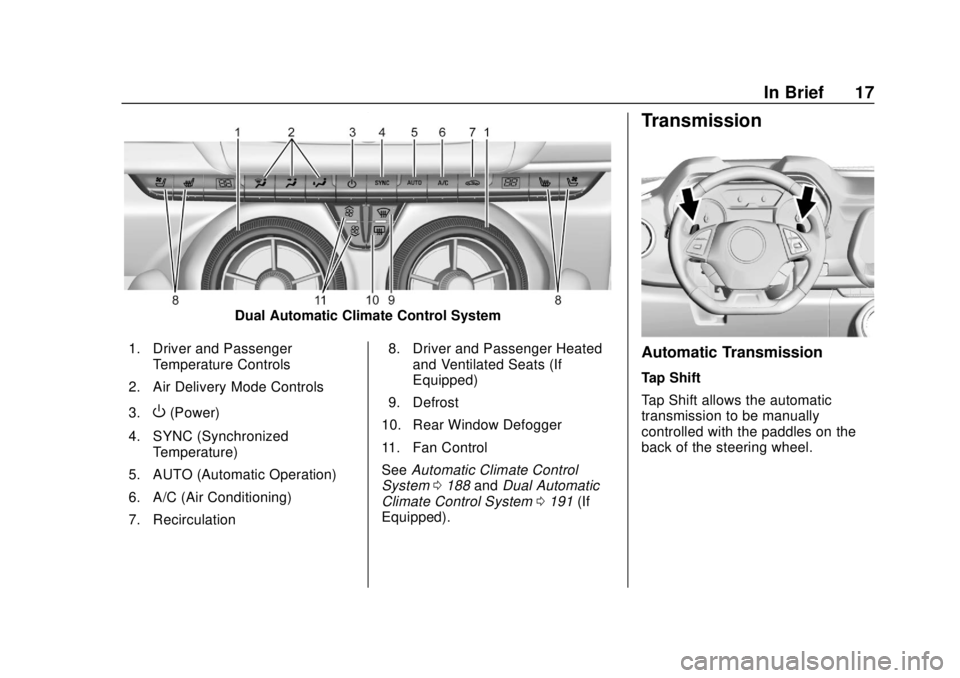
Dual Automatic Climate Control System
1. Driver and Passenger Temperature Controls
2. Air Delivery Mode Controls
3.
O(Power)
4. SYNC (Synchronized Temperature)
5. AUTO (Automatic Operation)
6. A/C (Air Conditioning)
7. Recirculation 8. Driver and Passenger Heated
and Ventilated Seats (If
Equipped)
9. Defrost
10. Rear Window Defogger
11. Fan Control
See Automatic Climate Control
System 0188 andDual Automatic
Climate Control System 0191 (If
Equipped).
Transmission
Automatic Transmission
Tap Shift
Tap Shift allows the automatic
transmission to be manually
controlled with the paddles on the
back of the steering wheel.
Page 32 of 393
Chevrolet Camaro Owner Manual (GMNA-Localizing-U.S./Canada/Mexico-
11348325) - 2018 - CRC - 10/23/17
Keys, Doors, and Windows 31
turn signals flash for 30 seconds or
until
7is pressed again or the
ignition is turned on.
Convertible Top
. Do not try to start the vehicle
while using the RKE transmitter
to open the convertible top.
Release
Mon the RKE
transmitter and ENGINE START/
STOP. Wait a few seconds
before starting the vehicle
normally.
. The passive door unlock feature
may not operate properly while
using the RKE transmitter to
open the convertible top.
The convertible top can also be
opened using a button in the
overhead console. See Convertible
Top 052.
Keyless Access Operation
The Keyless Access system lets
you lock and unlock the doors and
access the trunk without removing
the RKE transmitter from your
pocket, purse, briefcase, etc. The RKE transmitter should be within
1 m (3 ft) of the trunk or door being
opened. If equipped, there will be
buttons on the outside door
handles.
Keyless Access can be
programmed to unlock all doors on
the first lock/unlock press from the
driver door. See
Vehicle
Personalization 0138.
If equipped with memory seats, RKE
transmitters 1 and 2 are linked to
the seating positions of memory 1 or
2. See Memory Seats 061.
Keyless Unlocking/Locking from
the Driver Door
When the doors are locked and the
RKE transmitter is within 1 m (3 ft)
of the driver door handle, pressing
the lock/unlock button on the driver
door handle will unlock the driver
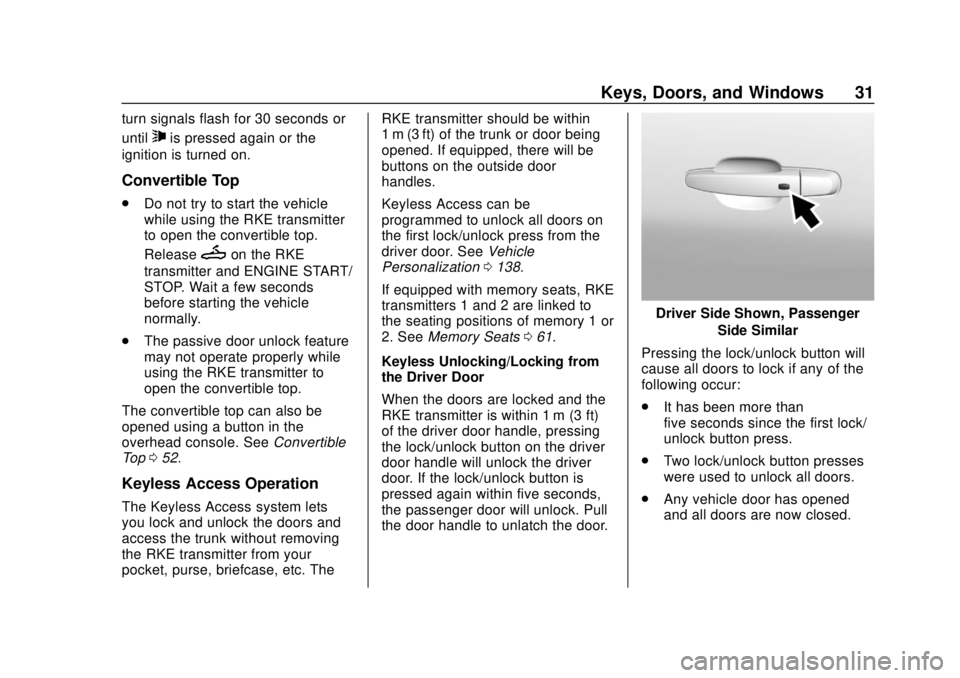
door. If the lock/unlock button is
pressed again within five seconds,
the passenger door will unlock. Pull
the door handle to unlatch the door.
Driver Side Shown, Passenger Side Similar
Pressing the lock/unlock button will
cause all doors to lock if any of the
following occur:
. It has been more than
five seconds since the first lock/
unlock button press.
. Two lock/unlock button presses
were used to unlock all doors.
. Any vehicle door has opened
and all doors are now closed.
Page 37 of 393
Chevrolet Camaro Owner Manual (GMNA-Localizing-U.S./Canada/Mexico-
11348325) - 2018 - CRC - 10/23/17
36 Keys, Doors, and Windows
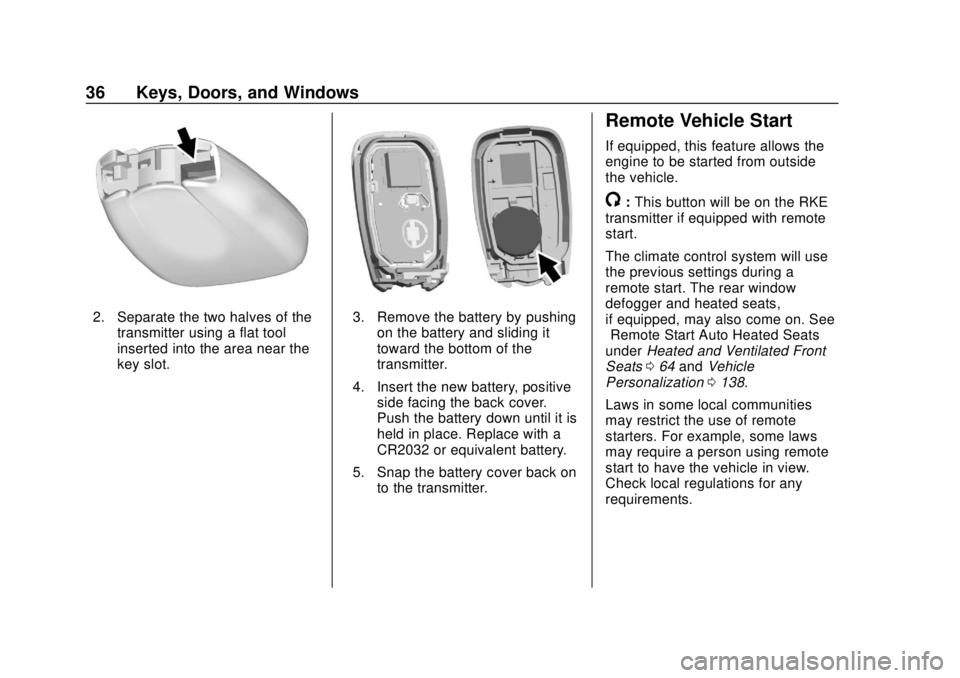
2. Separate the two halves of thetransmitter using a flat tool
inserted into the area near the
key slot.3. Remove the battery by pushingon the battery and sliding it
toward the bottom of the
transmitter.
4. Insert the new battery, positive side facing the back cover.
Push the battery down until it is
held in place. Replace with a
CR2032 or equivalent battery.
5. Snap the battery cover back on to the transmitter.
Remote Vehicle Start
If equipped, this feature allows the
engine to be started from outside
the vehicle.
/:This button will be on the RKE
transmitter if equipped with remote
start.
The climate control system will use
the previous settings during a
remote start. The rear window
defogger and heated seats,
if equipped, may also come on. See
“Remote Start Auto Heated Seats”
under Heated and Ventilated Front
Seats 064 and Vehicle
Personalization 0138.
Laws in some local communities
may restrict the use of remote
starters. For example, some laws
may require a person using remote
start to have the vehicle in view.
Check local regulations for any
requirements.
Page 48 of 393
Chevrolet Camaro Owner Manual (GMNA-Localizing-U.S./Canada/Mexico-
11348325) - 2018 - CRC - 10/23/17
Keys, Doors, and Windows 47
Side Blind Zone Alert (SBZA)
The vehicle may have SBZA. See
Side Blind Zone Alert (SBZA)0245.
Lane Change Alert (LCA)
The vehicle may have LCA. See
Lane Change Alert (LCA) 0245.
Heated Mirrors
If equipped with heated mirrors:
=:The rear window defogger also
heats the outside mirrors.
See Dual Automatic Climate Control
System 0191.
Automatic Dimming
Mirror
If the vehicle is equipped with an
automatic dimming outside mirror on
the driver side, the mirror will adjust
for the glare of headlamps
behind you.
Reverse Tilt Mirrors
If equipped with memory seats, the
passenger and/or driver mirror tilts
to a preselected position when the
vehicle is in R (Reverse). This
allows the curb to be seen when
parallel parking.
The mirror(s) return to the original
position when:
.
The vehicle is shifted out of
R (Reverse), or remains in
R (Reverse) for about
30 seconds.
. The ignition is turned off.
. The vehicle is driven in
R (Reverse) above a set speed.
To turn this feature on or off, see
Vehicle Personalization 0138.
Interior Mirrors
Interior Rearview Mirrors
Adjust the rearview mirror for a clear
view of the area behind your
vehicle.
If equipped with OnStar, the vehicle
may have three control buttons at
the bottom of the mirror. See OnStar
Overview 0369.
To avoid accidental OnStar calls,
clean the mirror with the ignition off.
Do not spray glass cleaner directly
on the mirror. Use a soft towel
dampened with water.
Page 59 of 393
Chevrolet Camaro Owner Manual (GMNA-Localizing-U.S./Canada/Mexico-
11348325) - 2018 - CRC - 10/23/17
58 Seats and Restraints
Seats and
Restraints
Head Restraints
Head Restraints . . . . . . . . . . . . . . . 59
Front Seats
Power Seat Adjustment . . . . . . . . 60
Reclining Seatbacks . . . . . . . . . . . 60
Memory Seats . . . . . . . . . . . . . . . . . 61
Seatback Latches . . . . . . . . . . . . . . 64
Heated and Ventilated FrontSeats . . . . . . . . . . . . . . . . . . . . . . . . . 64
Rear Seats
Rear Seats . . . . . . . . . . . . . . . . . . . . 65
Seat Belts
Seat Belts . . . . . . . . . . . . . . . . . . . . . 66
How to Wear Seat BeltsProperly . . . . . . . . . . . . . . . . . . . . . . 67
Lap-Shoulder Belt . . . . . . . . . . . . . 68
Seat Belt Use During Pregnancy . . . . . . . . . . . . . . . . . . . . 70
Seat Belt Extender . . . . . . . . . . . . . 70
Safety System Check . . . . . . . . . . 71
Seat Belt Care . . . . . . . . . . . . . . . . . 71
Replacing Seat Belt System Parts after a Crash . . . . . . . . . . . 71
Airbag System
Airbag System . . . . . . . . . . . . . . . . . 72
Where Are the Airbags? . . . . . . . 74
When Should an AirbagInflate? . . . . . . . . . . . . . . . . . . . . . . . 76
What Makes an Airbag
Inflate? . . . . . . . . . . . . . . . . . . . . . . . 77
How Does an Airbag Restrain? . . . . . . . . . . . . . . . . . . . . . 77
What Will You See after an Airbag Inflates? . . . . . . . . . . . . . . 77
Passenger Sensing System . . . 79
Servicing the Airbag-Equipped Vehicle . . . . . . . . . . . . . . . . . . . . . . . 83
Adding Equipment to the Airbag-Equipped Vehicle . . . . . 83
Airbag System Check . . . . . . . . . . 84
Replacing Airbag System Parts after a Crash . . . . . . . . . . . . . . . . . 84
Child Restraints
Older Children . . . . . . . . . . . . . . . . . 85
Infants and Young Children . . . . 86
Child Restraint Systems . . . . . . . 89
Where to Put the Restraint . . . . . 90
Lower Anchors and Tethers forChildren (LATCH System) . . . . 91
Replacing LATCH System Parts After a Crash . . . . . . . . . . . . . . . . . 97 Securing Child Restraints (With
the Seat Belt in the
Rear Seat) . . . . . . . . . . . . . . . . . . . 97
Securing Child Restraints (With the Seat Belt in the
Front Seat) . . . . . . . . . . . . . . . . . . . 99