display CHEVROLET CAMARO 2019 User Guide
[x] Cancel search | Manufacturer: CHEVROLET, Model Year: 2019, Model line: CAMARO, Model: CHEVROLET CAMARO 2019Pages: 375, PDF Size: 6.16 MB
Page 47 of 375
Chevrolet Camaro Owner Manual (GMNA-Localizing-U.S./Canada/Mexico-
12461811) - 2019 - crc - 11/5/18
46 Keys, Doors, and Windows
Reverse Tilt Mirrors
If equipped with memory seats, the
passenger and/or driver mirror tilts
to a preselected position when the
vehicle is in R (Reverse). This
allows the curb to be seen when
parallel parking.
The mirror(s) return to the original
position when:
.The vehicle is shifted out of
R (Reverse), or remains in
R (Reverse) for about
30 seconds.
. The ignition is turned off.
. The vehicle is driven in
R (Reverse) above a set speed.
To turn this feature on or off, see
Vehicle Personalization 0141.
Interior Mirrors
Interior Rearview Mirrors
Adjust the rearview mirror for a clear
view of the area behind the vehicle.
Do not spray glass cleaner directly
on the mirror. Use a soft towel
dampened with water.
Manual Rearview Mirror
If equipped, push the tab forward for
daytime use and pull it for nighttime
use to avoid glare from the
headlamps from behind.
Automatic Dimming
Rearview Mirror
If equipped, automatic dimming
reduces the glare of headlamps
from behind. The dimming feature
comes on when the vehicle is
started.
Rear Camera Mirror
This automatic dimming mirror
provides a wide angle camera view
of the area behind the vehicle.
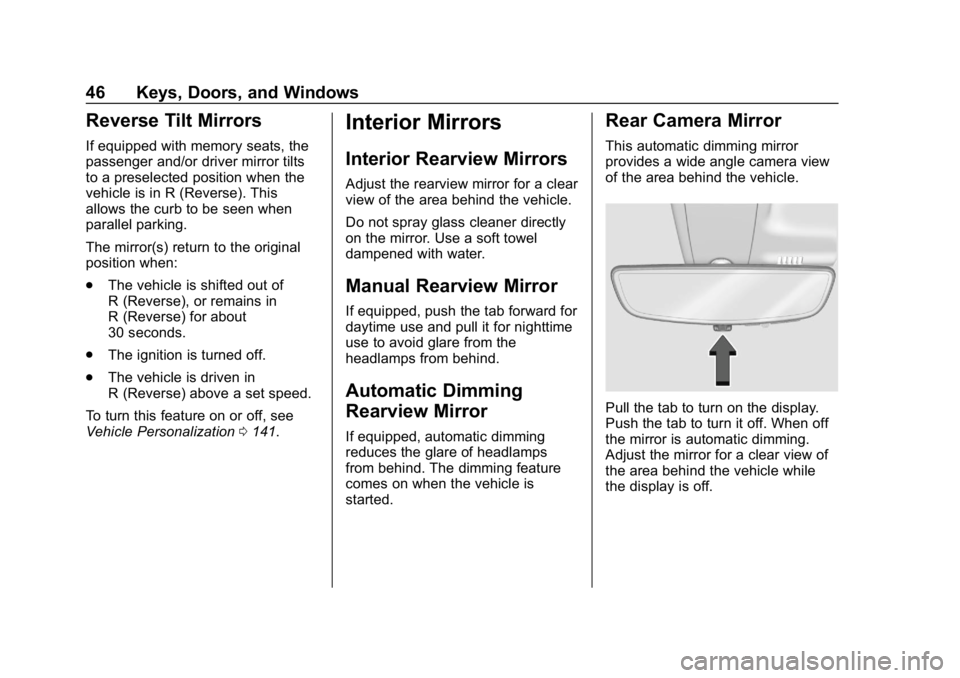
Pull the tab to turn on the display.
Push the tab to turn it off. When off
the mirror is automatic dimming.
Adjust the mirror for a clear view of
the area behind the vehicle while
the display is off.
Page 49 of 375
Chevrolet Camaro Owner Manual (GMNA-Localizing-U.S./Canada/Mexico-
12461811) - 2019 - crc - 11/5/18
48 Keys, Doors, and Windows
{Warning
The Rear Camera Mirror (RCM)
has a limited view. Portions of the
road, vehicles, and other objects
may not be seen. Do not drive or
park the vehicle using only this
camera. Objects may appear
closer than they are. Check the
outside mirrors or glance over
your shoulder when making lane
changes or merging. Failure to
use proper care may result in
injury, death, or vehicle damage.Troubleshooting
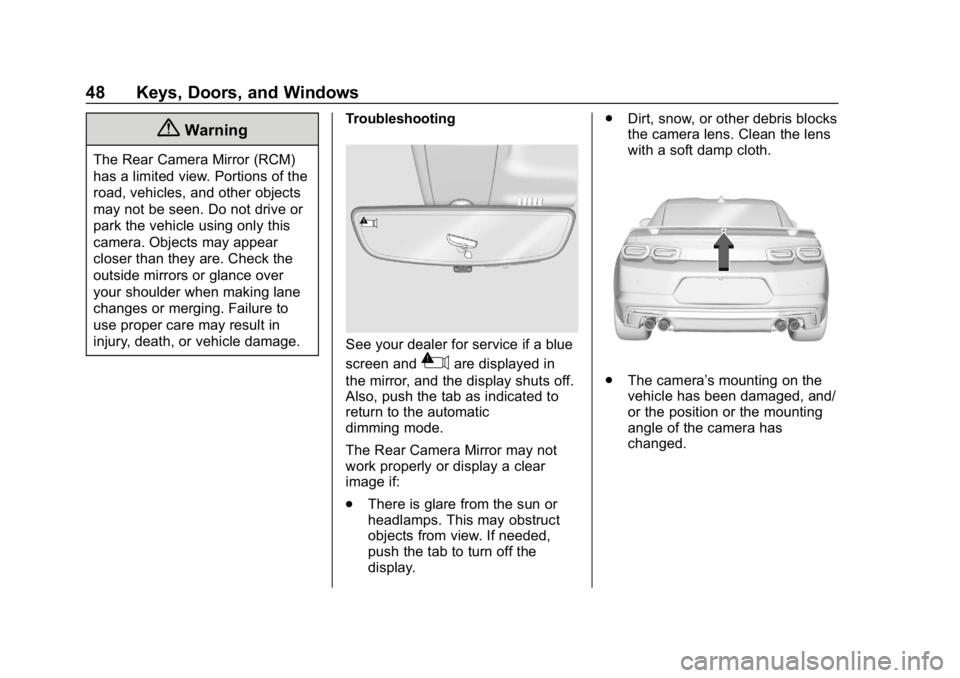
See your dealer for service if a blue
screen and
3are displayed in
the mirror, and the display shuts off.
Also, push the tab as indicated to
return to the automatic
dimming mode.
The Rear Camera Mirror may not
work properly or display a clear
image if:
. There is glare from the sun or
headlamps. This may obstruct
objects from view. If needed,
push the tab to turn off the
display. .
Dirt, snow, or other debris blocks
the camera lens. Clean the lens
with a soft damp cloth..The camera’s mounting on the
vehicle has been damaged, and/
or the position or the mounting
angle of the camera has
changed.
Page 55 of 375
Chevrolet Camaro Owner Manual (GMNA-Localizing-U.S./Canada/Mexico-
12461811) - 2019 - crc - 11/5/18
54 Keys, Doors, and Windows
Caution
When the convertible top is open,
there are sliding covers next to
the rear seat on each side of the
vehicle. Do not press down on or
move these covers as damage
may occur to the covers or the
convertible top.
Opening the Convertible Top
Using the Overhead Console
Switch 1. Remove all objects from the top of the tonneau cover and
forward of the rear trunk
partition. Place the partition in
the rear storage area in the
upright position. Fasten both
sides of the partition to the
posts just below the tonneau
cover. See Rear Storage
0 106.
2. Close the trunk.
3. Start the vehicle or place it in ACC/ACCESSORY. 4. When possible, operate the
convertible top when the
vehicle is stopped. The top can
be operated while driving
below 50 km/h (31 mph) and
will stop if that speed is
exceeded. The top operation
will take approximately
25 seconds. Make sure the top
operation can be completed
before that speed is reached.
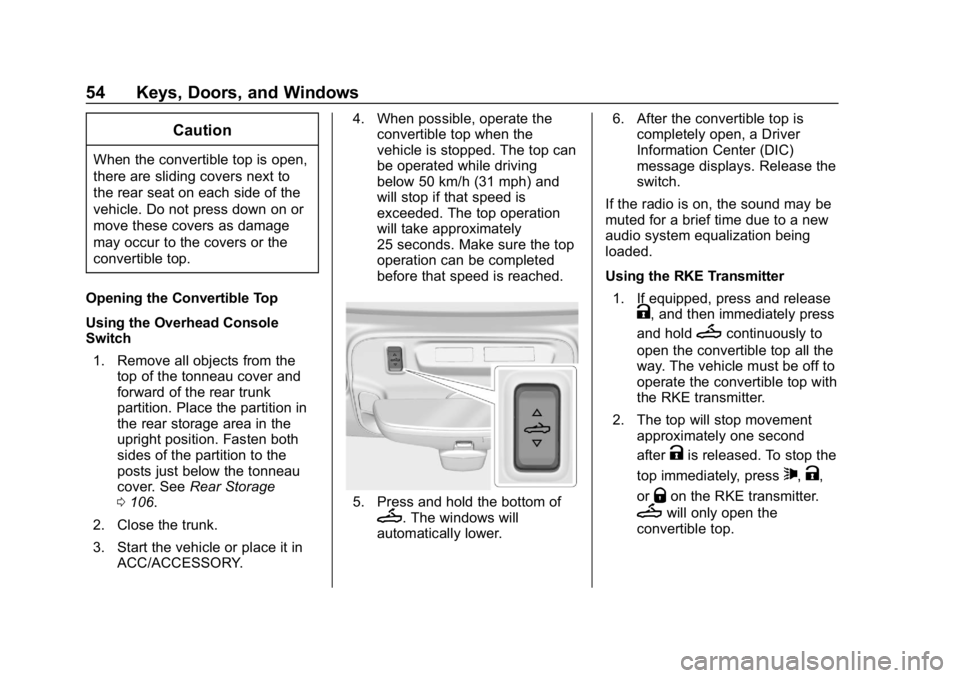
5. Press and hold the bottom ofM. The windows will
automatically lower. 6. After the convertible top is
completely open, a Driver
Information Center (DIC)
message displays. Release the
switch.
If the radio is on, the sound may be
muted for a brief time due to a new
audio system equalization being
loaded.
Using the RKE Transmitter 1. If equipped, press and release
K, and then immediately press
and hold
Mcontinuously to
open the convertible top all the
way. The vehicle must be off to
operate the convertible top with
the RKE transmitter.
2. The top will stop movement approximately one second
after
Kis released. To stop the
top immediately, press
7,K,
or
Qon the RKE transmitter.
Mwill only open the
convertible top.
Page 56 of 375
Chevrolet Camaro Owner Manual (GMNA-Localizing-U.S./Canada/Mexico-
12461811) - 2019 - crc - 11/5/18
Keys, Doors, and Windows 55
SeeRemote Keyless Entry
(RKE) System 027 and
Remote Keyless Entry (RKE)
System Operation 027.
Closing the Convertible Top
The RKE transmitter cannot be used
to close the convertible top. 1. Make sure the sun visor mirror covers are closed and the sun
visors are stored in the center
mount position.
2. Remove all objects from the top of the tonneau cover and
forward of the partition. Place
the partition in the rear storage
area in the upright position.
Fasten both sides of the
partition to the posts just below
the tonneau cover. See Rear
Storage 0106.
3. Close the trunk.
4. Start the vehicle or place it in ACC/ACCESSORY.
5. When possible, operate the convertible top when the
vehicle is stopped. The top can
be operated while driving below 50 km/h (31 mph) and
will stop if that speed is
exceeded. The top operation
will take approximately
25 seconds. Make sure the top
operation can be completed
before that speed is reached.
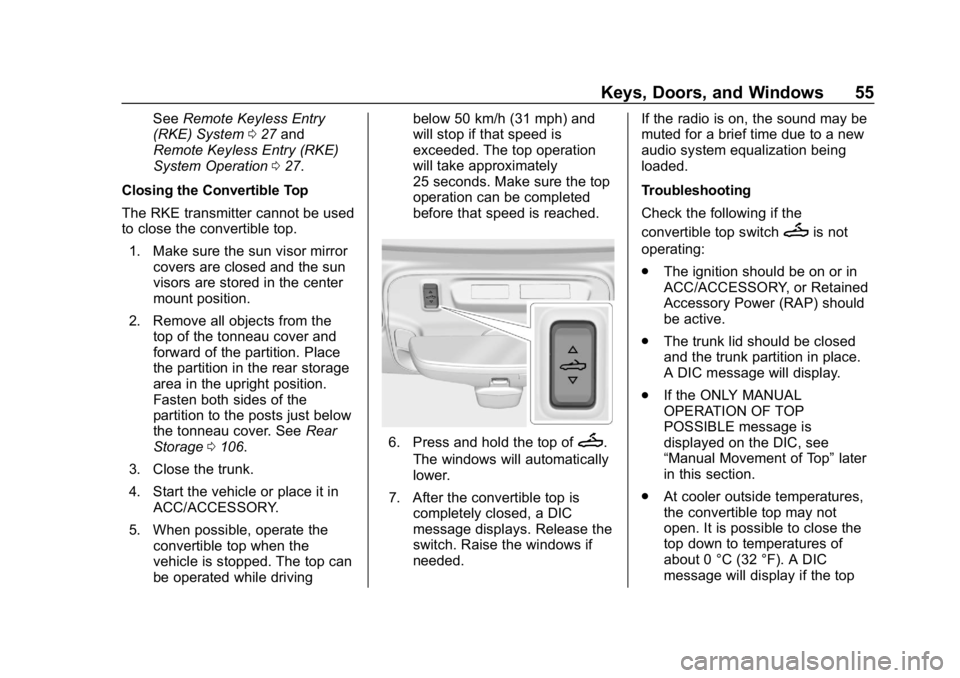
6. Press and hold the top ofM.
The windows will automatically
lower.
7. After the convertible top is completely closed, a DIC
message displays. Release the
switch. Raise the windows if
needed. If the radio is on, the sound may be
muted for a brief time due to a new
audio system equalization being
loaded.
Troubleshooting
Check the following if the
convertible top switch
Mis not
operating:
. The ignition should be on or in
ACC/ACCESSORY, or Retained
Accessory Power (RAP) should
be active.
. The trunk lid should be closed
and the trunk partition in place.
A DIC message will display.
. If the ONLY MANUAL
OPERATION OF TOP
POSSIBLE message is
displayed on the DIC, see
“Manual Movement of Top” later
in this section.
. At cooler outside temperatures,
the convertible top may not
open. It is possible to close the
top down to temperatures of
about 0 °C (32 °F). A DIC
message will display if the top
Page 57 of 375
Chevrolet Camaro Owner Manual (GMNA-Localizing-U.S./Canada/Mexico-
12461811) - 2019 - crc - 11/5/18
56 Keys, Doors, and Windows
will not open due to low
temperature. If necessary, move
the vehicle to a heated indoor
area to operate the top.
. If the top has recently been
cycled repeatedly or left in an
intermediate state, it will be
temporarily disabled. A DIC
message displays. Normal
operation will be restored within
10 minutes after the system has
cooled.
. If the vehicle battery is low, the
power top operation may be
disabled. Try to start the vehicle.
A DIC message displays.
. If the battery has recently been
reconnected or if the vehicle has
been jump started, the top may
not operate until the power
windows have been indexed.
Complete the power window
indexing procedure. See Power
Windows 049. Other features may be affected
while operating the convertible top:
.
The trunk can only be opened
with the key until the convertible
top is completely opened or
closed.
. The windows cannot close while
the top is moving.
. When driving with the top not
fully secured, chimes can be
heard above 80 km/h (50 mph).
If the vehicle battery has been
disconnected and reconnected, the
fuses were pulled or replaced, or a
jump start was performed, the TOP
NOT SECURE message may
display. Press and hold
Mto
open/close the top until this
message is cleared.
Partial Top Cycling
If the convertible top operation is
stopped before completion, the top
will temporarily hold its position.
If the ignition is on or in ACC/
ACCESSORY, the top will be held
for up to five minutes, then pulse down. If the vehicle is moving or off,
the amount of time will vary from a
few seconds to about a minute.
Beeps and DIC messages will be
displayed before the top will move.
When this occurs, immediately finish
the convertible top operation by
pressing
Magain until it
completes.
If the top cannot be secured, keep
clear of the top components. In
some conditions the top may move
quickly.
Do not drive with the convertible top
in an unsecured position. The top
components may move
unexpectedly. In some cases the
top may not be able to be power
operated. If this occurs, follow the
DIC messages displayed.
If the tonneau cover is not secured
and latched, and the vehicle is
moving above 10 km/h (6 mph), the
tonneau cover may automatically
move to a stable position.
Page 58 of 375
Chevrolet Camaro Owner Manual (GMNA-Localizing-U.S./Canada/Mexico-
12461811) - 2019 - crc - 11/5/18
Keys, Doors, and Windows 57
Manual Movement of Top
If the DIC displays the ONLY
MANUAL OPERATION OF TOP
POSSIBLE message:1. Press
Mto either open or
close the top. Press the switch
in the opposite direction if one
does not work.
2. If the top moves, continue pressing the switch in that
direction for at least
five seconds. The top should
then work normally.
If the top does not respond in either
direction, take it to your dealer for
service. If the top is retracted but
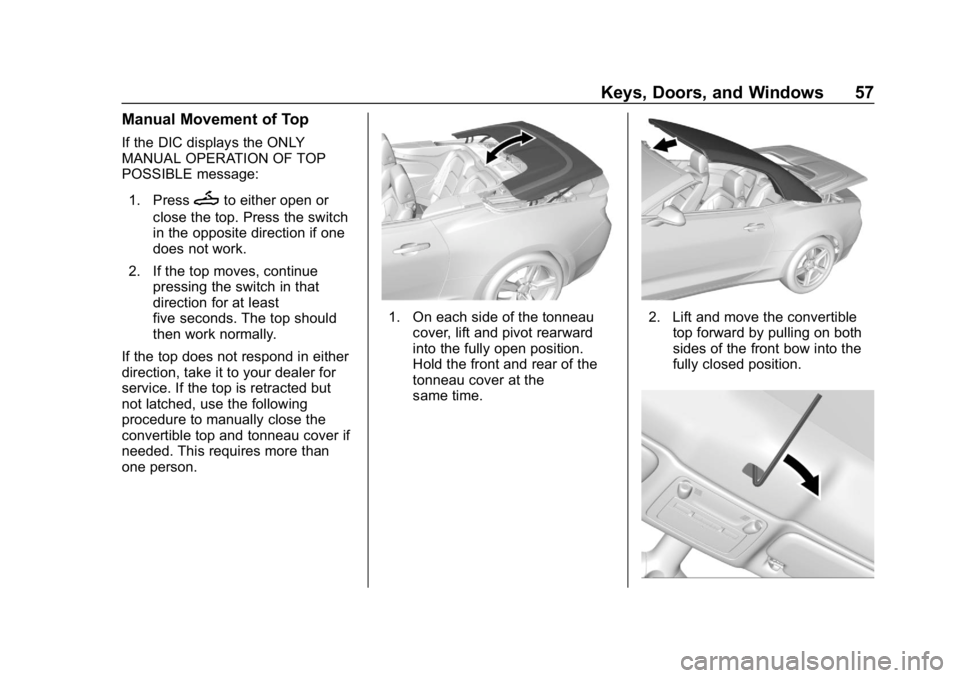
not latched, use the following
procedure to manually close the
convertible top and tonneau cover if
needed. This requires more than
one person.
1. On each side of the tonneau cover, lift and pivot rearward
into the fully open position.
Hold the front and rear of the
tonneau cover at the
same time.2. Lift and move the convertibletop forward by pulling on both
sides of the front bow into the
fully closed position.
Page 64 of 375
Chevrolet Camaro Owner Manual (GMNA-Localizing-U.S./Canada/Mexico-
12461811) - 2019 - crc - 11/5/18
Seats and Restraints 63
Memory positions are linked to RKE
transmitter 1 or 2 for automatic
memory recalls.
Before saving, adjust all available
memory feature positions. Turn the
ignition on and then press and
release SET; a beep will sound.
Then immediately press and hold 1,
2, or
B(Exit) until two beeps
sound. To manually recall these
positions, press and hold 1, 2, or
B
until the saved position is reached.
Follow the instructions under
“Saving Memory Positions.”
The vehicle identifies the current
driver ’s RKE transmitter number (1–
8). See Remote Keyless Entry
(RKE) System Operation 027. Only
RKE transmitters 1 and 2 can be
used for automatic memory recalls.
A Driver Information Center (DIC)
welcome message indicating the
transmitter number may display for
the first few ignition cycles following
a transmitter change. For Seat Entry
Memory to work properly, save the
positions to the memory button (1 or
2) matching the RKE transmitter
number displayed in the DIC welcome message. Carry the linked
RKE transmitter when entering the
vehicle.
Memory adjustments may not be
available upon delivery or after
service until steps in
“Saving
Memory Positions” section are
performed.
Vehicle Personalization Settings
. To have the Seat Entry Memory
movement begin when the
vehicle is started, select the
Settings menu, then Vehicle,
then Seating Position, and then
Seat Entry Memory. Select On or
Off. See “Seat Entry Memory”
later in this section.
. Seat Exit Memory movement
begins when the ignition is
turned off and the driver door is
opened, or when the ignition is
turned off with the driver door
already opened, select the
Settings menu, then Vehicle,
then Seating Position, and then
Seat Exit Memory. Select On or
Off. See “Seat Exit Memory”
later in this section. .
See Vehicle Personalization
0 141 for additional setting
information.
Identifying Driver Number
To identify the driver number: 1. Start the vehicle with a different key or RKE transmitter. The
DIC should display the driver
number; 1 or 2. Turn the
ignition off and remove the key
or RKE transmitter from the
vehicle.
2. Start the vehicle with the initial key or RKE transmitter. The
DIC should display the other
driver number not shown in
Step 1.
Saving Memory Positions
Read these instructions completely
before saving memory positions.
To save preferred driving positions
1 and 2: 1. Turn the ignition on or to ACC/ ACCESSORY.
A DIC welcome message may
indicate driver number 1 or 2.
Page 107 of 375
Chevrolet Camaro Owner Manual (GMNA-Localizing-U.S./Canada/Mexico-
12461811) - 2019 - crc - 11/5/18
106 Storage
Storage
Storage Compartments
Storage Compartments . . . . . . . 106
Glove Box . . . . . . . . . . . . . . . . . . . . 106
Rear Storage . . . . . . . . . . . . . . . . . 106
Center Console Storage . . . . . . 107
Additional Storage Features
Convenience Net . . . . . . . . . . . . . 107
Storage
Compartments
{Warning
Do not store heavy or sharp
objects in storage compartments.
In a crash, these objects may
cause the cover to open and
could result in injury.
Glove Box
Open the glove box by lifting up on
the lever. Use the key to lock and
unlock the glove box.
Rear Storage
Rear Seat Trunk Access
(Coupe)
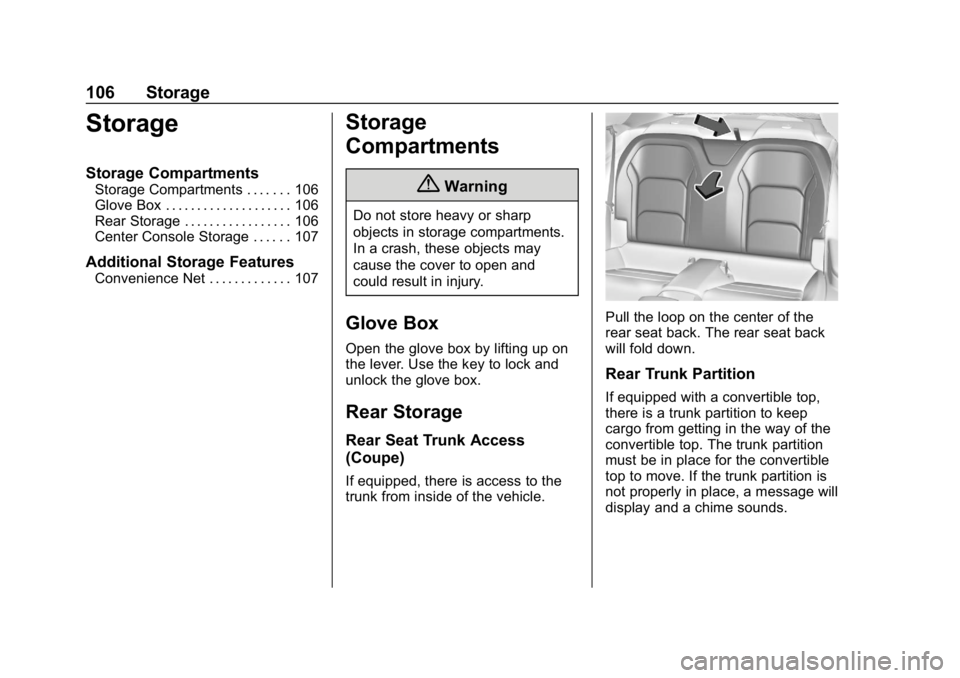
If equipped, there is access to the
trunk from inside of the vehicle.
Pull the loop on the center of the
rear seat back. The rear seat back
will fold down.
Rear Trunk Partition
If equipped with a convertible top,
there is a trunk partition to keep
cargo from getting in the way of the
convertible top. The trunk partition
must be in place for the convertible
top to move. If the trunk partition is
not properly in place, a message will
display and a chime sounds.
Page 109 of 375
Chevrolet Camaro Owner Manual (GMNA-Localizing-U.S./Canada/Mexico-
12461811) - 2019 - crc - 11/5/18
108 Instruments and Controls
Instruments and
Controls
Controls
Steering Wheel Adjustment . . . 109
Steering Wheel Controls . . . . . . 109
Heated Steering Wheel . . . . . . . 109
Horn . . . . . . . . . . . . . . . . . . . . . . . . . . 109
Windshield Wiper/Washer . . . . 109
Compass . . . . . . . . . . . . . . . . . . . . . 110
Clock . . . . . . . . . . . . . . . . . . . . . . . . . 111
Power Outlets . . . . . . . . . . . . . . . . 111
Wireless Charging . . . . . . . . . . . . 111
Warning Lights, Gauges, and
Indicators
Warning Lights, Gauges, andIndicators . . . . . . . . . . . . . . . . . . . 114
Instrument Cluster . . . . . . . . . . . . 115
Speedometer . . . . . . . . . . . . . . . . . 119
Odometer . . . . . . . . . . . . . . . . . . . . . 119
Trip Odometer . . . . . . . . . . . . . . . . 119
Tachometer . . . . . . . . . . . . . . . . . . . 119
Fuel Gauge . . . . . . . . . . . . . . . . . . . 119
Boost Gauge (Uplevel Cluster Only) . . . . . . . . . . . . . . . . 121
Engine Oil Pressure Gauge (Uplevel Cluster Only) . . . . . . . 121 Engine Coolant Temperature
Gauge . . . . . . . . . . . . . . . . . . . . . . 122
Voltmeter Gauge (Uplevel Cluster Only) . . . . . . . . . . . . . . . . 123
Seat Belt Reminders . . . . . . . . . 124
Airbag Readiness Light . . . . . . . 125
Passenger Airbag Status
Indicator . . . . . . . . . . . . . . . . . . . . 125
Charging System Light . . . . . . . 126
Malfunction Indicator Lamp . . . 126
Brake System Warning Light . . . . . . . . . . . . . . . . . . . . . . . . 128
Electric Parking Brake Light . . . . . . . . . . . . . . . . . . . . . . . . 129
Service Electric Parking Brake Light . . . . . . . . . . . . . . . . . . . . . . . . 129
Antilock Brake System (ABS) Warning Light . . . . . . . . . . . . . . . 130
Vehicle Ahead Indicator . . . . . . 130
Traction Off Light . . . . . . . . . . . . . 130
StabiliTrak OFF Light . . . . . . . . . 131
Traction Control System (TCS)/ StabiliTrak Light . . . . . . . . . . . . . 131
Tire Pressure Light . . . . . . . . . . . 131
Engine Oil Pressure Light . . . . 132
Low Fuel Warning Light . . . . . . 132
Security Light . . . . . . . . . . . . . . . . . 132
High-Beam On Light . . . . . . . . . . 133
Lamps On Reminder . . . . . . . . . 133
Cruise Control Light . . . . . . . . . . 133 Door Ajar Light . . . . . . . . . . . . . . . 133
Information Displays
Driver Information
Center (DIC) . . . . . . . . . . . . . . . . 133
Head-Up Display (HUD) . . . . . . 137
Vehicle Messages
Vehicle Messages . . . . . . . . . . . . 140
Engine Power Messages . . . . . 141
Vehicle Speed Messages . . . . . 141
Vehicle Personalization
Vehicle Personalization . . . . . . . 141
Page 110 of 375
Chevrolet Camaro Owner Manual (GMNA-Localizing-U.S./Canada/Mexico-
12461811) - 2019 - crc - 11/5/18
Instruments and Controls 109
Controls
Steering Wheel
Adjustment
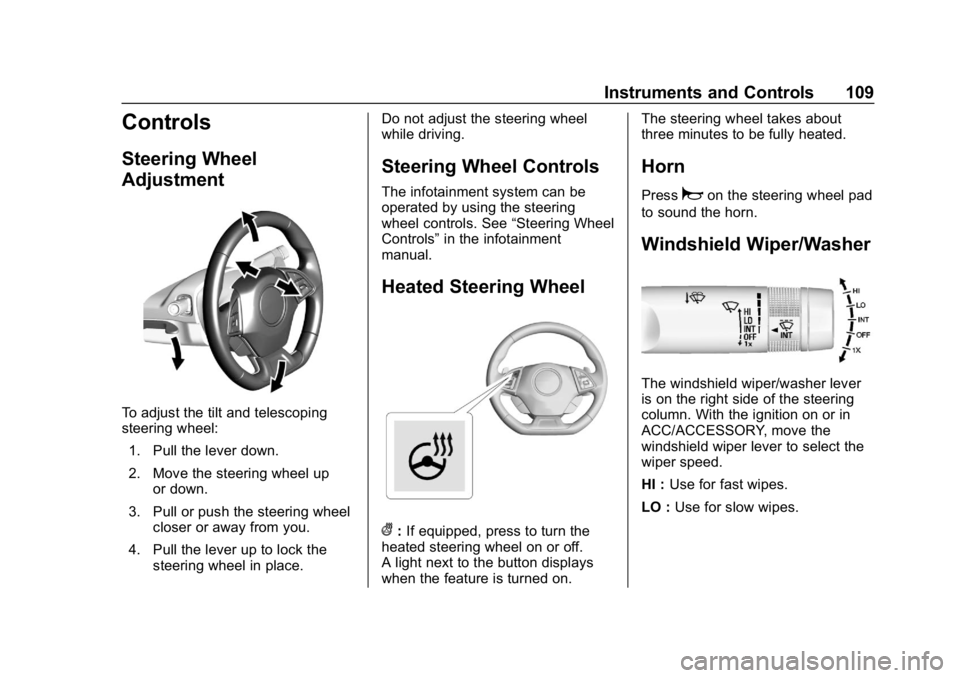
To adjust the tilt and telescoping
steering wheel:1. Pull the lever down.
2. Move the steering wheel up or down.
3. Pull or push the steering wheel closer or away from you.
4. Pull the lever up to lock the steering wheel in place. Do not adjust the steering wheel
while driving.
Steering Wheel Controls
The infotainment system can be
operated by using the steering
wheel controls. See
“Steering Wheel
Controls” in the infotainment
manual.
Heated Steering Wheel
(: If equipped, press to turn the
heated steering wheel on or off.
A light next to the button displays
when the feature is turned on. The steering wheel takes about
three minutes to be fully heated.
Horn
Pressaon the steering wheel pad
to sound the horn.
Windshield Wiper/Washer
The windshield wiper/washer lever
is on the right side of the steering
column. With the ignition on or in
ACC/ACCESSORY, move the
windshield wiper lever to select the
wiper speed.
HI : Use for fast wipes.
LO : Use for slow wipes.