display CHEVROLET CAMARO 2019 Workshop Manual
[x] Cancel search | Manufacturer: CHEVROLET, Model Year: 2019, Model line: CAMARO, Model: CHEVROLET CAMARO 2019Pages: 375, PDF Size: 6.16 MB
Page 159 of 375
Chevrolet Camaro Owner Manual (GMNA-Localizing-U.S./Canada/Mexico-
12461811) - 2019 - crc - 11/5/18
158 Infotainment System
.GPS Tracking Map: Shows the
vehicle’s current position relative
to a known route.
. Engine Rotations Per Minute
(RPMs): The vertical line and
triangle indicate current RPMs.
As the RPMs increase, the
backfill follows.
. Transmission State (Current
Gear): Same as Sport.
. Friction Bubble Graphic: Lateral
and longitudinal G-Forces are
displayed as a dot within a
bubble. A red dot displays when
the vehicle starts braking and
turns green when the vehicle
accelerates. The dot is white
when the vehicle is not moving.
A white dot is the default.
. Brake and Throttle Graphic:
Displays the percentage value of
brake and throttle pedal position
from 0–100%.
. Steering Angle: The graphic fills
from the center to the left or right
depending on the direction of steering. The numerical steering
angle displays below the
graphic.
. StabiliTrak/Electronic Stability
Control (ESC) Active Indicator:
The graphic only displays if the
active handling systems are
activated.
. Performance Traction
Management (PTM) Mode:
Displays the current PTM mode.
The options are Wet, Dry, Sport
1, Sport 2, or Race.
. Current Lap Time: Displays the
elapsed lap time if the finish line
is defined and the vehicle has
crossed the defined finish line at
least once.
. Event Odometer: Displays the
distance driven since the
recording began.
. Drive Mode: Displays the
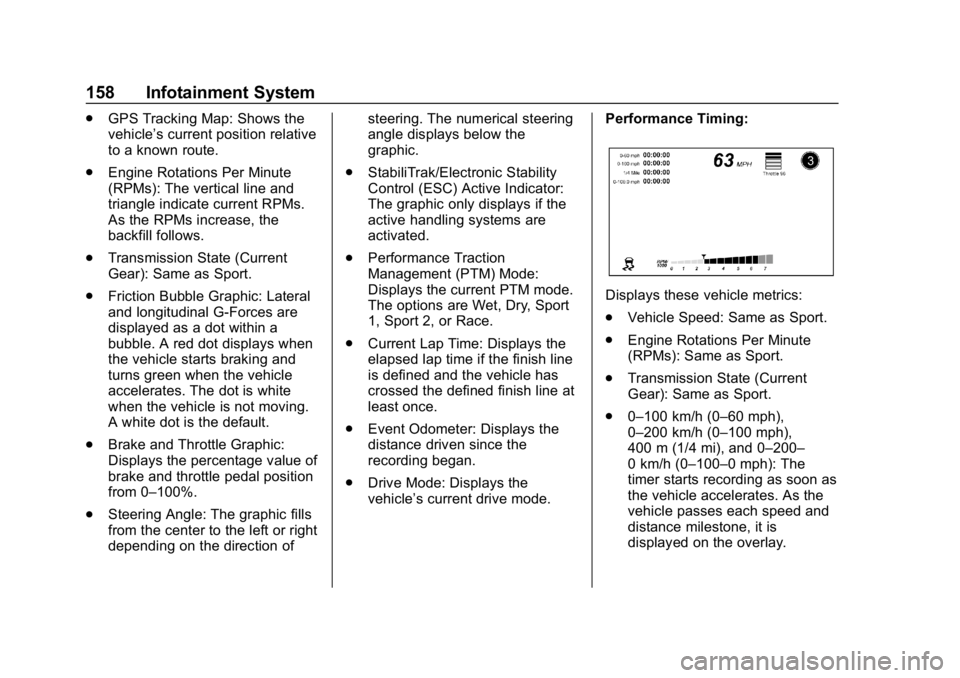
vehicle’s current drive mode. Performance Timing:
Displays these vehicle metrics:
.
Vehicle Speed: Same as Sport.
. Engine Rotations Per Minute
(RPMs): Same as Sport.
. Transmission State (Current
Gear): Same as Sport.
. 0–100 km/h (0–60 mph),
0–200 km/h (0–100 mph),
400 m (1/4 mi), and 0–200–
0 km/h (0–100–0 mph): The
timer starts recording as soon as
the vehicle accelerates. As the
vehicle passes each speed and
distance milestone, it is
displayed on the overlay.
Page 160 of 375
Chevrolet Camaro Owner Manual (GMNA-Localizing-U.S./Canada/Mexico-
12461811) - 2019 - crc - 11/5/18
Infotainment System 159
.Throttle Position: Displays
the percentage of throttle applied
from 0–100%.
. StabiliTrak/ESC Active Indicator:
The graphic only displays if the
active handling systems are
activated.
Naming Convention
The recorded video file name is
stored as the recorded date and the
length of the recording.
If the recorded session was
recorded while the system was in
Valet Mode, the file name will
display the mode, date, and length
of time.
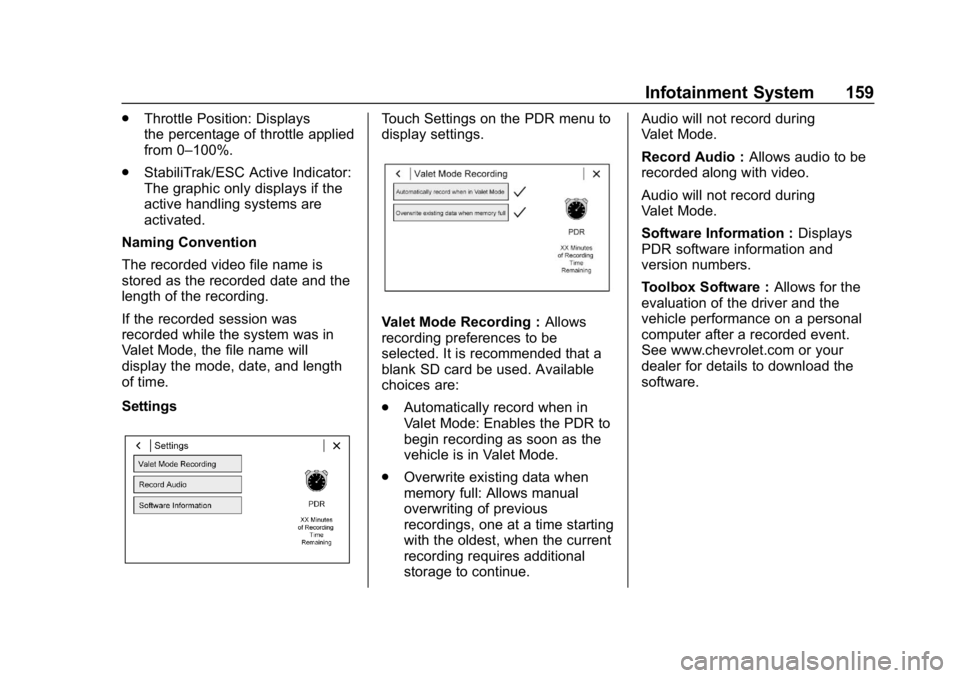
SettingsTouch Settings on the PDR menu to
display settings.
Valet Mode Recording : Allows
recording preferences to be
selected. It is recommended that a
blank SD card be used. Available
choices are:
. Automatically record when in
Valet Mode: Enables the PDR to
begin recording as soon as the
vehicle is in Valet Mode.
. Overwrite existing data when
memory full: Allows manual
overwriting of previous
recordings, one at a time starting
with the oldest, when the current
recording requires additional
storage to continue. Audio will not record during
Valet Mode.
Record Audio :
Allows audio to be
recorded along with video.
Audio will not record during
Valet Mode.
Software Information : Displays
PDR software information and
version numbers.
Toolbox Software : Allows for the
evaluation of the driver and the
vehicle performance on a personal
computer after a recorded event.
See www.chevrolet.com or your
dealer for details to download the
software.
Page 162 of 375
Chevrolet Camaro Owner Manual (GMNA-Localizing-U.S./Canada/Mexico-
12461811) - 2019 - crc - 11/5/18
Climate Controls 161
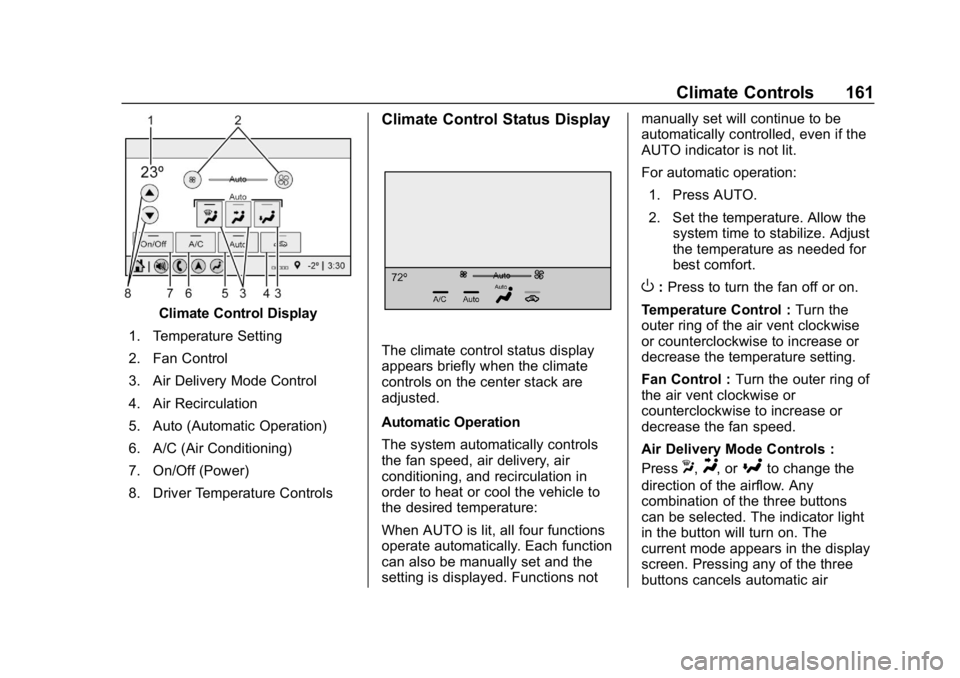
Climate Control Display
1. Temperature Setting
2. Fan Control
3. Air Delivery Mode Control
4. Air Recirculation
5. Auto (Automatic Operation)
6. A/C (Air Conditioning)
7. On/Off (Power)
8. Driver Temperature Controls
Climate Control Status Display
The climate control status display
appears briefly when the climate
controls on the center stack are
adjusted.
Automatic Operation
The system automatically controls
the fan speed, air delivery, air
conditioning, and recirculation in
order to heat or cool the vehicle to
the desired temperature:
When AUTO is lit, all four functions
operate automatically. Each function
can also be manually set and the
setting is displayed. Functions not manually set will continue to be
automatically controlled, even if the
AUTO indicator is not lit.
For automatic operation:
1. Press AUTO.
2. Set the temperature. Allow the system time to stabilize. Adjust
the temperature as needed for
best comfort.
O:Press to turn the fan off or on.
Temperature Control : Turn the
outer ring of the air vent clockwise
or counterclockwise to increase or
decrease the temperature setting.
Fan Control : Turn the outer ring of
the air vent clockwise or
counterclockwise to increase or
decrease the fan speed.
Air Delivery Mode Controls :
Press
X,Y, or[to change the
direction of the airflow. Any
combination of the three buttons
can be selected. The indicator light
in the button will turn on. The
current mode appears in the display
screen. Pressing any of the three
buttons cancels automatic air
Page 165 of 375
Chevrolet Camaro Owner Manual (GMNA-Localizing-U.S./Canada/Mexico-
12461811) - 2019 - crc - 11/5/18
164 Climate Controls
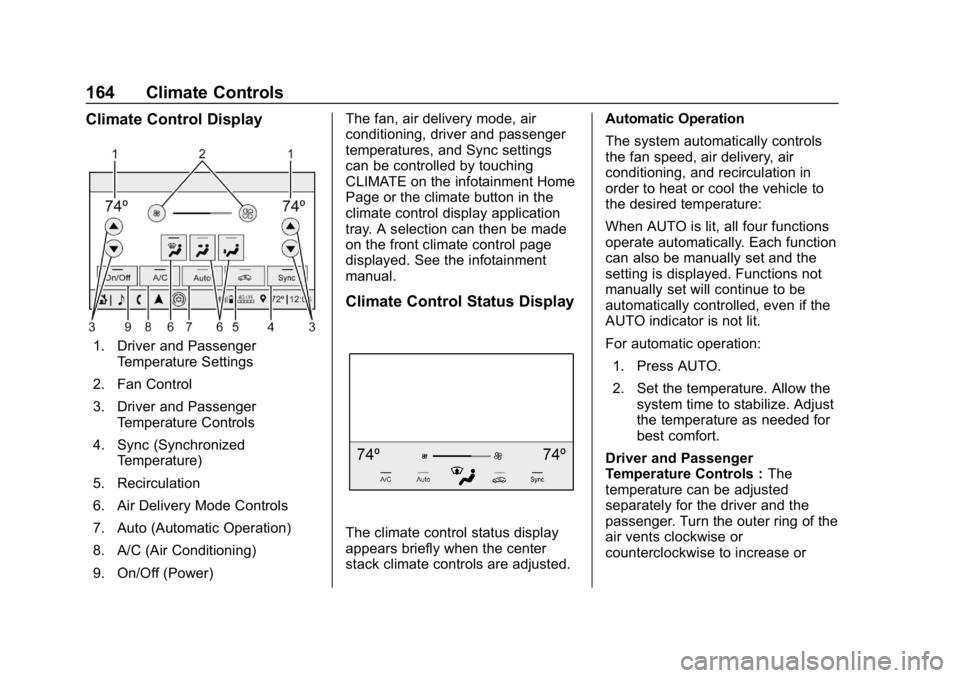
Climate Control Display
1. Driver and PassengerTemperature Settings
2. Fan Control
3. Driver and Passenger Temperature Controls
4. Sync (Synchronized Temperature)
5. Recirculation
6. Air Delivery Mode Controls
7. Auto (Automatic Operation)
8. A/C (Air Conditioning)
9. On/Off (Power) The fan, air delivery mode, air
conditioning, driver and passenger
temperatures, and Sync settings
can be controlled by touching
CLIMATE on the infotainment Home
Page or the climate button in the
climate control display application
tray. A selection can then be made
on the front climate control page
displayed. See the infotainment
manual.
Climate Control Status Display
The climate control status display
appears briefly when the center
stack climate controls are adjusted.
Automatic Operation
The system automatically controls
the fan speed, air delivery, air
conditioning, and recirculation in
order to heat or cool the vehicle to
the desired temperature:
When AUTO is lit, all four functions
operate automatically. Each function
can also be manually set and the
setting is displayed. Functions not
manually set will continue to be
automatically controlled, even if the
AUTO indicator is not lit.
For automatic operation:
1. Press AUTO.
2. Set the temperature. Allow the system time to stabilize. Adjust
the temperature as needed for
best comfort.
Driver and Passenger
Temperature Controls : The
temperature can be adjusted
separately for the driver and the
passenger. Turn the outer ring of the
air vents clockwise or
counterclockwise to increase or
Page 166 of 375
Chevrolet Camaro Owner Manual (GMNA-Localizing-U.S./Canada/Mexico-
12461811) - 2019 - crc - 11/5/18
Climate Controls 165
decrease the driver or passenger
temperature setting. The setting will
appear on the temperature display.
SYNC :Press to link the passenger
climate temperature settings to the
driver setting. The SYNC indicator
light will turn on. When the
passenger settings are adjusted, the
SYNC indicator light turns off.
Manual Operation
O: Press to turn the fan off or on.
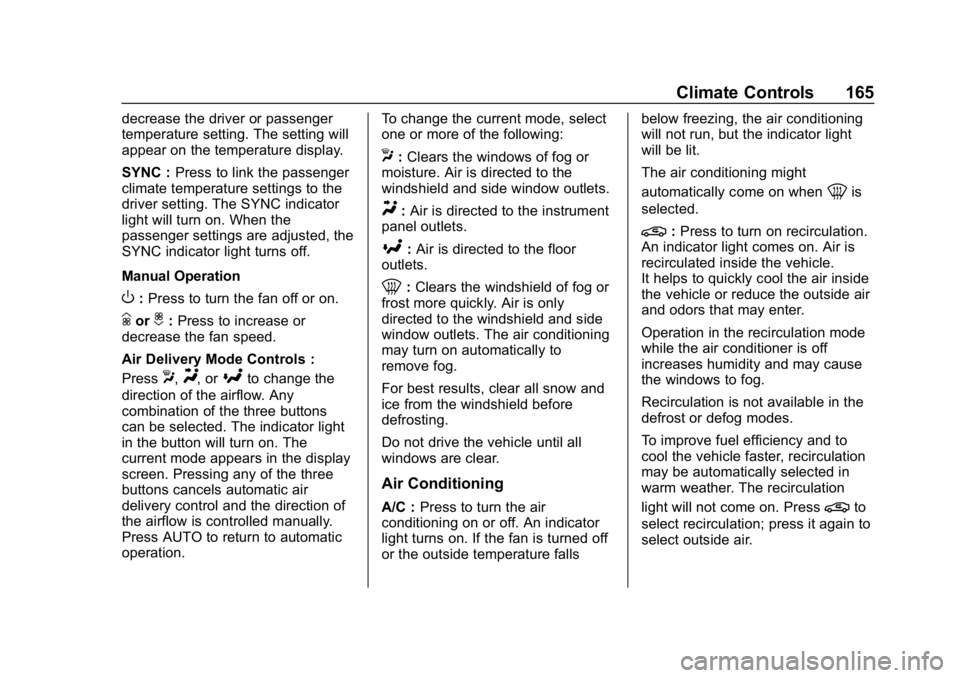
hori:Press to increase or
decrease the fan speed.
Air Delivery Mode Controls :
Press
X,Y, or[to change the
direction of the airflow. Any
combination of the three buttons
can be selected. The indicator light
in the button will turn on. The
current mode appears in the display
screen. Pressing any of the three
buttons cancels automatic air
delivery control and the direction of
the airflow is controlled manually.
Press AUTO to return to automatic
operation. To change the current mode, select
one or more of the following:
X:
Clears the windows of fog or
moisture. Air is directed to the
windshield and side window outlets.
Y: Air is directed to the instrument
panel outlets.
[: Air is directed to the floor
outlets.
0: Clears the windshield of fog or
frost more quickly. Air is only
directed to the windshield and side
window outlets. The air conditioning
may turn on automatically to
remove fog.
For best results, clear all snow and
ice from the windshield before
defrosting.
Do not drive the vehicle until all
windows are clear.
Air Conditioning
A/C : Press to turn the air
conditioning on or off. An indicator
light turns on. If the fan is turned off
or the outside temperature falls below freezing, the air conditioning
will not run, but the indicator light
will be lit.
The air conditioning might
automatically come on when
0is
selected.
@: Press to turn on recirculation.
An indicator light comes on. Air is
recirculated inside the vehicle.
It helps to quickly cool the air inside
the vehicle or reduce the outside air
and odors that may enter.
Operation in the recirculation mode
while the air conditioner is off
increases humidity and may cause
the windows to fog.
Recirculation is not available in the
defrost or defog modes.
To improve fuel efficiency and to
cool the vehicle faster, recirculation
may be automatically selected in
warm weather. The recirculation
light will not come on. Press
@to
select recirculation; press it again to
select outside air.
Page 192 of 375
Chevrolet Camaro Owner Manual (GMNA-Localizing-U.S./Canada/Mexico-
12461811) - 2019 - crc - 11/5/18
Driving and Operating 191
Ignition Positions
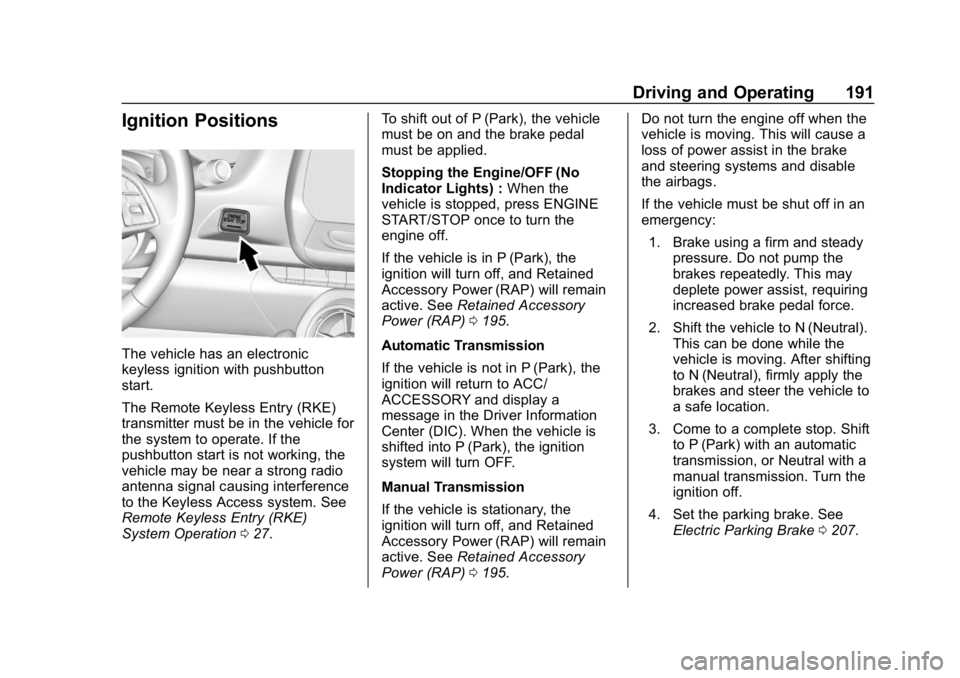
The vehicle has an electronic
keyless ignition with pushbutton
start.
The Remote Keyless Entry (RKE)
transmitter must be in the vehicle for
the system to operate. If the
pushbutton start is not working, the
vehicle may be near a strong radio
antenna signal causing interference
to the Keyless Access system. See
Remote Keyless Entry (RKE)
System Operation027. To shift out of P (Park), the vehicle
must be on and the brake pedal
must be applied.
Stopping the Engine/OFF (No
Indicator Lights) :
When the
vehicle is stopped, press ENGINE
START/STOP once to turn the
engine off.
If the vehicle is in P (Park), the
ignition will turn off, and Retained
Accessory Power (RAP) will remain
active. See Retained Accessory
Power (RAP) 0195.
Automatic Transmission
If the vehicle is not in P (Park), the
ignition will return to ACC/
ACCESSORY and display a
message in the Driver Information
Center (DIC). When the vehicle is
shifted into P (Park), the ignition
system will turn OFF.
Manual Transmission
If the vehicle is stationary, the
ignition will turn off, and Retained
Accessory Power (RAP) will remain
active. See Retained Accessory
Power (RAP) 0195. Do not turn the engine off when the
vehicle is moving. This will cause a
loss of power assist in the brake
and steering systems and disable
the airbags.
If the vehicle must be shut off in an
emergency:
1. Brake using a firm and steady pressure. Do not pump the
brakes repeatedly. This may
deplete power assist, requiring
increased brake pedal force.
2. Shift the vehicle to N (Neutral). This can be done while the
vehicle is moving. After shifting
to N (Neutral), firmly apply the
brakes and steer the vehicle to
a safe location.
3. Come to a complete stop. Shift to P (Park) with an automatic
transmission, or Neutral with a
manual transmission. Turn the
ignition off.
4. Set the parking brake. See Electric Parking Brake 0207.
Page 194 of 375
Chevrolet Camaro Owner Manual (GMNA-Localizing-U.S./Canada/Mexico-
12461811) - 2019 - crc - 11/5/18
Driving and Operating 193
Manual Transmission
The shift lever should be in Neutral
and the parking brake engaged.
Hold the clutch pedal down to the
floor, press the brake pedal, and
start the engine.
Starting the Vehicle
The RKE transmitter must be inside
the vehicle for the ignition to work.
Cell phone chargers can interfere
with the operation of the Keyless
Access system. Battery chargers
should not be plugged in when
starting or turning off the engine.
To start the vehicle:1. For vehicles with an automatic transmission, press the brake
pedal, then press ENGINE
START/STOP on the
instrument panel. For a manual
transmission, place the shift
lever in Neutral with the
parking brake engaged and
apply the brake firmly. Hold the
clutch pedal down to the floor,
press the brake and start the
engine. If there is no RKE transmitter in
the vehicle or if there is
something causing interference
with it, the Driver Information
Center (DIC) will display a
message.
2. When the engine begins cranking, let go of the button
and the engine cranks
automatically until it starts.
If the battery in the RKE
transmitter is weak, the DIC will
display a message. The vehicle
can still be driven.
See “Starting the Vehicle with a
Low Transmitter Battery” under
Remote Keyless Entry (RKE)
System Operation 027. If the
RKE transmitter battery is
dead, insert it into the rear
cupholder to enable engine
starting.
3. Do not race the engine immediately after starting it.
Operate the engine and
transmission gently until the oil
warms up and lubricates all
moving parts. 4. If the engine does not start and
no DIC message is displayed,
wait 15 seconds before trying
again to let the cranking motor
cool down.
If the engine does not start
after five to 10 seconds,
especially in very cold weather
(below −18 °C or 0 °F), it could
be flooded with too much
gasoline. Try pushing the
accelerator pedal all the way to
the floor while cranking for up
to 15 seconds maximum. Wait
at least 15 seconds between
each try, to allow the cranking
motor to cool down. When the
engine starts, let go of the
accelerator. If the vehicle starts
briefly but then stops again,
repeat these steps. This clears
the extra gasoline from the
engine.
Page 195 of 375
Chevrolet Camaro Owner Manual (GMNA-Localizing-U.S./Canada/Mexico-
12461811) - 2019 - crc - 11/5/18
194 Driving and Operating
Caution
Cranking the engine for long
periods of time, by returning the
ignition to the START position
immediately after cranking has
ended, can overheat and damage
the cranking motor, and drain the
battery. Wait at least 15 seconds
between each try, to let the
cranking motor cool down.
Stopping the Engine
If the vehicle has an automatic
transmission, move the shift lever to
P (Park) and press and hold
ENGINE START/STOP on the
instrument panel, until the engine
shuts off. If the shift lever is not in
P (Park), the engine shuts off and
the ignition goes to ACC/
ACCESSORY. The DIC displays
SHIFT TO PARK. Once the shift
lever is moved to P (Park), the
vehicle turns off.
If the vehicle has a manual
transmission, before getting out of
the vehicle, shift to 1 (First) orR (Reverse) and firmly apply the
parking brake. Then turn off the
ignition off by pressing ENGINE
START/STOP and release the
clutch pedal when the engine has
stopped.
If the RKE transmitter is not
detected inside the vehicle when it
is turned off the DIC displays a
message.
Engine Heater
{Warning
Do not plug in the engine block
heater while the vehicle is parked
in a garage or under a carport.
Property damage or personal
injury may result. Always park the
vehicle in a clear open area away
from buildings or structures.
If equipped, the engine heater can
help in cold weather conditions at or
below −18 °C (0 °F) for easier
starting and better fuel economy
during engine warm-up. Plug in the coolant heater at least four hours
before starting the vehicle. An
internal thermostat in the plug end
of the cord will prevent engine
heater operation at temperatures
above
−18 °C (0 °F).
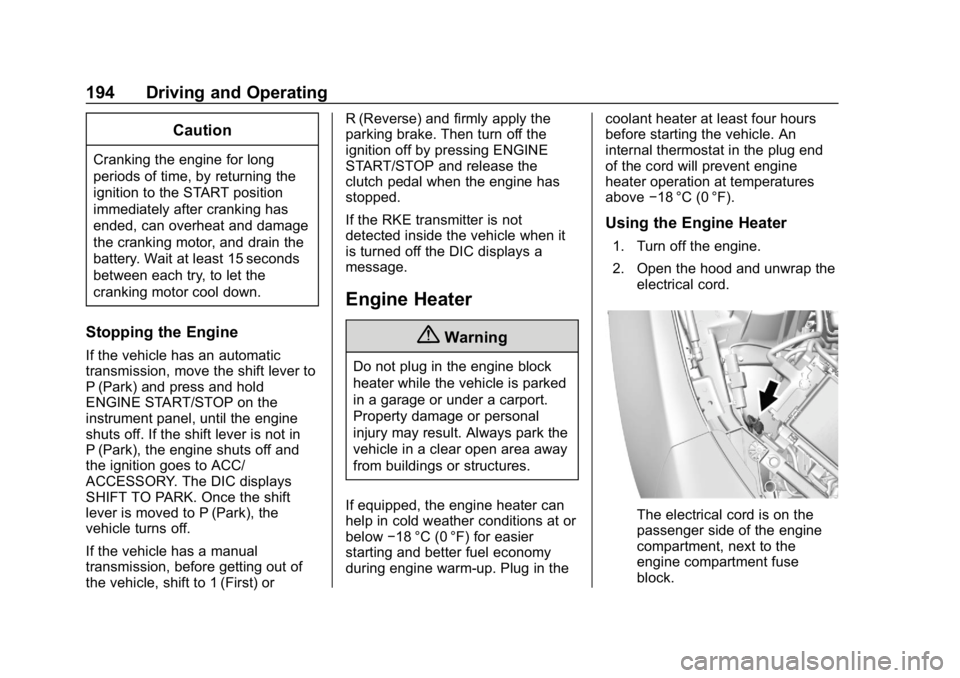
Using the Engine Heater
1. Turn off the engine.
2. Open the hood and unwrap the
electrical cord.
The electrical cord is on the
passenger side of the engine
compartment, next to the
engine compartment fuse
block.
Page 200 of 375
Chevrolet Camaro Owner Manual (GMNA-Localizing-U.S./Canada/Mexico-
12461811) - 2019 - crc - 11/5/18
Driving and Operating 199
Running the Vehicle
While Parked
It is better not to park with the
engine running.
If the vehicle is left with the engine
running, follow the proper steps to
be sure the vehicle will not move.
SeeShifting Into Park 0196 and
Engine Exhaust 0198. If the vehicle
has a manual transmission, see
Parking (Manual Transmission)
0 197.
Automatic
Transmission
The Driver Information Center (DIC)
displays the current gear selected in
the lower right corner. When Sport
Mode is active, an S is displayed.
If Manual Mode is active, an M and
the current gear selected is
displayed next to the M.
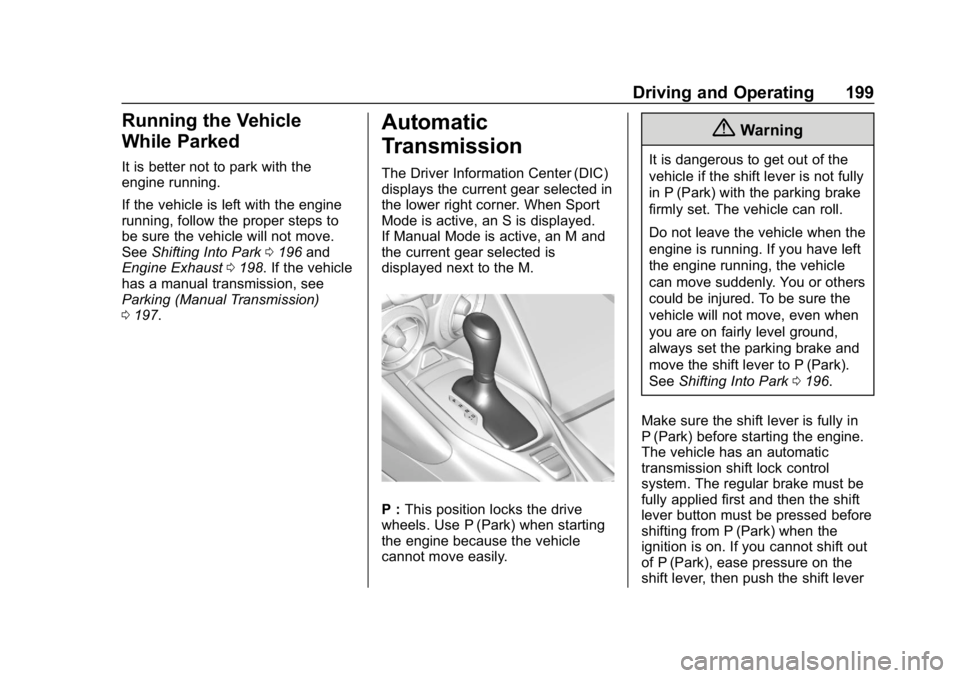
P : This position locks the drive
wheels. Use P (Park) when starting
the engine because the vehicle
cannot move easily.
{Warning
It is dangerous to get out of the
vehicle if the shift lever is not fully
in P (Park) with the parking brake
firmly set. The vehicle can roll.
Do not leave the vehicle when the
engine is running. If you have left
the engine running, the vehicle
can move suddenly. You or others
could be injured. To be sure the
vehicle will not move, even when
you are on fairly level ground,
always set the parking brake and
move the shift lever to P (Park).
See Shifting Into Park 0196.
Make sure the shift lever is fully in
P (Park) before starting the engine.
The vehicle has an automatic
transmission shift lock control
system. The regular brake must be
fully applied first and then the shift
lever button must be pressed before
shifting from P (Park) when the
ignition is on. If you cannot shift out
of P (Park), ease pressure on the
shift lever, then push the shift lever
Page 201 of 375
Chevrolet Camaro Owner Manual (GMNA-Localizing-U.S./Canada/Mexico-
12461811) - 2019 - crc - 11/5/18
200 Driving and Operating
all the way into P (Park) as you
maintain brake application. Then
press the shift lever button and
move the shift lever into another
gear. SeeShifting out of Park 0196.
R : Use this gear to back up.
Caution
Shifting to R (Reverse) while the
vehicle is moving forward could
damage the transmission. The
repairs would not be covered by
the vehicle warranty. Shift to
R (Reverse) only after the vehicle
is stopped.
To rock the vehicle back and forth to
get out of snow, ice, or sand without
damaging the transmission, see If
the Vehicle Is Stuck 0186.
N : In this position, the engine does
not connect with the wheels. To
restart the engine when the vehicle
is already moving, use
N (Neutral) only.
{Warning
Shifting into a drive gear while the
engine is running at high speed is
dangerous. Unless your foot is
firmly on the brake pedal, the
vehicle could move very rapidly.
You could lose control and hit
people or objects. Do not shift
into a drive gear while the engine
is running at high speed.
Caution
Shifting out of P (Park) or
N (Neutral) with the engine
running at high speed may
damage the transmission. The
repairs would not be covered by
the vehicle warranty. Be sure the
engine is not running at high
speed when shifting the vehicle.
Caution
A transmission hot message may
display if the automatic
transmission fluid is too hot.
Driving under this condition can
damage the vehicle. Stop and idle
the engine to cool the automatic
transmission fluid. This message
clears when the transmission fluid
has cooled sufficiently.
D : This position is for normal
driving. If more power is needed for
passing, press the accelerator
pedal down.
Powertrain Braking
When driving on steep descents
with the shift lever in D (Drive)
where frequent braking is required,
the transmission will shift down a
gear to help hold vehicle speed and
reduce brake wear. If the brake
continues to be pressed, the
transmission will downshift until
3 (Third) gear is reached.