lights CHEVROLET CAMARO 2019 Owner's Guide
[x] Cancel search | Manufacturer: CHEVROLET, Model Year: 2019, Model line: CAMARO, Model: CHEVROLET CAMARO 2019Pages: 375, PDF Size: 6.16 MB
Page 192 of 375
Chevrolet Camaro Owner Manual (GMNA-Localizing-U.S./Canada/Mexico-
12461811) - 2019 - crc - 11/5/18
Driving and Operating 191
Ignition Positions
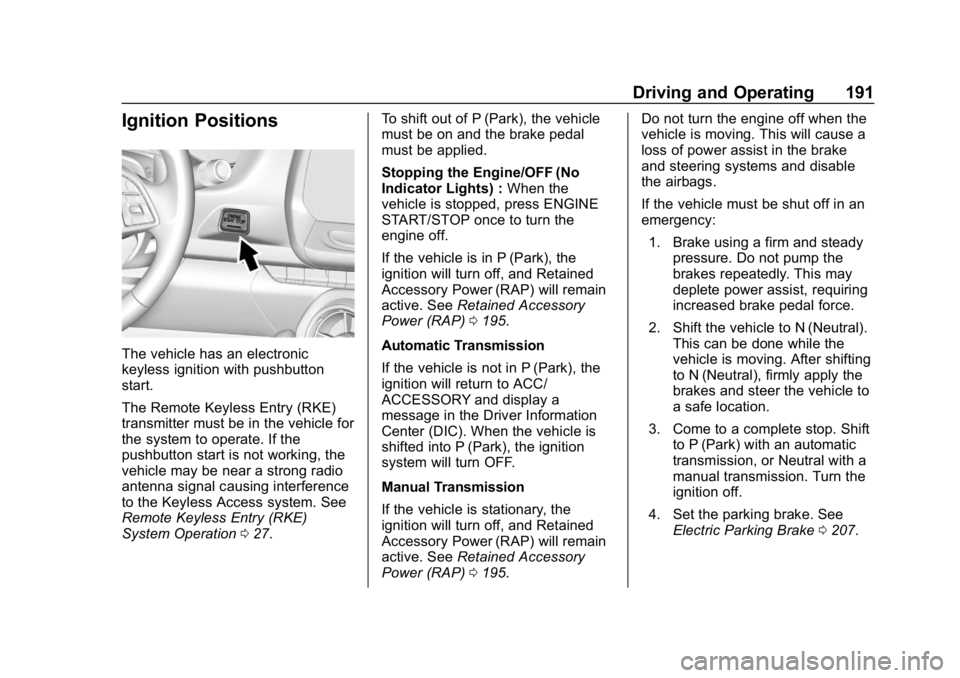
The vehicle has an electronic
keyless ignition with pushbutton
start.
The Remote Keyless Entry (RKE)
transmitter must be in the vehicle for
the system to operate. If the
pushbutton start is not working, the
vehicle may be near a strong radio
antenna signal causing interference
to the Keyless Access system. See
Remote Keyless Entry (RKE)
System Operation027. To shift out of P (Park), the vehicle
must be on and the brake pedal
must be applied.
Stopping the Engine/OFF (No
Indicator Lights) :
When the
vehicle is stopped, press ENGINE
START/STOP once to turn the
engine off.
If the vehicle is in P (Park), the
ignition will turn off, and Retained
Accessory Power (RAP) will remain
active. See Retained Accessory
Power (RAP) 0195.
Automatic Transmission
If the vehicle is not in P (Park), the
ignition will return to ACC/
ACCESSORY and display a
message in the Driver Information
Center (DIC). When the vehicle is
shifted into P (Park), the ignition
system will turn OFF.
Manual Transmission
If the vehicle is stationary, the
ignition will turn off, and Retained
Accessory Power (RAP) will remain
active. See Retained Accessory
Power (RAP) 0195. Do not turn the engine off when the
vehicle is moving. This will cause a
loss of power assist in the brake
and steering systems and disable
the airbags.
If the vehicle must be shut off in an
emergency:
1. Brake using a firm and steady pressure. Do not pump the
brakes repeatedly. This may
deplete power assist, requiring
increased brake pedal force.
2. Shift the vehicle to N (Neutral). This can be done while the
vehicle is moving. After shifting
to N (Neutral), firmly apply the
brakes and steer the vehicle to
a safe location.
3. Come to a complete stop. Shift to P (Park) with an automatic
transmission, or Neutral with a
manual transmission. Turn the
ignition off.
4. Set the parking brake. See Electric Parking Brake 0207.
Page 203 of 375
Chevrolet Camaro Owner Manual (GMNA-Localizing-U.S./Canada/Mexico-
12461811) - 2019 - crc - 11/5/18
202 Driving and Operating
descending hills, to stay in gear
longer, or to downshift for more
power or engine braking.
The transmission will only allow you
to shift into gears appropriate for the
vehicle speed and engine
revolutions per minute (rpm). The
transmission will not automatically
shift to the next lower gear if the
engine rpm is too high, nor to the
next higher gear when the maximum
engine rpm is reached.
While in the DSC mode, the
transmission will automatically
downshift as the vehicle comes to a
stop. This will allow for more power
during take-off.
When accelerating the vehicle from
a stop in snowy and icy conditions,
you may want to shift into second
gear. A higher gear allows the
vehicle to gain more traction on
slippery surfaces.Tap Shift
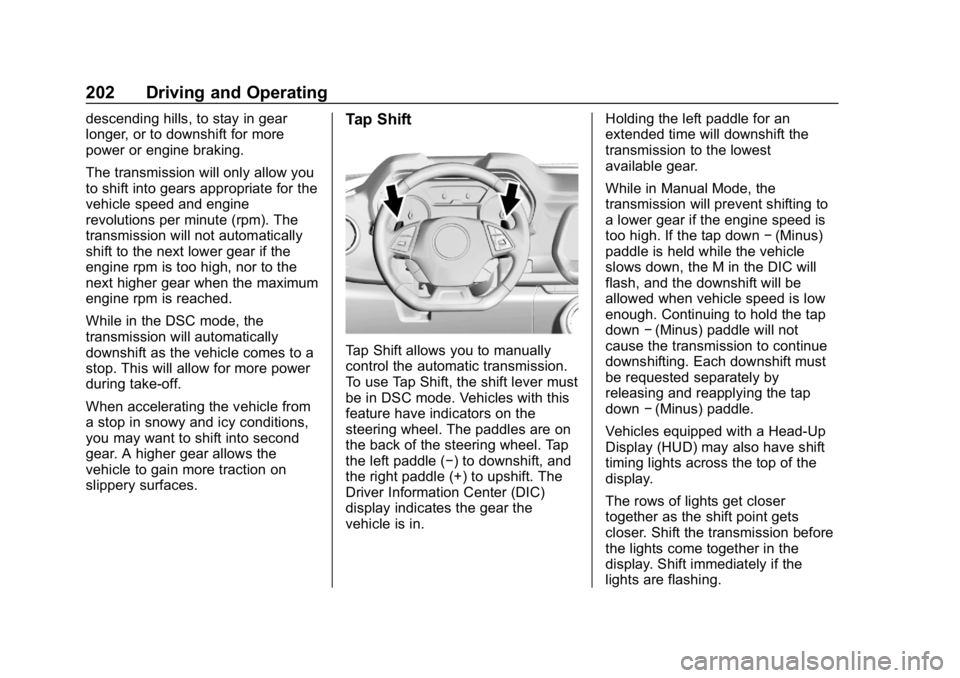
Tap Shift allows you to manually
control the automatic transmission.
To use Tap Shift, the shift lever must
be in DSC mode. Vehicles with this
feature have indicators on the
steering wheel. The paddles are on
the back of the steering wheel. Tap
the left paddle (−) to downshift, and
the right paddle (+) to upshift. The
Driver Information Center (DIC)
display indicates the gear the
vehicle is in.Holding the left paddle for an
extended time will downshift the
transmission to the lowest
available gear.
While in Manual Mode, the
transmission will prevent shifting to
a lower gear if the engine speed is
too high. If the tap down
−(Minus)
paddle is held while the vehicle
slows down, the M in the DIC will
flash, and the downshift will be
allowed when vehicle speed is low
enough. Continuing to hold the tap
down −(Minus) paddle will not
cause the transmission to continue
downshifting. Each downshift must
be requested separately by
releasing and reapplying the tap
down −(Minus) paddle.
Vehicles equipped with a Head-Up
Display (HUD) may also have shift
timing lights across the top of the
display.
The rows of lights get closer
together as the shift point gets
closer. Shift the transmission before
the lights come together in the
display. Shift immediately if the
lights are flashing.
Page 206 of 375
Chevrolet Camaro Owner Manual (GMNA-Localizing-U.S./Canada/Mexico-
12461811) - 2019 - crc - 11/5/18
Driving and Operating 205
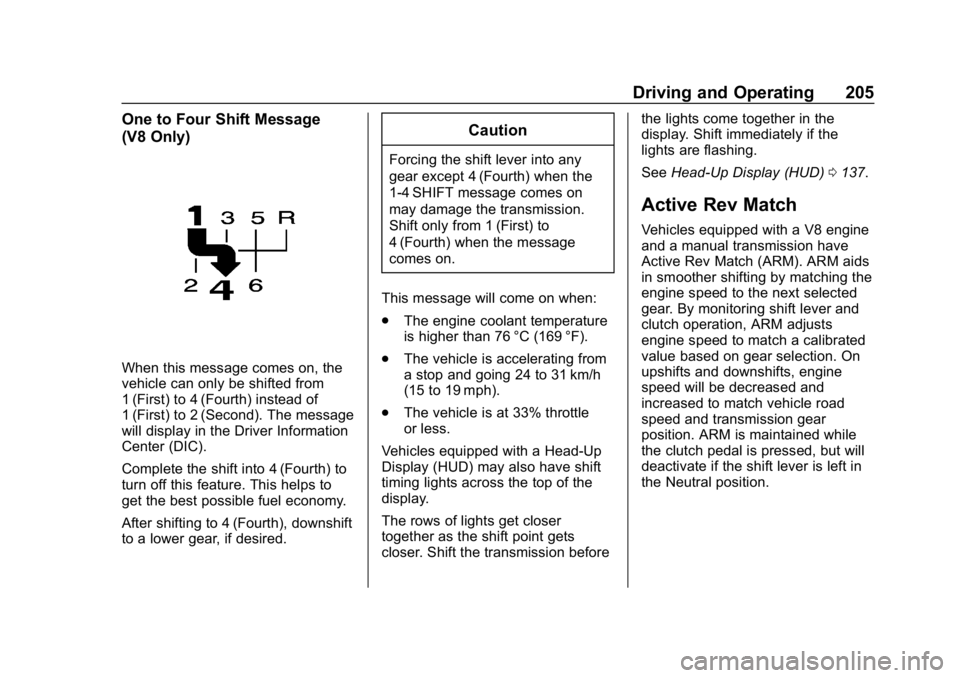
One to Four Shift Message
(V8 Only)
When this message comes on, the
vehicle can only be shifted from
1 (First) to 4 (Fourth) instead of
1 (First) to 2 (Second). The message
will display in the Driver Information
Center (DIC).
Complete the shift into 4 (Fourth) to
turn off this feature. This helps to
get the best possible fuel economy.
After shifting to 4 (Fourth), downshift
to a lower gear, if desired.
Caution
Forcing the shift lever into any
gear except 4 (Fourth) when the
1-4 SHIFT message comes on
may damage the transmission.
Shift only from 1 (First) to
4 (Fourth) when the message
comes on.
This message will come on when:
. The engine coolant temperature
is higher than 76 °C (169 °F).
. The vehicle is accelerating from
a stop and going 24 to 31 km/h
(15 to 19 mph).
. The vehicle is at 33% throttle
or less.
Vehicles equipped with a Head-Up
Display (HUD) may also have shift
timing lights across the top of the
display.
The rows of lights get closer
together as the shift point gets
closer. Shift the transmission before the lights come together in the
display. Shift immediately if the
lights are flashing.
See
Head-Up Display (HUD) 0137.
Active Rev Match
Vehicles equipped with a V8 engine
and a manual transmission have
Active Rev Match (ARM). ARM aids
in smoother shifting by matching the
engine speed to the next selected
gear. By monitoring shift lever and
clutch operation, ARM adjusts
engine speed to match a calibrated
value based on gear selection. On
upshifts and downshifts, engine
speed will be decreased and
increased to match vehicle road
speed and transmission gear
position. ARM is maintained while
the clutch pedal is pressed, but will
deactivate if the shift lever is left in
the Neutral position.
Page 217 of 375
Chevrolet Camaro Owner Manual (GMNA-Localizing-U.S./Canada/Mexico-
12461811) - 2019 - crc - 11/5/18
216 Driving and Operating
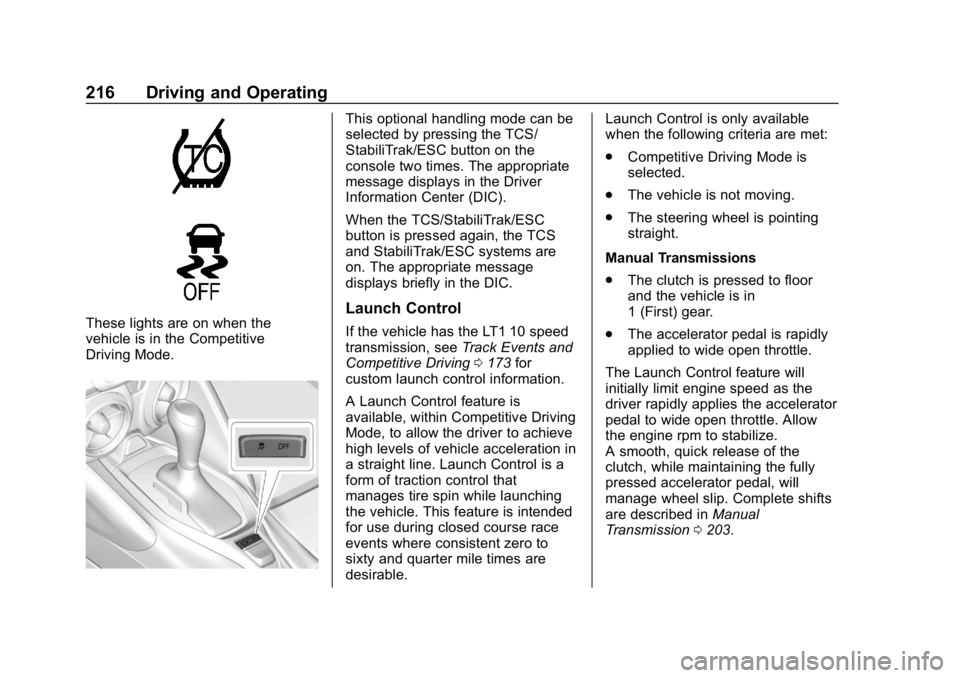
These lights are on when the
vehicle is in the Competitive
Driving Mode.
This optional handling mode can be
selected by pressing the TCS/
StabiliTrak/ESC button on the
console two times. The appropriate
message displays in the Driver
Information Center (DIC).
When the TCS/StabiliTrak/ESC
button is pressed again, the TCS
and StabiliTrak/ESC systems are
on. The appropriate message
displays briefly in the DIC.
Launch Control
If the vehicle has the LT1 10 speed
transmission, seeTrack Events and
Competitive Driving 0173 for
custom launch control information.
A Launch Control feature is
available, within Competitive Driving
Mode, to allow the driver to achieve
high levels of vehicle acceleration in
a straight line. Launch Control is a
form of traction control that
manages tire spin while launching
the vehicle. This feature is intended
for use during closed course race
events where consistent zero to
sixty and quarter mile times are
desirable. Launch Control is only available
when the following criteria are met:
.
Competitive Driving Mode is
selected.
. The vehicle is not moving.
. The steering wheel is pointing
straight.
Manual Transmissions
. The clutch is pressed to floor
and the vehicle is in
1 (First) gear.
. The accelerator pedal is rapidly
applied to wide open throttle.
The Launch Control feature will
initially limit engine speed as the
driver rapidly applies the accelerator
pedal to wide open throttle. Allow
the engine rpm to stabilize.
A smooth, quick release of the
clutch, while maintaining the fully
pressed accelerator pedal, will
manage wheel slip. Complete shifts
are described in Manual
Transmission 0203.
Page 225 of 375
Chevrolet Camaro Owner Manual (GMNA-Localizing-U.S./Canada/Mexico-
12461811) - 2019 - crc - 11/5/18
224 Driving and Operating
up to 20 m (65 ft) from the left or
right side of the vehicle. When an
object is detected, three beeps
sound from the left or right,
depending on the direction of the
detected vehicle.
SeeRadio Frequency Statement
0 347.
Turning the Features On or Off
RPA and RCTA can be turned on or
off. See “Collision/Detection
Systems” underVehicle
Personalization 0141.
To turn the rear Park Assist symbols
or guidance lines on or off, see
“Rear Camera” underVehicle
Personalization 0141.
Forward Collision Alert
(FCA) System
If equipped, the FCA system may
help to avoid or reduce the harm
caused by front-end crashes. When
approaching a vehicle ahead too
quickly, FCA provides a red flashing
alert on the windshield and rapidly
beeps or pulses the driver seat. FCA also lights an amber visual
alert if following another vehicle
much too closely.
FCA detects vehicles within a
distance of approximately 60 m
(197 ft) and operates at speeds
above 8 km/h (5 mph).
{Warning
FCA is a warning system and
does not apply the brakes. When
approaching a slower-moving or
stopped vehicle ahead too rapidly,
or when following a vehicle too
closely, FCA may not provide a
warning with enough time to help
avoid a crash. It also may not
provide any warning at all. FCA
does not warn of pedestrians,
animals, signs, guardrails,
bridges, construction barrels,
or other objects. Be ready to take
action and apply the brakes. See
Defensive Driving
0171.
FCA can be disabled with the FCA
steering wheel control.
Detecting the Vehicle Ahead
FCA warnings will not occur unless
the FCA system detects a vehicle
ahead. When a vehicle is detected,
the vehicle ahead indicator will
display green. Vehicles may not be
detected on curves, highway exit
ramps, or hills, due to poor visibility;
or if a vehicle ahead is partially
blocked by pedestrians or other
objects. FCA will not detect another
vehicle ahead until it is completely
in the driving lane.
{Warning
FCA does not provide a warning
to help avoid a crash, unless it
detects a vehicle. FCA may not
detect a vehicle ahead if the FCA
sensor is blocked by dirt, snow, (Continued)
Page 228 of 375
Chevrolet Camaro Owner Manual (GMNA-Localizing-U.S./Canada/Mexico-
12461811) - 2019 - crc - 11/5/18
Driving and Operating 227
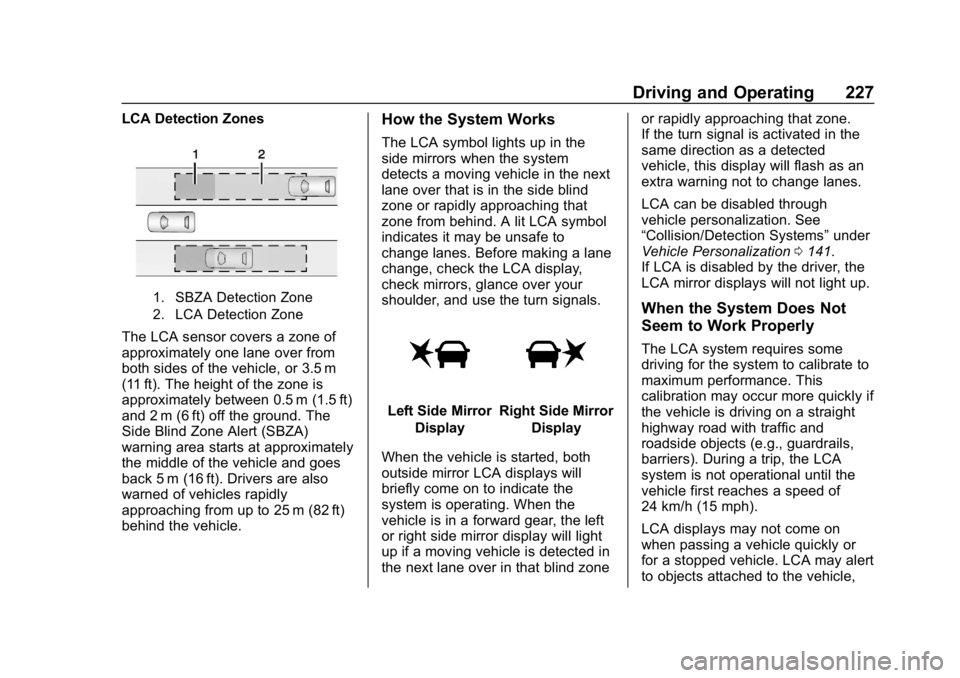
LCA Detection Zones
1. SBZA Detection Zone
2. LCA Detection Zone
The LCA sensor covers a zone of
approximately one lane over from
both sides of the vehicle, or 3.5 m
(11 ft). The height of the zone is
approximately between 0.5 m (1.5 ft)
and 2 m (6 ft) off the ground. The
Side Blind Zone Alert (SBZA)
warning area starts at approximately
the middle of the vehicle and goes
back 5 m (16 ft). Drivers are also
warned of vehicles rapidly
approaching from up to 25 m (82 ft)
behind the vehicle.
How the System Works
The LCA symbol lights up in the
side mirrors when the system
detects a moving vehicle in the next
lane over that is in the side blind
zone or rapidly approaching that
zone from behind. A lit LCA symbol
indicates it may be unsafe to
change lanes. Before making a lane
change, check the LCA display,
check mirrors, glance over your
shoulder, and use the turn signals.
Left Side MirrorDisplayRight Side Mirror Display
When the vehicle is started, both
outside mirror LCA displays will
briefly come on to indicate the
system is operating. When the
vehicle is in a forward gear, the left
or right side mirror display will light
up if a moving vehicle is detected in
the next lane over in that blind zone or rapidly approaching that zone.
If the turn signal is activated in the
same direction as a detected
vehicle, this display will flash as an
extra warning not to change lanes.
LCA can be disabled through
vehicle personalization. See
“Collision/Detection Systems”
under
Vehicle Personalization 0141.
If LCA is disabled by the driver, the
LCA mirror displays will not light up.
When the System Does Not
Seem to Work Properly
The LCA system requires some
driving for the system to calibrate to
maximum performance. This
calibration may occur more quickly if
the vehicle is driving on a straight
highway road with traffic and
roadside objects (e.g., guardrails,
barriers). During a trip, the LCA
system is not operational until the
vehicle first reaches a speed of
24 km/h (15 mph).
LCA displays may not come on
when passing a vehicle quickly or
for a stopped vehicle. LCA may alert
to objects attached to the vehicle,
Page 273 of 375
Chevrolet Camaro Owner Manual (GMNA-Localizing-U.S./Canada/Mexico-
12461811) - 2019 - crc - 11/5/18
272 Vehicle Care
Fuses UsageF2 Front blower
F3 Electric parking brake
F4 –
F5 –
F6 Rear drive control module
F7 Right window
F8 –
F9 Left window
F10 Heated mirror F11 –
F12 Heated steering wheel
F13 –
F14 HVAC control
F15 Spare
F16 Display
F17 Spare
F18 – Fuses Usage
F19 Front ventilated seat
F20 Spare
F21 –
F22 –
F23 Body control module
F24 –
F25 –
F26 –
F27 RGB lights
F28 Passive entry/ Passive start
battery
F29 Data link connector
F30 Canister vent
F31 Power fold top
F32 Memory seat module
F33 Wireless charger Fuses Usage
F34 Engine control module battery
F35 Fuel system control
module V6
F36 –
F37 Electric steering
column lock
F38 Outside rear view mirror/
Power window
F39 Rear closure
F40 –
F41 Battery regulated
voltage control
F42 SADS
F43 –
F44 Folding top solenoid
F45 Amplifier
Page 305 of 375
Chevrolet Camaro Owner Manual (GMNA-Localizing-U.S./Canada/Mexico-
12461811) - 2019 - crc - 11/5/18
304 Vehicle Care
Caution
Ignoring these steps could result
in costly damage to the vehicle
that would not be covered by the
vehicle warranty. Trying to start
the vehicle by pushing or pulling it
will not work, and it could damage
the vehicle.
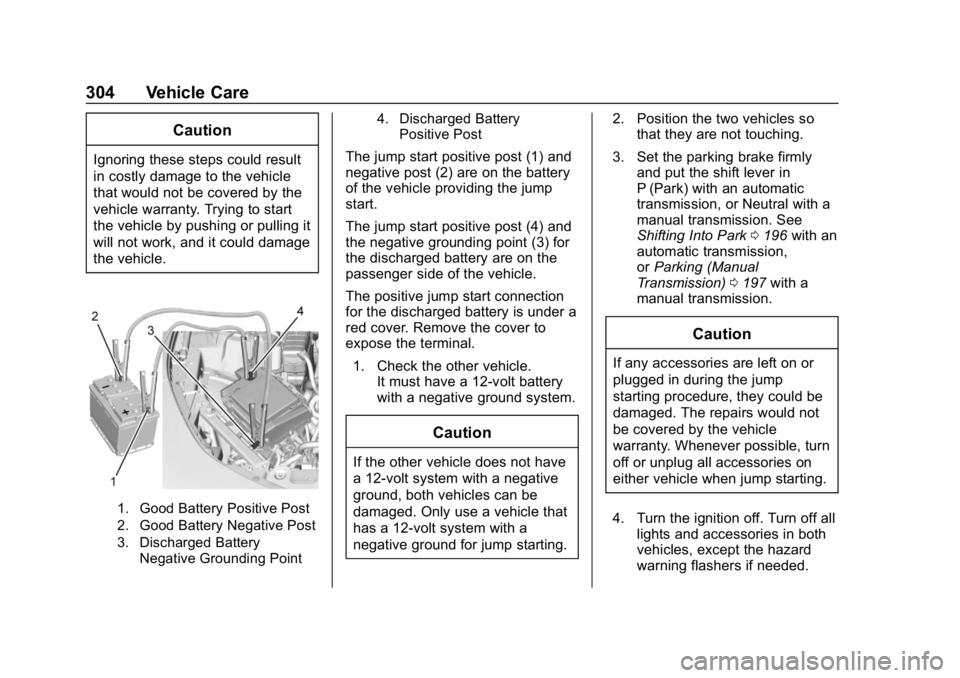
1. Good Battery Positive Post
2. Good Battery Negative Post
3. Discharged BatteryNegative Grounding Point 4. Discharged Battery
Positive Post
The jump start positive post (1) and
negative post (2) are on the battery
of the vehicle providing the jump
start.
The jump start positive post (4) and
the negative grounding point (3) for
the discharged battery are on the
passenger side of the vehicle.
The positive jump start connection
for the discharged battery is under a
red cover. Remove the cover to
expose the terminal.
1. Check the other vehicle. It must have a 12-volt battery
with a negative ground system.
Caution
If the other vehicle does not have
a 12-volt system with a negative
ground, both vehicles can be
damaged. Only use a vehicle that
has a 12-volt system with a
negative ground for jump starting. 2. Position the two vehicles so
that they are not touching.
3. Set the parking brake firmly and put the shift lever in
P (Park) with an automatic
transmission, or Neutral with a
manual transmission. See
Shifting Into Park 0196 with an
automatic transmission,
or Parking (Manual
Transmission) 0197 with a
manual transmission.
Caution
If any accessories are left on or
plugged in during the jump
starting procedure, they could be
damaged. The repairs would not
be covered by the vehicle
warranty. Whenever possible, turn
off or unplug all accessories on
either vehicle when jump starting.
4. Turn the ignition off. Turn off all lights and accessories in both
vehicles, except the hazard
warning flashers if needed.
Page 327 of 375
Chevrolet Camaro Owner Manual (GMNA-Localizing-U.S./Canada/Mexico-
12461811) - 2019 - crc - 11/5/18
326 Service and Maintenance
Additional
Maintenance and Care
Your vehicle is an important
investment and caring for it properly
may help to avoid future costly
repairs. To maintain vehicle
performance, additional
maintenance services may be
required.
It is recommended that your dealer
perform these services—their
trained dealer technicians know
your vehicle best. Your dealer can
also perform a thorough
assessment with a multi-point
inspection to recommend when your
vehicle may need attention.
The following list is intended to
explain the services and conditions
to look for that may indicate
services are required.
Battery
The 12-volt battery supplies power
to start the engine and operate any
additional electrical accessories. .
To avoid break-down or failure to
start the vehicle, maintain a
battery with full cranking power.
. Trained dealer technicians have
the diagnostic equipment to test
the battery and ensure that the
connections and cables are
corrosion-free.
Belts
. Belts may need replacing if they
squeak or show signs of
cracking or splitting.
. Trained dealer technicians have
access to tools and equipment
to inspect the belts and
recommend adjustment or
replacement when necessary.
Brakes
Brakes stop the vehicle and are
crucial to safe driving.
. Signs of brake wear may include
chirping, grinding, or squealing
noises, or difficulty stopping. .
Trained dealer technicians have
access to tools and equipment
to inspect the brakes and
recommend quality parts
engineered for the vehicle.
Fluids
Proper fluid levels and approved
fluids protect the vehicle’s systems
and components. See
Recommended Fluids and
Lubricants 0329 for GM approved
fluids.
. Engine oil and windshield
washer fluid levels should be
checked at every fuel fill.
. Instrument cluster lights may
come on to indicate that fluids
may be low and need to be
filled.
Hoses
Hoses transport fluids and should
be regularly inspected to ensure
that there are no cracks or leaks.
With a multi-point inspection, your
dealer can inspect the hoses and
advise if replacement is needed.
Page 368 of 375

Chevrolet Camaro Owner Manual (GMNA-Localizing-U.S./Canada/Mexico-
12461811) - 2019 - crc - 11/5/18
Index 367
G
Gas Strut(s) . . . . . . . . . . . . . . . . . . . . 263
GaugesBoost . . . . . . . . . . . . . . . . . . . . . . . . . 121
Engine CoolantTemperature . . . . . . . . . . . . . . . . 122
Engine Oil Pressure . . . . . . . . . . 121
Fuel . . . . . . . . . . . . . . . . . . . . . . . . . . .119
Odometer . . . . . . . . . . . . . . . . . . . . . .119
Speedometer . . . . . . . . . . . . . . . . . .119
Tachometer . . . . . . . . . . . . . . . . . . . .119
Trip Odometer . . . . . . . . . . . . . . . . .119
Voltmeter . . . . . . . . . . . . . . . . . . . . . 123
Warning Lights and Indicators . . . . . . . . . . . . . . . . . . . .114
General Information Service and Maintenance . . . . . 318
Towing . . . . . . . . . . . . . . . . . . . . . . . . 232
Vehicle Care . . . . . . . . . . . . . . . . . . 235
Glove Box . . . . . . . . . . . . . . . . . . . . . . 106
GM Mobility Reimbursement Program . . . . . . . . . . . . . . . . . . . . . . . 341
H
Halogen Bulbs . . . . . . . . . . . . . . . . . . 265
Hazard Warning Flashers . . . . . . . 149
Head Restraints . . . . . . . . . . . . . . . . . 60
Head-up Display . . . . . . . . . . . . . . . . 137 Headlamps
Aiming . . . . . . . . . . . . . . . . . . . . . . . . 264
Automatic . . . . . . . . . . . . . . . . . . . . . 148
Bulb Replacement . . . . . . . . . . . . 265
Daytime Running
Lamps (DRL) . . . . . . . . . . . . . . . . 148
Flash-to-Pass . . . . . . . . . . . . . . . . . 148
High Intensity Discharge
(HID) Lighting . . . . . . . . . . . . . . . 265
High-Beam On Light . . . . . . . . . . 133
High/Low Beam Changer . . . . . 147
Lamps On Reminder . . . . . . . . . 133
Heated Steering Wheel . . . . . . . . . . . . . . . 109
Heated and Ventilated Front Seats . . . . . . . . . . . . . . . . . . . . . . . . . . 66
Heated Mirrors . . . . . . . . . . . . . . . . . . . 45
Heater Engine . . . . . . . . . . . . . . . . . . . . . . . . 194
Heating . . . . . . . . . . . . . . . . . . . . 160, 163
High-Beam On Light . . . . . . . . . . . . 133
High-Speed Operation . . . . . . . . . . 283
Hill and Mountain Roads . . . . . . . . 184
Hill Start Assist (HSA) . . . . . . . . . . 209
Hood . . . . . . . . . . . . . . . . . . . . . . . . . . . 237
Horn . . . . . . . . . . . . . . . . . . . . . . . . . . . . 109
How to Wear Seat Belts Properly . . . . . . . . . . . . . . . . . . . . . . . . 69 HVAC . . . . . . . . . . . . . . . . . . . . . . 160, 163
Hydraulic Clutch . . . . . . . . . . . . . . . . 248
I
Ignition Positions . . . . . . . . . . . . . . . 191
Immobilizer . . . . . . . . . . . . . . . . . . . . . . 43
Indicator
Vehicle Ahead . . . . . . . . . . . . . . . . 130
Infants and Young Children, Restraints . . . . . . . . . . . . . . . . . . . . . . 89
Information Publication Ordering . . . . . . . . . . 346
Infotainment . . . . . . . . . . . . . . . . . . . . 154
Infotainment System . . . . . . . . . . . . 350
Instrument Cluster . . . . . . . . . . . . . . 115
Interior Lamps . . . . . . . . . . . . . . . . . . 151
Interior Rearview Mirrors . . . . . . . . . 46
Introduction . . . . . . . . . . . . . . . . . . . . . . . 2
J
Jump Starting - North America . . . . . . . . . . . . . . . . . . . . . . . 303
K
Keyless Entry
Remote (RKE) System . . . . . . . . . 27
Keys . . . . . . . . . . . . . . . . . . . . . . . . . . . . . 26