lock CHEVROLET CAMARO 2019 Workshop Manual
[x] Cancel search | Manufacturer: CHEVROLET, Model Year: 2019, Model line: CAMARO, Model: CHEVROLET CAMARO 2019Pages: 375, PDF Size: 6.16 MB
Page 131 of 375
Chevrolet Camaro Owner Manual (GMNA-Localizing-U.S./Canada/Mexico-
12461811) - 2019 - crc - 11/5/18
130 Instruments and Controls
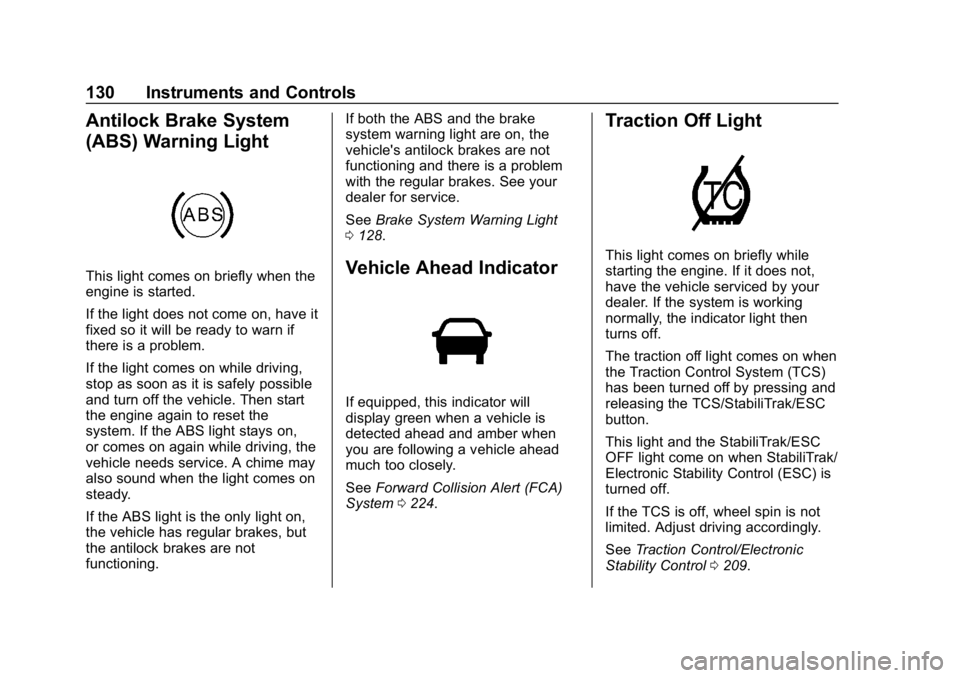
Antilock Brake System
(ABS) Warning Light
This light comes on briefly when the
engine is started.
If the light does not come on, have it
fixed so it will be ready to warn if
there is a problem.
If the light comes on while driving,
stop as soon as it is safely possible
and turn off the vehicle. Then start
the engine again to reset the
system. If the ABS light stays on,
or comes on again while driving, the
vehicle needs service. A chime may
also sound when the light comes on
steady.
If the ABS light is the only light on,
the vehicle has regular brakes, but
the antilock brakes are not
functioning.If both the ABS and the brake
system warning light are on, the
vehicle's antilock brakes are not
functioning and there is a problem
with the regular brakes. See your
dealer for service.
See
Brake System Warning Light
0 128.Vehicle Ahead Indicator
If equipped, this indicator will
display green when a vehicle is
detected ahead and amber when
you are following a vehicle ahead
much too closely.
See Forward Collision Alert (FCA)
System 0224.
Traction Off Light
This light comes on briefly while
starting the engine. If it does not,
have the vehicle serviced by your
dealer. If the system is working
normally, the indicator light then
turns off.
The traction off light comes on when
the Traction Control System (TCS)
has been turned off by pressing and
releasing the TCS/StabiliTrak/ESC
button.
This light and the StabiliTrak/ESC
OFF light come on when StabiliTrak/
Electronic Stability Control (ESC) is
turned off.
If the TCS is off, wheel spin is not
limited. Adjust driving accordingly.
See Traction Control/Electronic
Stability Control 0209.
Page 139 of 375
Chevrolet Camaro Owner Manual (GMNA-Localizing-U.S./Canada/Mexico-
12461811) - 2019 - crc - 11/5/18
138 Instruments and Controls
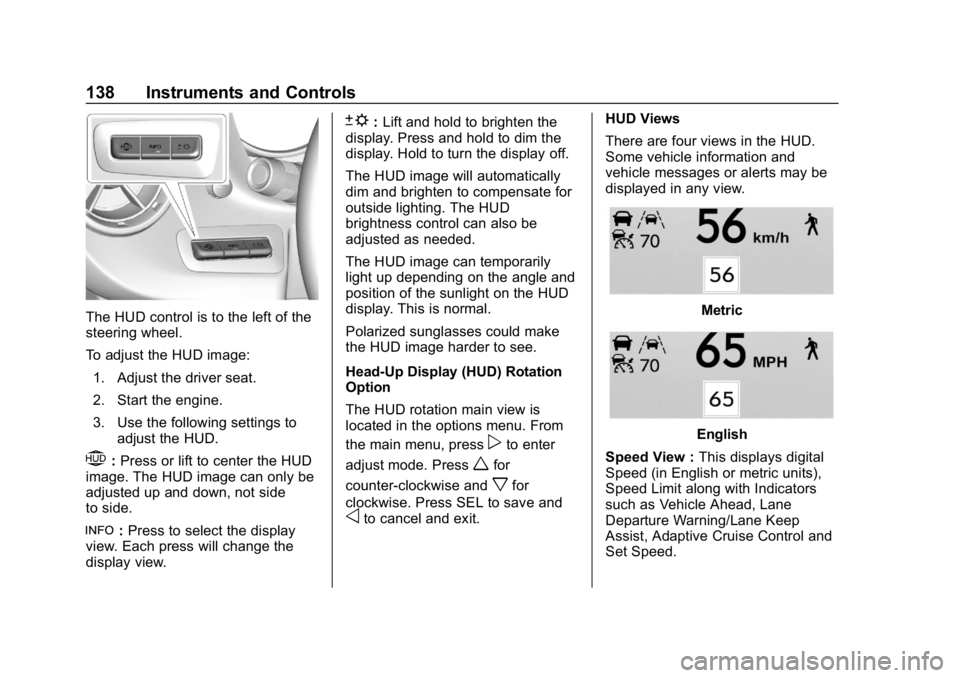
The HUD control is to the left of the
steering wheel.
To adjust the HUD image:1. Adjust the driver seat.
2. Start the engine.
3. Use the following settings to adjust the HUD.
$:Press or lift to center the HUD
image. The HUD image can only be
adjusted up and down, not side
to side.
!: Press to select the display
view. Each press will change the
display view.
D: Lift and hold to brighten the
display. Press and hold to dim the
display. Hold to turn the display off.
The HUD image will automatically
dim and brighten to compensate for
outside lighting. The HUD
brightness control can also be
adjusted as needed.
The HUD image can temporarily
light up depending on the angle and
position of the sunlight on the HUD
display. This is normal.
Polarized sunglasses could make
the HUD image harder to see.
Head-Up Display (HUD) Rotation
Option
The HUD rotation main view is
located in the options menu. From
the main menu, press
pto enter
adjust mode. Press
wfor
counter-clockwise and
xfor
clockwise. Press SEL to save and
oto cancel and exit. HUD Views
There are four views in the HUD.
Some vehicle information and
vehicle messages or alerts may be
displayed in any view.
Metric
English
Speed View : This displays digital
Speed (in English or metric units),
Speed Limit along with Indicators
such as Vehicle Ahead, Lane
Departure Warning/Lane Keep
Assist, Adaptive Cruise Control and
Set Speed.
Page 145 of 375
Chevrolet Camaro Owner Manual (GMNA-Localizing-U.S./Canada/Mexico-
12461811) - 2019 - crc - 11/5/18
144 Instruments and Controls
.Exit Lighting
Ambient Lighting
This setting allows the selection of
available colors for the ambient
lighting in the vehicle.
The Link to Drive Mode option will
change the ambient lighting to
match the color being used in the
instrument cluster based on the
setting of the drive mode button.
This feature can be turned off or on.
Vehicle Locator Lights
This setting flashes the vehicle’ s
headlamps when
Kis pressed on
the Remote Keyless Entry (RKE)
transmitter.
Touch Off or On.
Exit Lighting
This setting specifies how long the
headlamps stay on after the vehicle
is turned off and exited.
Touch Off, 30 Seconds, 60 Seconds,
or 120 Seconds.
Power Door Locks
Touch and the following may
display:
. Open Door Anti Lock Out
. Auto Door Unlock
. Delayed Door Lock
Open Door Anti Lock Out
This setting prevents the driver door
from locking when the door is open.
If this setting is on, the Delayed
Door Lock menu will not be
available.
Touch Off or On.
Auto Door Unlock
This allows selection of which of the
doors will automatically unlock when
the vehicle is shifted into P (Park)
with an automatic transmission or
when the vehicle is turned off with a
manual transmission.
Select Off, All Doors, or Driver Door. Delayed Door Lock
When on, this feature will delay the
locking of the doors. To override the
delay, press the power door lock
switch on the door.
Touch Off or On.
Remote Lock, Unlock, Start
Touch and the following may
display:
.
Remote Unlock Light Feedback
. Remote Lock Feedback
. Remote Door Unlock
. Remote Start Auto Cool Seats
. Remote Start Auto Heat Seats
. Remote Window Operation
. Passive Door Unlock
. Passive Door Lock
. Remote Left in Vehicle Alert
Remote Unlock Light Feedback
This setting flashes the exterior
lamps when the vehicle is unlocked
with the RKE transmitter.
Touch Off or Flash Lights.
Page 146 of 375
Chevrolet Camaro Owner Manual (GMNA-Localizing-U.S./Canada/Mexico-
12461811) - 2019 - crc - 11/5/18
Instruments and Controls 145
Remote Lock Feedback
This setting specifies how the
vehicle responds when the vehicle
is locked with the RKE transmitter.
Touch Off, Lights and Horn, Lights
Only, or Horn Only.
Remote Door Unlock
This setting specifies whether all
doors, or just the driver door, unlock
when pressing
Kon the RKE
transmitter.
Touch All Doors or Driver Door.
Remote Start Auto Cool Seats
If equipped and turned on, this
feature will turn the ventilated seats
on when using remote start on
warm days.
Touch Off, On-Driver and
Passenger, or On-Driver.
Remote Start Auto Heat Seats
This setting automatically turns on
the heated seats when using the
remote start function on cold days. See
Heated and Ventilated Front
Seats 066 and Remote Vehicle
Start 034.
Touch Off, On-Driver and
Passenger, or On-Driver.
Remote Window Operation
If equipped, this feature enables
remote operation of the windows
with the RKE transmitter. See
Remote Keyless Entry (RKE)
System Operation 027.
Touch Off or On.
Passive Door Unlock
This setting specifies which doors
unlock when using the button on the
driver door handle to unlock the
vehicle.
Touch All Doors or Driver Door Only.
Passive Door Lock
This setting specifies if the vehicle
will automatically lock, or lock and
provide an alert after all the doors
are closed, and you walk away from
the vehicle with the RKE transmitter.
See Remote Keyless Entry (RKE)
System Operation 027. Touch Off, On with Horn
Chirp, or On.
Remote Left in Vehicle Alert
This feature sounds an alert when
the RKE transmitter is left in the
vehicle. This menu also enables
Remote No Longer in Vehicle Alert.
Touch Off or On.
Seating Position
Touch and the following may
display:
.
Seat Entry Memory
. Seat Exit Memory
Seat Entry Memory
This feature automatically recalls
the previously stored 1 or 2 button
positions when the ignition is
changed from off to on or ACC/
ACCESSORY. See Memory Seats
0 62.
Touch Off or On.
Page 147 of 375
Chevrolet Camaro Owner Manual (GMNA-Localizing-U.S./Canada/Mexico-
12461811) - 2019 - crc - 11/5/18
146 Instruments and Controls
Seat Exit Memory
This feature automatically recalls
the previously stored exit button
position when exiting the vehicle.
SeeMemory Seats 062.
Touch Off or On.
Teen Driver
See “Teen Driver” under“Settings”
in the infotainment manual.
Valet Mode
This will lock the infotainment
system and steering wheel controls.
It may also limit access to vehicle
storage locations, if equipped.
To enable valet mode:
1. Enter a four-digit code on the keypad.
2. Touch Enter to go to the confirmation screen.
3. Re-enter the four-digit code.
Touch Lock or Unlock to lock or
unlock the system. Touch Back to
go back to the previous menu.
Page 151 of 375
Chevrolet Camaro Owner Manual (GMNA-Localizing-U.S./Canada/Mexico-
12461811) - 2019 - crc - 11/5/18
150 Lighting
Turn and Lane-Change
Signals
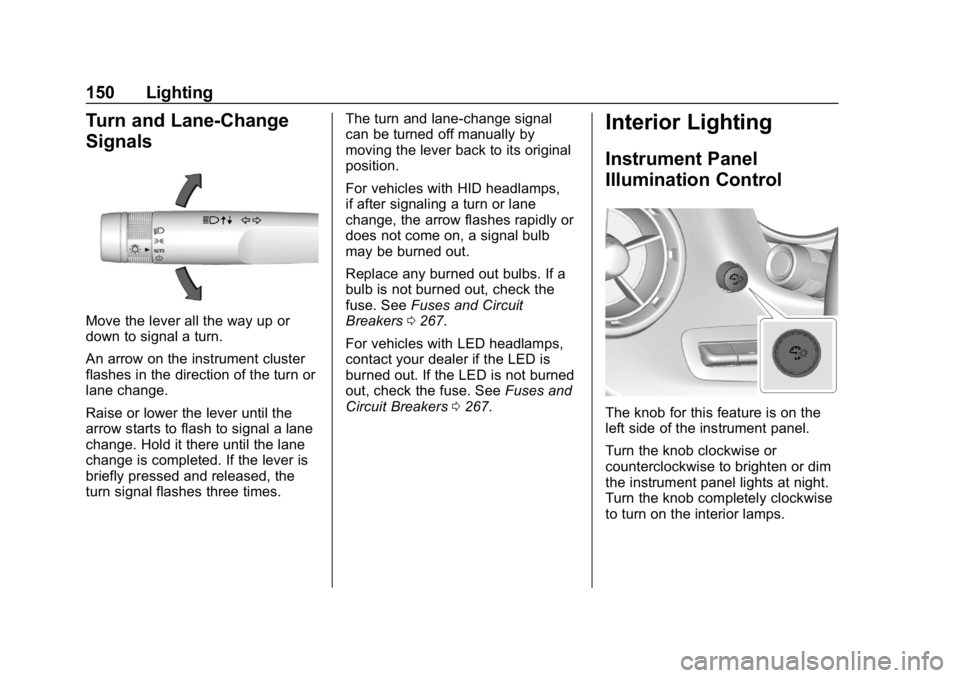
Move the lever all the way up or
down to signal a turn.
An arrow on the instrument cluster
flashes in the direction of the turn or
lane change.
Raise or lower the lever until the
arrow starts to flash to signal a lane
change. Hold it there until the lane
change is completed. If the lever is
briefly pressed and released, the
turn signal flashes three times.The turn and lane-change signal
can be turned off manually by
moving the lever back to its original
position.
For vehicles with HID headlamps,
if after signaling a turn or lane
change, the arrow flashes rapidly or
does not come on, a signal bulb
may be burned out.
Replace any burned out bulbs. If a
bulb is not burned out, check the
fuse. See
Fuses and Circuit
Breakers 0267.
For vehicles with LED headlamps,
contact your dealer if the LED is
burned out. If the LED is not burned
out, check the fuse. See Fuses and
Circuit Breakers 0267.
Interior Lighting
Instrument Panel
Illumination Control
The knob for this feature is on the
left side of the instrument panel.
Turn the knob clockwise or
counterclockwise to brighten or dim
the instrument panel lights at night.
Turn the knob completely clockwise
to turn on the interior lamps.
Page 162 of 375
Chevrolet Camaro Owner Manual (GMNA-Localizing-U.S./Canada/Mexico-
12461811) - 2019 - crc - 11/5/18
Climate Controls 161
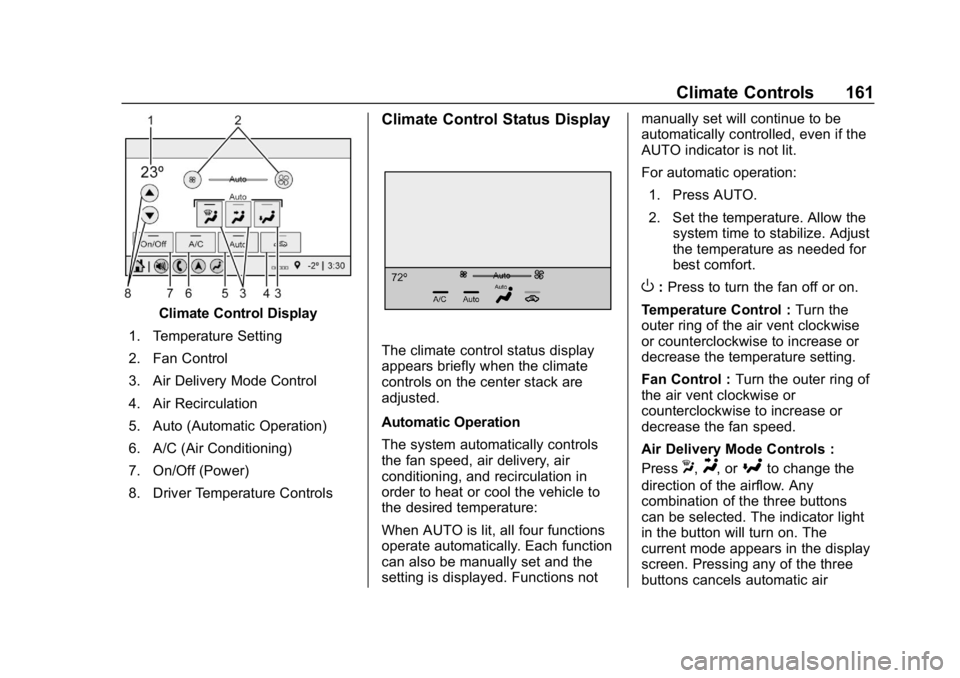
Climate Control Display
1. Temperature Setting
2. Fan Control
3. Air Delivery Mode Control
4. Air Recirculation
5. Auto (Automatic Operation)
6. A/C (Air Conditioning)
7. On/Off (Power)
8. Driver Temperature Controls
Climate Control Status Display
The climate control status display
appears briefly when the climate
controls on the center stack are
adjusted.
Automatic Operation
The system automatically controls
the fan speed, air delivery, air
conditioning, and recirculation in
order to heat or cool the vehicle to
the desired temperature:
When AUTO is lit, all four functions
operate automatically. Each function
can also be manually set and the
setting is displayed. Functions not manually set will continue to be
automatically controlled, even if the
AUTO indicator is not lit.
For automatic operation:
1. Press AUTO.
2. Set the temperature. Allow the system time to stabilize. Adjust
the temperature as needed for
best comfort.
O:Press to turn the fan off or on.
Temperature Control : Turn the
outer ring of the air vent clockwise
or counterclockwise to increase or
decrease the temperature setting.
Fan Control : Turn the outer ring of
the air vent clockwise or
counterclockwise to increase or
decrease the fan speed.
Air Delivery Mode Controls :
Press
X,Y, or[to change the
direction of the airflow. Any
combination of the three buttons
can be selected. The indicator light
in the button will turn on. The
current mode appears in the display
screen. Pressing any of the three
buttons cancels automatic air
Page 165 of 375
Chevrolet Camaro Owner Manual (GMNA-Localizing-U.S./Canada/Mexico-
12461811) - 2019 - crc - 11/5/18
164 Climate Controls
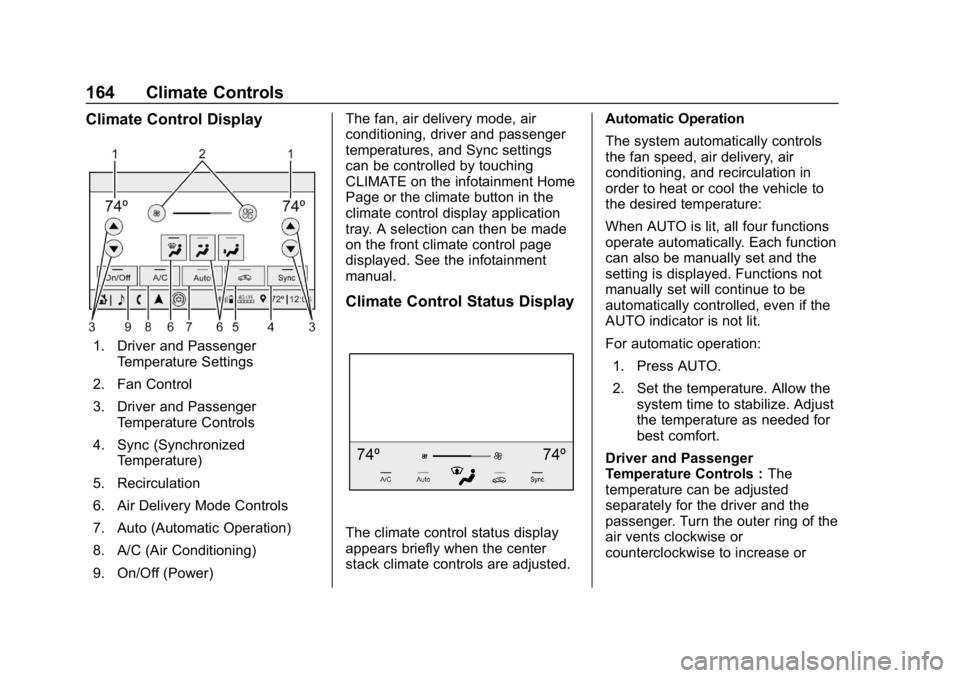
Climate Control Display
1. Driver and PassengerTemperature Settings
2. Fan Control
3. Driver and Passenger Temperature Controls
4. Sync (Synchronized Temperature)
5. Recirculation
6. Air Delivery Mode Controls
7. Auto (Automatic Operation)
8. A/C (Air Conditioning)
9. On/Off (Power) The fan, air delivery mode, air
conditioning, driver and passenger
temperatures, and Sync settings
can be controlled by touching
CLIMATE on the infotainment Home
Page or the climate button in the
climate control display application
tray. A selection can then be made
on the front climate control page
displayed. See the infotainment
manual.
Climate Control Status Display
The climate control status display
appears briefly when the center
stack climate controls are adjusted.
Automatic Operation
The system automatically controls
the fan speed, air delivery, air
conditioning, and recirculation in
order to heat or cool the vehicle to
the desired temperature:
When AUTO is lit, all four functions
operate automatically. Each function
can also be manually set and the
setting is displayed. Functions not
manually set will continue to be
automatically controlled, even if the
AUTO indicator is not lit.
For automatic operation:
1. Press AUTO.
2. Set the temperature. Allow the system time to stabilize. Adjust
the temperature as needed for
best comfort.
Driver and Passenger
Temperature Controls : The
temperature can be adjusted
separately for the driver and the
passenger. Turn the outer ring of the
air vents clockwise or
counterclockwise to increase or
Page 168 of 375
Chevrolet Camaro Owner Manual (GMNA-Localizing-U.S./Canada/Mexico-
12461811) - 2019 - crc - 11/5/18
Climate Controls 167
Air Vents
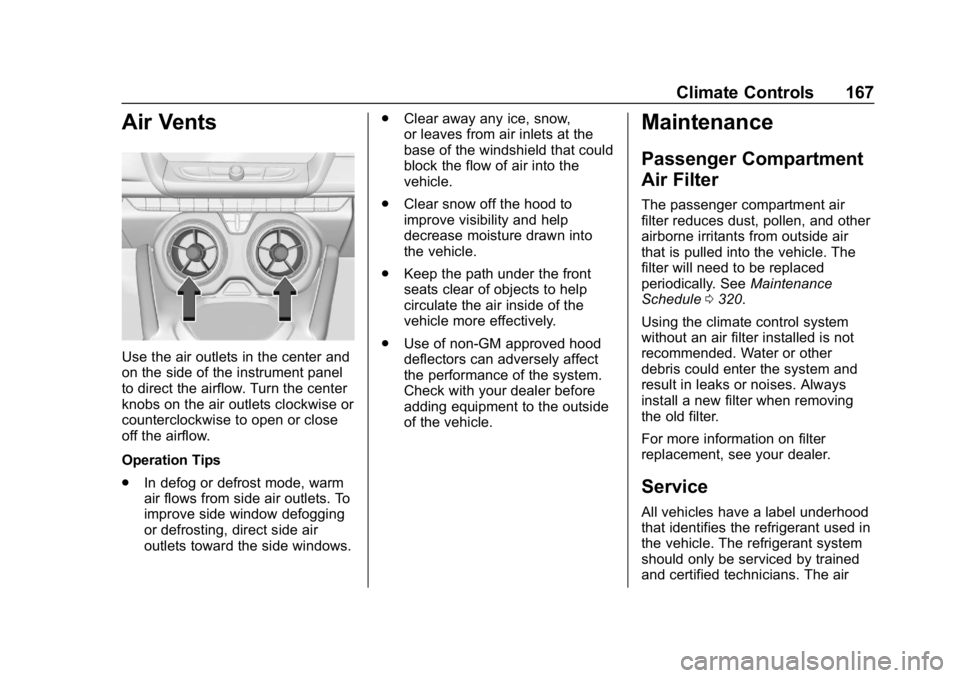
Use the air outlets in the center and
on the side of the instrument panel
to direct the airflow. Turn the center
knobs on the air outlets clockwise or
counterclockwise to open or close
off the airflow.
Operation Tips
.In defog or defrost mode, warm
air flows from side air outlets. To
improve side window defogging
or defrosting, direct side air
outlets toward the side windows. .
Clear away any ice, snow,
or leaves from air inlets at the
base of the windshield that could
block the flow of air into the
vehicle.
. Clear snow off the hood to
improve visibility and help
decrease moisture drawn into
the vehicle.
. Keep the path under the front
seats clear of objects to help
circulate the air inside of the
vehicle more effectively.
. Use of non-GM approved hood
deflectors can adversely affect
the performance of the system.
Check with your dealer before
adding equipment to the outside
of the vehicle.
Maintenance
Passenger Compartment
Air Filter
The passenger compartment air
filter reduces dust, pollen, and other
airborne irritants from outside air
that is pulled into the vehicle. The
filter will need to be replaced
periodically. See Maintenance
Schedule 0320.
Using the climate control system
without an air filter installed is not
recommended. Water or other
debris could enter the system and
result in leaks or noises. Always
install a new filter when removing
the old filter.
For more information on filter
replacement, see your dealer.
Service
All vehicles have a label underhood
that identifies the refrigerant used in
the vehicle. The refrigerant system
should only be serviced by trained
and certified technicians. The air
Page 170 of 375
Chevrolet Camaro Owner Manual (GMNA-Localizing-U.S./Canada/Mexico-
12461811) - 2019 - crc - 11/5/18
Driving and Operating 169
Driving and
Operating
Driving Information
Distracted Driving . . . . . . . . . . . . 170
Defensive Driving . . . . . . . . . . . . . 171
Drunk Driving . . . . . . . . . . . . . . . . . 171
Control of a Vehicle . . . . . . . . . . . 171
Braking . . . . . . . . . . . . . . . . . . . . . . . 171
Steering . . . . . . . . . . . . . . . . . . . . . . 172
Off-Road Recovery . . . . . . . . . . . 172
Loss of Control . . . . . . . . . . . . . . . 173
Track Events and CompetitiveDriving . . . . . . . . . . . . . . . . . . . . . . 173
Driving on Wet Roads . . . . . . . . 183
Hill and Mountain Roads . . . . . 184
Winter Driving . . . . . . . . . . . . . . . . 184
If the Vehicle Is Stuck . . . . . . . . 186
Vehicle Load Limits . . . . . . . . . . . 186
Starting and Operating
New Vehicle Break-In . . . . . . . . . 190
Ignition Positions . . . . . . . . . . . . . 191
Starting the Engine . . . . . . . . . . . 192
Engine Heater . . . . . . . . . . . . . . . . 194
Retained Accessory Power (RAP) . . . . . . . . . . . . . . . . 195
Shifting Into Park . . . . . . . . . . . . . 196 Shifting out of Park . . . . . . . . . . . 196
Parking (Manual
Transmission) . . . . . . . . . . . . . . . 197
Parking over Things That Burn . . . . . . . . . . . . . . . . . . . 197
Active Fuel Management . . . . . 197
Extended Parking . . . . . . . . . . . . 197
Engine Exhaust
Engine Exhaust . . . . . . . . . . . . . . 198
Running the Vehicle While Parked . . . . . . . . . . . . . . . . . . . . . . 199
Automatic Transmission
Automatic Transmission . . . . . . 199
Manual Mode . . . . . . . . . . . . . . . . . 201
Manual Transmission
Manual Transmission . . . . . . . . . 203
Active Rev Match . . . . . . . . . . . . . 205
Brakes
Antilock BrakeSystem (ABS) . . . . . . . . . . . . . . . 206
Electric Parking Brake . . . . . . . . 207
Brake Assist . . . . . . . . . . . . . . . . . . 209
Hill Start Assist (HSA) . . . . . . . . 209
Ride Control Systems
Traction Control/Electronic Stability Control . . . . . . . . . . . . . 209
Driver Mode Control . . . . . . . . . . 211 Competitive Driving Mode (SS,
ZL1 and 1LE
Models Only) . . . . . . . . . . . . . . . . 215
Limited-Slip Rear Axle . . . . . . . . 217
Cruise Control
Cruise Control . . . . . . . . . . . . . . . . 217
Driver Assistance Systems
Driver Assistance Systems . . . 220
Assistance Systems for Parking or Backing . . . . . . . . . . 222
Forward Collision Alert (FCA) System . . . . . . . . . . . . . . . . . . . . . . 224
Side Blind Zone Alert (SBZA) . . . . . . . . . . . . . . . . 226
Lane Change Alert (LCA) . . . . . 226
Fuel
Top Tier Fuel . . . . . . . . . . . . . . . . . 228
Recommended Fuel (3.6L V6 Engine) . . . . . . . . . . . . . . . . . . 229
Recommended Fuel (2.0L L4 Turbo Engine and 6.2L
V8 Engine) . . . . . . . . . . . . . . . . . . 229
Recommended Fuel (6.2L V8 Supercharged Engine) . . . . . . 229
Prohibited Fuels . . . . . . . . . . . . . . 229
Fuels in Foreign Countries . . . 230
Fuel Additives . . . . . . . . . . . . . . . . 230
Filling the Tank . . . . . . . . . . . . . . . 230