lock CHEVROLET CAMARO 2019 Manual PDF
[x] Cancel search | Manufacturer: CHEVROLET, Model Year: 2019, Model line: CAMARO, Model: CHEVROLET CAMARO 2019Pages: 375, PDF Size: 6.16 MB
Page 199 of 375
Chevrolet Camaro Owner Manual (GMNA-Localizing-U.S./Canada/Mexico-
12461811) - 2019 - crc - 11/5/18
198 Driving and Operating
If the vehicle is left parked and
running with the Remote Keyless
Entry (RKE) transmitter outside the
vehicle, it will continue to run for up
to half an hour.
If the vehicle is left parked and
running with the RKE transmitter
inside the vehicle, it will continue to
run for up to an hour.
The vehicle could turn off sooner if it
is parked on a hill, due to lack of
available fuel.
Automatic Transmission
The timer will reset if the vehicle is
taken out of P (Park) while it is
running.
Manual Transmission
The timer will reset if vehicle speed
exceeds 4 km/h (2.5 mph).Engine Exhaust
{Warning
Engine exhaust contains carbon
monoxide (CO), which cannot be
seen or smelled. Exposure to CO
can cause unconsciousness and
even death.
Exhaust may enter the vehicle if:. The vehicle idles in areas
with poor ventilation
(parking garages, tunnels,
deep snow that may block
underbody airflow or tail
pipes).
. The exhaust smells or
sounds strange or different.
. The exhaust system leaks
due to corrosion or damage.
. The vehicle exhaust system
has been modified,
damaged, or improperly
repaired.
(Continued)
Warning (Continued)
.There are holes or openings
in the vehicle body from
damage or aftermarket
modifications that are not
completely sealed.
If unusual fumes are detected or
if it is suspected that exhaust is
coming into the vehicle: . Drive it only with the
windows completely down.
. Have the vehicle repaired
immediately.
Never park the vehicle with the
engine running in an enclosed
area such as a garage or a
building that has no fresh air
ventilation.
Page 200 of 375
Chevrolet Camaro Owner Manual (GMNA-Localizing-U.S./Canada/Mexico-
12461811) - 2019 - crc - 11/5/18
Driving and Operating 199
Running the Vehicle
While Parked
It is better not to park with the
engine running.
If the vehicle is left with the engine
running, follow the proper steps to
be sure the vehicle will not move.
SeeShifting Into Park 0196 and
Engine Exhaust 0198. If the vehicle
has a manual transmission, see
Parking (Manual Transmission)
0 197.
Automatic
Transmission
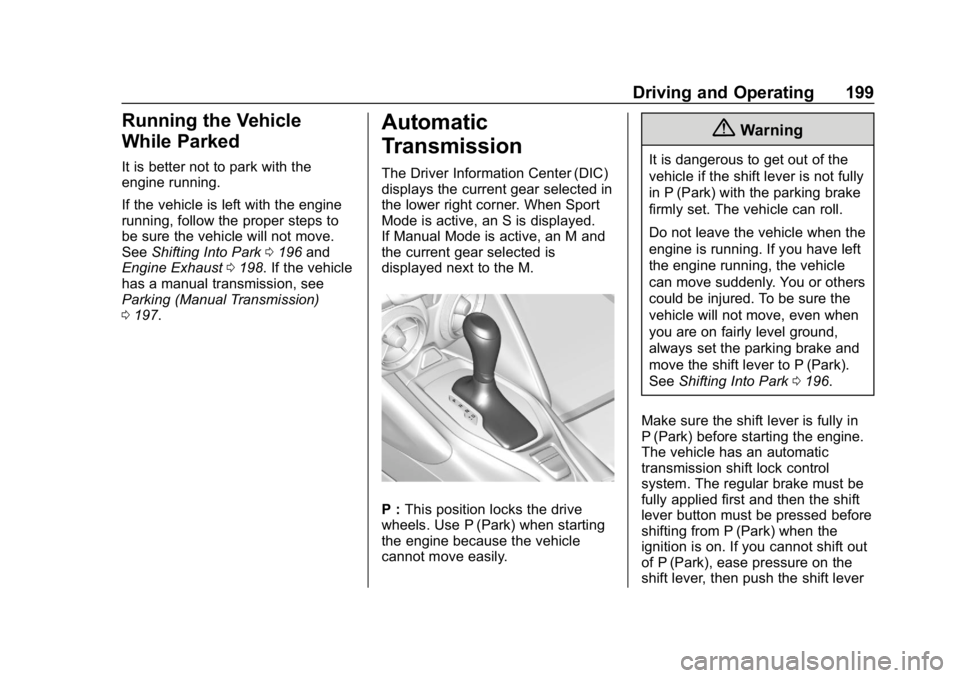
The Driver Information Center (DIC)
displays the current gear selected in
the lower right corner. When Sport
Mode is active, an S is displayed.
If Manual Mode is active, an M and
the current gear selected is
displayed next to the M.
P : This position locks the drive
wheels. Use P (Park) when starting
the engine because the vehicle
cannot move easily.
{Warning
It is dangerous to get out of the
vehicle if the shift lever is not fully
in P (Park) with the parking brake
firmly set. The vehicle can roll.
Do not leave the vehicle when the
engine is running. If you have left
the engine running, the vehicle
can move suddenly. You or others
could be injured. To be sure the
vehicle will not move, even when
you are on fairly level ground,
always set the parking brake and
move the shift lever to P (Park).
See Shifting Into Park 0196.
Make sure the shift lever is fully in
P (Park) before starting the engine.
The vehicle has an automatic
transmission shift lock control
system. The regular brake must be
fully applied first and then the shift
lever button must be pressed before
shifting from P (Park) when the
ignition is on. If you cannot shift out
of P (Park), ease pressure on the
shift lever, then push the shift lever
Page 207 of 375
Chevrolet Camaro Owner Manual (GMNA-Localizing-U.S./Canada/Mexico-
12461811) - 2019 - crc - 11/5/18
206 Driving and Operating
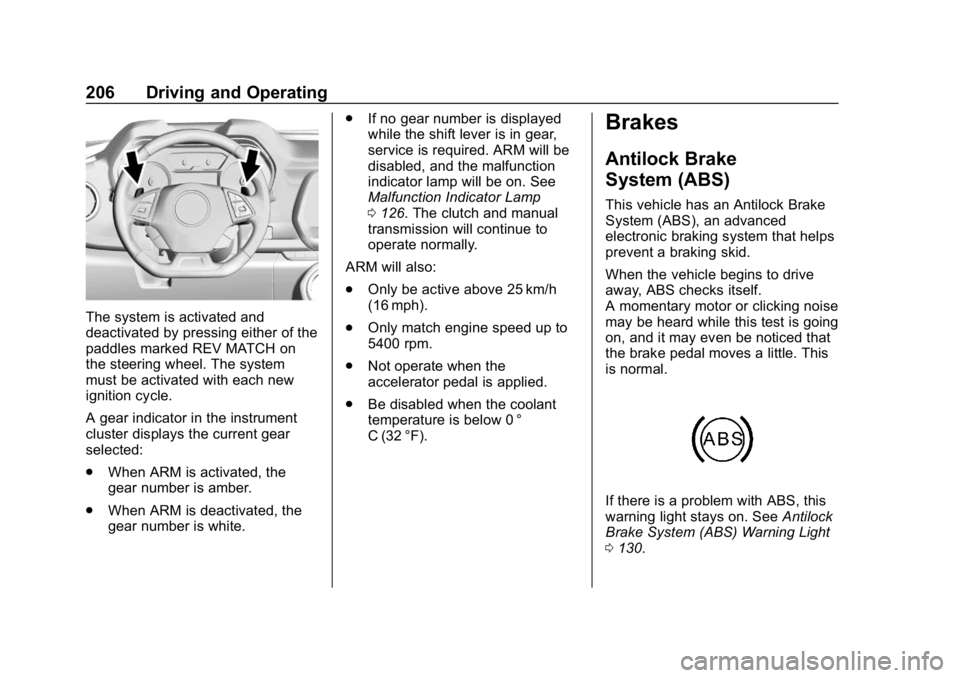
The system is activated and
deactivated by pressing either of the
paddles marked REV MATCH on
the steering wheel. The system
must be activated with each new
ignition cycle.
A gear indicator in the instrument
cluster displays the current gear
selected:
.When ARM is activated, the
gear number is amber.
. When ARM is deactivated, the
gear number is white. .
If no gear number is displayed
while the shift lever is in gear,
service is required. ARM will be
disabled, and the malfunction
indicator lamp will be on. See
Malfunction Indicator Lamp
0126. The clutch and manual
transmission will continue to
operate normally.
ARM will also:
. Only be active above 25 km/h
(16 mph).
. Only match engine speed up to
5400 rpm.
. Not operate when the
accelerator pedal is applied.
. Be disabled when the coolant
temperature is below 0 °
C (32 °F).
Brakes
Antilock Brake
System (ABS)
This vehicle has an Antilock Brake
System (ABS), an advanced
electronic braking system that helps
prevent a braking skid.
When the vehicle begins to drive
away, ABS checks itself.
A momentary motor or clicking noise
may be heard while this test is going
on, and it may even be noticed that
the brake pedal moves a little. This
is normal.
If there is a problem with ABS, this
warning light stays on. See Antilock
Brake System (ABS) Warning Light
0 130.
Page 209 of 375
Chevrolet Camaro Owner Manual (GMNA-Localizing-U.S./Canada/Mexico-
12461811) - 2019 - crc - 11/5/18
208 Driving and Operating
flashes continuously, then the EPB
is only partially applied or there is a
problem with the EPB. A DIC
message will display. Release the
EPB and try to apply it again. If the
light does not come on, or keeps
flashing, have the vehicle serviced.
Do not drive the vehicle if the
Yor
PARK light is flashing. See your
dealer. See Electric Parking Brake
Light 0129.
If the
8light is on, pull the EPB
switch and hold it. Continue to hold
the switch until the
Yor PARK
light remains on. If the
8light
remains on, see your dealer.
If the EPB is applied while the
vehicle is moving, the vehicle will
decelerate as long as the switch is
pulled. If the switch is pulled until
the vehicle comes to a stop, the
EPB will remain applied.
The vehicle may automatically apply
the EPB in some situations when
the vehicle is not moving. This is
normal, and is done to periodically
check the correct operation of the
EPB system. If the EPB fails to apply, block the
rear wheels to prevent vehicle
movement.
EPB Release
To release the EPB:
1. Turn the ignition on or to ACC/ ACCESSORY.
2. Apply and hold the brake pedal.
3. Press the EPB switch momentarily.
The EPB is released when the
Y
or PARK light is off.
If the
8light is on, release the EPB
by pressing and holding the EPB
switch. Continue to hold the switch
until the
Yor PARK light is off.
If either light stays on after release
is attempted, see your dealer.
Caution
Driving with the parking brake on
can overheat the brake system
and cause premature wear or
damage to brake system parts.
Make sure that the parking brake
is fully released and the brake
warning light is off before driving.
Automatic EPB Release
The EPB will automatically release if
the vehicle is running, placed into
gear, and an attempt is made to
drive away. Avoid rapid acceleration
when the EPB is applied, to
preserve parking brake lining life.
The EPB can also be used to
prevent roll back for vehicles with a
manual transmission taking off on a
hill. When no roll back is desired, an
applied EPB will allow both feet to
be used for the clutch and
accelerator pedals in preparation for
starting the vehicle moving in the
intended direction. In this case,
there is no need to press the switch
to release the EPB.
Page 222 of 375
Chevrolet Camaro Owner Manual (GMNA-Localizing-U.S./Canada/Mexico-
12461811) - 2019 - crc - 11/5/18
Driving and Operating 221
Warning (Continued)
Under many conditions, these
systems will not:. Detect children,
pedestrians, bicyclists,
or animals.
. Detect vehicles or objects
outside the area monitored
by the system.
. Work at all driving speeds.
. Warn you or provide you
with enough time to avoid a
crash.
. Work under poor visibility or
bad weather conditions.
. Work if the detection sensor
is not cleaned or is covered
by ice, snow, mud, or dirt.
. Work if the detection sensor
is covered up, such as with
a sticker, magnet, or metal
plate.
(Continued)
Warning (Continued)
.Work if the area surrounding
the detection sensor is
damaged or not properly
repaired.
Complete attention is always
required while driving, and you
should be ready to take action
and apply the brakes and/or steer
the vehicle to avoid crashes.
Audible Alert
Some driver assistance features
alert the driver of obstacles by
beeping. To change the volume of
the warning chime, see “Comfort
and Convenience” underVehicle
Personalization 0141.
Cleaning
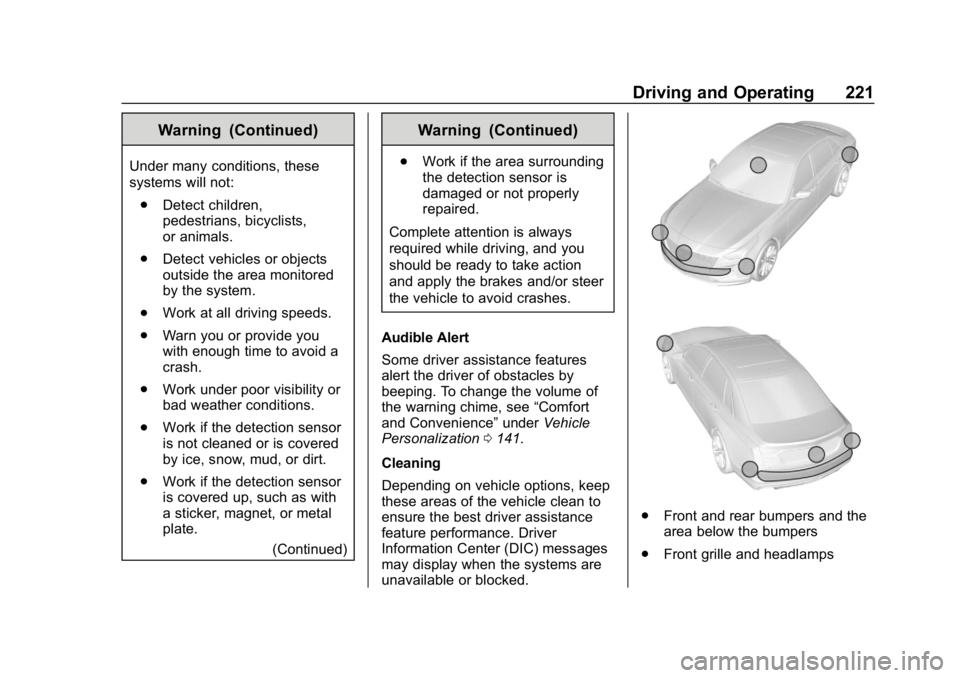
Depending on vehicle options, keep
these areas of the vehicle clean to
ensure the best driver assistance
feature performance. Driver
Information Center (DIC) messages
may display when the systems are
unavailable or blocked.
. Front and rear bumpers and the
area below the bumpers
. Front grille and headlamps
Page 224 of 375
Chevrolet Camaro Owner Manual (GMNA-Localizing-U.S./Canada/Mexico-
12461811) - 2019 - crc - 11/5/18
Driving and Operating 223
{Warning
The camera(s) do not display
children, pedestrians, bicyclists,
crossing traffic, animals, or any
other object outside of the
cameras’field of view, below the
bumper, or under the vehicle.
Shown distances may be different
from actual distances. Do not
drive or park the vehicle using
only these camera(s). Always
check behind and around the
vehicle before driving. Failure to
use proper care may result in
injury, death, or vehicle damage.
Park Assist
With RPA, as the vehicle backs up
at speeds of less than 8 km/h
(5 mph), the sensors on the rear
bumper may detect objects up to
2.5 m (8 ft) behind the vehicle within
a zone 25 cm (10 in) high off the
ground and below bumper level.
These detection distances may be
shorter during warmer or humid
weather. Blocked sensors will not detect
objects and can also cause false
detections. Keep the sensors clean
of mud, dirt, snow, ice, and slush;
and clean sensors after a car wash
in freezing temperatures.
{Warning
The Park Assist system does not
detect children, pedestrians,
bicyclists, animals, or objects
located below the bumper or that
are too close or too far from the
vehicle. It is not available at
speeds greater than 8 km/h
(5 mph). To prevent injury, death,
or vehicle damage, even with
Park Assist, always check the
area around the vehicle and
check all mirrors before moving
forward or backing.The instrument cluster may have a
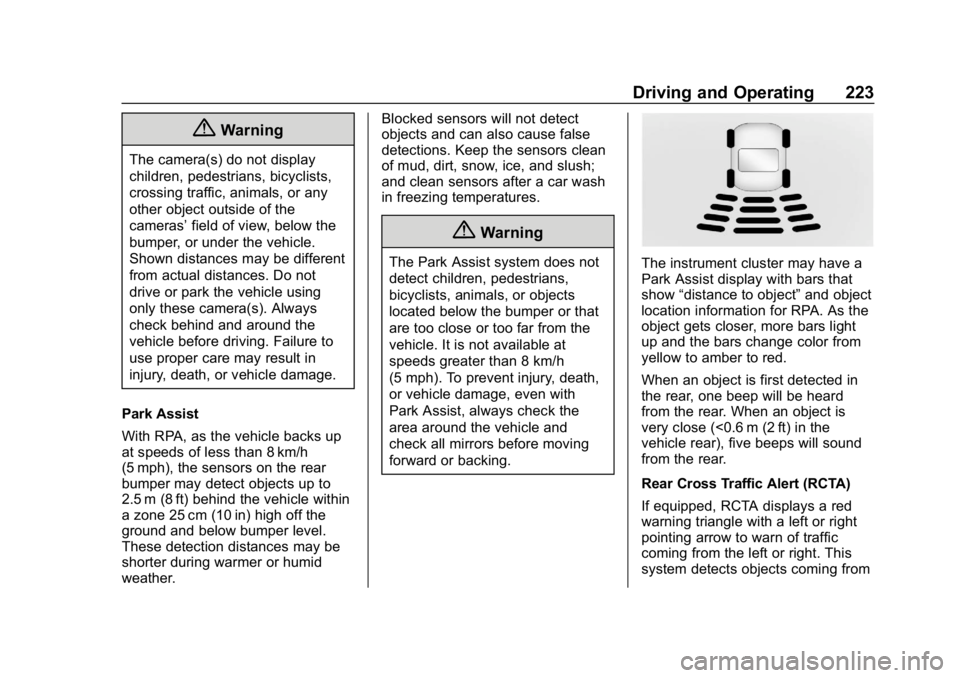
Park Assist display with bars that
show
“distance to object” and object
location information for RPA. As the
object gets closer, more bars light
up and the bars change color from
yellow to amber to red.
When an object is first detected in
the rear, one beep will be heard
from the rear. When an object is
very close (<0.6 m (2 ft) in the
vehicle rear), five beeps will sound
from the rear.
Rear Cross Traffic Alert (RCTA)
If equipped, RCTA displays a red
warning triangle with a left or right
pointing arrow to warn of traffic
coming from the left or right. This
system detects objects coming from
Page 225 of 375
Chevrolet Camaro Owner Manual (GMNA-Localizing-U.S./Canada/Mexico-
12461811) - 2019 - crc - 11/5/18
224 Driving and Operating
up to 20 m (65 ft) from the left or
right side of the vehicle. When an
object is detected, three beeps
sound from the left or right,
depending on the direction of the
detected vehicle.
SeeRadio Frequency Statement
0 347.
Turning the Features On or Off
RPA and RCTA can be turned on or
off. See “Collision/Detection
Systems” underVehicle
Personalization 0141.
To turn the rear Park Assist symbols
or guidance lines on or off, see
“Rear Camera” underVehicle
Personalization 0141.
Forward Collision Alert
(FCA) System
If equipped, the FCA system may
help to avoid or reduce the harm
caused by front-end crashes. When
approaching a vehicle ahead too
quickly, FCA provides a red flashing
alert on the windshield and rapidly
beeps or pulses the driver seat. FCA also lights an amber visual
alert if following another vehicle
much too closely.
FCA detects vehicles within a
distance of approximately 60 m
(197 ft) and operates at speeds
above 8 km/h (5 mph).
{Warning
FCA is a warning system and
does not apply the brakes. When
approaching a slower-moving or
stopped vehicle ahead too rapidly,
or when following a vehicle too
closely, FCA may not provide a
warning with enough time to help
avoid a crash. It also may not
provide any warning at all. FCA
does not warn of pedestrians,
animals, signs, guardrails,
bridges, construction barrels,
or other objects. Be ready to take
action and apply the brakes. See
Defensive Driving
0171.
FCA can be disabled with the FCA
steering wheel control.
Detecting the Vehicle Ahead
FCA warnings will not occur unless
the FCA system detects a vehicle
ahead. When a vehicle is detected,
the vehicle ahead indicator will
display green. Vehicles may not be
detected on curves, highway exit
ramps, or hills, due to poor visibility;
or if a vehicle ahead is partially
blocked by pedestrians or other
objects. FCA will not detect another
vehicle ahead until it is completely
in the driving lane.
{Warning
FCA does not provide a warning
to help avoid a crash, unless it
detects a vehicle. FCA may not
detect a vehicle ahead if the FCA
sensor is blocked by dirt, snow, (Continued)
Page 235 of 375
Chevrolet Camaro Owner Manual (GMNA-Localizing-U.S./Canada/Mexico-
12461811) - 2019 - crc - 11/5/18
234 Vehicle Care
Vehicle Care
General Information
General Information . . . . . . . . . . 235
California Proposition65 Warning . . . . . . . . . . . . . . . . . 235
California Perchlorate Materials Requirements . . . . . 236
Accessories and Modifications . . . . . . . . . . . . . . . . 236
Vehicle Checks
Doing Your OwnService Work . . . . . . . . . . . . . . . 236
Hood . . . . . . . . . . . . . . . . . . . . . . . . . 237
Engine Compartment Overview . . . . . . . . . . . . . . . . . . . . 238
Engine Oil . . . . . . . . . . . . . . . . . . . . 243
Engine Oil Life System . . . . . . . 246
Automatic Transmission Fluid . . . . . . . . . . . . . . . . . . . . . . . . 247
Manual Transmission Fluid . . . 248
Hydraulic Clutch . . . . . . . . . . . . . . 248
Engine Air Filter Life System (2.0L LTG and 3.6L LGX
Engines Only) . . . . . . . . . . . . . . . 248
Engine Air Cleaner/Filter . . . . . . 249
Cooling System . . . . . . . . . . . . . . 251
Engine Overheating . . . . . . . . . . 255 Washer Fluid . . . . . . . . . . . . . . . . . 257
Brakes . . . . . . . . . . . . . . . . . . . . . . . 257
Brake Fluid . . . . . . . . . . . . . . . . . . . 258
Battery - North America . . . . . . 260
Rear Axle . . . . . . . . . . . . . . . . . . . . 260
Starter Switch Check . . . . . . . . . 261
Automatic Transmission Shift
Lock Control Function
Check . . . . . . . . . . . . . . . . . . . . . . . 261
Park Brake and P (Park) Mechanism Check . . . . . . . . . . 261
Wiper Blade Replacement . . . . 262
Windshield Replacement . . . . . 263
Gas Strut(s) . . . . . . . . . . . . . . . . . . 263
Headlamp Aiming
Headlamp Aiming . . . . . . . . . . . . 264
Bulb Replacement
Bulb Replacement . . . . . . . . . . . . 265
Halogen Bulbs . . . . . . . . . . . . . . . . 265
High Intensity Discharge (HID) Lighting . . . . . . . . . . . . . . . . . . . . . 265
LED Lighting . . . . . . . . . . . . . . . . . 265
Back-Up Lamps . . . . . . . . . . . . . . 265
License Plate Lamp . . . . . . . . . . 266
Electrical System
Electrical System Overload . . . 266
Fuses and Circuit Breakers . . . 267 Engine Compartment Fuse
Block . . . . . . . . . . . . . . . . . . . . . . . . 267
Rear Compartment Fuse Block . . . . . . . . . . . . . . . . . . . . . . . . 271
Wheels and Tires
Tires . . . . . . . . . . . . . . . . . . . . . . . . . . 273
All-Season Tires . . . . . . . . . . . . . . 274
Winter Tires . . . . . . . . . . . . . . . . . . 275
Run-Flat Tires . . . . . . . . . . . . . . . . 275
Low-Profile Tires . . . . . . . . . . . . . 276
Summer Tires . . . . . . . . . . . . . . . . 276
Tire Sidewall Labeling . . . . . . . . 277
Tire Designations . . . . . . . . . . . . . 278
Tire Terminology andDefinitions . . . . . . . . . . . . . . . . . . 279
Tire Pressure . . . . . . . . . . . . . . . . . 282
Tire Pressure for High-Speed
Operation . . . . . . . . . . . . . . . . . . . 283
Tire Pressure Monitor System . . . . . . . . . . . . . . . . . . . . . . 283
Tire Pressure Monitor Operation . . . . . . . . . . . . . . . . . . . 284
Tire Inspection . . . . . . . . . . . . . . . . 287
Tire Rotation . . . . . . . . . . . . . . . . . 288
When It Is Time for New Tires . . . . . . . . . . . . . . . . . . . . . . . . 289
Buying New Tires . . . . . . . . . . . . . 290
Different Size Tires and Wheels . . . . . . . . . . . . . . . . . . . . . . 291
Page 237 of 375
Chevrolet Camaro Owner Manual (GMNA-Localizing-U.S./Canada/Mexico-
12461811) - 2019 - crc - 11/5/18
236 Vehicle Care
California Perchlorate
Materials Requirements
Certain types of automotive
applications, such as airbag
initiators, seat belt pretensioners,
and lithium batteries contained in
Remote Keyless Entry transmitters,
may contain perchlorate materials.
Special handling may be necessary.
For additional information, see
www.dtsc.ca.gov/hazardouswaste/
perchlorate.
Accessories and
Modifications
Adding non-dealer accessories or
making modifications to the vehicle
can affect vehicle performance and
safety, including such things as
airbags, braking, stability, ride and
handling, emissions systems,
aerodynamics, durability, and
electronic systems like antilock
brakes, traction control, and stability
control. These accessories or
modifications could even cause
malfunction or damage not covered
by the vehicle warranty.Damage to suspension components
caused by modifying vehicle height
outside of factory settings will not be
covered by the vehicle warranty.
Damage to vehicle components
resulting from modifications or the
installation or use of non-GM
certified parts, including control
module or software modifications, is
not covered under the terms of the
vehicle warranty and may affect
remaining warranty coverage for
affected parts.
GM Accessories are designed to
complement and function with other
systems on the vehicle. See your
dealer to accessorize the vehicle
using genuine GM Accessories
installed by a dealer technician.
Also, see
Adding Equipment to the
Airbag-Equipped Vehicle 086.
Vehicle Checks
Doing Your Own
Service Work
{Warning
It can be dangerous to work on
your vehicle if you do not have
the proper knowledge, service
manual, tools, or parts. Always
follow owner ’s manual procedures
and consult the service manual
for your vehicle before doing any
service work.
If doing some of your own service
work, use the proper service
manual. It tells you much more
about how to service the vehicle
than this manual can. To order the
proper service manual, see
Publication Ordering Information
0 346.
This vehicle has an airbag system.
Before attempting to do your own
service work, see Servicing the
Airbag-Equipped Vehicle 086.
Page 240 of 375

Chevrolet Camaro Owner Manual (GMNA-Localizing-U.S./Canada/Mexico-
12461811) - 2019 - crc - 11/5/18
Vehicle Care 239
1. Windshield Washer FluidReservoir. See Washer Fluid
0 257.
2. Engine Coolant Surge Tank and Pressure Cap. See
Cooling System 0251.
3. Engine Oil Fill Cap. See Engine Oil 0243.
4. Engine Oil Dipstick. See Engine Oil 0243.
5. Brake/Clutch Fluid Reservoir. See Brake Fluid 0258 and
Hydraulic Clutch 0248.
6. Engine Air Cleaner/Filter 0249.
7. Engine Cooling Fan (Out of View). See Cooling System
0 251.
8. Engine Compartment Fuse
Block 0267.
9. Negative (–) Battery Terminal. See Jump Starting - North
America 0303.
10. Positive (+) Battery Terminal. SeeJump Starting - North
America 0303.