steering CHEVROLET CAMARO 2019 Workshop Manual
[x] Cancel search | Manufacturer: CHEVROLET, Model Year: 2019, Model line: CAMARO, Model: CHEVROLET CAMARO 2019Pages: 375, PDF Size: 6.16 MB
Page 215 of 375
Chevrolet Camaro Owner Manual (GMNA-Localizing-U.S./Canada/Mexico-
12461811) - 2019 - crc - 11/5/18
214 Driving and Operating
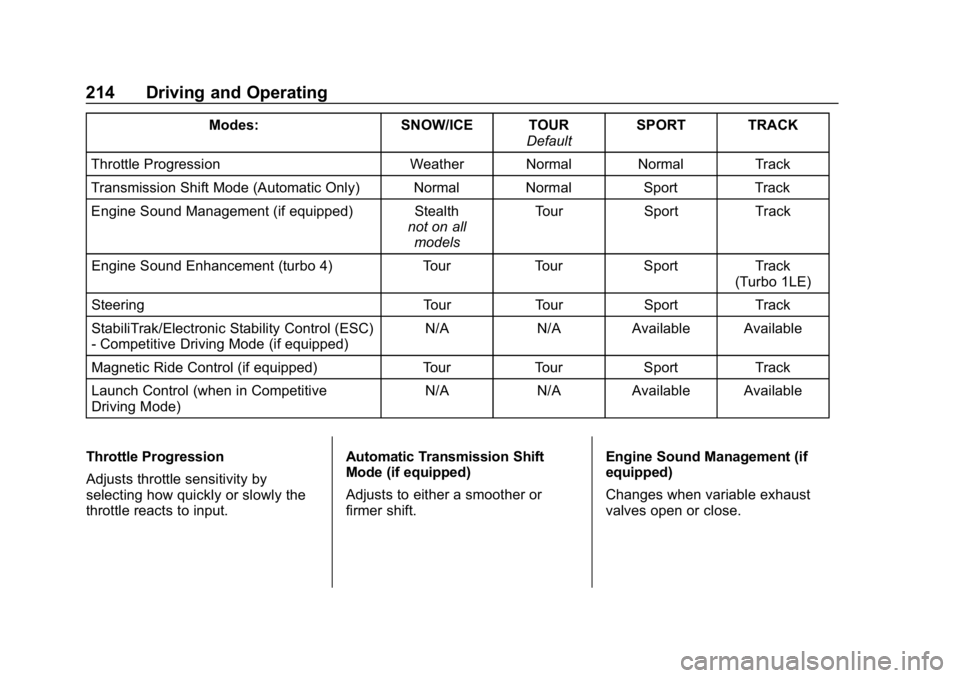
Modes:SNOW/ICE TOUR
DefaultSPORT TRACK
Throttle Progression Weather Normal Normal Track
Transmission Shift Mode (Automatic Only) Normal Normal SportTrack
Engine Sound Management (if equipped) Stealth not on all
models Tour
Sport Track
Engine Sound Enhancement (turbo 4) TourTourSport Track
(Turbo 1LE)
Steering TourTourSport Track
StabiliTrak/Electronic Stability Control (ESC)
- Competitive Driving Mode (if equipped) N/A
N/AAvailable Available
Magnetic Ride Control (if equipped) TourTourSport Track
Launch Control (when in Competitive
Driving Mode) N/A
N/AAvailable Available
Throttle Progression
Adjusts throttle sensitivity by
selecting how quickly or slowly the
throttle reacts to input. Automatic Transmission Shift
Mode (if equipped)
Adjusts to either a smoother or
firmer shift.
Engine Sound Management (if
equipped)
Changes when variable exhaust
valves open or close.
Page 216 of 375
Chevrolet Camaro Owner Manual (GMNA-Localizing-U.S./Canada/Mexico-
12461811) - 2019 - crc - 11/5/18
Driving and Operating 215
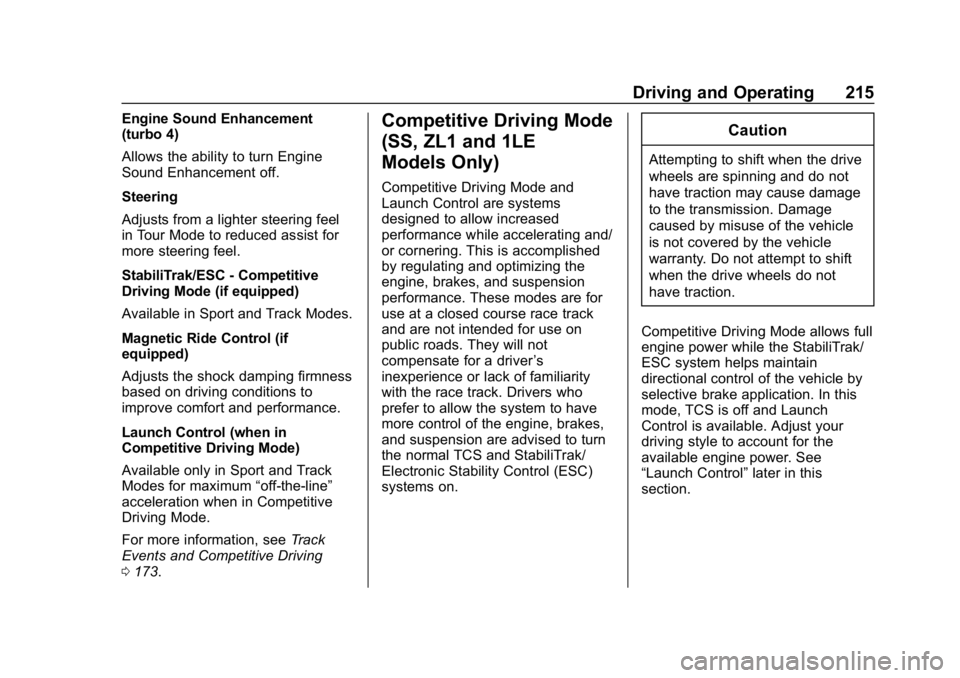
Engine Sound Enhancement
(turbo 4)
Allows the ability to turn Engine
Sound Enhancement off.
Steering
Adjusts from a lighter steering feel
in Tour Mode to reduced assist for
more steering feel.
StabiliTrak/ESC - Competitive
Driving Mode (if equipped)
Available in Sport and Track Modes.
Magnetic Ride Control (if
equipped)
Adjusts the shock damping firmness
based on driving conditions to
improve comfort and performance.
Launch Control (when in
Competitive Driving Mode)
Available only in Sport and Track
Modes for maximum“off-the-line”
acceleration when in Competitive
Driving Mode.
For more information, see Track
Events and Competitive Driving
0 173.Competitive Driving Mode
(SS, ZL1 and 1LE
Models Only)
Competitive Driving Mode and
Launch Control are systems
designed to allow increased
performance while accelerating and/
or cornering. This is accomplished
by regulating and optimizing the
engine, brakes, and suspension
performance. These modes are for
use at a closed course race track
and are not intended for use on
public roads. They will not
compensate for a driver ’s
inexperience or lack of familiarity
with the race track. Drivers who
prefer to allow the system to have
more control of the engine, brakes,
and suspension are advised to turn
the normal TCS and StabiliTrak/
Electronic Stability Control (ESC)
systems on.
Caution
Attempting to shift when the drive
wheels are spinning and do not
have traction may cause damage
to the transmission. Damage
caused by misuse of the vehicle
is not covered by the vehicle
warranty. Do not attempt to shift
when the drive wheels do not
have traction.
Competitive Driving Mode allows full
engine power while the StabiliTrak/
ESC system helps maintain
directional control of the vehicle by
selective brake application. In this
mode, TCS is off and Launch
Control is available. Adjust your
driving style to account for the
available engine power. See
“Launch Control” later in this
section.
Page 217 of 375
Chevrolet Camaro Owner Manual (GMNA-Localizing-U.S./Canada/Mexico-
12461811) - 2019 - crc - 11/5/18
216 Driving and Operating
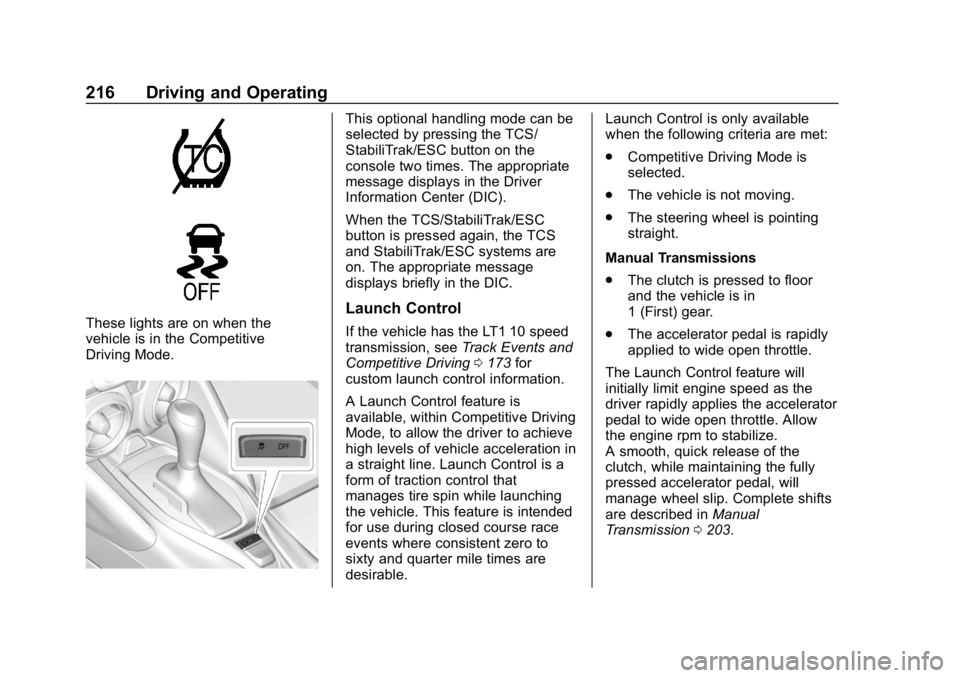
These lights are on when the
vehicle is in the Competitive
Driving Mode.
This optional handling mode can be
selected by pressing the TCS/
StabiliTrak/ESC button on the
console two times. The appropriate
message displays in the Driver
Information Center (DIC).
When the TCS/StabiliTrak/ESC
button is pressed again, the TCS
and StabiliTrak/ESC systems are
on. The appropriate message
displays briefly in the DIC.
Launch Control
If the vehicle has the LT1 10 speed
transmission, seeTrack Events and
Competitive Driving 0173 for
custom launch control information.
A Launch Control feature is
available, within Competitive Driving
Mode, to allow the driver to achieve
high levels of vehicle acceleration in
a straight line. Launch Control is a
form of traction control that
manages tire spin while launching
the vehicle. This feature is intended
for use during closed course race
events where consistent zero to
sixty and quarter mile times are
desirable. Launch Control is only available
when the following criteria are met:
.
Competitive Driving Mode is
selected.
. The vehicle is not moving.
. The steering wheel is pointing
straight.
Manual Transmissions
. The clutch is pressed to floor
and the vehicle is in
1 (First) gear.
. The accelerator pedal is rapidly
applied to wide open throttle.
The Launch Control feature will
initially limit engine speed as the
driver rapidly applies the accelerator
pedal to wide open throttle. Allow
the engine rpm to stabilize.
A smooth, quick release of the
clutch, while maintaining the fully
pressed accelerator pedal, will
manage wheel slip. Complete shifts
are described in Manual
Transmission 0203.
Page 225 of 375
Chevrolet Camaro Owner Manual (GMNA-Localizing-U.S./Canada/Mexico-
12461811) - 2019 - crc - 11/5/18
224 Driving and Operating
up to 20 m (65 ft) from the left or
right side of the vehicle. When an
object is detected, three beeps
sound from the left or right,
depending on the direction of the
detected vehicle.
SeeRadio Frequency Statement
0 347.
Turning the Features On or Off
RPA and RCTA can be turned on or
off. See “Collision/Detection
Systems” underVehicle
Personalization 0141.
To turn the rear Park Assist symbols
or guidance lines on or off, see
“Rear Camera” underVehicle
Personalization 0141.
Forward Collision Alert
(FCA) System
If equipped, the FCA system may
help to avoid or reduce the harm
caused by front-end crashes. When
approaching a vehicle ahead too
quickly, FCA provides a red flashing
alert on the windshield and rapidly
beeps or pulses the driver seat. FCA also lights an amber visual
alert if following another vehicle
much too closely.
FCA detects vehicles within a
distance of approximately 60 m
(197 ft) and operates at speeds
above 8 km/h (5 mph).
{Warning
FCA is a warning system and
does not apply the brakes. When
approaching a slower-moving or
stopped vehicle ahead too rapidly,
or when following a vehicle too
closely, FCA may not provide a
warning with enough time to help
avoid a crash. It also may not
provide any warning at all. FCA
does not warn of pedestrians,
animals, signs, guardrails,
bridges, construction barrels,
or other objects. Be ready to take
action and apply the brakes. See
Defensive Driving
0171.
FCA can be disabled with the FCA
steering wheel control.
Detecting the Vehicle Ahead
FCA warnings will not occur unless
the FCA system detects a vehicle
ahead. When a vehicle is detected,
the vehicle ahead indicator will
display green. Vehicles may not be
detected on curves, highway exit
ramps, or hills, due to poor visibility;
or if a vehicle ahead is partially
blocked by pedestrians or other
objects. FCA will not detect another
vehicle ahead until it is completely
in the driving lane.
{Warning
FCA does not provide a warning
to help avoid a crash, unless it
detects a vehicle. FCA may not
detect a vehicle ahead if the FCA
sensor is blocked by dirt, snow, (Continued)
Page 226 of 375
Chevrolet Camaro Owner Manual (GMNA-Localizing-U.S./Canada/Mexico-
12461811) - 2019 - crc - 11/5/18
Driving and Operating 225
Warning (Continued)
or ice, or if the windshield is
damaged. It may also not detect a
vehicle on winding or hilly roads,
or in conditions that can limit
visibility such as fog, rain,
or snow, or if the headlamps or
windshield are not cleaned or in
proper condition. Keep the
windshield, headlamps, and FCA
sensors clean and in good repair.
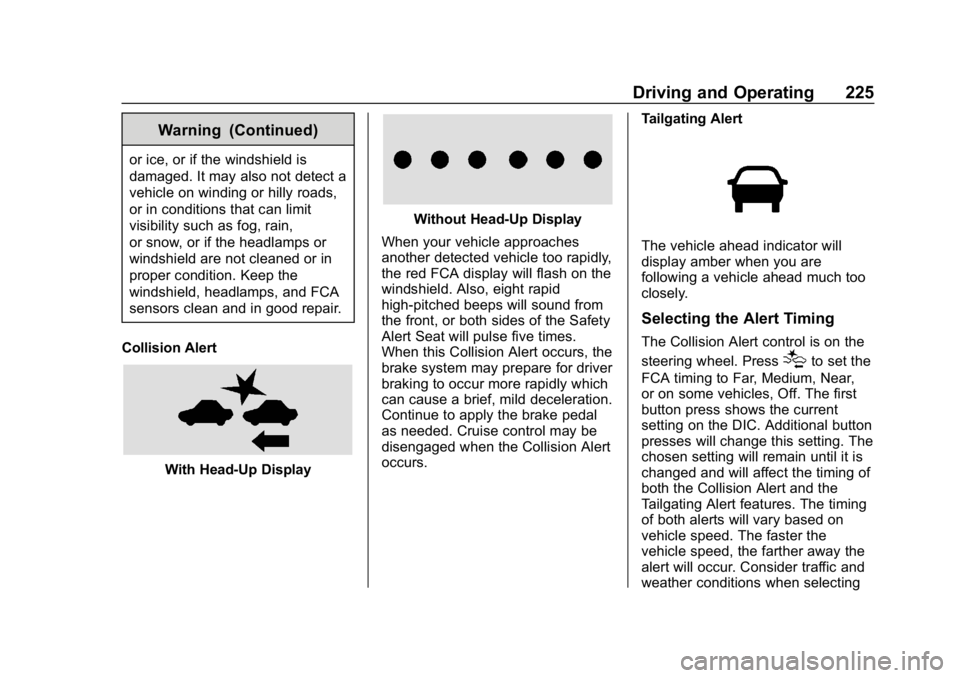
Collision Alert
With Head-Up Display
Without Head-Up Display
When your vehicle approaches
another detected vehicle too rapidly,
the red FCA display will flash on the
windshield. Also, eight rapid
high-pitched beeps will sound from
the front, or both sides of the Safety
Alert Seat will pulse five times.
When this Collision Alert occurs, the
brake system may prepare for driver
braking to occur more rapidly which
can cause a brief, mild deceleration.
Continue to apply the brake pedal
as needed. Cruise control may be
disengaged when the Collision Alert
occurs. Tailgating Alert
The vehicle ahead indicator will
display amber when you are
following a vehicle ahead much too
closely.
Selecting the Alert Timing
The Collision Alert control is on the
steering wheel. Press
[to set the
FCA timing to Far, Medium, Near,
or on some vehicles, Off. The first
button press shows the current
setting on the DIC. Additional button
presses will change this setting. The
chosen setting will remain until it is
changed and will affect the timing of
both the Collision Alert and the
Tailgating Alert features. The timing
of both alerts will vary based on
vehicle speed. The faster the
vehicle speed, the farther away the
alert will occur. Consider traffic and
weather conditions when selecting
Page 238 of 375
Chevrolet Camaro Owner Manual (GMNA-Localizing-U.S./Canada/Mexico-
12461811) - 2019 - crc - 11/5/18
Vehicle Care 237
If equipped with remote vehicle
start, open the hood before
performing any service work to
prevent remote starting the vehicle
accidentally. SeeRemote Vehicle
Start 034.
Keep a record with all parts receipts
and list the mileage and the date of
any service work performed. See
Maintenance Records 0332.
Caution
Even small amounts of
contamination can cause damage
to vehicle systems. Do not allow
contaminants to contact the fluids,
reservoir caps, or dipsticks.
Hood
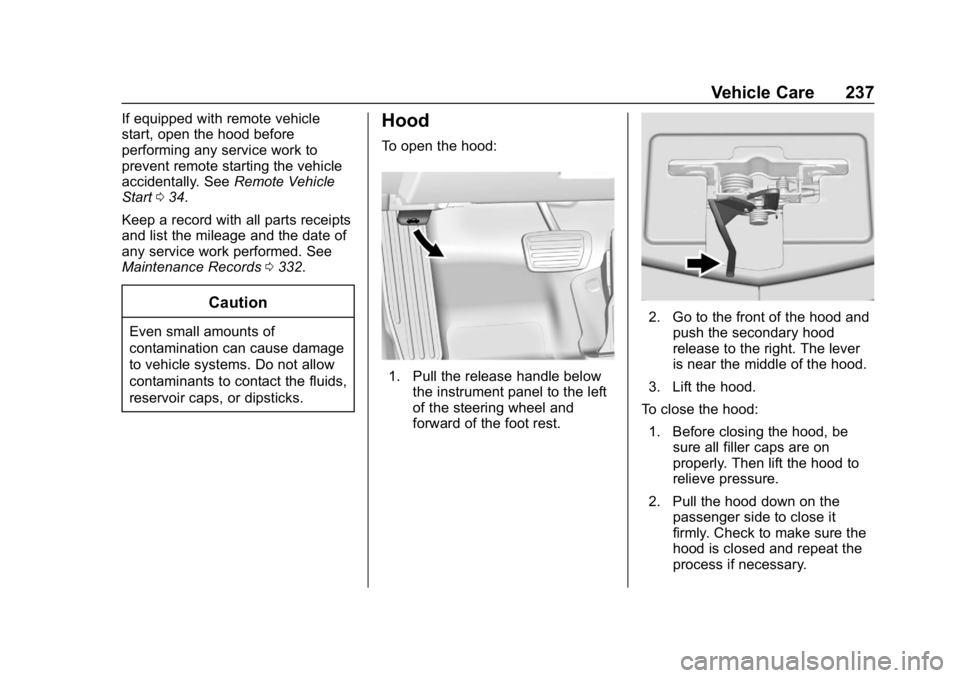
To open the hood:
1. Pull the release handle below
the instrument panel to the left
of the steering wheel and
forward of the foot rest.
2. Go to the front of the hood andpush the secondary hood
release to the right. The lever
is near the middle of the hood.
3. Lift the hood.
To close the hood:
1. Before closing the hood, be sure all filler caps are on
properly. Then lift the hood to
relieve pressure.
2. Pull the hood down on the passenger side to close it
firmly. Check to make sure the
hood is closed and repeat the
process if necessary.
Page 270 of 375
Chevrolet Camaro Owner Manual (GMNA-Localizing-U.S./Canada/Mexico-
12461811) - 2019 - crc - 11/5/18
Vehicle Care 269
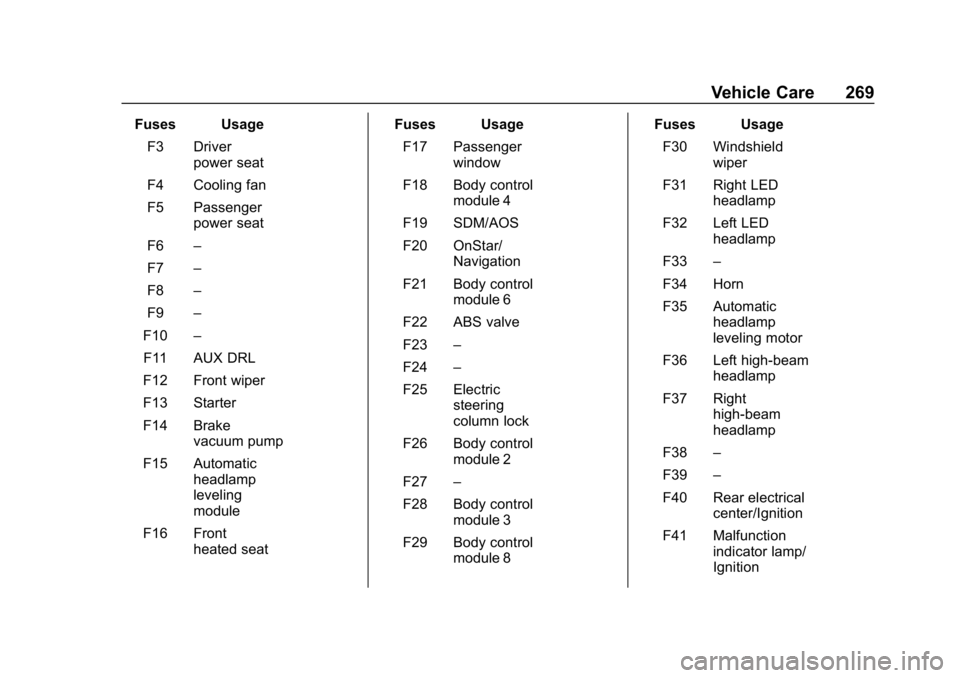
Fuses UsageF3 Driver power seat
F4 Cooling fan
F5 Passenger power seat
F6 –
F7 –
F8 –
F9 –
F10 –
F11 AUX DRL
F12 Front wiper
F13 Starter
F14 Brake vacuum pump
F15 Automatic headlamp
leveling
module
F16 Front heated seat Fuses Usage
F17 Passenger window
F18 Body control module 4
F19 SDM/AOS
F20 OnStar/ Navigation
F21 Body control module 6
F22 ABS valve
F23 –
F24 –
F25 Electric steering
column lock
F26 Body control module 2
F27 –
F28 Body control module 3
F29 Body control module 8 Fuses Usage
F30 Windshield wiper
F31 Right LED headlamp
F32 Left LED headlamp
F33 –
F34 Horn
F35 Automatic headlamp
leveling motor
F36 Left high-beam headlamp
F37 Right high-beam
headlamp
F38 –
F39 –
F40 Rear electrical center/Ignition
F41 Malfunction indicator lamp/
Ignition
Page 271 of 375
Chevrolet Camaro Owner Manual (GMNA-Localizing-U.S./Canada/Mexico-
12461811) - 2019 - crc - 11/5/18
270 Vehicle Care
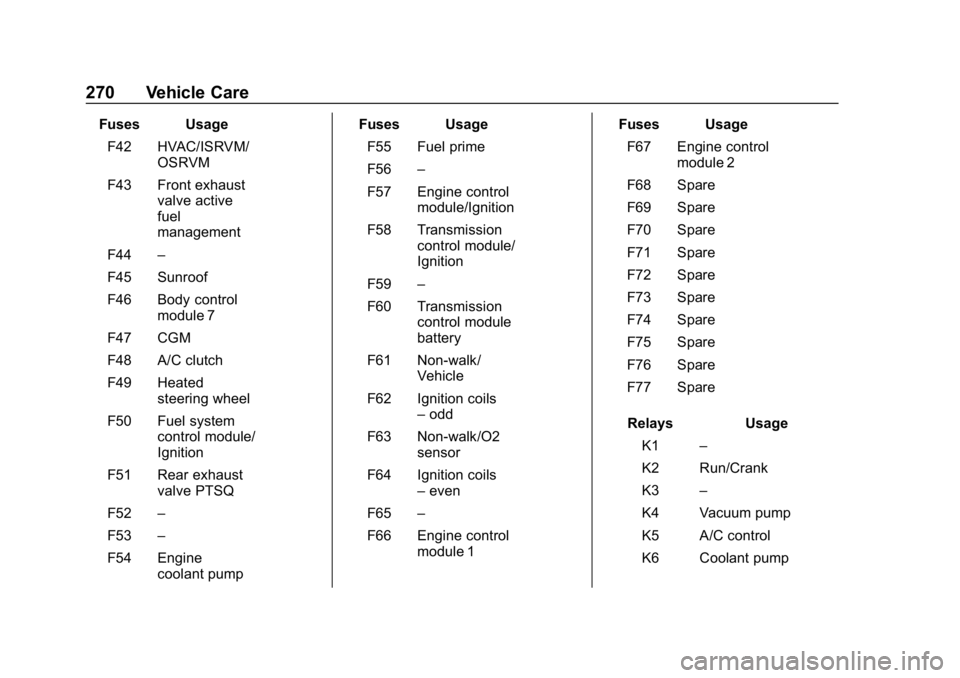
Fuses UsageF42 HVAC/ISRVM/ OSRVM
F43 Front exhaust valve active
fuel
management
F44 –
F45 Sunroof
F46 Body control module 7
F47 CGM
F48 A/C clutch
F49 Heated steering wheel
F50 Fuel system control module/
Ignition
F51 Rear exhaust valve PTSQ
F52 –
F53 –
F54 Engine coolant pump Fuses Usage
F55 Fuel prime
F56 –
F57 Engine control module/Ignition
F58 Transmission control module/
Ignition
F59 –
F60 Transmission control module
battery
F61 Non-walk/ Vehicle
F62 Ignition coils –odd
F63 Non-walk/O2 sensor
F64 Ignition coils –even
F65 –
F66 Engine control module 1 Fuses Usage
F67 Engine control module 2
F68 Spare
F69 Spare
F70 Spare
F71 Spare
F72 Spare
F73 Spare
F74 Spare
F75 Spare
F76 Spare
F77 Spare
Relays Usage K1 –
K2 Run/Crank
K3 –
K4 Vacuum pump
K5 A/C control
K6 Coolant pump
Page 273 of 375
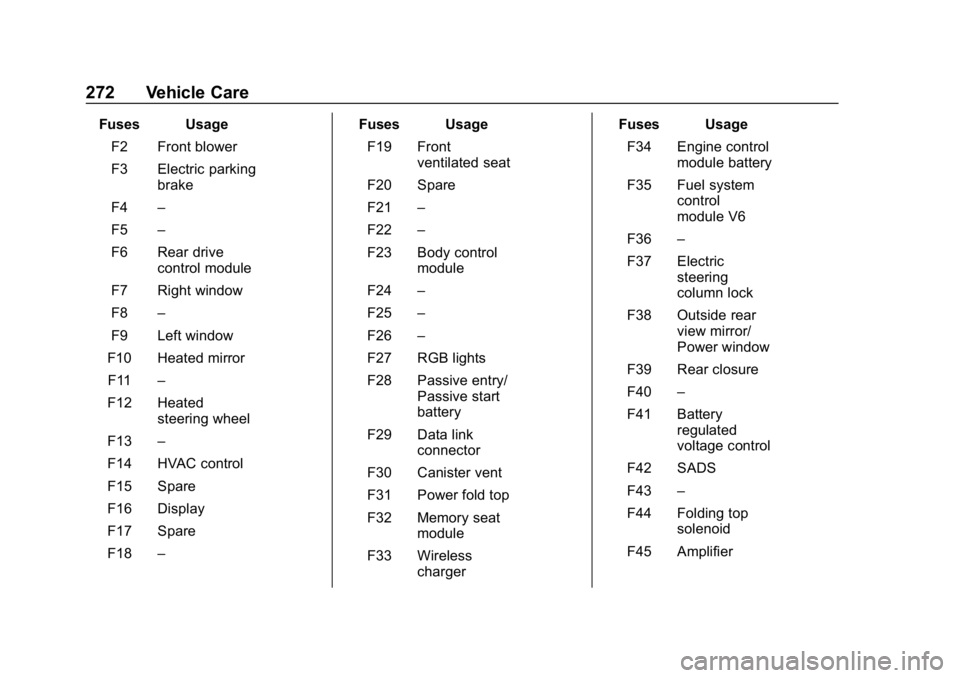
Chevrolet Camaro Owner Manual (GMNA-Localizing-U.S./Canada/Mexico-
12461811) - 2019 - crc - 11/5/18
272 Vehicle Care
Fuses UsageF2 Front blower
F3 Electric parking brake
F4 –
F5 –
F6 Rear drive control module
F7 Right window
F8 –
F9 Left window
F10 Heated mirror F11 –
F12 Heated steering wheel
F13 –
F14 HVAC control
F15 Spare
F16 Display
F17 Spare
F18 – Fuses Usage
F19 Front ventilated seat
F20 Spare
F21 –
F22 –
F23 Body control module
F24 –
F25 –
F26 –
F27 RGB lights
F28 Passive entry/ Passive start
battery
F29 Data link connector
F30 Canister vent
F31 Power fold top
F32 Memory seat module
F33 Wireless charger Fuses Usage
F34 Engine control module battery
F35 Fuel system control
module V6
F36 –
F37 Electric steering
column lock
F38 Outside rear view mirror/
Power window
F39 Rear closure
F40 –
F41 Battery regulated
voltage control
F42 SADS
F43 –
F44 Folding top solenoid
F45 Amplifier
Page 274 of 375
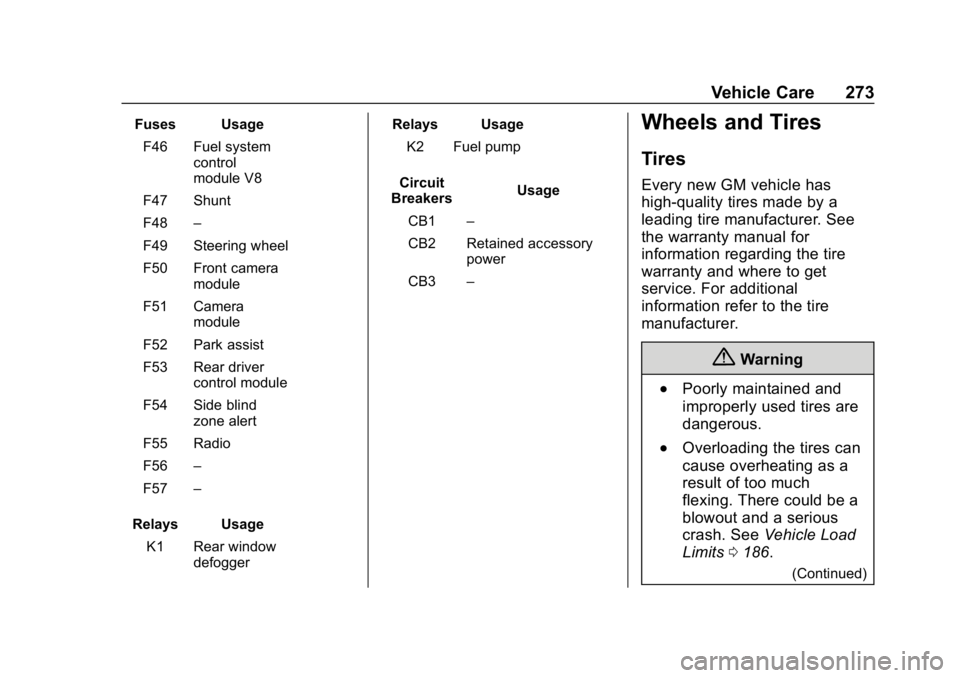
Chevrolet Camaro Owner Manual (GMNA-Localizing-U.S./Canada/Mexico-
12461811) - 2019 - crc - 11/5/18
Vehicle Care 273
Fuses UsageF46 Fuel system control
module V8
F47 Shunt
F48 –
F49 Steering wheel
F50 Front camera module
F51 Camera module
F52 Park assist
F53 Rear driver control module
F54 Side blind zone alert
F55 Radio
F56 –
F57 –
Relays Usage K1 Rear window defogger Relays Usage
K2 Fuel pump
Circuit
Breakers Usage
CB1 –
CB2 Retained accessory power
CB3 –Wheels and Tires
Tires
Every new GM vehicle has
high-quality tires made by a
leading tire manufacturer. See
the warranty manual for
information regarding the tire
warranty and where to get
service. For additional
information refer to the tire
manufacturer.
{Warning
.Poorly maintained and
improperly used tires are
dangerous.
.Overloading the tires can
cause overheating as a
result of too much
flexing. There could be a
blowout and a serious
crash. See Vehicle Load
Limits 0186.
(Continued)