steering CHEVROLET CAMARO 2021 Service Manual
[x] Cancel search | Manufacturer: CHEVROLET, Model Year: 2021, Model line: CAMARO, Model: CHEVROLET CAMARO 2021Pages: 354, PDF Size: 8.86 MB
Page 185 of 354

Chevrolet Camaro Owner Manual (GMNA-Localizing-U.S./Canada/Mexico-
14583589) - 2021 - CRC - 10/1/20
184 Driving and Operating
Electric Power Steering
The vehicle has electric power steering.
It does not have power steering fluid.
Regular maintenance is not required.
If power steering assist is lost due to a
system malfunction, the vehicle can be
steered, but may require increased effort.
If the steering assist is used for an extended
period of time while the vehicle is not
moving, power assist may be reduced.
If the steering wheel is turned until it
reaches the end of its travel and is held
against that position for an extended period
of time, power steering assist may be
reduced.
Normal use of the power steering assist
should return when the system cools down.
See your dealer if there is a problem.
Curve Tips
.Take curves at a reasonable speed.
.Reduce speed before entering a curve.
.Maintain a reasonable steady speed
through the curve.
.Wait until the vehicle is out of the curve
before accelerating gently into the
straightaway.
Steering in Emergencies
.There are some situations when steering
around a problem may be more effective
than braking.
.Holding both sides of the steering wheel
allows you to turn 180 degrees without
removing a hand.
.The Antilock Brake System (ABS) allows
steering while braking.
Off-Road Recovery
The vehicle's right wheels can drop off the
edge of a road onto the shoulder while
driving. Follow these tips:1. Ease off the accelerator and then,
if there is nothing in the way, steer the
vehicle so that it straddles the edge of
the pavement.
2. Turn the steering wheel about one-eighth of a turn, until the right front
tire contacts the pavement edge.
3. Turn the steering wheel to go straight down the roadway.
Loss of Control
Skidding
There are three types of skids that
correspond to the vehicle's three control
systems:
.Braking Skid —wheels are not rolling.
.Steering or Cornering Skid —too much
speed or steering in a curve causes tires
to slip and lose cornering force.
.Acceleration Skid —too much throttle
causes the driving wheels to spin.
Defensive drivers avoid most skids by taking
reasonable care suited to existing conditions,
and by not overdriving those conditions. But
skids are always possible.
If the vehicle starts to slide, follow these
suggestions:
Page 186 of 354
Chevrolet Camaro Owner Manual (GMNA-Localizing-U.S./Canada/Mexico-
14583589) - 2021 - CRC - 10/1/20
Driving and Operating 185
.Ease your foot off the accelerator pedal
and steer the way you want the vehicle
to go. The vehicle may straighten out. Be
ready for a second skid if it occurs.
.Slow down and adjust your driving
according to weather conditions. Stopping
distance can be longer and vehicle control
can be affected when traction is reduced
by water, snow, ice, gravel, or other
material on the road. Learn to recognize
warning clues—such as enough water,
ice, or packed snow on the road to make
a mirrored surface —and slow down
when you have any doubt.
.Try to avoid sudden steering, acceleration,
or braking, including reducing vehicle
speed by shifting to a lower gear. Any
sudden changes could cause the tires to
slide.
Remember: Antilock brakes help avoid only
the braking skid.
Track Events and Competitive
Driving
{Danger
High-performance features are intended
for use only on closed tracks by
experienced and qualified drivers and
should not be used on public roads.
High-speed driving, aggressive cornering,
hard braking, and other high-performance
driving can be dangerous. Improper driver
inputs for the conditions may result in
loss of control of the vehicle, which could
injure or kill you or others. Always drive
safely.
If the vehicle is a Camaro High Performance
model, see the additional items in the
Camaro High Performance supplement.
Track events or competitive driving may
affect the vehicle warranty. See the
warranty manual before using the vehicle
for racing or other competitive driving.
The Engine Sound Management setting (if
equipped) should not be set to Stealth Mode
during track events and competitive driving.
See Driver Mode Control 0216.
{Warning
Prior to each track event and again
before returning to public roads, tighten
the wheel nuts with a torque wrench to
the proper torque specification. Wheel
nuts that are improperly or incorrectly
tightened can cause the wheels to
become loose or come off, resulting in a
crash. See Capacities and Specifications
0 318 for wheel nut torque specifications.
Engine Oil
Caution
If you use the vehicle for racing or other
competitive driving, the engine may use
more oil than it would with normal use.
Low oil levels can damage the engine. For
information on how to add oil, see
Engine Oil0242.
Be sure to check the oil level often during
racing or other competitive driving and
keep the level at or near the upper mark
that shows the proper operating range on
the engine oil dipstick.
Page 190 of 354
Chevrolet Camaro Owner Manual (GMNA-Localizing-U.S./Canada/Mexico-
14583589) - 2021 - CRC - 10/1/20
Driving and Operating 189
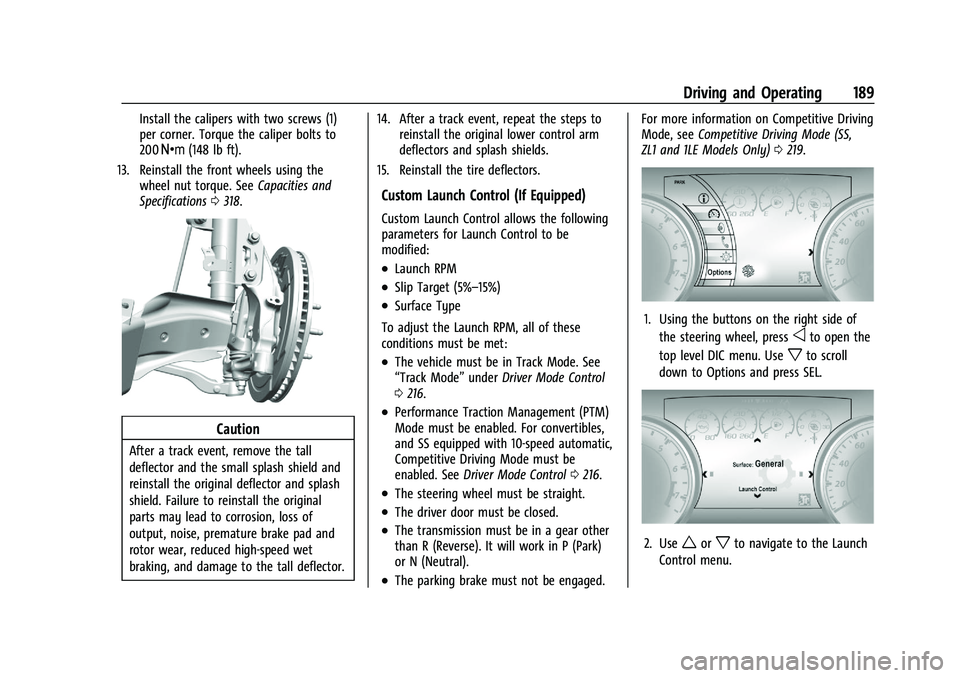
Install the calipers with two screws (1)
per corner. Torque the caliper bolts to
200Y (148 lb ft).
13. Reinstall the front wheels using the wheel nut torque. See Capacities and
Specifications 0318.
Caution
After a track event, remove the tall
deflector and the small splash shield and
reinstall the original deflector and splash
shield. Failure to reinstall the original
parts may lead to corrosion, loss of
output, noise, premature brake pad and
rotor wear, reduced high-speed wet
braking, and damage to the tall deflector. 14. After a track event, repeat the steps to
reinstall the original lower control arm
deflectors and splash shields.
15. Reinstall the tire deflectors.
Custom Launch Control (If Equipped)
Custom Launch Control allows the following
parameters for Launch Control to be
modified:
.Launch RPM
.Slip Target (5%–15%)
.Surface Type
To adjust the Launch RPM, all of these
conditions must be met:
.The vehicle must be in Track Mode. See
“Track Mode” underDriver Mode Control
0 216.
.Performance Traction Management (PTM)
Mode must be enabled. For convertibles,
and SS equipped with 10-speed automatic,
Competitive Driving Mode must be
enabled. See Driver Mode Control 0216.
.The steering wheel must be straight.
.The driver door must be closed.
.The transmission must be in a gear other
than R (Reverse). It will work in P (Park)
or N (Neutral).
.The parking brake must not be engaged. For more information on Competitive Driving
Mode, see
Competitive Driving Mode (SS,
ZL1 and 1LE Models Only) 0219.
1. Using the buttons on the right side of
the steering wheel, press
oto open the
top level DIC menu. Use
xto scroll
down to Options and press SEL.
2. Useworxto navigate to the Launch
Control menu.
Page 192 of 354
Chevrolet Camaro Owner Manual (GMNA-Localizing-U.S./Canada/Mexico-
14583589) - 2021 - CRC - 10/1/20
Driving and Operating 191
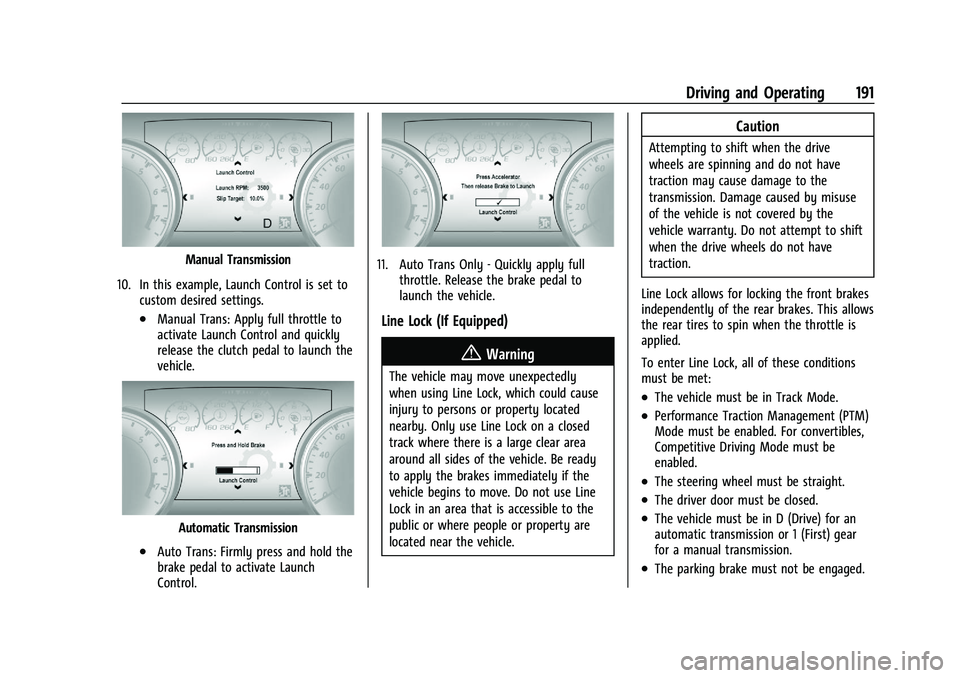
Manual Transmission
10. In this example, Launch Control is set to custom desired settings.
.Manual Trans: Apply full throttle to
activate Launch Control and quickly
release the clutch pedal to launch the
vehicle.
Automatic Transmission
.Auto Trans: Firmly press and hold the
brake pedal to activate Launch
Control.
11. Auto Trans Only - Quickly apply fullthrottle. Release the brake pedal to
launch the vehicle.
Line Lock (If Equipped)
{Warning
The vehicle may move unexpectedly
when using Line Lock, which could cause
injury to persons or property located
nearby. Only use Line Lock on a closed
track where there is a large clear area
around all sides of the vehicle. Be ready
to apply the brakes immediately if the
vehicle begins to move. Do not use Line
Lock in an area that is accessible to the
public or where people or property are
located near the vehicle.
Caution
Attempting to shift when the drive
wheels are spinning and do not have
traction may cause damage to the
transmission. Damage caused by misuse
of the vehicle is not covered by the
vehicle warranty. Do not attempt to shift
when the drive wheels do not have
traction.
Line Lock allows for locking the front brakes
independently of the rear brakes. This allows
the rear tires to spin when the throttle is
applied.
To enter Line Lock, all of these conditions
must be met:
.The vehicle must be in Track Mode.
.Performance Traction Management (PTM)
Mode must be enabled. For convertibles,
Competitive Driving Mode must be
enabled.
.The steering wheel must be straight.
.The driver door must be closed.
.The vehicle must be in D (Drive) for an
automatic transmission or 1 (First) gear
for a manual transmission.
.The parking brake must not be engaged.
Page 193 of 354
Chevrolet Camaro Owner Manual (GMNA-Localizing-U.S./Canada/Mexico-
14583589) - 2021 - CRC - 10/1/20
192 Driving and Operating
.The vehicle must be stopped on level
ground. The accelerator pedal must not
be applied.
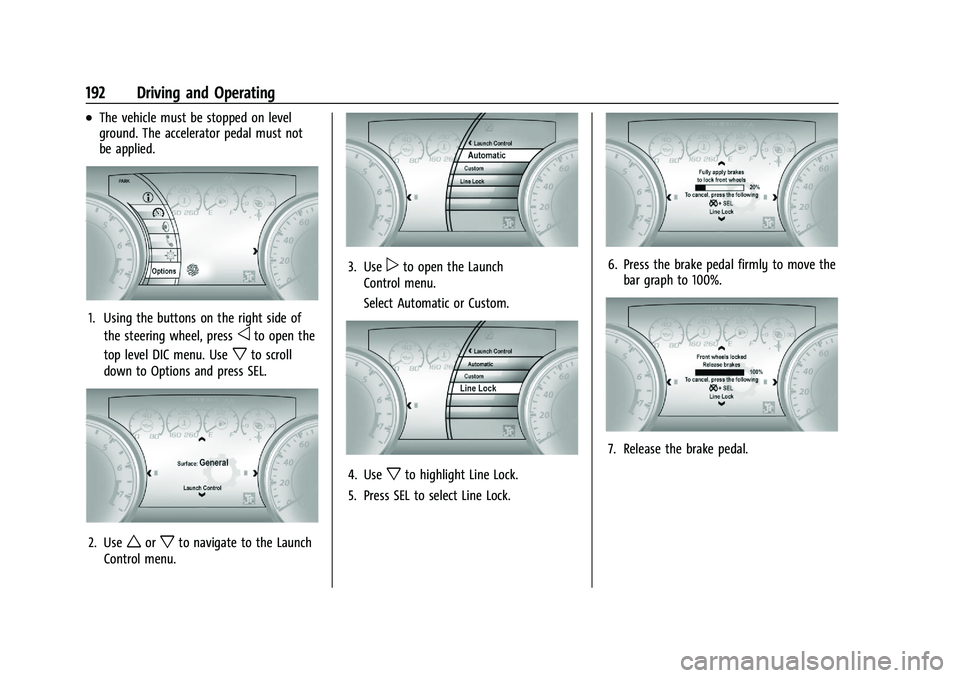
1. Using the buttons on the right side ofthe steering wheel, press
oto open the
top level DIC menu. Use
xto scroll
down to Options and press SEL.
2. Useworxto navigate to the Launch
Control menu.
3. Usepto open the Launch
Control menu.
Select Automatic or Custom.
4. Usexto highlight Line Lock.
5. Press SEL to select Line Lock.
6. Press the brake pedal firmly to move the bar graph to 100%.
7. Release the brake pedal.
Page 195 of 354
Chevrolet Camaro Owner Manual (GMNA-Localizing-U.S./Canada/Mexico-
14583589) - 2021 - CRC - 10/1/20
194 Driving and Operating
.Turn off cruise control.
Hill and Mountain Roads
Driving on steep hills or through mountains
is different than driving on flat or rolling
terrain. Tips include:
.Keep the vehicle serviced and in good
shape.
.Check all fluid levels and brakes, tires,
cooling system, and transmission.
.Shift to a lower gear when going down
steep or long hills.
{Warning
Using the brakes to slow the vehicle on a
long downhill slope can cause brake
overheating, can reduce brake
performance, and could result in a loss of
braking. Shift the transmission to a lower
gear to let the engine assist the brakes
on a steep downhill slope.
{Warning
Coasting downhill in N (Neutral) or with
the ignition off is dangerous. This can
cause overheating of the brakes and loss
of steering assist. Always have the engine
running and the vehicle in gear.
.Drive at speeds that keep the vehicle in
its own lane. Do not swing wide or cross
the center line.
.Be alert on top of hills; something could
be in your lane (e.g., stalled car, crash).
.Pay attention to special road signs (e.g.,
falling rocks area, winding roads, long
grades, passing or no-passing zones) and
take appropriate action.
Winter Driving
Driving on Snow or Ice
Snow or ice between the tires and the road
creates less traction or grip, so drive
carefully. Wet ice can occur at about 0 °C
(32 °F) when freezing rain begins to fall.
Avoid driving on wet ice or in freezing rain
until roads can be treated.For Slippery Road Driving:
.Accelerate gently. Accelerating too quickly
causes the wheels to spin and makes the
surface under the tires slick.
.Turn on Traction Control. See
Traction
Control/Electronic Stability Control 0214.
.The Antilock Brake System (ABS) improves
vehicle stability during hard stops, but
the brakes should be applied sooner than
when on dry pavement. See Antilock
Brake System (ABS) 0212.
.Allow greater following distance and
watch for slippery spots. Icy patches can
occur on otherwise clear roads in shaded
areas. The surface of a curve or an
overpass can remain icy when the
surrounding roads are clear. Avoid sudden
steering maneuvers and braking while
on ice.
.Turn off cruise control.
Blizzard Conditions
Stop the vehicle in a safe place and signal
for help. Stay with the vehicle unless there
is help nearby. If possible, use Roadside
Assistance. See Roadside Assistance Program
0 326. To get help and keep everyone in the
vehicle safe:
.Turn on the hazard warning flashers.
Page 196 of 354

Chevrolet Camaro Owner Manual (GMNA-Localizing-U.S./Canada/Mexico-
14583589) - 2021 - CRC - 10/1/20
Driving and Operating 195
.Tie a red cloth to an outside mirror.
{Warning
Snow can trap engine exhaust under the
vehicle. This may cause exhaust gases to
get inside. Engine exhaust contains
carbon monoxide (CO), which cannot be
seen or smelled. It can cause
unconsciousness and even death.
If the vehicle is stuck in snow:
.Clear snow from the base of the
vehicle, especially any blocking the
exhaust pipe.
.Open a window about 5 cm (2 in) on
the vehicle side that is away from the
wind, to bring in fresh air.
.Fully open the air outlets on or under
the instrument panel.
.Adjust the climate control system to
circulate the air inside the vehicle and
set the fan speed to the highest
setting. See“Climate Control Systems.”
For more information about CO, see
Engine Exhaust 0205. To save fuel, run the engine for short
periods to warm the vehicle and then shut
the engine off and partially close the
window. Moving about to keep warm also
helps.
If it takes time for help to arrive, when
running the engine, push the accelerator
pedal slightly so the engine runs faster than
the idle speed. This keeps the battery
charged to restart the vehicle and to signal
for help with the headlamps. Do this as
little as possible, to save fuel.
If the Vehicle Is Stuck
Slowly and cautiously spin the wheels to
free the vehicle when stuck in sand, mud,
ice, or snow.
If stuck too severely for the traction system
to free the vehicle, turn the traction system
off and use the rocking method. See
Traction Control/Electronic Stability Control
0
214.
{Warning
If the vehicle's tires spin at high speed,
they can explode, and you or others
could be injured. The vehicle can
(Continued)
Warning (Continued)
overheat, causing an engine compartment
fire or other damage. Spin the wheels as
little as possible and avoid going above
56 km/h (35 mph).
Rocking the Vehicle to Get it Out
Turn the steering wheel left and right to
clear the area around the front wheels. Turn
off any traction system. Shift back and forth
between R (Reverse) and a low forward gear,
spinning the wheels as little as possible. To
prevent transmission wear, wait until the
wheels stop spinning before shifting gears.
Release the accelerator pedal while shifting,
and press lightly on the accelerator pedal
when the transmission is in gear. Slowly
spinning the wheels in the forward and
reverse directions causes a rocking motion
that could free the vehicle. If that does not
get the vehicle out after a few tries, it
might need to be towed out. If the vehicle
does need to be towed out, see Towing the
Vehicle 0293.
Page 201 of 354

Chevrolet Camaro Owner Manual (GMNA-Localizing-U.S./Canada/Mexico-
14583589) - 2021 - CRC - 10/1/20
200 Driving and Operating
Stopping the Engine/OFF (No Indicator
Lights) :When the vehicle is stopped, press
ENGINE START/STOP once to turn the
engine off.
If the vehicle is in P (Park), the ignition will
turn off, and Retained Accessory Power (RAP)
will remain active. See Retained Accessory
Power (RAP) 0203.
Automatic Transmission
If the vehicle is not in P (Park), the ignition
will return to ACC/ACCESSORY and display a
message in the Driver Information Center
(DIC). When the vehicle is shifted into
P (Park), the ignition system will turn OFF.
Manual Transmission
If the vehicle is stationary, the ignition will
turn off, and Retained Accessory Power (RAP)
will remain active. See Retained Accessory
Power (RAP) 0203.
Do not turn the engine off when the vehicle
is moving. This will cause a loss of power
assist in the brake and steering systems and
disable the airbags.
If the vehicle must be shut off in an
emergency: 1. Brake using a firm and steady pressure.
Do not pump the brakes repeatedly. This
may deplete power assist, requiring
increased brake pedal force.
2. Shift the vehicle to N (Neutral). This can be done while the vehicle is moving.
After shifting to N (Neutral), firmly apply
the brakes and steer the vehicle to a
safe location.
3. Come to a complete stop. Shift to P (Park) with an automatic transmission,
or Neutral with a manual transmission.
Turn the ignition off.
4. Set the parking brake. See Electric
Parking Brake 0213.
{Warning
Turning off the vehicle while moving may
cause loss of power assist in the brake
and steering systems and disable the
airbags. While driving, only shut the
vehicle off in an emergency.
If the vehicle cannot be pulled over, and
must be shut off while driving, press and
hold ENGINE START/STOP for longer than
two seconds, or press twice within
five seconds. ACC/ACCESSORY (Amber Indicator Light) :
This mode allows the use of some electrical
accessories when the engine is off.
With the ignition off, pressing the button
one time without the brake pedal applied
will place the ignition system in ACC/
ACCESSORY.
The ignition will switch from ACC/
ACCESSORY to OFF after five minutes to
prevent battery rundown.
ON/RUN/START (Green Indicator Light) :
This
mode is for driving and starting. With the
ignition off, and the brake pedal applied,
pressing the button once will place the
ignition system in ON/RUN/START. Once
engine cranking begins, release the button.
Engine cranking will continue until the
engine starts. See Starting the Engine 0201.
The ignition will then remain on.
Service Mode
This power mode is available for service and
diagnostics, and to verify the proper
operation of the malfunction indicator lamp
as may be required for emission inspection
purposes. With the vehicle off, and the
brake pedal not applied, pressing and
holding ENGINE START/STOP for more than
five seconds will place the vehicle in Service
Page 210 of 354

Chevrolet Camaro Owner Manual (GMNA-Localizing-U.S./Canada/Mexico-
14583589) - 2021 - CRC - 10/1/20
Driving and Operating 209
the steering wheel. The paddles are on the
back of the steering wheel. Tap the left
paddle (−) to downshift, and the right
paddle (+) to upshift. The Driver Information
Center (DIC) display indicates the gear the
vehicle is in.
Holding the left paddle for an extended time
will downshift the transmission to the
lowest available gear.
While in Manual Mode, the transmission will
prevent shifting to a lower gear if the
engine speed is too high. If the tap down
−(Minus) paddle is held while the vehicle
slows down, the M in the DIC will flash, and
the downshift will be allowed when vehicle
speed is low enough. Continuing to hold the
tap down −(Minus) paddle will not cause
the transmission to continue downshifting.
Each downshift must be requested
separately by releasing and reapplying the
tap down −(Minus) paddle.
Head-Up Display (HUD)
Vehicles equipped with a Head-Up Display
(HUD) may also have performance shift
timing lights across the top of the display. The rows of lights get closer together as the
maximum shift point gets closer. Shift the
transmission before the lights come together
in the display. Shift immediately if the lights
are flashing.
See
Head-Up Display (HUD) 0100.
Temporary Tap Shift Mode allows brief
entry into Tap Shift Mode while in D (Drive).
Tapping either the upshift or downshift
control will place the transmission in Tap
Shift Mode. Exit Tap Shift Mode by holding
the upshift control for two seconds. The
system will return to automatic shifting
after seven seconds of driving at a steady
speed, or when the vehicle comes to a stop.
This may be used for sport driving or when
climbing or descending hills, to stay in gear
longer, or to downshift for more power or
engine braking. The transmission will only
allow you to shift into gears appropriate for
the vehicle speed and engine revolutions per
minute (rpm). The transmission will not
automatically shift to the next higher gear if
the engine rpm is too high. If shifting is
prevented for any reason, the gear displayed
in the DIC will blink several times, indicating
that the transmission has not shifted gears. While in the Tap Shift Mode, the
transmission will not automatically
downshift on hard acceleration.
Manual Transmission
Shift Pattern
–V8 Engine
Page 213 of 354

Chevrolet Camaro Owner Manual (GMNA-Localizing-U.S./Canada/Mexico-
14583589) - 2021 - CRC - 10/1/20
212 Driving and Operating
The system is activated and deactivated by
pressing either of the paddles marked REV
MATCH on the steering wheel. The system
must be activated with each new ignition
cycle.
A gear indicator in the instrument cluster
displays the current gear selected:
.When ARM is activated, the gear number
is amber.
.When ARM is deactivated, the gear
number is white.
.If no gear number is displayed while the
shift lever is in gear, service is required.
ARM will be disabled, and the malfunctionindicator lamp will be on. See
Malfunction
Indicator Lamp 091. The clutch and
manual transmission will continue to
operate normally.
ARM will also:
.Only be active above 25 km/h (16 mph).
.Only match engine speed up to
5400 rpm.
.Not operate when the accelerator pedal is
applied.
.Be disabled when the coolant
temperature is below 0 °C (32 °F).
Brakes
Antilock Brake System (ABS)
The Antilock Brake System (ABS) helps
prevent a braking skid and maintain steering
while braking hard.
ABS performs a system check when the
vehicle is first driven. A momentary motor
or clicking noise may be heard while this
test is going on, and the brake pedal may
move slightly. This is normal.
If there is a problem with ABS, this warning
light stays on. See Antilock Brake System
(ABS) Warning Light 094.
ABS does not change the time needed to
get a foot on the brake pedal and does not
always decrease stopping distance. If you
get too close to the vehicle ahead, there will
not be enough time to apply the brakes if
that vehicle suddenly slows or stops. Always
leave enough room ahead to stop, even
with ABS.
Using ABS
Do not pump the brakes. Just hold the brake
pedal down firmly. Hearing or feeling ABS
operate is normal.
Braking in Emergencies
ABS allows steering and braking at the same
time. In many emergencies, steering can
help even more than braking.