parking brake CHEVROLET CAMARO 2021 Owner's Manual
[x] Cancel search | Manufacturer: CHEVROLET, Model Year: 2021, Model line: CAMARO, Model: CHEVROLET CAMARO 2021Pages: 354, PDF Size: 8.86 MB
Page 6 of 354
Chevrolet Camaro Owner Manual (GMNA-Localizing-U.S./Canada/Mexico-
14583589) - 2021 - CRC - 10/1/20
Introduction 5
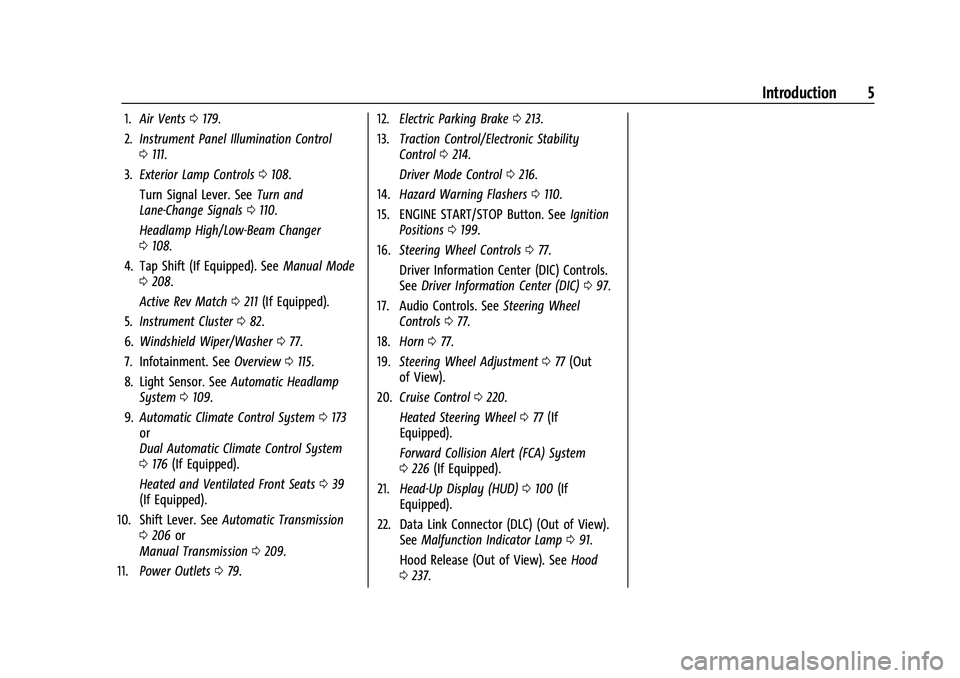
1.Air Vents 0179.
2. Instrument Panel Illumination Control
0111.
3. Exterior Lamp Controls 0108.
Turn Signal Lever. See Turn and
Lane-Change Signals 0110.
Headlamp High/Low-Beam Changer
0 108.
4. Tap Shift (If Equipped). See Manual Mode
0 208.
Active Rev Match 0211 (If Equipped).
5. Instrument Cluster 082.
6. Windshield Wiper/Washer 077.
7. Infotainment. See Overview0115.
8. Light Sensor. See Automatic Headlamp
System 0109.
9. Automatic Climate Control System 0173
or
Dual Automatic Climate Control System
0 176 (If Equipped).
Heated and Ventilated Front Seats 039
(If Equipped).
10. Shift Lever. See Automatic Transmission
0 206 or
Manual Transmission 0209.
11. Power Outlets 079. 12.
Electric Parking Brake 0213.
13. Traction Control/Electronic Stability
Control 0214.
Driver Mode Control 0216.
14. Hazard Warning Flashers 0110.
15. ENGINE START/STOP Button. See Ignition
Positions 0199.
16. Steering Wheel Controls 077.
Driver Information Center (DIC) Controls.
See Driver Information Center (DIC) 097.
17. Audio Controls. See Steering Wheel
Controls 077.
18. Horn 077.
19. Steering Wheel Adjustment 077 (Out
of View).
20. Cruise Control 0220.
Heated Steering Wheel 077 (If
Equipped).
Forward Collision Alert (FCA) System
0 226 (If Equipped).
21. Head-Up Display (HUD) 0100 (If
Equipped).
22. Data Link Connector (DLC) (Out of View). SeeMalfunction Indicator Lamp 091.
Hood Release (Out of View). See Hood
0 237.
Page 19 of 354
Chevrolet Camaro Owner Manual (GMNA-Localizing-U.S./Canada/Mexico-
14583589) - 2021 - CRC - 10/1/20
18 Keys, Doors, and Windows
detected and the number of RKE
transmitters inside has not reduced, the
driver door will unlock and the horn will
chirp three times.
Lockout Protection can be manually
overridden with the driver door open by
pressing and holding
Qon the power door
lock switch.
Open Door Anti-Lockout
If Open Door Anti-Lockout has been turned
on and the vehicle is off, the driver door is
open, and locking is requested, all the doors
will lock and the driver door will remain
unlocked. The Open Door Anti-Lockout
feature can be turned on or off. See Vehicle
Personalization 0104.
Doors
Trunk
{Warning
Exhaust gases can enter the vehicle if it
is driven with the liftgate, trunk/hatch
open, or with any objects that pass
through the seal between the body and
the trunk/hatch or liftgate. Engine
(Continued)
Warning (Continued)
exhaust contains carbon monoxide (CO)
which cannot be seen or smelled. It can
cause unconsciousness and even death.
If the vehicle must be driven with the
liftgate, or trunk/hatch open:
.Close all of the windows.
.Fully open the air outlets on or under
the instrument panel.
.Adjust the climate control system to a
setting that brings in only outside air
and set the fan speed to the highest
setting. See“Climate Control Systems”
in the Index.
.If the vehicle has a power liftgate,
disable the power liftgate function.
For more information about carbon
monoxide, see Engine Exhaust 0205.
Trunk Release
To open the trunk from outside of the
vehicle:
.PressXtwice quickly on the Remote
Keyless Entry (RKE) transmitter.
.Press the touch pad in the area above the
license plate after unlocking all doors.
.For Keyless Access, press the touch pad in
the area above the license plate when the
transmitter is within 1 m (3 ft) of the rear
of the vehicle.
For automatic transmissions, the vehicle
must be in P (Park). For manual
transmissions, the vehicle must be off,
or stationary with the parking brake set.
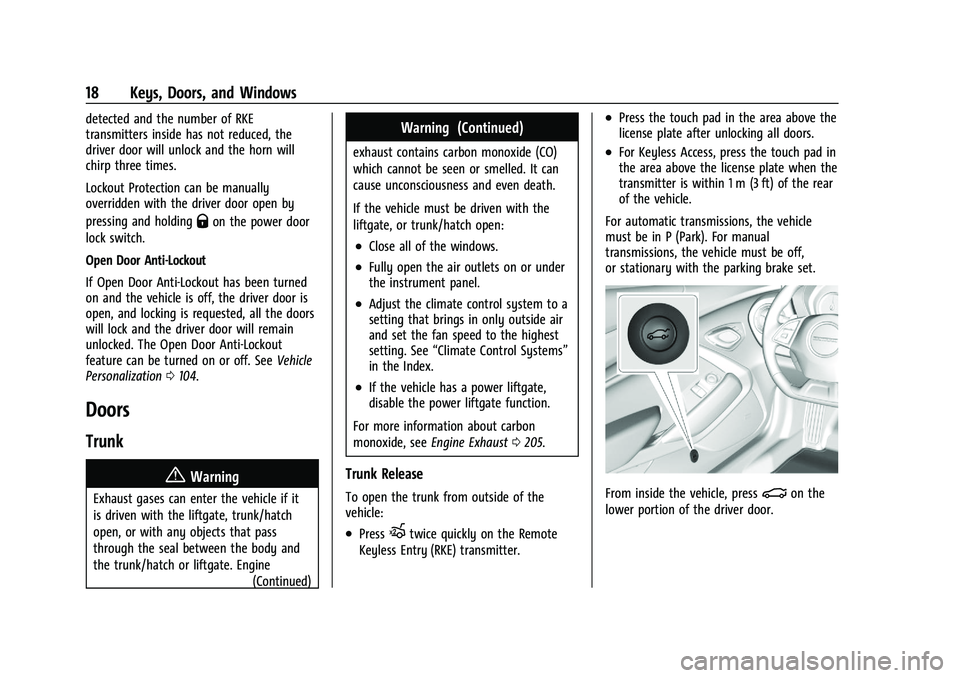
From inside the vehicle, press|on the
lower portion of the driver door.
Page 39 of 354
Chevrolet Camaro Owner Manual (GMNA-Localizing-U.S./Canada/Mexico-
14583589) - 2021 - CRC - 10/1/20
38 Seats and Restraints
To save the position forBand Seat Exit
Memory features, repeat Steps 1–4 using
B. This saves the position for getting out
of the vehicle.
Save preferred memory feature positions to
both 1 and 2 if you are the only driver.
Manually Recalling Memory Positions
Press and hold 1, 2, or
Bto recall the
previously saved memory positions if you
are driver 1 or 2 identified in the DIC
welcome message.
To stop Manual Memory recall movement,
release 1, 2, or
Bor press any of the
following controls:
.Power seat
.Memory SET
.Power mirror, with the driver or
passenger side mirror selected
.Power steering wheel, if equipped
If equipped with an automatic transmission,
Manual Memory recall movement for 1, 2,
or
Bbuttons may be initiated and will
complete to the saved memory position if
the vehicle is in or out of P (Park). Seat Entry Memory
The vehicle identifies the number of the
current driver’s RKE transmitter (1–8). See
Remote Keyless Entry (RKE) System
Operation
07. If the RKE transmitter is 1 or
2, and Seat Entry Memory is enabled in
vehicle personalization, the positions saved
to the same memory button number 1 or 2
are automatically recalled when the vehicle
is turned on, or turned from off to ACC/
ACCESSORY. RKE transmitters 3–8 will not
provide automatic memory recalls.
To turn Seat Entry Memory on or off, see
“Vehicle Personalization Settings” previously
in this section and Vehicle Personalization
0 104.
If equipped with an automatic transmission,
the shift lever must be in P (Park) to start
Seat Entry Memory recall. Seat Entry
Memory recall will complete if the vehicle is
shifted out of P (Park) prior to reaching the
saved memory position.
If equipped with a manual transmission, the
parking brake must be set to start Seat
Entry Memory recall. Seat Entry Memory
recall will complete if the parking brake is
released prior to reaching the saved memory
position. To stop Seat Entry Memory recall
movement, turn the vehicle off or press any
of the following controls:
.Power seat
.Memory SET, 1, 2, orB
.Power mirror, with the driver or
passenger side mirror selected
.Power steering wheel, if equipped
If the saved memory seat position does not
automatically recall or recalls to the wrong
positions, the driver’s RKE transmitter
number (1 or 2) may not match the memory
button number that positions were saved to.
Try storing the position to the other
memory button or try the other RKE
transmitter.
Seat Exit Memory
Seat Exit Memory is not linked to an RKE
transmitter. The position saved to
Bis
used for all drivers. To turn Seat Exit
Memory on or off, see "Vehicle
Personalization Settings" previously in this
section and Vehicle Personalization 0104.
If turned on, the position saved to
Bis
automatically recalled when one of the
following occurs:
Page 40 of 354
Chevrolet Camaro Owner Manual (GMNA-Localizing-U.S./Canada/Mexico-
14583589) - 2021 - CRC - 10/1/20
Seats and Restraints 39
.The vehicle is turned off and the driver
door is opened within a short time.
.The vehicle is turned off with the driver
door open.
If equipped with a manual transmission, the
parking brake must be set to start Seat Exit
Memory recall. Seat Exit Memory recall will
complete if the parking brake is released
prior to reaching the saved memory
position.
To stop Seat Exit Memory movement, press
any of the following memory controls:
.Power seat
.Memory SET, 1, 2, orB
.Power mirror, with the driver or
passenger side mirror selected
.Power steering wheel, if equipped
Obstructions
If something has blocked the driver seat
while recalling a memory position, the recall
may stop. Remove the obstruction and try
the recall again. If the memory position still
does not recall, see your dealer.
Seatback Latches
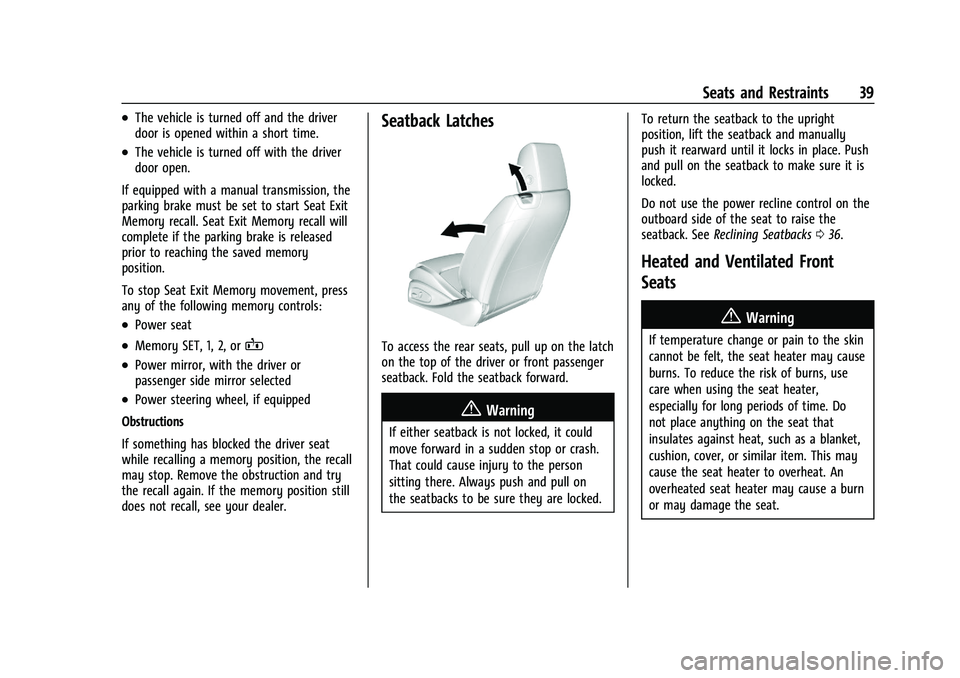
To access the rear seats, pull up on the latch
on the top of the driver or front passenger
seatback. Fold the seatback forward.
{Warning
If either seatback is not locked, it could
move forward in a sudden stop or crash.
That could cause injury to the person
sitting there. Always push and pull on
the seatbacks to be sure they are locked. To return the seatback to the upright
position, lift the seatback and manually
push it rearward until it locks in place. Push
and pull on the seatback to make sure it is
locked.
Do not use the power recline control on the
outboard side of the seat to raise the
seatback. See
Reclining Seatbacks 036.
Heated and Ventilated Front
Seats
{Warning
If temperature change or pain to the skin
cannot be felt, the seat heater may cause
burns. To reduce the risk of burns, use
care when using the seat heater,
especially for long periods of time. Do
not place anything on the seat that
insulates against heat, such as a blanket,
cushion, cover, or similar item. This may
cause the seat heater to overheat. An
overheated seat heater may cause a burn
or may damage the seat.
Page 77 of 354
Chevrolet Camaro Owner Manual (GMNA-Localizing-U.S./Canada/Mexico-
14583589) - 2021 - CRC - 10/1/20
76 Instruments and Controls
Instruments and Controls
Controls
Steering Wheel Adjustment . . . . . . . . . . . . . 77
Steering Wheel Controls . . . . . . . . . . . . . . . . 77
Heated Steering Wheel . . . . . . . . . . . . . . . . . 77
Horn . . . . . . . . . . . . . . . . . . . . . . . . . . . . . . . . . . . . 77
Windshield Wiper/Washer . . . . . . . . . . . . . . 77
Compass . . . . . . . . . . . . . . . . . . . . . . . . . . . . . . . . 78
Clock . . . . . . . . . . . . . . . . . . . . . . . . . . . . . . . . . . . 78
Power Outlets . . . . . . . . . . . . . . . . . . . . . . . . . . 79
Wireless Charging . . . . . . . . . . . . . . . . . . . . . . 79
Warning Lights, Gauges, and Indicators
Warning Lights, Gauges, andIndicators . . . . . . . . . . . . . . . . . . . . . . . . . . . . . 81
Instrument Cluster . . . . . . . . . . . . . . . . . . . . . 82
Speedometer . . . . . . . . . . . . . . . . . . . . . . . . . . . 85
Odometer . . . . . . . . . . . . . . . . . . . . . . . . . . . . . . 85
Trip Odometer . . . . . . . . . . . . . . . . . . . . . . . . . . 85
Tachometer . . . . . . . . . . . . . . . . . . . . . . . . . . . . 85
Fuel Gauge . . . . . . . . . . . . . . . . . . . . . . . . . . . . . 86
Boost Gauge (Uplevel Cluster Only) . . . . 87
Engine Oil Pressure Gauge (Uplevel Cluster Only) . . . . . . . . . . . . . . . . . . . . . . . . . 87
Engine Coolant Temperature Gauge . . . . 88
Voltmeter Gauge (Uplevel Cluster Only) . . . . . . . . . . . . . . . . . . . . . . . . . 89 Seat Belt Reminders . . . . . . . . . . . . . . . . . . . . 89
Airbag Readiness Light . . . . . . . . . . . . . . . . . 90
Passenger Airbag Status Indicator . . . . . . 90
Charging System Light . . . . . . . . . . . . . . . . . . 91
Malfunction Indicator Lamp . . . . . . . . . . . . . 91
Brake System Warning Light . . . . . . . . . . . 93
Electric Parking Brake Light . . . . . . . . . . . . . 93
Service Electric Parking Brake Light . . . . . 93
Antilock Brake System (ABS) Warning
Light . . . . . . . . . . . . . . . . . . . . . . . . . . . . . . . . . 94
Performance Shifting Light . . . . . . . . . . . . . 94
Vehicle Ahead Indicator . . . . . . . . . . . . . . . . 94
Traction Off Light . . . . . . . . . . . . . . . . . . . . . . 94
StabiliTrak OFF Light . . . . . . . . . . . . . . . . . . . 95
Traction Control System (TCS)/StabiliTrak Light . . . . . . . . . . . . . . . . . . . . . . . . . . . . . . . . . . 95
Tire Pressure Light . . . . . . . . . . . . . . . . . . . . . . 95
Engine Oil Pressure Light . . . . . . . . . . . . . . . 96
Low Fuel Warning Light . . . . . . . . . . . . . . . . 96
Security Light . . . . . . . . . . . . . . . . . . . . . . . . . . 96
High-Beam On Light . . . . . . . . . . . . . . . . . . . . 97
Lamps On Reminder . . . . . . . . . . . . . . . . . . . . 97
Cruise Control Light . . . . . . . . . . . . . . . . . . . . 97
Door Ajar Light . . . . . . . . . . . . . . . . . . . . . . . . . 97
Information Displays
Driver Information Center (DIC) . . . . . . . . . 97
Head-Up Display (HUD) . . . . . . . . . . . . . . . 100
Vehicle Messages
Vehicle Messages . . . . . . . . . . . . . . . . . . . . . . 103
Engine Power Messages . . . . . . . . . . . . . . . 103
Vehicle Speed Messages . . . . . . . . . . . . . . . 103
Vehicle Personalization
Vehicle Personalization . . . . . . . . . . . . . . . . 104
Page 94 of 354

Chevrolet Camaro Owner Manual (GMNA-Localizing-U.S./Canada/Mexico-
14583589) - 2021 - CRC - 10/1/20
Instruments and Controls 93
operation. SeeAdd-On Electrical Equipment
0 233. See your dealer if assistance is
needed.
The vehicle may not pass inspection if:
.The light is on when the engine is
running.
.The light does not come on when the
ignition is in Service Mode.
.Critical emission control systems have not
been completely diagnosed. If this
happens, the vehicle would not be ready
for inspection and might require
several days of routine driving before the
system is ready for inspection. This can
happen if the 12-volt battery has recently
been replaced or run down, or if the
vehicle has been recently serviced.
See your dealer if the vehicle will not pass
or cannot be made ready for the test.
Brake System Warning Light
MetricEnglish This light should come on briefly when the
vehicle is turned on. If it does not come on
then, have it fixed so it will be ready to
warn you if there is a problem.
If the light comes on and stays on at start
up, there is a brake problem. Have the brake
system inspected right away.
If the light comes on while driving, pull off
the road and stop carefully. The brake pedal
might be harder to push, or the brake pedal
may go closer to the floor. It could take
longer to stop. If the light is still on, have
the vehicle towed for service. See
Towing
the Vehicle 0293.
{Warning
The brake system might not be working
properly if the brake system warning
light is on. Driving with the brake system
warning light on can lead to a crash.
If the light is still on after the vehicle has
been pulled off the road and carefully
stopped, have the vehicle towed for
service.
Electric Parking Brake Light
MetricEnglish
This light comes on when the parking brake
is applied. If the light continues flashing
after the parking brake is released, or while
driving, there is a problem with the Electric
Parking Brake system. A message may also
display in the Driver Information
Center (DIC).
If the light does not come on, or remains
flashing, see your dealer.
Service Electric Parking Brake
Light
Page 95 of 354
Chevrolet Camaro Owner Manual (GMNA-Localizing-U.S./Canada/Mexico-
14583589) - 2021 - CRC - 10/1/20
94 Instruments and Controls
The Service Electric Parking brake light
should come on briefly when starting the
vehicle. If it does not come on, have the
vehicle serviced by your dealer.
If this light stays on, there is a problem
with a system on the vehicle that is causing
the parking brake system to work at a
reduced level. The vehicle can still be driven,
but should be taken to a dealer as soon as
possible. SeeElectric Parking Brake 0213.
A message may also display in the Driver
Information Center (DIC).
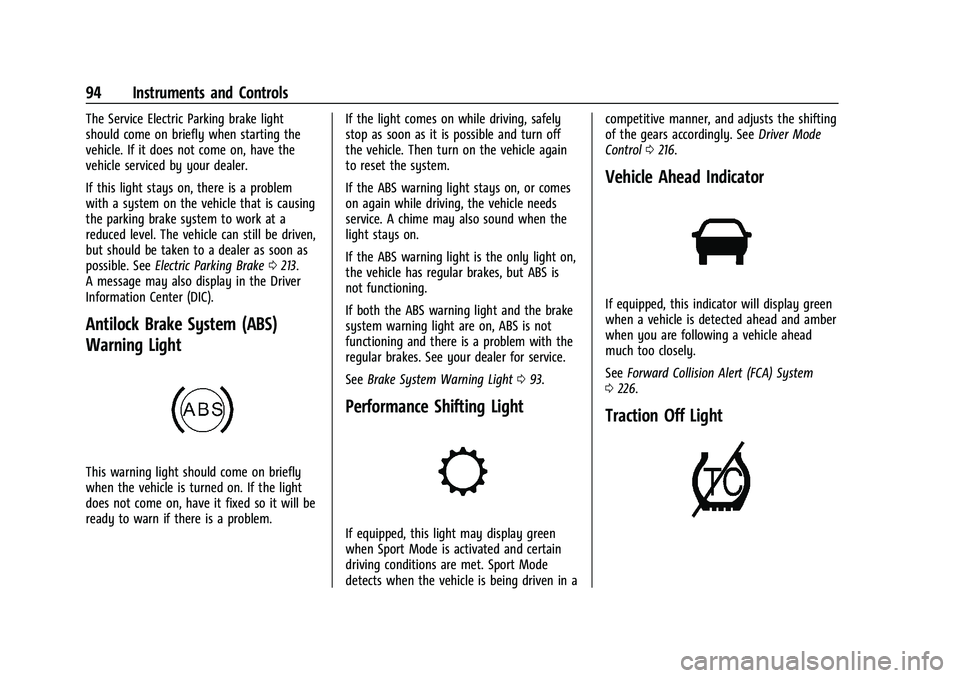
Antilock Brake System (ABS)
Warning Light
This warning light should come on briefly
when the vehicle is turned on. If the light
does not come on, have it fixed so it will be
ready to warn if there is a problem. If the light comes on while driving, safely
stop as soon as it is possible and turn off
the vehicle. Then turn on the vehicle again
to reset the system.
If the ABS warning light stays on, or comes
on again while driving, the vehicle needs
service. A chime may also sound when the
light stays on.
If the ABS warning light is the only light on,
the vehicle has regular brakes, but ABS is
not functioning.
If both the ABS warning light and the brake
system warning light are on, ABS is not
functioning and there is a problem with the
regular brakes. See your dealer for service.
See
Brake System Warning Light 093.
Performance Shifting Light
If equipped, this light may display green
when Sport Mode is activated and certain
driving conditions are met. Sport Mode
detects when the vehicle is being driven in a competitive manner, and adjusts the shifting
of the gears accordingly. See
Driver Mode
Control 0216.
Vehicle Ahead Indicator
If equipped, this indicator will display green
when a vehicle is detected ahead and amber
when you are following a vehicle ahead
much too closely.
See Forward Collision Alert (FCA) System
0 226.
Traction Off Light
Page 163 of 354
Chevrolet Camaro Owner Manual (GMNA-Localizing-U.S./Canada/Mexico-
14583589) - 2021 - CRC - 10/1/20
162 Infotainment System
Name
Touch to edit your user name that will be
displayed in the vehicle.
Vehicle Account Information
Touch to view the vehicle account
information and to change the account
password.
An“unverified user account” pop-up will
display until the account information
verification process has been completed on
the Internet. Check your registered e-mail
account for an activation e-mail to complete
the verification process.
Profile Picture
Touch to choose or change your profile
picture.
Profile Identifiers
Touch to have the vehicle recognize the
identifier you choose.
Touch Vehicle Key 1 and/or Vehicle Key 2.
If the Remote Keyless Entry (RKE)
transmitter is lost or stolen, see your dealer.
Security
Touch to have your profile secured with
a PIN. Touch No or Yes.
Vehicle Name
Touch to edit your vehicle name.
Vehicle Account
Touch to view the vehicle account
information and to change the account
password.
Delete Profile
Touch to remove the profile from the
vehicle.
Touch Remove or Cancel.
Teen Driver
If equipped, this allows multiple keys to be
registered for beginner drivers to encourage
safe driving habits. When the vehicle is
started with a Teen Driver key, it will
automatically activate certain safety
systems, allow setting of some features, and
limit the use of others. The Report Card will
record vehicle data about driving behavior
that can be viewed later. When the vehicle
is started with a registered key, the Driver
Information Center (DIC) displays a message
that Teen Driver is active.
To access:
1. Touch Settings on the Home Page, then touch Vehicle, and then Teen Driver.
2. Create a Personal Identification Number (PIN) by choosing a four-digit PIN.
Re-enter the PIN to confirm. To change
the PIN, touch Change PIN.
The PIN is required to:
.Register or unregister keys.
.Change Teen Driver settings.
.Change or clear the Teen Driver PIN.
.Access or delete Report Card data.
Register keys to activate Teen Driver and
assign restrictions to the key:
Any vehicle key can be registered, up to a
maximum of eight keys. Label the key to
tell it apart from the other keys.
For a pushbutton start system: 1. Start the engine.
2. For automatic transmissions, the vehicle must be in P (Park). For manual
transmissions, the vehicle must be
stopped with the parking brake set.
3. From the Settings menu, touch Vehicle and then Teen Driver.
4. Enter the PIN.
Page 164 of 354
Chevrolet Camaro Owner Manual (GMNA-Localizing-U.S./Canada/Mexico-
14583589) - 2021 - CRC - 10/1/20
Infotainment System 163
5. Place the Remote Keyless Entry (RKE)transmitter key you wish to register in
the transmitter pocket. The key does not
need to be the one that started the
vehicle. See Remote Keyless Entry (RKE)
System Operation 07for transmitter
pocket location.
6. From the Teen Driver menu, touch Setup Keys.
.If the transmitter key has not
previously been registered, the option
to add the key displays. Touch Setup
and a confirmation message displays.
Teen Driver restrictions will be
applied whenever this key is used to
operate the vehicle.
.If the transmitter key has already
been registered, the option to
remove the key displays. If Remove is
touched, the transmitter key is no
longer registered. A confirmation
message displays, and Teen Driver
restrictions will not be applied if this
transmitter key is used to operate
the vehicle.
In vehicles with a pushbutton start system,
if a Teen Driver and a non-Teen Driver key
are both present at start up, the vehicle will recognize the non-Teen Driver key to start
the vehicle. The Teen Driver settings will not
be active.
For a keyed ignition system:
1. Start the engine.
2. For automatic transmissions, the vehicle must be in P (Park). For manual
transmissions, the vehicle must be
stopped with the parking brake set.
3. From the Settings menu, touch Vehicle and then Teen Driver.
4. Enter the PIN.
5. Touch Setup Keys. The system displays instructions for registering or
unregistering a key. A confirmation
message displays.
Manage Settings
Audio Volume Limit : Allows the audio
volume limit to be turned on or off. Touch
Set Audio Volume Limit to choose the
maximum allowable audio volume level.
Set Audio Volume Limit : Allows a
maximum radio volume to be set. Use the
arrows to choose the maximum allowable
level for the audio volume. Teen Driver Speed Limiter :
Limits the
maximum speed of the vehicle. When the
speed limiter is turned on and the vehicle is
started with a Teen Driver key, the DIC
displays a message that the top speed is
limited.
On certain vehicles, when the Speed Limiter
is turned ON, the vehicle’s maximum
acceleration will be limited. The DIC will
display a message that the acceleration is
limited.
Teen Driver Speed Warning : Allows the
speed warning to be turned on or off. Touch
Set Teen Driver Speed Warning to set the
warning speed.
Set Teen Driver Speed Warning : Displays a
warning in the DIC when exceeding a
selectable speed. Choose the desired speed
warning level. The speed warning does not
limit the speed of the vehicle.
SiriusXM Explicit Content Filter (if
equipped) : Allows the SiriusXM Explicit
Content Filter to be turned ON or OFF.
When ON, the teen driver will not be able
to listen to SiriusXM stations that contain
explicit content, and the Explicit Content
Filter selection in the Audio Settings will be
unavailable for change.
Page 182 of 354
Chevrolet Camaro Owner Manual (GMNA-Localizing-U.S./Canada/Mexico-
14583589) - 2021 - CRC - 10/1/20
Driving and Operating 181
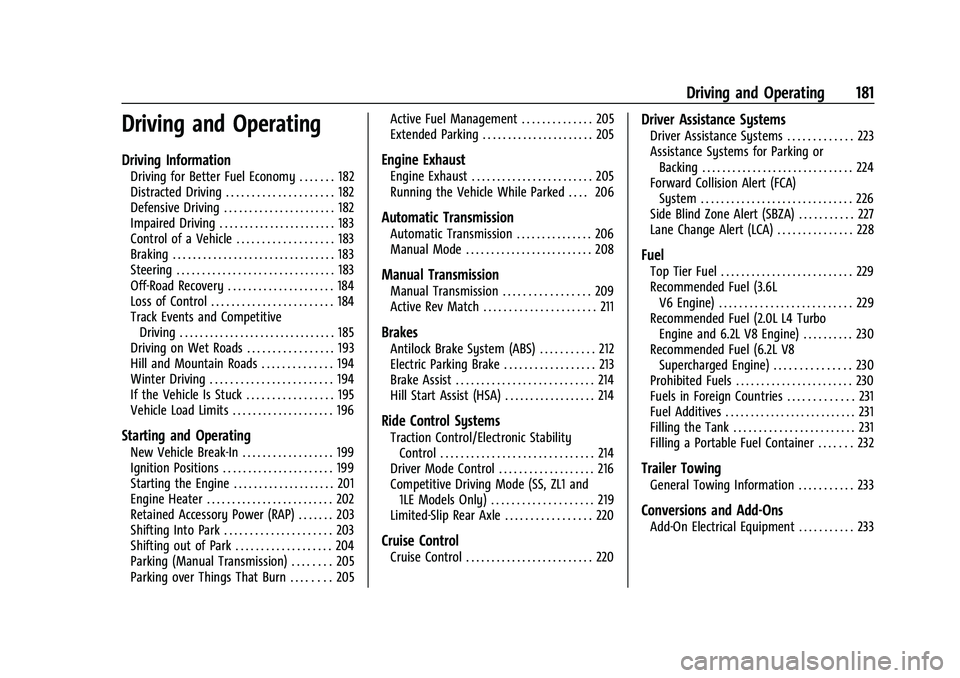
Driving and Operating
Driving Information
Driving for Better Fuel Economy . . . . . . . 182
Distracted Driving . . . . . . . . . . . . . . . . . . . . . 182
Defensive Driving . . . . . . . . . . . . . . . . . . . . . . 182
Impaired Driving . . . . . . . . . . . . . . . . . . . . . . . 183
Control of a Vehicle . . . . . . . . . . . . . . . . . . . 183
Braking . . . . . . . . . . . . . . . . . . . . . . . . . . . . . . . . 183
Steering . . . . . . . . . . . . . . . . . . . . . . . . . . . . . . . 183
Off-Road Recovery . . . . . . . . . . . . . . . . . . . . . 184
Loss of Control . . . . . . . . . . . . . . . . . . . . . . . . 184
Track Events and CompetitiveDriving . . . . . . . . . . . . . . . . . . . . . . . . . . . . . . . 185
Driving on Wet Roads . . . . . . . . . . . . . . . . . 193
Hill and Mountain Roads . . . . . . . . . . . . . . 194
Winter Driving . . . . . . . . . . . . . . . . . . . . . . . . 194
If the Vehicle Is Stuck . . . . . . . . . . . . . . . . . 195
Vehicle Load Limits . . . . . . . . . . . . . . . . . . . . 196
Starting and Operating
New Vehicle Break-In . . . . . . . . . . . . . . . . . . 199
Ignition Positions . . . . . . . . . . . . . . . . . . . . . . 199
Starting the Engine . . . . . . . . . . . . . . . . . . . . 201
Engine Heater . . . . . . . . . . . . . . . . . . . . . . . . . 202
Retained Accessory Power (RAP) . . . . . . . 203
Shifting Into Park . . . . . . . . . . . . . . . . . . . . . 203
Shifting out of Park . . . . . . . . . . . . . . . . . . . 204
Parking (Manual Transmission) . . . . . . . . 205
Parking over Things That Burn . . . . . . . . 205 Active Fuel Management . . . . . . . . . . . . . . 205
Extended Parking . . . . . . . . . . . . . . . . . . . . . . 205
Engine Exhaust
Engine Exhaust . . . . . . . . . . . . . . . . . . . . . . . . 205
Running the Vehicle While Parked . . . . 206
Automatic Transmission
Automatic Transmission . . . . . . . . . . . . . . . 206
Manual Mode . . . . . . . . . . . . . . . . . . . . . . . . . 208
Manual Transmission
Manual Transmission . . . . . . . . . . . . . . . . . 209
Active Rev Match . . . . . . . . . . . . . . . . . . . . . . 211
Brakes
Antilock Brake System (ABS) . . . . . . . . . . . 212
Electric Parking Brake . . . . . . . . . . . . . . . . . . 213
Brake Assist . . . . . . . . . . . . . . . . . . . . . . . . . . . 214
Hill Start Assist (HSA) . . . . . . . . . . . . . . . . . . 214
Ride Control Systems
Traction Control/Electronic Stability
Control . . . . . . . . . . . . . . . . . . . . . . . . . . . . . . 214
Driver Mode Control . . . . . . . . . . . . . . . . . . . 216
Competitive Driving Mode (SS, ZL1 and 1LE Models Only) . . . . . . . . . . . . . . . . . . . . 219
Limited-Slip Rear Axle . . . . . . . . . . . . . . . . . 220
Cruise Control
Cruise Control . . . . . . . . . . . . . . . . . . . . . . . . . 220
Driver Assistance Systems
Driver Assistance Systems . . . . . . . . . . . . . 223
Assistance Systems for Parking or Backing . . . . . . . . . . . . . . . . . . . . . . . . . . . . . . 224
Forward Collision Alert (FCA) System . . . . . . . . . . . . . . . . . . . . . . . . . . . . . . 226
Side Blind Zone Alert (SBZA) . . . . . . . . . . . 227
Lane Change Alert (LCA) . . . . . . . . . . . . . . . 228
Fuel
Top Tier Fuel . . . . . . . . . . . . . . . . . . . . . . . . . . 229
Recommended Fuel (3.6L V6 Engine) . . . . . . . . . . . . . . . . . . . . . . . . . . 229
Recommended Fuel (2.0L L4 Turbo Engine and 6.2L V8 Engine) . . . . . . . . . . 230
Recommended Fuel (6.2L V8 Supercharged Engine) . . . . . . . . . . . . . . . 230
Prohibited Fuels . . . . . . . . . . . . . . . . . . . . . . . 230
Fuels in Foreign Countries . . . . . . . . . . . . . 231
Fuel Additives . . . . . . . . . . . . . . . . . . . . . . . . . . 231
Filling the Tank . . . . . . . . . . . . . . . . . . . . . . . . 231
Filling a Portable Fuel Container . . . . . . . 232
Trailer Towing
General Towing Information . . . . . . . . . . . 233
Conversions and Add-Ons
Add-On Electrical Equipment . . . . . . . . . . . 233