remote control CHEVROLET CAMARO 2022 User Guide
[x] Cancel search | Manufacturer: CHEVROLET, Model Year: 2022, Model line: CAMARO, Model: CHEVROLET CAMARO 2022Pages: 357, PDF Size: 7.99 MB
Page 115 of 357
Chevrolet Camaro Owner Manual (GMNA-Localizing-U.S./Canada/Mexico-
14583589) - 2021 - CRC - 3/24/20
114 Lighting
Lighting Features
Entry Lighting
Some exterior lamps and interior lamps turn
on briefly at night, or in areas with limited
lighting, when
Kis pressed on the Remote
Keyless Entry (RKE) transmitter. After about
30 seconds the exterior lamps turn off.
Entry lighting can be disabled manually by
turning the ignition on or to ACC/
ACCESSORY, or by pressing
Qon the RKE
transmitter. When any door is opened or
remote unlock pressed, all interior lights
turn on and then interior lamps dim to off
after 20 seconds.
The entry lighting feature for exterior
lighting can be changed. See “Vehicle
Locator Lights” underVehicle Personalization
0 105.
Exit Lighting
Some exterior lamps come on at night or in
areas with limited lighting when the driver
door is opened after the ignition is
turned off.
The interior lamps come on after the
ignition is turned off or any door is opened. The exterior and interior lamps remain on
after the door is closed for a set amount of
time then automatically turn off.
Exit lighting for exterior lights can be
changed. See
Vehicle Personalization 0105.
Theater Dimming
This feature allows for a three to five
second fade out of the interior lamps
instead of having them turn off
immediately.
Battery Load Management
The vehicle has Electric Power Management
(EPM) that estimates the battery's
temperature and state of charge. It then
adjusts the voltage for best performance
and extended life of the battery.
When the battery's state of charge is low,
the voltage is raised slightly to quickly bring
the charge back up. When the state of
charge is high, the voltage is lowered
slightly to prevent overcharging. If the
vehicle has a voltmeter gauge or a voltage
display on the Driver Information Center
(DIC), you may see the voltage move up or
down. This is normal. If there is a problem,
an alert will be displayed. The battery can be discharged at idle if the
electrical loads are very high. This is true for
all vehicles. This is because the generator
(alternator) may not be spinning fast
enough at idle to produce all of the power
needed for very high electrical loads.
A high electrical load occurs when several of
the following are on, such as: headlamps,
high beams, rear window defogger, climate
control fan at high speed, heated seats,
engine cooling fans, trailer loads, and loads
plugged into accessory power outlets.
EPM works to prevent excessive discharge of
the battery. It does this by balancing the
generator's output and the vehicle's
electrical needs. It can increase engine idle
speed to generate more power whenever
needed. It can temporarily reduce the power
demands of some accessories.
Normally, these actions occur in steps or
levels, without being noticeable. In rare
cases at the highest levels of corrective
action, this action may be noticeable to the
driver. If so, a DIC message might be
displayed and it is recommended that the
driver reduce the electrical loads as much as
possible.
Page 180 of 357
Chevrolet Camaro Owner Manual (GMNA-Localizing-U.S./Canada/Mexico-
14583589) - 2021 - CRC - 3/24/20
Climate Controls 179
Caution
Do not use a razor blade or sharp object
to clear the inside rear window. Do not
adhere anything to the defogger grid
lines in the rear glass. These actions may
damage the rear defogger. Repairs would
not be covered by the vehicle warranty.
Remote Start Climate Control Operation, If
Equipped : The climate control system may
run when the vehicle is started remotely,
depending on the outside temperature. See
Remote Vehicle Start 014. The rear defog
may come on during remote start based on
cold ambient conditions. The rear defog
indicator light does not come on during a
remote start. When enabled, the front
heated seats, if equipped, will turn on
automatically if it is cold outside. See
Vehicle Personalization 0105. The heated
seat indicator lights do not come on during
a remote start.
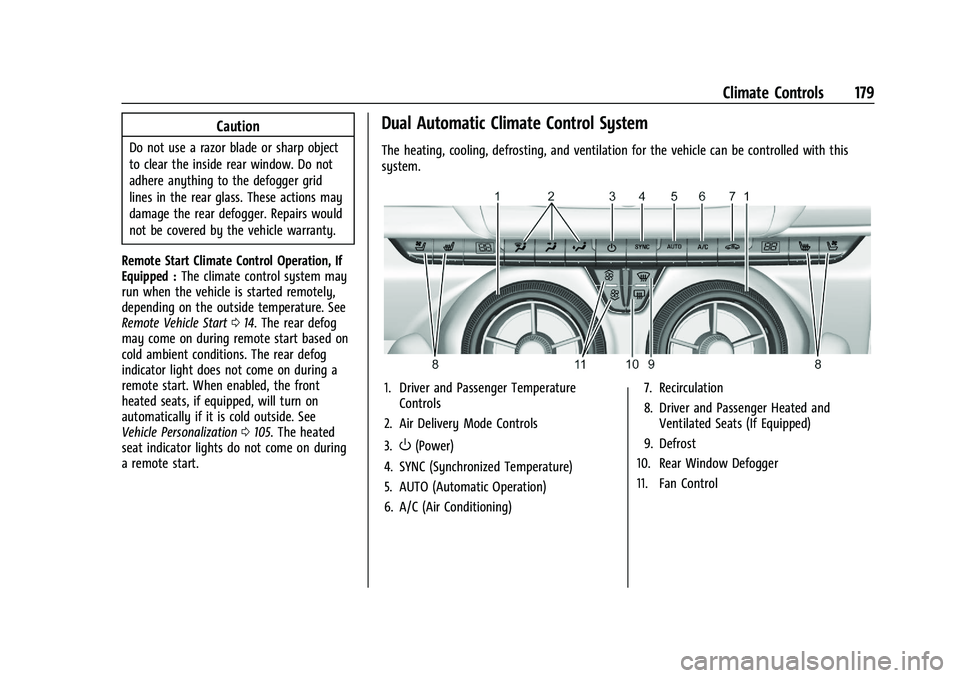
Dual Automatic Climate Control System
The heating, cooling, defrosting, and ventilation for the vehicle can be controlled with this
system.
1. Driver and Passenger Temperature Controls
2. Air Delivery Mode Controls
3.
O(Power)
4. SYNC (Synchronized Temperature)
5. AUTO (Automatic Operation)
6. A/C (Air Conditioning) 7. Recirculation
8. Driver and Passenger Heated and
Ventilated Seats (If Equipped)
9. Defrost
10. Rear Window Defogger
11. Fan Control
Page 183 of 357
Chevrolet Camaro Owner Manual (GMNA-Localizing-U.S./Canada/Mexico-
14583589) - 2021 - CRC - 3/24/20
182 Climate Controls
Do not drive the vehicle until all windows
are clear.
Caution
Do not use a razor blade or sharp object
to clear the inside rear window. Do not
adhere anything to the defogger grid
lines in the rear glass. These actions may
damage the rear defogger. Repairs would
not be covered by the vehicle warranty.
LorM(If Equipped) :PressLorMto
heat the driver or passenger seat.
Press
{orC, if equipped, to ventilate the
driver or passenger seat. See Heated and
Ventilated Front Seats 040.
Remote Start Climate Control Operation, If
Equipped : The climate control system may
run when the vehicle is started remotely,
depending on the outside temperature. See
Remote Vehicle Start 014. The rear defog
may come on during remote start based on
cold ambient conditions. The rear defog
indicator light does not come on during a
remote start. When enabled, the front
heated seats, if equipped, will turn on automatically if it is cold outside. See
Vehicle Personalization
0105. The heated
seat indicator lights do not come on during
a remote start.
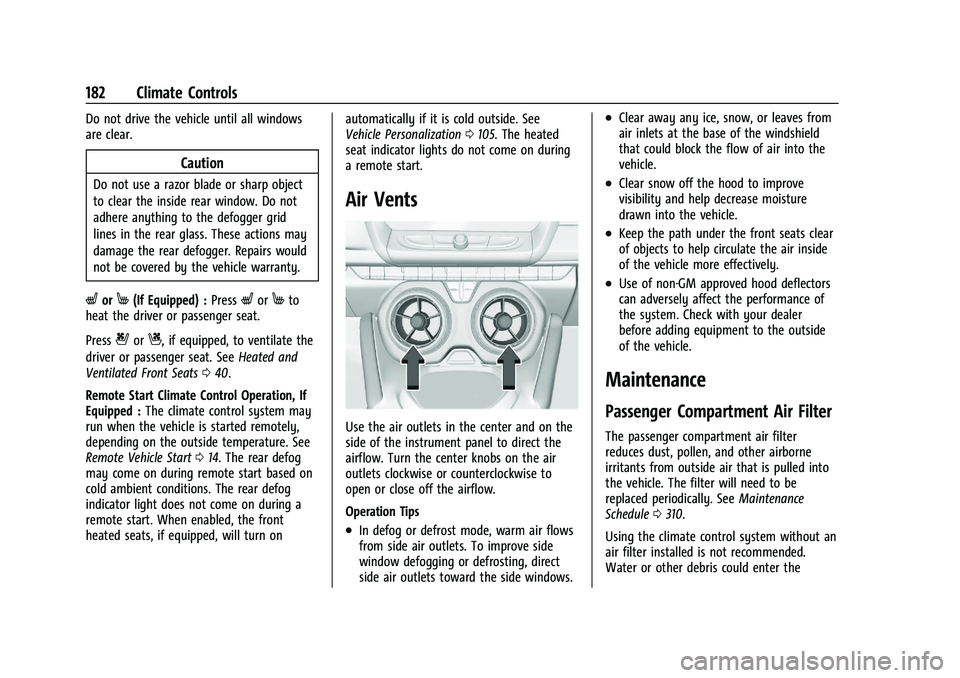
Air Vents
Use the air outlets in the center and on the
side of the instrument panel to direct the
airflow. Turn the center knobs on the air
outlets clockwise or counterclockwise to
open or close off the airflow.
Operation Tips
.In defog or defrost mode, warm air flows
from side air outlets. To improve side
window defogging or defrosting, direct
side air outlets toward the side windows.
.Clear away any ice, snow, or leaves from
air inlets at the base of the windshield
that could block the flow of air into the
vehicle.
.Clear snow off the hood to improve
visibility and help decrease moisture
drawn into the vehicle.
.Keep the path under the front seats clear
of objects to help circulate the air inside
of the vehicle more effectively.
.Use of non-GM approved hood deflectors
can adversely affect the performance of
the system. Check with your dealer
before adding equipment to the outside
of the vehicle.
Maintenance
Passenger Compartment Air Filter
The passenger compartment air filter
reduces dust, pollen, and other airborne
irritants from outside air that is pulled into
the vehicle. The filter will need to be
replaced periodically. See Maintenance
Schedule 0310.
Using the climate control system without an
air filter installed is not recommended.
Water or other debris could enter the
Page 241 of 357
Chevrolet Camaro Owner Manual (GMNA-Localizing-U.S./Canada/Mexico-
14583589) - 2021 - CRC - 3/24/20
240 Vehicle Care
Accessories and Modifications
Adding non-dealer accessories or making
modifications to the vehicle can affect
vehicle performance and safety, including
such things as airbags, braking, stability,
ride and handling, emissions systems,
aerodynamics, durability, and electronic
systems like antilock brakes, traction control,
and stability control. These accessories or
modifications could even cause malfunction
or damage not covered by the vehicle
warranty.
Damage to suspension components caused
by modifying vehicle height outside of
factory settings will not be covered by the
vehicle warranty.
Damage to vehicle components resulting
from modifications or the installation or use
of non-GM certified parts, including control
module or software modifications, is not
covered under the terms of the vehicle
warranty and may affect remaining
warranty coverage for affected parts.
GM Accessories are designed to complement
and function with other systems on the
vehicle. See your dealer to accessorize the
vehicle using genuine GM Accessories
installed by a dealer technician.Also, see
Adding Equipment to the
Airbag-Equipped Vehicle 058.
Vehicle Checks
Doing Your Own Service Work
{Warning
It can be dangerous to work on your
vehicle if you do not have the proper
knowledge, service manual, tools,
or parts. Always follow owner’s manual
procedures and consult the service
manual for your vehicle before doing any
service work.
If doing some of your own service work, use
the proper service manual. It tells you much
more about how to service the vehicle than
this manual can. To order the proper service
manual, see Publication Ordering
Information 0333.
This vehicle has an airbag system. Before
attempting to do your own service work,
see Servicing the Airbag-Equipped Vehicle
0 57. If equipped with remote vehicle start, open
the hood before performing any service
work to prevent remote starting the vehicle
accidentally. See
Remote Vehicle Start 014.
Keep a record with all parts receipts and list
the mileage and the date of any service
work performed. See Maintenance Records
0 321.Caution
Even small amounts of contamination can
cause damage to vehicle systems. Do not
allow contaminants to contact the fluids,
reservoir caps, or dipsticks.
Hood
{Warning
Turn the vehicle off before opening the
hood. If the engine is running with the
hood open, you or others could be
injured.
Page 340 of 357
Chevrolet Camaro Owner Manual (GMNA-Localizing-U.S./Canada/Mexico-
14583589) - 2021 - CRC - 3/24/20
OnStar 339
Reactivation for Subsequent Owners
Press|and follow the prompts to speak to
an Advisor as soon as possible. The Advisor
will update vehicle records and explain
OnStar or connected service options.
How OnStar Service Works
Automatic Crash Response, Emergency
Services, Crisis Assist, Stolen Vehicle
Assistance, Remote Services, and Roadside
Assistance are available on most vehicles.
Not all OnStar services are available
everywhere or on all vehicles. For more
information, a full description of OnStar
services, system limitations, and OnStar User
Terms, Privacy Statement, and Software
Terms:
.Call 1-888-4ONSTAR (1-888-466-7827).
.See www.onstar.com (U.S.).
.See www.onstar.ca (Canada).
.Call TTY 1-877-248-2080.
.Press|to speak with an Advisor.
OnStar or connected services cannot work
unless the vehicle is in a place where OnStar
has an agreement with a wireless service
provider for service in that area. The
wireless service provider must also have
coverage, network capacity, reception, and technology compatible with OnStar or
connected services. Service involving location
information about the vehicle cannot work
unless GPS signals are available,
unobstructed, and compatible with the
OnStar hardware. OnStar or connected
services may not work if the OnStar
equipment is not properly installed or it has
not been properly maintained. If equipment
or software is added, connected,
or modified, OnStar or connected services
may not work. Other problems beyond the
control of OnStar
—such as hills, tall
buildings, tunnels, weather, electrical system
design and architecture of the vehicle,
damage to the vehicle in a crash, or wireless
phone network congestion or jamming —
may prevent service.
See Radio Frequency Statement 0334.
Services for People with Disabilities
Advisors provide services to help with
physical disabilities and medical conditions.
Press
|to help:
.Locate a gas station with an attendant to
pump gas.
.Find a hotel, restaurant, etc., that meets
accessibility needs.
.Provide directions to the closest hospital
or pharmacy in urgent situations.
TTY Users
OnStar has the ability to communicate to
deaf, hard-of-hearing, or speech-impaired
customers while in the vehicle. The available
dealer-installed TTY system can provide
in-vehicle access to all OnStar services,
except Virtual Advisor and OnStar
Turn-by-Turn Navigation.
If equipped, TTY mode can be turned on or
off by touching Settings, then Apps, and
then Phone. When TTY mode is on, phone
calls can be made or received with OnStar
using the infotainment display.
OnStar Personal Identification
Number (PIN)
A PIN is needed to access some OnStar
services. The PIN will need to be changed
the first time when speaking with an
Advisor. To change the OnStar PIN, contact
an OnStar Advisor by pressing
|or calling
1-888-4ONSTAR.
Warranty
OnStar equipment may be warranted as part
of the vehicle warranty.
Page 344 of 357
Chevrolet Camaro Owner Manual (GMNA-Localizing-U.S./Canada/Mexico-
14583589) - 2021 - CRC - 3/24/20
Connected Services 343
Send Destination to Vehicle
Directions can be sent to the vehicle’s
navigation screen, if equipped.
Press
|then ask the Advisor to download
directions to the vehicle’s navigation system,
if equipped. After the call ends, the
navigation screen will provide prompts to
begin driving directions. Routes that are sent
to the navigation screen can only be
canceled through the navigation system.
See www.onstar.com (U.S.) or www.onstar.ca
(Canada).
Connections
The following services help with staying
connected.
For coverage maps, see www.onstar.com
(U.S.) or www.onstar.ca (Canada).
Ensuring Security
.Change the default passwords for the
Wi-Fi hotspot and myChevrolet mobile
application. Make these passwords
different from each other and use a
combination of letters and numbers to
increase the security.
.Change the default name of the SSID
(Service Set Identifier). This is your
network’s name that is visible to other
wireless devices. Choose a unique name
and avoid family names or vehicle
descriptions.
Wi-Fi Hotspot (If Equipped)
The vehicle may have a built-in Wi-Fi
hotspot that provides access to the Internet
and web content at 4G LTE speed. Up to
seven mobile devices can be connected.
A data plan is required. Use the in-vehicle
controls only when it is safe to do so. 1. To retrieve Wi-Fi hotspot information, press
Qto open the OnStar app on the
infotainment display, then select Wi-Fi
Hotspot. On some vehicles, touch Wi-Fi
or Wi-Fi Settings on the screen.
2. The Wi-Fi settings will display the Wi-Fi hotspot name (SSID), password, and on
some vehicles, the connection type (no
Internet connection, 3G, 4G, 4G LTE), and
signal quality (poor, good, excellent). The
LTE icon shows connection to Wi-Fi. It is
possible that the icon may not illuminate
even though the vehicle has an active
connection. 3. To change the SSID or password, press
|or call 1-888-4ONSTAR to connect
with an Advisor. On some vehicles, the
SSID and password can be changed in
the Wi-Fi Hotspot menu.
After initial set-up, your vehicle’s Wi-Fi
hotspot will connect automatically to your
mobile devices. Manage data usage by
turning Wi-Fi on or off on your mobile
device, using the myChevrolet mobile app,
or by contacting an OnStar Advisor. On
some vehicles, Wi-Fi can also be managed
from the Wi-Fi Hotspot menu.
MyChevrolet Mobile App (If Available)
Download the myChevrolet mobile app to
compatible Apple and Android smartphones.
Chevrolet users can access the following
services from a smartphone:
.Remotely start/stop the vehicle,
if factory-equipped.
.Lock/unlock doors, if equipped with
automatic locks.
.Activate the horn and lamps.
.Check the vehicle’s fuel level, oil life,
or tire pressure, if factory-equipped with
the Tire Pressure Monitor System.
.Send destinations to the vehicle.
Page 350 of 357
Chevrolet Camaro Owner Manual (GMNA-Localizing-U.S./Canada/Mexico-
14583589) - 2021 - CRC - 3/24/20
Index 349
GM Mobility ReimbursementProgram . . . . . . . . . . . . . . . . . . . . . . . . . . . . . . . 329
Guidance Problems with the Route . . . . . . . . . . . . . . . 141
H
Halogen Bulbs . . . . . . . . . . . . . . . . . . . . . . . . . . . 264
Hazard Warning Flashers . . . . . . . . . . . . . . . . . 112
HD Radio Technology . . . . . . . . . . . . . . . . . . . . .124
Head Restraints . . . . . . . . . . . . . . . . . . . . . . . . . . . .35
Head-up Display . . . . . . . . . . . . . . . . . . . . . . . . . .101
HeadlampsAiming . . . . . . . . . . . . . . . . . . . . . . . . . . . . . . . . 264
Automatic . . . . . . . . . . . . . . . . . . . . . . . . . . . . . . 111
Bulb Replacement . . . . . . . . . . . . . . . . . . . . . . 264
Daytime Running Lamps (DRL) . . . . . . . . . . 111
Flash-to-Pass . . . . . . . . . . . . . . . . . . . . . . . . . . . . 111
High Intensity Discharge (HID)Lighting . . . . . . . . . . . . . . . . . . . . . . . . . . . . . . 264
High-Beam On Light . . . . . . . . . . . . . . . . . . . . 98
High/Low Beam Changer . . . . . . . . . . . . . . 110
Lamps On Reminder . . . . . . . . . . . . . . . . . . . . 98
Heated Steering Wheel . . . . . . . . . . . . . . . . . . . . . . . . . 78
Heated and Ventilated Front Seats . . . . . . . 40
Heated Mirrors . . . . . . . . . . . . . . . . . . . . . . . . . . . .23
Heater Engine . . . . . . . . . . . . . . . . . . . . . . . . . . . . . . . . . 205 Heating . . . . . . . . . . . . . . . . . . . . . . . . . . . . . . 176, 179
High-Beam On Light . . . . . . . . . . . . . . . . . . . . . . 98
High-Speed Operation . . . . . . . . . . . . . . . . . . . 279
Hill and Mountain Roads . . . . . . . . . . . . . . . . 197
Hill Start Assist (HSA) . . . . . . . . . . . . . . . . . . . . . 217
Hood . . . . . . . . . . . . . . . . . . . . . . . . . . . . . . . . . . . . 240
Horn . . . . . . . . . . . . . . . . . . . . . . . . . . . . . . . . . . . . . . 78
How to Wear Seat Belts Properly . . . . . . . . . 43
HVAC . . . . . . . . . . . . . . . . . . . . . . . . . . . . . . . . 176, 179
Hydraulic Clutch . . . . . . . . . . . . . . . . . . . . . . . . . 250
I
If the System Needs Service . . . . . . . . . . . . . .142
Ignition Positions . . . . . . . . . . . . . . . . . . . . . . . . 203
Immobilizer . . . . . . . . . . . . . . . . . . . . . . . . . . . . . . . .22
Indicator
Vehicle Ahead . . . . . . . . . . . . . . . . . . . . . . . . . . 95
Infants and Young Children, Restraints . . . . 60
Information Publication Ordering . . . . . . . . . . . . . . . . . . . 333
Infotainment System . . . . . . . . . . . . . . . . . . . . 336
Instrument Cluster . . . . . . . . . . . . . . . . . . . . . . . . 83
Instrument Panel Overview . . . . . . . . . . . . . . . . 4
Interior Lamps . . . . . . . . . . . . . . . . . . . . . . . . . . . . 113
Interior Rearview Mirrors . . . . . . . . . . . . . . . . . 24
Introduction . . . . . . . . . . . . . . . . . . . . . . . . . . . .1, 116
J
Jack
Auxiliary . . . . . . . . . . . . . . . . . . . . . . . . . . . . . . . 129
Jump Starting - North America . . . . . . . . . . . 297
K
Keyless Entry Remote (RKE) System . . . . . . . . . . . . . . . . . . . . 7
Keys . . . . . . . . . . . . . . . . . . . . . . . . . . . . . . . . . . . . . . . 6
L
Labeling, Tire Sidewall . . . . . . . . . . . . . . . . . . . 275
Lamps Daytime Running (DRL) . . . . . . . . . . . . . . . . . 111
Exterior Controls . . . . . . . . . . . . . . . . . . . . . . . 110
Exterior Lighting Battery Saver . . . . . . . . . 115
Interior . . . . . . . . . . . . . . . . . . . . . . . . . . . . . . . . . 113
License Plate . . . . . . . . . . . . . . . . . . . . . . . . . . . 265
Malfunction Indicator (CheckEngine) . . . . . . . . . . . . . . . . . . . . . . . . . . . . . . . 92
On Reminder . . . . . . . . . . . . . . . . . . . . . . . . . . . 98
Reading . . . . . . . . . . . . . . . . . . . . . . . . . . . . . . . . . 113
Lane Change Alert (LCA) . . . . . . . . . . . . . . . . . 232
Lap-Shoulder Belt . . . . . . . . . . . . . . . . . . . . . . . . . 45
LATCH System Replacing Parts after a Crash . . . . . . . . . . . 70
LATCH, Lower Anchors and Tethers for Children . . . . . . . . . . . . . . . . . . . . . . . . . . . . . . . . . 65
Latches, Seatback . . . . . . . . . . . . . . . . . . . . . . . . . 40
Page 353 of 357
Chevrolet Camaro Owner Manual (GMNA-Localizing-U.S./Canada/Mexico-
14583589) - 2021 - CRC - 3/24/20
352 Index
R
RadioHD Radio Technology . . . . . . . . . . . . . . . . . . 124
Radio Data System (RDS) . . . . . . . . . . . . . . . . . 125
Radio Frequency Statement . . . . . . . . . . . . . . 334
Radio Reception . . . . . . . . . . . . . . . . . . . . . . . . . . 125
Radios AM-FM Radio . . . . . . . . . . . . . . . . . . . . . . . . . . 122
Satellite . . . . . . . . . . . . . . . . . . . . . . . . . . . . . . . . 125
Reading Lamps . . . . . . . . . . . . . . . . . . . . . . . . . . . 113
Rear Axle . . . . . . . . . . . . . . . . . . . . . . . . . . . . . . . . 261
Limited-Slip . . . . . . . . . . . . . . . . . . . . . . . . . . . . 224
Rear Camera Mirror . . . . . . . . . . . . . . . . . . . . . . . 24
Rear Seats . . . . . . . . . . . . . . . . . . . . . . . . . . . . . . . . .41
Rear Storage . . . . . . . . . . . . . . . . . . . . . . . . . . . . . . .75
Rear Vision Camera (RVC) . . . . . . . . . . . . . . . . 228
Rearview Mirrors . . . . . . . . . . . . . . . . . . . . . . . . . 24 Automatic Dimming . . . . . . . . . . . . . . . . . . . . 24
Reclining Seatbacks . . . . . . . . . . . . . . . . . . . . . . . .37
Recognition
Voice . . . . . . . . . . . . . . . . . . . . . . . . . . . . . . . . . . 143
Recommended Fuel . . . . . . . . . . . . . . . . . . . . . . . . . . . . . . . . . . . . 234
Recommended Fluids and Lubricants . . . . . .318
Records
Maintenance . . . . . . . . . . . . . . . . . . . . . . . . . . . 321
Recreational Vehicle Towing . . . . . . . . . . . . . 300 Reimbursement Program, GM
Mobility . . . . . . . . . . . . . . . . . . . . . . . . . . . . . . . 329
Remote Keyless Entry (RKE) System . . . . . . . .7
Remote Vehicle Start . . . . . . . . . . . . . . . . . . . . . .14
Replacement Parts Airbags . . . . . . . . . . . . . . . . . . . . . . . . . . . . . . . . . 59
Maintenance . . . . . . . . . . . . . . . . . . . . . . . . . . . 320
Replacing Airbag System . . . . . . . . . . . . . . . . . . 59
Replacing LATCH System Parts after a Crash . . . . . . . . . . . . . . . . . . . . . . . . . . . . . . . . . . . 70
Replacing Seat Belt System Parts after
a Crash . . . . . . . . . . . . . . . . . . . . . . . . . . . . . . . . . 48
Reporting Safety Defects Canadian Government . . . . . . . . . . . . . . . . . 334
General Motors . . . . . . . . . . . . . . . . . . . . . . . . 335
U.S. Government . . . . . . . . . . . . . . . . . . . . . . . 334
Restraints Where to Put . . . . . . . . . . . . . . . . . . . . . . . . . . . 64
Retained Accessory Power (RAP) . . . . . . . . . 207
Reverse Tilt Mirrors . . . . . . . . . . . . . . . . . . . . . . . 24
Ride Control Systems Limited Slip Rear Axle . . . . . . . . . . . . . . . . . 224
Roads Driving, Wet . . . . . . . . . . . . . . . . . . . . . . . . . . . 196
Roadside Assistance Program . . . . . . . . . . . . 329
Roof
Sunroof . . . . . . . . . . . . . . . . . . . . . . . . . . . . . . . . . 29
Rotation, Tires . . . . . . . . . . . . . . . . . . . . . . . . . . . 284 Routing, Engine Drive Belt . . . . . . . . . . . . . . . 325
Run-Flat Tires . . . . . . . . . . . . . . . . . . . . . . . . . . . . 273
Running the Vehicle While Parked . . . . . . . 209
S
Safety Defects Reporting
Canadian Government . . . . . . . . . . . . . . . . . 334
General Motors . . . . . . . . . . . . . . . . . . . . . . . . 335
U.S. Government . . . . . . . . . . . . . . . . . . . . . . . 334
Safety System Check . . . . . . . . . . . . . . . . . . . . . 47
Satellite Radio . . . . . . . . . . . . . . . . . . . . . . . . . . . . 125
Scheduling Appointments . . . . . . . . . . . . . . . . 330
Sealant Kit, Tire . . . . . . . . . . . . . . . . . . . . . . . . . . 291
Seat Belts . . . . . . . . . . . . . . . . . . . . . . . . . . . . . . . . . 42 Care . . . . . . . . . . . . . . . . . . . . . . . . . . . . . . . . . . . . 47
Extender . . . . . . . . . . . . . . . . . . . . . . . . . . . . . . . . 47
How to Wear Seat Belts Properly . . . . . . . 43
Lap-Shoulder Belt . . . . . . . . . . . . . . . . . . . . . . . 45
Reminders . . . . . . . . . . . . . . . . . . . . . . . . . . . . . . 90
Replacing after a Crash . . . . . . . . . . . . . . . . . 48
Use During Pregnancy . . . . . . . . . . . . . . . . . . 47
Seatback Latches . . . . . . . . . . . . . . . . . . . . . . . . . . 40
Seats Adjustment, Front . . . . . . . . . . . . . . . . . . . . . . 36
Head Restraints . . . . . . . . . . . . . . . . . . . . . . . . . 35
Heated and Ventilated Front . . . . . . . . . . . . 40
Memory . . . . . . . . . . . . . . . . . . . . . . . . . . . . . . . . 37
Power Adjustment, Front . . . . . . . . . . . . . . . 36
Page 354 of 357
Chevrolet Camaro Owner Manual (GMNA-Localizing-U.S./Canada/Mexico-
14583589) - 2021 - CRC - 3/24/20
Index 353
Seats (cont'd)Rear . . . . . . . . . . . . . . . . . . . . . . . . . . . . . . . . . . . . 41
Reclining Seatbacks . . . . . . . . . . . . . . . . . . . . . 37
Securing Child Restraints . . . . . . . . . . . . . . . 71, 72
Security Light . . . . . . . . . . . . . . . . . . . . . . . . . . . . . . . . . . . . 98
OnStar . . . . . . . . . . . . . . . . . . . . . . . . . . . . . . . . . 338
Vehicle . . . . . . . . . . . . . . . . . . . . . . . . . . . . . . . . . . 21
Vehicle Alarm . . . . . . . . . . . . . . . . . . . . . . . . . . . . 21
Service . . . . . . . . . . . . . . . . . . . . . . . . . . . . . . . . . . . .183 Accessories and Modifications . . . . . . . . . 240
Doing Your Own Work . . . . . . . . . . . . . . . . . 240
Maintenance Records . . . . . . . . . . . . . . . . . . 321
Maintenance, General Information . . . . . 309
Parts Identification . . . . . . . . . . . . . . . . . . . . . 322
Scheduling Appointments . . . . . . . . . . . . . . 330
Service Electric Parking Brake Light . . . . . . . 95
Services Special Application . . . . . . . . . . . . . . . . . . . . . 316
Servicing System . . . . . . . . . . . . . . . . . . . . . . . . .142
Servicing the Airbag . . . . . . . . . . . . . . . . . . . . . . .57
Settings . . . . . . . . . . . . . . . . . . . . . . . . . . . . . . . . . . .158
Shift Lock Control Function Check, Automatic Transmission . . . . . . . . . . . . . . . . 261
Shifting Into Park . . . . . . . . . . . . . . . . . . . . . . . . . . . . . . 207
Out of Park . . . . . . . . . . . . . . . . . . . . . . . . . . . . 207
Side Blind Zone Alert (SBZA) . . . . . . . . . . . . . . 231 Signals, Turn and Lane-Change . . . . . . . . . . . . 112
Software Updates . . . . . . . . . . . . . . . . . . . . . . . . . 122
Special Application Services . . . . . . . . . . . . . . 316
Specifications and Capacities . . . . . . . . . . . . . 323
Speedometer . . . . . . . . . . . . . . . . . . . . . . . . . . . . . 86
StabiliTrak
OFF Light . . . . . . . . . . . . . . . . . . . . . . . . . . . . . . . 96
Start Assist, Hill . . . . . . . . . . . . . . . . . . . . . . . . . . . 217
Start Vehicle, Remote . . . . . . . . . . . . . . . . . . . . . .14
Starting the Engine . . . . . . . . . . . . . . . . . . . . . . 204
Steering . . . . . . . . . . . . . . . . . . . . . . . . . . . . . . . . . 186 Heated Wheel . . . . . . . . . . . . . . . . . . . . . . . . . . 78
Wheel Adjustment . . . . . . . . . . . . . . . . . . . . . . 78
Wheel Controls . . . . . . . . . . . . . . . . . . . . . . . . . 78
Steering Wheel Controls . . . . . . . . . . . . . . . . . . 119
Storage Rear . . . . . . . . . . . . . . . . . . . . . . . . . . . . . . . . . . . . 75
Storage Areas Center Console . . . . . . . . . . . . . . . . . . . . . . . . . 76
Convenience Net . . . . . . . . . . . . . . . . . . . . . . . . 76
Glove Box . . . . . . . . . . . . . . . . . . . . . . . . . . . . . . 75
Storage Compartments . . . . . . . . . . . . . . . . . . . .75
Storing the Tire Sealant and Compressor Kit . . . . . . . . . . . . . . . . . . . . . . . . . 296
Struts
Gas . . . . . . . . . . . . . . . . . . . . . . . . . . . . . . . . . . . . 263
Stuck Vehicle . . . . . . . . . . . . . . . . . . . . . . . . . . . . 198
Summer Tires . . . . . . . . . . . . . . . . . . . . . . . . . . . . 274 Sun Visors . . . . . . . . . . . . . . . . . . . . . . . . . . . . . . . . 29
Sunroof . . . . . . . . . . . . . . . . . . . . . . . . . . . . . . . . . . . 29
Symbols . . . . . . . . . . . . . . . . . . . . . . . . . . . . . . . . . . . .2
Navigation . . . . . . . . . . . . . . . . . . . . . . . . . . . . . 134
System Engine Air Filter Life . . . . . . . . . . . . . . . . . . . 251
Forward Collision Alert (FCA) . . . . . . . . . . . 230
Global Positioning . . . . . . . . . . . . . . . . . . . . . . 141
Infotainment . . . . . . . . . . . . . . . . . . . . . . . . . . . 336
OnStar . . . . . . . . . . . . . . . . . . . . . . . . . . . . . . . . . 140
Systems
Driver Assistance . . . . . . . . . . . . . . . . . . . . . . 227
T
Tachometer . . . . . . . . . . . . . . . . . . . . . . . . . . . . . . . 87
Teen Driver . . . . . . . . . . . . . . . . . . . . . . . . . . . . . . 164
Text Telephone (TTY) Users . . . . . . . . . . . . . . 328
Theater Dimming . . . . . . . . . . . . . . . . . . . . . . . . . 114
Theft-Deterrent Systems . . . . . . . . . . . . . . . . . . .22Immobilizer . . . . . . . . . . . . . . . . . . . . . . . . . . . . . 22
Time . . . . . . . . . . . . . . . . . . . . . . . . . . . . . . . . . . . . . . 79
Tires . . . . . . . . . . . . . . . . . . . . . . . . . . . . . . . . . . . . . 272
All-Season . . . . . . . . . . . . . . . . . . . . . . . . . . . . . 273
Buying New Tires . . . . . . . . . . . . . . . . . . . . . . 286
Chains . . . . . . . . . . . . . . . . . . . . . . . . . . . . . . . . . 290
Designations . . . . . . . . . . . . . . . . . . . . . . . . . . . 276
Different Size . . . . . . . . . . . . . . . . . . . . . . . . . . 287
If a Tire Goes Flat . . . . . . . . . . . . . . . . . . . . . 290
Page 355 of 357
Chevrolet Camaro Owner Manual (GMNA-Localizing-U.S./Canada/Mexico-
14583589) - 2021 - CRC - 3/24/20
354 Index
Tires (cont'd)Inspection . . . . . . . . . . . . . . . . . . . . . . . . . . . . . 284
Low Profile . . . . . . . . . . . . . . . . . . . . . . . . . . . . 274
Pressure . . . . . . . . . . . . . . . . . . . . . . . . . . 278, 279
Pressure Light . . . . . . . . . . . . . . . . . . . . . . . . . . 97
Pressure Monitor Operation . . . . . . . . . . . 281
Pressure Monitor System . . . . . . . . . . . . . . 280
Rotation . . . . . . . . . . . . . . . . . . . . . . . . . . . . . . . 284
Run-Flat . . . . . . . . . . . . . . . . . . . . . . . . . . . . . . . . 273
Sealant and Compressor Kit . . . . . . . . . . . . 291
Sealant and Compressor Kit,
Storing . . . . . . . . . . . . . . . . . . . . . . . . . . . . . . . 296
Sidewall Labeling . . . . . . . . . . . . . . . . . . . . . . 275
Terminology and Definitions . . . . . . . . . . . 276
Uniform Tire Quality Grading . . . . . . . . . . 288
Wheel Alignment and Tire Balance . . . . 289
Wheel Replacement . . . . . . . . . . . . . . . . . . . . 289
When It Is Time for New Tires . . . . . . . . . 285
Winter . . . . . . . . . . . . . . . . . . . . . . . . . . . . . . . . . 273
Top Tier Fuel . . . . . . . . . . . . . . . . . . . . . . . . . . . . 233
Towing General Information . . . . . . . . . . . . . . . . . . . 237
Recreational Vehicle . . . . . . . . . . . . . . . . . . . 300
Vehicle . . . . . . . . . . . . . . . . . . . . . . . . . . . . . . . . 299
Track Events and Competitive Driving . . . . 188
Traction Control System (TCS)/StabiliTrakLight . . . . . . . . . . . . . . . . . . . . . . . . . . . . . . . . . . 96 Traction (cont'd)
Limited-Slip Rear Axle . . . . . . . . . . . . . . . . . . 224
Off Light . . . . . . . . . . . . . . . . . . . . . . . . . . . . . . . . 96
Traction Control/Electronic Stability Control . . . . . . . . . . . . . . . . . . . . . . . . . . . . . . . . . .218
Trademarks and License Agreements . . . . . 167
Transmission Automatic . . . . . . . . . . . . . . . . . . . . . . . . . . . . . 209
Fluid, Automatic . . . . . . . . . . . . . . . . . . . . . . . 250
Fluid, Manual . . . . . . . . . . . . . . . . . . . . . . . . . . 250
Transportation Program, Courtesy . . . . . . . . 331
Trip Odometer . . . . . . . . . . . . . . . . . . . . . . . . . . . . 86
Trunk . . . . . . . . . . . . . . . . . . . . . . . . . . . . . . . . . . . . . .18
Turn and Lane-Change Signals . . . . . . . . . . . . 112
U
Uniform Tire Quality Grading . . . . . . . . . . . . 288
Updates Map Data . . . . . . . . . . . . . . . . . . . . . . . . . . . . . . 142
Software . . . . . . . . . . . . . . . . . . . . . . . . . . . . . . . 122
USB Port . . . . . . . . . . . . . . . . . . . . . . . . . . . . . . . . . 126
Using the Navigation System . . . . . . . . . . . . . 131
Using the System . . . . . . . . . . . . . . . . . . . . . . . . . 119
Using This Manual . . . . . . . . . . . . . . . . . . . . . . . . . .2
V
Vehicle Alarm System . . . . . . . . . . . . . . . . . . . . . . . . . . . 21
Canadian Owners . . . . . . . . . . . . . . . . . . . . . . . . . 1 Vehicle (cont'd)
Control . . . . . . . . . . . . . . . . . . . . . . . . . . . . . . . . 186
Identification Number (VIN) . . . . . . . . . . . . 322
Load Limits . . . . . . . . . . . . . . . . . . . . . . . . . . . . 199
Messages . . . . . . . . . . . . . . . . . . . . . . . . . . . . . . 104
Personalization . . . . . . . . . . . . . . . . . . . . . . . . 105
Remote Start . . . . . . . . . . . . . . . . . . . . . . . . . . . 14
Security . . . . . . . . . . . . . . . . . . . . . . . . . . . . . . . . . . 21
Speed Messages . . . . . . . . . . . . . . . . . . . . . . . 105
Towing . . . . . . . . . . . . . . . . . . . . . . . . . . . . . . . . 299
Vehicle Ahead Indicator . . . . . . . . . . . . . . . . . . . 95
Vehicle Care Storing the Tire Sealant andCompressor Kit . . . . . . . . . . . . . . . . . . . . . . . 296
Tire Pressure . . . . . . . . . . . . . . . . . . . . . . . . . . . 278
Vehicle Data Recording and Privacy . . . . . . 335
Vehicle Positioning . . . . . . . . . . . . . . . . . . . . . . . 141
Ventilation, Air . . . . . . . . . . . . . . . . . . . . . . . . . . .182
Visors . . . . . . . . . . . . . . . . . . . . . . . . . . . . . . . . . . . . . 29
Voice Recognition . . . . . . . . . . . . . . . . . . . . . . . . .143
Voltmeter Gauge . . . . . . . . . . . . . . . . . . . . . . . . . 90
W
Warning
Brake System Light . . . . . . . . . . . . . . . . . . . . . 94
Caution and Danger . . . . . . . . . . . . . . . . . . . . . 2
Warning Lights, Gauges, and Indicators . . . . . . . . . . . . . . . . . . . . . . . . . . . . . . . 82