remote control CHEVROLET CAMARO 2023 User Guide
[x] Cancel search | Manufacturer: CHEVROLET, Model Year: 2023, Model line: CAMARO, Model: CHEVROLET CAMARO 2023Pages: 345, PDF Size: 16.19 MB
Page 155 of 345
Chevrolet Camaro Owner Manual (GMNA-Localizing-U.S./Canada/Mexico-
16408685) - 2023 - CRC - 3/28/22
154 Infotainment System
On most compatible mobile devices,
activation of the Wi-Fi hotspot is in the
Settings menu under Mobile Network
Sharing, Personal Hotspot, Mobile Hotspot,
or similar.
Availability of Over-the-Air software updates
varies by vehicle and country. Features are
subject to change. For more information on
this feature, seeOnline Account0316 for
details.
Preferences
Allows the infotainment system to disable
or enable the download of new updates in
the background.
About
Shows the infotainment system software
information.
Running Applications
Shows a complete list of applications that
are currently running on the infotainment
system.
Return to Factory Settings
Allows resetting the infotainment system
settings in the vehicle.Apps
The menu may contain the following:
Android Auto
Allows interacting directly with a mobile
device on the infotainment display. See
Apple CarPlay and Android Auto 0151.
Apple CarPlay
This feature allows you to interact directly
with your mobile device on the infotainment
display. See Apple CarPlay and Android Auto
0 151.
Apps
Shows app settings and information.
Audio
Adjusts different audio settings.
Climate
Adjusts different climate settings.
Navigation
Adjusts different navigation settings.
Phone
Adjusts different phone settings.
SiriusXM
Adjusts different features.
Vehicle
The menu may contain the following:
Driving Mode
See “Driver Mode Customization” inDriver
Mode Control 0209.
Climate and Air Quality
Adjusts different climate settings.
Collision/Detection Systems
Adjusts different driver assistance system
settings.
Comfort and Convenience
Adjusts different comfort and convenience
settings.
Lighting
Adjusts different lighting settings.
Power Door Locks
Adjusts different door lock settings.
Remote Lock, Unlock, and Start
Adjusts different remote lock settings.
Seating Position
Adjusts different seat settings.
Page 156 of 345
Chevrolet Camaro Owner Manual (GMNA-Localizing-U.S./Canada/Mexico-
16408685) - 2023 - CRC - 3/28/22
Infotainment System 155
Teen Driver
SeeTeen Driver 0155.
Valet Mode
This will lock the infotainment system and
steering wheel controls. It may also limit
access to vehicle storage locations,
if equipped.
To enable valet mode: 1. Enter a four-digit code on the keypad.
2. Select Enter to go to the confirmation screen.
3. Re-enter the four-digit code.
Touch Lock or Unlock to lock or unlock the
system. Touch Back to go back to the
previous menu.
Personal
If equipped, this menu allows adjustment of
different user profile settings. See “Users”in
Using the System 0115 for information on
setting up user profiles.
The menu may contain the following:
Name
Edit your user name that will be displayed
in the vehicle. Vehicle Account Information
View the vehicle account information and to
change the account password.
An
“unverified user account” pop-up will
display until the account information
verification process has been completed on
the Internet. Check your registered e-mail
account for an activation e-mail to complete
the verification process.
Profile Picture
Choose or change your profile picture.
Profile Identifiers
Have the vehicle recognize the identifier you
choose.
If the remote key is lost or stolen, see your
dealer.
Security
Have your profile secured with a PIN.
Vehicle Name
Edit the vehicle name.
Vehicle Account
View the vehicle account information and to
change the account password. Delete Profile
Remove the profile from the vehicle.
Teen Driver
If equipped, this allows multiple keys to be
registered for beginner drivers to encourage
safe driving habits. When the vehicle is
started with a Teen Driver key, it will
automatically activate certain safety
systems, allow setting of some features, and
limit the use of others. The Report Card will
record vehicle data about driving behavior
that can be viewed later. When the vehicle
is started with a registered key, the Driver
Information Center (DIC) displays a message
that Teen Driver is active.
To access:
1. Touch Settings on the Home Page, then touch Vehicle, and then Teen Driver.
2. Create a Personal Identification Number (PIN) by choosing a four-digit PIN.
Re-enter the PIN to confirm. To change
the PIN, touch Change PIN.
The PIN is required to:
.Set up/Add or remove keys.
.Change Teen Driver settings.
.Change or clear the Teen Driver PIN.
Page 169 of 345
Chevrolet Camaro Owner Manual (GMNA-Localizing-U.S./Canada/Mexico-
16408685) - 2023 - CRC - 3/28/22
168 Climate Controls
Remote Start Climate Control Operation, If
Equipped :The climate control system may
run when the vehicle is started remotely,
depending on the outside temperature. See
Remote Vehicle Start 014. The rear defog
may come on during remote start based on
cold ambient conditions. The rear defog
indicator light does not come on during a
remote start. When enabled, the front
heated seats, if equipped, will turn on
automatically if it is cold outside. The
heated seat indicator lights do not come on
during a remote start.
Afterblow Feature
If equipped, under certain conditions, the
fan may stay on or may turn on and off
several times after you turn off and lock the
vehicle. This is normal.Dual Automatic Climate Control System
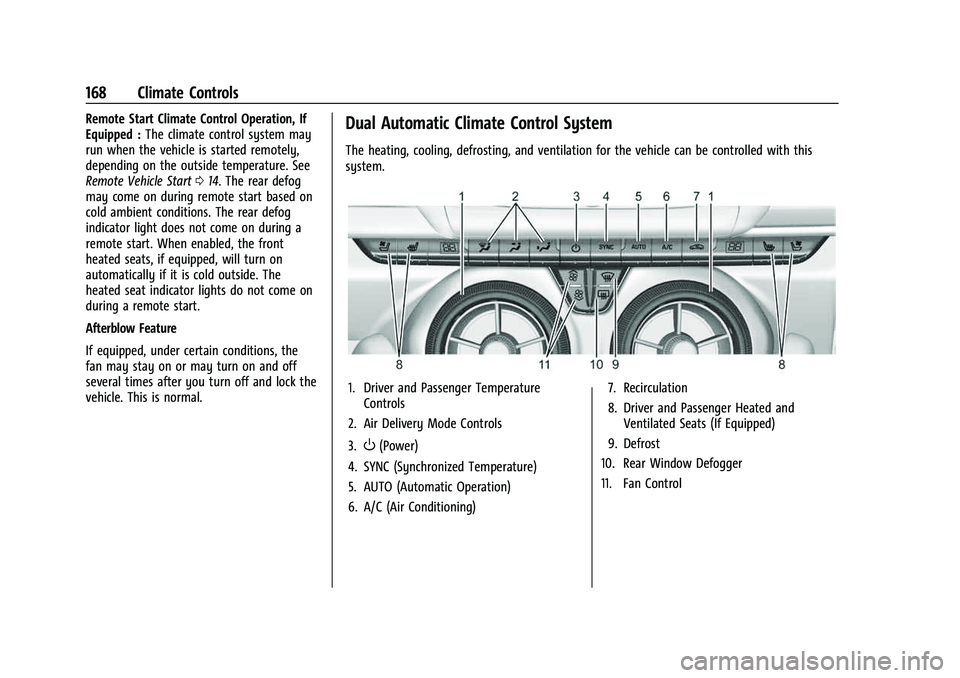
The heating, cooling, defrosting, and ventilation for the vehicle can be controlled with this
system.
1. Driver and Passenger Temperature Controls
2. Air Delivery Mode Controls
3.
O(Power)
4. SYNC (Synchronized Temperature)
5. AUTO (Automatic Operation)
6. A/C (Air Conditioning) 7. Recirculation
8. Driver and Passenger Heated and
Ventilated Seats (If Equipped)
9. Defrost
10. Rear Window Defogger
11. Fan Control
Page 172 of 345
Chevrolet Camaro Owner Manual (GMNA-Localizing-U.S./Canada/Mexico-
16408685) - 2023 - CRC - 3/28/22
Climate Controls 171
Do not drive the vehicle until all windows
are clear.
Caution
Do not use a razor blade or sharp object
to clear the inside rear window. Do not
adhere anything to the defogger grid
lines in the rear glass. These actions may
damage the rear defogger. Repairs would
not be covered by the vehicle warranty.
LorM(If Equipped) :PressLorMto
heat the driver or passenger seat.
Press
{orC, if equipped, to ventilate the
driver or passenger seat. See Heated and
Ventilated Front Seats 040.
Remote Start Climate Control Operation, If
Equipped : The climate control system may
run when the vehicle is started remotely,
depending on the outside temperature. See
Remote Vehicle Start 014. The rear defog
may come on during remote start based on
cold ambient conditions. The rear defog
indicator light does not come on during a
remote start. When enabled, the front
heated seats, if equipped, will turn on
automatically if it is cold outside. The
heated seat indicator lights do not come on
during a remote start. Afterblow Feature
If equipped, under certain conditions, the
fan may stay on or may turn on and off
several times after you turn off and lock the
vehicle. This is normal.
Air Vents
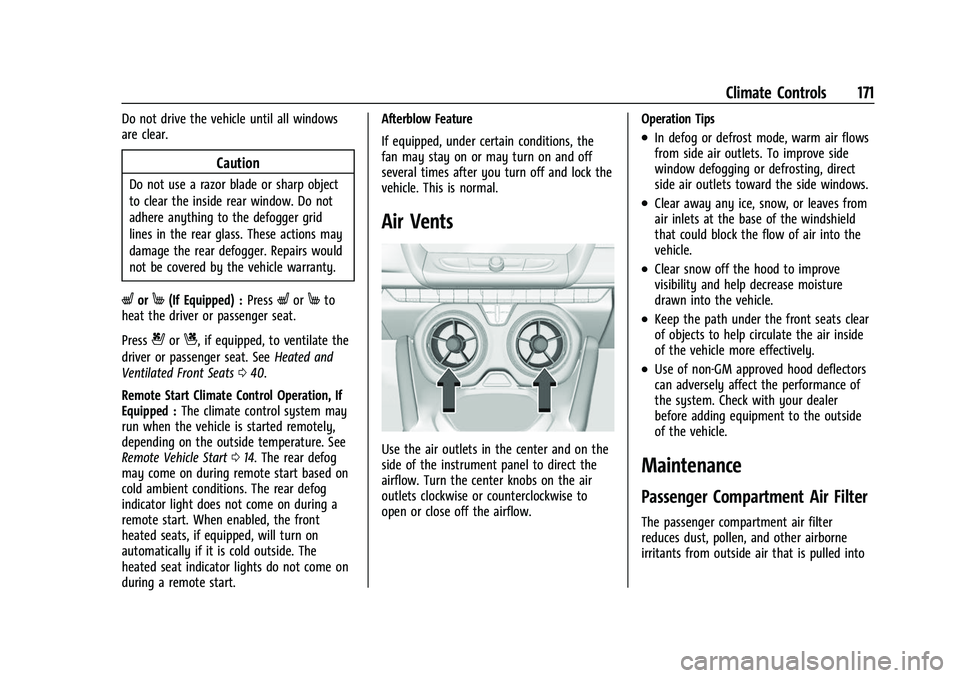
Use the air outlets in the center and on the
side of the instrument panel to direct the
airflow. Turn the center knobs on the air
outlets clockwise or counterclockwise to
open or close off the airflow.
Operation Tips
.In defog or defrost mode, warm air flows
from side air outlets. To improve side
window defogging or defrosting, direct
side air outlets toward the side windows.
.Clear away any ice, snow, or leaves from
air inlets at the base of the windshield
that could block the flow of air into the
vehicle.
.Clear snow off the hood to improve
visibility and help decrease moisture
drawn into the vehicle.
.Keep the path under the front seats clear
of objects to help circulate the air inside
of the vehicle more effectively.
.Use of non-GM approved hood deflectors
can adversely affect the performance of
the system. Check with your dealer
before adding equipment to the outside
of the vehicle.
Maintenance
Passenger Compartment Air Filter
The passenger compartment air filter
reduces dust, pollen, and other airborne
irritants from outside air that is pulled into
Page 328 of 345
Chevrolet Camaro Owner Manual (GMNA-Localizing-U.S./Canada/Mexico-
16408685) - 2023 - CRC - 3/28/22
OnStar 327
OnStar Additional
Information
In-Vehicle Audio Messages
Audio messages may play important
information at the following times:
.Prior to vehicle purchase. PressQto set
up an account.
.After change in ownership and at
90 days.
Transferring Service
PressQto request account transfer
eligibility information. The Advisor can
cancel or change account information.
Selling/Transferring the Vehicle
Call 1-888-4ONSTAR (1-888-466-7827)
immediately to terminate your OnStar or
connected services if the vehicle is disposed
of, sold, transferred, or if the lease ends.
Reactivation for Subsequent Owners
PressQand follow the prompts to speak to
an Advisor as soon as possible. The Advisor
will update vehicle records and explain
OnStar or connected service options.
How OnStar Service Works
Automatic Crash Response, Emergency
Services, Crisis Assist, Stolen Vehicle
Assistance, Remote Services, and Roadside
Assistance are available on most vehicles.
Not all OnStar services are available
everywhere or on all vehicles. For more
information, a full description of OnStar
services, system limitations, and OnStar User
Terms, Privacy Statement, and Software
Terms:
.Call 1-888-4ONSTAR (1-888-466-7827).
.See www.onstar.com (U.S.).
.See www.onstar.ca (Canada).
.Call TTY 1-877-248-2080.
.PressQto speak with an Advisor.
OnStar or connected services cannot work
unless the vehicle is in a place where OnStar
has an agreement with a wireless service
provider for service in that area. The
wireless service provider must also have
coverage, network capacity, reception, and
technology compatible with OnStar or
connected services. Service involving location
information about the vehicle cannot work
unless GPS signals are available,
unobstructed, and compatible with the
OnStar hardware. OnStar or connected services may not work if the OnStar
equipment is not properly installed or it has
not been properly maintained. If equipment
or software is added, connected,
or modified, OnStar or connected services
may not work. Other problems beyond the
control of OnStar
—such as hills, tall
buildings, tunnels, weather, electrical system
design and architecture of the vehicle,
damage to the vehicle in a crash, or wireless
phone network congestion or jamming —
may prevent service.
See Radio Frequency Statement 0322.
Services for People with Disabilities
Advisors provide services to help with
physical disabilities and medical conditions.
Press
Qto help:
.Locate a gas station with an attendant to
pump gas.
.Find a hotel, restaurant, etc., that meets
accessibility needs.
.Provide directions to the closest hospital
or pharmacy in urgent situations.
Page 332 of 345
Chevrolet Camaro Owner Manual (GMNA-Localizing-U.S./Canada/Mexico-
16408685) - 2023 - CRC - 3/28/22
Connected Services 331
Ensuring Security
.Change the default passwords for the
Wi-Fi hotspot and myChevrolet mobile
application. Make these passwords
different from each other and use a
combination of letters and numbers to
increase the security.
.Change the default name of the SSID
(Service Set Identifier). This is your
network’s name that is visible to other
wireless devices. Choose a unique name
and avoid family names or vehicle
descriptions.
Wi-Fi Hotspot (If Equipped)
The vehicle may have a built-in Wi-Fi
hotspot that provides access to the Internet
and web content at 4G LTE speed. Up to
seven mobile devices can be connected.
A data plan is required. Use the in-vehicle
controls only when it is safe to do so. 1. To retrieve Wi-Fi hotspot information, press
=to open the OnStar app on the
infotainment display, then select Wi-Fi
Hotspot. On some vehicles, touch Wi-Fi
or Wi-Fi Settings on the screen. 2. The Wi-Fi settings will display the Wi-Fi
hotspot name (SSID), password, and on
some vehicles, the connection type (no
Internet connection, 3G, 4G, 4G LTE), and
signal quality (poor, good, excellent).
3. To change the SSID or password, press
Qor call 1-888-4ONSTAR to connect
with an Advisor. On some vehicles, the
SSID and password can be changed in
the Wi-Fi Hotspot menu.
After initial set-up, your vehicle’s Wi-Fi
hotspot will connect automatically to your
mobile devices. Manage data usage by
turning Wi-Fi on or off on your mobile
device, using the myChevrolet mobile app,
or by contacting an OnStar Advisor. On
some vehicles, Wi-Fi can also be managed
from the Wi-Fi Hotspot menu.
MyChevrolet Mobile App (If Available)
Download the myChevrolet mobile app to
compatible Apple and Android smartphones.
Chevrolet users can access the following
services from a smartphone:
.Remotely start/stop the vehicle,
if factory-equipped.
.Lock/unlock doors, if equipped with
automatic locks.
.Activate the horn and lamps.
.Check the vehicle’s fuel level, oil life,
or tire pressure, if factory-equipped
with the Tire Pressure Monitor System.
.Send destinations to the vehicle.
.Locate the vehicle on a map (U.S.
market only).
.Turn the vehicle's Wi-Fi hotspot on/off,
manage settings, and monitor data
consumption, if equipped.
.Locate a dealer and schedule service.
.Request roadside assistance.
.Set a parking reminder with pin drop,
take a photo, make a note, and set a
timer.
.Connect with Chevrolet on social media.
Features are subject to change. For
myChevrolet mobile app information and
compatibility, see my.chevrolet.com.
An active OnStar or connected service plan
may be required. A compatible device,
factory-installed remote start, and power
locks are required. Data rates apply. See
www.onstar.com for details and system
limitations.
Page 339 of 345
Chevrolet Camaro Owner Manual (GMNA-Localizing-U.S./Canada/Mexico-
16408685) - 2023 - CRC - 3/28/22
338 Index
K
Keys . . . . . . . . . . . . . . . . . . . . . . . . . . . . . . . . . . . . . . . 6Remote . . . . . . . . . . . . . . . . . . . . . . . . . . . . . . . . . . 7
Remote Operation . . . . . . . . . . . . . . . . . . . . . . . 7
L
Labeling, Tire Sidewall . . . . . . . . . . . . . . . . . . . 264
LampsDaytime Running (DRL) . . . . . . . . . . . . . . . . 107
Exterior Controls . . . . . . . . . . . . . . . . . . . . . . . 106
Exterior Lighting Battery Saver . . . . . . . . . 111
Flash-to-Pass . . . . . . . . . . . . . . . . . . . . . . . . . . . 107
High/Low Beam Changer . . . . . . . . . . . . . . 106
Interior . . . . . . . . . . . . . . . . . . . . . . . . . . . . . . . . 109
License Plate . . . . . . . . . . . . . . . . . . . . . . . . . . . 253
Malfunction Indicator (CheckEngine) . . . . . . . . . . . . . . . . . . . . . . . . . . . . . . . 93
On Reminder . . . . . . . . . . . . . . . . . . . . . . . . . . . 99
Reading . . . . . . . . . . . . . . . . . . . . . . . . . . . . . . . . 109
Lane
Change Alert (LCA) . . . . . . . . . . . . . . . . . . . . . 221
Lap-Shoulder Belt . . . . . . . . . . . . . . . . . . . . . . . . . 45
LATCH System Replacing Parts after a Crash . . . . . . . . . . . . 71
LATCH, Lower Anchors and Tethers for Children . . . . . . . . . . . . . . . . . . . . . . . . . . . . . . . . . 65
Latches, Seatback . . . . . . . . . . . . . . . . . . . . . . . . . 40
LED Lighting . . . . . . . . . . . . . . . . . . . . . . . . . . . . . 253 Lighting
Entry . . . . . . . . . . . . . . . . . . . . . . . . . . . . . . . . . . 109
Exit . . . . . . . . . . . . . . . . . . . . . . . . . . . . . . . . . . . . 110
Illumination Control . . . . . . . . . . . . . . . . . . . 109
LED . . . . . . . . . . . . . . . . . . . . . . . . . . . . . . . . . . . . 253
Lights Airbag Readiness . . . . . . . . . . . . . . . . . . . . . . . 92
Antilock Brake System (ABS)
Warning . . . . . . . . . . . . . . . . . . . . . . . . . . . . . . 96
Brake System Warning . . . . . . . . . . . . . . . . . 95
Charging System . . . . . . . . . . . . . . . . . . . . . . . 93
Check Engine (Malfunction Indicator) . . . . . . . . . . . . . . . . . . . . . . . . . . . . . 93
Cruise Control Light . . . . . . . . . . . . . . . . . . . . . 99
Door Ajar . . . . . . . . . . . . . . . . . . . . . . . . . . . . . . . 99
Electric Parking Brake . . . . . . . . . . . . . . . . . . . 95
Engine Oil Pressure . . . . . . . . . . . . . . . . . . . . . 98
Gauges and Indicators . . . . . . . . . . . . . . . . . . 83
High-Beam On . . . . . . . . . . . . . . . . . . . . . . . . . . 99
Low Fuel Warning . . . . . . . . . . . . . . . . . . . . . . 98
Performance Shifting . . . . . . . . . . . . . . . . . . . 96
Seat Belt Reminders . . . . . . . . . . . . . . . . . . . . 91
Security . . . . . . . . . . . . . . . . . . . . . . . . . . . . . . . . . 98
Service Electric Parking Brake . . . . . . . . . . . 95
StabiliTrak OFF . . . . . . . . . . . . . . . . . . . . . . . . . . 97
Tire Pressure . . . . . . . . . . . . . . . . . . . . . . . . . . . . 97
Traction Control System (TCS)/StabiliTrak . . . . . . . . . . . . . . . . . . . . . . 97 Lights (cont'd)
Traction Off . . . . . . . . . . . . . . . . . . . . . . . . . . . . . 96
Limited-Slip Rear Axle . . . . . . . . . . . . . . . . . . . . . 213
Locks Automatic Door . . . . . . . . . . . . . . . . . . . . . . . . . . 17
Delayed Locking . . . . . . . . . . . . . . . . . . . . . . . . . 17
Door . . . . . . . . . . . . . . . . . . . . . . . . . . . . . . . . . . . . . 15
Lockout Protection . . . . . . . . . . . . . . . . . . . . . . 18
Power Door . . . . . . . . . . . . . . . . . . . . . . . . . . . . . . 17
Loss of Control . . . . . . . . . . . . . . . . . . . . . . . . . . . 177
Low Fuel Warning Light . . . . . . . . . . . . . . . . . . 98
Low-Profile Tires . . . . . . . . . . . . . . . . . . . . . . . . . 263
Lower Anchors and Tethers for Children (LATCH System) . . . . . . . . . . . . . . . . 65
M
MaintenanceRecords . . . . . . . . . . . . . . . . . . . . . . . . . . . . . . . . 307
Maintenance Schedule . . . . . . . . . . . . . . . . . . . 300 Recommended Fluids andLubricants . . . . . . . . . . . . . . . . . . . . . . . . . . . . 304
Malfunction Indicator Lamp . . . . . . . . . . . . . . . 93
Manual
Mode . . . . . . . . . . . . . . . . . . . . . . . . . . . . . . . . . . 201
Transmission . . . . . . . . . . . . . . . . . . . . . . . . . . . 202
Transmission Fluid . . . . . . . . . . . . . . . . . . . . . 238
Map Data Updates . . . . . . . . . . . . . . . . . . . . . . . 136
Maps . . . . . . . . . . . . . . . . . . . . . . . . . . . . . . . . . . . . .128
Page 341 of 345
Chevrolet Camaro Owner Manual (GMNA-Localizing-U.S./Canada/Mexico-
16408685) - 2023 - CRC - 3/28/22
340 Index
PowerDoor Locks . . . . . . . . . . . . . . . . . . . . . . . . . . . . . . . 17
Mirrors . . . . . . . . . . . . . . . . . . . . . . . . . . . . . . . . . 23
Outlets . . . . . . . . . . . . . . . . . . . . . . . . . . . . . . . . . 80
Protection, Battery . . . . . . . . . . . . . . . . . . . . . 110
Retained Accessory (RAP) . . . . . . . . . . . . . . 196
Seat Adjustment . . . . . . . . . . . . . . . . . . . . . . . . 36
Windows . . . . . . . . . . . . . . . . . . . . . . . . . . . . . . . 26
Pregnancy, Using Seat Belts . . . . . . . . . . . . . . 47
Privacy Vehicle Data Recording . . . . . . . . . . . . . . . . 323
Problems with Route Guidance . . . . . . . . . . 136
Program Courtesy Transportation . . . . . . . . . . . . . . . 319
Prohibited Fuels . . . . . . . . . . . . . . . . . . . . . . . . . 224
Proposition 65 Warning California . . . . . . . . . . . . . . . . . . . . . . . . . . . . . . . . . 1
Proposition 65 Warning, California . . . . . . . 286
Publication Ordering Information . . . . . . . . . 321
R
Radiator . . . . . . . . . . . . . . . . . . . . . . . . . . . . . . . . . .241
Radio AM-FM Radio . . . . . . . . . . . . . . . . . . . . . . . . . . . 118
Data System (RDS) . . . . . . . . . . . . . . . . . . . . . . 121
Frequency Statement . . . . . . . . . . . . . . . . . . 322
HD Radio Technology . . . . . . . . . . . . . . . . . . 120
Reception . . . . . . . . . . . . . . . . . . . . . . . . . . . . . . . 121 Radio (cont'd)
Satellite . . . . . . . . . . . . . . . . . . . . . . . . . . . . . . . . . 121
Reading Lamps . . . . . . . . . . . . . . . . . . . . . . . . . . 109
Rear Axle . . . . . . . . . . . . . . . . . . . . . . . . . . . . . . . . . . . 249
Camera Mirror . . . . . . . . . . . . . . . . . . . . . . . . . . 24
Cross Traffic Alert (RCTA) System . . . . . . 219
Limited-Slip Axle . . . . . . . . . . . . . . . . . . . . . . . 213
Seats . . . . . . . . . . . . . . . . . . . . . . . . . . . . . . . . . . . 42
Storage . . . . . . . . . . . . . . . . . . . . . . . . . . . . . . . . . 76
Vision Camera (RVC) . . . . . . . . . . . . . . . . . . . . 217
Rearview Mirrors . . . . . . . . . . . . . . . . . . . . . . . . . 24
Automatic Dimming . . . . . . . . . . . . . . . . . . . . 24
Reclining Seatbacks . . . . . . . . . . . . . . . . . . . . . . . .37
Recognition Voice . . . . . . . . . . . . . . . . . . . . . . . . . . . . . . . . . . . 137
Recommended Fuel . . . . . . . . . . . . . . . . . . . . . . . . . . . . . . . . . . . . 223
Recommended Fluids and Lubricants . . . . . 304
Records Maintenance . . . . . . . . . . . . . . . . . . . . . . . . . . . 307
Recreational Vehicle Towing . . . . . . . . . . . . . 290
Reimbursement Program, GM Mobility . . . . . . . . . . . . . . . . . . . . . . . . . . . . . . . . 317
Remote Key . . . . . . . . . . . . . . . . . . . . . . . . . . . . . . . . . . . . . . 7
Key Operation . . . . . . . . . . . . . . . . . . . . . . . . . . . 7
Vehicle Start . . . . . . . . . . . . . . . . . . . . . . . . . . . . 14 Replacement Parts
Airbags . . . . . . . . . . . . . . . . . . . . . . . . . . . . . . . . . 59
Maintenance . . . . . . . . . . . . . . . . . . . . . . . . . . . 305
Replacing Airbag System . . . . . . . . . . . . . . . . . . . . . . . . . . 59
LATCH System Parts After a Crash . . . . . . . 71
Seat Belt System Parts after aCrash . . . . . . . . . . . . . . . . . . . . . . . . . . . . . . . . . 48
Reporting Safety Defects Canadian Government . . . . . . . . . . . . . . . . . 322
General Motors . . . . . . . . . . . . . . . . . . . . . . . . 323
U.S. Government . . . . . . . . . . . . . . . . . . . . . . . 322
Restraints Where to Put . . . . . . . . . . . . . . . . . . . . . . . . . . . 64
Retained Accessory Power (RAP) . . . . . . . . . 196
Reverse Tilt Mirrors . . . . . . . . . . . . . . . . . . . . . . . .23
Ride Control Systems Limited Slip Rear Axle . . . . . . . . . . . . . . . . . 213
Roads Driving, Wet . . . . . . . . . . . . . . . . . . . . . . . . . . . 186
Roadside Assistance Program . . . . . . . . . . . . . 317
Roof
Sunroof . . . . . . . . . . . . . . . . . . . . . . . . . . . . . . . . . 29
Rotation, Tires . . . . . . . . . . . . . . . . . . . . . . . . . . . 274
Routing, Engine Drive Belt . . . . . . . . . . . . . . . . 313
Run-Flat Tires . . . . . . . . . . . . . . . . . . . . . . . . . . . . 263
Running the Vehicle While Parked . . . . . . . 199
Page 342 of 345
Chevrolet Camaro Owner Manual (GMNA-Localizing-U.S./Canada/Mexico-
16408685) - 2023 - CRC - 3/28/22
Index 341
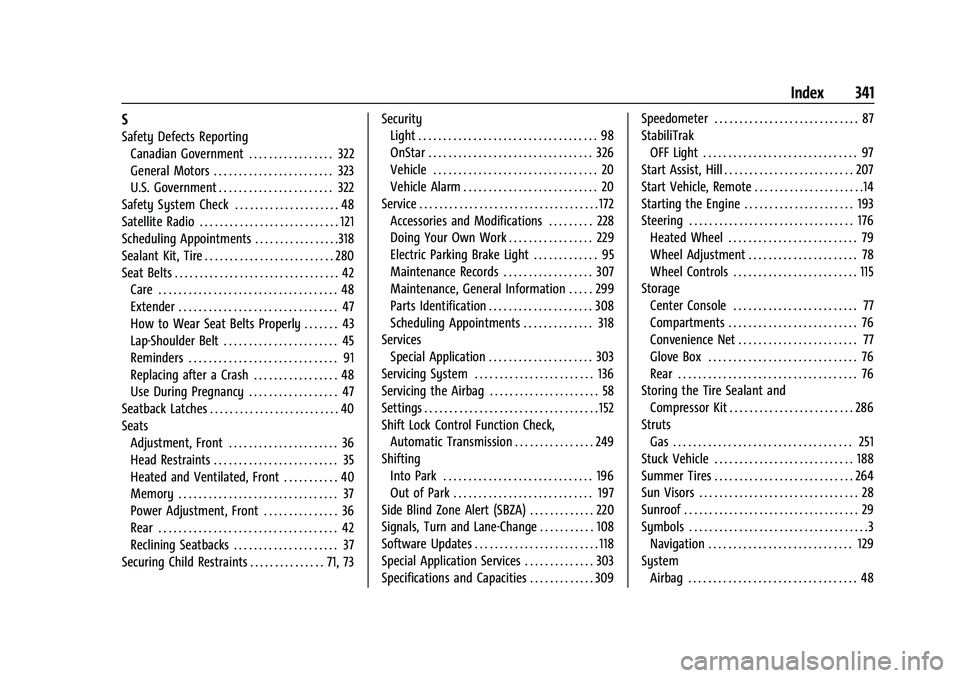
S
Safety Defects ReportingCanadian Government . . . . . . . . . . . . . . . . . 322
General Motors . . . . . . . . . . . . . . . . . . . . . . . . 323
U.S. Government . . . . . . . . . . . . . . . . . . . . . . . 322
Safety System Check . . . . . . . . . . . . . . . . . . . . . 48
Satellite Radio . . . . . . . . . . . . . . . . . . . . . . . . . . . . 121
Scheduling Appointments . . . . . . . . . . . . . . . . .318
Sealant Kit, Tire . . . . . . . . . . . . . . . . . . . . . . . . . . 280
Seat Belts . . . . . . . . . . . . . . . . . . . . . . . . . . . . . . . . . 42 Care . . . . . . . . . . . . . . . . . . . . . . . . . . . . . . . . . . . . 48
Extender . . . . . . . . . . . . . . . . . . . . . . . . . . . . . . . . 47
How to Wear Seat Belts Properly . . . . . . . 43
Lap-Shoulder Belt . . . . . . . . . . . . . . . . . . . . . . . 45
Reminders . . . . . . . . . . . . . . . . . . . . . . . . . . . . . . 91
Replacing after a Crash . . . . . . . . . . . . . . . . . 48
Use During Pregnancy . . . . . . . . . . . . . . . . . . 47
Seatback Latches . . . . . . . . . . . . . . . . . . . . . . . . . . 40
Seats Adjustment, Front . . . . . . . . . . . . . . . . . . . . . . 36
Head Restraints . . . . . . . . . . . . . . . . . . . . . . . . . 35
Heated and Ventilated, Front . . . . . . . . . . . 40
Memory . . . . . . . . . . . . . . . . . . . . . . . . . . . . . . . . 37
Power Adjustment, Front . . . . . . . . . . . . . . . 36
Rear . . . . . . . . . . . . . . . . . . . . . . . . . . . . . . . . . . . . 42
Reclining Seatbacks . . . . . . . . . . . . . . . . . . . . . 37
Securing Child Restraints . . . . . . . . . . . . . . . 71, 73 Security
Light . . . . . . . . . . . . . . . . . . . . . . . . . . . . . . . . . . . . 98
OnStar . . . . . . . . . . . . . . . . . . . . . . . . . . . . . . . . . 326
Vehicle . . . . . . . . . . . . . . . . . . . . . . . . . . . . . . . . . 20
Vehicle Alarm . . . . . . . . . . . . . . . . . . . . . . . . . . . 20
Service . . . . . . . . . . . . . . . . . . . . . . . . . . . . . . . . . . . . 172 Accessories and Modifications . . . . . . . . . 228
Doing Your Own Work . . . . . . . . . . . . . . . . . 229
Electric Parking Brake Light . . . . . . . . . . . . . 95
Maintenance Records . . . . . . . . . . . . . . . . . . 307
Maintenance, General Information . . . . . 299
Parts Identification . . . . . . . . . . . . . . . . . . . . . 308
Scheduling Appointments . . . . . . . . . . . . . . 318
Services Special Application . . . . . . . . . . . . . . . . . . . . . 303
Servicing System . . . . . . . . . . . . . . . . . . . . . . . . 136
Servicing the Airbag . . . . . . . . . . . . . . . . . . . . . . 58
Settings . . . . . . . . . . . . . . . . . . . . . . . . . . . . . . . . . . . 152
Shift Lock Control Function Check,
Automatic Transmission . . . . . . . . . . . . . . . . 249
Shifting
Into Park . . . . . . . . . . . . . . . . . . . . . . . . . . . . . . 196
Out of Park . . . . . . . . . . . . . . . . . . . . . . . . . . . . 197
Side Blind Zone Alert (SBZA) . . . . . . . . . . . . . 220
Signals, Turn and Lane-Change . . . . . . . . . . . 108
Software Updates . . . . . . . . . . . . . . . . . . . . . . . . . 118
Special Application Services . . . . . . . . . . . . . . 303
Specifications and Capacities . . . . . . . . . . . . . 309 Speedometer . . . . . . . . . . . . . . . . . . . . . . . . . . . . . 87
StabiliTrak
OFF Light . . . . . . . . . . . . . . . . . . . . . . . . . . . . . . . 97
Start Assist, Hill . . . . . . . . . . . . . . . . . . . . . . . . . . 207
Start Vehicle, Remote . . . . . . . . . . . . . . . . . . . . . .14
Starting the Engine . . . . . . . . . . . . . . . . . . . . . . 193
Steering . . . . . . . . . . . . . . . . . . . . . . . . . . . . . . . . . 176 Heated Wheel . . . . . . . . . . . . . . . . . . . . . . . . . . 79
Wheel Adjustment . . . . . . . . . . . . . . . . . . . . . . 78
Wheel Controls . . . . . . . . . . . . . . . . . . . . . . . . . 115
Storage
Center Console . . . . . . . . . . . . . . . . . . . . . . . . . 77
Compartments . . . . . . . . . . . . . . . . . . . . . . . . . . 76
Convenience Net . . . . . . . . . . . . . . . . . . . . . . . . 77
Glove Box . . . . . . . . . . . . . . . . . . . . . . . . . . . . . . 76
Rear . . . . . . . . . . . . . . . . . . . . . . . . . . . . . . . . . . . . 76
Storing the Tire Sealant and Compressor Kit . . . . . . . . . . . . . . . . . . . . . . . . . 286
Struts Gas . . . . . . . . . . . . . . . . . . . . . . . . . . . . . . . . . . . . 251
Stuck Vehicle . . . . . . . . . . . . . . . . . . . . . . . . . . . . 188
Summer Tires . . . . . . . . . . . . . . . . . . . . . . . . . . . . 264
Sun Visors . . . . . . . . . . . . . . . . . . . . . . . . . . . . . . . . 28
Sunroof . . . . . . . . . . . . . . . . . . . . . . . . . . . . . . . . . . . 29
Symbols . . . . . . . . . . . . . . . . . . . . . . . . . . . . . . . . . . . .3
Navigation . . . . . . . . . . . . . . . . . . . . . . . . . . . . . 129
System Airbag . . . . . . . . . . . . . . . . . . . . . . . . . . . . . . . . . . 48