ECO mode CHEVROLET CAMARO 2023 Owner's Manual
[x] Cancel search | Manufacturer: CHEVROLET, Model Year: 2023, Model line: CAMARO, Model: CHEVROLET CAMARO 2023Pages: 345, PDF Size: 16.19 MB
Page 148 of 345
Chevrolet Camaro Owner Manual (GMNA-Localizing-U.S./Canada/Mexico-
16408685) - 2023 - CRC - 3/28/22
Infotainment System 147
.Pair mobile device(s) to the vehicle. The
system may not work with all mobile
devices. See“Pairing”later in this section.
Vehicles with a Bluetooth system can use a
Bluetooth-capable mobile device with a
Hands-Free Profile to make and receive
phone calls. The infotainment system and
voice recognition are used to control the
system. The system can be used while the
ignition is on or in accessory mode. The
range of the Bluetooth system can be up to
9.1 m (30 ft). Not all mobile devices support
all functions and not all mobile devices work
with the Bluetooth system. Visit your brand
website for more information about
compatible mobile devices. See Online
Account 0316.
Controls
Use the controls on the center stack and the
steering wheel to operate the Bluetooth
system.
Steering Wheel Controls
g:Press to answer incoming calls and start
voice recognition on your connected
Bluetooth mobile device.
i: Press to end a call, decline a call,
or cancel an operation. Press to mute or
unmute the infotainment system when not
on a call.
Infotainment System Controls
For information about how to navigate the
menu system using the infotainment
controls, see Overview0113.
Audio System
When using the Bluetooth mobile device
system, sound comes through the vehicle's
front audio system speakers and overrides
the audio system. The volume level while on
a mobile device call can be adjusted by
pressing the steering wheel controls or the
volume control on the center stack. The
adjusted volume level remains in memory
for later calls. The volume cannot be
lowered beyond a certain level.
Bluetooth (Pairing and Using a
Phone)
Pairing
A Bluetooth-enabled mobile device must be
paired to the Bluetooth system and then
connected to the vehicle before it can be used. See the mobile device manufacturer's
user guide for Bluetooth functions before
pairing the device.
Pairing Information
.If no mobile device has been connected,
the Phone main page on the infotainment
display will show the Connect Phone
option. Touch this option to connect.
Another way to connect is to touch the
Phones tab at the top right of the display
and then touch Add Phone.
.A Bluetooth smartphone with music
capability can be paired to the vehicle as
a smartphone and a music player at the
same time.
.Up to 10 devices can be paired to the
Bluetooth system.
.The pairing process is disabled when the
vehicle is moving.
.Pairing only needs to be completed once,
unless the pairing information on the cell
phone changes or the cell phone is
deleted from the system.
.If multiple paired cell phones are within
range of the system, the system connects
to the paired cell phone that is set to
First to Connect. If there is no cell phone
set to First to Connect, it will link to the
Page 150 of 345
Chevrolet Camaro Owner Manual (GMNA-Localizing-U.S./Canada/Mexico-
16408685) - 2023 - CRC - 3/28/22
Infotainment System 149
If needed, touch the Secondary Phone while
in the Phones list to swap it into the
Outgoing and Incoming role. This role makes
it possible to place outgoing calls from the
Contacts and Recents list.
Listing All Paired and Connected Phones1. Touch the Phone icon on the Home Page or the phone icon on the shortcut tray
near the bottom of the display.
2. Touch Phones.
Disconnecting a Connected Phone 1. Touch the Phone icon on the Home Page.
2. Touch Phones.
3. Touch the information icon or the pencil icon next to the connected cell phone or
mobile device to show the cell phone’s
or mobile device’s information display.
4. Touch Disconnect.
Deleting a Paired Phone 1. Touch the Phone icon on the Home Page or the phone icon on the shortcut tray
near the bottom of the display.
2. Touch Phones. 3. Touch the information icon or the pencil
icon next to the connected cell phone to
display the cell phone’s or mobile
device’s information display.
4. Touch Forget Device.
Linking to a Different Phone
To link to a different cell phone, the new
cell phone must be in the vehicle and paired
to the Bluetooth system. 1. Touch the Phone icon on the Home Page or the phone icon on the shortcut tray
near the bottom of the display.
2. Touch Phones.
3. Touch the new cell phone to link to from the not connected phone list. See “First
to Connect Paired Phones” and
“Secondary Phone” previously in this
section.
Switching to Handset or
Handsfree Mode
To switch between handset or
handsfree mode:
.While the active call is hands-free, touch
the Handset option to switch to the
handset mode.
The mute icon will not be available or
functional while Handset mode is active.
.While the active call is on the handset,
touch the Handset option to switch to the
hands-free mode.
Making a Call Using Contacts and Recent
Calls
Calls can be made through the Bluetooth
system using personal cell phone contact
information for all cell phones that support
the Phone Book feature. Become familiar
with the cell phone settings and operation.
Verify the cell phone supports this feature.
The Contacts menu accesses the phone book
stored in the cell phone.
The Recents menu accesses the recents call
list from your cell phone.
To make a call using the Contacts menu:
1. Touch the Phone icon on the Home Page.
2. Touch Contacts.
3. The Contacts list can be searched by using the first character. Touch A-Z on
the infotainment display to scroll
through the list of names.
Touch the name to call.
4. Touch the desired contact number to call.
To make a call using the Recents menu: 1. Touch Phone on the Home Page.
Page 156 of 345
Chevrolet Camaro Owner Manual (GMNA-Localizing-U.S./Canada/Mexico-
16408685) - 2023 - CRC - 3/28/22
Infotainment System 155
Teen Driver
SeeTeen Driver 0155.
Valet Mode
This will lock the infotainment system and
steering wheel controls. It may also limit
access to vehicle storage locations,
if equipped.
To enable valet mode: 1. Enter a four-digit code on the keypad.
2. Select Enter to go to the confirmation screen.
3. Re-enter the four-digit code.
Touch Lock or Unlock to lock or unlock the
system. Touch Back to go back to the
previous menu.
Personal
If equipped, this menu allows adjustment of
different user profile settings. See “Users”in
Using the System 0115 for information on
setting up user profiles.
The menu may contain the following:
Name
Edit your user name that will be displayed
in the vehicle. Vehicle Account Information
View the vehicle account information and to
change the account password.
An
“unverified user account” pop-up will
display until the account information
verification process has been completed on
the Internet. Check your registered e-mail
account for an activation e-mail to complete
the verification process.
Profile Picture
Choose or change your profile picture.
Profile Identifiers
Have the vehicle recognize the identifier you
choose.
If the remote key is lost or stolen, see your
dealer.
Security
Have your profile secured with a PIN.
Vehicle Name
Edit the vehicle name.
Vehicle Account
View the vehicle account information and to
change the account password. Delete Profile
Remove the profile from the vehicle.
Teen Driver
If equipped, this allows multiple keys to be
registered for beginner drivers to encourage
safe driving habits. When the vehicle is
started with a Teen Driver key, it will
automatically activate certain safety
systems, allow setting of some features, and
limit the use of others. The Report Card will
record vehicle data about driving behavior
that can be viewed later. When the vehicle
is started with a registered key, the Driver
Information Center (DIC) displays a message
that Teen Driver is active.
To access:
1. Touch Settings on the Home Page, then touch Vehicle, and then Teen Driver.
2. Create a Personal Identification Number (PIN) by choosing a four-digit PIN.
Re-enter the PIN to confirm. To change
the PIN, touch Change PIN.
The PIN is required to:
.Set up/Add or remove keys.
.Change Teen Driver settings.
.Change or clear the Teen Driver PIN.
Page 174 of 345
Chevrolet Camaro Owner Manual (GMNA-Localizing-U.S./Canada/Mexico-
16408685) - 2023 - CRC - 3/28/22
Driving and Operating 173
Driving and Operating
Driving Information
Driving for Better Fuel Economy . . . . . . . 174
Distracted Driving . . . . . . . . . . . . . . . . . . . . . 174
Defensive Driving . . . . . . . . . . . . . . . . . . . . . . 175
Impaired Driving . . . . . . . . . . . . . . . . . . . . . . . 175
Control of a Vehicle . . . . . . . . . . . . . . . . . . . . 175
Braking . . . . . . . . . . . . . . . . . . . . . . . . . . . . . . . . 175
Steering . . . . . . . . . . . . . . . . . . . . . . . . . . . . . . . 176
Off-Road Recovery . . . . . . . . . . . . . . . . . . . . . 176
Loss of Control . . . . . . . . . . . . . . . . . . . . . . . . . 177
Track Events and CompetitiveDriving . . . . . . . . . . . . . . . . . . . . . . . . . . . . . . . 177
Driving on Wet Roads . . . . . . . . . . . . . . . . . 186
Hill and Mountain Roads . . . . . . . . . . . . . . 186
Winter Driving . . . . . . . . . . . . . . . . . . . . . . . . . 187
If the Vehicle Is Stuck . . . . . . . . . . . . . . . . . 188
Vehicle Load Limits . . . . . . . . . . . . . . . . . . . . 188
Starting and Operating
New Vehicle Break-In . . . . . . . . . . . . . . . . . . 191
Ignition Positions . . . . . . . . . . . . . . . . . . . . . . 192
Starting the Engine . . . . . . . . . . . . . . . . . . . . 193
Engine Heater . . . . . . . . . . . . . . . . . . . . . . . . . 195
Retained Accessory Power (RAP) . . . . . . . 196
Shifting Into Park . . . . . . . . . . . . . . . . . . . . . 196
Shifting out of Park . . . . . . . . . . . . . . . . . . . 197 Parking (Manual Transmission) . . . . . . . . 198
Parking over Things That Burn . . . . . . . . 198
Active Fuel Management . . . . . . . . . . . . . . 198
Extended Parking . . . . . . . . . . . . . . . . . . . . . . 198
Engine Exhaust
Engine Exhaust . . . . . . . . . . . . . . . . . . . . . . . . 198
Running the Vehicle While Parked . . . . . 199
Automatic Transmission
Automatic Transmission . . . . . . . . . . . . . . . 199
Manual Mode . . . . . . . . . . . . . . . . . . . . . . . . . 201
Manual Transmission
Manual Transmission . . . . . . . . . . . . . . . . . . 202
Active Rev Match . . . . . . . . . . . . . . . . . . . . . 204
Brakes
Antilock Brake System (ABS) . . . . . . . . . . 205
Electric Parking Brake . . . . . . . . . . . . . . . . . 206
Brake Assist . . . . . . . . . . . . . . . . . . . . . . . . . . . 207
Hill Start Assist (HSA) . . . . . . . . . . . . . . . . . 207
Ride Control Systems
Traction Control/Electronic Stability
Control . . . . . . . . . . . . . . . . . . . . . . . . . . . . . . 207
Driver Mode Control . . . . . . . . . . . . . . . . . . 209
Competitive Driving Mode (SS, ZL1 and 1LE Models Only) . . . . . . . . . . . . . . . . . . . . . 212
Limited-Slip Rear Axle . . . . . . . . . . . . . . . . . . 213
Cruise Control
Cruise Control . . . . . . . . . . . . . . . . . . . . . . . . . . 213
Driver Assistance Systems
Driver Assistance Systems . . . . . . . . . . . . . 216
Assistance Systems for Parking or Backing . . . . . . . . . . . . . . . . . . . . . . . . . . . . . . 217
Rear Vision Camera (RVC) . . . . . . . . . . . . . . 217
Park Assist . . . . . . . . . . . . . . . . . . . . . . . . . . . . . 218
Rear Cross Traffic Alert (RCTA) System . . . . . . . . . . . . . . . . . . . . . . . . . . . . . . 219
Forward Collision Alert (FCA) System . . . . . . . . . . . . . . . . . . . . . . . . . . . . . . 219
Side Blind Zone Alert (SBZA) . . . . . . . . . . 220
Lane Change Alert (LCA) . . . . . . . . . . . . . . . 221
Fuel
Top Tier Fuel . . . . . . . . . . . . . . . . . . . . . . . . . . 222
Recommended Fuel (3.6L V6 Engine) . . . . . . . . . . . . . . . . . . . . . . . . . . . 223
Recommended Fuel (2.0L L4 Turbo Engine and 6.2L V8 Engine) . . . . . . . . . . 223
Recommended Fuel (6.2L V8 Supercharged Engine) . . . . . . . . . . . . . . . . 223
Prohibited Fuels . . . . . . . . . . . . . . . . . . . . . . . 224
Fuels in Foreign Countries . . . . . . . . . . . . . 224
Fuel Additives . . . . . . . . . . . . . . . . . . . . . . . . . 224
Filling the Tank . . . . . . . . . . . . . . . . . . . . . . . . 224
Filling a Portable Fuel Container . . . . . . . 226
Page 178 of 345
Chevrolet Camaro Owner Manual (GMNA-Localizing-U.S./Canada/Mexico-
16408685) - 2023 - CRC - 3/28/22
Driving and Operating 177
2. Turn the steering wheel aboutone-eighth of a turn, until the right front
tire contacts the pavement edge.
3. Turn the steering wheel to go straight down the roadway.
Loss of Control
Skidding
There are three types of skids that
correspond to the vehicle's three control
systems:
.Braking Skid —wheels are not rolling.
.Steering or Cornering Skid —too much
speed or steering in a curve causes tires
to slip and lose cornering force.
.Acceleration Skid —too much throttle
causes the driving wheels to spin.
Defensive drivers avoid most skids by taking
reasonable care suited to existing conditions,
and by not overdriving those conditions. But
skids are always possible.
If the vehicle starts to slide, follow these
suggestions:
.Ease your foot off the accelerator pedal
and steer the way you want the vehicle
to go. The vehicle may straighten out. Be
ready for a second skid if it occurs.
.Slow down and adjust your driving
according to weather conditions. Stopping
distance can be longer and vehicle control
can be affected when traction is reduced
by water, snow, ice, gravel, or other
material on the road. Learn to recognize
warning clues —such as enough water,
ice, or packed snow on the road to make
a mirrored surface —and slow down
when you have any doubt.
.Try to avoid sudden steering, acceleration,
or braking, including reducing vehicle
speed by shifting to a lower gear. Any
sudden changes could cause the tires to
slide.
Remember: Antilock brakes help avoid only
the braking skid.
Track Events and Competitive
Driving
{Danger
High-performance features are intended
for use only on closed tracks by
experienced and qualified drivers and
should not be used on public roads.
High-speed driving, aggressive cornering,
hard braking, and other high-performance (Continued)
Danger (Continued)
driving can be dangerous. Improper driver
inputs for the conditions may result in
loss of control of the vehicle, which could
injure or kill you or others. Always drive
safely.
If the vehicle is a Camaro High Performance
model, see the additional items in the
Camaro High Performance supplement.
Track events or competitive driving may
affect the vehicle warranty. See the
warranty manual before using the vehicle
for racing or other competitive driving.
The Engine Sound Management setting (if
equipped) should not be set to Stealth Mode
during track events and competitive driving.
See Driver Mode Control 0209.
{Warning
Prior to each track event and again
before returning to public roads, tighten
the wheel nuts with a torque wrench to
the proper torque specification. Wheel
nuts that are improperly or incorrectly
tightened can cause the wheels to
(Continued)
Page 180 of 345
Chevrolet Camaro Owner Manual (GMNA-Localizing-U.S./Canada/Mexico-
16408685) - 2023 - CRC - 3/28/22
Driving and Operating 179
Rear Axle Fluid
Axles must have 2 400 km (1,500 mi) before
being used in track driving.
The rear axle fluid temperatures may be
higher than when driving in severe
conditions. Drain and refill with new fluid
after the first racing or competitive driving
event, and then after every 24 hours of
racing or competitive driving. See
Recommended Fluids and Lubricants0304.
Caution
During a first time track or racing event,
high rear axle temperatures can occur.
Damage could be caused to the rear axle
and would not be covered by the vehicle
warranty. Do not drive as long or as fast
the first time the vehicle is driven on the
track or raced.
Brake Fluid
For track events or competitive driving, it is
recommended that the brake fluid be
replaced with a high performance brake fluid
that has a dry boiling point greater than
279 °C (534 °F). After conversion to the high
performance brake fluid, follow the brake fluid service recommendations outlined by
the fluid manufacturer. Do not use silicone
or DOT-5 brake fluids.
Brake Burnishing
To prepare the Camaro brake systems for
track events and racing, complete the
appropriate high performance brake
burnishing procedure described below.
New brake pads must be burnished before
racing or competitive driving.
Caution
These procedures are specific to the
Camaro LT with Y4Q Heavy Duty Cooling
System and J55 brakes, SS, ZL1, and
models equipped with the 1LE track
package. This procedure should not be
run on other Camaro models equipped
with JL9 or J55 brakes without Y4Q heavy
duty cooling system as damage may
result.
Caution
The new vehicle break-in period should be
completed before performing the brake
burnishing procedure or damage may
occur to the powertrain/engine. See
New
Vehicle Break-In 0191.
When performed as instructed, this
procedure will not damage the brakes.
During the burnishing procedure, the brake
pads will smoke and produce an odor. The
braking force and pedal travel may increase.
After the procedure is complete, the brake
pads may appear white at the rotor contact.
Run this procedure in a safe manner and in
compliance with all local and state
ordinances/laws regarding motor vehicle
operation. Run this procedure only on dry
pavement.
Racing/Track Brake Burnishing Procedure
Caution
Brake fade will occur during this track
burnish procedure and can cause brake
pedal travel and force to increase. This
could extend stopping distance until the
brakes are fully burnished.
Page 193 of 345

Chevrolet Camaro Owner Manual (GMNA-Localizing-U.S./Canada/Mexico-
16408685) - 2023 - CRC - 3/28/22
192 Driving and Operating
Caution (Continued)
.Do not participate in racing events,
sport driving schools, or similar
activities during this break-in period.
.Check engine oil with every refueling
and add if necessary. Oil and fuel
consumption may be higher than
normal during the first
2 414 km (1,500 mi).
.To break in new tires, drive at
moderate speeds and avoid hard
cornering for the first 322 km (200 mi).
New tires do not have maximum
traction and may tend to slip.
.New brake linings also need a break-in
period. Avoid making hard stops
during the first 322 km (200 mi). This
is recommended every time brake
linings are replaced.
.Should the vehicle be used for racing
or competitive driving (after break-in),
the rear axle lubricant must be
replaced beforehand.
See Track Events and Competitive Driving
0 177. On new vehicles, the various mechanical and
electrical systems experience a
“break-in”
period during the first 6,400 km
(4,000 miles) of routine driving. As the
vehicle is driven, the mechanical systems
adjust to provide optimal fuel economy and
transmission shift performance.
Electrical systems will adapt and calibrate
during the break-in period. A one-time
occurrence of clicks and similar vehicle
noises is normal during this process.
Normal driving charges the vehicle’s battery
to achieve the best operation of the vehicle,
including fuel economy.
Ignition Positions
The vehicle has an electronic keyless ignition
with pushbutton start.
The remote key must be in the vehicle for
the system to operate. If the pushbutton
start is not working, the vehicle may be
near a strong radio antenna signal causing
interference to the Keyless Access system.
See Remote Key Operation 07.
To shift out of P (Park), the vehicle must be
on and the brake pedal must be applied.
Stopping the Engine/OFF (No Indicator
Lights) : When the vehicle is stopped, press
ENGINE START/STOP once to turn the
engine off.
If the vehicle is in P (Park), the ignition will
turn off, and Retained Accessory Power (RAP)
will remain active. See Retained Accessory
Power (RAP) 0196.
Automatic Transmission
If the vehicle is not in P (Park), the ignition
will return to accessory mode and display a
message in the Driver Information Center
(DIC). When the vehicle is shifted into
P (Park), the ignition system will turn OFF.
Page 194 of 345
Chevrolet Camaro Owner Manual (GMNA-Localizing-U.S./Canada/Mexico-
16408685) - 2023 - CRC - 3/28/22
Driving and Operating 193
Manual Transmission
If the vehicle is stationary, the ignition will
turn off, and Retained Accessory Power (RAP)
will remain active. SeeRetained Accessory
Power (RAP) 0196.
Do not turn the engine off when the vehicle
is moving. This will cause a loss of power
assist in the brake and steering systems and
disable the airbags.
If the vehicle must be shut off in an
emergency: 1. Brake using a firm and steady pressure. Do not pump the brakes repeatedly. This
may deplete power assist, requiring
increased brake pedal force.
2. Shift the vehicle to N (Neutral). This can be done while the vehicle is moving.
After shifting to N (Neutral), firmly apply
the brakes and steer the vehicle to a
safe location.
3. Come to a complete stop. Shift to P (Park) with an automatic transmission,
or Neutral with a manual transmission.
Turn the ignition off.
4. Set the parking brake. See Electric
Parking Brake 0206.{Warning
Turning off the vehicle while moving may
cause loss of power assist in the brake
and steering systems and disable the
airbags. While driving, only shut the
vehicle off in an emergency.
If the vehicle cannot be pulled over, and
must be shut off while driving, press and
hold ENGINE START/STOP for longer than
two seconds, or press twice within
five seconds.
Accessory Mode (Amber Indicator Light) :
This mode allows the use of some electrical
accessories when the engine is off.
With the ignition off, pressing the button
one time without the brake pedal applied
will place the ignition system in
accessory mode.
The ignition will switch from accessory
mode to OFF after five minutes to prevent
battery rundown.
ON/RUN/START (Green Indicator Light) : This
mode is for driving and starting. With the
ignition off, and the brake pedal applied,
pressing the button once will place the
ignition system in ON/RUN/START. Once engine cranking begins, release the button.
Engine cranking will continue until the
engine starts. See
Starting the Engine 0193.
The ignition will then remain on.
Service Mode
This power mode is available for service and
diagnostics, and to verify the proper
operation of the malfunction indicator lamp
as may be required for emission inspection
purposes. With the vehicle off, and the
brake pedal not applied, pressing and
holding ENGINE START/STOP for more than
five seconds will place the vehicle in Service
Mode. The instruments and audio systems
will operate as they do in ON/RUN, but the
vehicle will not be able to be driven. The
engine will not start in Service Mode. Press
the button again to turn the vehicle off.
Starting the Engine
Place the transmission in the proper gear.
Caution
If you add electrical parts or accessories,
you could change the way the engine
operates. Any resulting damage would
not be covered by the vehicle warranty.
See Add-On Electrical Equipment 0226.
Page 196 of 345
Chevrolet Camaro Owner Manual (GMNA-Localizing-U.S./Canada/Mexico-
16408685) - 2023 - CRC - 3/28/22
Driving and Operating 195
Stopping the Engine
If the vehicle has an automatic transmission,
move the shift lever to P (Park) and press
and hold ENGINE START/STOP on the
instrument panel, until the engine shuts off.
If the shift lever is not in P (Park), the
engine shuts off and the ignition goes to
accessory mode. The DIC displays SHIFT TO
PARK. Once the shift lever is moved to
P (Park), the vehicle turns off.
If the vehicle has a manual transmission,
before getting out of the vehicle, shift to
1 (First) or R (Reverse) and apply the parking
brake. Then turn off the ignition off by
pressing ENGINE START/STOP and release
the clutch pedal when the engine has
stopped.
If the remote key is not detected inside the
vehicle when it is turned off the DIC
displays a message.
Engine Heater
{Warning
Do not plug in the engine block heater
while the vehicle is parked in a garage or
under a carport. Property damage or(Continued)
Warning (Continued)
personal injury may result. Always park
the vehicle in a clear open area away
from buildings or structures.
If equipped, the engine heater can help in
cold weather conditions at or below −18 °C
(0 °F) for easier starting and better fuel
economy during engine warm-up. Plug in
the coolant heater at least four hours before
starting the vehicle. An internal thermostat
in the plug end of the cord will prevent
engine heater operation at temperatures
above −18 °C (0 °F).
Using the Engine Heater
1. Turn off the engine.
2. Open the hood and unwrap the
electrical cord.
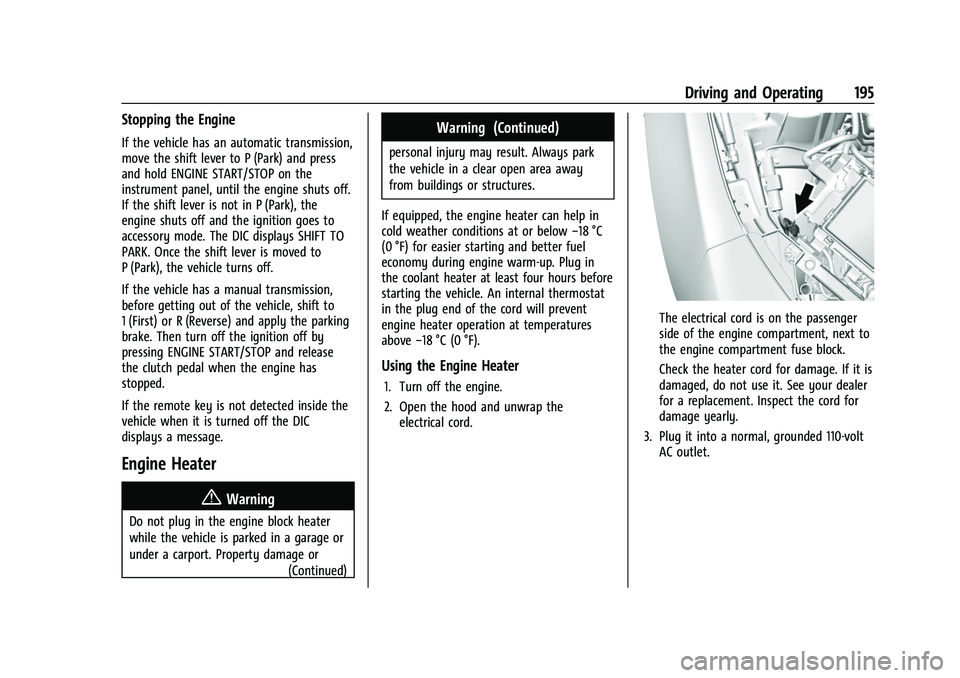
The electrical cord is on the passenger
side of the engine compartment, next to
the engine compartment fuse block.
Check the heater cord for damage. If it is
damaged, do not use it. See your dealer
for a replacement. Inspect the cord for
damage yearly.
3. Plug it into a normal, grounded 110-volt AC outlet.
Page 197 of 345
Chevrolet Camaro Owner Manual (GMNA-Localizing-U.S./Canada/Mexico-
16408685) - 2023 - CRC - 3/28/22
196 Driving and Operating
{Warning
Improper use of the heater cord or an
extension cord can damage the cord and
may result in overheating and fire.
.Plug the cord into a three-prong
electrical utility receptacle that is
protected by a ground fault detection
function. An ungrounded outlet could
cause an electric shock.
.Use a weatherproof, heavy-duty,
15 amp-rated extension cord if needed.
Failure to use the recommended
extension cord in good operating
condition, or using a damaged heater
or extension cord, could make it
overheat and cause a fire, property
damage, electric shock, and injury.
.Do not operate the vehicle with the
heater cord permanently attached to
the vehicle. Possible heater cord and
thermostat damage could occur.(Continued)
Warning (Continued)
.While in use, do not let the heater
cord touch vehicle parts or sharp
edges. Never close the hood on the
heater cord.
.Before starting the vehicle, unplug the
cord, reattach the cover to the plug,
and securely fasten the cord. Keep the
cord away from any moving parts.
4. Before starting the engine, be sure to unplug and store the cord as it was
before to keep it away from moving
engine parts. If you do not it could be
damaged.
The length of time the heater should remain
plugged in depends on several factors. Ask a
dealer in the area where you will be parking
the vehicle for the best advice on this.
Retained Accessory Power (RAP)
When the vehicle is turned from on to off,
the following features (if equipped) will
continue to function for up to 10 minutes,
or until the driver door is opened. These
features will also work when the vehicle is
on or in accessory mode:
.Infotainment System
.Power Windows (during RAP this
functionality will be lost when any door
is opened)
.Sunroof (during RAP this functionality will
be lost when any door is opened)
.Auxiliary Power Outlet
.Audio System
.OnStar System
Shifting Into Park
To shift into P (Park): 1. Hold the brake pedal down and set the parking brake.
See Electric Parking Brake 0206.
2. Move the shift lever into P (Park) by holding in the button on the shift lever
and pushing the shift lever all the way
toward the front of the vehicle.
3. Turn the ignition off.