wheel CHEVROLET CAMARO 2023 Owner's Guide
[x] Cancel search | Manufacturer: CHEVROLET, Model Year: 2023, Model line: CAMARO, Model: CHEVROLET CAMARO 2023Pages: 345, PDF Size: 16.19 MB
Page 177 of 345
Chevrolet Camaro Owner Manual (GMNA-Localizing-U.S./Canada/Mexico-
16408685) - 2023 - CRC - 3/28/22
176 Driving and Operating
applied. Once the power assist is used up, it
can take longer to stop and the brake pedal
will be harder to push.
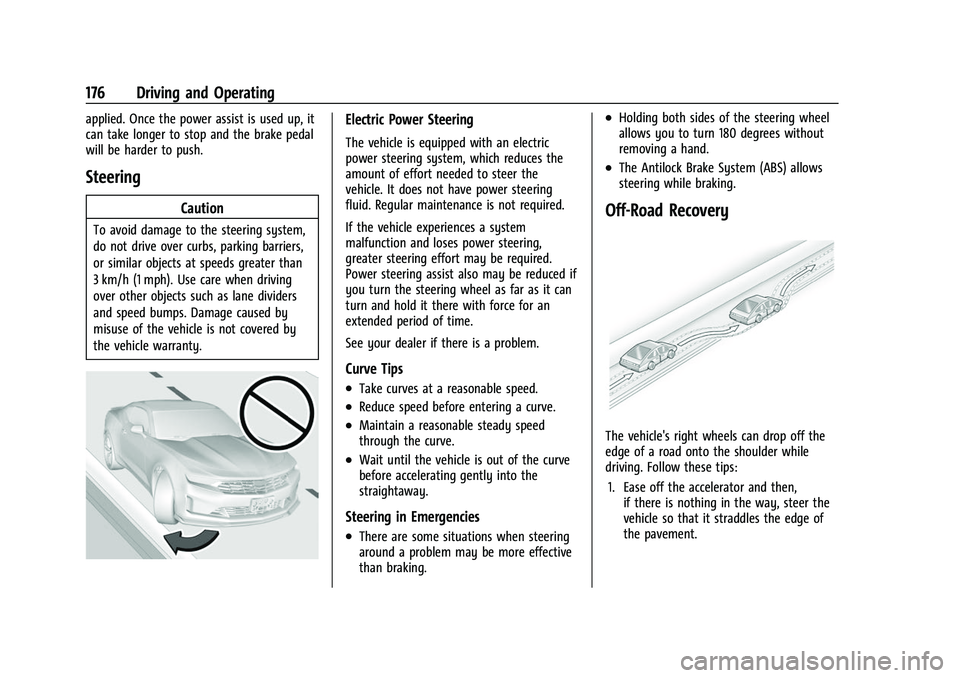
Steering
Caution
To avoid damage to the steering system,
do not drive over curbs, parking barriers,
or similar objects at speeds greater than
3 km/h (1 mph). Use care when driving
over other objects such as lane dividers
and speed bumps. Damage caused by
misuse of the vehicle is not covered by
the vehicle warranty.
Electric Power Steering
The vehicle is equipped with an electric
power steering system, which reduces the
amount of effort needed to steer the
vehicle. It does not have power steering
fluid. Regular maintenance is not required.
If the vehicle experiences a system
malfunction and loses power steering,
greater steering effort may be required.
Power steering assist also may be reduced if
you turn the steering wheel as far as it can
turn and hold it there with force for an
extended period of time.
See your dealer if there is a problem.
Curve Tips
.Take curves at a reasonable speed.
.Reduce speed before entering a curve.
.Maintain a reasonable steady speed
through the curve.
.Wait until the vehicle is out of the curve
before accelerating gently into the
straightaway.
Steering in Emergencies
.There are some situations when steering
around a problem may be more effective
than braking.
.Holding both sides of the steering wheel
allows you to turn 180 degrees without
removing a hand.
.The Antilock Brake System (ABS) allows
steering while braking.
Off-Road Recovery
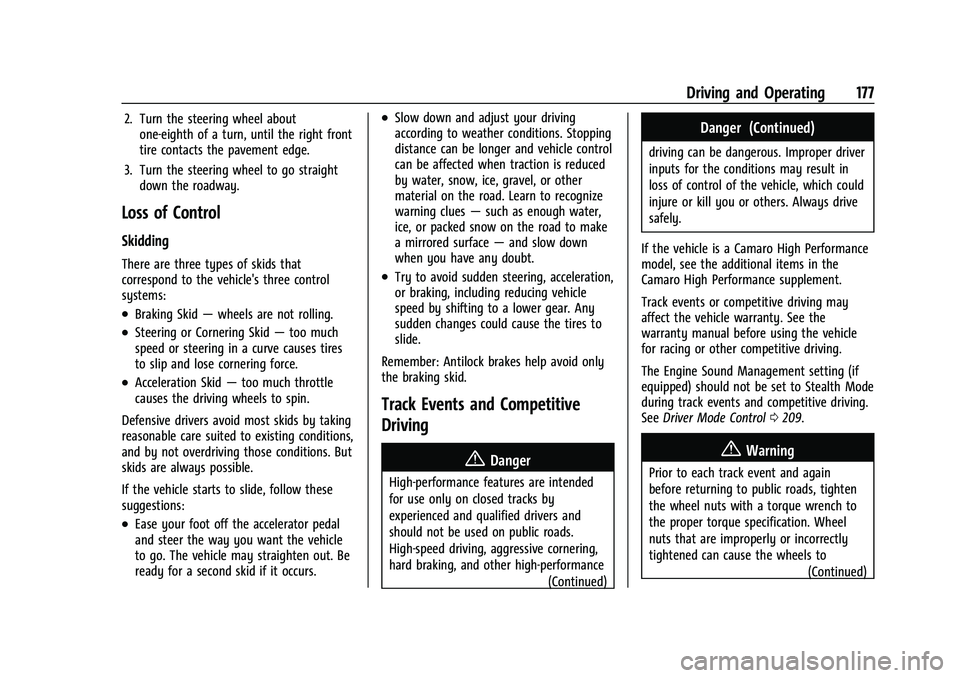
The vehicle's right wheels can drop off the
edge of a road onto the shoulder while
driving. Follow these tips:1. Ease off the accelerator and then, if there is nothing in the way, steer the
vehicle so that it straddles the edge of
the pavement.
Page 178 of 345
Chevrolet Camaro Owner Manual (GMNA-Localizing-U.S./Canada/Mexico-
16408685) - 2023 - CRC - 3/28/22
Driving and Operating 177
2. Turn the steering wheel aboutone-eighth of a turn, until the right front
tire contacts the pavement edge.
3. Turn the steering wheel to go straight down the roadway.
Loss of Control
Skidding
There are three types of skids that
correspond to the vehicle's three control
systems:
.Braking Skid —wheels are not rolling.
.Steering or Cornering Skid —too much
speed or steering in a curve causes tires
to slip and lose cornering force.
.Acceleration Skid —too much throttle
causes the driving wheels to spin.
Defensive drivers avoid most skids by taking
reasonable care suited to existing conditions,
and by not overdriving those conditions. But
skids are always possible.
If the vehicle starts to slide, follow these
suggestions:
.Ease your foot off the accelerator pedal
and steer the way you want the vehicle
to go. The vehicle may straighten out. Be
ready for a second skid if it occurs.
.Slow down and adjust your driving
according to weather conditions. Stopping
distance can be longer and vehicle control
can be affected when traction is reduced
by water, snow, ice, gravel, or other
material on the road. Learn to recognize
warning clues —such as enough water,
ice, or packed snow on the road to make
a mirrored surface —and slow down
when you have any doubt.
.Try to avoid sudden steering, acceleration,
or braking, including reducing vehicle
speed by shifting to a lower gear. Any
sudden changes could cause the tires to
slide.
Remember: Antilock brakes help avoid only
the braking skid.
Track Events and Competitive
Driving
{Danger
High-performance features are intended
for use only on closed tracks by
experienced and qualified drivers and
should not be used on public roads.
High-speed driving, aggressive cornering,
hard braking, and other high-performance (Continued)
Danger (Continued)
driving can be dangerous. Improper driver
inputs for the conditions may result in
loss of control of the vehicle, which could
injure or kill you or others. Always drive
safely.
If the vehicle is a Camaro High Performance
model, see the additional items in the
Camaro High Performance supplement.
Track events or competitive driving may
affect the vehicle warranty. See the
warranty manual before using the vehicle
for racing or other competitive driving.
The Engine Sound Management setting (if
equipped) should not be set to Stealth Mode
during track events and competitive driving.
See Driver Mode Control 0209.
{Warning
Prior to each track event and again
before returning to public roads, tighten
the wheel nuts with a torque wrench to
the proper torque specification. Wheel
nuts that are improperly or incorrectly
tightened can cause the wheels to
(Continued)
Page 179 of 345
Chevrolet Camaro Owner Manual (GMNA-Localizing-U.S./Canada/Mexico-
16408685) - 2023 - CRC - 3/28/22
178 Driving and Operating
Warning (Continued)
become loose or come off, resulting in a
crash. SeeCapacities and Specifications
0 309 for wheel nut torque specifications.
Engine Oil
Caution
If you use the vehicle for racing or other
competitive driving, the engine may use
more oil than it would with normal use.
Low oil levels can damage the engine. For
information on how to add oil, see
Engine Oil0235.
Be sure to check the oil level often during
racing or other competitive driving and
keep the level at or near the upper mark
that shows the proper operating range on
the engine oil dipstick.
3.6L (LGX) V6 Engine
Change the engine oil to 0W-40 or 5W-40
that meets the dexos2 specification. If this
oil is not available, the following oil can be
used as an alternative: Valvoline SYNPOWER
MST 5W-40. For LS/LT 1LE, add 0.9 L (1.0 qt) of oil over
the nominal fill level for a track event. After
the competitive driving, remove the excess
oil so that the level on the dipstick is not
above the upper mark that shows the
proper operating range.
During track usage, do not follow the Engine
Oil Life System status. Change the engine oil
after four hours of accumulative track usage.
6.2L (LT1) V8 Engine
The LT1 engine is factory filled with 0W-40
dexosR oil. 0W-40 dexosR engine oil is
approved for both track and street use with
the LT1 engine. 15W-50 full synthetic engine
oil may also be used for track use, but after
track use must be changed back to 0W-40
dexosR for street use. See
Capacities and
Specifications 0309.
Fuel
Use premium unleaded gasoline with a
posted octane rating of 93 at a track event.
Unleaded gasoline with a posted octane
rating of 91 may be used, but performance
will be degraded.
Automatic Transmission Fluid
Have the transmission fluid checked and set
to proper level prior to track usage.
Transmission fluid should be changed after
every 15 hours of track usage. Any
transmission level set or change should be
performed at your dealer.
Manual Transmission Fluid
Manual transmission fluid should be
changed after every 15 hours of track usage.
Brake Fluid
Replace existing brake fluid with a qualified
high performance DOT 4 brake fluid from a
sealed container. Brake fluid with a dry
boiling point >310 °C (590 °F) is qualified.
If high performance brake fluid is used,
replace it with GM approved brake fluid
before driving on public roads. If high
performance brake fluid is in the vehicle and
the age of the brake fluid is over a month
old or unknown, replace the brake fluid
before track events and competitive driving.
Do not use silicone or DOT 5 brake fluids.
Check the fluid level before each competitive
driving event.
Page 181 of 345
Chevrolet Camaro Owner Manual (GMNA-Localizing-U.S./Canada/Mexico-
16408685) - 2023 - CRC - 3/28/22
180 Driving and Operating
1. Apply the brakes 25 times starting at100 km/h (60 mph) to 50 km/h (30 mph)
while decelerating at 0.4 g. This is a
medium brake application. Drive for at
least 1 km (0.6 mi) between applying the
brakes. This first step may be skipped if
there are more than 320 km (200 mi) on
the brake pads.
2. Repeatedly apply the brakes from 100 km/h (60 mph) to 25 km/h (15 mph)
while decelerating at 0.8 g. This is a hard
brake application, without activating the
Antilock Brake System (ABS). Drive for at
least 1 km (0.6 mi) between stops. Repeat
until the brake pedal travel starts to
increase. Depending on conditions, this
should take no longer than 25 brake
applications.
3. Cool down: Drive at 100 km/h (60 mph) for approximately 15 km (10 mi) without
using the brakes.
4. Apply the brakes 25 times from 100 km/h (60 mph) to 50 km/h (30 mph)
while decelerating at 0.4 g. This is a
medium brake application. Drive for at
least 1 km (0.6 mi) between applications.Front Tire Deflectors, Lower Control Arm
Deflectors, and Disc Splash Shields (SS
except 1LE Only)
Before any racing event, remove the tire
deflectors in the front of the vehicle, and
replace the original deflector and splash
shield with the tall deflector and small
splash shield.
Caution
Race track driving with the original front
disc brake splash shield and front tire
deflector may result in brake pedal fade
due to high rotor temperatures.
To install the tall deflector and small splash
shield:
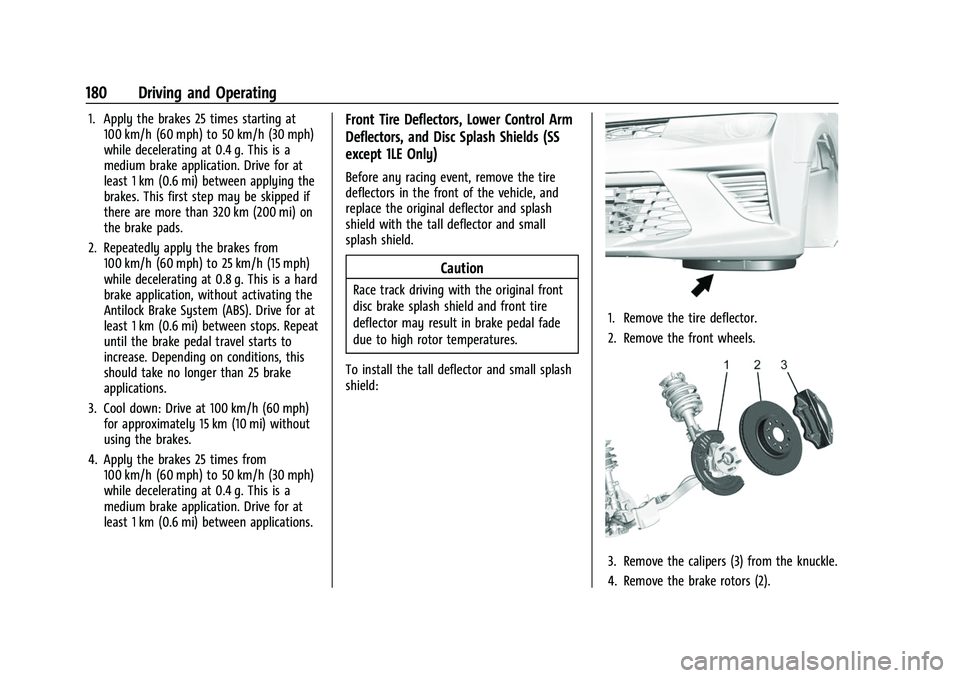
1. Remove the tire deflector.
2. Remove the front wheels.
3. Remove the calipers (3) from the knuckle.
4. Remove the brake rotors (2).
Page 182 of 345
Chevrolet Camaro Owner Manual (GMNA-Localizing-U.S./Canada/Mexico-
16408685) - 2023 - CRC - 3/28/22
Driving and Operating 181
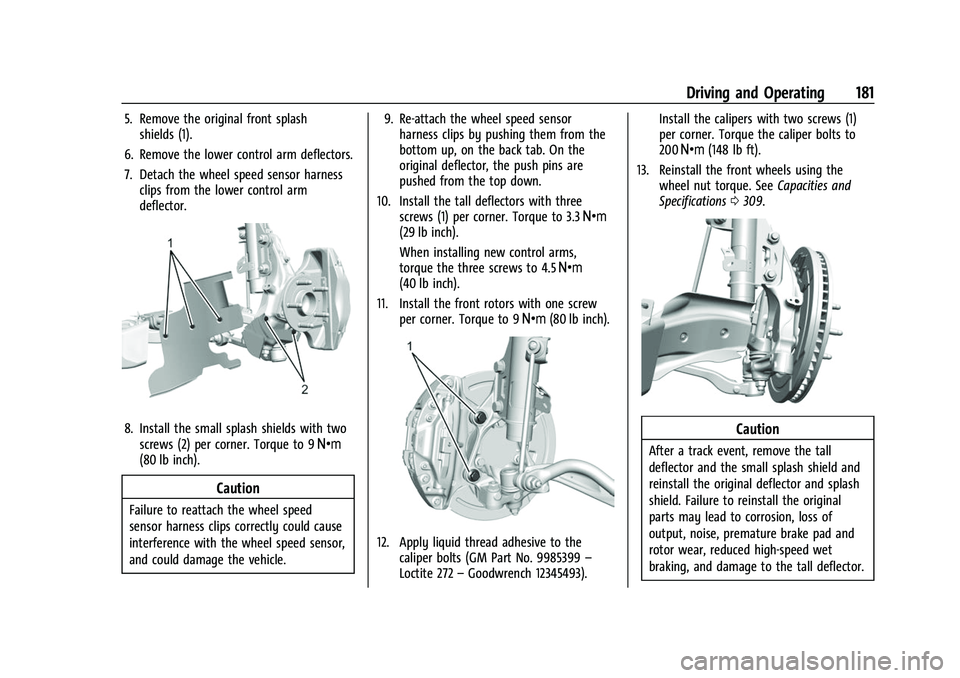
5. Remove the original front splashshields (1).
6. Remove the lower control arm deflectors.
7. Detach the wheel speed sensor harness clips from the lower control arm
deflector.
8. Install the small splash shields with two
screws (2) per corner. Torque to 9 Y
(80 lb inch).
Caution
Failure to reattach the wheel speed
sensor harness clips correctly could cause
interference with the wheel speed sensor,
and could damage the vehicle. 9. Re-attach the wheel speed sensor
harness clips by pushing them from the
bottom up, on the back tab. On the
original deflector, the push pins are
pushed from the top down.
10. Install the tall deflectors with three screws (1) per corner. Torque to 3.3 Y
(29 lb inch).
When installing new control arms,
torque the three screws to 4.5 Y
(40 lb inch).
11. Install the front rotors with one screw per corner. Torque to 9 Y(80 lb inch).
12. Apply liquid thread adhesive to the
caliper bolts (GM Part No. 9985399 –
Loctite 272 –Goodwrench 12345493). Install the calipers with two screws (1)
per corner. Torque the caliper bolts to
200
Y (148 lb ft).
13. Reinstall the front wheels using the wheel nut torque. See Capacities and
Specifications 0309.
Caution
After a track event, remove the tall
deflector and the small splash shield and
reinstall the original deflector and splash
shield. Failure to reinstall the original
parts may lead to corrosion, loss of
output, noise, premature brake pad and
rotor wear, reduced high-speed wet
braking, and damage to the tall deflector.
Page 183 of 345
Chevrolet Camaro Owner Manual (GMNA-Localizing-U.S./Canada/Mexico-
16408685) - 2023 - CRC - 3/28/22
182 Driving and Operating
14. After a track event, repeat the steps toreinstall the original lower control arm
deflectors and splash shields.
15. Reinstall the tire deflectors.
Custom Launch Control (If Equipped)
Custom Launch Control allows the following
parameters for Launch Control to be
modified:
.Launch RPM
.Slip Target (5%–15%)
.Surface Type
To adjust the Launch RPM, all of these
conditions must be met:
.The vehicle must be in Track Mode. See
“Track Mode” underDriver Mode Control
0 209.
.Performance Traction Management (PTM)
Mode must be enabled. For convertibles,
and SS equipped with 10-speed automatic,
Competitive Driving Mode must be
enabled. See Driver Mode Control 0209.
.The steering wheel must be straight.
.The driver door must be closed.
.The transmission must be in a gear other
than R (Reverse). It will work in P (Park)
or N (Neutral).
.The parking brake must not be engaged. For more information on Competitive Driving
Mode, see
Competitive Driving Mode (SS,
ZL1 and 1LE Models Only) 0212.
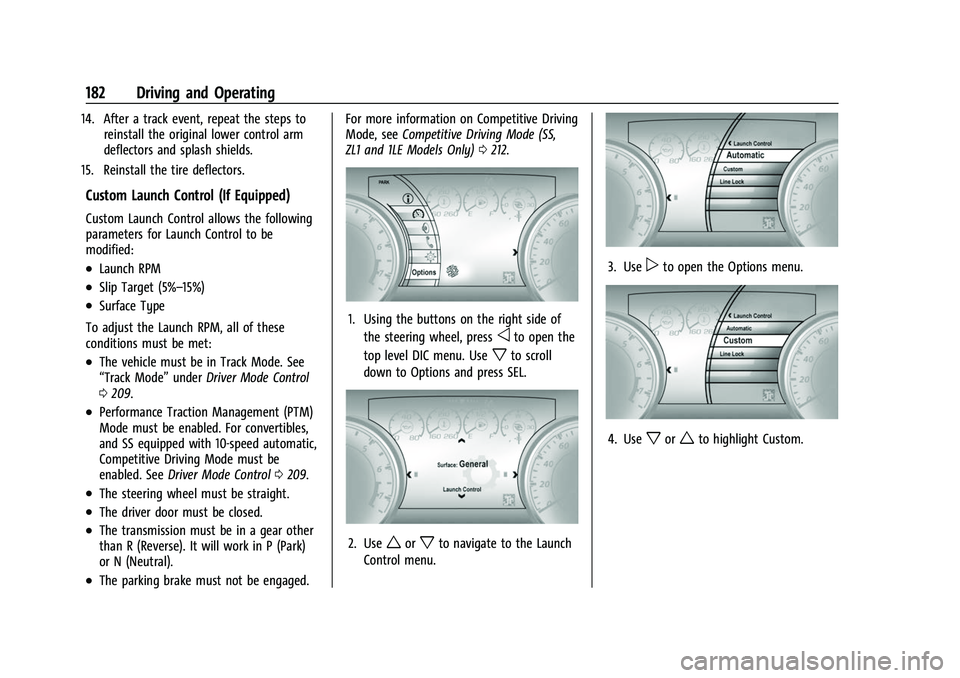
1. Using the buttons on the right side of
the steering wheel, press
oto open the
top level DIC menu. Use
xto scroll
down to Options and press SEL.
2. Useworxto navigate to the Launch
Control menu.
3. Usepto open the Options menu.
4. Usexorwto highlight Custom.
Page 185 of 345
Chevrolet Camaro Owner Manual (GMNA-Localizing-U.S./Canada/Mexico-
16408685) - 2023 - CRC - 3/28/22
184 Driving and Operating
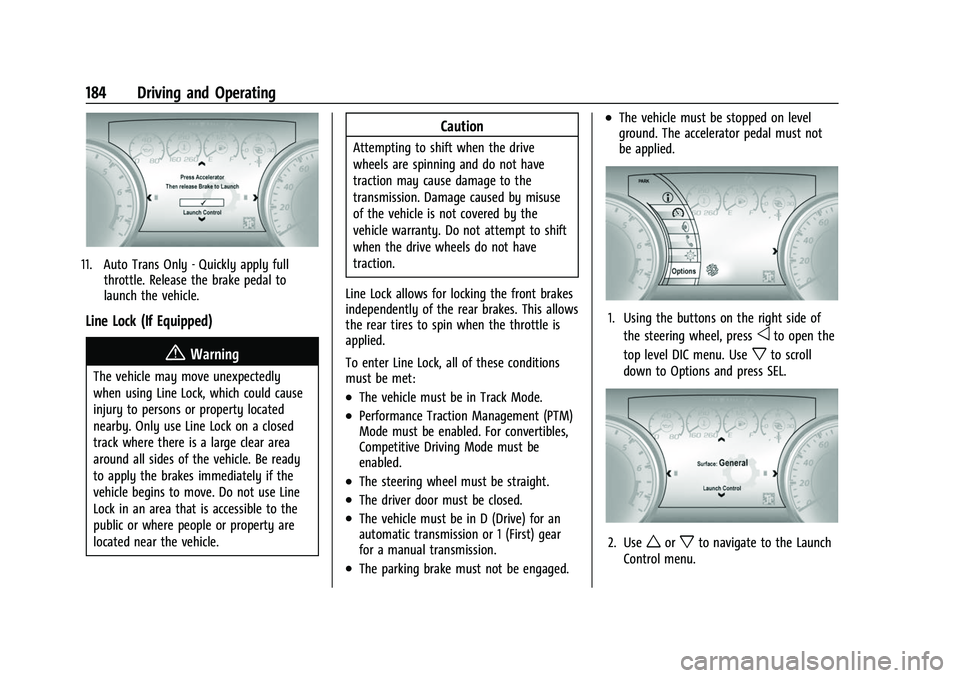
11. Auto Trans Only - Quickly apply fullthrottle. Release the brake pedal to
launch the vehicle.
Line Lock (If Equipped)
{Warning
The vehicle may move unexpectedly
when using Line Lock, which could cause
injury to persons or property located
nearby. Only use Line Lock on a closed
track where there is a large clear area
around all sides of the vehicle. Be ready
to apply the brakes immediately if the
vehicle begins to move. Do not use Line
Lock in an area that is accessible to the
public or where people or property are
located near the vehicle.
Caution
Attempting to shift when the drive
wheels are spinning and do not have
traction may cause damage to the
transmission. Damage caused by misuse
of the vehicle is not covered by the
vehicle warranty. Do not attempt to shift
when the drive wheels do not have
traction.
Line Lock allows for locking the front brakes
independently of the rear brakes. This allows
the rear tires to spin when the throttle is
applied.
To enter Line Lock, all of these conditions
must be met:
.The vehicle must be in Track Mode.
.Performance Traction Management (PTM)
Mode must be enabled. For convertibles,
Competitive Driving Mode must be
enabled.
.The steering wheel must be straight.
.The driver door must be closed.
.The vehicle must be in D (Drive) for an
automatic transmission or 1 (First) gear
for a manual transmission.
.The parking brake must not be engaged.
.The vehicle must be stopped on level
ground. The accelerator pedal must not
be applied.
1. Using the buttons on the right side of the steering wheel, press
oto open the
top level DIC menu. Use
xto scroll
down to Options and press SEL.
2. Useworxto navigate to the Launch
Control menu.
Page 188 of 345
Chevrolet Camaro Owner Manual (GMNA-Localizing-U.S./Canada/Mexico-
16408685) - 2023 - CRC - 3/28/22
Driving and Operating 187
{Warning
Coasting downhill in N (Neutral) or with
the ignition off is dangerous. This can
cause overheating of the brakes and loss
of steering assist. Always have the engine
running and the vehicle in gear.
.Drive at speeds that keep the vehicle in
its own lane. Do not swing wide or cross
the center line.
.Be alert on top of hills; something could
be in your lane (e.g., stalled car, crash).
.Pay attention to special road signs (e.g.,
falling rocks area, winding roads, long
grades, passing or no-passing zones) and
take appropriate action.
Winter Driving
Driving on Snow or IceCaution
To avoid damage to the wheels and
brake components, always clear snow and
ice from inside the wheels and
underneath the vehicle before driving. Snow or ice between the tires and the road
creates less traction or grip, so drive
carefully. Wet ice can occur at about 0 °C
(32 °F) when freezing rain begins to fall.
Avoid driving on wet ice or in freezing rain
until roads can be treated.
For Slippery Road Driving:
.Accelerate gently. Accelerating too quickly
causes the wheels to spin and makes the
surface under the tires slick.
.Turn on Traction Control. See
Traction
Control/Electronic Stability Control 0207.
.The Antilock Brake System (ABS) improves
vehicle stability during hard stops, but
the brakes should be applied sooner than
when on dry pavement. See Antilock
Brake System (ABS) 0205.
.Allow greater following distance and
watch for slippery spots. Icy patches can
occur on otherwise clear roads in shaded
areas. The surface of a curve or an
overpass can remain icy when the
surrounding roads are clear. Avoid sudden
steering maneuvers and braking while
on ice.
.Turn off cruise control.
Blizzard Conditions
Stop the vehicle in a safe place and signal
for help. Stay with the vehicle unless there
is help nearby. If possible, use Roadside
Assistance. See Roadside Assistance Program
0 317. To get help and keep everyone in the
vehicle safe:
.Turn on the hazard warning flashers.
.Tie a red cloth to an outside mirror.
{Warning
Snow can trap engine exhaust under the
vehicle. This may cause exhaust gases to
get inside. Engine exhaust contains
carbon monoxide (CO), which cannot be
seen or smelled. It can cause
unconsciousness and even death.
If the vehicle is stuck in snow:
.Clear snow from the base of the
vehicle, especially any blocking the
exhaust pipe.
.Open a window about 5 cm (2 in) on
the vehicle side that is away from the
wind, to bring in fresh air.
.Fully open the air outlets on or under
the instrument panel.
(Continued)
Page 189 of 345
Chevrolet Camaro Owner Manual (GMNA-Localizing-U.S./Canada/Mexico-
16408685) - 2023 - CRC - 3/28/22
188 Driving and Operating
Warning (Continued)
.Adjust the climate control system to
circulate the air inside the vehicle and
set the fan speed to the highest
setting. See“Climate Control Systems.”
For more information about CO, see
Engine Exhaust 0198.
To save fuel, run the engine for short
periods to warm the vehicle and then shut
the engine off and partially close the
window. Moving about to keep warm also
helps.
If it takes time for help to arrive, when
running the engine, push the accelerator
pedal slightly so the engine runs faster than
the idle speed. This keeps the battery
charged to restart the vehicle and to signal
for help with the headlamps. Do this as
little as possible, to save fuel.
If the Vehicle Is Stuck
Slowly and cautiously spin the wheels to
free the vehicle when stuck in sand, mud,
ice, or snow.
The Traction Control System (TCS) can often
help to free a stuck vehicle. See Traction
Control/Electronic Stability Control 0207. If TCS cannot free the vehicle, turn TCS off
and use the rocking method. See
“Rocking
the Vehicle to Get it Out” following.
{Warning
If the vehicle's tires spin at high speed,
they can explode, and you or others
could be injured. The vehicle can
overheat, causing an engine compartment
fire or other damage. Spin the wheels as
little as possible and avoid going above
56 km/h (35 mph).
Rocking the Vehicle to Get it Out
Turn the steering wheel left and right to
clear the area around the front wheels. Turn
off any traction system. Shift back and forth
between R (Reverse) and a low forward gear,
spinning the wheels as little as possible. To
prevent transmission wear, wait until the
wheels stop spinning before shifting gears.
Release the accelerator pedal while shifting,
and press lightly on the accelerator pedal
when the transmission is in gear. Slowly
spinning the wheels in the forward and
reverse directions causes a rocking motion
that could free the vehicle. If that does not
get the vehicle out after a few tries, it might need to be towed out. If the vehicle
does need to be towed out, see
Transporting
a Disabled Vehicle 0289.
Vehicle Load Limits
It is very important to know how much
weight the vehicle can carry. This
weight is called the vehicle capacity
weight and includes the weight of all
occupants, cargo, and all
nonfactory-installed options. Two labels
on the vehicle may show how much
weight it may properly carry: the Tire
and Loading Information label and the
Certification label.
{Warning
Do not load the vehicle any heavier
than the Gross Vehicle Weight Rating
(GVWR), or either the maximum
front or rear Gross Axle Weight
Rating (GAWR). This can cause
systems to break and change the
way the vehicle handles. This could
cause loss of control and a crash.
(Continued)
Page 200 of 345
Chevrolet Camaro Owner Manual (GMNA-Localizing-U.S./Canada/Mexico-
16408685) - 2023 - CRC - 3/28/22
Driving and Operating 199
Warning (Continued)
.There are holes or openings in the
vehicle body from damage or
aftermarket modifications that are not
completely sealed.
If unusual fumes are detected or if it is
suspected that exhaust is coming into the
vehicle:
.Drive it only with the windows
completely down.
.Have the vehicle repaired immediately.
Never park the vehicle with the engine
running in an enclosed area such as a
garage or a building that has no fresh air
ventilation.
Running the Vehicle While Parked
It is better not to park with the engine
running.
If the vehicle is left with the engine running,
follow the proper steps to be sure the
vehicle will not move. See Shifting Into Park
0 196 and Engine Exhaust 0198. If the
vehicle has a manual transmission, see
Parking (Manual Transmission) 0198.
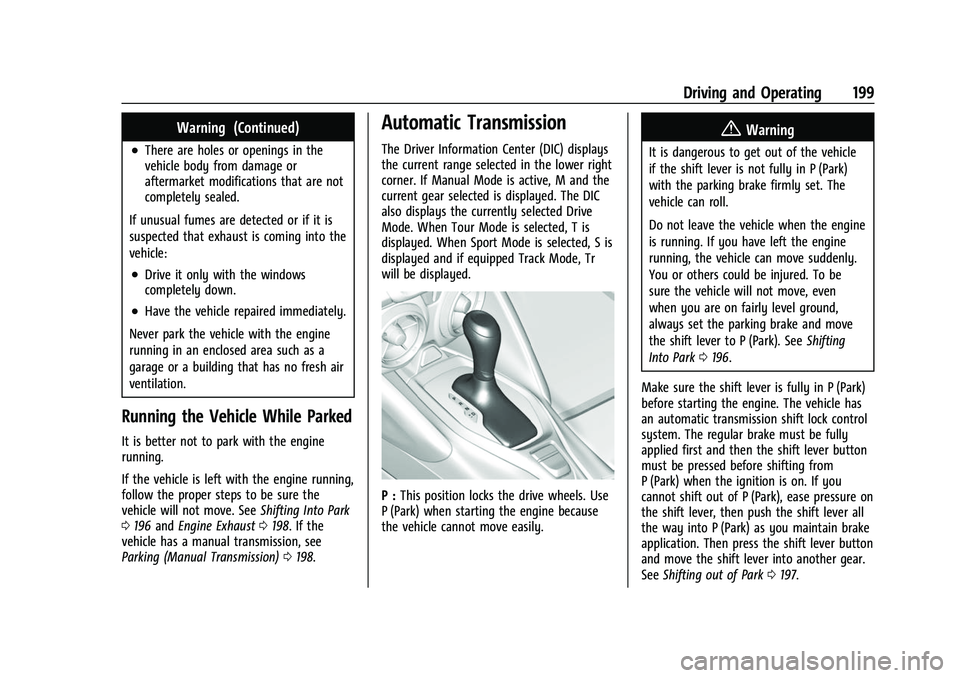
Automatic Transmission
The Driver Information Center (DIC) displays
the current range selected in the lower right
corner. If Manual Mode is active, M and the
current gear selected is displayed. The DIC
also displays the currently selected Drive
Mode. When Tour Mode is selected, T is
displayed. When Sport Mode is selected, S is
displayed and if equipped Track Mode, Tr
will be displayed.
P : This position locks the drive wheels. Use
P (Park) when starting the engine because
the vehicle cannot move easily.
{Warning
It is dangerous to get out of the vehicle
if the shift lever is not fully in P (Park)
with the parking brake firmly set. The
vehicle can roll.
Do not leave the vehicle when the engine
is running. If you have left the engine
running, the vehicle can move suddenly.
You or others could be injured. To be
sure the vehicle will not move, even
when you are on fairly level ground,
always set the parking brake and move
the shift lever to P (Park). See Shifting
Into Park 0196.
Make sure the shift lever is fully in P (Park)
before starting the engine. The vehicle has
an automatic transmission shift lock control
system. The regular brake must be fully
applied first and then the shift lever button
must be pressed before shifting from
P (Park) when the ignition is on. If you
cannot shift out of P (Park), ease pressure on
the shift lever, then push the shift lever all
the way into P (Park) as you maintain brake
application. Then press the shift lever button
and move the shift lever into another gear.
See Shifting out of Park 0197.