steering CHEVROLET CAMARO 2023 Service Manual
[x] Cancel search | Manufacturer: CHEVROLET, Model Year: 2023, Model line: CAMARO, Model: CHEVROLET CAMARO 2023Pages: 345, PDF Size: 16.19 MB
Page 203 of 345
Chevrolet Camaro Owner Manual (GMNA-Localizing-U.S./Canada/Mexico-
16408685) - 2023 - CRC - 3/28/22
202 Driving and Operating
the steering wheel. The paddles are on the
back of the steering wheel. Tap the left
paddle (−) to downshift, and the right
paddle (+) to upshift. The Driver Information
Center (DIC) display indicates the gear the
vehicle is in.
Holding the left paddle for an extended time
will downshift the transmission to the
lowest available gear.
While in Manual Mode, the transmission will
prevent shifting to a lower gear if the
engine speed is too high. If the tap down
−(Minus) paddle is held while the vehicle
slows down, the M in the DIC will flash, and
the downshift will be allowed when vehicle
speed is low enough. Continuing to hold the
tap down −(Minus) paddle will not cause
the transmission to continue downshifting.
Each downshift must be requested
separately by releasing and reapplying the
tap down −(Minus) paddle.
Head-Up Display (HUD)
Vehicles equipped with a Head-Up Display
(HUD) may also have performance shift
timing lights across the top of the display. The rows of lights get closer together as the
maximum shift point gets closer. Shift the
transmission before the lights come together
in the display. Shift immediately if the lights
are flashing.
See
Head-Up Display (HUD) 0102.
Temporary Tap Shift Mode allows brief
entry into Tap Shift Mode while in D (Drive).
Tapping either the upshift or downshift
control will place the transmission in Tap
Shift Mode. Exit Tap Shift Mode by holding
the upshift control for two seconds. The
system will return to automatic shifting
after seven seconds of driving at a steady
speed, or when the vehicle comes to a stop.
This may be used for sport driving or when
climbing or descending hills, to stay in gear
longer, or to downshift for more power or
engine braking. The transmission will only
allow you to shift into gears appropriate for
the vehicle speed and engine revolutions per
minute (rpm). The transmission will not
automatically shift to the next higher gear if
the engine rpm is too high. If shifting is
prevented for any reason, the gear displayed
in the DIC will blink several times, indicating
that the transmission has not shifted gears. While in the Tap Shift Mode, the
transmission will not automatically
downshift on hard acceleration.
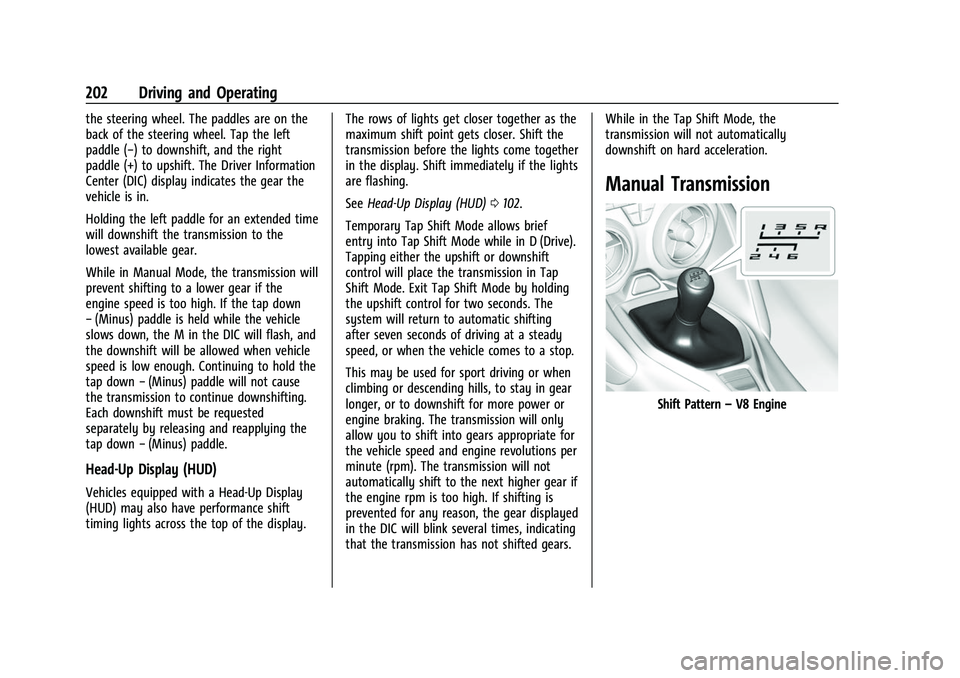
Manual Transmission
Shift Pattern
–V8 Engine
Page 206 of 345
Chevrolet Camaro Owner Manual (GMNA-Localizing-U.S./Canada/Mexico-
16408685) - 2023 - CRC - 3/28/22
Driving and Operating 205
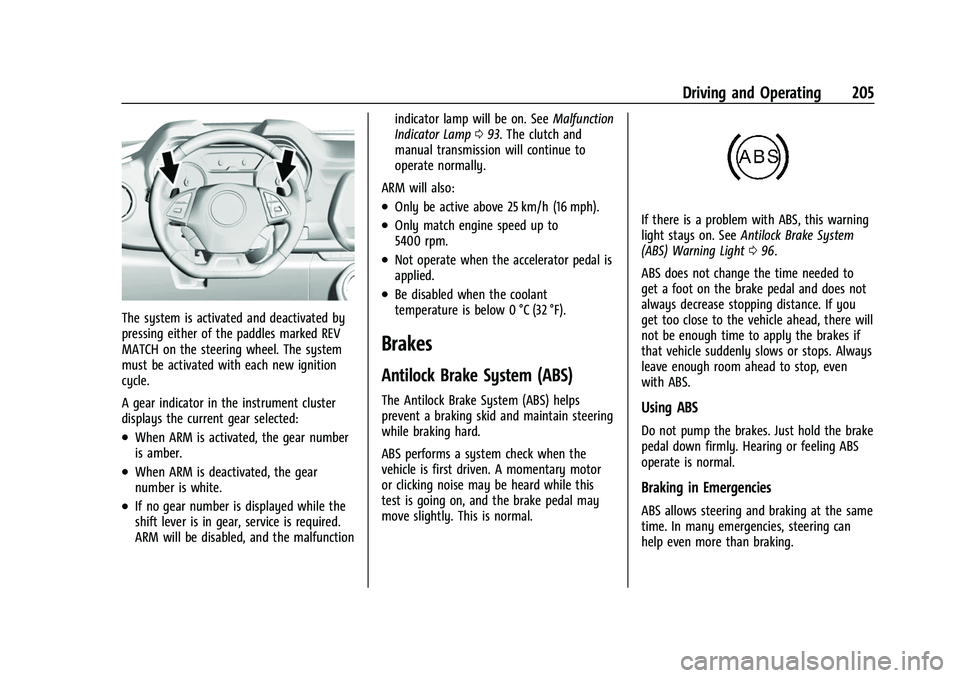
The system is activated and deactivated by
pressing either of the paddles marked REV
MATCH on the steering wheel. The system
must be activated with each new ignition
cycle.
A gear indicator in the instrument cluster
displays the current gear selected:
.When ARM is activated, the gear number
is amber.
.When ARM is deactivated, the gear
number is white.
.If no gear number is displayed while the
shift lever is in gear, service is required.
ARM will be disabled, and the malfunctionindicator lamp will be on. See
Malfunction
Indicator Lamp 093. The clutch and
manual transmission will continue to
operate normally.
ARM will also:
.Only be active above 25 km/h (16 mph).
.Only match engine speed up to
5400 rpm.
.Not operate when the accelerator pedal is
applied.
.Be disabled when the coolant
temperature is below 0 °C (32 °F).
Brakes
Antilock Brake System (ABS)
The Antilock Brake System (ABS) helps
prevent a braking skid and maintain steering
while braking hard.
ABS performs a system check when the
vehicle is first driven. A momentary motor
or clicking noise may be heard while this
test is going on, and the brake pedal may
move slightly. This is normal.
If there is a problem with ABS, this warning
light stays on. See Antilock Brake System
(ABS) Warning Light 096.
ABS does not change the time needed to
get a foot on the brake pedal and does not
always decrease stopping distance. If you
get too close to the vehicle ahead, there will
not be enough time to apply the brakes if
that vehicle suddenly slows or stops. Always
leave enough room ahead to stop, even
with ABS.
Using ABS
Do not pump the brakes. Just hold the brake
pedal down firmly. Hearing or feeling ABS
operate is normal.
Braking in Emergencies
ABS allows steering and braking at the same
time. In many emergencies, steering can
help even more than braking.
Page 210 of 345
Chevrolet Camaro Owner Manual (GMNA-Localizing-U.S./Canada/Mexico-
16408685) - 2023 - CRC - 3/28/22
Driving and Operating 209
To turn TCS on again, pressY. The traction
off light
idisplayed in the instrument
cluster will turn off.
If TCS is limiting wheel spin when
Yis
pressed, the system will not turn off until
the wheels stop spinning.
To turn off both TCS and StabiliTrak/ESC,
press and hold
Yuntil the traction off
light
iand StabiliTrak/ESC OFF lightg
come on and stay on in the instrument
cluster.
To turn TCS and StabiliTrak/ESC on again,
press
Y. The traction off lightiand
StabiliTrak/ESC OFF light
gin the
instrument cluster turn off.
Adding accessories can affect the vehicle
performance. See Accessories and
Modifications 0228.
Engine Drag Control (EDC)
EDC improves vehicle stability by sensing if
there is a difference in speed between the
free rolling front wheels and the rear drive
wheels that often occurs when the driver
takes their foot off the accelerator pedal on
slippery surfaces (snow, ice, etc.). When this
is detected, EDC sends more torque to the rear wheels to make sure all four wheels are
spinning at similar speeds, making the
vehicle more stable.
Driver Mode Control
Driver Mode Control adds a sportier feel,
provides a more comfortable ride, or assists
in different weather conditions or terrain.
This system changes various subsystems to
optimize driving performance. Depending on
the option package, available features, and
mode selected, the exhaust, suspension,
steering, and powertrain will change
calibrations to achieve the desired mode
characteristics. If the vehicle is equipped
with Magnetic Ride Control, selecting the
various Driver modes adjusts the ride of the
vehicle to enhance the ride performance for
the road conditions and the selected mode.
While in the Sport and Track Modes, the
vehicle monitors driving behavior and
automatically enables performance shift
features in the automatic transmission when
spirited driving is detected. These features
maintain lower transmission gears to
increase available engine braking and
improve acceleration response. The vehicle
will exit these features and return to normal
operation after a short period when no
spirited driving is detected.
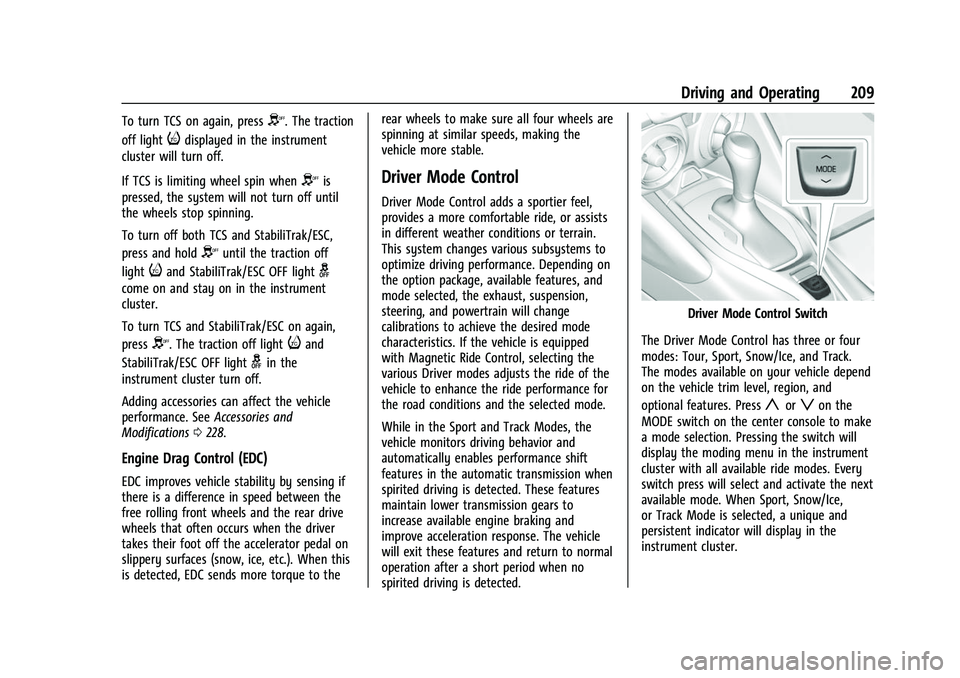
Driver Mode Control Switch
The Driver Mode Control has three or four
modes: Tour, Sport, Snow/Ice, and Track.
The modes available on your vehicle depend
on the vehicle trim level, region, and
optional features. Press
yorzon the
MODE switch on the center console to make
a mode selection. Pressing the switch will
display the moding menu in the instrument
cluster with all available ride modes. Every
switch press will select and activate the next
available mode. When Sport, Snow/Ice,
or Track Mode is selected, a unique and
persistent indicator will display in the
instrument cluster.
Page 211 of 345
Chevrolet Camaro Owner Manual (GMNA-Localizing-U.S./Canada/Mexico-
16408685) - 2023 - CRC - 3/28/22
210 Driving and Operating
Tour Mode
Use for normal city and highway driving to
provide a smooth, soft ride.
This setting provides a balanced setting
between comfort and handling. This is the
standard mode.
Sport Mode
Use where road conditions or personal
preference demand a more controlled
response.
When Sport Mode is selected, the
transmission may downshift to a lower gear
for better performance. The transmission
will continue to shift automatically but can
hold a lower gear longer than it would in
the Tour Mode based on braking, throttle
input, and vehicle lateral acceleration. See
Automatic Transmission0199. The steering
will change to provide more precise control.
Your vehicle may be equipped with the
following features that are supported by
Sport mode:
Magnetic Ride Control : The suspension will
change to provide better cornering
performance. Active Exhaust :
The exhaust valves will
open earlier and more often.
Competitive Driving Mode : It can be
accessed through Sport mode by pressing
g
on the console twice.
Snow/Ice Mode
If equipped, use when more traction is
needed during slippery conditions. The
automatic transmission will upshift normally
when the vehicle is moving. The acceleration
will adjust to help provide a smoother
launch. The automatic transmission will also
shift differently to assist in maintaining
traction.
This feature is not intended for use when
the vehicle is stuck in sand, mud, ice, snow,
or gravel. If the vehicle becomes stuck, see If
the Vehicle Is Stuck 0188.
Track Mode
If equipped, use when maximum vehicle
handling is desired. When Track Mode is selected, the
transmission may downshift to a lower gear
for better performance. The automatic
transmission and steering will function
similar to Sport Mode. The accelerator pedal
is adjusted to give maximum control during
the highest level of spirited driving. The
Magnetic Ride Control will be set to the
optimum level for vehicle responsiveness.
If the vehicle is equipped with Active
Exhaust, the exhaust valves will open.
Performance Traction Management (PTM)
can be accessed through this mode by
pressing
gon the console twice.
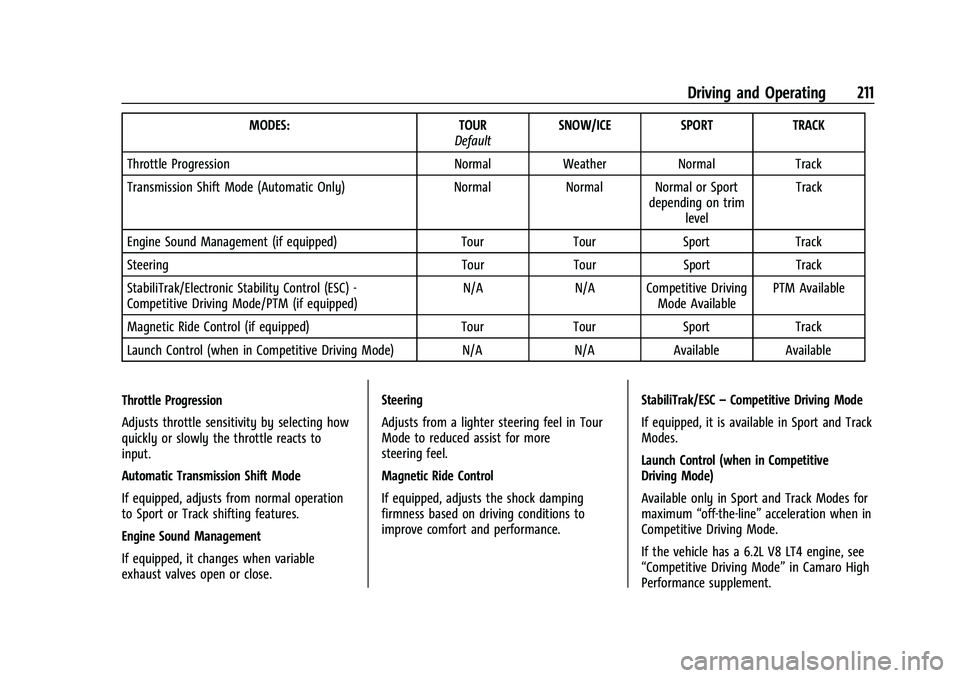
There are attributes that vary by mode
shown below. Not all vehicles have all
features, depending on the vehicle options.
Page 212 of 345
Chevrolet Camaro Owner Manual (GMNA-Localizing-U.S./Canada/Mexico-
16408685) - 2023 - CRC - 3/28/22
Driving and Operating 211
MODES:TOUR
Default SNOW/ICE SPORT
TRACK
Throttle Progression NormalWeather Normal Track
Transmission Shift Mode (Automatic Only) NormalNormal Normal or Sport
depending on trimlevel Track
Engine Sound Management (if equipped) TourTourSport Track
Steering TourTourSport Track
StabiliTrak/Electronic Stability Control (ESC) -
Competitive Driving Mode/PTM (if equipped) N/A
N/A Competitive Driving
Mode Available PTM Available
Magnetic Ride Control (if equipped) TourTourSport Track
Launch Control (when in Competitive Driving Mode) N/A N/AAvailable Available
Throttle Progression
Adjusts throttle sensitivity by selecting how
quickly or slowly the throttle reacts to
input.
Automatic Transmission Shift Mode
If equipped, adjusts from normal operation
to Sport or Track shifting features.
Engine Sound Management
If equipped, it changes when variable
exhaust valves open or close. Steering
Adjusts from a lighter steering feel in Tour
Mode to reduced assist for more
steering feel.
Magnetic Ride Control
If equipped, adjusts the shock damping
firmness based on driving conditions to
improve comfort and performance.
StabiliTrak/ESC
–Competitive Driving Mode
If equipped, it is available in Sport and Track
Modes.
Launch Control (when in Competitive
Driving Mode)
Available only in Sport and Track Modes for
maximum “off-the-line” acceleration when in
Competitive Driving Mode.
If the vehicle has a 6.2L V8 LT4 engine, see
“Competitive Driving Mode” in Camaro High
Performance supplement.
Page 214 of 345
Chevrolet Camaro Owner Manual (GMNA-Localizing-U.S./Canada/Mexico-
16408685) - 2023 - CRC - 3/28/22
Driving and Operating 213
A Launch Control feature is available, within
Competitive Driving Mode, to allow the
driver to achieve high levels of vehicle
acceleration in a straight line. Launch
Control is a form of traction control that
manages tire spin while launching the
vehicle. This feature is intended for use
during closed course race events where
consistent zero to sixty and quarter mile
times are desirable.
Launch Control is only available when the
following criteria are met:
.Competitive Driving Mode is selected.
.The vehicle is not moving.
.The steering wheel is pointing straight.
Manual Transmissions
.The clutch is pressed to floor and the
vehicle is in 1 (First) gear.
.The accelerator pedal is rapidly applied to
wide open throttle.
The Launch Control feature will initially limit
engine speed as the driver rapidly applies
the accelerator pedal to wide open throttle.
Allow the engine rpm to stabilize. A smooth,
quick release of the clutch, while
maintaining the fully pressed accelerator pedal, will manage wheel slip. Complete
shifts are described in
Manual Transmission
0 202.
Automatic Transmissions
.The brake pedal must be firmly pressed
to the floor, equivalent to a panic brake
event.
.The accelerator pedal is rapidly applied to
wide open throttle. (If the vehicle rolls
due to wide open throttle, release the
throttle, press the brake pedal more
firmly, and re-apply the accelerator to
wide open throttle.)
After the vehicle is launched, the system
continues in Competitive Driving Mode.
Competitive Driving Mode and Launch
Control are systems designed for a closed
course race track and not intended for use
on public roads. The systems are not
intended to compensate for lack of driver
experience or familiarity with the race track.
Limited-Slip Rear Axle
Vehicles with a limited-slip rear axle can
give more traction on snow, mud, ice, sand,
or gravel. When traction is low, this feature
allows the drive wheel with the most
traction to move the vehicle. The limited-slip
rear axle also gives the driver enhanced
control when cornering hard or completing a
maneuver, such as a lane change. For
vehicles with limited-slip differential, driven
under severe conditions, the rear axle fluid
should be changed. See Competitive Driving
Mode (SS, ZL1 and 1LE Models Only) 0212
and Maintenance Schedule 0300.
Cruise Control
When using cruise control, the vehicle can
maintain a speed of about 40 km/h (25 mph)
or more without keeping your foot on the
accelerator. Cruise control does not work at
speeds below 40 km/h (25 mph).
{Warning
Cruise control can be dangerous where
you cannot drive safely at a steady
speed. Do not use cruise control on
winding roads or in heavy traffic.
(Continued)
Page 220 of 345
Chevrolet Camaro Owner Manual (GMNA-Localizing-U.S./Canada/Mexico-
16408685) - 2023 - CRC - 3/28/22
Driving and Operating 219
Rear Cross Traffic Alert (RCTA)
System
If equipped, RCTA displays a red warning
triangle with a left or right pointing arrow
to warn of traffic coming from the left or
right. This system detects objects coming
from up to 20 m (65 ft) from the left or
right side of the vehicle. When an object is
detected, three beeps sound from the left or
right, depending on the direction of the
detected vehicle.
Turning the Features On or Off
To view available settings for this feature,
touch the Settings icon on the infotainment
home page. Select“Vehicle”to display the
list of available options and select “Collision/
Detection Systems”.
Forward Collision Alert (FCA)
System
If equipped, the FCA system may help to
avoid or reduce the harm caused by
front-end crashes. When approaching a
vehicle ahead too quickly, FCA provides a
red flashing alert on the windshield and rapidly beeps. FCA also lights an amber
visual alert if following another vehicle
much too closely.
FCA detects vehicles within a distance of
approximately 60 m (197 ft) and operates at
speeds above 8 km/h (5 mph).
{Warning
FCA is a warning system and does not
apply the brakes. When approaching a
slower-moving or stopped vehicle ahead
too rapidly, or when following a vehicle
too closely, FCA may not provide a
warning with enough time to help avoid
a crash. It also may not provide any
warning at all. FCA does not warn of
pedestrians, animals, signs, guardrails,
bridges, construction barrels, or other
objects. Be ready to take action and
apply the brakes. See
Defensive Driving
0 175.
FCA can be disabled with the FCA steering
wheel control.
Detecting the Vehicle Ahead
FCA warnings will not occur unless the FCA
system detects a vehicle ahead. When a
vehicle is detected, the vehicle ahead
indicator will display green. Vehicles may
not be detected on curves, highway exit
ramps, or hills, due to poor visibility; or if a
vehicle ahead is partially blocked by
pedestrians or other objects. FCA will not
detect another vehicle ahead until it is
completely in the driving lane.
{Warning
FCA does not provide a warning to help
avoid a crash, unless it detects a vehicle.
FCA may not detect a vehicle ahead if
the FCA sensor is blocked by dirt, snow,
or ice, or if the windshield is damaged.
It may also not detect a vehicle on
winding or hilly roads, or in conditions
that can limit visibility such as fog, rain, (Continued)
Page 221 of 345
Chevrolet Camaro Owner Manual (GMNA-Localizing-U.S./Canada/Mexico-
16408685) - 2023 - CRC - 3/28/22
220 Driving and Operating
Warning (Continued)
or snow, or if the headlamps or
windshield are not cleaned or in proper
condition. Keep the windshield,
headlamps, and FCA sensors clean and in
good repair.
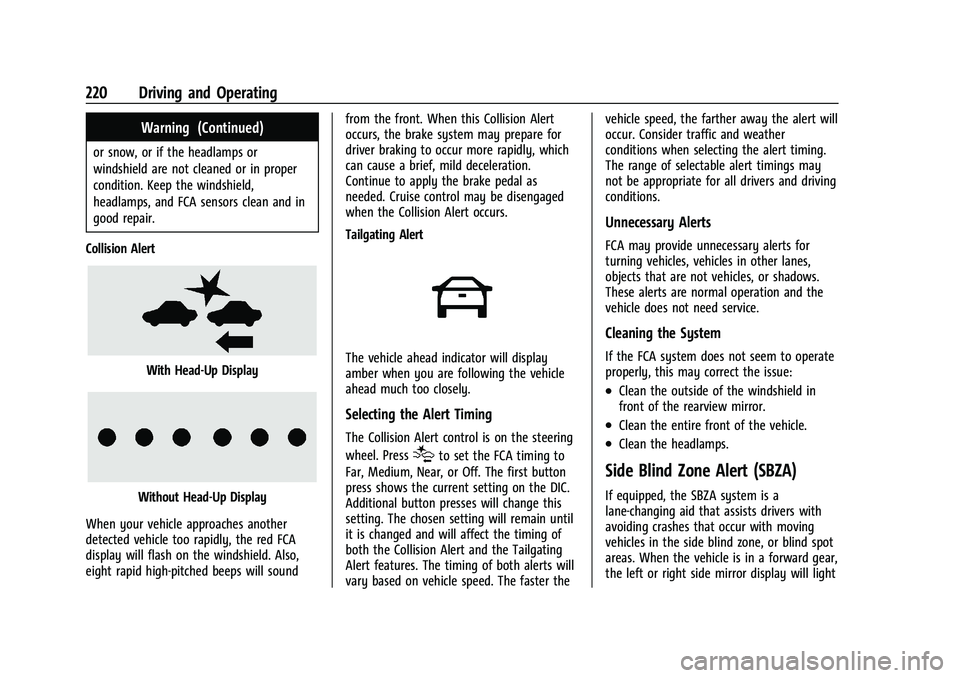
Collision Alert
With Head-Up Display
Without Head-Up Display
When your vehicle approaches another
detected vehicle too rapidly, the red FCA
display will flash on the windshield. Also,
eight rapid high-pitched beeps will sound from the front. When this Collision Alert
occurs, the brake system may prepare for
driver braking to occur more rapidly, which
can cause a brief, mild deceleration.
Continue to apply the brake pedal as
needed. Cruise control may be disengaged
when the Collision Alert occurs.
Tailgating Alert
The vehicle ahead indicator will display
amber when you are following the vehicle
ahead much too closely.
Selecting the Alert Timing
The Collision Alert control is on the steering
wheel. Press
[to set the FCA timing to
Far, Medium, Near, or Off. The first button
press shows the current setting on the DIC.
Additional button presses will change this
setting. The chosen setting will remain until
it is changed and will affect the timing of
both the Collision Alert and the Tailgating
Alert features. The timing of both alerts will
vary based on vehicle speed. The faster the vehicle speed, the farther away the alert will
occur. Consider traffic and weather
conditions when selecting the alert timing.
The range of selectable alert timings may
not be appropriate for all drivers and driving
conditions.
Unnecessary Alerts
FCA may provide unnecessary alerts for
turning vehicles, vehicles in other lanes,
objects that are not vehicles, or shadows.
These alerts are normal operation and the
vehicle does not need service.
Cleaning the System
If the FCA system does not seem to operate
properly, this may correct the issue:
.Clean the outside of the windshield in
front of the rearview mirror.
.Clean the entire front of the vehicle.
.Clean the headlamps.
Side Blind Zone Alert (SBZA)
If equipped, the SBZA system is a
lane-changing aid that assists drivers with
avoiding crashes that occur with moving
vehicles in the side blind zone, or blind spot
areas. When the vehicle is in a forward gear,
the left or right side mirror display will light
Page 259 of 345
Chevrolet Camaro Owner Manual (GMNA-Localizing-U.S./Canada/Mexico-
16408685) - 2023 - CRC - 3/28/22
258 Vehicle Care
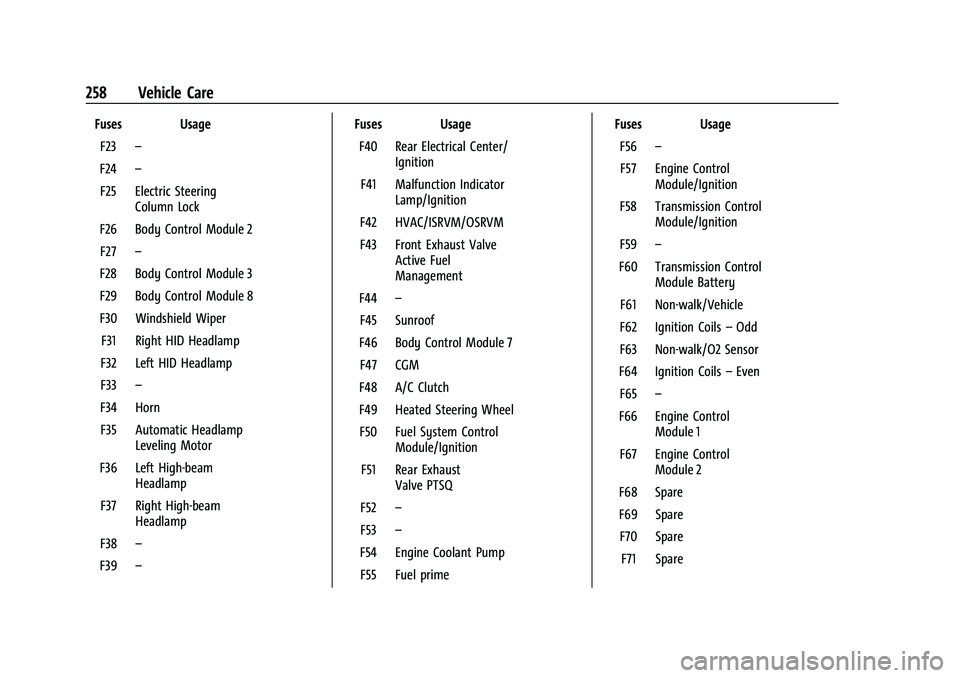
Fuses UsageF23 –
F24 –
F25 Electric Steering Column Lock
F26 Body Control Module 2 F27 –
F28 Body Control Module 3
F29 Body Control Module 8
F30 Windshield Wiper F31 Right HID Headlamp
F32 Left HID Headlamp
F33 –
F34 Horn F35 Automatic Headlamp Leveling Motor
F36 Left High-beam Headlamp
F37 Right High-beam Headlamp
F38 –
F39 – Fuses Usage
F40 Rear Electrical Center/ Ignition
F41 Malfunction Indicator Lamp/Ignition
F42 HVAC/ISRVM/OSRVM
F43 Front Exhaust Valve Active Fuel
Management
F44 –
F45 Sunroof
F46 Body Control Module 7 F47 CGM
F48 A/C Clutch
F49 Heated Steering Wheel F50 Fuel System Control Module/Ignition
F51 Rear Exhaust Valve PTSQ
F52 –
F53 –
F54 Engine Coolant Pump F55 Fuel prime Fuses Usage
F56 –
F57 Engine Control Module/Ignition
F58 Transmission Control Module/Ignition
F59 –
F60 Transmission Control Module Battery
F61 Non-walk/Vehicle
F62 Ignition Coils –Odd
F63 Non-walk/O2 Sensor
F64 Ignition Coils –Even
F65 –
F66 Engine Control Module 1
F67 Engine Control Module 2
F68 Spare
F69 Spare F70 Spare F71 Spare
Page 261 of 345
Chevrolet Camaro Owner Manual (GMNA-Localizing-U.S./Canada/Mexico-
16408685) - 2023 - CRC - 3/28/22
260 Vehicle Care
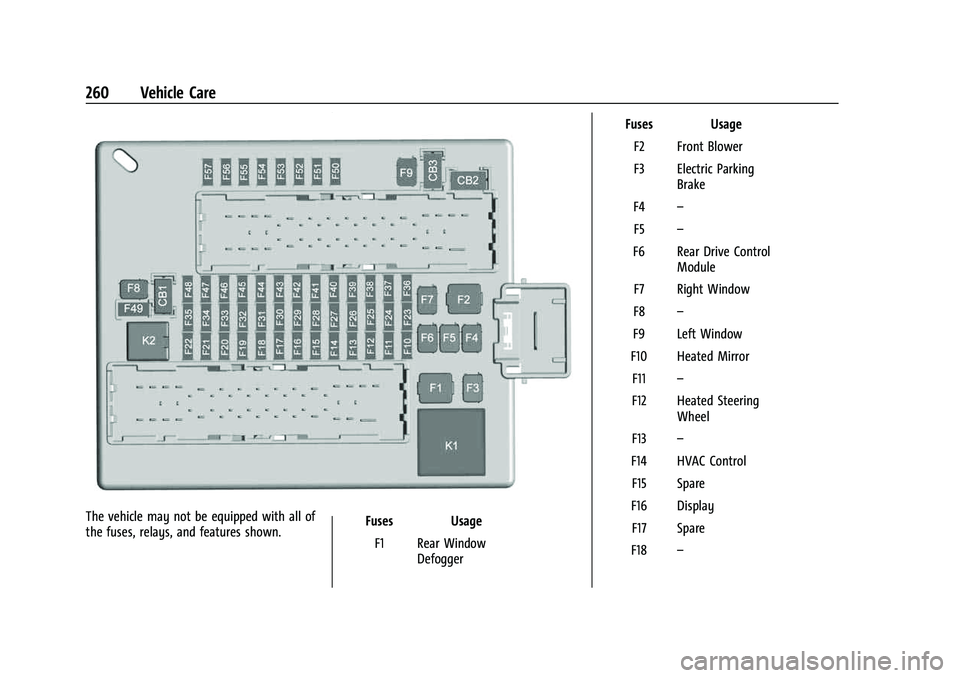
The vehicle may not be equipped with all of
the fuses, relays, and features shown.Fuses Usage
F1 Rear Window Defogger Fuses Usage
F2 Front Blower
F3 Electric Parking Brake
F4 –
F5 –
F6 Rear Drive Control Module
F7 Right Window
F8 –
F9 Left Window
F10 Heated Mirror F11 –
F12 Heated Steering Wheel
F13 –
F14 HVAC Control F15 Spare
F16 Display F17 Spare
F18 –