display CHEVROLET CAMARO 2023 Manual Online
[x] Cancel search | Manufacturer: CHEVROLET, Model Year: 2023, Model line: CAMARO, Model: CHEVROLET CAMARO 2023Pages: 345, PDF Size: 16.19 MB
Page 165 of 345
Chevrolet Camaro Owner Manual (GMNA-Localizing-U.S./Canada/Mexico-
16408685) - 2023 - CRC - 3/28/22
164 Infotainment System
ITS AFFILIATES OR THEIR LICENSORS. YOU
ASSUME ANY RISKS ASSOCIATED WITH YOUR
USE OF THE SOFTWARE UNDER THIS LICENSE.
EXCEPT TO THE EXTENT OTHERWISE
REQUIRED BY APPLICABLE LAW (SUCH AS IN
THE CASE OF DELIBERATE OR GROSSLY
NEGLIGENT ACTS), IN NO EVENT SHALL QSSC,
ITS AFFILIATES OR THEIR LICENSORS BE
LIABLE TO YOU UNDER ANY LEGAL THEORY,
WHETHER IN TORT (INCLUDING NEGLIGENCE),
CONTRACT OR OTHERWISE, FOR DAMAGES,
INCLUDING ANY DIRECT, INDIRECT, SPECIAL,
INCIDENTAL, OR CONSEQUENTIAL DAMAGES
OF ANY CHARACTER ARISING AS A RESULT OF
THIS LICENSE OR OUT OF THE USE OR
INABILITY TO USE THE PRODUCT (INCLUDING
BUT NOT LIMITED TO DAMAGES FOR LOSS
OF GOODWILL, WORK STOPPAGE, PRODUCT
FAILURE OR MALFUNCTION, OR ANY AND ALL
OTHER COMMERCIAL DAMAGES OR LOSSES),
EVEN IF QSSC, ITS AFFILIATES OR THEIR
LICENSORS HAVE BEEN ADVISED OF THE
POSSIBILITY OF SUCH DAMAGES.WMA
This product is protected by certain
intellectual property rights of Microsoft. Use
or distribution of such technology outside of
this product is prohibited without a license
from Microsoft.
For more information on the Software,
including any open source software license
terms (and available source code) as well as
copyright attributions applicable to the
Runtime Configuration indicated above,
please contact the Manufacturer or contact
QSSC at 175 Terence Matthews Crescent,
Kanata, Ontario, Canada K2M 1W8
([email protected]).
Linotype
Helvetica is a trademark of Linotype Corp.
registered in the U.S. Patent and Trademark
Office and may be registered in certain
other jurisdictions in the name of Linotype
Corp. or its licensee Linotype GmbH.
Usage in text form of each of the Licensed
Trademarks is:
The trademark attribution requirements for
the Licensed Trademarks may be viewed at
https://www.linotype.com/2061-19414/
trademarks.html.END USER NOTICE
The marks of companies displayed by this
product to indicate business locations are
the marks of their respective owners. The
use of such marks in this product does not
imply any sponsorship, approval,
or endorsement by such companies of this
product.
Page 167 of 345
Chevrolet Camaro Owner Manual (GMNA-Localizing-U.S./Canada/Mexico-
16408685) - 2023 - CRC - 3/28/22
166 Climate Controls
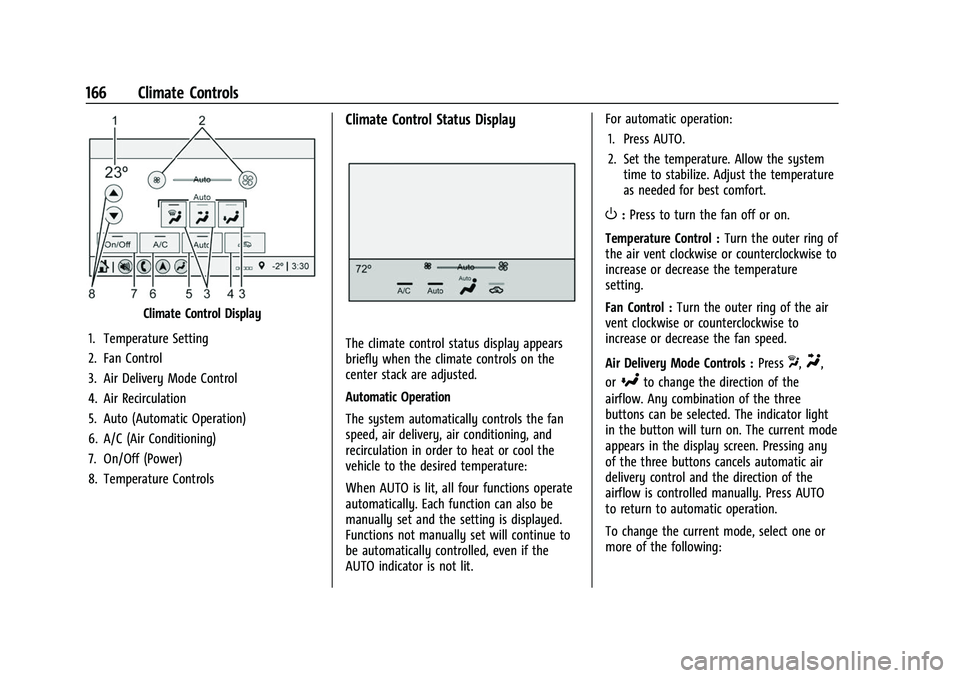
Climate Control Display
1. Temperature Setting
2. Fan Control
3. Air Delivery Mode Control
4. Air Recirculation
5. Auto (Automatic Operation)
6. A/C (Air Conditioning)
7. On/Off (Power)
8. Temperature Controls
Climate Control Status Display
The climate control status display appears
briefly when the climate controls on the
center stack are adjusted.
Automatic Operation
The system automatically controls the fan
speed, air delivery, air conditioning, and
recirculation in order to heat or cool the
vehicle to the desired temperature:
When AUTO is lit, all four functions operate
automatically. Each function can also be
manually set and the setting is displayed.
Functions not manually set will continue to
be automatically controlled, even if the
AUTO indicator is not lit. For automatic operation:
1. Press AUTO.
2. Set the temperature. Allow the system time to stabilize. Adjust the temperature
as needed for best comfort.
O:Press to turn the fan off or on.
Temperature Control : Turn the outer ring of
the air vent clockwise or counterclockwise to
increase or decrease the temperature
setting.
Fan Control : Turn the outer ring of the air
vent clockwise or counterclockwise to
increase or decrease the fan speed.
Air Delivery Mode Controls : Press
X,Y,
or
[to change the direction of the
airflow. Any combination of the three
buttons can be selected. The indicator light
in the button will turn on. The current mode
appears in the display screen. Pressing any
of the three buttons cancels automatic air
delivery control and the direction of the
airflow is controlled manually. Press AUTO
to return to automatic operation.
To change the current mode, select one or
more of the following:
Page 170 of 345
Chevrolet Camaro Owner Manual (GMNA-Localizing-U.S./Canada/Mexico-
16408685) - 2023 - CRC - 3/28/22
Climate Controls 169
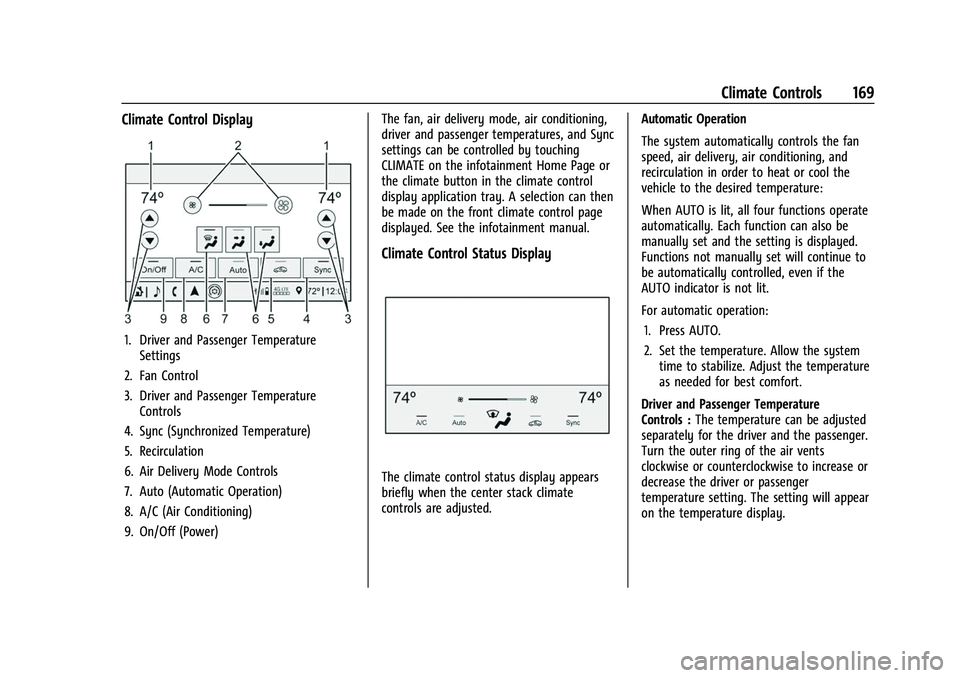
Climate Control Display
1. Driver and Passenger TemperatureSettings
2. Fan Control
3. Driver and Passenger Temperature Controls
4. Sync (Synchronized Temperature)
5. Recirculation
6. Air Delivery Mode Controls
7. Auto (Automatic Operation)
8. A/C (Air Conditioning)
9. On/Off (Power) The fan, air delivery mode, air conditioning,
driver and passenger temperatures, and Sync
settings can be controlled by touching
CLIMATE on the infotainment Home Page or
the climate button in the climate control
display application tray. A selection can then
be made on the front climate control page
displayed. See the infotainment manual.
Climate Control Status Display
The climate control status display appears
briefly when the center stack climate
controls are adjusted.
Automatic Operation
The system automatically controls the fan
speed, air delivery, air conditioning, and
recirculation in order to heat or cool the
vehicle to the desired temperature:
When AUTO is lit, all four functions operate
automatically. Each function can also be
manually set and the setting is displayed.
Functions not manually set will continue to
be automatically controlled, even if the
AUTO indicator is not lit.
For automatic operation:
1. Press AUTO.
2. Set the temperature. Allow the system time to stabilize. Adjust the temperature
as needed for best comfort.
Driver and Passenger Temperature
Controls : The temperature can be adjusted
separately for the driver and the passenger.
Turn the outer ring of the air vents
clockwise or counterclockwise to increase or
decrease the driver or passenger
temperature setting. The setting will appear
on the temperature display.
Page 171 of 345
Chevrolet Camaro Owner Manual (GMNA-Localizing-U.S./Canada/Mexico-
16408685) - 2023 - CRC - 3/28/22
170 Climate Controls
SYNC :Press to link the passenger climate
temperature settings to the driver setting.
The SYNC indicator light will turn on. When
the passenger settings are adjusted, the
SYNC indicator light turns off.
Manual Operation
O: Press to turn the fan off or on.
hori:Press to increase or decrease the
fan speed.
Air Delivery Mode Controls : Press
X,Y,
or
[to change the direction of the
airflow. Any combination of the three
buttons can be selected. The indicator light
in the button will turn on. The current mode
appears in the display screen. Pressing any
of the three buttons cancels automatic air
delivery control and the direction of the
airflow is controlled manually. Press AUTO
to return to automatic operation.
To change the current mode, select one or
more of the following:
X: Clears the windows of fog or moisture.
Air is directed to the windshield and side
window outlets.
Y: Air is directed to the instrument panel
outlets.
[: Air is directed to the floor outlets.
0:Clears the windshield of fog or frost
more quickly. Air is only directed to the
windshield and side window outlets. The air
conditioning may turn on automatically to
remove fog.
For best results, clear all snow and ice from
the windshield before defrosting.
Do not drive the vehicle until all windows
are clear.
Air Conditioning
A/C : Press to turn the air conditioning on
or off. An indicator light turns on. If the fan
is turned off or the outside temperature
falls below freezing, the air conditioning will
not run, but the indicator light will be lit.
The air conditioning might automatically
come on when
0is selected.
@: Press to turn on recirculation. An
indicator light comes on. Air is recirculated
inside the vehicle. It helps to quickly cool
the air inside the vehicle or reduce the
outside air and odors that may enter.
Operation in the recirculation mode while
the air conditioner is off increases humidity
and may cause the windows to fog. Recirculation is not available in the defrost
or defog modes.
To improve fuel efficiency and to cool the
vehicle faster, recirculation may be
automatically selected in warm weather. The
recirculation light will not come on. Press
@to select recirculation; press it again to
select outside air.
Rear Window Defogger
1: Press to turn the rear window
defogger on or off. An indicator light on the
button comes on to show that the rear
window defogger is on. The defogger turns
off if the ignition is turned off or to
accessory mode.
To turn Auto Defog off or on, select Settings
> Climate and Air Quality > Auto Rear Defog
> Select ON or OFF. When Auto Rear Defog
is selected, the rear window defogger turns
on automatically when the interior
temperature is cold and the outside
temperature is about 7 °C (44 °F) and below.
The heated outside mirrors turn on when
the rear window defogger button is on and
help to clear fog or frost from the surface of
the mirrors.
Page 193 of 345

Chevrolet Camaro Owner Manual (GMNA-Localizing-U.S./Canada/Mexico-
16408685) - 2023 - CRC - 3/28/22
192 Driving and Operating
Caution (Continued)
.Do not participate in racing events,
sport driving schools, or similar
activities during this break-in period.
.Check engine oil with every refueling
and add if necessary. Oil and fuel
consumption may be higher than
normal during the first
2 414 km (1,500 mi).
.To break in new tires, drive at
moderate speeds and avoid hard
cornering for the first 322 km (200 mi).
New tires do not have maximum
traction and may tend to slip.
.New brake linings also need a break-in
period. Avoid making hard stops
during the first 322 km (200 mi). This
is recommended every time brake
linings are replaced.
.Should the vehicle be used for racing
or competitive driving (after break-in),
the rear axle lubricant must be
replaced beforehand.
See Track Events and Competitive Driving
0 177. On new vehicles, the various mechanical and
electrical systems experience a
“break-in”
period during the first 6,400 km
(4,000 miles) of routine driving. As the
vehicle is driven, the mechanical systems
adjust to provide optimal fuel economy and
transmission shift performance.
Electrical systems will adapt and calibrate
during the break-in period. A one-time
occurrence of clicks and similar vehicle
noises is normal during this process.
Normal driving charges the vehicle’s battery
to achieve the best operation of the vehicle,
including fuel economy.
Ignition Positions
The vehicle has an electronic keyless ignition
with pushbutton start.
The remote key must be in the vehicle for
the system to operate. If the pushbutton
start is not working, the vehicle may be
near a strong radio antenna signal causing
interference to the Keyless Access system.
See Remote Key Operation 07.
To shift out of P (Park), the vehicle must be
on and the brake pedal must be applied.
Stopping the Engine/OFF (No Indicator
Lights) : When the vehicle is stopped, press
ENGINE START/STOP once to turn the
engine off.
If the vehicle is in P (Park), the ignition will
turn off, and Retained Accessory Power (RAP)
will remain active. See Retained Accessory
Power (RAP) 0196.
Automatic Transmission
If the vehicle is not in P (Park), the ignition
will return to accessory mode and display a
message in the Driver Information Center
(DIC). When the vehicle is shifted into
P (Park), the ignition system will turn OFF.
Page 195 of 345
Chevrolet Camaro Owner Manual (GMNA-Localizing-U.S./Canada/Mexico-
16408685) - 2023 - CRC - 3/28/22
194 Driving and Operating
Automatic Transmission
Move the shift lever to P (Park) or
N (Neutral). To restart the vehicle when it is
already moving, use N (Neutral) only.
Caution
Do not try to shift to P (Park) if the
vehicle is moving. If you do, you could
damage the transmission. Shift to P (Park)
only when the vehicle is stopped.
Manual Transmission
The shift lever should be in Neutral and the
parking brake engaged. Hold the clutch
pedal down to the floor, press the brake
pedal, and start the engine.
Starting the Vehicle
The remote key must be inside the vehicle
for the ignition to work.
Cell phone chargers can interfere with the
operation of the Keyless Access system.
Battery chargers should not be plugged in
when starting or turning off the engine.
To start the vehicle: 1. For vehicles with an automatic transmission, press the brake pedal, then
press ENGINE START/STOP on the instrument panel. For a manual
transmission, place the shift lever in
Neutral with the parking brake engaged.
Hold the clutch pedal down to the floor,
press the brake pedal, then press ENGINE
START/STOP.
If there is no remote key in the vehicle
or if there is something causing
interference with it, the Driver
Information Center (DIC) will display a
message.
2. When the engine begins cranking, let go of the button and the engine cranks
automatically until it starts. If the
battery in the remote key is weak, the
DIC will display a message. The vehicle
can still be driven.
See “Starting the Vehicle with a Low
Remote Key Battery” underRemote Key
Operation 07. If the remote key battery
is dead, insert it into the rear cupholder
to enable engine starting.
3. Do not race the engine immediately after starting it. Operate the engine and
transmission gently until the oil warms
up and lubricates all moving parts. 4. If the engine does not start and no DIC
message is displayed, wait 15 seconds
before trying again to let the cranking
motor cool down.
If the engine does not start after five to
10 seconds, especially in very cold
weather (below −18 °C or 0 °F), it could
be flooded with too much gasoline. Try
pushing the accelerator pedal all the way
to the floor while cranking for up to
15 seconds maximum. Wait at least
15 seconds between each try, to allow
the cranking motor to cool down. When
the engine starts, let go of the
accelerator. If the vehicle starts briefly
but then stops again, repeat these steps.
This clears the extra gasoline from the
engine.
Caution
Cranking the engine for long periods of
time, by returning the ignition to the
START position immediately after
cranking has ended, can overheat and
damage the cranking motor, and drain
the battery. Wait at least 15 seconds
between each try, to let the cranking
motor cool down.
Page 196 of 345
Chevrolet Camaro Owner Manual (GMNA-Localizing-U.S./Canada/Mexico-
16408685) - 2023 - CRC - 3/28/22
Driving and Operating 195
Stopping the Engine
If the vehicle has an automatic transmission,
move the shift lever to P (Park) and press
and hold ENGINE START/STOP on the
instrument panel, until the engine shuts off.
If the shift lever is not in P (Park), the
engine shuts off and the ignition goes to
accessory mode. The DIC displays SHIFT TO
PARK. Once the shift lever is moved to
P (Park), the vehicle turns off.
If the vehicle has a manual transmission,
before getting out of the vehicle, shift to
1 (First) or R (Reverse) and apply the parking
brake. Then turn off the ignition off by
pressing ENGINE START/STOP and release
the clutch pedal when the engine has
stopped.
If the remote key is not detected inside the
vehicle when it is turned off the DIC
displays a message.
Engine Heater
{Warning
Do not plug in the engine block heater
while the vehicle is parked in a garage or
under a carport. Property damage or(Continued)
Warning (Continued)
personal injury may result. Always park
the vehicle in a clear open area away
from buildings or structures.
If equipped, the engine heater can help in
cold weather conditions at or below −18 °C
(0 °F) for easier starting and better fuel
economy during engine warm-up. Plug in
the coolant heater at least four hours before
starting the vehicle. An internal thermostat
in the plug end of the cord will prevent
engine heater operation at temperatures
above −18 °C (0 °F).
Using the Engine Heater
1. Turn off the engine.
2. Open the hood and unwrap the
electrical cord.
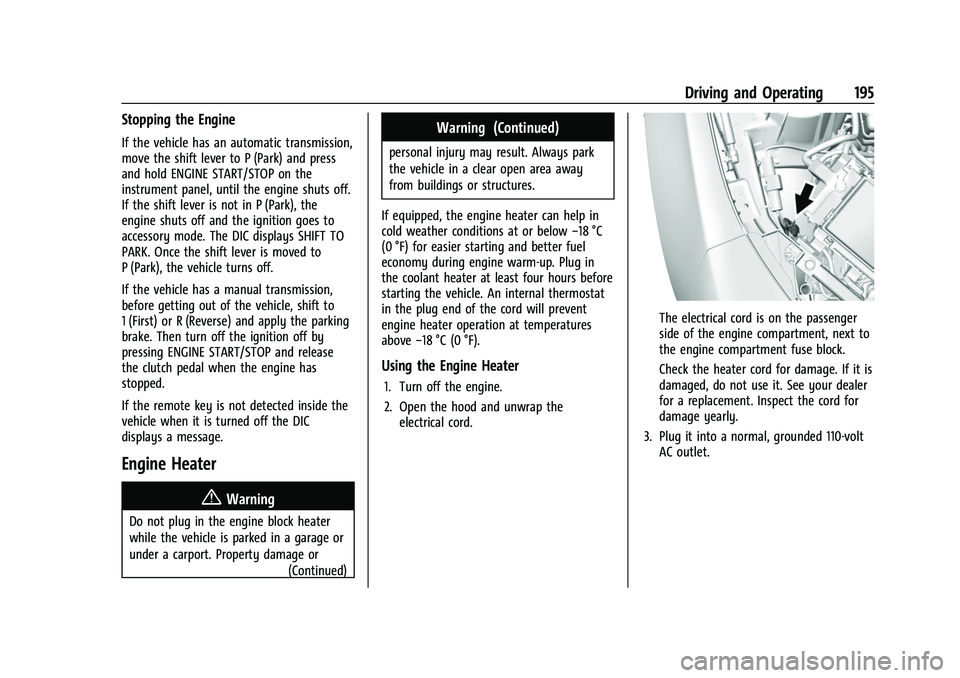
The electrical cord is on the passenger
side of the engine compartment, next to
the engine compartment fuse block.
Check the heater cord for damage. If it is
damaged, do not use it. See your dealer
for a replacement. Inspect the cord for
damage yearly.
3. Plug it into a normal, grounded 110-volt AC outlet.
Page 200 of 345
Chevrolet Camaro Owner Manual (GMNA-Localizing-U.S./Canada/Mexico-
16408685) - 2023 - CRC - 3/28/22
Driving and Operating 199
Warning (Continued)
.There are holes or openings in the
vehicle body from damage or
aftermarket modifications that are not
completely sealed.
If unusual fumes are detected or if it is
suspected that exhaust is coming into the
vehicle:
.Drive it only with the windows
completely down.
.Have the vehicle repaired immediately.
Never park the vehicle with the engine
running in an enclosed area such as a
garage or a building that has no fresh air
ventilation.
Running the Vehicle While Parked
It is better not to park with the engine
running.
If the vehicle is left with the engine running,
follow the proper steps to be sure the
vehicle will not move. See Shifting Into Park
0 196 and Engine Exhaust 0198. If the
vehicle has a manual transmission, see
Parking (Manual Transmission) 0198.
Automatic Transmission
The Driver Information Center (DIC) displays
the current range selected in the lower right
corner. If Manual Mode is active, M and the
current gear selected is displayed. The DIC
also displays the currently selected Drive
Mode. When Tour Mode is selected, T is
displayed. When Sport Mode is selected, S is
displayed and if equipped Track Mode, Tr
will be displayed.
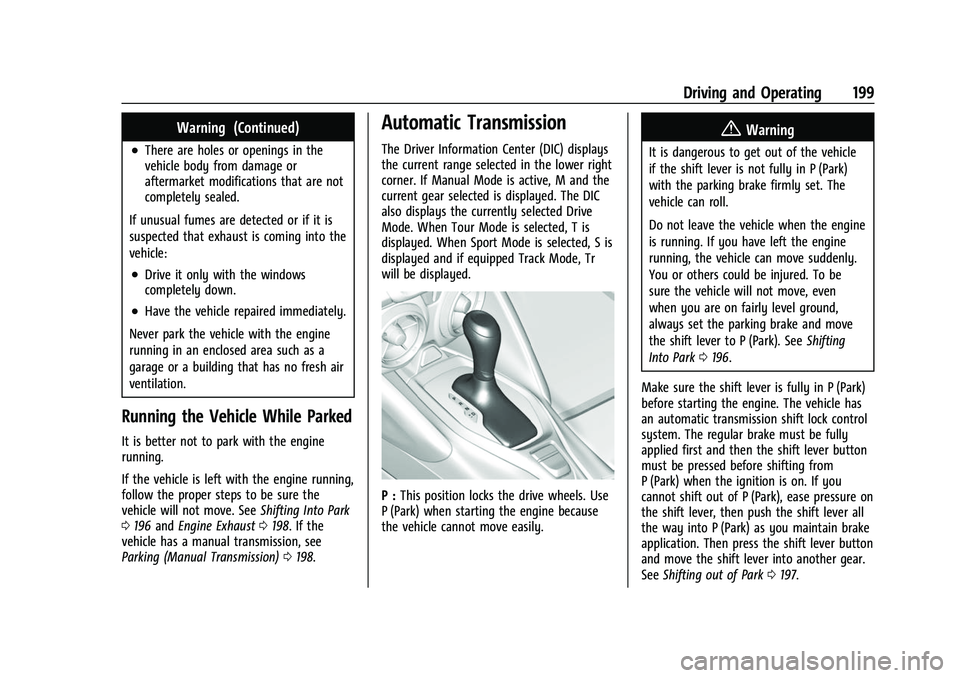
P : This position locks the drive wheels. Use
P (Park) when starting the engine because
the vehicle cannot move easily.
{Warning
It is dangerous to get out of the vehicle
if the shift lever is not fully in P (Park)
with the parking brake firmly set. The
vehicle can roll.
Do not leave the vehicle when the engine
is running. If you have left the engine
running, the vehicle can move suddenly.
You or others could be injured. To be
sure the vehicle will not move, even
when you are on fairly level ground,
always set the parking brake and move
the shift lever to P (Park). See Shifting
Into Park 0196.
Make sure the shift lever is fully in P (Park)
before starting the engine. The vehicle has
an automatic transmission shift lock control
system. The regular brake must be fully
applied first and then the shift lever button
must be pressed before shifting from
P (Park) when the ignition is on. If you
cannot shift out of P (Park), ease pressure on
the shift lever, then push the shift lever all
the way into P (Park) as you maintain brake
application. Then press the shift lever button
and move the shift lever into another gear.
See Shifting out of Park 0197.
Page 201 of 345
Chevrolet Camaro Owner Manual (GMNA-Localizing-U.S./Canada/Mexico-
16408685) - 2023 - CRC - 3/28/22
200 Driving and Operating
R :Use this gear to back up.
Caution
Shifting to R (Reverse) while the vehicle is
moving forward could damage the
transmission. The repairs would not be
covered by the vehicle warranty. Shift to
R (Reverse) only after the vehicle is
stopped.
To rock the vehicle back and forth to get
out of snow, ice, or sand without damaging
the transmission, see If the Vehicle Is Stuck
0 188.
N : In this position, the engine does not
connect with the wheels. To restart the
engine when the vehicle is already moving,
use N (Neutral) only.
{Warning
Shifting into a drive gear while the
engine is running at high speed is
dangerous. Unless your foot is firmly on
the brake pedal, the vehicle could move
very rapidly. You could lose control and
hit people or objects. Do not shift into a
drive gear while the engine is running at
high speed.
Caution
Shifting out of P (Park) or N (Neutral) with
the engine running at high speed may
damage the transmission. The repairs
would not be covered by the vehicle
warranty. Be sure the engine is not
running at high speed when shifting the
vehicle.
Caution
A transmission hot message may display
if the automatic transmission fluid is too
hot. Driving under this condition can
damage the vehicle. Stop and idle the
engine to cool the automatic
transmission fluid. This message clears
when the transmission fluid has cooled
sufficiently.
D : This position is for normal driving.
If more power is needed for passing, press
the accelerator pedal down.
Powertrain Braking
When driving on steep descents with the
shift lever in D (Drive) where frequent
braking is required, the transmission will
shift down a gear to help hold vehicle speed and reduce brake wear. If the brake
continues to be pressed, the transmission
will downshift until the correct gear for
optimal braking is reached.
If the road levels out and the accelerator
pedal is pressed, the transmission will
upshift until the appropriate gear is reached.
Caution
If the vehicle does not shift gears, the
transmission could be damaged. Have the
vehicle serviced right away.
Performance Shifting
While driving in Sport Mode (L4, if equipped
or V6, if equipped), or Sport Mode and Track
Mode (V8, if equipped), if Tap Shift has not
been activated, the transmission determines
when the vehicle is being driven in a
competitive manner. The transmission may
remain in a gear longer than it would in the
normal driving mode based on throttle input
and vehicle lateral acceleration. If there is a
rapid reduction in throttle from a heavy
throttle position at high rpm, the
transmission will maintain the current gear
up to near redline rpm. While braking, the
transmission will automatically downshift to
the next lower gear keeping engine speed
Page 203 of 345
Chevrolet Camaro Owner Manual (GMNA-Localizing-U.S./Canada/Mexico-
16408685) - 2023 - CRC - 3/28/22
202 Driving and Operating
the steering wheel. The paddles are on the
back of the steering wheel. Tap the left
paddle (−) to downshift, and the right
paddle (+) to upshift. The Driver Information
Center (DIC) display indicates the gear the
vehicle is in.
Holding the left paddle for an extended time
will downshift the transmission to the
lowest available gear.
While in Manual Mode, the transmission will
prevent shifting to a lower gear if the
engine speed is too high. If the tap down
−(Minus) paddle is held while the vehicle
slows down, the M in the DIC will flash, and
the downshift will be allowed when vehicle
speed is low enough. Continuing to hold the
tap down −(Minus) paddle will not cause
the transmission to continue downshifting.
Each downshift must be requested
separately by releasing and reapplying the
tap down −(Minus) paddle.
Head-Up Display (HUD)
Vehicles equipped with a Head-Up Display
(HUD) may also have performance shift
timing lights across the top of the display. The rows of lights get closer together as the
maximum shift point gets closer. Shift the
transmission before the lights come together
in the display. Shift immediately if the lights
are flashing.
See
Head-Up Display (HUD) 0102.
Temporary Tap Shift Mode allows brief
entry into Tap Shift Mode while in D (Drive).
Tapping either the upshift or downshift
control will place the transmission in Tap
Shift Mode. Exit Tap Shift Mode by holding
the upshift control for two seconds. The
system will return to automatic shifting
after seven seconds of driving at a steady
speed, or when the vehicle comes to a stop.
This may be used for sport driving or when
climbing or descending hills, to stay in gear
longer, or to downshift for more power or
engine braking. The transmission will only
allow you to shift into gears appropriate for
the vehicle speed and engine revolutions per
minute (rpm). The transmission will not
automatically shift to the next higher gear if
the engine rpm is too high. If shifting is
prevented for any reason, the gear displayed
in the DIC will blink several times, indicating
that the transmission has not shifted gears. While in the Tap Shift Mode, the
transmission will not automatically
downshift on hard acceleration.
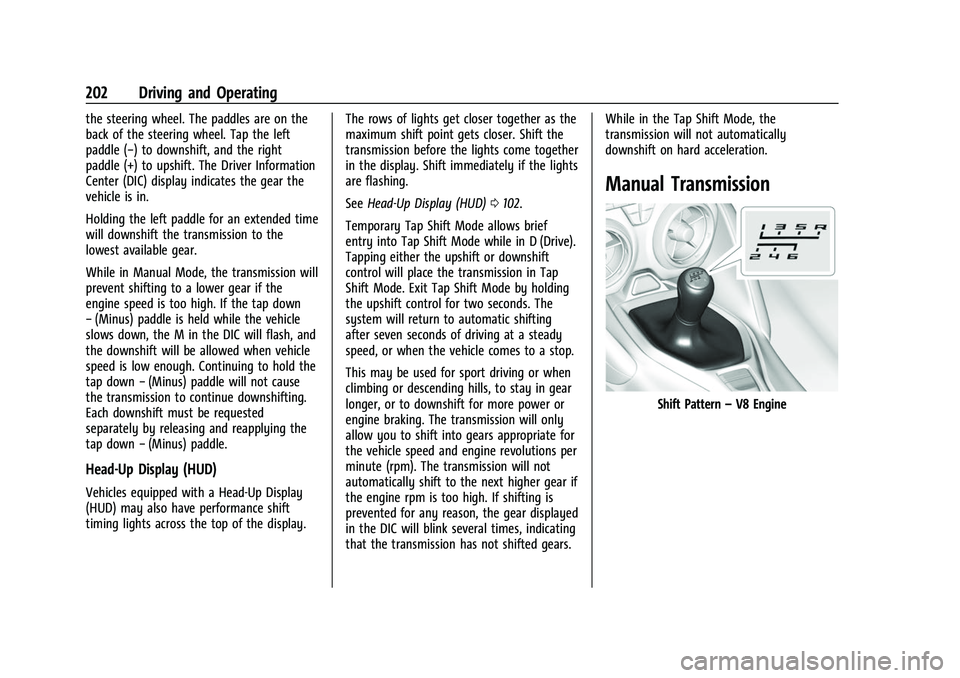
Manual Transmission
Shift Pattern
–V8 Engine