lift CHEVROLET CAMARO 2023 Owners Manual
[x] Cancel search | Manufacturer: CHEVROLET, Model Year: 2023, Model line: CAMARO, Model: CHEVROLET CAMARO 2023Pages: 345, PDF Size: 16.19 MB
Page 17 of 345
Chevrolet Camaro Owner Manual (GMNA-Localizing-U.S./Canada/Mexico-
16408685) - 2023 - CRC - 3/28/22
16 Keys, Doors, and Windows
Keyless Access
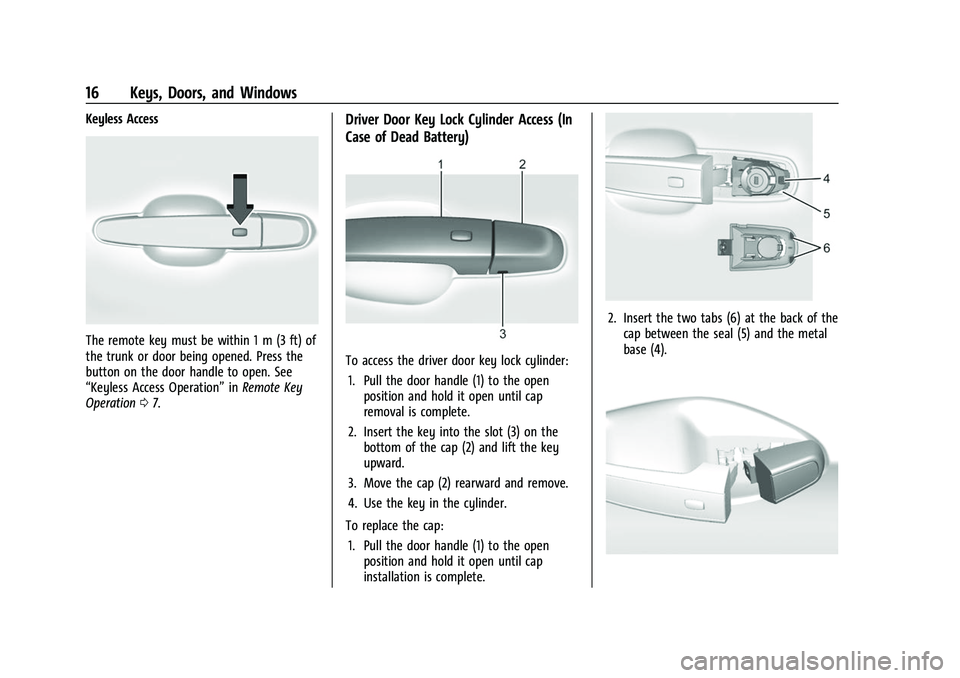
The remote key must be within 1 m (3 ft) of
the trunk or door being opened. Press the
button on the door handle to open. See
“Keyless Access Operation”inRemote Key
Operation 07.
Driver Door Key Lock Cylinder Access (In
Case of Dead Battery)
To access the driver door key lock cylinder:
1. Pull the door handle (1) to the open position and hold it open until cap
removal is complete.
2. Insert the key into the slot (3) on the bottom of the cap (2) and lift the key
upward.
3. Move the cap (2) rearward and remove.
4. Use the key in the cylinder.
To replace the cap: 1. Pull the door handle (1) to the open position and hold it open until cap
installation is complete.
2. Insert the two tabs (6) at the back of thecap between the seal (5) and the metal
base (4).
Page 19 of 345
Chevrolet Camaro Owner Manual (GMNA-Localizing-U.S./Canada/Mexico-
16408685) - 2023 - CRC - 3/28/22
18 Keys, Doors, and Windows
.If equipped with an automatic
transmission, shift the transmission into
P (Park).
.If equipped with a manual transmission,
turn the vehicle off when parked.
Automatic door locking cannot be disabled.
Automatic door unlocking can be enabled
through vehicle personalization. To view
available settings for this feature, touch the
Settings icon on the infotainment home
page. Select “Vehicle”to display the list of
available options and select “Power Door
Locks”.
Lockout Protection
If the vehicle is on or in accessory mode and
the power door lock switch is pressed with
the driver door open, all the doors will lock
and only the driver door will unlock.
If the vehicle is off and locking is requested
while a door is open, when all doors are
closed the vehicle will check for remote keys
inside. If an remote key is detected and the
number of remote keys inside has not
reduced, the driver door will unlock and the
horn will chirp three times. Lockout Protection can be manually
overridden with the driver door open by
pressing and holding
Qon the power door
lock switch.
Open Door Anti-Lockout
If Open Door Anti-Lockout has been turned
on and the vehicle is off, the driver door is
open, and locking is requested, all the doors
will lock and the driver door will remain
unlocked. The Open Door Anti-Lockout
feature can be turned on or off. To view
available settings from the infotainment
screen, touch Settings > Vehicle > Power
Door Locks.
Doors
Trunk
{Warning
Exhaust gases can enter the vehicle if it
is driven with the liftgate, trunk/hatch
open, or with any objects that pass
through the seal between the body and
the trunk/hatch or liftgate. Engine
(Continued)
Warning (Continued)
exhaust contains carbon monoxide (CO)
which cannot be seen or smelled. It can
cause unconsciousness and even death.
If the vehicle must be driven with the
liftgate, or trunk/hatch open:
.Close all of the windows.
.Fully open the air outlets on or under
the instrument panel.
.Adjust the climate control system to a
setting that brings in only outside air
and set the fan speed to the highest
setting. See“Climate Control Systems”
in the Index.
.If the vehicle has a power liftgate,
disable the power liftgate function.
For more information about carbon
monoxide, see Engine Exhaust 0198.
Trunk Release
To open the trunk from outside of the
vehicle:
.PressXtwice quickly on the
remote key.
Page 34 of 345
Chevrolet Camaro Owner Manual (GMNA-Localizing-U.S./Canada/Mexico-
16408685) - 2023 - CRC - 3/28/22
Keys, Doors, and Windows 33
1. PressMto either open or close the
top. Press the switch in the opposite
direction if one does not work.
2. If the top moves, continue pressing the switch in that direction for at least
five seconds. The top should then work
normally.
If the top does not respond in either
direction, take it to your dealer for service.
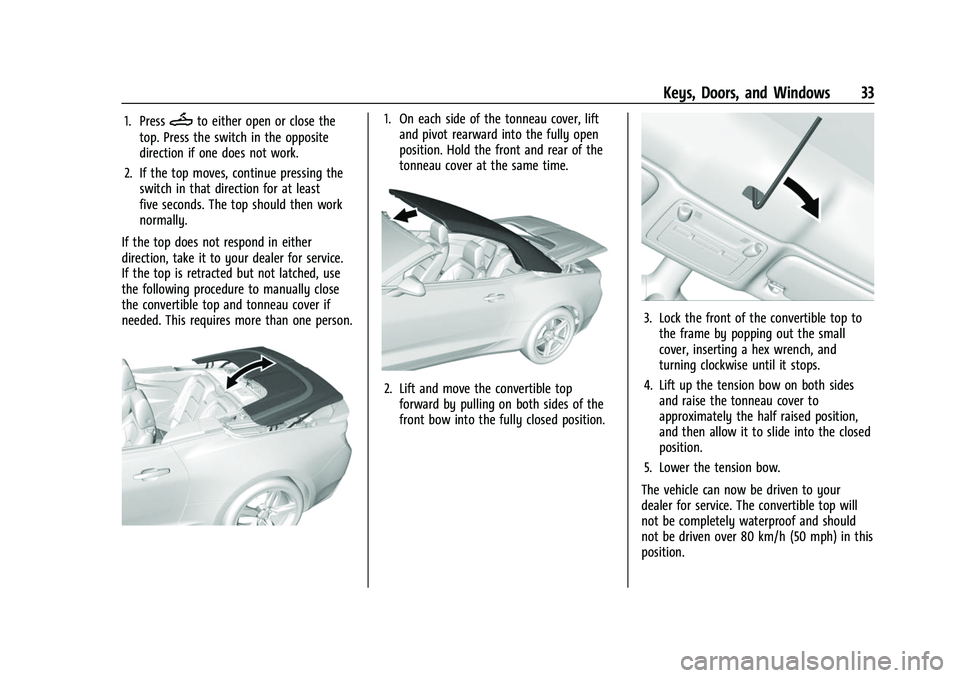
If the top is retracted but not latched, use
the following procedure to manually close
the convertible top and tonneau cover if
needed. This requires more than one person.1. On each side of the tonneau cover, lift and pivot rearward into the fully open
position. Hold the front and rear of the
tonneau cover at the same time.
2. Lift and move the convertible topforward by pulling on both sides of the
front bow into the fully closed position.
3. Lock the front of the convertible top tothe frame by popping out the small
cover, inserting a hex wrench, and
turning clockwise until it stops.
4. Lift up the tension bow on both sides and raise the tonneau cover to
approximately the half raised position,
and then allow it to slide into the closed
position.
5. Lower the tension bow.
The vehicle can now be driven to your
dealer for service. The convertible top will
not be completely waterproof and should
not be driven over 80 km/h (50 mph) in this
position.
Page 41 of 345
Chevrolet Camaro Owner Manual (GMNA-Localizing-U.S./Canada/Mexico-
16408685) - 2023 - CRC - 3/28/22
40 Seats and Restraints
If manual transmission equipped, Seat Exit
Memory will continue if the parking brake is
released prior to reaching the save memory
position.
Seat Exit Memory is not linked to the
driver’s remote key. The seating position
saved to
Bis used for all drivers.
Cancel Memory Seating Recalls
.During any memory recall:
Press a power seat control
Press SET memory button
.During Manual memory recall:
Release 1, 2, or
Bmemory button
.During Auto Seat Entry Memory Recall:
Turn vehicle off
Press SET, 1, 2, or
Bmemory buttons
.During Auto Seat Exit Memory Recall:
Press SET, 1, 2, or
Bmemory buttons
Obstructions
If something has blocked the seat while
recalling a memory position, the recall may
stop. Remove the obstruction and try the
recall again. If the memory position still
does not recall, see your dealer.
Seatback Latches
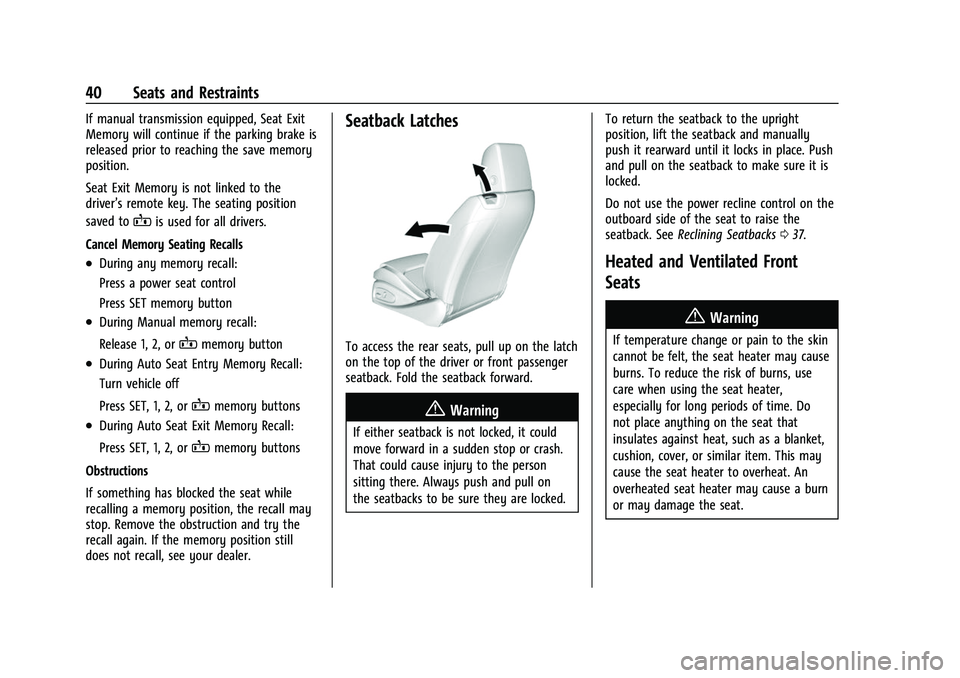
To access the rear seats, pull up on the latch
on the top of the driver or front passenger
seatback. Fold the seatback forward.
{Warning
If either seatback is not locked, it could
move forward in a sudden stop or crash.
That could cause injury to the person
sitting there. Always push and pull on
the seatbacks to be sure they are locked. To return the seatback to the upright
position, lift the seatback and manually
push it rearward until it locks in place. Push
and pull on the seatback to make sure it is
locked.
Do not use the power recline control on the
outboard side of the seat to raise the
seatback. See
Reclining Seatbacks 037.
Heated and Ventilated Front
Seats
{Warning
If temperature change or pain to the skin
cannot be felt, the seat heater may cause
burns. To reduce the risk of burns, use
care when using the seat heater,
especially for long periods of time. Do
not place anything on the seat that
insulates against heat, such as a blanket,
cushion, cover, or similar item. This may
cause the seat heater to overheat. An
overheated seat heater may cause a burn
or may damage the seat.
Page 43 of 345
Chevrolet Camaro Owner Manual (GMNA-Localizing-U.S./Canada/Mexico-
16408685) - 2023 - CRC - 3/28/22
42 Seats and Restraints
Rear Seats
If equipped, the coupe seat can be folded
for more cargo space. The rear seat has two
designated seating positions. Fold the seat
only when the vehicle is parked.
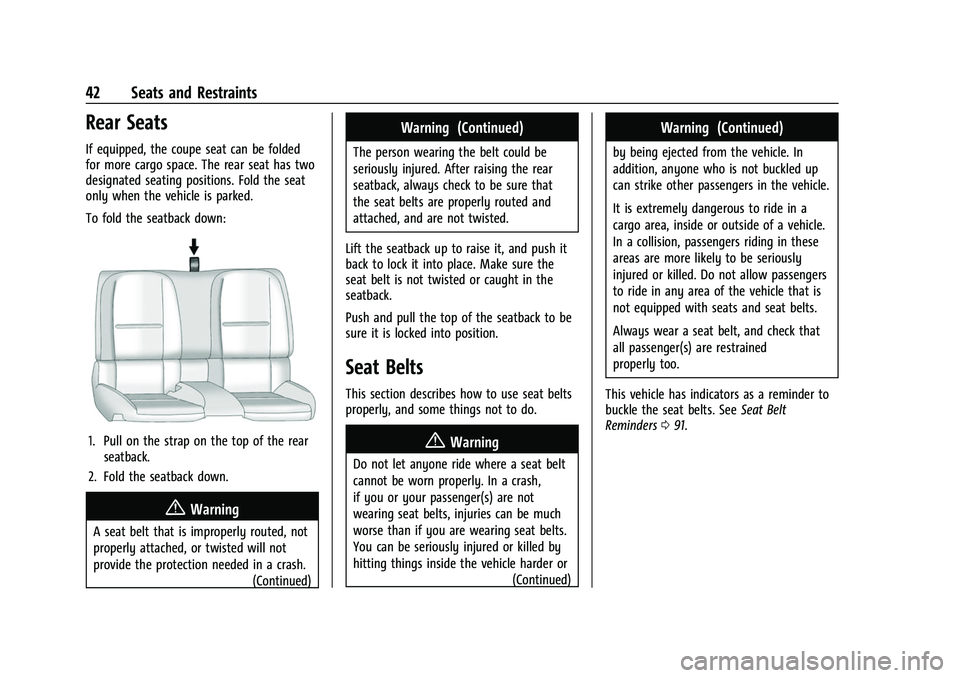
To fold the seatback down:
1. Pull on the strap on the top of the rearseatback.
2. Fold the seatback down.
{Warning
A seat belt that is improperly routed, not
properly attached, or twisted will not
provide the protection needed in a crash. (Continued)
Warning (Continued)
The person wearing the belt could be
seriously injured. After raising the rear
seatback, always check to be sure that
the seat belts are properly routed and
attached, and are not twisted.
Lift the seatback up to raise it, and push it
back to lock it into place. Make sure the
seat belt is not twisted or caught in the
seatback.
Push and pull the top of the seatback to be
sure it is locked into position.
Seat Belts
This section describes how to use seat belts
properly, and some things not to do.
{Warning
Do not let anyone ride where a seat belt
cannot be worn properly. In a crash,
if you or your passenger(s) are not
wearing seat belts, injuries can be much
worse than if you are wearing seat belts.
You can be seriously injured or killed by
hitting things inside the vehicle harder or (Continued)
Warning (Continued)
by being ejected from the vehicle. In
addition, anyone who is not buckled up
can strike other passengers in the vehicle.
It is extremely dangerous to ride in a
cargo area, inside or outside of a vehicle.
In a collision, passengers riding in these
areas are more likely to be seriously
injured or killed. Do not allow passengers
to ride in any area of the vehicle that is
not equipped with seats and seat belts.
Always wear a seat belt, and check that
all passenger(s) are restrained
properly too.
This vehicle has indicators as a reminder to
buckle the seat belts. See Seat Belt
Reminders 091.
Page 77 of 345
Chevrolet Camaro Owner Manual (GMNA-Localizing-U.S./Canada/Mexico-
16408685) - 2023 - CRC - 3/28/22
76 Storage
Storage
Storage Compartments
Storage Compartments . . . . . . . . . . . . . . . . . 76
Glove Box . . . . . . . . . . . . . . . . . . . . . . . . . . . . . . 76
Rear Storage . . . . . . . . . . . . . . . . . . . . . . . . . . . 76
Center Console Storage . . . . . . . . . . . . . . . . . 77
Additional Storage Features
Convenience Net . . . . . . . . . . . . . . . . . . . . . . . . 77
Storage Compartments{
Warning
Do not store heavy or sharp objects in
storage compartments. In a crash, these
objects may cause the cover to open and
could result in injury.
Glove Box
Open the glove box by lifting up on the
lever. Use the key to lock and unlock the
glove box.
Rear Storage
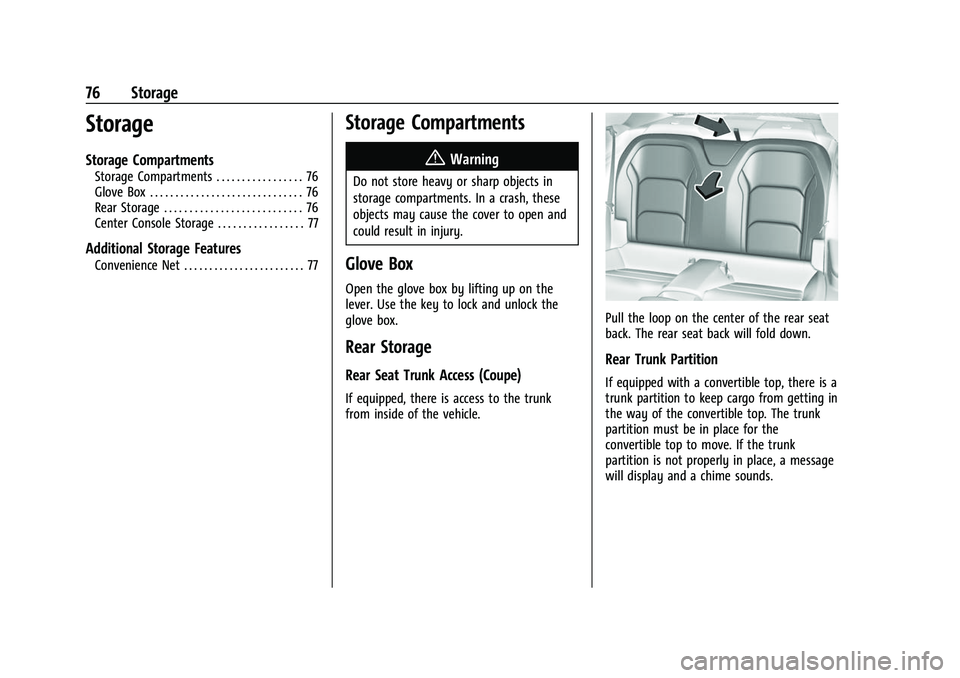
Rear Seat Trunk Access (Coupe)
If equipped, there is access to the trunk
from inside of the vehicle.
Pull the loop on the center of the rear seat
back. The rear seat back will fold down.
Rear Trunk Partition
If equipped with a convertible top, there is a
trunk partition to keep cargo from getting in
the way of the convertible top. The trunk
partition must be in place for the
convertible top to move. If the trunk
partition is not properly in place, a message
will display and a chime sounds.
Page 104 of 345
Chevrolet Camaro Owner Manual (GMNA-Localizing-U.S./Canada/Mexico-
16408685) - 2023 - CRC - 3/28/22
Instruments and Controls 103
.Performance
.Vehicle Messages
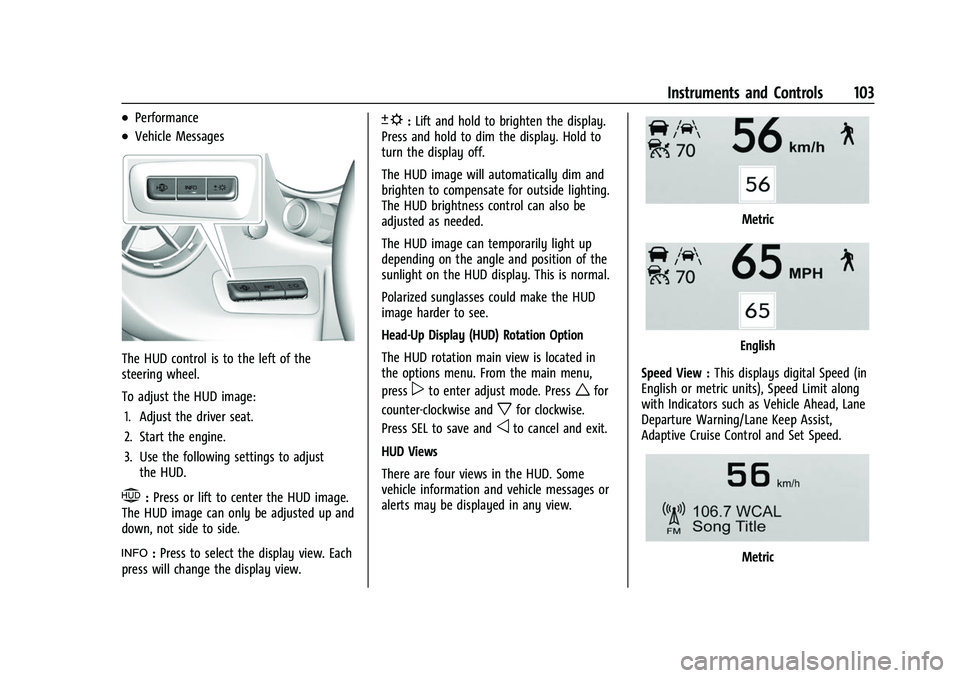
The HUD control is to the left of the
steering wheel.
To adjust the HUD image:1. Adjust the driver seat.
2. Start the engine.
3. Use the following settings to adjust the HUD.
$:Press or lift to center the HUD image.
The HUD image can only be adjusted up and
down, not side to side.
!: Press to select the display view. Each
press will change the display view.
D: Lift and hold to brighten the display.
Press and hold to dim the display. Hold to
turn the display off.
The HUD image will automatically dim and
brighten to compensate for outside lighting.
The HUD brightness control can also be
adjusted as needed.
The HUD image can temporarily light up
depending on the angle and position of the
sunlight on the HUD display. This is normal.
Polarized sunglasses could make the HUD
image harder to see.
Head-Up Display (HUD) Rotation Option
The HUD rotation main view is located in
the options menu. From the main menu,
press
pto enter adjust mode. Presswfor
counter-clockwise and
xfor clockwise.
Press SEL to save and
oto cancel and exit.
HUD Views
There are four views in the HUD. Some
vehicle information and vehicle messages or
alerts may be displayed in any view.
Metric
English
Speed View : This displays digital Speed (in
English or metric units), Speed Limit along
with Indicators such as Vehicle Ahead, Lane
Departure Warning/Lane Keep Assist,
Adaptive Cruise Control and Set Speed.
Metric
Page 231 of 345
Chevrolet Camaro Owner Manual (GMNA-Localizing-U.S./Canada/Mexico-
16408685) - 2023 - CRC - 3/28/22
230 Vehicle Care
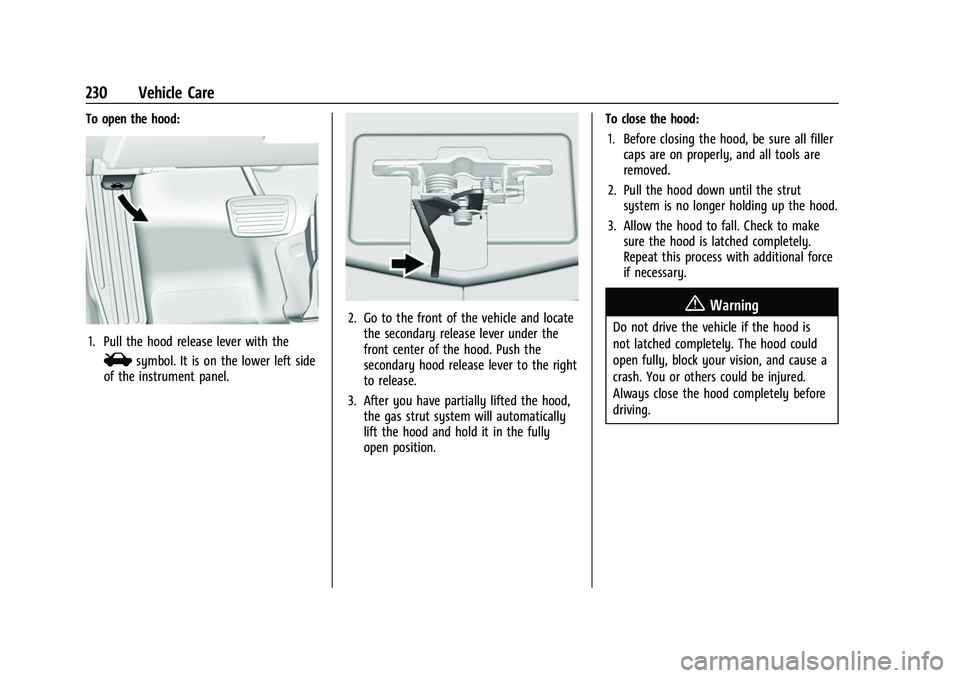
To open the hood:
1. Pull the hood release lever with the
isymbol. It is on the lower left side
of the instrument panel.
2. Go to the front of the vehicle and locate the secondary release lever under the
front center of the hood. Push the
secondary hood release lever to the right
to release.
3. After you have partially lifted the hood, the gas strut system will automatically
lift the hood and hold it in the fully
open position. To close the hood:
1. Before closing the hood, be sure all filler caps are on properly, and all tools are
removed.
2. Pull the hood down until the strut system is no longer holding up the hood.
3. Allow the hood to fall. Check to make sure the hood is latched completely.
Repeat this process with additional force
if necessary.{Warning
Do not drive the vehicle if the hood is
not latched completely. The hood could
open fully, block your vision, and cause a
crash. You or others could be injured.
Always close the hood completely before
driving.
Page 241 of 345
Chevrolet Camaro Owner Manual (GMNA-Localizing-U.S./Canada/Mexico-
16408685) - 2023 - CRC - 3/28/22
240 Vehicle Care
How to Inspect/Replace the Engine Air
Cleaner/Filter
Do not start the engine or have the engine
running with the engine air cleaner/filter
housing open. Before removing the engine
air cleaner/filter, make sure that the engine
air cleaner/filter housing and nearby
components are free of dirt and debris.
Remove the engine air cleaner/filter. Lightly
tap and shake the engine air cleaner/filter
(away from the vehicle), to release loose
dust and dirt. Inspect the engine air cleaner/
filter for damage, and replace if damaged.
Do not clean the engine air cleaner/filter or
components with water or compressed air.
{Warning
Operating the engine with the air
cleaner/filter off can cause you or others
to be burned. Use caution when working
on the engine. Do not start the engine or
drive the vehicle with the air cleaner/
filter off, as flames may be present if the
engine backfires.
Caution
If the air cleaner/filter is off, dirt can
easily get into the engine, which could
damage it. Always have the air cleaner/
filter in place when driving.
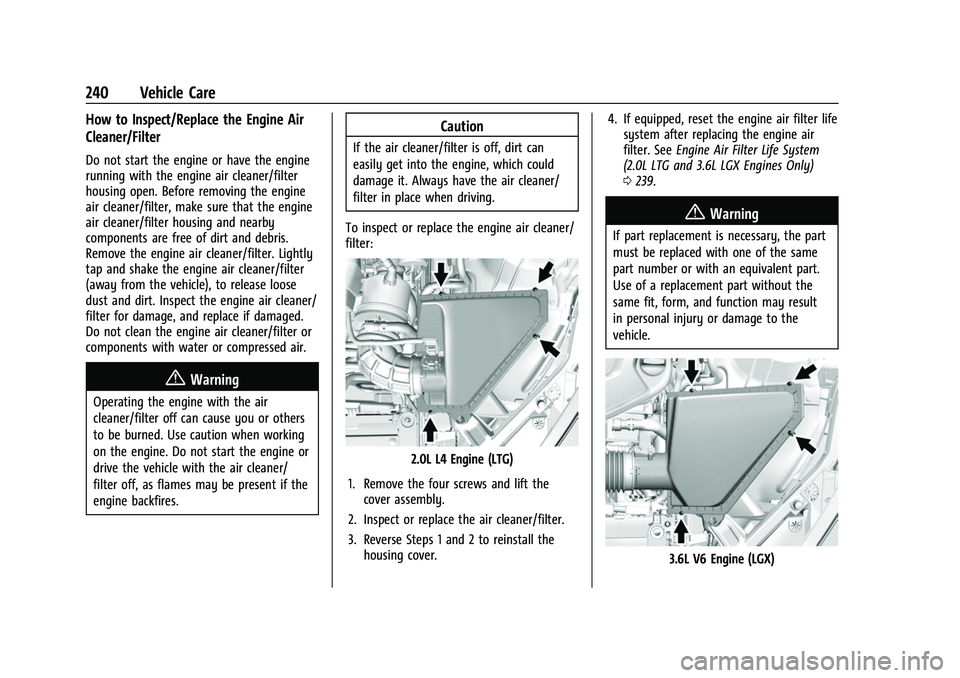
To inspect or replace the engine air cleaner/
filter:
2.0L L4 Engine (LTG)
1. Remove the four screws and lift the cover assembly.
2. Inspect or replace the air cleaner/filter.
3. Reverse Steps 1 and 2 to reinstall the housing cover. 4. If equipped, reset the engine air filter life
system after replacing the engine air
filter. See Engine Air Filter Life System
(2.0L LTG and 3.6L LGX Engines Only)
0 239.
{Warning
If part replacement is necessary, the part
must be replaced with one of the same
part number or with an equivalent part.
Use of a replacement part without the
same fit, form, and function may result
in personal injury or damage to the
vehicle.
3.6L V6 Engine (LGX)
Page 242 of 345
Chevrolet Camaro Owner Manual (GMNA-Localizing-U.S./Canada/Mexico-
16408685) - 2023 - CRC - 3/28/22
Vehicle Care 241
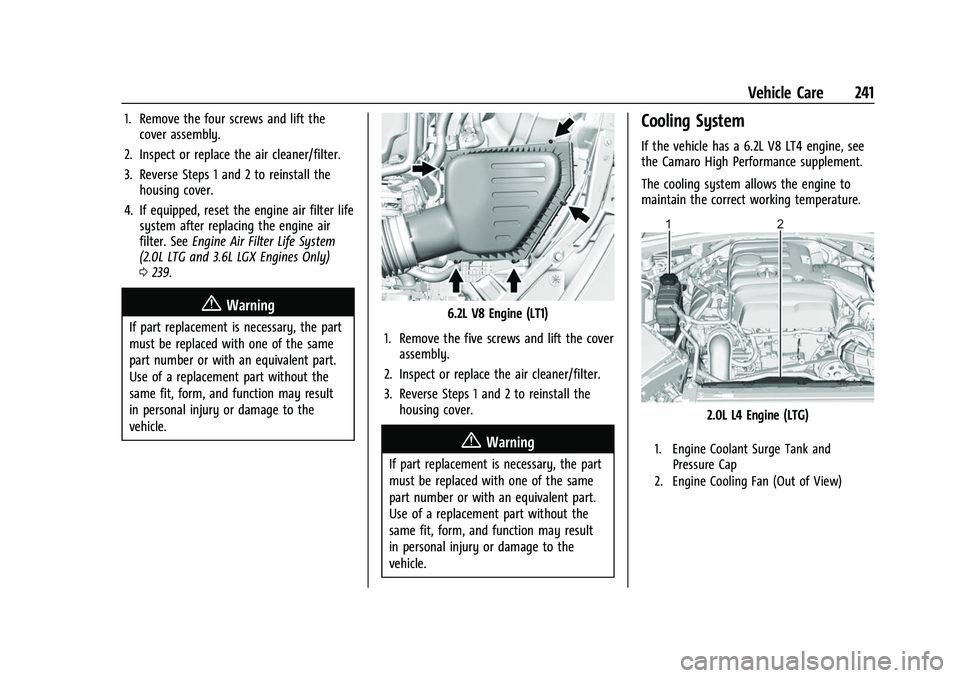
1. Remove the four screws and lift thecover assembly.
2. Inspect or replace the air cleaner/filter.
3. Reverse Steps 1 and 2 to reinstall the housing cover.
4. If equipped, reset the engine air filter life system after replacing the engine air
filter. See Engine Air Filter Life System
(2.0L LTG and 3.6L LGX Engines Only)
0 239.
{Warning
If part replacement is necessary, the part
must be replaced with one of the same
part number or with an equivalent part.
Use of a replacement part without the
same fit, form, and function may result
in personal injury or damage to the
vehicle.6.2L V8 Engine (LT1)
1. Remove the five screws and lift the cover assembly.
2. Inspect or replace the air cleaner/filter.
3. Reverse Steps 1 and 2 to reinstall the housing cover.
{Warning
If part replacement is necessary, the part
must be replaced with one of the same
part number or with an equivalent part.
Use of a replacement part without the
same fit, form, and function may result
in personal injury or damage to the
vehicle.
Cooling System
If the vehicle has a 6.2L V8 LT4 engine, see
the Camaro High Performance supplement.
The cooling system allows the engine to
maintain the correct working temperature.
2.0L L4 Engine (LTG)
1. Engine Coolant Surge Tank and Pressure Cap
2. Engine Cooling Fan (Out of View)