trunk CHEVROLET CAMARO 2023 Owners Manual
[x] Cancel search | Manufacturer: CHEVROLET, Model Year: 2023, Model line: CAMARO, Model: CHEVROLET CAMARO 2023Pages: 345, PDF Size: 16.19 MB
Page 7 of 345
Chevrolet Camaro Owner Manual (GMNA-Localizing-U.S./Canada/Mexico-
16408685) - 2023 - CRC - 3/28/22
6 Keys, Doors, and Windows
Keys, Doors, and
Windows
Keys and Locks
Keys . . . . . . . . . . . . . . . . . . . . . . . . . . . . . . . . . . . . . 6
Remote Key . . . . . . . . . . . . . . . . . . . . . . . . . . . . . 7
Remote Key Operation . . . . . . . . . . . . . . . . . . . 7
Remote Vehicle Start . . . . . . . . . . . . . . . . . . . 14
Door Locks . . . . . . . . . . . . . . . . . . . . . . . . . . . . . . 15
Power Door Locks . . . . . . . . . . . . . . . . . . . . . . . 17
Delayed Locking . . . . . . . . . . . . . . . . . . . . . . . . 17
Automatic Door Locks . . . . . . . . . . . . . . . . . . . 17
Lockout Protection . . . . . . . . . . . . . . . . . . . . . . 18
Doors
Trunk . . . . . . . . . . . . . . . . . . . . . . . . . . . . . . . . . . . 18
Vehicle Security
Vehicle Security . . . . . . . . . . . . . . . . . . . . . . . . 20
Vehicle Alarm System . . . . . . . . . . . . . . . . . . 20
Immobilizer . . . . . . . . . . . . . . . . . . . . . . . . . . . . . 21
Immobilizer Operation . . . . . . . . . . . . . . . . . . 22
Exterior Mirrors
Convex Mirrors . . . . . . . . . . . . . . . . . . . . . . . . . 22
Power Mirrors . . . . . . . . . . . . . . . . . . . . . . . . . . 23
Heated Mirrors . . . . . . . . . . . . . . . . . . . . . . . . . 23
Automatic Dimming Mirror . . . . . . . . . . . . . 23
Reverse Tilt Mirrors . . . . . . . . . . . . . . . . . . . . . 23
Interior Mirrors
Interior Rearview Mirrors . . . . . . . . . . . . . . . 23
Manual Rearview Mirror . . . . . . . . . . . . . . . . 24
Automatic Dimming Rearview Mirror . . . 24
Rear Camera Mirror . . . . . . . . . . . . . . . . . . . . 24
Windows
Windows . . . . . . . . . . . . . . . . . . . . . . . . . . . . . . . 26
Power Windows . . . . . . . . . . . . . . . . . . . . . . . . 26
Sun Visors . . . . . . . . . . . . . . . . . . . . . . . . . . . . . . 28
Roof
Sunroof . . . . . . . . . . . . . . . . . . . . . . . . . . . . . . . . 29
Convertible Top . . . . . . . . . . . . . . . . . . . . . . . . 29
Keys and Locks
Keys
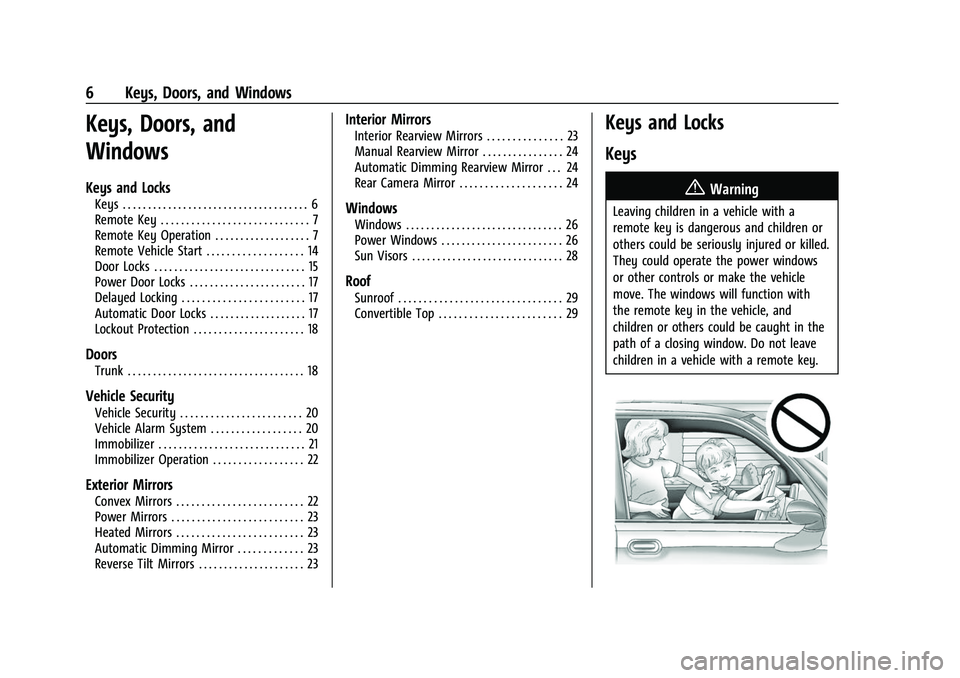
{Warning
Leaving children in a vehicle with a
remote key is dangerous and children or
others could be seriously injured or killed.
They could operate the power windows
or other controls or make the vehicle
move. The windows will function with
the remote key in the vehicle, and
children or others could be caught in the
path of a closing window. Do not leave
children in a vehicle with a remote key.
Page 9 of 345
Chevrolet Camaro Owner Manual (GMNA-Localizing-U.S./Canada/Mexico-
16408685) - 2023 - CRC - 3/28/22
8 Keys, Doors, and Windows
PressingQmay also arm the alarm system.
See Vehicle Alarm System 020.
K:Press to unlock the driver door. Press
unlock again within five seconds to unlock
all doors. The remote key can be
programmed to unlock all doors on the first
button press. To view available settings from
the infotainment screen, touch Settings >
Vehicle > Remote Lock, Unlock, Start.
The turn signal indicators may flash and/or
the horn may sound to indicate unlocking.
To view available settings from the
infotainment screen, touch Settings >
Vehicle > Remote Lock, Unlock, Start.
Pressing
Kwill disarm the alarm system.
See Vehicle Alarm System 020.
If equipped, press and hold
Kon the
remote key to open the windows remotely,
if enabled. To view available settings from
the infotainment screen, touch Settings >
Vehicle > Remote Lock, Unlock, Start.
/: If equipped, press and releaseQand
then immediately press and hold
/for at
least four seconds to start the engine from
outside the vehicle using the remote key.
See Remote Vehicle Start 014.
X:Press twice quickly to release the
trunk.
M: If equipped, press and releaseK,
then immediately press and hold
M
continuously to open the convertible top all
the way. The vehicle must be off to operate
the convertible top with the remote key.
The top will stop movement approximately
one second after
Mis released. To stop
the top immediately, press
7,K, orQon
the remote key.
Mwill only open the
convertible top.
The convertible top can also be opened
using a button in the overhead console. See
Convertible Top 029.
7:Press and release to initiate vehicle
locator. The exterior lamps flash and the
horn chirps three times.
Press and hold
7for at least three seconds
to sound the panic alarm. The horn sounds
and the turn signals flash for 30 seconds,
or until
7is pressed again or the ignition is
turned on.
Convertible Top
.Do not try to start the vehicle while using
the remote key to open the convertible
top. Release
Mon the remote key and
ENGINE START/STOP. Wait a few seconds
before starting the vehicle normally.
.The passive door unlock feature may not
operate properly while using the remote
key to open the convertible top.
The convertible top can also be opened
using a button in the overhead console. See
Convertible Top 029.
Keyless Access Operation
The Keyless Access system lets you lock and
unlock the doors and access the trunk
without removing the remote key from your
pocket, purse, briefcase, etc. The remote key
should be within 1 m (3 ft) of the trunk or
door being opened. There will be buttons on
the outside door handles.
Keyless Access can be programmed to
unlock all doors on the first lock/unlock
press from the driver door. Keyless Access
can also be turned Off. To view available
settings from the infotainment screen, touch
Settings > Vehicle > Remote Lock, Unlock,
Start.
Page 10 of 345
Chevrolet Camaro Owner Manual (GMNA-Localizing-U.S./Canada/Mexico-
16408685) - 2023 - CRC - 3/28/22
Keys, Doors, and Windows 9
If equipped with memory seats, remote keys
1 and 2 are linked to the seating positions of
memory 1 or 2. SeeMemory Seats037.
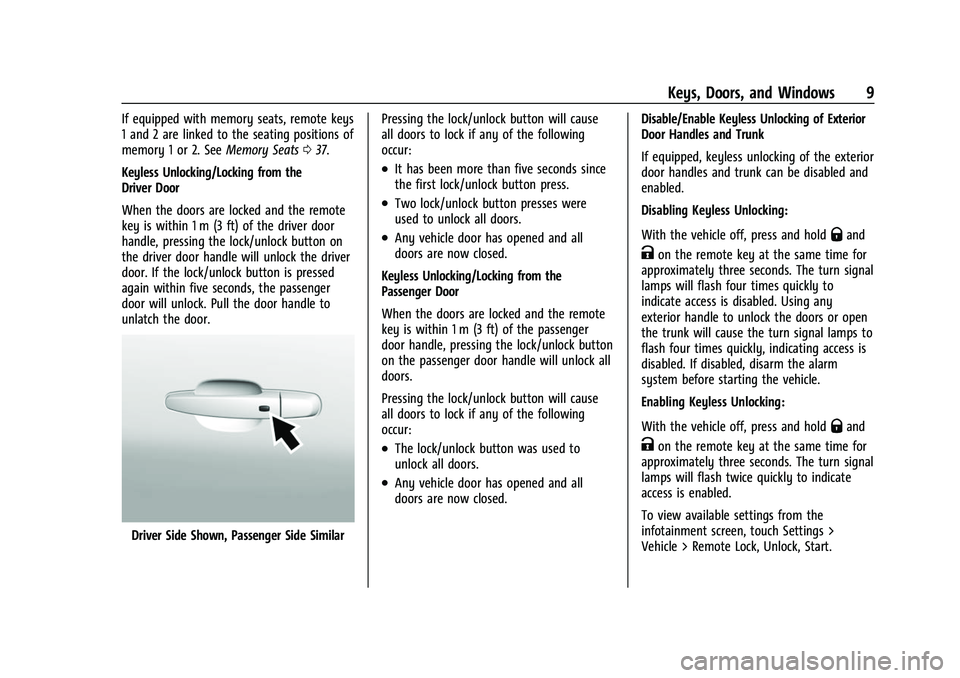
Keyless Unlocking/Locking from the
Driver Door
When the doors are locked and the remote
key is within 1 m (3 ft) of the driver door
handle, pressing the lock/unlock button on
the driver door handle will unlock the driver
door. If the lock/unlock button is pressed
again within five seconds, the passenger
door will unlock. Pull the door handle to
unlatch the door.
Driver Side Shown, Passenger Side Similar Pressing the lock/unlock button will cause
all doors to lock if any of the following
occur:
.It has been more than five seconds since
the first lock/unlock button press.
.Two lock/unlock button presses were
used to unlock all doors.
.Any vehicle door has opened and all
doors are now closed.
Keyless Unlocking/Locking from the
Passenger Door
When the doors are locked and the remote
key is within 1 m (3 ft) of the passenger
door handle, pressing the lock/unlock button
on the passenger door handle will unlock all
doors.
Pressing the lock/unlock button will cause
all doors to lock if any of the following
occur:
.The lock/unlock button was used to
unlock all doors.
.Any vehicle door has opened and all
doors are now closed. Disable/Enable Keyless Unlocking of Exterior
Door Handles and Trunk
If equipped, keyless unlocking of the exterior
door handles and trunk can be disabled and
enabled.
Disabling Keyless Unlocking:
With the vehicle off, press and hold
Qand
Kon the remote key at the same time for
approximately three seconds. The turn signal
lamps will flash four times quickly to
indicate access is disabled. Using any
exterior handle to unlock the doors or open
the trunk will cause the turn signal lamps to
flash four times quickly, indicating access is
disabled. If disabled, disarm the alarm
system before starting the vehicle.
Enabling Keyless Unlocking:
With the vehicle off, press and hold
Qand
Kon the remote key at the same time for
approximately three seconds. The turn signal
lamps will flash twice quickly to indicate
access is enabled.
To view available settings from the
infotainment screen, touch Settings >
Vehicle > Remote Lock, Unlock, Start.
Page 11 of 345
Chevrolet Camaro Owner Manual (GMNA-Localizing-U.S./Canada/Mexico-
16408685) - 2023 - CRC - 3/28/22
10 Keys, Doors, and Windows
Passive Locking
With Keyless Access the vehicle will lock
several seconds after all doors are closed if
the vehicle is off and at least one remote
key has been removed or none remain in
the vehicle.
If other electronic devices interfere with the
remote key signal, the vehicle may not
detect the remote key inside the vehicle.
If passive locking is enabled, the doors may
lock with the remote key inside the vehicle.
Do not leave the remote key in an
unattended vehicle.
To view available settings from the
infotainment screen, touch Settings >
Vehicle > Remote Lock, Unlock, Start.
Temporary Disable of Passive Locking
Temporarily disable passive locking by
pressing and holding
Kon the interior door
switch with a door open for at least
four seconds, or until three chimes are
heard. Passive locking will then remain
disabled until
Qon the interior door is
pressed, or until the vehicle is turned on. Remote Left In Vehicle Alert
When the vehicle is turned off and an
remote key is left in the vehicle, the horn
will chirp three times after all doors are
closed. To view available settings from the
infotainment screen, touch Settings >
Vehicle > Remote Lock, Unlock, Start.
Remote No Longer In Vehicle Alert
If the vehicle is on with a door open, and
then all doors are closed, the vehicle will
check for remote keys inside. If an remote
key is not detected, the Driver Information
Center (DIC) will display NO REMOTE
DETECTED and the horn will chirp three
times.
This occurs only once each time the vehicle
is driven.
To view available settings from the
infotainment screen, touch Settings >
Vehicle > Remote Lock, Unlock, Start.
Keyless Trunk Opening
When the doors are locked, press the touch
pad to open the trunk if the remote key is
within 1 m (3 ft).Key Access
To access a vehicle with a weak remote key
battery, see
Door Locks015.
Programming Remote Keys to the
Vehicle
Only remote keys programmed to the
vehicle will work. If a remote key is lost or
stolen, a replacement can be purchased and
programmed through your dealer. The
vehicle can be reprogrammed so that lost or
stolen remote keys no longer work. Any
remaining remote keys will need to be
reprogrammed. Each vehicle can have up to
eight remote keys matched to it.
Programming with Recognized Remote Keys
A new remote key can be programmed to
the vehicle when there are two recognized
remote keys. To program, the vehicle must
be off and all of the remote keys, both
currently recognized and new, must be
with you.
Page 17 of 345
Chevrolet Camaro Owner Manual (GMNA-Localizing-U.S./Canada/Mexico-
16408685) - 2023 - CRC - 3/28/22
16 Keys, Doors, and Windows
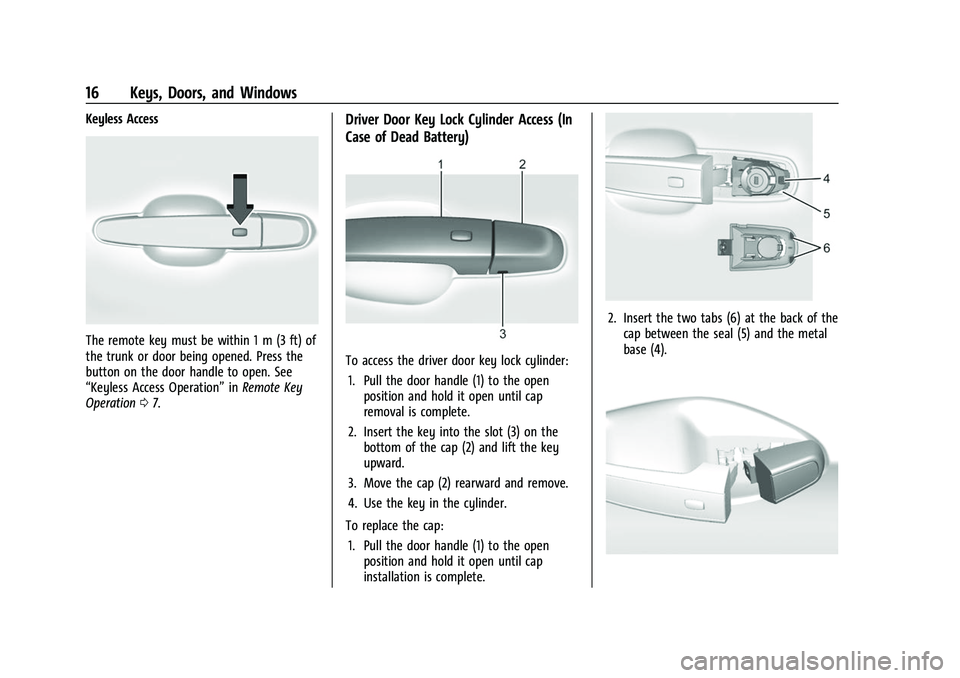
Keyless Access
The remote key must be within 1 m (3 ft) of
the trunk or door being opened. Press the
button on the door handle to open. See
“Keyless Access Operation”inRemote Key
Operation 07.
Driver Door Key Lock Cylinder Access (In
Case of Dead Battery)
To access the driver door key lock cylinder:
1. Pull the door handle (1) to the open position and hold it open until cap
removal is complete.
2. Insert the key into the slot (3) on the bottom of the cap (2) and lift the key
upward.
3. Move the cap (2) rearward and remove.
4. Use the key in the cylinder.
To replace the cap: 1. Pull the door handle (1) to the open position and hold it open until cap
installation is complete.
2. Insert the two tabs (6) at the back of thecap between the seal (5) and the metal
base (4).
Page 19 of 345
Chevrolet Camaro Owner Manual (GMNA-Localizing-U.S./Canada/Mexico-
16408685) - 2023 - CRC - 3/28/22
18 Keys, Doors, and Windows
.If equipped with an automatic
transmission, shift the transmission into
P (Park).
.If equipped with a manual transmission,
turn the vehicle off when parked.
Automatic door locking cannot be disabled.
Automatic door unlocking can be enabled
through vehicle personalization. To view
available settings for this feature, touch the
Settings icon on the infotainment home
page. Select “Vehicle”to display the list of
available options and select “Power Door
Locks”.
Lockout Protection
If the vehicle is on or in accessory mode and
the power door lock switch is pressed with
the driver door open, all the doors will lock
and only the driver door will unlock.
If the vehicle is off and locking is requested
while a door is open, when all doors are
closed the vehicle will check for remote keys
inside. If an remote key is detected and the
number of remote keys inside has not
reduced, the driver door will unlock and the
horn will chirp three times. Lockout Protection can be manually
overridden with the driver door open by
pressing and holding
Qon the power door
lock switch.
Open Door Anti-Lockout
If Open Door Anti-Lockout has been turned
on and the vehicle is off, the driver door is
open, and locking is requested, all the doors
will lock and the driver door will remain
unlocked. The Open Door Anti-Lockout
feature can be turned on or off. To view
available settings from the infotainment
screen, touch Settings > Vehicle > Power
Door Locks.
Doors
Trunk
{Warning
Exhaust gases can enter the vehicle if it
is driven with the liftgate, trunk/hatch
open, or with any objects that pass
through the seal between the body and
the trunk/hatch or liftgate. Engine
(Continued)
Warning (Continued)
exhaust contains carbon monoxide (CO)
which cannot be seen or smelled. It can
cause unconsciousness and even death.
If the vehicle must be driven with the
liftgate, or trunk/hatch open:
.Close all of the windows.
.Fully open the air outlets on or under
the instrument panel.
.Adjust the climate control system to a
setting that brings in only outside air
and set the fan speed to the highest
setting. See“Climate Control Systems”
in the Index.
.If the vehicle has a power liftgate,
disable the power liftgate function.
For more information about carbon
monoxide, see Engine Exhaust 0198.
Trunk Release
To open the trunk from outside of the
vehicle:
.PressXtwice quickly on the
remote key.
Page 20 of 345
Chevrolet Camaro Owner Manual (GMNA-Localizing-U.S./Canada/Mexico-
16408685) - 2023 - CRC - 3/28/22
Keys, Doors, and Windows 19
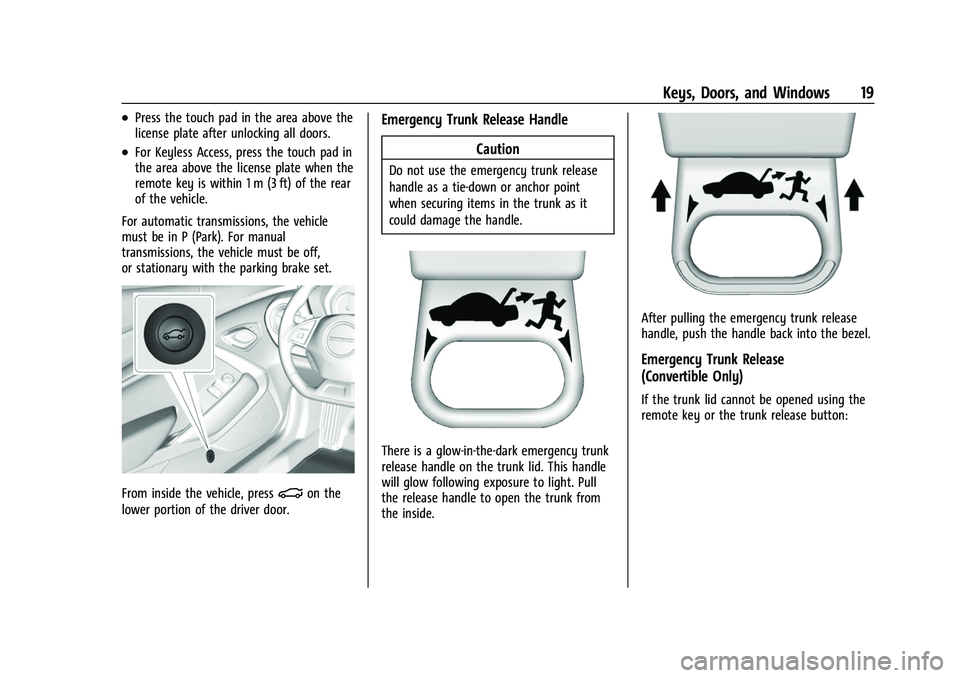
.Press the touch pad in the area above the
license plate after unlocking all doors.
.For Keyless Access, press the touch pad in
the area above the license plate when the
remote key is within 1 m (3 ft) of the rear
of the vehicle.
For automatic transmissions, the vehicle
must be in P (Park). For manual
transmissions, the vehicle must be off,
or stationary with the parking brake set.
From inside the vehicle, press|on the
lower portion of the driver door.
Emergency Trunk Release Handle
Caution
Do not use the emergency trunk release
handle as a tie-down or anchor point
when securing items in the trunk as it
could damage the handle.
There is a glow-in-the-dark emergency trunk
release handle on the trunk lid. This handle
will glow following exposure to light. Pull
the release handle to open the trunk from
the inside.
After pulling the emergency trunk release
handle, push the handle back into the bezel.
Emergency Trunk Release
(Convertible Only)
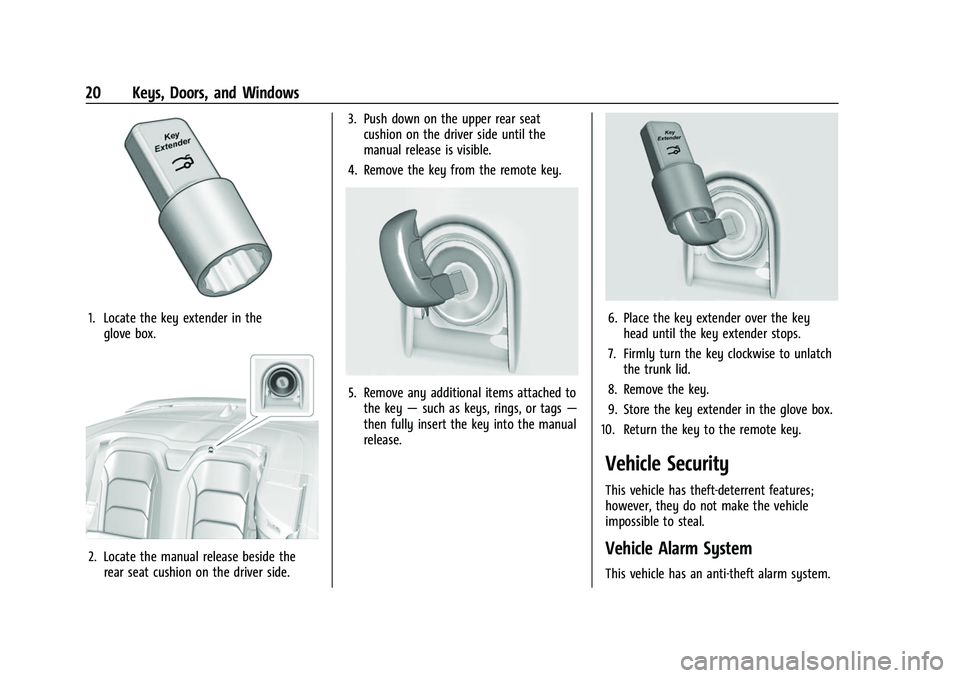
If the trunk lid cannot be opened using the
remote key or the trunk release button:
Page 21 of 345
Chevrolet Camaro Owner Manual (GMNA-Localizing-U.S./Canada/Mexico-
16408685) - 2023 - CRC - 3/28/22
20 Keys, Doors, and Windows
1. Locate the key extender in theglove box.
2. Locate the manual release beside therear seat cushion on the driver side. 3. Push down on the upper rear seat
cushion on the driver side until the
manual release is visible.
4. Remove the key from the remote key.
5. Remove any additional items attached to the key —such as keys, rings, or tags —
then fully insert the key into the manual
release.
6. Place the key extender over the key head until the key extender stops.
7. Firmly turn the key clockwise to unlatch the trunk lid.
8. Remove the key.
9. Store the key extender in the glove box.
10. Return the key to the remote key.
Vehicle Security
This vehicle has theft-deterrent features;
however, they do not make the vehicle
impossible to steal.
Vehicle Alarm System
This vehicle has an anti-theft alarm system.
Page 22 of 345
Chevrolet Camaro Owner Manual (GMNA-Localizing-U.S./Canada/Mexico-
16408685) - 2023 - CRC - 3/28/22
Keys, Doors, and Windows 21
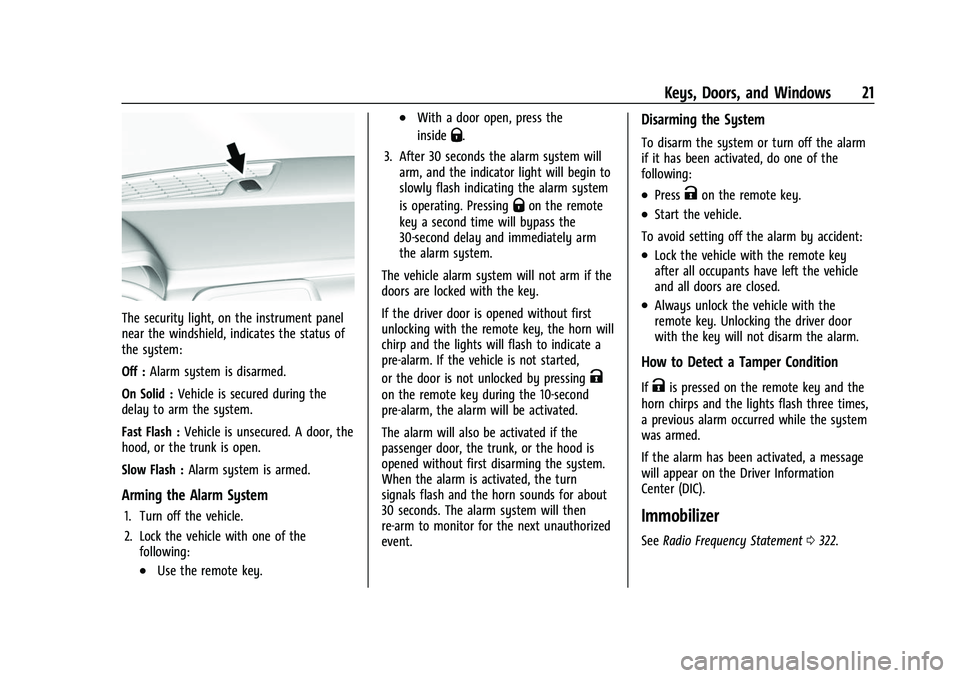
The security light, on the instrument panel
near the windshield, indicates the status of
the system:
Off :Alarm system is disarmed.
On Solid : Vehicle is secured during the
delay to arm the system.
Fast Flash : Vehicle is unsecured. A door, the
hood, or the trunk is open.
Slow Flash : Alarm system is armed.
Arming the Alarm System
1. Turn off the vehicle.
2. Lock the vehicle with one of the
following:
.Use the remote key.
.With a door open, press the
inside
Q.
3. After 30 seconds the alarm system will arm, and the indicator light will begin to
slowly flash indicating the alarm system
is operating. Pressing
Qon the remote
key a second time will bypass the
30-second delay and immediately arm
the alarm system.
The vehicle alarm system will not arm if the
doors are locked with the key.
If the driver door is opened without first
unlocking with the remote key, the horn will
chirp and the lights will flash to indicate a
pre-alarm. If the vehicle is not started,
or the door is not unlocked by pressing
K
on the remote key during the 10-second
pre-alarm, the alarm will be activated.
The alarm will also be activated if the
passenger door, the trunk, or the hood is
opened without first disarming the system.
When the alarm is activated, the turn
signals flash and the horn sounds for about
30 seconds. The alarm system will then
re-arm to monitor for the next unauthorized
event.
Disarming the System
To disarm the system or turn off the alarm
if it has been activated, do one of the
following:
.PressKon the remote key.
.Start the vehicle.
To avoid setting off the alarm by accident:
.Lock the vehicle with the remote key
after all occupants have left the vehicle
and all doors are closed.
.Always unlock the vehicle with the
remote key. Unlocking the driver door
with the key will not disarm the alarm.
How to Detect a Tamper Condition
IfKis pressed on the remote key and the
horn chirps and the lights flash three times,
a previous alarm occurred while the system
was armed.
If the alarm has been activated, a message
will appear on the Driver Information
Center (DIC).
Immobilizer
See Radio Frequency Statement 0322.
Page 31 of 345
Chevrolet Camaro Owner Manual (GMNA-Localizing-U.S./Canada/Mexico-
16408685) - 2023 - CRC - 3/28/22
30 Keys, Doors, and Windows
{Warning
While opening or closing the convertible
top, people can be injured by the moving
parts of the tonneau cover or convertible
top. Maintain visual contact with the top
while it is being operated.
Caution
Follow these guidelines when operating
the convertible top or damage can occur:
.Remove all items from the roof, trunk
lid, or tonneau cover before operating.
.Remove all objects from the trunk that
may contact the convertible top when
it is operated.
.Do not leave the vehicle with the
convertible top open.
.Do not exceed 50 km/h (31 mph) until
the top has completely closed or
opened.
.Do not open or close the top while
driving in high wind conditions.
(Continued)
Caution (Continued)
.Do not operate the convertible top
multiple times in a short period of
time without starting the engine to
avoid draining the vehicle battery.
.Do not open or store the convertible
top when it is dirty or wet. This could
result in stains, mildew, or other
damage.
.Only store the vehicle with the top
fully closed.
Caution
When the convertible top is open, there
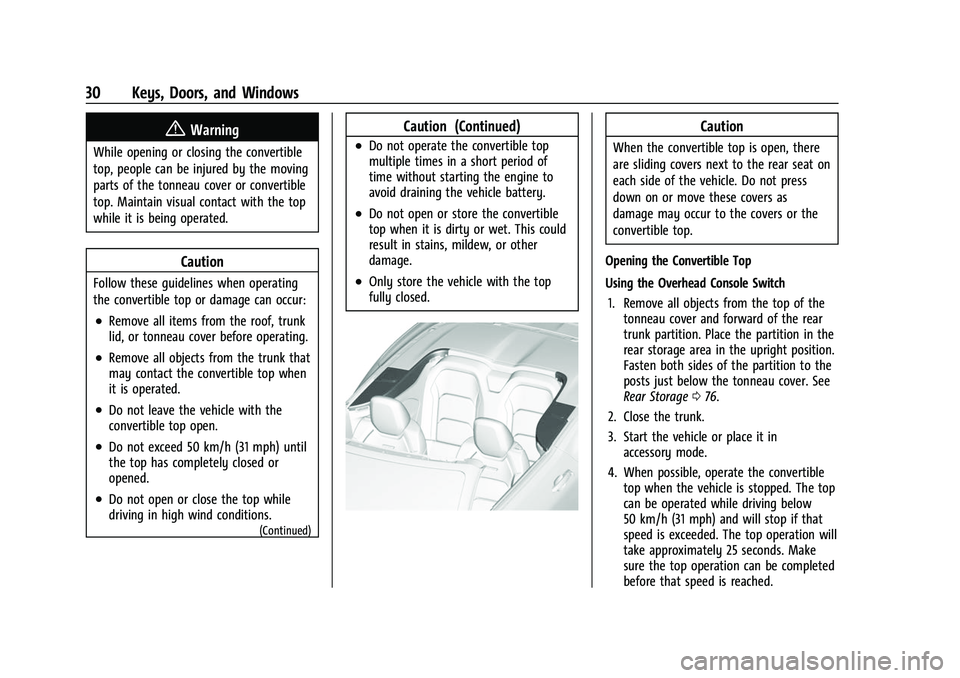
are sliding covers next to the rear seat on
each side of the vehicle. Do not press
down on or move these covers as
damage may occur to the covers or the
convertible top.
Opening the Convertible Top
Using the Overhead Console Switch 1. Remove all objects from the top of the tonneau cover and forward of the rear
trunk partition. Place the partition in the
rear storage area in the upright position.
Fasten both sides of the partition to the
posts just below the tonneau cover. See
Rear Storage 076.
2. Close the trunk.
3. Start the vehicle or place it in accessory mode.
4. When possible, operate the convertible top when the vehicle is stopped. The top
can be operated while driving below
50 km/h (31 mph) and will stop if that
speed is exceeded. The top operation will
take approximately 25 seconds. Make
sure the top operation can be completed
before that speed is reached.